

From User Stories to Database Schema: An AI-Guided Method
Learn a practical method to turn user stories, entities, and workflows into a clear database schema, and how AI reasoning can help you check gaps and rules.
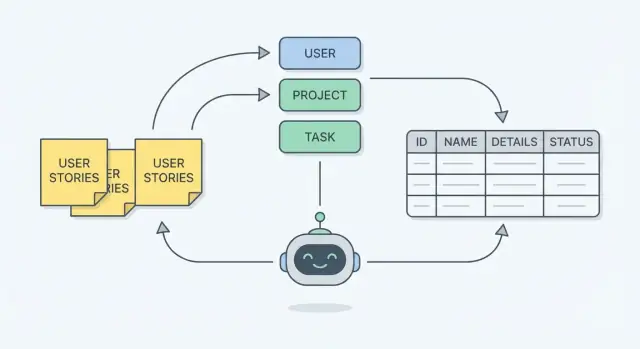
What You’re Building: A Schema That Matches Real Work
A database schema is the plan for how your app will remember things. In practical terms, it’s:
- Tables: the “buckets” of information (Customers, Orders, Tickets)
- Fields (columns): the details you store about each thing (customer_name, order_date)
- Relationships: how buckets connect (an Order belongs to one Customer; a Customer can have many Orders)
When the schema matches real work, it reflects what people actually do—create, review, approve, schedule, assign, cancel—rather than what sounds tidy on a whiteboard.
Why start from user stories?
User stories and acceptance criteria describe real needs in plain language: who does what, and what “done” means. If you use those as your source, the schema is less likely to miss key details (like “we must track who approved the refund” or “a booking can be rescheduled multiple times”).
Starting from stories also keeps you honest about scope. If it isn’t in the stories (or the workflow), treat it as optional instead of quietly building a complicated model “just in case.”
What AI can and cannot do here
AI can help you move faster by:
- Pulling out candidate entities (the important “things” in the stories)
- Suggesting fields implied by acceptance criteria (timestamps, statuses, references)
- Spotting likely relationships and gaps (“you mention approvals but don’t store approver”)
AI cannot reliably:
- Know your hidden business rules or edge cases you didn’t write down
- Choose the “right” level of detail without trade-offs (simple vs. flexible)
- Guarantee the schema fits your reporting, security, or compliance needs
Treat AI as a strong assistant, not the decision-maker.
If you want to turn that assistant into momentum, a vibe-coding platform like Koder.ai can help you go from schema decisions to a working React + Go + PostgreSQL app faster—while still keeping you in control of the model, constraints, and migrations.
Set expectations: iterative, not one-shot
Schema design is a loop: draft → test against stories → find missing data → refine. The goal isn’t a perfect first output; it’s a model you can trace back to each user story and confidently say: “Yes, we can store everything this workflow needs—and we can explain why each table exists.”
Inputs: User Stories, Acceptance Criteria, and Real Examples
Before you turn requirements into tables, get clear on what you’re modeling. A good schema rarely starts from a blank page—it starts from concrete work people do and the proof you’ll need later (screens, outputs, and edge cases).
The typical inputs you want in one place
User stories are the headline, but they’re not enough by themselves. Gather:
- User stories + roles (who is doing what and why)
- Acceptance criteria (the “must be true” rules)
- Forms/screens (fields users type, pick, or see)
- Reports/exports (what needs to be summarized, grouped, filtered)
- Real examples (sample orders, invoices, tickets, calendars—anything representative)
If you’re using AI, these inputs keep the model grounded. AI can propose entities and fields quickly, but it needs real artifacts to avoid inventing structure that doesn’t match your product.
Acceptance criteria: the hidden source of constraints
Acceptance criteria often contain the most important database rules, even when they don’t mention data explicitly. Look for statements like:
- “Email must be unique” (uniqueness)
- “Status can be Draft, Submitted, Approved” (allowed values)
- “Only managers can approve” (permissions, possibly audit fields)
- “Can’t delete an invoice with payments” (referential rules)
Common pitfalls to fix early
Vague stories (“As a user, I can manage projects”) hide multiple entities and workflows. Another frequent gap is missing edge cases like cancellations, retries, partial refunds, or reassignment.
Quick story-quality checklist (before modeling)
- The actor/role is explicit.
- The object is specific (not “data” or “things”).
- At least one real example exists.
- Acceptance criteria include validations and boundaries.
- Error and “what if” cases are mentioned (or explicitly deferred).
Step 1 — Extract Entities from Stories (The Nouns)
Before you think about tables or diagrams, read the user stories and highlight the nouns. In requirements writing, nouns usually point to the “things” your system must remember—these often become entities in your schema.
A quick mental model: nouns become entities, while verbs become actions or workflows. If a story says “A manager assigns a technician to a job,” the likely entities are manager, technician, and job—and “assigns” hints at a relationship you’ll model later.
How to tell if a noun is a true entity
Not every noun deserves its own table. A noun is a strong candidate for an entity when it:
- Has its own identity: you can point to one specific instance (Job #1042, Customer A).
- Changes over time: it has a lifecycle (a job moves from scheduled → completed).
- Is used in multiple places: several stories reference it, or multiple workflows touch it.
If a noun shows up only once, or only describes something else (“red button”, “Friday”), it may not be an entity.
Attribute vs. separate entity (the “Address” and “Tag” test)
A common mistake is turning every detail into a table. Use this rule of thumb:
- If it’s one value describing a thing, it’s usually an attribute (e.g., Customer.phone_number).
- If it’s repeatable, shared, or structured, it’s often a separate entity.
Two classic examples:
- Address: If you store shipping and billing addresses, keep history, or reuse addresses across customers/locations, Address is likely its own entity. If you only need a single mailing address and never reuse it, it may stay as attributes.
- Tag: Tags are almost always their own entity because they’re repeatable and many-to-many (one Job has many Tags; one Tag applies to many Jobs).
Using AI to suggest candidate entities (carefully)
AI can speed up entity discovery by scanning stories and returning a draft list of candidate nouns grouped by theme (people, work items, documents, locations). A useful prompt is: “Extract nouns that represent data we must store, and group duplicates/synonyms.”
Treat the output as a starting point, not the answer. Ask follow-ups like:
- “Which of these have a lifecycle or need their own ID?”
- “Which are actually statuses, categories, or attributes?”
- “Are any synonyms (e.g., ‘client’ vs ‘customer’)?”
The goal of Step 1 is a short, clean list of entities you can defend by pointing back to real stories.
Step 2 — Turn Details into Fields (The Reminders You Must Store)
Once you’ve named the entities (like Order, Customer, Ticket), the next job is capturing the details you’ll need later. In a database, those details are fields (also called attributes)—the reminders your system can’t afford to forget.
How to choose fields (without guessing)
Start with the user story, then read the acceptance criteria like a checklist of what must be stored.
If a requirement says “Users can filter orders by delivery date,” then delivery_date isn’t optional—it must exist as a field (or be reliably derived from other stored data). If it says “Show who approved the request and when,” you’ll likely need approved_by and approved_at.
A practical test: Will someone need this to display, search, sort, audit, or calculate something? If yes, it probably belongs as a field.
Simple rules for clean fields
- Keep values atomic: store “First name” and “Last name” separately if you’ll search or sort by them. Avoid packing multiple values into one field (e.g., “red, blue”).
- Use consistent types: dates as dates, money as decimals, booleans as true/false—not mixed formats like “$10”, “10 USD”, and “10”.
- Avoid duplicated text: don’t copy the customer’s address into every order line item. Store it once in the right place and reference it.
Controlled vocabularies: statuses, types, and categories
Many stories include words like “status,” “type,” or “priority.” Treat these as controlled vocabularies—a limited set of allowed values.
If the set is small and stable, a simple enum-style field can work. If it may grow, needs labels, or requires permissions (e.g., admin-managed categories), use a separate lookup table (e.g., status_codes) and store a reference.
This is how stories turn into fields you can trust—searchable, reportable, and hard to mis-enter.
Step 3 — Connect Entities with Relationships
Once you’ve listed the entities (User, Order, Invoice, Comment, etc.) and drafted their fields, the next step is to connect them. Relationships are the “how these things interact” layer implied by your stories.
The three relationship shapes (plain English)
One-to-one (1:1) means “one thing has exactly one of another thing.”
- Story phrase: “Each user has one profile.”
- Model idea:
User↔Profile(often you can merge these unless there’s a reason to keep them separate).
One-to-many (1:N) means “one thing can have many of another thing.” This is the most common.
- Story phrase: “A user can have many orders.”
- Model idea:
User→Order(storeuser_idonOrder).
Many-to-many (M:N) means “many things can relate to many things.” This needs an extra table.
- Story phrase: “An order can include many products, and a product can be in many orders.”
Many-to-many: the join table trick
Databases can’t store “a list of product IDs” neatly inside Order without causing problems later (searching, updating, reporting). Instead, create a join table that represents the relationship itself.
Example:
OrderProductOrderItem(join table)
OrderItem typically includes:
order_idproduct_id- extra details from the story like
quantity,unit_price,discount
Notice how the story’s details (“quantity”) often belong on the relationship, not on either entity.
Required vs. optional (without jargon)
Stories also tell you whether a connection is mandatory or sometimes missing.
- “An order must belong to a user” → every
Orderneeds auser_id(you should not allow a blank). - “A user may have a phone number” →
phonecan be empty. - “An order can have a shipping address (if physical goods)” →
shipping_address_idmight be empty for digital orders.
A quick check: if the story implies you can’t create the record without the link, treat it as required. If the story says “can,” “may,” or gives exceptions, treat it as optional.
Turn story sentences into relationship sentences
When you read a story, rewrite it as a simple pairing:
- “A user can leave many comments” →
User1:NComment - “A comment belongs to one user” →
CommentN:1User
Do this for every interaction in your stories. By the end, you’ll have a connected model that matches how the work actually happens—before you ever open an ER diagram tool.
Step 4 — Use Workflows to Find States, Events, and Gaps
User stories tell you what people want. Workflows show you how work actually moves, step by step. Translating a workflow into data is one of the fastest ways to catch “we forgot to store that” problems—before you build anything.
Start with a simple workflow
Write the workflow as a sequence of actions and state changes. For example:
- Create request → Draft
- Submit request → Submitted
- Manager reviews → Approved or Rejected
- If approved, work is scheduled → In progress
- Completed → Done
Those bold words often become a status field (or a small “state” table), with clear allowed values.
Workflows expose missing fields
As you walk through each step, ask: “What would we need to know later?” Workflows commonly reveal fields like:
- timestamps:
submitted_at,approved_at,completed_at - ownership:
created_by,assigned_to,approved_by - reason/context:
rejection_reason,approval_note - ordering:
sequencefor multi-step processes
If your workflow includes waiting, escalation, or handoffs, you’ll usually need at least one timestamp and one “who has it now” field.
Workflows expose missing tables
Some workflow steps aren’t just fields—they’re separate data structures:
- Audit log / history for “who changed status when”
- Approvals for multi-approver or conditional approval rules
- Attachments when users upload files during a step
- Comments when discussion is part of the process
Using AI to cross-check for gaps
Give AI both: (1) the user stories and acceptance criteria, and (2) the workflow steps. Ask it to list every step and identify required data for each (state, actor, timestamps, outputs), then highlight any requirement that can’t be supported by the current fields/tables.
In platforms like Koder.ai, this “gap check” becomes especially practical because you can iterate quickly: adjust the schema assumptions, regenerate scaffolding, and keep moving without a long detour through manual boilerplate.
Keys, Uniqueness, and Basic Constraints (Without the Jargon)
When you turn user stories into tables, you’re not just listing fields—you’re also deciding how the data stays identifiable and consistent over time.
Primary keys: a stable “ID card” for every row
A primary key uniquely identifies one record—think of it as the row’s permanent ID card.
Why every row needs one: stories imply updates, references, and history. If a story says “Support can view an order and issue a refund,” you need a stable way to point to the order—even if the customer changes their email, the address is edited, or the order status changes.
In practice, this is usually an internal id (often a number or UUID) that never changes.
Foreign keys: pointers between tables
A foreign key is how one table safely points to another. If orders.customer_id references customers.id, the database can enforce that every order belongs to a real customer.
This matches stories like “As a user, I can see my invoices.” The invoice isn’t floating around; it’s attached to a customer (and often to an order or subscription).
Uniqueness rules: turning “must be unique” into enforcement
User stories regularly contain hidden uniqueness requirements:
- “Users sign up with email” → enforce unique email (or unique per tenant if you support multiple accounts).
- “Finance searches by invoice number” → enforce unique invoice_number.
These rules prevent confusing duplicates that otherwise show up months later as “data bugs.”
Indexing (high level): make the common lookups fast
Indexes speed up searches like “find customer by email” or “list orders by customer.” Start with indexes that align with your most common queries and uniqueness rules.
What to defer: heavy indexing for rare reports or speculative filters. Capture those needs in stories, validate the schema first, then optimize based on real usage and slow-query evidence.
Keep Data Consistent: A Practical Normalization Checklist
Normalization has one simple goal: prevent conflicting duplicates. If the same fact can be saved in two places, sooner or later it will disagree (two spellings, two prices, two “current” addresses). A normalized schema stores each fact once, then references it.
A quick checklist you can run on any draft schema
1) Watch for repeated groups
If you see patterns like “Phone1, Phone2, Phone3” or “ItemA, ItemB, ItemC,” that’s a signal for a separate table (e.g., CustomerPhones, OrderItems). Repeated groups make it hard to search, validate, and scale.
2) Don’t copy the same name/details into multiple tables
If CustomerName appears in Orders, Invoices, and Shipments, you’ve created multiple sources of truth. Keep customer details in Customers, and store only a customer_id elsewhere.
3) Avoid “multiple columns for the same thing”
Columns like billing_address, shipping_address, home_address can be fine if they’re truly different concepts. But if you’re really modeling “many addresses of different types,” use an Addresses table with a type field.
4) Separate lookups from free text
If users pick from a known set (status, category, role), model it consistently: either a constrained enum or a lookup table. This prevents “Pending” vs “pending” vs “PENDING.”
5) Check that every non-ID field depends on the right thing
A helpful gut-check: in a table, if a column describes something other than the table’s main entity, it likely belongs elsewhere. Example: Orders shouldn’t store product_price unless it means “price at time of order” (a historical snapshot).
When denormalization is acceptable (as a later choice)
Sometimes you do store duplicates on purpose:
- Reporting/performance: pre-aggregated totals or summary tables.
- Caching: a computed value stored to avoid heavy recalculation.
- Audit/history: copying “name at time of purchase” to preserve past reality.
The key is making it intentional: document which field is the source of truth and how copies are updated.
Where AI helps—and where humans decide
AI can flag suspicious duplication (repeated columns, similar field names, inconsistent “status” fields) and suggest splits into tables. Humans still choose the trade-off—simplicity vs. flexibility vs. performance—based on how the product will actually be used.
Stored vs. Calculated: What Belongs in the Database
A useful rule: store facts you can’t reliably recreate later; calculate everything else.
Stored vs. calculated (derived) data
Stored data is the source of truth: individual line items, timestamps, status changes, who did what. Calculated (derived) data is produced from those facts: totals, counters, flags like “is overdue”, and rollups like “current inventory”.
If two values can be computed from the same underlying facts, prefer storing the facts and calculating the rest. Otherwise you risk contradictions.
Why storing derived values causes mismatches
Derived values change whenever their inputs change. If you store both the inputs and the derived result, you now have to keep them in sync across every workflow and edge case (edits, refunds, partial shipments, backdated changes). One missed update and the database starts telling two different stories.
Example: storing order_total while also storing order_items. If someone changes a quantity or applies a discount and the total isn’t updated perfectly, finance sees one number while the cart shows another.
Use workflows to decide what must be stored (history and snapshots)
Workflows reveal when you need historical truth, not just “current truth.” If users need to know what the value was at the time, store a snapshot.
For an order, you may store:
- Line items and prices (facts)
- A captured
order_totalat checkout (snapshot), because taxes, discounts, and pricing rules may change later
For inventory, “inventory level” is often calculated from movements (receipts, sales, adjustments). But if you need an audit trail, you store the movements and optionally store periodic snapshots for reporting speed.
For login tracking, store last_login_at as a fact (an event timestamp). “Is active in the last 30 days?” stays calculated.
Worked Example: From 5 User Stories to an ER Model
Let’s use a familiar support ticket app. We’ll go from five user stories to a simple ER model (entities + fields + relationships), then check it against one workflow.
5 user stories → nouns → entities
- As a customer, I can create a support ticket with a subject, description, and category.
- As an agent, I can assign a ticket to myself or another agent.
- As an agent, I can add internal notes and public replies to a ticket.
- As a customer, I can see when my ticket is updated and when it’s closed.
- As a manager, I can track how long tickets stay open and who closed them.
From those nouns, we get core entities:
- User (customers, agents, managers)
- Ticket
- Message (public replies + internal notes)
- Category
- TicketEvent (audit/history)
Fields and relationships (a compact ER model)
- User: id, name, email, role
- Category: id, name
- Ticket: id, subject, description, status, created_at, updated_at, closed_at
- relationships: Ticket.category_id → Category.id
- relationships: Ticket.requester_id → User.id (customer)
- relationships: Ticket.assignee_id → User.id (agent, nullable)
- Message: id, ticket_id, author_id, body, is_internal, created_at
- relationships: Message.ticket_id → Ticket.id
- relationships: Message.author_id → User.id
- TicketEvent: id, ticket_id, actor_id, type, from_status, to_status, created_at
Workflow mapping: create → update → close
- Create: insert Ticket (status = “open”, created_at), insert TicketEvent(type = “created”).
- Update (assign, reply): insert Message or update Ticket.assignee_id, and insert TicketEvent(type = “assigned”/“replied”, updated_at).
- Close: update Ticket.status = “closed”, set closed_at, insert TicketEvent(type = “closed”, actor_id = closer).
“Before and after”: AI catches a missing constraint
Before (common miss): Ticket has assignee_id, but we forgot to ensure only agents can be assignees.
After: AI flags it and you add a practical rule: assignee must be a User with role = “agent” (implemented via application validation or a database constraint/policy, depending on your stack). This prevents “assigned to customer” data that breaks reports later.
Validate the Schema: Trace Back to Every Story
A schema is only “done” when every user story can be answered with data you can actually store and query. The simplest validation step is to pick up each story and ask: “Can we answer this question from the database, reliably, for every case?” If the answer is “maybe,” your model has a gap.
Turn each story into a database question
Rewrite every user story as one or more test questions—things you’d expect a report, screen, or API to ask. Examples:
- Reports: “Show all open orders by customer, with totals for the last 30 days.”
- Permissions: “Which users are allowed to approve refunds for this store?”
- Edge cases: “Can an order exist without a shipping address? What about digital items?”
- Deletions: “If we delete a customer, what happens to orders, invoices, and notes?”
If you can’t express a story as a clear question, the story is unclear. If you can express it—but can’t answer it with your schema—you’re missing a field, a relationship, a status/event, or a constraint.
Use sample data as a fast sanity check
Create a tiny dataset (5–20 rows per key table) that includes normal cases and awkward ones (duplicates, missing values, cancellations). Then “play through” the stories using that data. You’ll quickly spot problems like “we can’t tell which address was used at the time of purchase” or “we have nowhere to store who approved the change.”
Let AI help you find unhandled cases
Ask AI to generate validation questions per story (including edge cases and deletion scenarios), and to list what data would be required to answer them. Compare that list to your schema: any mismatch is a concrete action item, not a vague feeling that “something’s off.”
Using AI Safely and Keeping the Schema Maintainable
AI can speed up data modeling, but it also increases the risk of leaking sensitive information or hard-coding bad assumptions. Treat it like a very fast assistant: useful, but it still needs guardrails.
What to share with AI (and what to avoid)
Share inputs that are realistic enough to model, but sanitized enough to be safe:
- Sanitized user stories (rename customers, products, locations)
- Acceptance criteria and edge cases (“refund within 14 days”, “one active subscription per account”)
- Example fields with fake data (e.g.,
invoice_total: 129.50,status: "paid") - Current CSV headers / existing tables (structure is usually safe; content often isn’t)
Avoid anything that can identify a person or reveal confidential operations:
- Real names, emails, phone numbers, addresses
- Real order histories, support tickets, internal notes
- API keys, database credentials, screenshots containing private data
If you need realism, generate synthetic samples that match formats and ranges—never copy production rows.
Put assumptions next to the schema
Schemas fail most often because “everyone assumed” something different. Next to your ER model (or in the same repo), keep a short decision log:
- Definitions (“What counts as an ‘active’ account?”)
- Constraints (“A user can belong to multiple organizations”)
- Tradeoffs (“We store currency code on each invoice for audits”)
This turns AI output into team knowledge instead of a one-off artifact.
Plan for change: versioning and migrations
Your schema will evolve with new stories. Keep it safe by:
- Versioning schema changes (migration files in Git)
- Writing reversible migrations when possible
- Updating seeds and sample queries so changes are testable
- Reviewing AI-generated migrations like any other code
If you’re using a platform like Koder.ai, take advantage of guardrails like snapshots and rollback when iterating on schema changes, and export the source code when you need deeper customization or a traditional review process.
A simple repeatable workflow
- Sanitize stories + create 5–10 synthetic examples.
- Ask AI to propose entities, fields, relationships, and constraints.
- Review with the team; record assumptions.
- Implement migrations; run a small “story trace” test (each story can be satisfied by the model).
- Repeat when stories change; keep the schema and notes in sync.
FAQ
How do I extract database entities from user stories?
Start with the stories and highlight nouns that represent things your system must remember (e.g., Ticket, User, Category).
Promote a noun to an entity when it:
- needs its own ID
- changes over time (has a lifecycle/status)
- shows up across multiple stories
Keep a short list you can justify by pointing to specific story sentences.
When should something be a field vs. its own table?
Use an “attribute vs. entity” test:
- Make it a field if it’s a single value describing one record (e.g.,
customer.phone_number). - Make it a separate table if it’s repeatable, shared, structured, or needs history (e.g., multiple addresses, tags, attachments).
A quick clue: if you ever need “many of these,” you probably need another table.
How do acceptance criteria translate into fields and constraints?
Treat acceptance criteria as a storage checklist. If a requirement says you must filter/sort/display/audit something, you must store it (or be able to derive it reliably).
Examples:
- “Show who approved and when” →
approved_by,approved_at - “Filter by delivery date” →
delivery_date - “Email must be unique” → a unique constraint/index on
email
How do I turn story text into table relationships (1:1, 1:N, M:N)?
Rewrite story sentences into relationship sentences:
- “A customer can have many orders” → 1:N (put
customer_idonorders) - “An order includes many products” → M:N (add a join table like
order_items)
If the relationship itself has data (quantity, price, role), that data belongs on the join table.
What’s the right way to model many-to-many relationships?
Model M:N with a join table that stores both foreign keys plus relationship-specific fields.
Typical pattern:
ordersproductsorder_itemswithorder_id,product_id,quantity,unit_price
Avoid storing “a list of IDs” in a single column—querying, updating, and enforcing integrity becomes painful.
How do workflows help me find missing tables or fields?
Walk through the workflow step-by-step and ask: “What would we need to prove this happened later?”
Common additions:
- timestamps:
submitted_at,closed_at - actors:
created_by,assigned_to,closed_by - reasons/notes:
rejection_reason
If you need “who changed what when,” add an event/audit table rather than overwriting a single field.
Which constraints should I add first (keys, uniqueness, indexes)?
Start with:
- a stable primary key per table (
id) - foreign keys for relationships (
orders.customer_id → customers.id) - uniqueness rules pulled from requirements (email, invoice number)
Then add indexes for your most common lookups (e.g., email, customer_id, status + created_at). Defer speculative indexing until you see real query patterns.
How do I know if my schema is normalized enough without overdoing it?
Run a quick consistency check:
- If you see repeated groups like
Phone1/Phone2, split into a child table. - If the same fact appears in multiple tables, pick one source of truth and reference it.
- If a column describes something else (not the table’s main entity), move it.
Denormalize later only with a clear reason (performance, reporting, audit snapshots) and document what’s authoritative.
What should be stored vs. calculated in the database?
Store facts you can’t reliably recreate later; calculate everything else.
Good to store:
- events and timestamps
- line items and historical prices
- “who did what” for audit
Good to calculate:
- totals (from line items)
- flags like “is overdue” (from dates)
If you store derived values (like order_total), decide how it stays in sync and test the edge cases (refunds, edits, partial shipments).
How can I use AI safely to speed up schema design without making bad assumptions?
Use AI for drafts, then verify against your artifacts.
Practical prompts:
- “Extract candidate entities and synonyms from these stories.”
- “List fields implied by acceptance criteria (timestamps, actors, statuses).”
- “Given this workflow, what data is required at each step?”
Guardrails:
- sanitize inputs (no real PII, credentials, or production rows)
- keep a decision log of assumptions next to the schema
- treat AI migrations like any other code review and version them in Git