

GST invoice data model: minimum fields for HSN and orders
GST invoice data model basics: the minimum fields, HSN handling, and admin screens needed to generate compliant invoices and simplify reconciliation.
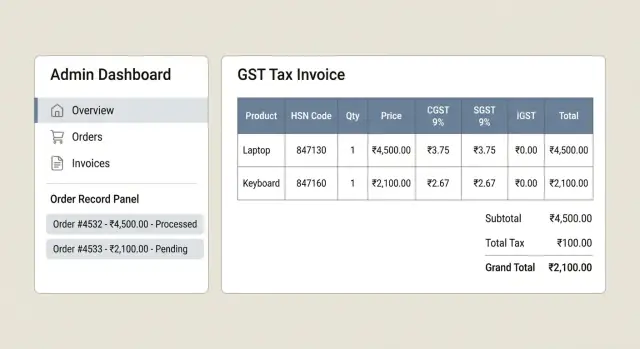
What usually goes wrong with GST invoices
Most GST invoice problems are not “complex tax” problems. They are missing or inconsistent data problems. An audit fails when the invoice cannot be tied cleanly to what was sold, to whom, where it was supplied, and how tax was computed.
A common trigger is HSN being absent, outdated, or applied at the wrong level. Teams may store an HSN on the product, but the invoice line is created from a different SKU name or variant, so the HSN never makes it onto the final document. Another frequent issue is the wrong tax split: charging IGST when it should be CGST and SGST (or the reverse) because “place of supply” was guessed from the shipping address without storing the state codes used for the decision.
Finance teams feel this immediately. Reconciliation becomes a daily cleanup job: invoice totals do not match the order, the order does not match the payment gateway settlement, and refunds become a chain of manual notes. Even small rounding differences across line items can create mismatches between the invoice PDF, GST reports, and the ledger.
Here are the patterns that cause most mismatch pain:
- Product and invoice lines do not share the same HSN, GST rate, and taxable value fields.
- Tax is calculated in more than one place (cart vs invoice) and results differ.
- Totals are stored only as “grand total” with no breakdown for taxable value and each tax component.
- Invoice numbering is editable or duplicated across series.
- Refunds are recorded as negative orders instead of proper credit notes.
The goal of a GST invoice data model is simple: store a minimum set of order, product, party, tax, invoice, and credit note fields so every number can be reproduced and explained later. Keep it small, but do not drop legally important fields that decide tax type, rate, and reporting.
The smallest set of records you need
If you want GST invoices to be easy to generate and easy to reconcile later, start with a small set of objects and make each one do a single job. A clean GST invoice data model is less about having many tables and more about keeping facts stable over time.
Here are the core records most teams need on day one:
- Customer: who bought (name, phone/email, GSTIN if B2B)
- Address: shipping and billing, plus state and place of supply signals
- Product (or Service): what was sold, with unit, base price, and default HSN/SAC
- Order: the commercial event (cart, discounts, shipping charges, status)
- Payment: how money moved (gateway reference, method, captured amount, date)
An Invoice should be separate from an Order. Orders can change (edited address, canceled items, partial fulfillment). Invoices should not. They need stable numbering, dates, and totals that never “drift” because someone updated an order later.
The anchor for tax accuracy is Line Items. Each order line item (and later each invoice line item) should hold the exact quantity, unit price, discount, and tax breakdown for that specific item. That is where HSN/SAC and GST rates actually get applied.
One detail that saves finance teams: store snapshots. When you generate an invoice, copy the product description, HSN/SAC, tax rate, and pricing into invoice line items. Do not rely on the current product master, because rates and names change.
Optional but often worth adding early are Returns, Refunds, and Credit Notes as separate records. Example: if a customer returns one item from a two-item order, you want a credit note that references the original invoice line, while the payment refund record references the gateway transaction. Keeping these as explicit objects prevents month-end “manual fixes” in GST registers.
If you build this in Koder.ai, treat each object as a simple screen first (create, view, edit), then add invoice generation only after snapshots and line-level fields are in place.
HSN and SAC: where they fit in the model
HSN (for goods) and SAC (for services) are not “invoice-only” details. They start at the product or service definition, and then get copied onto each invoice line at the moment you raise the invoice. This keeps mixed carts correct and makes audits easier because each line stands on its own.
A practical minimum data model is:
- Product: id, name, SKU, unit (UOM), base_price, tax_category_id, hsn_or_sac_type, hsn_or_sac_code
- InvoiceLine: id, invoice_id, product_id (optional for manual lines), description, unit, qty, unit_price, tax_category_id, hsn_or_sac_type, hsn_or_sac_code
Putting HSN/SAC on the Product helps your admin team maintain it in one place. Copying it to InvoiceLine is what makes past invoices stable. Even if the product later changes, the invoice still shows what was true at the time of sale. This is the heart of a GST invoice data model that does not break during reconciliation.
For HSN storage, keep it simple: code is required, description is optional, and an effective_from date is optional if you want a change history. Most teams do not need the description on every line item, but it can help when finance checks exceptions.
Mixed carts are normal: one invoice can have multiple line items and therefore multiple HSN/SAC codes. Do not try to force one code per invoice. Totals roll up at the invoice level, while classification stays at the line level.
Change management is where people get into trouble. Use a small rule set:
- Never overwrite HSN/SAC on issued invoice lines.
- If a product’s HSN/SAC changes, update the Product for future orders only.
- If you track history, add a new effective_from record rather than editing the old one.
Admin screen wise, you only need one place to edit Product tax fields, plus a read-only view on the invoice line to confirm what was captured when the invoice was created. If you are building these screens quickly, tools like Koder.ai can generate the basic CRUD pages and data tables from this model with minimal effort.
Party details: GSTIN, addresses, and place of supply
A GST invoice data model fails most often on party details. If the buyer or seller identity is even slightly off, your invoice may be valid on paper but painful in returns and reconciliation.
Start by treating “seller”, “buyer”, and “ship-to” as separate parties, even when they are the same person. This prevents later hacks when a customer adds a different shipping address or when you sell from more than one GST registration.
Minimum fields to store (buyer and seller)
Keep the fields boring and explicit. These are the ones that usually end up needed on the invoice and in reports:
- Legal name (as to appear on invoice)
- Trade name (optional, but useful)
- GSTIN (seller required; buyer nullable)
- Phone/email (not always mandatory, but helpful for support)
- Address lines, city, state, country, PIN/postal code
Store state as both a human-readable name and a state code, because reporting and place-of-supply rules often rely on the code.
Billing vs shipping and place of supply
Capture both billing and shipping addresses on the order, not just on the customer profile. Profiles change; invoices should not.
Place of supply should be stored as a specific state code on the invoice (copied from the order at invoice time). Do not “recalculate” it later. If your rule is “ship-to state”, store that result, plus the state used to decide it. This makes audits and disputes easier.
B2B vs B2C: when GSTIN is mandatory
For B2B, buyer GSTIN is normally required and should be validated for length and format at entry time. For B2C, GSTIN can stay empty, but you still need a full address and state to determine whether CGST/SGST or IGST applies.
A simple rule that works in most systems: if buyer GSTIN is present, treat as B2B; if not, treat as B2C. If you need exceptions, store an explicit customer_type field.
Multi-entity sellers (multiple GSTINs)
If you have branches or business units with different GST registrations, model “Seller Entity” as its own record with its own GSTIN and address. Each order should reference exactly one seller entity, and each invoice should copy those details so historic invoices stay accurate even if the seller address changes later.
Tools like Koder.ai can generate the admin forms for these records quickly, but the key is the structure: separate seller entity, order-time snapshots, and an explicit place-of-supply state code.
Tax calculation fields you must store
The most common split is simple: if the place of supply is in the same state as the supplier, tax is CGST + SGST. If it is a different state, tax is IGST. Your system should not “recompute later from totals” because tiny differences (rounding, discounts, shipping) are exactly what cause mismatches.
At minimum, store tax numbers at the invoice line level, not just the invoice header. That way you can explain every rupee on the invoice and match it back to product, HSN, and revenue.
A practical minimum per invoice line in your GST invoice data model looks like this:
- taxable_value (after line-level discount allocation)
- gst_rate_percent
- cgst_rate_percent, sgst_rate_percent, igst_rate_percent (store the split used)
- cgst_amount, sgst_amount, igst_amount (store the computed amounts)
- line_total (taxable_value + tax amounts)
Discounts are where systems get messy. Decide one rule and store it clearly. If discounts reduce the price before tax (typical for item discounts and coupons), store the original gross amount, the discount amount, and the resulting taxable value. If you have an order-level coupon, allocate it across lines (usually proportional to each line’s pre-discount taxable value) and store each line’s allocated discount so your tax math remains explainable.
Rounding should be consistent and recorded. Choose whether you round at the line level or only at the invoice level, then store the rounded results you printed. Many teams compute tax per line, round to 2 decimals, sum, then apply a final invoice_rounding_adjustment field to reach the exact payable amount.
Shipping and handling should not be a hidden add-on. Treat them as a separate invoice line with its own HSN/service code and tax rate rules. For example, an order with two products and a shipping fee becomes three lines, each with stored taxable value and tax component amounts, making finance reconciliation much easier.
Invoice document data: numbering, dates, totals, status
Once tax is calculated, the invoice still needs “document” fields that make it valid, auditable, and easy to reconcile later. In a GST invoice data model, treat the invoice header like a legal record: it should be stable even if product or customer data changes in the future.
Start with the header basics: invoice number, issue date (the date on the invoice), invoice type (tax invoice, export, B2B, B2C, etc.), and currency. Even if you mostly invoice in INR, storing currency avoids messy edge cases for exports or multi-currency marketplaces.
Numbering is where teams get burned. Keep a series or prefix (for example “FY25-INV-”), store the financial year, and enforce uniqueness at the database level. Also store “next number” controls per series in admin so two admins cannot issue the same number at the same time.
Totals should be stored explicitly, not only derived. Save subtotal (taxable value), total tax, grand total, and a separate round-off amount. If you recalculate later from line items, a small rule change can make old invoices stop matching the filed return.
Statuses should reflect the real lifecycle and lock the record when needed:
- Draft (editable)
- Issued (number assigned, PDF generated)
- Cancelled (kept for audit, not deleted)
- Refunded (payment reversed, may require credit note)
- Credit noted (linked credit note issued)
Finally, store generated artifact metadata: PDF template version, generation timestamp, and a file identifier. A hash is optional, but useful if you need to prove the PDF was not altered.
Example: if a support agent regenerates a PDF after a template update, the invoice totals and number should stay identical, but the stored template version explains why the PDF layout looks different.
Admin screens for products, taxes, and customer details
If you want clean GST invoices, don’t start in the invoice screen. Start with the admin pages that feed it. A good GST invoice data model stays small when these inputs are controlled and consistent.
Product master (SKU to HSN/SAC)
The product master is where most future mismatches begin, so keep it strict. Each SKU should have exactly one default HSN (or SAC for services), plus a default GST rate and any exceptions that apply only for certain dates.
A practical product screen usually needs:
- SKU and product name (as you want it printed)
- HSN/SAC code, GST rate, and tax category (if you use one)
- Active from/to dates (so changes don’t rewrite old invoices)
- Price overrides (for special MRPs or channel specific pricing)
- Status (active/inactive) with a clear reason for deactivation
Tax setup (rates and intra vs inter-state inputs)
Avoid a “calculator” UI. Instead, store inputs your system can apply consistently: rate tables, place of supply rules you follow, and how you decide intra-state vs inter-state (usually by comparing supplier state and ship-to state).
Keep the tax screen focused on: tax rate by category/HSN group, effective dates, and what should happen when the buyer provides a valid GSTIN vs not.
Customer and company profile (who is on the invoice)
The customer screen should capture GSTIN and its validation status, plus default billing and shipping addresses. Don’t let users type freeform states; use a controlled list so “KA” and “Karnataka” don’t become two different values.
Your company profile screen is equally important: legal name, GSTIN, registered address, and invoice series settings (prefix, next number, and financial year boundaries). Lock this down with permissions because changes affect every future document.
Audit log basics (trust and traceability)
You don’t need a complex system, but you do need a trail. Log who changed HSN/SAC, GST rates, invoice series settings, or company GSTIN, along with the old value, new value, timestamp, and reason.
If you’re building these screens in a tool like Koder.ai, treat audit logging and effective dates as first-class fields from day one. They cost little to add early and save hours during finance review later.
Step by step: from order to compliant invoice
A compliant invoice is less about fancy formatting and more about freezing the right facts at the right time. If you design your GST invoice data model around this flow, finance work becomes a simple match, not a weekly investigation.
1) Freeze what the customer actually bought
Before you calculate tax, lock an order snapshot: items, quantities, unit prices, discounts, shipping/handling charges, customer GSTIN (if any), billing and shipping addresses, and place of supply signals. The snapshot should not change even if the product price or HSN mapping changes later.
2) Turn snapshot into invoice lines (with copied tax attributes)
Compute taxes and generate invoice lines from the snapshot. Each invoice line should copy the HSN/SAC, tax rate(s), taxable value, and tax amounts used at that moment, instead of looking them up live later.
3) Issue the invoice and make it immutable
Assign the invoice number and issue date, then mark the invoice as issued. From this point, block edits to pricing, tax rates, HSN codes, and addresses on the invoice record. If you need to allow anything, limit it to non-financial notes and internal tags.
4) Produce the final document and store the totals
Generate the PDF/print view from the issued invoice, then store the final totals you will report: taxable total, CGST/SGST/IGST totals, rounding, and grand total. If you want extra safety, store a document version or checksum so you can prove the printout matches the stored numbers.
5) Handle changes the legal way
After issue, changes should follow rules, not edits:
- Customer wants a price correction: raise a credit note (or debit note) referencing the original invoice.
- Order is canceled after issue: cancel the invoice if allowed, otherwise issue a credit note.
- Customer updates address after issue: do not rewrite the invoice; correct via the proper document and keep an audit trail.
- Partial refund: credit note for only the refunded lines/amount.
- Replacement shipment: new order/invoice, not a silent edit.
If you build this flow into your admin screens (Koder.ai-style planning mode is helpful for mapping the steps before building), your team can generate invoices quickly without breaking reconciliation later.
Make reconciliation painless: payments, refunds, and registers
Reconciliation gets messy when payments are treated as a single “paid/unpaid” flag on the order. Keep payments and refunds as separate records that point to the order and the invoice, so finance can match bank settlements without rewriting history.
Separate payment and refund records (don’t edit the invoice)
A compliant invoice should stay stable after it’s issued. If a customer pays in parts, or you refund later, record that movement as a payment or refund entry, not as a change to the invoice totals.
Minimum fields that usually make reconciliation easy:
- Payment: payment_id, order_id, invoice_id, method, gateway_name, gateway_payment_id, amount, currency, authorized_at, captured_at, settlement_date, status
- Settlement (optional but helpful): settlement_id, gateway_payout_id, settlement_date, gross_amount, fees, net_amount
- Refund: refund_id, order_id, invoice_id, payment_id, credit_note_id (if issued), gateway_refund_id, amount, reason, refunded_at, status
- Reconciliation keys you should never reuse: order_id, invoice_id, payment_id, refund_id, credit_note_id
If the customer returns one item, don’t “reduce the invoice.” Issue a credit note and link it to the original invoice. The invoice register stays clean, and the refund ties back to the credit note.
Finance view and exports that save hours
Give finance a single screen that answers: what was issued, what got paid, what is still open, and what was reversed. Include ageing (0-7, 8-30, 31-60, 60+ days) and drill-down to the related payment and refund entries.
Exports most teams need every month:
- Invoice register (issued, cancelled, credit-noted)
- Tax summary by rate and HSN/SAC (supports your GST invoice data model)
- Payment vs invoice reconciliation (invoice_id, payment totals, balance)
- Refund and credit note register
- Gateway settlement report (payout_id to invoice/payment mapping)
Example: an order is Rs 10,000, paid Rs 6,000 today and Rs 4,000 next week. The invoice stays Rs 10,000. Your finance view shows balance Rs 4,000 until the second settlement arrives, then marks it fully paid without altering the issued document.
Common traps that cause compliance and mismatch issues
Most GST invoice problems are not “tax logic” problems. They are record keeping problems: the numbers on the PDF do not match what finance exports, or the invoice cannot be explained months later.
The first trap is calculating GST only at view time. If you compute CGST/SGST/IGST every time someone opens an invoice, you will eventually get different results after a rate change, rounding change, or a bug fix. Store the computed tax breakdown that was used when the invoice was issued, even if you also store the inputs.
A second trap is allowing edits to an issued invoice. Once an invoice is final, changes should happen through a credit note or a replacement flow with an audit trail. Otherwise, you will see “why does the customer PDF differ from the books?” arguments.
Here are the mismatch patterns that show up most often in a GST invoice data model:
- Place of supply is missing or the state code is wrong, so IGST is applied when it should be CGST+SGST (or the reverse).
- Product HSN/SAC or tax rate is updated, and old orders get recalculated using the new value.
- Tax is stored, but rounding rules differ between UI, PDF generation, and CSV exports.
- Discounts are applied after tax in one place and before tax in another.
- Refunds are recorded as negative line items without clear linkage to the original invoice.
A quick example: you sell to a customer in Karnataka, but the shipping address is in Maharashtra. If your system picks the billing state for place of supply by mistake, you may charge CGST+SGST instead of IGST. If you also recalculate tax on the fly, that error can silently “fix itself” later, leaving finance with numbers that do not match the issued document.
When you build admin screens (whether custom or via a platform like Koder.ai), add small guardrails: lock issued invoices, show place-of-supply inputs next to the computed tax type, and keep an immutable snapshot of HSN, rate, and rounding used at issue time.
Quick checklist and next steps
Before you send an invoice to a customer or mark it as “issued”, run a fast set of checks. This is where most small mistakes turn into big reconciliation headaches later. If you’re building a GST invoice data model, it’s worth baking these checks into both validation rules and your admin UI.
Per-invoice checks (before you issue)
- HSN/SAC is present on every line item and matches the product or service you actually sold.
- GSTIN rules are applied correctly (B2B vs B2C), and the billing and shipping details don’t contradict each other.
- Place of supply is stored and the tax split makes sense (CGST/SGST vs IGST).
- Totals add up exactly: taxable value, each tax component, rounding, and grand total.
- Once issued, the invoice is locked (no silent edits). Fixes happen via a credit note or cancellation flow, not by rewriting history.
A simple example: a customer updates their shipping address after payment, and the state changes. If you re-issue the same invoice number with new tax, your register and payment records stop matching. The safer approach is to keep the original invoice immutable and create an adjustment document.
Data + workflow checks (to keep finance clean)
- Invoice numbering is unique, sequential per your policy, and generated only at “issue” time.
- Store the computed tax amounts you used, not just the tax rates, so reports stay stable even if rates change later.
- Clear status steps exist: draft -> issued -> cancelled (and separate credit note documents).
- Reports reconcile by period: invoice register totals should tie to payments captured, refunds processed, and outstanding receivables.
- Audit fields are always present: created by, issued at, and a reason note for cancellations or credit notes.
Next steps: implement the screens and validations first, then iterate. In Koder.ai, start with Planning Mode to sketch the records and admin screens (products with HSN/SAC mapping, customer/GSTIN details, tax rules, and invoices). Generate the app, test a few real orders end-to-end, then use snapshots and rollback to safely refine the workflow. When you need deeper customization or reviews, export the source code and continue evolving it with your usual process.
FAQ
Where should I store HSN and SAC codes?
Store the HSN or SAC code on the product or service, then copy it to each invoice line when you issue the invoice. The copied value keeps older invoices accurate if the product master changes later.
Can one invoice contain multiple HSN or SAC codes?
Keep HSN or SAC at the invoice-line level. A single order can include goods and services with different classifications, so one invoice-level code will create errors.
How do I decide between IGST and CGST plus SGST?
Store supplier state, billing address, shipping address, and a fixed place-of-supply state code on the invoice. Compare the supplier state with the place of supply to choose CGST plus SGST or IGST.
What tax fields should every invoice line include?
Each invoice line needs quantity, unit price, discount amount, taxable value, GST rate, each tax rate split, each tax amount, and the final line total. These fields let finance trace every total back to a sale.
Should an order and an invoice be the same record?
No. An order can change during fulfillment, while an issued invoice needs fixed numbering, dates, party details, tax values, and totals. Create the invoice from an order snapshot, then lock it after issue.
What data should I snapshot when issuing an invoice?
Copy the product name, HSN or SAC, unit, price, discount, tax rate, tax amounts, customer details, and addresses into invoice records. Do not calculate old invoices from current product or customer data.
How should I handle multiple seller GSTINs?
Use a separate seller-entity record for every GST registration. Each order should select one seller entity, and the invoice should copy that entity's legal name, GSTIN, and registered address.
How should I apply an order-level discount for GST?
Allocate the order-level discount across invoice lines, usually in proportion to each line's value before discount. Store the allocated amount on every line, then calculate GST from the reduced taxable value.
What should I do when a customer returns an item after invoicing?
Keep the original invoice unchanged. Create a credit note that references the original invoice and the affected lines, then link any refund record to both the payment and the credit note.
Which records make GST reconciliation easier?
Store payments, refunds, and gateway settlements as separate records linked to the order and invoice. Finance can then match issued amounts, money received, refunds, fees, and outstanding balances without changing the invoice.