

Guest checkout vs customer accounts: choose for D2C
Guest checkout vs customer accounts: learn the tradeoffs for D2C, then follow a phased rollout plan with clear metrics for conversion, retention, and support load.
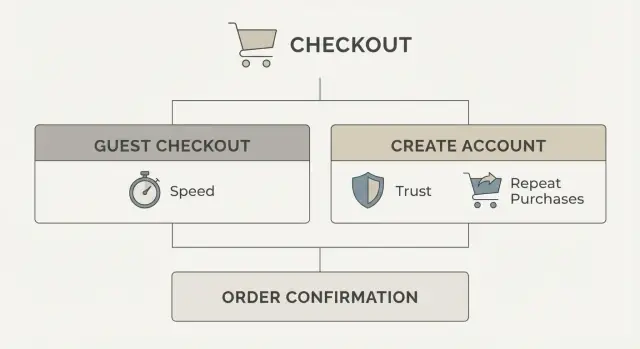
The real choice: friction now vs loyalty later
This decision is less about features and more about timing. Guest checkout helps a first purchase happen with the fewest steps. Customer accounts make the second, third, and tenth purchase easier, and they give you more ways to recognize and reward returning buyers.
People often frame guest checkout vs customer accounts as a binary choice. It isn’t. You can start with a clean guest flow, then add account benefits once you have proof shoppers actually want them.
A quick definition helps:
Guest checkout usually means someone can pay without creating a password. You may still ask for an email (receipts and shipping updates) and shipping details (because you need them).
An account means the shopper can sign in later to see orders, save addresses, track returns, and get perks. Accounts can be password-based or passwordless (like a one-time code), but either way they add an extra step.
That extra step is the real risk. Checkout is a fragile moment. One more field, one more screen, or one more decision can drop conversion fast, especially for first-time buyers who are still deciding if they trust you.
A practical way to frame it:
- If your goal is more first purchases, reduce friction.
- If your goal is higher repeat rate, add reasons to come back.
- If you need both, separate the two: keep the first purchase simple, then invite people into an account after they buy.
You don’t need to build everything at once. Start with the simplest flow that still feels trustworthy, then add accounts when you can tie them to clear value (faster reorders, easier returns, points, or early access).
When guest checkout usually wins (and when it doesn’t)
For most D2C brands, the early goal is simple: turn curious visitors into first-time buyers. That’s why the default answer is often “start with guest,” then add accounts once you’ve earned repeat behavior.
Guest checkout usually wins when the shopper is trying to finish fast, not “start a relationship.” Common cases include first-time buyers, gift purchases, mobile shoppers who hate long forms, impulse buys from social traffic, and short seasonal campaigns where speed matters more than retention.
Accounts start to matter when the product naturally brings people back. If you sell subscriptions, replenishment items (skincare, supplements, pet food), or anything with a high repeat rate, accounts can remove effort on the second purchase. They also help when customers need to manage orders, returns, or multiple shipments, because “where’s my order?” contacts often drop when people can self-serve.
A quick way to decide: look at what percent of orders are from new customers today. If most orders are new-customer orders, forcing account creation is usually a tax on your main growth engine. If repeat orders are already a big share, accounts can be a helpful upgrade, especially if “sign in” feels optional and rewarding, not required.
A practical rule: if a shopper can buy in under a minute on mobile as a guest, you’re protecting conversion. Add accounts when you can explain the payoff in one sentence (faster reorders, tracking, perks) and deliver it immediately.
Tradeoffs side by side: conversion, support, and repeat buying
Choosing between guest checkout and customer accounts is mostly a choice between reducing friction today and building convenience for repeat customers tomorrow. Both can work, but they pull your business in different directions.
Guest checkout tends to lift first-purchase completion. It’s quicker, especially on mobile, and it avoids two common blockers: “create a password” and “I forgot my password.” It can also feel safer because shoppers don’t have to commit to a relationship before they trust you.
Accounts shine after the first order. They make reordering easier with saved addresses and payment preferences, give customers order history, and reduce back-and-forth when someone asks, “Where is my order?” or “What size did I buy last time?” Returns also get smoother because purchases are easier to find.
Here’s the trade in plain terms:
- Conversion: guest checkout usually wins for first-time buyers; mandatory accounts can drop completion.
- Support load: required logins create password reset tickets and “can’t sign in” messages.
- Repeat buying: accounts help when customers come back regularly (refills, staples, subscriptions).
- Trust: forced account creation can feel like marketing; guests feel more in control.
- Data quality: accounts can improve identity matching, but only if people actually use them.
A shopper who buys a gift once benefits from guest checkout. A shopper who buys the same skincare every month will value an account if it truly saves time (easy reorders, easy returns) and doesn’t bombard them with emails.
The key is to earn the account: keep it optional at checkout, then offer clear, practical benefits after purchase.
Decisions to make before you build anything
Before you choose a direction, decide what you’re optimizing for in the next 30 to 60 days: fewer drop-offs today, or more data for future marketing. For most early-stage D2C brands, fewer drop-offs is the win.
First decision: will an account be optional or required? If you’re still learning your market, keep accounts optional. A required account adds a hard stop right when the buyer is trying to pay.
Next, get strict about what data you truly need at checkout. Most brands only need enough to take payment and deliver the order. Everything else can wait until after the customer has their confirmation.
Build choices that prevent regret later:
- Make checkout work as a guest by default, with an optional sign-in.
- Collect only essentials at payment: email, shipping address, and payment details.
- Postpone everything else: birthday, preferences, SMS opt-in, and full profile.
- Choose the safest moment to ask for an account: after purchase, on the thank-you page, or in the confirmation flow.
- Plan a gentle return path: prefill email, offer one-time code sign-in, and remember the cart when possible.
A good rule: ask for commitment only after you’ve delivered value. After a first order, “Save your details for next time” and “Track returns faster” turns accounts into a perk, not a toll.
Also decide how you’ll treat returning customers without blocking new ones. A small sign-in prompt at the top of checkout can work, but avoid a full-page login gate.
If you’re building quickly, Koder.ai can help you prototype both flows and compare them without turning it into a big redesign. The product point stays the same either way: remove hard stops.
A phased rollout plan: guest first, accounts later
If you’re unsure, start with guest checkout. It gives you the cleanest read on product, price, and shipping without signup friction. You can still capture the one thing you truly need on day one: an email for receipts and updates.
Phase 1: guest checkout that feels complete
Launch guest checkout with email receipt, clear delivery updates, and simple order tracking. Make sure support can locate an order using email plus order number. This phase answers one question: can new shoppers buy smoothly?
Phase 2: create an account after the purchase (not before)
After checkout, offer a one-click prompt to set a password and save details. Avoid extra forms. The customer already gave you name, address, and email, so don’t ask again. The message should be about convenience, not commitment.
Phase 3: add perks that solve real repeat tasks
Now you earn the right to push accounts by making them useful. Good early perks are practical and easy to explain: quick reorders, saved addresses and cards (if you support it), and faster returns or exchanges.
Phase 4: go deeper only if it fits your brand
Subscriptions, loyalty points, and personalized support can help, but they also add rules and support load. Add them only when you can show they improve repeat purchase, not just account creation.
Build a rollback plan for every phase. If conversion drops after a change, revert quickly and learn why:
- Keep the old flow available behind a feature flag.
- Watch checkout completion daily for the first week.
- Record where drop-offs increase (cart, shipping, payment).
- Roll back within 24 hours if the drop is sustained.
- Document what changed so you can retest cleanly.
If you’re building fast, a platform like Koder.ai can help you ship each phase as a small, reversible change instead of a big redesign.
Success metrics that tell you if the choice is working
Treat this as an experiment with clear pass-fail signals. The goal isn’t “more sign-ups.” The goal is more completed orders with fewer problems.
Start with a small set of weekly metrics, and compare guest vs logged-in flows side by side:
- Checkout conversion rate: orders divided by checkout starts.
- Checkout abandonment rate: share of people who start checkout but don’t pay.
- Time to complete checkout: median minutes from checkout start to payment success.
- Payment failure rate: failed payments divided by attempts.
- Quality cost: returns, fraud or chargebacks, and address errors per 100 orders.
Then add hidden costs that often show up after you push accounts:
- Retention: repeat purchase rate, average time to second order, and share of logged-in orders.
- Support load: login tickets, password reset requests, and delivery status contacts per 1,000 orders.
A concrete way to use these: if you launch guest checkout first, you might set a target like “conversion up 10% and time to checkout down 20%, with no increase in address errors.” Only after you hit that baseline should you add account perks.
When you introduce accounts later, success looks different: conversion should stay flat or improve, while logged-in share rises because the benefits are real (faster reorders, saved addresses), not because you forced a login.
One warning: track metrics by traffic source and device. A change that helps desktop email traffic can still hurt mobile social traffic, and averages can hide that.
How to test it without fooling yourself
The biggest risk is “testing” a bundle of changes and guessing what caused the result. Keep the experiment clean so you can trust the answer.
Keep the test simple and comparable
Run an A/B test where only one thing changes. If you’re testing guest checkout, don’t also redesign the whole checkout page, change shipping prices, or add new payment methods in the same release.
Before you start, set a baseline period (how checkout performs today) and a test period that matches normal shopping cycles. For many D2C brands, that means at least 1 to 2 full weeks, and longer if you have weekend-heavy traffic or frequent promos. Avoid running the test during a big sale unless that’s the only time you sell.
Decide what “good enough” looks like
Write down decision rules in advance so you don’t move the goalposts:
- Primary metric: checkout completion rate (orders / checkout starts).
- Guardrails: payment failures, support tickets per 1,000 orders, refund rate.
- Threshold example: stop if checkout completion drops more than 2% relative, or if support tickets rise more than 10%.
- Minimum sample: don’t call a winner until you have enough orders in each variant to reduce noise.
Then segment results. Guest checkout might help new customers on mobile from paid ads, but do little for returning customers on desktop.
At minimum, compare:
- New vs returning customers
- Mobile vs desktop
- Paid vs organic traffic
If one segment improves while another gets worse, you may need different defaults (for example, guest by default on mobile, account nudges after purchase).
Common mistakes that hurt conversion
Most checkout drop-offs aren’t about price. They happen when people feel slowed down, uncertain, or trapped. The biggest conversion killers usually come from small UX choices that add friction at the worst moment.
Mistakes that quietly push shoppers away
A common one is forcing account creation before payment without a clear payoff. If the shopper doesn’t understand what they get right now (faster checkout next time, order tracking, easy returns), it feels like a tax.
Another is asking for too much, too early. Phone number, date of birth, and extra marketing checkboxes can wait until after the order. During payment, every extra field raises the chance someone quits or makes a typo.
Some stores technically offer guest checkout but hide it. If “Continue as guest” is small, below the fold, or behind an extra step, many shoppers assume they must create an account and leave.
Confusing sign-in paths also hurt. Mixing email login, magic links, and social login without clear labels can make people wonder, “Did I already create an account?” That uncertainty leads to retries, cart abandonment, or support tickets.
Finally, not planning recovery flows from day one is a silent failure. If a buyer can’t reset a password easily, or reset emails arrive late or not at all, they won’t come back for repeat purchases.
A quick sanity-check before launch:
- Make guest checkout as visible as account checkout, not buried.
- Keep required fields to the minimum needed to ship and pay.
- Use one primary sign-in method, and explain it in plain words.
- Offer “create an account after purchase” with a one-step setup.
- Test password reset and email delivery on real devices.
Example: a small skincare brand that asks for phone number and account creation on the first screen often sees mobile shoppers bail. Switching to guest-first, then offering account perks on the thank-you page, usually reduces friction without giving up long-term retention.
UX and copy: how you ask matters
Most shoppers don’t have a strong opinion about accounts. They react to what you put in front of them at the moment they want to pay. If the choice feels confusing or pushy, they leave.
Make the decision obvious with two clear paths. Put them side by side, give them the same visual weight, and use plain labels. Avoid guilt language like “No thanks, I hate saving money” or “Continue as guest (not recommended).”
A simple pattern that works:
- Checkout as guest
- Sign in or create account
- Short helper text under each option
- One click continues (no extra form fields yet)
Reassurance text does a lot of work when it’s specific. Tell people what the account is for, and what it isn’t. “Create an account to track orders and reorder faster” is clear. “No spam. Marketing emails are optional” is often enough.
Be careful with consent. Account creation and marketing signup are different choices. If you need an email for receipts, say so. If you want promotional emails, ask separately and make it opt-in.
A clean approach is to keep one checkbox only for marketing, with copy like: “Email me offers and new drops (optional).” Don’t pre-check it. Don’t bundle it into “Create an account.”
After purchase is often the best time to invite an account, because you can attach it to a real benefit. Keep it to one concrete perk, not a long list. For example, on the confirmation page: “Want faster reorders? Create a password to save your details and track this order.”
If you sell consumables, “Reorder in 2 taps” is a strong post-purchase prompt. If you sell limited drops, “Get restock alerts in your account” can work, but only if it’s true and used.
Example rollout for a small D2C brand
A small D2C skincare brand is getting most sales from paid social ads. Most visitors are first-time buyers on mobile, and the top goal is simple: get the first purchase without friction. They decide to default to guest, then earn accounts later.
Phase 1 (weeks 1-2): guest-first checkout
They launch a clean checkout with guest as the primary path, and a low-pressure option to save details after purchase (not before). They keep the form short, use clear error messages, and only ask for account creation on the thank-you page.
What they measure in week 1 to 2:
- Checkout conversion rate (sessions to purchase) and drop-off by step
- Time to complete checkout and payment failure rate
- Support tickets about order status, address changes, and returns
- Repeat purchase rate at 30 days (even if it’s small)
Phase 2 trigger: enough returning traffic to justify perks
They invest in accounts only when returning behavior is real. A simple trigger could be: at least 20 to 30% of sessions are returning visitors for 2 to 3 weeks, and email-driven traffic is growing.
Phase 2 adds a few clear perks: faster reorders, saved addresses, order tracking, and easier returns. They still let people check out as a guest, and they avoid forcing sign-in.
Example outcome: overall conversion stays stable, guest remains the majority, but the share of logged-in checkouts grows slowly as repeat buyers opt in.
If metrics worsen, they don’t guess. They revert, simplify, and re-test:
- Remove forced account prompts and extra fields.
- Move “create password” to post-purchase only.
- A/B test one change at a time, with a fixed test window.
- Keep the better-performing version and archive the rest.
If they need to ship and test changes quickly on a custom stack, a build tool like Koder.ai can help create variants and roll back cleanly when results dip.
Quick checklist and next steps
A checkout decision only pays off if the experience matches what you intended. This checklist catches common issues before customers do.
Before you launch
Guest checkout should be a single, clear path. The fastest way to lose sales is to say “guest” but still make people hunt for it.
- One obvious “Checkout as guest” option, not hidden behind sign-in.
- No forced account creation at any point (including after payment).
- Form fields are minimal and explain why you need each one.
- Error messages are specific (what’s wrong, how to fix it) and preserve entered data.
- Mobile flow works with one hand: big buttons, short pages, fast load.
After you confirm the flow, write down what “good” looks like in numbers (baseline conversion, expected support volume, repeat rate). That prevents arguments based on opinions later.
After you launch
Check results daily for the first 1 to 2 weeks. Small UX problems show up fast, and you can fix them before they become “normal.”
- Checkout conversion rate by device (mobile often shows issues first).
- Drop-off at each step (shipping, payment, review).
- Support tickets: password issues, “can’t find my order,” address edits.
- Repeat purchase rate and time-to-second-order.
- Account creation rate (if optional) and why people choose it.
Pick your phase based on the metrics. If guest checkout lifts conversion but support spikes, add lightweight post-purchase tools first (order lookup, easy edits). If repeat buying is flat, introduce account perks that save time, like saved addresses or faster reorders, and measure whether they increase second orders.
If you want to prototype and iterate quickly, Koder.ai (koder.ai) can help you draft guest and account screens through a chat-driven build workflow, test the copy and steps, then export the source code when you’re ready to implement.
FAQ
Should I force customers to create an account to buy?
Default to guest checkout if you’re optimizing for first purchases.
A required account adds an extra decision and usually more steps (password, verification, “forgot password”), which can reduce completion—especially on mobile and for first-time buyers.
When does guest checkout make the most sense?
Offer guest checkout as the primary path when most orders are from new customers, impulse traffic, or mobile shoppers.
Accounts become more valuable when you already see frequent repeats (refills, subscriptions, staples) or when customers regularly need to manage orders and returns.
How do I get the benefits of accounts without hurting conversion?
Make accounts optional and invite them after purchase.
A simple pattern is: guest checkout now → on the thank-you page, offer “Save your details for next time” with one quick step (password or one-time code).
What information should I ask for during guest checkout?
Collect only what’s required to take payment and deliver the order:
- Email (receipt and updates)
- Shipping name and address
- Payment details
Move everything else (birthday, preferences, marketing opt-ins, profile fields) to post-purchase or account settings.
How do I make sure shoppers actually notice the guest checkout option?
Keep the guest option obvious and equal in visual weight to sign-in.
Avoid hiding it behind small text or an extra click. If people can’t immediately see “Checkout as guest,” many assume they’re forced to create an account and leave.
What should the UI copy say so accounts feel optional, not pushy?
Use clear, specific copy tied to immediate value.
Examples:
- “Create an account to track orders and reorder faster.”
- “Marketing emails are optional.”
Avoid guilt language or anything that makes guest checkout feel like a bad choice.
Should I use passwords or passwordless login for accounts?
Passwordless sign-in (one-time code) usually reduces friction because it avoids password creation and resets.
If you use passwords, keep setup minimal and make password reset fast and reliable, or you’ll generate support tickets and drop-offs.
What metrics tell me if guest checkout is working?
Track a small set of metrics weekly:
- Checkout completion rate (orders / checkout starts)
- Abandonment rate by step (shipping vs payment)
- Median time to complete checkout
- Payment failure rate
- Support tickets related to login and order status
For accounts added later, also watch repeat purchase rate and the share of logged-in orders (it should rise because it’s useful, not because it’s forced).
How can I test guest checkout vs accounts without getting misleading results?
Run a clean A/B test where only one thing changes.
Predefine:
- Primary metric: checkout completion rate
- Guardrails: payment failures, support tickets per 1,000 orders, refunds/chargebacks
- A stop rule (for example, revert if completion drops beyond a set threshold)
Segment results by device and new vs returning customers so averages don’t hide mobile losses.
What are the biggest mistakes that make checkout drop-offs worse?
Common conversion killers include:
- Requiring an account before payment
- Too many required fields (phone, DOB, extra checkboxes)
- Confusing sign-in options (multiple methods without clear labels)
- Hidden guest checkout
- Weak recovery flows (slow or unreliable password reset emails)
Fixing these often improves conversion more than adding new features.