

Hejlsberg’s TypeScript & C#: Tooling That Scales Code
How Anders Hejlsberg shaped C# and TypeScript to improve developer experience: types, IDE services, refactoring, and feedback loops that scale codebases.
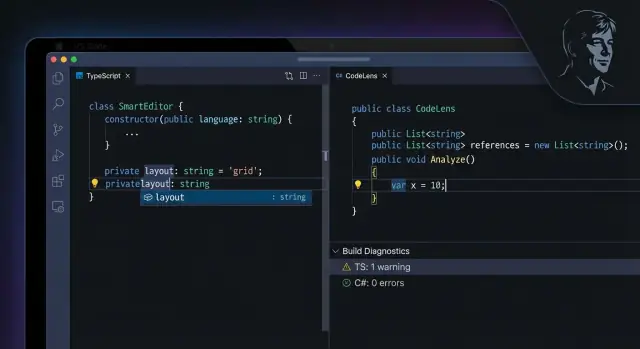
Why Developer Experience Matters When Codebases Grow
A codebase rarely slows down because engineers suddenly forget how to code. It slows down because the cost of figuring things out rises: understanding unfamiliar modules, making a change safely, and proving the change didn’t break something else.
As a project grows, “just search and edit” stops working. You start paying for every missing hint: unclear APIs, inconsistent patterns, weak autocomplete, slow builds, and unhelpful errors. The result isn’t only slower delivery—it’s more cautious delivery. Teams avoid refactors, postpone cleanup, and ship smaller, safer changes that don’t move the product forward.
Why Anders Hejlsberg is relevant here
Anders Hejlsberg is a key figure behind both C# and TypeScript—two languages that treat developer experience (DX) as a first-class feature. That matters because a language isn’t only syntax and runtime behavior; it’s also the tooling ecosystem around it: editors, refactoring tools, navigation, and the quality of feedback you get while writing code.
This article looks at TypeScript and C# through a practical lens: how their design choices help teams move faster as systems and teams expand.
What “scaling” really means
When we say a codebase is “scaling,” we’re usually talking about several pressures at once:
- Team size: more contributors, more styles, more coordination overhead.
- Code size: more modules, more dependencies, more “unknown” areas.
- Change rate: more frequent releases and parallel work streams.
Strong tooling reduces the tax created by those pressures. It helps engineers answer common questions instantly: “Where is this used?”, “What does this function expect?”, “What changes if I rename this?”, and “Is this safe to ship?” That’s developer experience—and it’s often the difference between a large codebase that evolves and one that ossifies.
Anders Hejlsberg’s Influence: A Practical Lens
Anders Hejlsberg’s influence is easiest to see not as a set of quotes or personal milestones, but as a consistent product philosophy that shows up in mainstream developer tooling: make common work fast, make mistakes obvious early, and make large-scale change safer.
This section isn’t a biography. It’s a practical lens for understanding how language design and the surrounding tooling ecosystem can shape day-to-day engineering culture. When teams talk about “good DX,” they often mean things that were deliberately designed into systems like C# and TypeScript: predictable autocomplete, sensible defaults, refactoring you can trust, and errors that point you toward a fix instead of just rejecting your code.
What “influence” looks like in tooling culture
You can observe the impact in the expectations developers now bring to languages and editors:
- Editors should understand the code, not just color it.
- Navigation, rename, and “find references” should work across a whole repo.
- Types (where available) should improve productivity, not slow it down.
- Tooling should stay fast enough to use constantly, not only before a release.
These outcomes are measurable in practice: fewer avoidable runtime mistakes, more confident refactors, and shorter time spent “re-learning” a codebase when joining a team.
Why compare C# and TypeScript
C# and TypeScript run in different environments and serve different audiences: C# is often used for server-side and enterprise applications, while TypeScript targets the JavaScript ecosystem. But they share a similar DX goal: help developers move quickly while reducing the cost of change.
Comparing them is useful because it separates principles from platform. When similar ideas succeed in two very different runtimes—static language on a managed runtime (C#) and a typed layer over JavaScript (TypeScript)—it suggests the win is not accidental. It’s the result of explicit design choices that prioritize feedback, clarity, and maintainability at scale.
Static Types as a Scaling Mechanism (Not Just a Preference)
Static typing often gets framed as taste: “I like types” vs. “I prefer flexibility.” In large codebases, it’s less about preference and more about economics. Types are a way to keep everyday work predictable as more people touch more files more often.
What “strong typing” buys you day to day
A strong type system gives names and shapes to your program’s promises: what a function expects, what it returns, and what states are allowed. That turns implicit knowledge (held in someone’s head or buried in docs) into something the compiler and tooling can enforce.
Practically, that means fewer “Wait, can this be null?” conversations, clearer autocompletion, safer navigation across unfamiliar modules, and faster code review because intent is encoded in the API.
Compile-time checks vs. runtime failures
Compile-time checks fail early, often before code is merged. If you pass the wrong argument type, forget a required field, or misuse a return value, the compiler flags it immediately.
Runtime failures show up later—maybe in QA, maybe in production—when a particular code path executes with real data. Those bugs are usually costlier: they’re harder to reproduce, they interrupt users, and they create reactive work.
Static types don’t prevent every runtime bug, but they remove a big class of “this should never have compiled” errors.
Scaling failures types help prevent
As teams grow, the common breakpoints are:
- Unclear contracts: modules don’t state what they guarantee, so usage drifts.
- Unsafe refactors: renames and signature changes silently miss call sites.
- Hidden coupling: unrelated parts depend on the same loosely defined object shape.
Types act like a shared map. When you change a contract, you get a concrete list of what needs updating.
The trade-offs (real, but manageable)
Typing has costs: a learning curve, extra annotations (especially at boundaries), and occasional friction when the type system can’t express what you mean cleanly. The key is using types strategically—most heavily at public APIs and shared data structures—so you get the scaling benefits without turning development into paperwork.
Fast Feedback Loops: The Hidden Advantage of Modern Languages
A feedback loop is the tiny cycle you repeat all day: edit → check → fix. You change a line, your tools immediately verify it, and you correct what’s wrong before your brain context-switches.
Slow feedback: when bugs travel far
In a slow loop, “check” mostly means running the app and relying on manual testing (or waiting for CI). That delay turns small mistakes into scavenger hunts:
- You push code.
- Tests fail later (or worse, users report it).
- Someone has to reconstruct intent, reproduce the issue, and patch it under time pressure.
The longer the gap between edit and discovery, the more expensive each fix becomes.
Fast feedback: editor + compiler as a teammate
Modern languages and their tooling shorten the loop to seconds. In TypeScript and C#, your editor can flag problems as you type, often with a suggested fix.
Concrete examples that get caught early:
- Missing property: you access
user.address.zip, butaddressisn’t guaranteed to exist. - Wrong parameter type: you pass a string where a number (or a specific enum) is required.
- Unreachable code: a
returnmakes the rest of the function impossible to execute.
These aren’t “gotchas”—they’re common slips that fast tools turn into quick corrections.
Why this matters more in teams
Fast feedback reduces coordination costs. When the compiler and language service catch mismatches immediately, fewer issues escape into code review, QA, or other teams’ workstreams. That means less back-and-forth (“What did you mean here?”), fewer broken builds, and fewer “someone changed a type and my feature exploded” surprises.
At scale, speed isn’t just runtime performance—it’s how quickly developers can be confident their change is valid.
Tooling That Feels Native: Language Services and IDE Integration
“Language services” is a plain name for the set of editor features that make code feel searchable and safe to touch. Think: autocomplete that understands your project, “go to definition” that jumps to the right file, rename that updates every usage, and diagnostics that underline problems before you run anything.
TypeScript: the compiler as an always-on assistant
TypeScript’s editor experience works because the TypeScript compiler isn’t only for producing JavaScript—it also powers the TypeScript Language Service, the engine behind most IDE features.
When you open a TS project in VS Code (or other editors that speak the same protocol), the language service reads your tsconfig, follows imports, builds a model of your program, and continuously answers questions like:
- What type is this value right now?
- Which overload is being called?
- Where is this symbol defined across the workspace?
That’s why TypeScript can offer accurate autocomplete, safe renames, jump-to-definition, “find all references,” quick fixes, and inline errors while you’re still typing. In large JavaScript-heavy repositories, that tight loop is a scaling advantage: engineers can edit unfamiliar modules and get immediate guidance about what will break.
C#: compiler + IDE working as a unit
C# benefits from a similar principle, but with especially deep IDE integration in common workflows (notably Visual Studio and also VS Code via language servers). The compiler platform supports rich semantic analysis, and the IDE layers on refactorings, code actions, project-wide navigation, and build-time feedback.
This matters when teams grow: you spend less time “mentally compiling” the codebase. Instead, the tools can confirm intent—showing you the real symbol you’re calling, the nullability expectations, the impacted call sites, and whether a change ripples across projects.
Why this scales beyond convenience
At small size, tooling is a nice-to-have. At large size, it’s how teams move without fear. Strong language services make unfamiliar code easier to explore, easier to change safely, and easier to review—because the same facts (types, references, errors) are visible to everyone, not just the person who originally wrote the module.
Refactoring Support: Making Change Cheap and Reliable
Refactoring isn’t a “spring cleaning” event you do after the real work. In large codebases, it is the real work: continuously reshaping code so new features don’t get slower and riskier each month.
When a language and its tooling make refactoring safe, teams can keep modules small, names accurate, and boundaries clear—without scheduling a risky, multi-week rewrite.
The refactorings you end up needing every day
Modern IDE support in TypeScript and C# tends to cluster around a few high-leverage moves:
- Safe rename for variables, methods, classes, files, and modules
- Extract method/function to turn long blocks into readable, testable units
- Move symbol (e.g., move a class to a different file/namespace/module) while keeping imports/usings correct
- Organize imports/usings to reduce noise and avoid subtle conflicts
These are small actions, but at scale they’re the difference between “we can change this” and “nobody touch that file.”
Why refactoring needs semantic understanding (not text search)
Text search can’t tell whether two identical words refer to the same symbol. Real refactoring tools use the compiler’s understanding of the program—types, scopes, overloads, module resolution—to update meaning, not just characters.
That semantic model is what makes it possible to rename an interface without touching a string literal, or to move a method and automatically fix every import and reference.
Failure modes good tooling helps you avoid
Without semantic refactoring, teams routinely ship avoidable breakage:
- Broken references after renames or moves
- Missed call sites due to dynamic patterns, overloads, or shadowed names
- Accidental edits to comments/strings instead of code
- Half-updated APIs where some files compile and others quietly diverge
This is where developer experience directly becomes engineering throughput: safer change means more change, earlier—and less fear baked into the codebase.
TypeScript’s Approach: Gradual Safety for a JavaScript World
TypeScript succeeds largely because it doesn’t ask teams to “start over.” It accepts that most real projects begin as JavaScript—messy, fast-moving, and already shipping—and then lets you layer safety on top without blocking momentum.
Structural typing, inference, and gradual typing (in plain terms)
TypeScript uses structural typing, which means compatibility is based on a value’s shape (its fields and methods), not the name of a declared type. If an object has { id: number }, it can usually be used anywhere that shape is expected—even if it came from a different module or wasn’t explicitly “declared” as that type.
It also leans heavily on type inference. You often get meaningful types without writing them:
const user = { id: 1, name: "Ava" }; // inferred as { id: number; name: string }
Finally, TypeScript is gradual: you can mix typed and untyped code. You can annotate the most critical boundaries first (API responses, shared utilities, core domain modules), and leave the rest for later.
“Add types as you go” makes adoption realistic
This incremental path is why TypeScript fits existing JavaScript codebases. Teams can convert file-by-file, accept some any early on, and still gain immediate wins: better autocomplete, safer refactors, and clearer function contracts.
Strictness is a dial teams turn up over time
Most organizations start with moderate settings, then ratchet stricter rules as the codebase stabilizes—enabling options like strict, tightening noImplicitAny, or improving strictNullChecks coverage. The key is progress without paralysis.
A brief caution: types express intent, not truth
Types model what you expect to happen; they don’t prove runtime behavior. You still need tests—especially for business rules, integration edges, and anything involving I/O or untrusted data.
C#’s Approach: Productivity Features That Scale Teams
C# has grown around a simple idea: make the “normal” way of writing code also the safest and most readable way. That matters when a codebase stops being something one person can hold in their head and becomes a shared system maintained by many.
Readability and intent as defaults
Modern C# leans into syntax that reads like business intent rather than mechanics. Small features add up: clearer object initialization, pattern matching for “handle these shapes of data,” and expressive switch expressions that reduce nested if blocks.
When dozens of developers touch the same files, these affordances reduce the need for tribal knowledge. Code reviews become less about deciphering and more about validating behavior.
Safety that fits real-world code
One of the most practical scaling improvements is nullability. Instead of treating null as an ever-present surprise, C# helps teams express intent:
- “This value can never be null” (so consumers can rely on it)
- “This might be null” (so callers are nudged to handle the case)
That shifts many defects from production to compile time, and it’s especially helpful in large teams where APIs are used by people who didn’t write them.
Async/await ergonomics: scalable concurrency for humans
As systems grow, so do network calls, file I/O, and background work. C#’s async/await makes asynchronous code read like synchronous code, which reduces the cognitive load of handling concurrency.
Instead of threading callbacks through the codebase, teams can write straightforward flows—fetch data, validate, then continue—while the runtime manages the waiting. The result is fewer timing-related bugs and fewer custom conventions that new team members must learn.
Tooling that stays useful in large solutions
C#’s productivity story is inseparable from its language services and IDE integration. In large solutions, strong tooling changes what’s feasible day to day:
- Fast navigation across projects (go to definition, find references)
- Solution-wide analysis that catches breaking changes early
- Safe, automated refactorings (rename, extract method, change signature)
This is how teams keep momentum. When the IDE can reliably answer “where is this used?” and “what will this change break?”, developers make improvements proactively instead of avoiding change.
A consistent “pit of success”
The lasting pattern is consistency: common tasks (null handling, async workflows, refactors) are supported by both the language and the tools. That combination turns good engineering habits into the easiest path—exactly what you want when scaling a codebase and the team behind it.
Diagnostics and Error Messages That Teach (Not Just Block)
When a codebase is small, a vague error can be “good enough.” At scale, diagnostics become part of your team’s communication system. TypeScript and C# both reflect a Hejlsberg-style bias toward messages that don’t just stop you—they show you how to move forward.
What “good” error messages look like
Helpful diagnostics tend to share three traits:
- Actionable: they suggest the next step (“Did you mean…”, “Add a null check”, “Convert to async”).
- Specific: they name the exact symbol, expected type, or missing member rather than describing the category of failure.
- Local: they point to the smallest area of code responsible, so you can fix it without spelunking through unrelated files.
This matters because errors are often read under pressure. A message that teaches reduces back-and-forth and turns “blocked” time into “learning” time.
Warnings vs. errors: why warnings protect future you
Errors enforce correctness right now. Warnings are where long-term health is protected: deprecated APIs, unreachable code, questionable null usage, implicit any, and other “it works today, but might break later” issues.
Teams can treat warnings as a gradual ratchet: start permissive, then tighten policies over time (and ideally keep warning counts from creeping up).
Diagnostics as team standards—and onboarding fuel
Consistent diagnostics create consistent code. Instead of relying on tribal knowledge (“we don’t do that here”), the tools explain the rule at the moment it matters.
That’s a scaling advantage: newcomers can fix issues they’ve never seen before because the compiler and IDE effectively document intent—right in the error list.
Performance and Incrementality: Keeping Tools Fast at Scale
When a codebase grows, slow feedback becomes a daily tax. It rarely shows up as a single “big” problem; it’s death by a thousand waits: longer builds, slower test suites, and CI pipelines that turn quick checks into an hour-long context switch.
The scaling pain you can actually feel
A few common symptoms appear across teams and stacks:
- Build times creep up as more projects, generated code, and dependencies pile in.
- Test times balloon, especially when “just run everything” becomes the default.
- CI feedback delays cause stacked PRs, more merge conflicts, and reviews based on guesswork rather than verified results.
- Editor lag (autocomplete, go-to-definition, rename) makes developers work around their tools instead of with them.
Why incrementality changes the experience
Modern language toolchains increasingly treat “rebuild everything” as the last resort. The key idea is simple: most edits only affect a small slice of the program, so tools should reuse prior work.
Incremental compilation and caching typically rely on:
- Dependency tracking: knowing what files/modules depend on what.
- Stable intermediate results: keeping parsed syntax trees, type information, or compiled outputs that can be reused.
- Smart invalidation: recomputing only what changed—and what must change because of it.
This isn’t just about faster builds. It’s what enables “live” language services to stay responsive while you type, even in large repositories.
Editor responsiveness as a quality bar
Treat IDE responsiveness like a product metric, not a nice-to-have. If rename, find references, and diagnostics take seconds, people stop trusting them—and stop refactoring.
Practical ways to keep feedback fast
Set explicit budgets (for example: local build under X minutes, key editor actions under Y ms, CI checks under Z minutes). Measure them continuously.
Then act on the numbers: split hot paths in CI, run the smallest test set that proves a change, and invest in caching and incremental workflows wherever you can. The goal is simple: make the fastest path the default path.
Designing for Change: APIs, Boundaries, and Maintainability
Large codebases don’t usually fail because of one bad function—they fail because boundaries blur over time. The easiest way to keep change safe is to treat APIs (even internal ones) as products: small, stable, and intentional.
Clear contracts (and why types help)
In both TypeScript and C#, types turn “how to call this” into an explicit contract. When a shared library exposes well-chosen types—narrow inputs, clear return shapes, meaningful enums—you reduce the number of “implicit rules” that only live in someone’s head.
For internal APIs, this matters even more: teams move, ownership changes, and the library becomes a dependency you can’t “just read quickly.” Strong types make misuse harder and refactors safer because callers break at compile time instead of in production.
Controlling surface area with boundaries
A maintainable system is usually layered:
- Public surface vs. internals: export only what you intend to support; keep helpers private.
- Modules/namespaces: group related capabilities so discoverability is high and accidental coupling is low.
- Dependency direction: higher-level code depends on lower-level primitives, not the other way around.
This is less about “architecture purity” and more about making it obvious where changes should happen.
Versioning, deprecations, and team habits
APIs evolve. Plan for it:
- Introduce new entry points alongside old ones, mark old ones as deprecated, and set a removal date.
- Keep a lightweight changelog for shared packages so upgrades don’t become archaeology.
Support these habits with automation: lint rules that ban internal imports, code review checklists for API changes, and CI checks that enforce semver and prevent accidental public exports. When the rules are executable, maintainability stops being a personal virtue and becomes a team guarantee.
Actionable Takeaways for Scaling Large Codebases
Large codebases don’t fail because a team “picked the wrong language.” They fail because change gets risky and slow. The practical pattern behind both TypeScript and C# is simple: types + tooling + fast feedback make everyday change safer.
The core takeaway
Static types are most valuable when they’re paired with great language services (autocomplete, navigation, quick fixes) and tight feedback loops (instant errors, incremental builds). That combination turns refactoring from a stressful event into a routine activity.
Where Koder.ai fits into the DX story
Not every scaling win comes from the language alone—workflow matters too. Platforms like Koder.ai aim to compress the “edit → check → fix” loop even further by letting teams build web, backend, and mobile apps through a chat-driven workflow (React on the web, Go + PostgreSQL on the backend, Flutter for mobile), while still keeping the outcome grounded in real, exportable source code.
In practice, features like planning mode (to clarify intent before changes), snapshots and rollback (to make refactors safer), and built-in deployment/hosting with custom domains map directly onto the same theme in this article: reduce the cost of change and keep feedback tight as systems grow.
A simple adoption roadmap (that works in the real world)
-
Start with tooling wins. Standardize an IDE setup, enable consistent formatting, add linting, and make “go to definition” and rename work reliably across the repo.
-
Add safety gradually. Turn on type checking where it hurts most (shared modules, APIs, high-churn code). Move toward stricter settings over time instead of trying to “flip the switch” in a week.
-
Refactor with guardrails. Once types and tooling are trustworthy, invest in bigger refactors: extracting modules, clarifying boundaries, and deleting dead code. Use the compiler and IDE to do the heavy lifting.
Signs you’re scaling well
- Changes are predictable: you can estimate effort without heroic debugging.
- Regressions drop because breaking changes get caught early.
- Refactors feel confident: rename/move/extract operations are boring, not scary.
- New teammates become productive faster because the codebase is “self-explaining” through types and tooling.
Practical next steps
Pick one upcoming feature and treat it as a pilot: tighten types in the touched area, require green builds in CI, and measure lead time and bug rate before/after.
If you want more ideas, browse related engineering posts at /blog.
FAQ
What does “developer experience” mean in the context of large codebases?
Developer experience (DX) is the day-to-day cost of making a change: understanding code, editing safely, and proving it works. As codebases and teams grow, that “figuring things out” cost dominates—and good DX (fast navigation, reliable refactors, clear errors) keeps delivery speed from collapsing under complexity.
Why does developer experience become more important as a project scales?
In a large repo, time is lost to uncertainty: unclear contracts, inconsistent patterns, and slow feedback.
Good tooling reduces that uncertainty by answering quickly:
- Where is this used?
- What type/shape is expected here?
- What will break if I rename or move this?
- Is this change safe to ship?
Why is Anders Hejlsberg relevant to a discussion about scaling engineering teams?
Because it’s a repeatable design philosophy that shows up in both ecosystems: prioritize fast feedback, strong language services, and safe refactoring. The practical lesson isn’t “follow a person,” it’s “build a workflow where common work is fast and mistakes are surfaced early.”
How do static types actually help a team move faster (not slower)?
Static types turn implicit assumptions into checkable contracts. That helps most when many people touch the same code:
- APIs communicate intent through types instead of tribal knowledge.
- Breaking changes surface at compile time, not in production.
- Refactors (rename/change signature) produce a concrete list of required updates.
What’s the practical difference between compile-time errors and runtime bugs?
Compile-time checks fail early—often while you type or before merging—so you fix issues when context is fresh. Runtime failures show up later (QA/production), with higher costs: reproduction, interruption, and emergency patching.
A practical rule: use types to prevent “should never have compiled” errors, and use tests to validate real runtime behavior and business rules.
Why is TypeScript considered “gradual,” and why does that matter for adoption?
TypeScript is designed for incremental adoption in existing JavaScript:
- Gradual typing: you can mix typed and untyped code.
- Inference: you often get useful types without writing many annotations.
- Structural typing: compatibility is based on object shape, which fits typical JS patterns.
A common migration strategy is file-by-file conversion and tightening tsconfig strictness over time.
What C# features most directly improve maintainability in big solutions?
C# tends to make the “normal” way of coding align with readability and safety at scale:
- Nullability annotations help communicate whether values can be
null. async/awaitkeeps asynchronous flows readable.- IDE-driven refactors and solution-wide analysis make large changes safer.
The result is less reliance on personal conventions and more consistency enforced by tools.
What are “language services,” and why do they matter more than syntax highlighting?
Language services are the editor features powered by a semantic understanding of your code (not just text). They typically include:
- Autocomplete based on real types
- Go to definition
- Find all references
- Safe rename/move
- Inline diagnostics and quick fixes
In TypeScript, this is largely driven by the TypeScript compiler + language service; in C#, by compiler/analysis infrastructure plus IDE integration.
How do you refactor safely when a repo is too big to “just search”?
Use semantic refactoring (IDE/compiler-backed), not search-and-replace. Good refactors rely on understanding scopes, overloads, module resolution, and symbol identity.
Practical habits:
- Prefer “Rename Symbol” and “Change Signature” actions.
- Turn on type checking/strictness where you refactor most.
- Keep changes small and let the compiler enumerate impacted call sites.
What are practical ways to keep builds, CI, and editor feedback fast as the codebase grows?
Treat speed as a product metric and optimize the feedback loop:
- Set budgets (e.g., local build under X minutes, key editor actions under Y ms, CI under Z minutes).
- Use incremental compilation/caching where available.
- Run targeted tests by default; keep full suites for merge gates/nightly.
- Fix editor lag aggressively—if developers stop trusting rename/find-references, refactoring stops.
The goal is to keep edit → check → fix tight enough that people stay confident making changes.