

How AI Hides Backend Complexity So Founders Ship Faster
AI can automate scaffolding, integrations, and routine ops work so founders spend less time on backend plumbing and more on product, UX, and go-to-market.
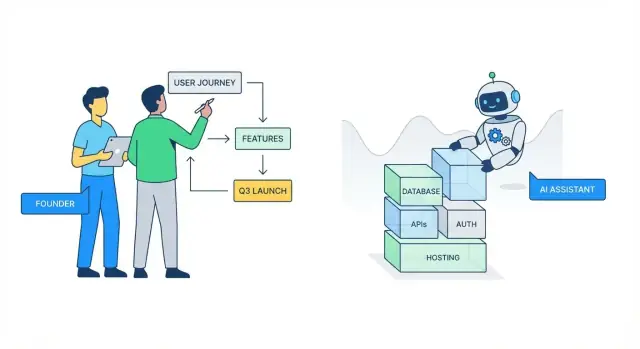
Why Backend Complexity Slows Founders Down
“Backend complexity” is all the invisible work required to make a product feel simple: storing data safely, exposing it through APIs, handling logins, sending emails, processing payments, running background jobs, monitoring errors, and keeping everything stable as usage grows.
For founders and early teams, that work slows momentum because it comes with a high setup cost before users see any value. You can spend days debating a database schema, wiring authentication, or configuring environments—only to learn from your first customers that the feature needs to change.
Backend work is also interconnected: a small product decision (“users can belong to multiple teams”) can cascade into database changes, permission rules, API updates, and migrations.
What “abstracted away by AI” looks like
In practice, AI abstraction means you describe what you want, and the tooling generates or orchestrates the tedious parts:
- Drafting CRUD endpoints, input validation, and basic error handling
- Proposing data models and relationships based on your features
- Generating auth flows (sessions, tokens) and permission scaffolds
- Creating integration code for common services (email, payments, analytics)
The key benefit isn’t perfection—it’s speed to a working baseline you can iterate on.
Platforms like Koder.ai take this a step further by pairing a chat-driven workflow with an agent-based architecture: you describe the outcome (web, backend, or mobile), and the system scaffolds the app end-to-end (for example, React on the web, Go + PostgreSQL on the backend, and Flutter for mobile), so you can move from idea to a deployable baseline without spending a week on plumbing.
What it doesn’t mean
AI doesn’t remove the need to make product and risk decisions. It won’t know your exact business rules, what data you must keep, how strict permissions should be, or what “secure enough” means for your domain. It also won’t prevent every scaling or maintenance issue if the underlying architecture choices are shaky.
Set expectations accordingly: AI helps you iterate faster and avoid blank-page engineering, but you still own the product logic, the trade-offs, and the final quality bar.
The Real Cost of Backend Work for Early Teams
Early teams rarely “choose” backend work—it shows up as a pile of necessary chores between an idea and something users can touch. The time sink isn’t just writing code; it’s the mental overhead of making dozens of small, high-stakes decisions before you’ve validated the product.
Where founder time quietly disappears
A few tasks tend to eat disproportionate hours:
- Authentication and permissions: login flows, password resets, roles, edge cases, and “what happens if…” scenarios.
- Data models: deciding tables/collections, relationships, migrations, and how to change things later without breaking everything.
- Deployments: environments, secrets, CI/CD setup, and the first “why is prod different from local?” incident.
- Integrations: webhooks, retries, idempotency, signature validation, and mapping third-party quirks into your product.
The hidden cost is constant context switching between product thinking (“what should users do?”) and infrastructure thinking (“how do we safely store and expose it?”). That switching slows progress, increases mistakes, and turns debugging into a multi-hour detour—especially when you’re also handling sales calls, support, and fundraising.
How it slows the learning loop
Every day spent wiring backend basics is a day not spent talking to users and iterating. That stretches the build–measure–learn cycle: you ship later, learn later, and risk building the wrong thing with more polish.
A week lost to “just getting set up”
A common scenario: Monday–Tuesday on auth and user tables, Wednesday on deployments and environment variables, Thursday on a payment or email integration, Friday chasing a webhook bug and writing a quick admin panel. You end the week with “plumbing,” not a feature users will pay for.
AI-assisted backend abstraction doesn’t eliminate responsibility—but it can reclaim that week so you ship experiments faster and keep momentum.
What AI “Abstraction” Means in Practice
AI “abstraction” isn’t magic—it’s a way to move backend work up a level. Instead of thinking in terms of frameworks, files, and glue code, you describe the outcome you want (“users can sign up,” “store orders,” “send a webhook on payment”), and the AI helps translate that intent into concrete building blocks.
AI as a copilot for repetitive engineering tasks
A large portion of backend effort is predictable: wiring routes, defining DTOs, setting up CRUD endpoints, validating inputs, generating migrations, and writing the same integration adapters again and again. AI is strongest when the work follows established patterns and best practices.
That’s the practical “abstraction”: reducing the time you spend remembering conventions and searching docs, while keeping you in control of what gets built.
How prompts turn into scaffolds, configs, and code suggestions
A good prompt acts like a mini spec. For example: “Create an Orders service with endpoints to create, list, and cancel orders. Use status transitions. Add audit fields. Return pagination.” From there, AI can propose:
- A scaffolded module structure (controllers/services/models)
- Config updates (env vars, CORS, queues, rate limits)
- Migrations and data models aligned to the feature
- Example tests and API docs snippets
You still review, adjust names, and decide the boundaries—but the blank-page cost drops sharply.
Where AI helps most—and where it struggles
AI tends to shine with standard components: auth flows, REST conventions, background jobs, basic caching, and common integrations.
It struggles when requirements are fuzzy (“make it scalable”), when business rules are nuanced (“refund logic depends on contract type and dates”), and in edge cases involving concurrency, money, and permissions. In those situations, the fastest path is often to clarify rules first (even in plain language), then ask the AI to implement that exact contract—and verify it with tests.
Scaffolding and Boilerplate: The Fastest Win
Founders lose days on work that doesn’t move the product forward: wiring folders, copying the same patterns, and getting “hello world” into something deployable. AI-powered backend abstraction is most valuable here because the output is predictable and repeatable—perfect for automation.
Generate a project skeleton that matches your intent
Instead of starting from an empty repo, you can describe what you’re building (“a multi-tenant SaaS with REST API, Postgres, background jobs”) and generate a coherent structure: services/modules, routing, database access layer, logging, and error handling conventions.
This gives your team a shared starting point and eliminates the early churn of “where should this file live?” decisions.
CRUD endpoints without the copy/paste marathon
Most MVPs need the same basics: create/read/update/delete endpoints plus straightforward validation. AI can scaffold these endpoints consistently—request parsing, status codes, and validation rules—so you spend your time on product logic (pricing rules, onboarding steps, permissions), not repetitive glue.
A practical benefit: consistent patterns make later refactors cheaper. When every endpoint follows the same conventions, you can change behavior (like pagination or error formats) once and propagate it.
Config and environment variables set up correctly
Misconfigured environments cause hidden delays: missing secrets, wrong database URLs, inconsistent dev/prod settings. AI can generate a sensible config approach early—env templates, config files, and clear “what to set where” documentation—so teammates can run the project locally with fewer interruptions.
Reduce boilerplate across services and modules
As you add more features, duplication grows: repeated middleware, repeated DTOs, repeated “service + controller” patterns. AI can factor out shared pieces into reusable helpers and templates, keeping your codebase smaller and easier to navigate.
The best outcome isn’t just speed today—it’s a codebase that stays understandable when the MVP turns into a real product.
Data Modeling Help Without Becoming a Database Expert
Data modeling is where many founders get stuck: you know what the product should do, but turning that into tables, relationships, and constraints can feel like learning a second language.
AI tools can bridge that gap by translating product requirements into a “first draft” schema you can react to—so you spend time making product decisions, not memorizing database rules.
From product requirements to entities and relationships
If you describe your core objects (“users can create projects; projects have tasks; tasks can be assigned to users”), AI can propose a structured model: entities, fields, and relationships (one-to-many vs. many-to-many).
The win isn’t that the AI is magically correct—it’s that you start with a concrete proposal you can validate quickly:
- Does a “Task” belong to one “Project” or can it be shared?
- Do you need “Organizations” now, or can “Projects” be owned by a single user for the MVP?
Migrations and seed data—generated, then reviewed
Once the model is agreed, AI can generate migrations and starter seed data to make the app usable in development. This often includes:
- creating tables and indexes
- adding foreign keys
- inserting a few realistic example records
Human review matters here. You’re checking for accidental data loss (e.g., destructive migration defaults), missing constraints, or indexes on the wrong fields.
Consistent naming across schema and code
Naming drift is a quiet source of bugs (“customer” in code, “client” in the database). AI can help keep naming consistent across models, migrations, API payloads, and documentation—especially when features evolve mid-build.
The caveat: the schema can’t choose your product strategy
AI can suggest structure, but it can’t decide what you should optimize for: flexibility vs. simplicity, auditability vs. speed, or whether you’ll need multi-tenancy later. Those are product calls.
A helpful rule: model what you must prove for the MVP, and leave room to extend—without over-designing on day one.
Authentication and Authorization Without the Headaches
Authentication (who a user is) and authorization (what they’re allowed to do) are two of the easiest places for early products to lose days. AI tools help by generating the “standard” parts quickly—but the value isn’t magic security. It’s that you start from proven patterns instead of reinventing them.
Fast login flows that match common patterns
Most MVPs need one or more of these flows:
- Email + password with password reset, email verification, and rate limiting.
- OAuth sign-in (Google, Apple, GitHub) with safe account linking.
- Invite-based onboarding for teams (accept invite → set password or OAuth).
AI can scaffold routes, controllers, UI forms, and the glue between them (sending reset emails, handling callbacks, persisting users). The win is speed and completeness: fewer forgotten endpoints and fewer half-finished edge cases.
Role-based access control (RBAC): simple, easy to get wrong
RBAC is often enough early on: admin, member, maybe viewer. Mistakes usually happen when:
- Roles are checked in some endpoints but not others.
- “Owner” logic gets mixed into roles (ownership is usually a separate rule).
- Frontend hiding is treated as security (authorization must be enforced server-side).
A good AI-generated baseline includes a single authorization layer (middleware/policies) so you don’t sprinkle checks everywhere.
Sessions vs tokens (high level)
- Sessions (cookie-based) are usually simplest for web apps: the server can revoke, rotate, and protect with
HttpOnlycookies. - Tokens (JWTs) can be convenient for mobile/API clients, but revocation and expiration strategy must be intentional.
If you’re unsure, default to sessions for a browser-first MVP and add token support when a real client requires it.
Checklist: reviewing AI-generated auth code safely
- Passwords are hashed with a modern algorithm (e.g., bcrypt/argon2), never stored or logged.
- Auth checks happen on the server for every protected route.
- Cookie settings are correct (
HttpOnly,Secure, sensibleSameSite). - OAuth callbacks validate
stateand allowed redirect URLs. - Rate limiting exists for login/reset endpoints.
- No secrets are hardcoded; configuration comes from environment variables.
- There’s a clear path to revoke sessions/tokens and to rotate credentials.
Integrations and Webhooks: Less Glue Code, More Momentum
Integrations are where “simple MVP” timelines often go to die: Stripe for payments, Postmark for email, Segment for analytics, HubSpot for CRM. Each one is “just an API,” until you’re juggling auth schemes, retries, rate limits, error formats, and half-documented edge cases.
AI-powered backend abstraction helps by turning these one-off chores into repeatable patterns—so you spend less time wiring and more time deciding what the product should do.
Connecting common services without a week of setup
The fastest wins usually come from standard integrations:
- Payments: create customers, start subscriptions, handle failed payments
- Email: transactional templates, deliverability events, suppression lists
- Analytics: consistent event naming, user identity linking
- CRMs: syncing accounts and contacts without duplicating everything
Instead of stitching together SDKs manually, AI can scaffold the “boring but necessary” pieces: environment variables, shared HTTP clients, typed request/response models, and sensible defaults for timeouts and retries.
Webhooks: auto-generated handlers, fewer missed events
Webhooks are the other half of most integrations—Stripe’s invoice.paid, email “delivered” events, CRM updates. Abstraction tools can generate webhook endpoints and signature verification, and create a clear internal event you can handle (e.g., PaymentSucceeded).
A key detail: webhook processing should be idempotent. If Stripe retries the same event, your system shouldn’t double-provision a plan. AI scaffolding can nudge you toward storing an event ID and safely ignoring duplicates.
Mapping data between systems (and where teams get burned)
Most integration bugs are data-shape bugs: mismatched IDs, time zones, money as floats, or “optional” fields that are missing in production.
Treat external IDs as first-class fields, store raw webhook payloads for audit/debugging, and avoid syncing more fields than you actually use.
Test in staging before production
Use sandbox accounts, separate API keys, and a staging webhook endpoint. Replay recorded webhook payloads to confirm your handler works, and validate the whole workflow (payment → webhook → database → email) before switching live.
API Design That Stays Aligned With the Product
When founders say “the backend is slowing us down,” it’s often an API problem: the frontend needs one shape of data, the backend returns another, and everyone burns hours in back-and-forth.
AI can reduce that friction by treating the API as a living contract—something you generate, validate, and evolve intentionally as product requirements change.
Start with contracts, not guesswork
A practical workflow is to ask AI to draft a basic API contract for a feature (endpoints, parameters, and error cases), along with concrete request/response examples. Those examples become your shared reference in tickets and PRs, and they make it harder for “interpretation” to creep in.
OpenAPI in both directions
If you already have endpoints, AI can help derive an OpenAPI spec from real routes and payloads, so documentation matches reality. If you prefer designing first, AI can scaffold routes, controllers, and validators from an OpenAPI file. Either way, you get a single source of truth that can power docs, mocks, and client generation.
Keep frontend and backend aligned with typed contracts
Typed contracts (TypeScript types, Kotlin/Swift models, etc.) prevent subtle drift. AI can:
- Generate client types from OpenAPI
- Suggest shared DTOs or schema definitions
- Flag places where the frontend expects fields the backend doesn’t return (and vice versa)
This is where “shipping faster” becomes real: fewer integration surprises, less manual wiring.
Avoid breaking changes as you evolve
As the product iterates, AI can review diffs and warn when a change is breaking (removed fields, changed meanings, status code shifts). It can also propose safer patterns: additive changes, explicit versioning, deprecation windows, and compatibility layers.
The result is an API that evolves with the product instead of constantly fighting it.
Testing and Debugging: Faster Confidence, Fewer Fire Drills
When you’re moving fast, the scariest moment is shipping a change and realizing you broke something unrelated. Testing and debugging are how you buy confidence—but writing tests from scratch can feel like a tax you “can’t afford” early on.
AI can shrink that tax by turning what you already know about your product into a repeatable safety net.
Draft tests for the flows that matter
Instead of aiming for perfect coverage, start with the few core user journeys that must never fail: sign-up, checkout, creating a record, inviting a teammate.
AI is useful here because it can draft tests for:
- The happy path (the normal successful flow)
- A small set of edge cases (invalid input, missing permissions, duplicate requests)
You still decide what “correct behavior” means, but you don’t have to write every assertion by hand.
Generate mock data and fixtures quickly
Many test suites stall because creating realistic test data is tedious. AI can generate fixtures that match your data model (users, plans, invoices) and produce variants—expired subscriptions, locked accounts, archived projects—so you can test behavior without manually crafting dozens of records.
Use AI as a debugging partner
When a test fails, AI can summarize noisy logs, translate stack traces into plain English, and suggest likely fixes (“this endpoint returns 403 because the test user lacks the role”). It’s especially helpful at spotting mismatches between what the test assumes and what the API actually returns.
Quality guardrails that keep you honest
AI can accelerate output, but it shouldn’t be the only safety mechanism. Keep lightweight guardrails:
- Code review (even if it’s just a 10-minute teammate check)
- CI that runs tests on every pull request
- A minimal coverage goal for critical modules, not the entire codebase
If you want a practical next step, set up a “core flows” test folder and make CI block merges when those tests fail. That alone prevents most late-night fire drills.
DevOps Automation Without Needing a Full-Time Ops Hire
DevOps is where “just ship it” often turns into late nights: flaky deployments, mismatched environments, and mystery bugs that only happen in production.
AI-powered tooling can’t replace good engineering judgment, but it can take a big bite out of the repetitive setup work that slows founders down.
CI setup, linting, and formatting—on autopilot
A common early trap is inconsistent code quality because no one had time to wire up the basics. AI assistants can generate a clean starting point for CI (GitHub Actions/GitLab CI), add linting and formatting rules, and ensure they run on every pull request.
That means fewer “style-only” debates, faster reviews, and fewer small issues slipping into main.
Deployment pipelines with clear environment separation
Founders often deploy straight to production until it hurts. AI can help scaffold a simple pipeline that supports dev → staging → prod, including:
- Separate environment variables and secrets per environment
- A repeatable build step (so staging matches prod)
- A manual approval step before production
The goal isn’t complexity—it’s reducing “it worked on my machine” moments and making releases routine.
Basic observability: logs, metrics, and alerts
You don’t need an enterprise monitoring setup to be safe. AI can propose a minimal observability baseline:
- Structured logs (so you can search by request/user)
- A few key metrics (error rate, latency, queue depth)
- Alerts for “something is broken” thresholds
This gives you answers faster when customers report issues.
What to keep manual early to reduce risk
Automate the repetitive parts, but keep control over high-impact decisions: production access, secret rotation, database migrations, and alert thresholds.
AI can draft the playbook, but you should own the “who can do what” and “when we push” rules.
Security and Compliance: What AI Can’t Decide for You
AI can generate secure-looking code and even set up common protections, but security and compliance are ultimately product decisions. They depend on what you’re building, who uses it, and which risks you’re willing to accept.
Treat AI as an accelerator—not as your security owner.
Security basics you still own
Secrets management is a founder responsibility. API keys, database credentials, JWT signing keys, and webhook secrets should never live in source code or chat logs. Use environment variables and a managed secret store where possible, and rotate keys when people leave or a leak is suspected.
Least privilege is the other non-negotiable. AI can scaffold roles and policies, but you must decide who should access what. A simple rule: if a service or user doesn’t need permission, don’t grant it. This applies to:
- Database accounts (read vs. write)
- Cloud services (storage, email, queues)
- Admin dashboards (avoid “everyone is admin” in production)
PII handling and access control decisions
If you store personal data (emails, phone numbers, addresses, payment identifiers, health data), compliance isn’t a checkbox—it shapes your architecture.
At a high level, define:
- What counts as PII in your app and where it’s stored
- Who can view/export it (support agents, admins, end users)
- How it’s logged (avoid printing PII in logs and error trackers)
- Retention rules (when you delete data, and how)
AI can help implement data access controls, but it can’t tell you what is “appropriate” for your users or required by regulations in your market.
Dependencies and vulnerability scanning
Modern backends rely on packages, containers, and third-party services. Make vulnerability checks part of your routine:
- Enable dependency alerts in your repo
- Scan container images in CI
- Patch regularly, especially auth and crypto libraries
One clear warning
Don’t ship AI-generated backend code without review. Have a human verify authentication flows, authorization checks, input validation, and any code touching money or PII before it reaches production.
Trade-Offs, Guardrails, and When to Go Deeper
AI backend abstraction can feel like magic—until you hit the edges. The goal isn’t to avoid “real engineering” forever; it’s to postpone the expensive parts until they’re justified by traction.
The real risks to watch
Vendor lock-in is the obvious one: if your data model, auth, and workflows are tied to one platform’s conventions, switching later can be costly.
Unclear architecture is the quieter risk: when AI generates services, policies, and integrations, teams sometimes can’t explain how requests flow, where data is stored, or what happens on failure.
Hidden complexity shows up during scale, audits, or edge cases—rate limits, retries, idempotency, permissions, and data migrations don’t disappear; they just wait.
Guardrails that keep you safe (and fast)
Keep an “escape hatch” from day one:
- Portable data: make sure you can export raw tables/collections and files on demand.
- Documented APIs: treat your API like a product contract—write down endpoints, auth rules, and key error cases.
- Own your domain model: even if AI scaffolds it, you decide naming, relationships, and what is “source of truth.”
If you use an AI-native build platform, prioritize features that make these guardrails easy in practice—like source code export, deployment/hosting you can control, and snapshots/rollback when an automated change goes sideways. (Koder.ai, for example, supports code export and snapshots to help teams move fast while keeping a clear escape hatch.)
A simple habit that helps: once a week, write a short “backend map” (what services exist, what they touch, and how to run locally).
When to bring in an engineer or consultant
Do it when any of these become true: you’re handling payments or sensitive data, uptime starts affecting revenue, you need complex permissions, migrations are frequent, or performance issues repeat.
Practical next steps
Start small: define your core entities, list required integrations, and decide what must be auditable. Then compare options and support levels on /pricing, and dig into tactical guides and examples in /blog.
FAQ
What does “backend complexity” actually include for an early-stage product?
Backend complexity is the “invisible” work that makes a product feel simple: safe data storage, APIs, authentication, emails, payments, background jobs, deployments, and monitoring. It’s slow early on because you pay a big setup cost before users see value—and small product decisions can cascade into schema, permissions, API changes, and migrations.
What does it mean for AI to “abstract away” backend work in practice?
It usually means you describe the outcome (e.g., “users can sign up,” “store orders,” “send payment webhooks”) and the tool scaffolds the repetitive parts:
- CRUD endpoints + input validation
- Initial data models and migrations
- Auth flows and permission scaffolds
- Integration glue (email, payments, analytics)
You still review and own the final behavior, but you start from a working baseline instead of a blank repo.
What are realistic expectations—what won’t AI backend abstraction do?
AI doesn’t make product and risk decisions for you. It won’t reliably infer:
- Your exact business rules and edge cases
- What “secure enough” means for your domain
- Correct handling for money, concurrency, and permissions by default
- Long-term architecture choices if requirements are unclear
Treat AI output as a draft that needs review, tests, and clear requirements.
How do I write prompts that produce usable backend scaffolds instead of vague code?
Write prompts like mini-specs with concrete contracts. Include:
- Entities and key fields (e.g.,
Order: status, total, userId) - Required endpoints and examples (request/response)
- Validation rules and error cases
- Permissions (who can do what)
- Non-functional needs (pagination, audit fields, idempotency)
The more explicit you are, the more useful the generated scaffolding becomes.
Can AI help with data modeling if I’m not a database expert?
Use AI for a first-draft schema you can react to, then refine based on MVP needs:
- Start with core entities and relationships (one-to-many vs many-to-many)
- Ask for migrations plus seed data for local development
- Review indexes, foreign keys, and destructive migration steps
- Keep naming consistent across DB, API payloads, and code
Aim to model what you must prove for the MVP, and avoid over-designing too early.
How can AI speed up authentication and authorization without creating security holes?
AI can scaffold standard flows fast (email/password, OAuth, invites), but you must verify security and authorization correctness.
Quick review checklist:
- Password hashing (bcrypt/argon2), never logged
- Server-side authorization on every protected route
- Safe cookies (
HttpOnly,Secure, sensibleSameSite) if using sessions - OAuth
statevalidation and redirect allowlists - Rate limiting on login/reset
- No hardcoded secrets; env-based configuration
If you’re unsure, sessions are often simplest for a browser-first MVP.
How does AI help with integrations and webhooks like Stripe without causing double-charges or missed events?
Integrations slow teams down because they require retries, timeouts, idempotency, signature verification, and mapping external data shapes.
AI helps by scaffolding:
- Shared HTTP clients and environment variable templates
- Webhook endpoints with signature validation
- Idempotent processing (store event IDs; ignore duplicates)
- Internal events (e.g.,
PaymentSucceeded) to keep code organized
Still test in staging with sandbox keys and replay real webhook payloads before going live.
How can AI help keep API design aligned with the product as it changes?
Treat the API as a living contract and keep frontend/backend aligned:
- Ask AI to draft endpoint lists plus example requests/responses
- Maintain an OpenAPI spec and generate validators/clients from it
- Prefer typed DTOs so fields don’t drift over time
- Make changes additive when possible; version or deprecate breaking changes
This reduces back-and-forth and prevents “the backend returns the wrong shape” churn.
How do I use AI to accelerate testing and debugging without skipping quality?
Use AI to draft a small, high-value safety net instead of chasing perfect coverage:
- Core-flow tests (signup, checkout, create/invite)
- A few edge cases (invalid input, missing permissions, duplicate requests)
- Realistic fixtures (expired subscription, archived project, locked user)
- Debug help: summarizing logs/stack traces into actionable hypotheses
Pair it with CI that blocks merges when core-flow tests fail.
What guardrails should founders keep when adopting AI-assisted backend abstraction?
Use AI to automate repetitive setup, but keep humans in charge of high-impact operations.
Good candidates for automation:
- CI pipelines, linting, formatting
- Dev/staging/prod environment separation
- Minimal observability: structured logs, basic metrics, alerts
Keep manual control over:
- Production access and secret rotation
- Database migrations (review and backups)
- Policies for permissions and data access
Also plan for long-term safety: portable data exports, documented APIs, and an “escape hatch” if a tool becomes limiting (see /pricing and /blog for comparisons and tactical guides).