

How Apple Face ID Works and Why It’s a Biometrics Breakthrough
Explore how Apple Face ID actually works, from 3D facial mapping to neural networks and Secure Enclave, and why it redefined mobile biometrics.
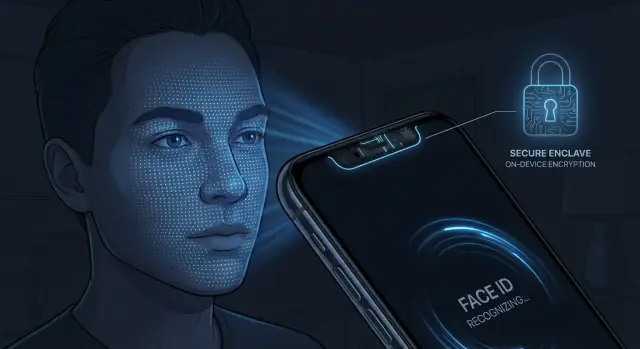
From passcodes to Face ID: why Apple changed unlock methods
Apple’s path to Face ID started with something very simple: a 4‑ or 6‑digit passcode. Passcodes were easy to implement, but not always easy to use. Many people chose weak codes, reused them, or disabled the lock screen entirely because typing a code dozens of times a day was annoying.
From passcodes to fingerprints
Touch ID, introduced with the iPhone 5s, fixed a lot of that friction. A quick fingerprint scan on the Home button made secure unlocking feel almost effortless. Adoption soared because it combined two things: strong protection (thanks to the Secure Enclave and on‑device matching) and nearly instant access.
But Touch ID had limits. Wet or dirty fingers failed. Gloves made it unusable. As screens grew and bezels shrank, dedicating front space to a fingerprint sensor became harder. Apple needed something that would scale with full‑screen designs while improving security and convenience.
Why Apple moved to Face ID
Face ID was Apple’s answer: a biometric you don’t have to think about. Look at your phone, and it unlocks. The goals were clear:
- Faster and more seamless than passcodes or fingerprints
- Stronger security than previous iPhone unlock methods
- Privacy by design, with biometric data processed and stored on‑device
- A system that works in more conditions—dark rooms, at angles, with everyday changes in appearance
Within consumer biometrics, Face ID marked a shift from simple 2D face unlock or single‑point fingerprints to high‑security 3D facial recognition tightly integrated with dedicated hardware and secure processing. It set a new bar for making strong authentication feel almost invisible during everyday use.
Core idea: what Face ID actually does in a split second
Face ID is a way for your iPhone or iPad to check that you are holding it, using the unique 3D shape of your face. Instead of asking for a passcode, it quickly compares what it “sees” in front of the screen with a stored mathematical model of your face. If they match closely enough, the device unlocks.
3D vs simple camera-based face unlock
Many phones with “face unlock” simply use the front camera to take a flat, 2D photo and compare it to a stored image. That can be fooled more easily by pictures, videos, or changes in lighting.
Face ID is different: it builds a depth map of your face in three dimensions. It doesn’t just see what your face looks like; it also measures how far each part is from the camera. That 3D structure is much harder to fake.
Hardware + software + Secure Enclave
During that split second when you look at your iPhone:
- The TrueDepth camera system projects and reads invisible infrared dots to capture your face in 3D.
- The processor runs a neural network to convert that raw depth data into a mathematical representation and compare it with your enrolled Face ID profile.
- The Secure Enclave, a dedicated security chip, stores and checks this profile so it never leaves the device.
All of this happens automatically as you raise or tap your phone, which is why Face ID feels almost invisible—your device simply unlocks when you look at it, without extra steps.
TrueDepth camera system: the hardware behind Face ID
Face ID starts with hardware. The TrueDepth camera system is a tight cluster of sensors and emitters built into the notch or Dynamic Island area at the top of the iPhone.
The components and what they do
TrueDepth includes several key parts that work together:
- IR (infrared) camera – Captures an infrared image of your face and the pattern of projected dots. This is the raw data used to build a depth map.
- Dot projector – Shoots out tens of thousands of tiny infrared dots in a known grid pattern onto your face. Distortions in this grid reveal the 3D shape of your features.
- Flood illuminator – Emits a broad wash of infrared light so your face is visible to the IR camera, even in complete darkness or harsh backlight.
- Front (RGB) camera – Captures a standard color image used for attention awareness (e.g., checking if your eyes are open and looking) and for features like Animoji and selfies.
- Proximity and ambient light sensors – Help the system adapt exposure and sensitivity and support general phone behavior (like turning the screen off near your ear).
During enrollment, the dot projector and flood illuminator work together so the IR camera can build a detailed 3D model of your face from slightly different angles.
During authentication, the same hardware quickly recreates this depth map and compares it to the stored template.
Why infrared and how it helps
Infrared light is invisible to you but easy for the sensors to see. Using IR instead of visible light has several advantages:
- Works in the dark – The flood illuminator provides its own illumination, so Face ID does not depend on room lighting.
- Less sensitive to makeup, hair, and color – IR reflects differently from visible light and focuses more on structure than color, making recognition more consistent across skin tones and cosmetic changes.
- Supports accurate depth sensing – The IR dot pattern is designed specifically for structured‑light 3D mapping, giving millimeter‑scale detail.
Apple’s hardware layout, optics, and calibration are tuned so TrueDepth can recognize your face from typical phone‑holding angles and distances, even slightly off‑axis, while still rejecting faces that are too far away or at extreme angles for reliable matching.
3D depth sensing: mapping your face in thousands of points
Face ID’s "secret sauce" is its ability to see your face in 3D, not just as a flat picture. That 3D understanding starts with the dot projector.
Dot projector and the depth map
When you raise your iPhone, the dot projector fires a pattern of more than 30,000 tiny infrared (IR) dots onto your face. This pattern is known in advance by the system.
The IR camera then captures how those dots land on your skin. Because your nose, eyes, cheekbones, and jaw are at different distances from the phone, the dot pattern gets subtly distorted in 3D space.
From these distortions, the system calculates a depth map: a precise, point‑by‑point model of the contours of your face.
Structured light: measuring distance from distortions
This method is called structured light. Instead of guessing depth from a single flat image, the phone compares the captured dot pattern to the original pattern it projected.
By measuring how far each dot has shifted, the system can triangulate distance for thousands of points, building a dense 3D mesh of your face.
Infrared image vs. depth map
At the same time, the IR camera captures a traditional 2D infrared image.
Both the 2D IR image and the 3D depth map are fed into Apple’s neural networks, but the depth map is the key security ingredient.
Why 3D beats 2D photos
A regular photograph, even a high‑resolution one, is essentially flat. It has no true depth information: your nose isn’t closer to the camera than your ears in a way the system can measure.
Face ID’s 3D depth sensing checks:
- Does the shape of the face match the enrolled 3D structure?
- Do depth relationships between features (nose, eyes, mouth, jawline) match what’s expected?
A printed photo or image on another screen can mimic appearance but not real 3D geometry. Even a simple mask struggles to reproduce all the fine‑grained depth variations across thousands of sampled points.
That dense, structured‑light depth map is why Face ID is far more resistant to spoofing than systems that rely on 2D facial images alone.
Neural networks and Secure Enclave: where your face data lives
Face ID never stores a photo of your face. Instead, it turns depth and infrared data into numbers that a neural network can understand and compare.
From image to mathematical template
When you set up Face ID, the TrueDepth system captures a detailed depth map plus a 2D infrared image. That raw sensor data is immediately processed on the device.
Apple’s algorithms convert this into a facial template: a compact mathematical representation of your face’s geometry. Think of it as a long string of numbers that describe distances, curves, and relative positions of key features, not an actual picture.
Neural networks trained by Apple are used to:
- Extract the most distinctive measurements from the raw capture.
- Normalize for lighting, minor expression changes, and camera angle.
- Match the live template against the one stored on the device, even if you grew a beard, put on glasses, or changed your hairstyle.
As your appearance gradually changes, the system can update the template over time after successful matches, improving recognition while keeping false accepts low.
Secure Enclave: the vault for your face template
The finished template is encrypted and stored only inside the Secure Enclave, a separate processor with its own memory and secure boot.
The main operating system can request “match or no match,” but it never sees the raw template or the neural network’s internal activations.
Facial templates never leave the device, are not backed up to iCloud, and are protected by hardware-based encryption keys that even Apple cannot access.
Enrollment: how your iPhone learns to recognize your face
Face ID enrollment is the one-time process where your iPhone builds a mathematical model of your face. It’s less like taking a photo and more like teaching the device what makes your face unique from many viewpoints.
Step-by-step: what you see on screen
- You go to Settings → Face ID & Passcode → Set up Face ID.
- The on-screen frame appears, and you’re asked to hold the iPhone at arm’s length.
- You slowly move your head to complete a circle, letting the TrueDepth camera scan your face.
- You repeat the circle a second time to capture more detail.
Those two “head circles” are not about redundancy; they gather your face from slightly different angles so the system can generalize better.
How multiple angles build a flexible model
As you move your head, the TrueDepth camera records a dense depth map and an infrared image from each angle. The neural network converts this into a compact, numerical representation—your Face ID template.
Because the template is trained on varied viewpoints, it can tolerate everyday differences: a slight tilt of your head, different hairstyles, light stubble, or a hat.
Over time, when Face ID successfully unlocks after small changes (like a new beard), it can update the template inside the Secure Enclave, gradually adapting to how you look.
What’s stored — and what isn’t
During enrollment, Face ID does not save raw color photos of your face.
Instead, it stores:
- A mathematical representation (template) derived from the depth map and IR image
- Supporting data that helps match future scans to this template
What it does not store or send:
- Raw camera images of your face in Photos or iCloud
- Face data to Apple servers for identification across devices
The template never leaves your device and is kept only inside the Secure Enclave, where it’s used solely for matching, not for general face recognition.
Alternate appearance: why a second look can help
Face ID supports an alternate appearance, configurable in Settings → Face ID & Passcode → Set Up an Alternate Appearance.
This is useful if you:
- Regularly look very different (e.g., heavy makeup vs. none, religious headwear, safety gear)
- Share the device with a trusted partner and want two distinct looks stored
The alternate appearance is enrolled in the same way as the primary one, creating an additional template. Both stay on-device in the Secure Enclave, extending Face ID’s flexibility without sacrificing its security guarantees.
Authentication: what happens during a Face ID unlock
Step-by-step: from glance to unlock
When you raise your iPhone or tap the screen, Face ID quietly starts a chain of events:
- Attention check – The system looks for your eyes being open and directed toward the screen (unless you’ve disabled “Require Attention”).
- TrueDepth activation – The infrared (IR) flood illuminator lights your face, the dot projector sprays thousands of IR dots, and the IR camera captures the pattern plus a 2D IR image.
- Depth map creation – The depth information from the dot pattern is combined with the IR image to build a current 3D representation of your face.
- Feature extraction – A neural network compresses this 3D data into a mathematical template, engineered to keep enough detail for recognition but discard unnecessary visual information.
- Secure comparison – This template is sent to the Secure Enclave, which compares it against the enrolled Face ID data. Only a similarity score, not the raw face image, is used for the decision.
- Decision and action – If the score passes the threshold and other checks (like recent lockout rules) succeed, the Secure Enclave signals iOS to unlock or authorize the request.
All of this typically happens in well under a second.
Liveness checks: proving you’re a real, present person
Face ID is designed to distinguish a real human face from photos, masks, or other static replicas.
Several signals contribute to “liveness” detection:
- Depth – The 3D map must look like a genuine face geometry, not a flat surface.
- Infrared patterns – Reflections and texture in IR reveal material differences between skin and printed images or many masks.
- Micro-movements – Subtle head and facial movements between frames help confirm a live subject.
- Attention – When enabled, detecting open eyes focusing on the device is a strong signal that you are consciously present.
These checks run within the same brief authentication window, so you don’t notice them, but they significantly raise the bar for spoofing attempts.
Matching thresholds: balancing convenience and security
At the core of each Face ID decision is a similarity score between the current scan and your stored Face ID template. Apple sets a threshold: above it, the match is accepted; below it, it’s rejected.
The threshold is tuned to keep the false acceptance rate (someone else unlocking your phone) extremely low—Apple quotes about 1 in 1,000,000 for Face ID versus 1 in 50,000 for Touch ID—while keeping the false rejection rate (you being denied) tolerable.
Conditions change—lighting, angles, facial hair, makeup—so the system isn’t looking for a pixel-perfect match. Instead, it expects natural variation and allows a range around your original template, as long as the match still looks statistically like the same person.
On-device learning: how Face ID quietly adapts
Face ID can become more reliable the more you use it, through on-device, incremental learning inside the Secure Enclave.
Here’s the key behavior:
- If Face ID successfully unlocks and the match was borderline but acceptable, the system may update your stored template, merging aspects of the new scan.
- If Face ID fails, but you immediately unlock with your passcode, the system treats that failure as a legitimate attempt from the true owner and can use that data to broaden its understanding of your appearance.
This lets Face ID adapt to gradual changes—growing a beard, changing hairstyles, aging, new glasses—without sending any biometric data off the device.
The learning process is conservative. It only updates when there is strong evidence the new data belongs to you, which helps prevent an attacker’s face from being blended into your template during failed attempts.
Security properties and spoofing resistance of Face ID
Face ID is designed so that ordinary use feels effortless, while deliberate attacks are statistically unlikely to succeed.
False match rate: what the numbers mean
Apple publishes a “false match rate” for Face ID: the chance that a random person’s face will unlock your phone. Apple states this is around 1 in 1,000,000 for a single enrolled face, compared with about 1 in 50,000 for Touch ID.
These figures are measured under controlled tests. Real‑world risk is usually lower, because an attacker must not only look similar to you, but also be physically present, hold the phone correctly, and avoid tripping other security checks like passcode fallback.
Why masks, photos, and 3D heads usually fail
Simple spoofing tricks that work against older face-unlock systems are largely ineffective against Face ID because it relies on structured 3D and infrared data, not just a 2D image.
- Photos and screens lack depth. The TrueDepth system expects a very specific dot pattern and depth profile; a flat image can’t reproduce it.
- Printed masks may have depth, but usually fail on fine-grained geometry and material properties. The infrared reflection pattern from skin is hard to mimic convincingly.
- 3D‑printed heads would need extremely precise shape, realistic skin-like materials, correct eye region behavior, and matching infrared characteristics. Apple trains its models specifically to reject such artifacts.
On top of this, Apple’s neural network is tuned to detect signs of life and natural variation—tiny movements and reflections that are hard to emulate with static objects.
Twins, close relatives, and children
Face ID is less discriminating between identical twins and sometimes very similar siblings. Apple openly notes a higher false match probability in these cases. For children under about 13, facial features are less distinct and still changing, which also slightly raises the chance of a mistaken match.
If you have an identical twin or are a parent unlocking for a child, Apple recommends using a passcode for sensitive data or being mindful that a close relative might unlock the device more easily.
Attention detection: eyes open and looking at the screen
By default, Face ID requires attention: your eyes must be open and oriented toward the screen. This protects you from someone trying to unlock your phone while you’re asleep, unconscious, or not intending to authenticate.
You can turn off attention detection in accessibility settings if needed (for example, for some vision impairments), but doing so slightly reduces protection against coercive or stealthy unlock attempts.
Privacy by design: how Face ID protects personal data
Apple engineered Face ID so that your face template never leaves your device and is never stored as a regular image.
On‑device processing, not the cloud
All key Face ID operations happen locally on the iPhone or iPad:
- The TrueDepth camera captures depth information and an infrared image.
- This data is converted into a mathematical representation (a “face template”).
- The template is encrypted and stored only inside the Secure Enclave, a separate, hardened part of the chip.
Apple’s servers do not receive your face template, and it is not backed up to iCloud, iTunes, or any other Apple service.
How apps use Face ID without seeing your face
Third‑party apps never access raw camera data, depth maps, or templates. Instead, they use system APIs such as Local Authentication. When an app prompts you to “Sign in with Face ID”:
- iOS shows a system dialog and handles the Face ID scan.
- The Secure Enclave compares the live scan with the stored template.
- The app only receives a simple result: success or failure (plus an error code if something went wrong).
Developers cannot extract, store, or transmit biometric data through this interface.
Addressing privacy worries
Face ID does not build a photo gallery of your expressions, does not tag you across Apple services, and is not designed for mass identification.
The system’s role is narrow: verify that the enrolled user is present on that specific device, at that moment, and share only that yes/no answer with apps that you have explicitly authorized.
Everyday use: reliability with glasses, masks, and angles
Face ID is designed for messy real life: glasses, hats, odd lighting, and constant appearance changes. Most of the time, it simply adapts in the background.
Glasses, sunglasses, hats, and facial hair
Standard prescription glasses are usually no problem. The infrared projector and camera can see your eye and brow structure through clear lenses, even if they’re thick or reflective.
Sunglasses are more mixed. If the lenses block infrared light or are extremely dark, Face ID may struggle, especially with "Require Attention" enabled (the default). Many sunglasses still pass enough IR that Face ID works; others will force you to tilt them down or type your passcode.
Hats, scarves, and changing hairstyles are handled surprisingly well as long as your eyes, nose bridge, and general face shape are visible. The system quietly updates its model when it sees consistent minor changes, so new makeup styles or a growing beard are usually learned automatically over a few unlocks.
If your look shifts dramatically (for example, clean-shaven to a very large beard), re-enrolling Face ID or using "Set Up an Alternate Appearance" can shorten the adaptation period.
Lighting and viewing angles
Face ID relies on its own infrared illuminator, so it works in near-total darkness as well as indoors. Very bright sunlight, especially directly into the sensors, can add noise to the infrared readings and occasionally cause an extra attempt or a passcode fallback. Cleaning the notch area and slightly adjusting the phone’s angle typically fixes this.
For most iPhones, Face ID is optimized for portrait orientation at arm’s length or closer. Newer models support more flexibility, including landscape orientation in many cases, and a fairly wide angle range. If it fails repeatedly, holding the phone a bit higher or closer to face level often restores one‑try unlocks.
Masks and how behavior changed over time
Early versions of Face ID expected most of your face to be visible, so masks mostly led to passcode prompts. During the pandemic, Apple first updated iOS so the system could recognize a mask early in the process and jump straight to the passcode screen, rather than forcing multiple failed scans.
Later, starting with compatible devices, Apple added "Face ID with a Mask." This mode focuses more heavily on the eye and surrounding regions, letting you unlock while masked without removing it. It’s less strict than full-face recognition but still tied to the 3D depth pattern of your upper face.
You can also pair Face ID with an Apple Watch for quick unlocks when wearing a mask or heavy face covering, which is particularly handy in stores or public transport.
Practical tips for more reliable Face ID
A few small habits can noticeably improve day‑to‑day reliability:
- Keep the TrueDepth area clean and unobstructed (case lips and screen protectors should not cover the sensors).
- Hold the phone roughly 25–50 cm (10–20 inches) from your face, at or near eye level.
- If you often look very different (work vs. home, with/without glasses), set up an alternate appearance.
- If you wear IR-blocking sunglasses and need hands‑free unlocks, consider temporarily disabling "Require Attention"—while understanding that this slightly lowers security.
Used this way, Face ID tends to fade into the background: most users see it succeed on the first try, under varied conditions, without needing to think about it.
Accessibility and when Face ID is not the best option
Face ID can make unlocking an iPhone far easier for many people, but it is not universally ideal. Understanding where it helps and where it struggles is important for choosing the right setup.
Where Face ID improves accessibility
For users who have difficulty typing complex passcodes—because of motor impairments, tremors, limited hand mobility, or cognitive load—Face ID can remove a significant barrier. A quick glance is often less tiring than entering numbers repeatedly throughout the day.
Face ID also reduces the need for precise tapping or swiping. Once configured, raising the phone, looking at it, and swiping up can be simpler than aiming for a small on‑screen keyboard.
When Face ID may not work as well
Face ID relies on consistent facial features and line of sight to the sensors. It can be challenging in situations such as:
- Some facial differences, burns, or significant asymmetry
- Users who frequently wear certain medical or religious coverings
- Involuntary movements or spasms that make holding the device in view difficult
- Users who cannot reliably open their eyes or direct their gaze
In these cases, Face ID may be less reliable or may fail outright.
Accessibility settings that affect Face ID
The Attention Aware Features setting controls whether Face ID requires you to look directly at your phone with eyes open. Turning this off can help users who have difficulty with eye contact or eye control, though it slightly reduces security.
Other options, such as Voice Control, Switch Control, or AssistiveTouch, can work alongside a passcode or Face ID to reduce physical effort.
When to prefer passcodes or alternatives
A strong passcode alone may be better when:
- You cannot reliably position the phone for Face ID
- Multiple caregivers or family members need access to the same device
- You want to avoid any biometric use for legal or personal reasons
For some people, combining Face ID with a memorable passcode and accessibility features offers the best balance. For others, disabling Face ID and relying on a passcode—possibly assisted by Voice Control or other input methods—will be more dependable and comfortable.
Face ID vs Touch ID and other biometric methods
Face ID and Touch ID solve the same problem with different trade‑offs.
Face ID uses 3D facial mapping and infrared sensing, giving it a very low false-accept rate (Apple cites about 1 in 1,000,000). Touch ID relies on fingerprint patterns, with a higher false-accept rate (around 1 in 50,000). For most people, both are strong enough, but Face ID is statistically harder to spoof at scale.
Versus Android face unlock
Many Android “face unlock” systems rely only on the front camera and 2D images. Some can be fooled by photos or videos, which is why many Android phones label them as “convenience” unlock and often block their use for payments or banking apps.
Apple’s Face ID, by contrast, uses structured light and depth sensing, checks for attention (eyes open, looking at the device, if enabled), and processes everything inside the Secure Enclave. That combination makes it closer to high-end 3D biometric systems than to simple camera-based unlock.
Face vs fingerprint vs passcode
- Face ID: Fast, hands‑free, works with gloves, but can struggle with masks or heavy face coverings.
- Touch ID: Great when wearing masks, less useful with wet, dirty, or injured fingers.
- Passcode: Slowest, but not tied to your body and resistant to biometric spoofing.
Why passcodes still matter
iOS always requires a passcode after a restart, long inactivity, or when changing security settings. Some people also prefer a strong passcode for legal or privacy reasons.
So even if Face ID or Touch ID handle most daily unlocks, the passcode remains the foundation that everything else depends on.
Limitations, edge cases, and practical workarounds
Everyday edge cases
Face ID is very reliable, but it has weak spots.
Wet, dirty, or smudged sensors can interfere with the infrared pattern. A greasy screen protector, fog, or water drops on the front glass may cause repeated failures. The simple fix is to wipe the area around the front camera and try again.
Very bright backlight or direct sun aimed at the camera can also confuse depth sensing. Turning slightly so the light is off‑axis, or shading the top of the phone with your hand, usually restores normal behavior.
Extreme angles are another limit. Face ID is designed for roughly arm’s‑length viewing. Holding the phone far below your chin, at your ear, or well off to the side can push it outside its recognition zone. Bringing the phone closer to face‑on alignment is the workaround.
Major changes to your face
Face ID continuously adapts to gradual changes like growing a beard or getting new glasses, but large, sudden changes can exceed what it can learn on the fly. Examples:
- Significant facial surgery
- Major trauma or bandages covering key features
- Very large weight change over a short period
If you start seeing frequent failures after such a change, the solution is to reset Face ID and enroll again, or use the “Set Up an Alternate Appearance” option so the system learns both versions of your face.
Hardware failures and fallbacks
If the TrueDepth camera system is damaged (often after a drop or improper screen replacement), iOS may show “Face ID is not available.” In that case, no amount of re-enrollment will help; the only options are a hardware repair or relying on your passcode.
Face ID is always layered on top of a passcode. If Face ID fails five times, the device forces a passcode entry. After a restart, after 48 hours of no unlocks, or after remote management commands, you must also enter your passcode before Face ID reactivates.
Those rules ensure you always retain access even if the biometric system breaks.
What Face ID does not solve
Face ID strengthens the “unlock the device” step, but it does not:
- Replace the need for a strong device passcode
- Protect cloud accounts (Apple ID, email, social media) if someone knows those passwords
- Block phishing links, malicious apps, or social‑engineering attacks
- Stop someone from reading notifications you choose to show on the lock screen
It also cannot defend against all coercive scenarios. If you are worried about being forced to unlock your phone, learn the emergency shortcut that temporarily disables biometrics: press and hold the side button and a volume button (or press the side button quickly five times, depending on model). After that, only your passcode will unlock the device.
Used with a long, unique passcode and good account hygiene, Face ID is a powerful convenience and security layer—but it is only one part of your overall security posture.
Why Face ID is viewed as a breakthrough in consumer biometrics
Face ID is widely seen as a turning point because it made strong biometric security feel almost invisible. It delivers three things at once: high security (3D mapping with liveness checks and Secure Enclave protection), fast response (usually under a second from lift to unlock), and minimal friction (no need to aim a sensor or think about it). That balance is unusual; earlier biometric systems usually sacrificed at least one of these.
Shaping the rest of the smartphone industry
After Face ID, 3D facial recognition moved from a niche feature to a mainstream goal. Competing phones started adding depth sensors, infrared cameras, and more advanced facial unlock—often marketed around secure payments and app logins, not just screen unlocks.
Face ID also normalized the idea that your most sensitive biometric data should stay on-device, driving wider adoption of hardware security modules and private, local machine learning.
Where this points for the future
Looking ahead, the same principles may drive:
- Multi-modal biometrics, combining face, voice, and behavioral signals to increase assurance without extra effort.
- More adaptive models that learn gradual changes in appearance while resisting one-time spoofing attempts.
- On-device AI that can verify identity continuously and quietly, without sending data to servers.
Lessons for user-friendly security design
Face ID’s success highlights a few core design rules:
- Make security the default, not an extra step.
- Keep sensitive data local and hardware-isolated.
- Optimize for “it just works” in everyday conditions, not lab demos.
- Provide clear fallback methods so users never feel locked out.
That combination—strong protection, near-zero friction, and transparent privacy guarantees—is why Face ID is seen as a genuine breakthrough in consumer biometrics.
FAQ
Is Face ID safe to use for banking apps and payments?
Yes. Face ID is designed to be strong enough for high‑value actions like:
- Authorizing App Store and iTunes purchases
- Approving Apple Pay transactions in stores and apps
- Unlocking banking and password‑manager apps that choose to support it
The underlying protections—3D depth sensing, liveness checks, and templates stored only in the Secure Enclave—give Face ID a much lower false‑accept rate than Touch ID. For maximum safety, keep a strong passcode and enable features like transaction notifications from your bank or wallet apps.
Can Apple, my bank, or anyone else access my Face ID data?
No. Your Face ID data is designed to stay locked inside your device.
- The system stores only an encrypted mathematical template of your face, not photos.
- That template lives only in the Secure Enclave on your device.
- It is not uploaded to Apple’s servers or backed up to iCloud.
- Apps never see your face data; they only receive a yes/no result from the system.
Apple states it cannot access your template, and there’s no supported way for third parties to export it. If you erase your device or turn off Face ID, the stored templates are deleted from the Secure Enclave.
What should I do if Face ID suddenly stops recognizing me?
Try these steps in order:
- Clean the TrueDepth area at the top of the screen and remove any case or screen protector that might cover the sensors.
- Hold the phone correctly: arm’s length, roughly at eye level, in decent lighting, facing your eyes.
- If failures continue, go to Settings → Face ID & Passcode → Reset Face ID and set it up again from scratch.
- If you recently had major facial changes (surgery, injury, large beard, etc.), re‑enroll Face ID or use Set Up an Alternate Appearance.
- If you see messages like “Face ID is not available,” the TrueDepth hardware may be damaged and you’ll need a repair; use your passcode in the meantime.
How can I temporarily disable Face ID if I’m worried about being forced to unlock my phone?
You can quickly switch off Face ID and force a passcode in a few ways:
- Emergency shortcut: Press and hold the side button and either volume button until the Emergency screen appears. Face ID is disabled until you enter your passcode.
- Five‑press shortcut (on some models): Press the side button five times quickly to reach the same state.
- Settings: Go to Settings → Face ID & Passcode and toggle off Face ID for iPhone Unlock, Wallet & Apple Pay, and apps.
Use the emergency shortcut if you’re worried about being forced to unlock your phone; it blocks all biometrics until the next correct passcode entry.
Does Face ID work if I’m wearing glasses, a mask, or heavy makeup?
Face ID is built to handle most everyday variations:
- Glasses: Regular prescription glasses almost always work. The system learns your look with and without them.
- Sunglasses: Many work; some block infrared and cause failures, especially with “Require Attention” on. You may need to tilt them or enter your passcode.
- Masks: On supported devices and iOS versions, you can enable Face ID with a Mask, or rely on Apple Watch unlock. Otherwise, you’ll be prompted for your passcode more often.
- Makeup and facial hair: Gradual changes (beard growth, new makeup styles) are usually learned automatically. For dramatic or frequent changes, consider setting up an alternate appearance.
If your eyes and nose bridge are consistently visible, Face ID tends to adapt well.
What happens to Face ID if I drop my iPhone or replace the screen?
Face ID depends on the TrueDepth camera system. Hardware issues can break it:
- After a hard drop or impact, you might see “Face ID is not available” or repeated failures. That often means the sensors or their alignment are damaged.
- After an improper screen replacement (especially with non‑genuine parts or uncalibrated repairs), the TrueDepth system may stop working.
If this happens, software resets and re‑enrollment will not fix it; you’ll need a proper hardware repair. Until then, you can keep using your passcode normally.
Does using Face ID all day drain my battery faster?
Face ID is designed to be efficient and only runs briefly when needed.
- The TrueDepth camera and neural processing are active for a fraction of a second during each attempt.
- Most of the time they are idle and draw no extra power.
In normal use, Face ID’s impact on overall battery life is small enough that you’re unlikely to notice it compared with screen brightness, background apps, or poor signal. If your battery drains unusually fast, the cause is almost always elsewhere.
Can someone unlock my iPhone with Face ID while I’m asleep?
By default, Face ID requires attention: your eyes must be open and directed toward the screen.
That means someone generally cannot unlock your iPhone just by pointing it at your face while you’re asleep with eyes closed.
Exceptions:
- If you have turned off Require Attention for Face ID in accessibility settings, the device may unlock more easily when your eyes are closed.
- If you are sedated but still have eyes open and appear to be looking at the phone, attention checks may pass.
If you’re concerned about coercion, learn and use the emergency shortcut to force a passcode before situations where you might be at risk.
How many faces or looks can I store with Face ID?
Face ID lets you store:
- One primary face, plus
- One alternate appearance.
The alternate appearance is intended for situations like:
- You looking very different in two common scenarios (e.g., with and without heavy gear or makeup)
- Letting a trusted partner share the device securely
If you need more than two people to have access, consider using only a strong passcode shared among them, or separate devices/accounts where possible.
Which settings and habits make Face ID more reliable and secure in daily use?
A few quick checks can make Face ID both smoother and safer:
- In Settings → Face ID & Passcode:
- Keep Require Attention for Face ID enabled if you can; it blocks many stealth unlock attempts.
- Ensure Face ID is turned on for iPhone Unlock and any uses you care about (Apple Pay, Password AutoFill, apps).
- Physically, keep the TrueDepth area clean and unobstructed; avoid cases or protectors that cover the sensors.
- Hold the phone 25–50 cm (10–20 inches) from your face, near eye level, especially when first setting it up.
- If you regularly look very different, set up an alternate appearance instead of fighting frequent failures.
These small steps usually produce quick, reliable unlocks with strong protection.