

Why Database Migrations Become a Bottleneck for Fast Teams
Database migrations can slow releases, break deployments, and create team friction. Learn why they become bottlenecks and how to ship schema changes safely.
What We Mean by a Migration Bottleneck
A database migration is any change you apply to your database so the app can evolve safely. That usually includes schema changes (creating or altering tables, columns, indexes, constraints) and sometimes data changes (backfilling a new column, transforming values, moving data to a new structure).
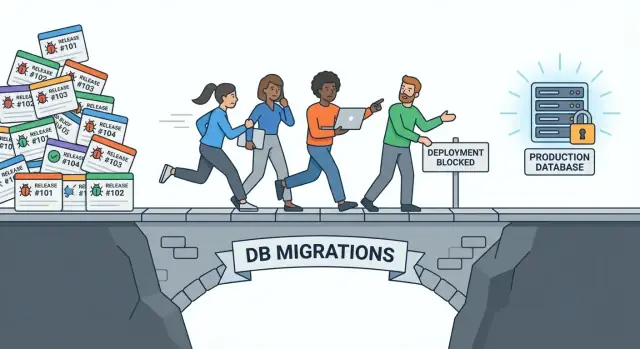
A migration becomes a bottleneck when it slows releases more than the code does. You might have features ready to ship, tests are green, and your CI/CD pipeline is humming—yet the team waits on a migration window, a DBA review, a long-running script, or a “please don’t deploy during peak hours” rule. The release isn’t blocked because engineers can’t build; it’s blocked because changing the database feels risky, slow, or unpredictable.
What “bottleneck” looks like in a release cycle
Common patterns include:
- Deployments queued behind one “big migration” that can’t be split
- A required maintenance window even for small changes
- Production deploys paused due to fear of locks, timeouts, or replication lag
- Incidents triggered by migrations that ran fine in staging but not at real scale
What this article will do (and won’t)
This isn’t a lecture about theory or an argument that “databases are bad.” It’s a practical guide to why migrations cause friction and how fast-moving teams can reduce it with repeatable patterns.
You’ll see concrete causes (like locking behavior, backfills, and mismatched app/schema versions) and actionable fixes (like expand/contract migrations, safer roll-forwards, automation, and guardrails).
Who this is for
This is written for product teams shipping frequently—weekly, daily, or multiple times per day—where database change management needs to keep up with modern release process expectations without turning every deploy into a high-stress event.
Where Migrations Sit in the Release Pipeline
Database migrations sit right in the critical path between “we’ve finished the feature” and “users can benefit from it.” A typical flow looks like:
Code change → migration → deploy → verify.
That sounds linear because it usually is. The application can often be built, tested, and packaged in parallel across many features. The database, however, is a shared resource that nearly every service depends on, so the migration step tends to serialize work.
Where work queues up
Even fast teams hit predictable choke points:
- Review: schema changes often require deeper scrutiny (indexes, locks, data backfills, query plans), so reviews take longer and get routed to a smaller set of “database-capable” reviewers.
- Execution: migrations run against a single production database (or a small set of primary instances). Only so many can run at once without impacting performance.
- Verification: you don’t just check “deployment succeeded.” You confirm the data looks right, the app version is compatible, and performance didn’t degrade.
When any of these stages slows down, everything behind it waits—other pull requests, other releases, other teams.
Why it’s harder to parallelize than app code
App code can be deployed behind feature flags, rolled out gradually, or released independently per service. A schema change, by contrast, touches shared tables and long-lived data. Two migrations that both alter the same hot table can’t safely run at the same time, and even “unrelated” changes can contend for resources (CPU, I/O, locks).
The cost of waiting
The biggest hidden cost is release cadence. A single slow migration can turn daily releases into weekly batches, increasing the size of each release and raising the chance of production incidents when changes finally ship.
The Most Common Root Causes
Migration bottlenecks usually aren’t caused by a single “bad query.” They’re the result of a few repeatable failure modes that show up when teams ship often and databases hold real volume.
Long-running locks and table rewrites
Some schema changes force the database to rewrite a whole table or take stronger locks than expected. Even if the migration itself looks small, the side effects can block writes, pile up queued requests, and turn a routine deploy into an incident.
Typical triggers include altering column types, adding constraints that need validation, or creating indexes in ways that block normal traffic.
Big backfills with unpredictable runtimes
Backfilling data (setting values for existing rows, denormalizing, populating new columns) often scales with table size and data distribution. What takes seconds in staging can take hours in production, especially when it competes with live traffic.
The biggest risk is uncertainty: if you can’t confidently estimate runtime, you can’t plan a safe deployment window.
Coupling between schema and application versions
When new code requires the new schema immediately (or old code breaks with the new schema), releases become “all-or-nothing.” That coupling removes flexibility: you can’t deploy app and database independently, can’t pause midway, and rollbacks get complicated.
Environment drift (dev/staging/prod not matching)
Small differences—missing columns, extra indexes, manual hotfixes, different data volume—cause migrations to behave differently across environments. Drift turns testing into false confidence and makes production the first real rehearsal.
Manual steps and unclear ownership
If a migration needs someone to run scripts, watch dashboards, or coordinate timing, it competes with everyone’s day job. When ownership is vague (app team vs. DBA vs. platform), reviews slip, checklists are skipped, and “we’ll do it later” becomes the default.
Symptoms You’ll Notice in Fast-Moving Teams
When database migrations start slowing a team down, the first signals aren’t usually errors—they’re patterns in how work gets planned, released, and recovered.
“Migration windows” start appearing on the calendar
A fast team ships whenever code is ready. A bottlenecked team ships when the database is available.
You’ll hear phrases like “we can’t deploy until tonight” or “wait for the low-traffic window,” and releases quietly become batch jobs. Over time, that creates bigger, riskier deployments because people hold changes back to “make the window worth it.”
Hotfixes get blocked by pending schema changes
A production issue shows up, the fix is small, but the deployment can’t go out because there’s an unfinished or unreviewed migration sitting in the pipeline.
This is where urgency collides with coupling: application changes and schema changes are tied together so tightly that even unrelated fixes have to wait. Teams end up choosing between delaying a hotfix or rushing a database change.
Multiple teams collide on the same tables
If several squads are editing the same core tables, coordination becomes constant. You’ll see:
- PRs that keep failing because migrations don’t apply cleanly
- “who owns this table?” questions in every planning meeting
- last-minute merge conflicts in migration files
Even when everything is technically correct, the overhead of sequencing changes becomes the real cost.
Rollbacks become normal, or you enter “re-deploy to fix” loops
Frequent rollbacks are often a sign that the migration and the app weren’t compatible in all states. The team deploys, hits an error, rolls back, tweaks, and re-deploys—sometimes multiple times.
This burns confidence and encourages slower approvals, more manual steps, and extra sign-offs.
One DB expert becomes a release gate
A single person (or tiny group) ends up reviewing every schema change, running migrations manually, or being paged for anything database-related.
The symptom isn’t just workload—it’s dependency. When that expert is away, releases slow down or stop entirely, and everyone else avoids touching the database unless they have to.
Why Production Makes Everything Harder
Production isn’t just “staging with more data.” It’s a live system with real read/write traffic, background jobs, and users doing unpredictable things at the same time. That constant activity changes how a migration behaves: operations that were quick in testing can suddenly queue behind active queries, or block them.
Small migrations can still block big workflows
Many “tiny” schema changes require locks. Adding a column with a default, rewriting a table, or touching a frequently used table can force the database to lock rows—or the whole table—while it updates metadata or rewrites data. If that table is in the middle of a critical path (checkout, login, messaging), even a brief lock can ripple into timeouts across the app.
Indexes, constraints, and type changes are higher-risk
Indexes and constraints protect data quality and speed up queries, but creating or validating them can be expensive. On a busy production database, building an index may compete with user traffic for CPU and I/O, slowing everything down.
Column type changes are especially risky because they can trigger a full rewrite (for example, changing an integer type or resizing a string in some databases). That rewrite can take minutes or hours on large tables, and it may hold locks longer than expected.
Downtime vs. degraded performance
“Downtime” is when users can’t use a feature at all—requests fail, pages error, jobs stop.
“Degraded performance” is sneakier: the site stays up, but everything becomes slow. Queues back up, retries pile on, and a migration that technically succeeded still creates an incident because it pushed the system past its limits.
Designing Migrations for Continuous Delivery
Continuous delivery works best when every change is safe to ship at any time. Database migrations often break that promise because they can force “big bang” coordination: the app must be deployed at the exact moment the schema changes.
The fix is to design migrations so old code and new code can run against the same database state during a rolling deploy.
The two-phase pattern: expand → migrate data → contract
A practical approach is the expand/contract (sometimes called “parallel change”) pattern:
- Expand: introduce new schema elements in a way that doesn’t break existing queries.
- Migrate data: backfill or transform data gradually, often in small batches.
- Contract: remove old columns, constraints, or code paths once you’re confident everything is using the new structure.
This turns one risky release into multiple small, low-risk steps.
Compatibility during rolling deploys
During a rolling deploy, some servers may run old code while others run new code. Your migrations should assume both versions are live at the same time.
That means:
- New code should be backward-compatible with the old schema.
- Old code should be forward-compatible enough to tolerate “extra” schema changes (like new nullable columns).
Concrete example: add, then backfill, then enforce
Instead of adding a NOT NULL column with a default (which can lock and rewrite big tables), do this:
- Add a nullable column.
- Deploy code that writes to both the old and new fields (or reads with a fallback).
- Backfill existing rows safely in batches.
- Add constraints (NOT NULL, foreign keys) only after the data is fully populated.
- Finally, remove the old column and clean up code.
Designed this way, schema changes stop being a blocker and become routine, shippable work.
Techniques to Reduce Risk and Runtime
Speedy teams rarely get blocked by writing migrations—they get blocked by how migrations behave under production load. The goal is to make schema changes predictable, short-running, and safe to retry.
Favor additive, low-impact schema changes
Prefer additive changes first: new tables, new columns, new indexes. These usually avoid rewrites and keep existing code working while you roll out updates.
When you must change or remove something, consider a staged approach: add the new structure, ship code that writes/reads both, then clean up later. This keeps the release process moving without forcing a risky “all-at-once” cutover.
Break big work into small, interruptible pieces
Large updates (like rewriting millions of rows) are where deployment bottlenecks are born.
- Batch large updates (e.g., 1,000–10,000 rows at a time) to reduce long locks and keep the database responsive.
- Use background jobs for backfills when possible, so the deploy isn’t waiting on a data rewrite.
- For heavy index or constraint work, prefer options that minimize blocking (your database may support “concurrent” or “online” variants).
Make migrations rerunnable and safe under pressure
Production incidents often turn a single failed migration into a multi-hour recovery. Reduce that risk by making migrations idempotent (safe to run more than once) and tolerant of partial progress.
Practical examples:
- Check for existence before creating/dropping objects.
- Record progress for long backfills so you can resume.
- Avoid mixing schema changes and large data changes in the same migration.
Timebox, measure, and enforce limits
Treat migration duration as a first-class metric. Timebox each migration and measure how long it takes in a staging environment with production-like data.
If a migration exceeds your budget, split it: ship the schema change now, and move the heavy data work into controlled batches. This is how teams keep CI/CD and migrations from turning into recurring production incidents.
Automation and Guardrails in CI/CD
When migrations are “special” and handled manually, they turn into a queue: someone has to remember them, run them, and confirm they worked. The fix isn’t just automation—it’s automation with guardrails, so unsafe changes get caught before they ever reach production.
Pre-deploy checks that stop bad migrations early
Treat migration files like code: they should pass checks before they can merge.
- Migration linting: flag risky operations (like dropping columns, renaming without a plan, or adding non-null columns without defaults) and enforce naming/order conventions.
- Dry runs / plan previews: run the migration against a disposable database to validate syntax and catch missing permissions or wrong SQL dialect.
- Dependency checks: verify the app version being deployed is compatible with the schema state (e.g., the app doesn’t start requiring a column that won’t exist until later).
These checks should fail fast in CI with clear output so developers can fix issues without guessing.
Automate execution with clear visibility
Running migrations should be a first-class step in the pipeline, not a side task.
A good pattern is: build → test → deploy app → run migrations (or the other way around, depending on your compatibility strategy) with:
- a dedicated job that logs migration start/end, version, and runtime
- a single source of truth for what ran (build number, commit SHA)
- an easy way for anyone to see status (pipeline UI, release notes, or an internal /deployments page)
The goal is to remove “Did the migration run?” as a question during release.
If you’re building internal apps quickly (especially on React + Go + PostgreSQL stacks), it also helps when your dev platform makes the “plan → ship → recover” loop explicit. For example, Koder.ai includes a planning mode for changes, plus snapshots and rollback, which can reduce the operational friction around frequent releases—especially when multiple developers are iterating on the same product surface.
Observability during schema changes
Migrations can fail in ways normal app monitoring won’t catch. Add targeted signals:
- alerts on migration duration, lock waits, and replication lag
- dashboard panels for database CPU/I/O and long-running queries during releases
- structured logs for backfills (rows processed, rate, estimated time)
Separate “deploy app” from “run heavy backfill”
If a migration includes a large data backfill, make it an explicit, trackable step. Deploy the app changes safely first, then run the backfill as a controlled job with rate limiting and the ability to pause/resume. This keeps releases moving without hiding a multi-hour operation inside a “migration” checkbox.
Rollbacks, Roll-Forwards, and Safer Releases
Migrations feel risky because they change shared state. A good release plan treats “undo” as a procedure, not a single SQL file. The goal is to keep the team moving even when something unexpected shows up in production.
What a real rollback plan includes
A “down” script is only one piece—and often the least reliable one. A practical rollback plan usually includes:
- A data safety strategy: backups, point-in-time recovery, and clear retention windows.
- A compatibility window: can the previous app version still run against the new schema (and vice versa) for a short time?
- Operational steps: who has access, how to verify success, and what to monitor (error rates, write failures, replication lag).
- A decision trigger: specific thresholds that tell you to stop the rollout and revert.
When rollbacks are unsafe (and roll-forward wins)
Some changes don’t roll back cleanly: destructive data migrations, backfills that rewrite rows, or column type changes that can’t be reversed without losing information. In these cases, roll-forward is safer: ship a follow-up migration or hotfix that restores compatibility and corrects data, rather than trying to rewind time.
The expand/contract pattern helps here too: keep a period of dual-read/dual-write, then remove the old path only when you’re sure.
Feature flags and progressive rollout
You can reduce blast radius by separating the migration from the behavior change. Use feature flags to enable new reads/writes gradually, and roll out progressively (percentage-based, per-tenant, or by cohort). If metrics spike, you can turn off the feature without touching the database immediately.
Practice the rollback in staging
Don’t wait for an incident to discover your rollback steps are incomplete. Rehearse them in staging with realistic data volume, timed runbooks, and monitoring dashboards. The practice run should answer one question clearly: “Can we return to a stable state quickly, and prove it?”
Team Process: Ownership, Reviews, and Scheduling
Migrations stall fast teams when they’re treated as “someone else’s problem.” The fastest fix is usually not a new tool—it’s a clearer process that makes database change a normal part of delivery.
Define ownership (without creating a bottleneck)
Assign explicit roles for every migration:
- Author: usually the feature developer who understands the change and the user impact.
- Reviewer: a teammate trained to spot performance and safety issues (not automatically “the database person”).
- Approver/escalation: a small rotation (on-call or platform) for truly high-risk changes.
This reduces the “single DB person” dependency while still giving the team a safety net.
Use a lightweight migration review checklist
Keep the checklist short enough that it actually gets used. A good review typically covers:
- Locking behavior: will it block reads/writes, even briefly?
- Data volume: how many rows will be touched, and how long could it run?
- Compatibility: can old and new app versions run against the schema during rollout?
- Backout plan: can you roll forward safely if you can’t roll back?
Consider storing this as a PR template so it’s consistent.
Schedule the risky stuff on purpose
Not every migration needs a meeting, but high-risk ones deserve coordination. Create a shared calendar or a simple “migration window” process with:
- a named owner,
- a preferred time (when support coverage is best),
- a link to the PR and the rollout steps.
If you want a deeper breakdown of safety checks and automation, tie this into your CI/CD rules in /blog/automation-and-guardrails-in-cicd.
Measure the Bottleneck and Keep It From Returning
If migrations are slowing releases, treat it like any other performance problem: define what “slow” means, measure it consistently, and make improvements visible. Otherwise you’ll fix one painful incident and drift back to the same patterns.
Track the metrics that predict pain
Start with a small dashboard (or even a weekly report) that answers: “How much delivery time do migrations consume?” Useful metrics include:
- Migration duration: total time spent running migrations per deploy, plus the p95 for the last 30–90 days.
- Failure rate: % of deploys where migrations fail, time out, or require manual intervention.
- Blocked deploys: number of releases delayed because a migration is running, queued, or considered risky.
Add a lightweight note for why a migration was slow (table size, index build, lock contention, network, etc.). The goal is not perfect accuracy—it’s spotting repeat offenders.
Record incidents and near-misses (then turn them into rules)
Don’t only document production incidents. Capture near-misses too: migrations that locked a hot table “for a minute,” releases that were postponed, or rollbacks that didn’t work as expected.
Keep a simple log: what happened, impact, contributing factors, and the prevention step you’ll take next time. Over time, these entries become your migration “anti-pattern” list and inform better defaults (for example, when to require backfills, when to split a change, when to run out-of-band).
Maintain a playbook for common migration types
Fast teams reduce decision fatigue by standardizing. A good playbook includes safe recipes for:
- Adding nullable columns and backfilling
- Creating indexes with minimal disruption
- Dropping/renaming columns with compatibility steps
- Large data migrations (batching, throttling, checkpoints)
Link the playbook from your release checklist so it’s used during planning, not after things go wrong.
Keep migration history from becoming its own bottleneck
Some stacks slow down as migration tables and files grow. If you notice increased startup time, longer diff checks, or tooling timeouts, plan periodic maintenance: prune or archive old migration history according to your framework’s recommended approach, and verify a clean rebuild path for new environments.
Choosing Tooling to Manage Database Change at Speed
Tooling won’t fix a broken migration strategy, but the right tool can remove a lot of friction: fewer manual steps, clearer visibility, and safer releases under pressure.
What “good” looks like in migration tooling
When evaluating database change management tools, prioritize features that reduce uncertainty during deploys:
- Zero-downtime support: patterns like expand/contract, online index creation, and safe backfills (or at least guidance and checks).
- Visibility: clear status of what ran, where, and when—per environment and per version.
- Approvals and separation of duties: support for gated production runs without turning every release into a ticket queue.
- Audit trail: immutable logs of who approved, who ran, what changed, and the exact scripts.
Fit matters more than feature lists
Start with your deployment model and work backwards:
- If you deploy many small services, you’ll want tooling that supports service-scoped migrations and avoids cross-team coupling.
- If you have one shared database, you’ll need stronger coordination, dependency tracking, and possibly staged rollouts.
- If you use CI/CD heavily, check how the tool integrates with your pipeline: can it run migrations automatically in lower environments, but require approval in production?
Also check operational reality: does it work with your database engine’s limits (locks, long-running DDL, replication), and does it produce output your on-call team can act on quickly?
If you’re using a platform approach for building and shipping apps, look for capabilities that shorten recovery time as much as they shorten build time. For instance, Koder.ai supports source code export plus hosting/deployment workflows, and its snapshot/rollback model can be useful when you need a fast, reliable “return to known good” during high-frequency releases.
Start small with a pilot
Don’t migrate your entire org’s workflow in one go. Pilot the tool on one service or one high-churn table.
Define success upfront: migration runtime, failure rate, time-to-approve, and how quickly you can recover from a bad change. If the pilot reduces “release anxiety” without adding bureaucracy, expand from there.
If you’re ready to explore options and rollout paths, see /pricing for packaging, or browse more practical guides in /blog.
FAQ
What makes a database migration a “bottleneck” instead of just a normal deploy step?
A migration becomes a bottleneck when it delays shipping more than the application code does—e.g., you have features ready, but releases wait on a maintenance window, a long-running script, a specialized reviewer, or fear of production locking/lag.
The core issue is predictability and risk: the database is shared and hard to parallelize, so migration work often serializes the pipeline.
Where do migrations create the most friction in a CI/CD release flow?
Most pipelines effectively become: code → migration → deploy → verify.
Even if code work is parallel, the migration step often isn’t:
- Reviews route to fewer people.
- Only one primary (or small set of primaries) can safely take impactful changes at a time.
- Verification requires checking data correctness and performance, not just “deploy succeeded.”
What are the most common technical reasons migrations slow fast-moving teams down?
Common root causes include:
- Operations that take long locks or trigger table rewrites (type changes, some constraints, some index builds).
- Large backfills with runtime that scales with production volume.
- Tight coupling between app and schema versions (no compatibility window).
- Environment drift (staging doesn’t match production enough to predict behavior).
- Manual execution and unclear ownership that slows review and rollout.
Why do migrations that work in staging still cause incidents in production?
Production has live read/write traffic, background jobs, and unpredictable query patterns. That changes how DDL and data updates behave:
- “Small” changes can still require locks on hot tables.
- Index/constraint work can compete with user traffic for CPU and I/O.
- What was fast in staging can become slow due to contention, replication lag, or different data distribution.
So the first real scalability test often happens during the production migration.
What does “app/schema compatibility during a rolling deploy” actually require?
The goal is to keep old and new application versions running safely against the same database state during rolling deploys.
In practice:
- New code should tolerate the old schema (backward-compatible reads/writes).
- Old code should tolerate the new schema (often by making changes additive, like new nullable columns).
This prevents “all-or-nothing” releases where schema and app must change at the exact same moment.
What is the expand/contract migration pattern and when should we use it?
It’s a repeatable way to avoid big-bang database changes:
- Expand: add new schema elements in a non-breaking way (new nullable column, new table).
- Migrate data: backfill/transform gradually (often via batches or background jobs).
- Contract: remove old columns/paths only after usage has shifted and data is correct.
This turns one risky migration into several smaller, shippable steps.
How do you add a NOT NULL column without causing a long lock or table rewrite?
A safer sequence is:
- Add the column as nullable (no rewrite-heavy default).
- Deploy code that writes both fields (or reads with a fallback).
- Backfill existing rows in batches.
- Add NOT NULL / foreign keys only after the data is fully populated.
- Remove old columns and cleanup code later.
This minimizes locking risk and keeps releases moving even while data is being migrated.
What are practical ways to reduce migration runtime and risk under production load?
Make heavy work interruptible and outside the critical deploy path:
- Batch updates (e.g., 1,000–10,000 rows per batch) to reduce lock time.
- Run backfills as background jobs with throttling and pause/resume.
- Prefer online/concurrent options for indexes/constraints when available.
- Avoid mixing large data updates with schema changes in the same migration.
This improves predictability and reduces the chance a single deploy blocks everyone.
What CI/CD checks and automation prevent “bad migrations” from reaching production?
Treat migrations like code with enforced guardrails:
- Linting to flag risky operations (drops, unsafe renames, non-null additions without a plan).
- Dry runs on disposable databases to catch syntax/permission issues early.
- Dependency/compatibility checks so the app version won’t require schema that isn’t present yet.
- A dedicated pipeline step with clear logs (start/end, version, runtime) as the source of truth.
The goal is to remove manual “Did it run?” uncertainty and fail fast before production.
When should you roll back vs. roll forward after a migration problem?
Focus on procedures, not just “down” scripts:
- Some migrations are unsafe to roll back (destructive rewrites, irreversible type changes), so roll-forward is often safer.
- Keep a compatibility window so you can revert app code without immediately reverting schema.
- Use feature flags to separate the schema change from the behavior change.
- Define triggers for stopping rollout (error rate, lock waits, replication lag) and rehearse runbooks in staging.
This keeps releases recoverable without freezing database changes entirely.