

How Mobile Frameworks Make Cross-Platform Apps Practical
Learn how mobile frameworks share code across iOS and Android, speed up development, and handle UI, native features, testing, and long-term maintenance.
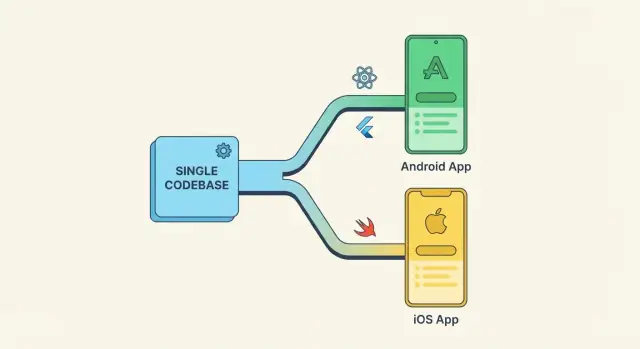
What Cross-Platform Development Means
Cross-platform development is a way to build a mobile app for both iOS and Android without writing everything twice. Instead of creating one app in Swift/Objective‑C for iPhone and a separate app in Kotlin/Java for Android, you build from a shared foundation and ship apps for each platform.
“One codebase, multiple apps” — what’s actually shared
Cross-platform is often summarized as “write once, run anywhere,” but the practical reality is “share what makes sense.” A typical cross-platform project shares a large portion of:
- App logic (screen behavior, validation, navigation rules)
- Data and networking (API calls, caching, syncing)
- State management and business rules
- Sometimes UI components, depending on the framework
What you don’t fully escape is platform difference. Even with a shared codebase, the result is still two platform-specific apps: one packaged for iOS and one for Android, each with its own store requirements, device quirks, and release process.
How this differs from fully native
With fully native development, teams usually maintain two independent codebases. That can maximize platform fit and provides direct access to every platform feature, but it also doubles many efforts: implementing the same feature twice, keeping behavior consistent, and coordinating releases.
Cross-platform frameworks reduce that duplication by letting you build features once and reuse them across platforms.
Set expectations: sharing isn’t 100%
Some apps share 70–90% of code; others share much less. Custom animations, complex camera workflows, or deep OS integrations may need platform-specific code. The goal is not perfect sameness—it’s delivering consistent value faster while keeping iOS and Android experiences high quality.
What Mobile Frameworks Typically Share
Most cross-platform mobile frameworks are built around the same core promise: you write a large portion of your app once, then the framework helps it run on iOS and Android with the right look, behavior, and access to device features.
A shared UI layer (most of the time)
Frameworks typically let you build screens, navigation, and reusable components in a single UI system. You define how the app flows (tabs, stacks, modals) and reuse the same screen structure across platforms, while still allowing platform tweaks when needed (for example, different back behavior or spacing).
Shared business logic
Rules and workflows—form validation, pricing logic, permissions checks, offline rules—are usually platform-agnostic. This is where sharing pays off quickly: fewer duplicated decisions, fewer “it works on Android but not on iOS” discrepancies, and simpler updates when requirements change.
Networking and data handling
Nearly every framework provides a standard way to make API calls, parse responses, and handle basic caching. You’ll still choose your backend patterns (REST, GraphQL, etc.), but the mechanics of talking to servers and handling common error cases tend to be reusable across platforms.
Platform-specific parts via bridges or plugins
Some capabilities are inherently native: camera access, push notifications, payments, background tasks, and biometrics. Frameworks handle these through plugins, modules, or bridge layers that expose native APIs to your cross-platform code.
In practice, teams mix shared code with small platform-specific pieces—especially for advanced payments, deep OS integrations, or strict compliance requirements.
The key takeaway: while UI and logic are often shared, you should expect a thin layer of platform-specific work for anything tightly tied to iOS/Android system behavior.
How Frameworks Handle UI Across iOS and Android
A cross-platform app still needs to feel “right” on both iOS and Android: familiar navigation patterns, readable typography, and responsive layouts. Frameworks tackle this by giving you a shared set of UI building blocks—buttons, lists, text, layout containers—that you assemble into screens once and ship to both platforms.
Shared building blocks (screens and layouts)
Most frameworks encourage composing small UI pieces into larger ones. You define layouts using rows/columns, stacks, constraints, or flex-style rules, and the framework translates that into a screen that adapts to different device sizes.
A practical benefit is consistency: teams can create a reusable component library (inputs, cards, headers) and use it across the app, reducing duplicated effort and UI drift.
Two main rendering approaches
Frameworks generally render UI in one of two ways:
- Native widgets approach: Your shared code declares UI, and the framework maps it to the platform’s native controls. This can help apps blend in with iOS and Android conventions.
- Custom-drawn approach: The framework draws UI itself (using a rendering engine) to achieve the same look everywhere. This can make it easier to keep visuals consistent across platforms, with less platform-specific tweaking.
Design systems and reusable components
If you have a brand design system, cross-platform frameworks make it easier to implement tokens (colors, spacing, typography) once and apply them everywhere. You can still add “platform flavor” where it matters—like iOS-style bottom sheets or Android-style back behavior—without rewriting entire screens.
Accessibility and localization
Good UI handling isn’t only visuals. Frameworks typically provide hooks for:
- Accessibility: semantic labels, focus order, dynamic text sizing, and screen-reader support
- Localization: string resources, right-to-left layouts, and locale-aware formatting for dates and numbers
Treat these as first-class requirements early; retrofitting them later is where cross-platform UI work gets expensive.
Accessing Native Device Features
Cross-platform apps still need “real phone” capabilities: taking photos, reading location, using Face ID, or talking to Bluetooth devices. Mobile frameworks solve this by providing a bridge between your shared code and each platform’s native APIs.
Plugins, bridges, and platform APIs
Most frameworks expose device features through plugins (sometimes called packages or libraries). Your app calls a simple, shared interface (for example, getCurrentLocation), and the plugin forwards that request to native code on iOS and Android.
Under the hood, a bridge translates data and method calls between the framework runtime and Swift/Objective‑C (iOS) or Kotlin/Java (Android). Good plugins hide platform quirks so your team can stay mostly in one codebase.
Common features you can access
Typical “native” capabilities available through plugins include:
- Camera and photo library
- GPS / location services
- Contacts and calendars
- Bluetooth (often with extra constraints on iOS)
- Push notifications
- Biometrics (Face ID / Touch ID / fingerprint)
- Secure storage (Keychain/Keystore)
Availability varies by framework and plugin quality, so it’s worth checking maintenance status and platform support before you commit.
When you’ll need custom native modules
Plugins cover a lot, but you may need custom native modules when:
- You’re integrating a niche hardware SDK (special scanners, medical devices)
- You require advanced background modes or OS-specific behaviors
- A plugin exists but doesn’t expose a critical setting or recent API
In those cases, you add a small native wrapper for iOS and Android, then expose a clean method to your shared layer.
Security basics: permissions and secure storage
Native features often require permissions (camera, location, Bluetooth). Request only what you need, explain why in plain language, and handle “denied” gracefully.
For sensitive data, avoid plain preferences or files. Use secure storage (iOS Keychain / Android Keystore via your framework’s secure-storage plugin), and keep tokens short-lived where possible.
Performance: What to Expect and How to Measure
Performance is mostly about how the app feels day to day: how quickly it opens, how smoothly it responds to taps, and whether it drains battery. Most modern cross-platform frameworks can deliver a great experience for typical business apps—but you should know where the edges are.
What users notice first
Two signals shape first impressions:
- App startup time: the time from tapping the icon to seeing a usable screen. Slow startup is often blamed on the framework, but it’s frequently caused by heavy initialization, large bundles, or too many network calls on launch.
- Smooth scrolling and animations: janky lists and stuttering transitions make an app feel cheap even if it “works.” This is often tied to doing too much work on the main UI thread (e.g., expensive rendering, large images, or complex layouts).
Where cross-platform is “good enough” (and where it’s sensitive)
Cross-platform is usually more than good enough for content apps, forms, dashboards, marketplaces, and most CRUD-style products.
Performance becomes more sensitive when you have:
- Heavy graphics, advanced 3D, or real-time effects (games, AR, complex custom drawing)
- Video editing / audio processing or other compute-heavy tasks
- Very large lists with rich cells, lots of dynamic measurements, or constant re-rendering
In these areas, you may still succeed cross-platform, but plan for extra optimization—or a native module for the hottest paths.
Battery life and background work
Battery issues rarely show up in demos, but users notice them fast. Common culprits include frequent location updates, aggressive polling, chatty analytics, and background timers.
Set clear rules for background behavior: how often you sync, when you schedule work, and what happens in low-power mode.
How to measure (so it’s not guesswork)
Treat performance like a feature with a checklist:
- Define targets (e.g., “cold start under 2 seconds on mid-range devices,” “60 fps on key screens”)
- Profile on real devices, not just emulators—especially older phones
- Use built-in tools (Flutter DevTools, React Native performance monitors, Android Studio Profiler, Xcode Instruments)
- Automate regression checks in CI where possible, and re-test after major UI changes
If you want a practical workflow for teams, pair this section with your testing strategy in /blog/mobile-app-testing-basics.
Common Framework Options (Quick Overview)
If you’re evaluating cross-platform development, it helps to know the “big buckets” of frameworks and what they optimize for. Below is a quick overview—enough to shortlist options before you dig into deeper comparisons.
React Native
React Native uses JavaScript or TypeScript and renders real native UI components under the hood. Many teams like it because they can reuse web-style development skills, hire from a large talent pool, and share a meaningful portion of a codebase across iOS and Android.
It’s a common pick for product teams that want near-native look and feel, solid third‑party ecosystem support, and fast iteration.
Flutter
Flutter uses Dart and draws its UI with its own rendering engine, which makes the interface highly consistent across platforms. You often get pixel-level control and a unified UI system, which can simplify design implementation and reduce platform-specific UI surprises.
Flutter is frequently chosen when a team wants one visual system across iOS and Android and predictable UI behavior.
Kotlin Multiplatform (KMP)
Kotlin Multiplatform focuses on sharing business logic (networking, data, rules) while letting you keep native UI where it matters. This can be attractive if you already have an Android team using Kotlin, or if you want platform-native experiences without duplicating the “core” app logic.
Ionic + Capacitor
Ionic builds apps with web technologies (HTML/CSS/JavaScript) and packages them for mobile via Capacitor. It’s often a strong fit for apps that resemble web products—dashboards, forms, content-heavy experiences—and for teams with strong web expertise.
Xamarin / .NET MAUI (also common)
If your organization is invested in Microsoft tooling, .NET MAUI can unify app development across platforms using C# and .NET, with good integration into enterprise ecosystems.
How to Choose the Right Framework for Your App
Choosing a cross-platform framework isn’t about finding “the best” option—it’s about matching a tool to your team and product goals. A framework that shines for a marketing app can be a poor fit for a hardware-heavy or performance-critical product.
Start with your team’s strengths
If your team is mostly web-focused, frameworks that reuse web skills can reduce ramp-up time. If you already have strong iOS/Android engineers, you may prefer an approach that keeps more platform-native code in play.
- Web team: faster onboarding, but verify access to native APIs you’ll need
- Mobile team: easier to maintain platform conventions and debug edge cases
- Mixed team: pick a framework with clear boundaries between shared and native modules
Clarify the product tradeoffs you can accept
Ask what matters most in the first release:
- Speed to market vs. deep platform integration: if you need many device-specific features early, favor frameworks with mature native bridging and plugin ecosystems
- UI expectations: do you want a platform-native look (iOS feels like iOS, Android feels like Android), or an identical UI everywhere for brand consistency?
Think beyond the first version
Framework choice affects hiring, maintenance, and release cadence for years.
- Hiring: can you reliably hire developers for this stack in your market?
- Maintenance: are upgrades predictable, and is the community active?
- Release cadence: can you ship updates quickly without fighting tooling every time OS versions change?
If you want a structured way to compare options, keep a simple scorecard and validate assumptions with a small prototype before committing. For planning the rollout pipeline, see /blog/build-release-ci-cd-considerations.
Cost, Time, and Maintenance Tradeoffs
Cross-platform development often saves money and time because you’re not building (and re-building) the same features twice. A shared codebase can reduce duplicated work for product logic, networking, analytics, and even parts of the UI—especially when your app’s screens are similar on iOS and Android.
Where you usually save
The biggest savings typically show up after the first release. Shared components improve consistency across platforms, so design tweaks (button styles, spacing, empty states) can be applied once and rolled out everywhere. The same is true for bug fixes in shared logic: one fix can benefit both apps.
Where costs can rise
Cross-platform doesn’t eliminate platform work—it changes where it happens. Costs can rise when you need complex native integrations (Bluetooth, background services, advanced camera pipelines, custom AR, specialized payment flows). Plugins help, but troubleshooting plugin issues, version mismatches, and OS updates can introduce unexpected time.
You may also pay extra when the app’s UX must feel “perfectly native” in edge cases, requiring platform-specific UI work or separate flows.
Planning a realistic budget
A practical way to control cost is to budget in stages:
- Milestone 1: Core MVP (highest-value flows, basic integrations)
- Milestone 2: Native edge cases (platform-specific polish, tricky permissions, background behavior)
- Milestone 3: Scale and maintain (refactoring, dependency upgrades, long-term support)
Keep scope tight by defining “must-have” integrations up front, and separating “nice-to-have” device features into later milestones. This makes timelines more predictable and keeps maintenance manageable as iOS and Android evolve.
Testing Cross-Platform Apps
Cross-platform doesn’t mean “test once, ship everywhere.” It means you can reuse a lot of tests—especially for shared business logic—while still proving your UI behaves correctly on both iOS and Android.
Unit tests for shared logic
Start with unit tests around the code you want to share: pricing rules, validation, offline sync decisions, formatting, and API parsing. These tests should run fast and on every commit.
A useful rule: if a bug would be expensive to find manually (edge cases, time zones, currency, retries), it belongs in unit tests.
UI tests on real devices and emulators
UI issues are where platforms diverge: navigation gestures, keyboard behavior, permissions prompts, and “small” layout differences. Use a mix:
- Emulators/simulators for quick feedback during development and CI
- Real devices for anything involving cameras, biometrics, Bluetooth, push notifications, performance, and vendor-specific quirks
Keep UI tests focused on critical flows (signup, checkout, core task completion) so they stay stable and provide signal instead of noise.
Device matrix planning
Instead of testing “everything,” plan a matrix that reflects your users:
- OS versions: current + at least one older major version per platform
- Screen sizes: one small, one medium, one large (and at least one tablet if you support it)
- Manufacturers: include a couple of popular Android brands because their system UI and power-management settings can differ
Review your analytics monthly and adjust the matrix based on real adoption, not guesses.
Crash reporting and analytics basics
Add crash reporting early, before beta. It’s your safety net for device-specific failures you can’t reproduce.
Track:
- Crash-free users/sessions
- OS and device model for top crashes
- App start time and slow screens (basic performance breadcrumbs)
Combine this with lightweight analytics to validate whether a fix improves real user journeys, not just test results.
Build, Release, and CI/CD Considerations
A cross-platform codebase simplifies day-to-day development, but shipping still means producing two native apps. Planning your build and release flow early prevents “works on my machine” surprises right before launch.
One repo, two automated build lanes
Most teams keep a single repository and run two CI pipelines: one that produces an Android App Bundle (AAB) and one that produces an iOS archive (IPA). The app code may be shared, but build steps differ—Android uses Gradle, iOS relies on Xcode.
A practical baseline is: run lint + unit tests on every pull request, then build signed artifacts on merges to your main branch. Keep CI configuration in the repo so it evolves with the app.
Signing, certificates, and store submissions
Signing is the most common release blocker.
For Android, you’ll manage a keystore and upload keys (often via Google Play App Signing). For iOS, you’ll manage certificates, provisioning profiles, and App Store Connect permissions.
Store secrets should live in your CI secret manager, not in the repository. Rotate credentials on a schedule, and document who can access them.
Environment setup: dev, staging, production
Treat environments as first-class: different API endpoints, feature flags, analytics keys, and push notification credentials. Many teams ship a “staging” build to internal testers via TestFlight and a Play internal track, while production stays locked down.
Versioning and release notes
Use a clear versioning policy across both platforms. A common approach is:
- One shared marketing version (e.g., 2.3.0)
- Separate platform build numbers (required on iOS)
Automate changelog generation from merged pull requests, then finalize human-readable release notes before submission. This keeps releases predictable and audit-friendly.
Risks and How to Reduce Them
Cross-platform frameworks remove a lot of duplicated work, but they also introduce a few predictable failure points. The good news: most risks are manageable if you plan for them early.
Plugin updates and dependency drift
Many apps rely on third-party plugins (camera, payments, analytics). Over time, those plugins may lag behind the framework or the OS.
A practical approach is to treat dependencies like a maintenance stream:
- Pin versions and upgrade on a schedule (monthly/quarterly), instead of “whenever something breaks”
- Prefer widely used, actively maintained plugins (recent releases, open issues being answered)
- Keep a small spike branch to test framework upgrades before merging
OS updates that change APIs or permissions
iOS and Android regularly tighten privacy, background execution, and permission flows. These changes can break features even when your app code hasn’t changed.
Reduce surprises by:
- Testing on the latest beta OS versions during the beta window
- Isolating permission checks behind a single app-level service so fixes happen in one place
- Tracking store policy updates and budgeting time for compliance work
Code organization: shared vs. platform folders
A shared codebase can become messy if platform-specific exceptions are scattered everywhere.
Aim for a clear boundary: keep most logic in shared modules, and put truly native code in platform folders behind small interfaces (e.g., notifications, biometrics). This keeps the shared layer clean and makes native fixes faster.
Documentation and onboarding
Cross-platform teams often mix web, mobile, and backend skill sets. Without lightweight documentation, onboarding slows down.
Maintain a short, living README + runbook: how to run the app, key architectural decisions, where native code lives, release steps, and common troubleshooting. Even one page can cut onboarding time dramatically.
Practical Decision Guide and Next Steps
Choosing a cross-platform approach is mostly about matching your app’s “shape” (UI, performance needs, device access, team skills) to the framework’s strengths.
A simple decision checklist
Ask these questions and note any non-negotiables:
- UI expectations: Do you need pixel-perfect platform-native UI, or is a consistent custom UI acceptable?
- Device features: Will you rely heavily on Bluetooth, NFC, AR, background services, sensors, or complex notifications?
- Performance sensitivity: Is your app animation-heavy, real-time, or doing intensive local processing?
- Team and hiring: Do you already have strong JavaScript, Dart, or .NET skills—or will you be hiring?
- Release speed: How often will you ship updates, and how important is sharing features across iOS/Android?
- Long-term ownership: Who will maintain this in 18–36 months, and how comfortable are they with the tooling?
Example scenarios (what usually works well)
MVP: A shared codebase is often the fastest route. Prioritize developer velocity and a smooth iteration loop.
Enterprise app: If you need strong integration with existing .NET systems and structured tooling, Xamarin/.NET MAUI is often attractive. If you need shared business logic with native UIs, consider Kotlin Multiplatform.
Content app: If the UI is primarily lists, feeds, and forms, most frameworks perform well—opt for the one your team can ship and maintain confidently.
Hardware-heavy app: If you depend on low-level device APIs or specialized SDKs, plan for a hybrid approach (shared core + native modules) or go fully native when reliability and feature depth outweigh code sharing.
Next steps
-
Write a one-page requirements brief (top screens, key device features, performance risks).
-
Build a small spike (one critical screen + one hardest native integration) before committing.
-
If you want to compress the spike timeline even further, consider using a vibe-coding workflow in Koder.ai to prototype the app from chat. Teams often use it to generate a working React web front end, a Go + PostgreSQL backend, and even Flutter mobile scaffolding, then export the source code for a conventional mobile team to refine platform-specific edges. Snapshots and rollback can be especially useful when experimenting with frameworks or plugin integrations.
-
For more examples and comparisons, browse /blog. If you’re estimating budget and timelines, see /pricing.
FAQ
What does cross-platform mobile development actually mean?
Cross-platform development means you build iOS and Android apps from a shared foundation instead of maintaining two fully separate codebases.
In practice, you typically share business logic, networking/data, and often UI components—then still produce two platform-specific builds (IPA for iOS, AAB for Android) with their own store and OS requirements.
Is cross-platform really “write once, run anywhere”?
It’s usually “share what makes sense.” Many teams share roughly 70–90% of code for typical product apps, but the remainder often includes:
- Platform-specific integrations (permissions, background behavior)
- Edge-case UI differences (navigation patterns, system controls)
- Native SDK wrappers (payments, hardware, compliance-driven features)
What parts of an app are typically shared in cross-platform frameworks?
Most frameworks share:
- Business logic: validation, workflows, state management
- Networking/data: API calls, parsing, caching patterns
- App structure: navigation rules and screen flow
- UI components: sometimes fully shared, sometimes partially
The “last mile” tends to be platform-specific polishing and native integrations.
How do cross-platform frameworks handle UI on iOS vs Android?
Frameworks generally render UI in one of two ways:
- Native widgets approach: shared code maps to platform-native controls (often feels more “native”).
- Custom-drawn approach: the framework draws UI itself for consistent visuals across platforms.
Your choice affects how much platform tweaking you’ll need and how consistent the UI looks between iOS and Android.
How do cross-platform apps access native device features like camera and biometrics?
They use plugins/bridges that expose native APIs through a shared interface. Your app calls something like getCurrentLocation, and the plugin executes the correct native code on iOS (Swift/Objective-C) and Android (Kotlin/Java).
When plugins don’t cover your needs, you build a custom native module and keep the surface area small and well-documented.
When will I need platform-specific code even with a shared codebase?
Expect custom native code when:
- You need a niche hardware SDK (scanners, medical devices)
- You rely on advanced background modes or OS-specific constraints
- A plugin exists but lags behind OS updates or misses critical options
A common pattern is “shared core + native wrappers,” so most of the app stays cross-platform while the hard parts are isolated.
How is performance in cross-platform apps, and how should we measure it?
Measure what users feel most:
- Startup time: avoid heavy initialization and too many launch-time network calls
- Smoothness: keep expensive work off the UI thread; optimize lists and images
- Battery: watch background timers, location frequency, and aggressive polling
Set targets (e.g., cold start on mid-range devices) and profile on real phones using tools like Xcode Instruments and Android Studio Profiler (plus framework-specific tooling).
Which cross-platform frameworks are most common, and how do they differ?
A practical shortlist:
- React Native: JavaScript/TypeScript, native UI components, large ecosystem
- Flutter: Dart, custom-drawn UI for consistent visuals and tight UI control
- Kotlin Multiplatform (KMP): share logic while keeping native UI
- Ionic + Capacitor: web tech packaged for mobile; great for form/content-heavy apps
- .NET MAUI: strong fit for Microsoft/.NET-heavy organizations
The best option depends on UI expectations, native feature depth, and team skills.
How do I choose the right cross-platform framework for my app?
Use a quick scorecard based on:
- Team skills: web-focused vs mobile-native experience
- UI goal: platform-native feel vs identical UI everywhere
- Native feature needs: Bluetooth/NFC/background services may require more native work
- Long-term maintainability: upgrade cadence, ecosystem health, hiring availability
Before committing, build a small prototype: one critical screen + the hardest native integration.
Do cross-platform apps need to be tested separately on iOS and Android?
No—plan to test both platforms.
A practical approach:
- Unit test shared logic heavily (rules, parsing, offline decisions)
- Run UI tests on both emulators/simulators and a small set of real devices
- Define a device/OS matrix based on analytics (not guesses)
- Add crash reporting early to catch device-specific failures you can’t reproduce
This keeps shared code reliable while still validating iOS/Android differences.