

How Modern Frameworks Handle Authentication and Authorization
Learn how modern frameworks implement authentication and authorization: sessions, tokens, OAuth/OIDC, middleware, roles, policies, and key security pitfalls.
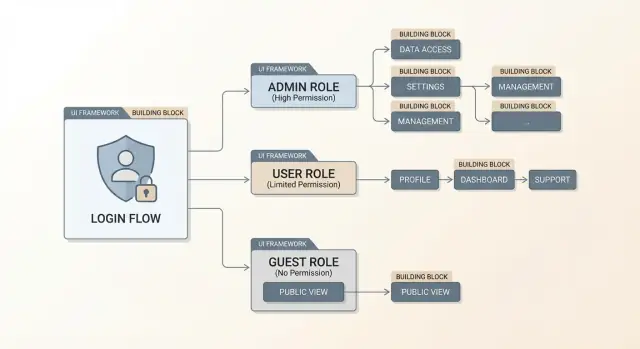
Authentication vs. Authorization: What Frameworks Usually Separate
Authentication answers “who are you?” Authorization answers “what are you allowed to do?” Modern frameworks treat them as related but distinct concerns, and that separation is one of the main reasons security can stay consistent as an app grows.
Authentication: establishing identity
Authentication is about proving a user (or service) is who they claim to be. Frameworks usually don’t hard-code a single method; instead, they provide extension points for common options such as password login, social login, SSO, API keys, and service credentials.
The output of authentication is an identity: a user ID, account status, and sometimes basic attributes (like whether an email is verified). Importantly, authentication should not decide whether an action is permitted—only who is making the request.
Authorization: deciding access
Authorization uses the established identity plus request context (route, resource owner, tenant, scopes, environment, etc.) to decide if an action is allowed. This is where roles, permissions, policies, and resource-based rules live.
Frameworks separate authorization rules from authentication so you can:
- change login methods without rewriting access rules
- apply consistent permission checks across web pages, APIs, and background jobs
- keep “who you are” logic independent from “what you can do” logic
Enforcement points: where the framework applies rules
Most frameworks enforce rules through centralized points in the request lifecycle:
- Middleware/filters/interceptors that run before controllers/handlers
- Guards that block access to routes or actions
- Policy checks invoked inside business logic for resource-specific decisions
Common building blocks (framework-agnostic)
Even though names differ, the building blocks are familiar: an identity store (users and credentials), a session or token that carries identity between requests, and middleware/guards that enforce authentication and authorization consistently.
The examples in this article stay conceptual so you can map them to your framework of choice.
Identity Stores and User Models
Before a framework can “log someone in,” it needs two things: a place to look up identity data (the identity store) and a consistent way to represent that identity in code (the user model). Many “authentication features” in modern frameworks are abstractions around these two pieces.
Typical identity sources
Frameworks usually support multiple backends, either built-in or via plugins:
- Application database users: the classic “users” table/collection managed by your app.
- External identity providers (IdPs): Google, Microsoft, GitHub, or a dedicated provider like Auth0/Okta, typically via OAuth 2.0 / OpenID Connect.
- Enterprise directories: LDAP/Active Directory, common for internal tools and B2B apps.
The key difference is who is the source of truth. With database users, your app owns credentials and profile data. With an IdP or directory, your app often stores a “local shadow user” that links to the external identity.
Core user model fields
Even when frameworks generate a default user model, most teams standardize a few fields:
- id: immutable primary key (preferably not the email).
- email/username: login identifier; often unique and normalized.
- password_hash: only if your app manages passwords (never store raw passwords).
- status flags: e.g.,
is_verified,is_active,is_locked,deleted_at.
These flags matter because authentication isn’t just “correct password?”—it’s also “is this account allowed to sign in right now?”
Account lifecycle: more than sign-up
A practical identity store supports common lifecycle events: registration, email/phone verification, password reset, session revocation after sensitive changes, and deactivation or soft-deletion. Frameworks often provide primitives (tokens, timestamps, hooks), but you still define the rules: expiry windows, rate limits, and what happens to existing sessions when an account is disabled.
Where frameworks plug in
Most modern frameworks offer extension points like user providers, adapters, or repositories. These components translate “given a login identifier, fetch the user” and “given a user ID, load the current user” into your chosen store—whether that’s a SQL query, a call to an IdP, or an enterprise directory lookup.
Session-Based Authentication (Cookies and Server Sessions)
Session-based authentication is the “classic” approach many web frameworks still default to—especially for server-rendered apps. The idea is simple: the server remembers who you are, and the browser holds a small pointer to that memory.
How it works
After a successful login, the framework creates a server-side session record (often a random session ID mapped to a user). The browser receives a cookie containing that session ID. On every request, the browser automatically sends the cookie back, and the server uses it to look up the logged-in user.
Because the cookie is only an identifier (not user data itself), sensitive information stays on the server.
Cookie flags frameworks typically set
Modern frameworks try to make session cookies harder to steal or misuse by setting secure defaults:
- HttpOnly: blocks JavaScript from reading the cookie (helps reduce damage from XSS).
- Secure: only sends the cookie over HTTPS.
- SameSite (Lax/Strict/None): controls cross-site sending of cookies (important for CSRF defenses and third-party auth flows).
You’ll often see these configured under “session cookie settings” or “security headers.”
Where sessions are stored
Frameworks usually let you choose a session store:
- In-memory: fast and easy, but sessions disappear on restart and don’t scale well across multiple servers.
- Database-backed: durable and auditable, but adds query overhead.
- Cache/redis-style store: fast and shared across servers; good for scaling, but you’re relying on another service.
At a high level, the trade-off is speed vs. durability vs. operational complexity.
Logout and invalidation
Logout can mean two different things:
- Single device logout: delete the current session and clear the cookie.
- Logout everywhere: invalidate all sessions for the user (e.g., after a password change).
Frameworks often implement “logout everywhere” by tracking a user “session version,” storing multiple session IDs per user, and revoking them. If you need stronger control (like immediate revocation), session-based auth is often simpler than tokens because the server can forget a session instantly.
Token-Based Authentication (JWT and Opaque Tokens)
Token-based authentication replaces server-side session lookups with a string the client presents on every request. Frameworks typically recommend tokens when your server is primarily an API (used by multiple clients), when you have mobile apps, when you’re building an SPA talking to a separate backend, or when services need to call each other without browser sessions.
What “a token” means in practice
A token is an access credential issued after login (or after an OAuth flow). The client sends it back on later requests so the server can authenticate the caller and then authorize the action. Most frameworks treat this as a first-class pattern: an “issue token” endpoint, authentication middleware that validates the token, and guards/policies that run after identity is established.
Opaque tokens vs. JWTs
Opaque tokens are random strings with no meaning to the client (for example, tX9...). The server validates them by looking up a database or cache entry. This makes revocation straightforward and keeps token contents private.
JWTs (JSON Web Tokens) are structured and signed. A JWT typically contains claims such as a user identifier (sub), issuer (iss), audience (aud), issued/expiry times (iat, exp), and sometimes roles/scopes. Important: JWTs are encoded, not encrypted by default—anyone holding the token can read its claims, even if they can’t forge a new one.
Storage: Authorization header vs cookies
Framework guidance usually converges on two safer defaults:
- Send access tokens via the
Authorization: Bearer <token>header for APIs. This avoids CSRF risks that come with automatically sent cookies, but it raises the bar for XSS defenses because JavaScript can typically read and attach tokens. - Use cookies only when you can make them
HttpOnly,Secure, andSameSite, and when you’re prepared to handle CSRF properly (often paired with separate CSRF tokens).
Refresh tokens, rotation, and endpoints
Access tokens are kept short-lived. To avoid forcing constant logins, many frameworks support refresh tokens: a long-lived credential used only to mint new access tokens.
A common structure is:
POST /auth/login→ returns access token (and refresh token)POST /auth/refresh→ rotates the refresh token and returns a new access tokenPOST /auth/logout→ invalidates refresh tokens server-side
Rotation (issuing a new refresh token every time) limits damage if a refresh token is stolen, and many frameworks provide hooks to store token identifiers, detect reuse, and revoke sessions quickly.
OAuth 2.0 and OpenID Connect in Framework Ecosystems
OAuth 2.0 and OpenID Connect (OIDC) are often mentioned together, but frameworks treat them differently because they solve different problems.
OAuth 2.0 vs OIDC: which one you actually need
Use OAuth 2.0 when you need delegated access: your app gets permission to call an API on a user’s behalf (for example, read a calendar or post to a repo) without handling the user’s password.
Use OpenID Connect when you need login/identity: your app wants to know who the user is and receive an ID token with identity claims. In practice, “Login with X” is usually OIDC on top of OAuth 2.0.
Core flows frameworks commonly support
Most modern frameworks and their auth libraries focus on two flows:
- Authorization Code flow + PKCE: the default for browser apps and mobile clients. PKCE helps prevent code interception and is expected by most providers.
- Client Credentials flow: for service-to-service calls where there is no end user (jobs, back-end workers, internal microservices).
Callback handling: where security details matter
Framework integrations typically provide a callback route and helper middleware, but you still need to configure the essentials correctly:
- Validate the redirect URI exactly (scheme/host/path). Avoid wildcard redirect URIs.
- Use and verify the state parameter to prevent CSRF-style login attacks.
- For OIDC, generate and validate a nonce to reduce token replay risks.
- Store transient values (state/nonce/verifier) in a secure session or encrypted cookie, not in local storage.
Scopes, claims, and mapping to local users
Frameworks usually normalize provider data into a local user model. The key design decision is what actually drives authorization:
- Scopes are OAuth permissions for APIs (what the access token can do).
- Claims are identity attributes in the OIDC ID token (who the user is).
A common pattern is: map stable identifiers (like sub) to a local user, then translate provider roles/groups/claims into local roles or policies your app controls.
Passwords, Hashing, MFA, and Account Recovery
Passwords are still the default sign-in method in many apps, so frameworks tend to ship with safer storage patterns and common guardrails. The core rule is unchanged: you should never store a password (or a simple hash of it) in your database.
Password hashing defaults (and why plain hashing is unsafe)
Modern frameworks and their auth libraries usually default to purpose-built password hashers like bcrypt, Argon2, or scrypt. These algorithms are intentionally slow and include salting, which helps prevent precomputed table attacks and makes large-scale cracking expensive.
A plain cryptographic hash (like SHA-256) is unsafe for passwords because it’s designed to be fast. If a database leaks, fast hashes let attackers guess billions of passwords quickly. Password hashers add work factors (cost parameters) so you can tune security as hardware improves.
Password policies you’ll often see
Frameworks typically provide hooks (or middleware/plugins) to enforce sensible rules without hard-coding them into every endpoint:
- Length-first policies (longer passwords/passphrases beat complex-but-short rules).
- Breach checks against known leaked password lists (conceptually: “don’t allow passwords already exposed”).
- Rate limiting and optional temporary lockout after repeated failures to slow brute-force attempts.
MFA options and trade-offs
Most ecosystems support adding MFA as a second step after password verification:
- TOTP authenticator apps: widely supported and offline-friendly; still phishable if users are tricked into entering codes.
- WebAuthn / passkeys: strong protection against phishing and replay; often the best UX once set up.
- SMS codes: easy to roll out, but weaker due to SIM-swap and interception risks—better than nothing, not ideal for high-risk accounts.
Account recovery done safely
Password reset is a common attack path, so frameworks usually encourage patterns like:
- Reset links backed by one-time tokens stored server-side (often hashed like passwords).
- Short expirations (minutes to hours) and single-use enforcement.
- Session invalidation or token rotation after a successful reset so stolen sessions don’t remain active.
A good rule: make recovery easy for legitimate users, but costly for attackers to automate.
Middleware, Guards, and the Request Lifecycle
Most modern frameworks treat security as part of the request pipeline: a series of steps that run before (and sometimes after) your controller/handler. The names vary—middleware, filters, guards, interceptors—but the idea is consistent: each step can read the request, add context, or stop processing.
A practical pipeline mental model
A typical flow looks like this:
- Routing selects the endpoint (e.g.,
/account/settings). - Pre-processing components run (middleware/filters/interceptors).
- Authentication attempts to identify the caller.
- Authorization decides whether the identified caller may access the endpoint.
- Handler/controller executes business logic.
- Post-processing may transform the response or log details.
Frameworks encourage you to keep security checks outside business logic, so controllers stay focused on “what to do” rather than “who can do it.”
Where authentication happens (identity first)
Authentication is the step where the framework establishes user context from cookies, session IDs, API keys, or bearer tokens. If successful, it creates a request-scoped identity—often exposed as a user, principal, or context.auth object.
This attachment is crucial because later steps (and your app code) shouldn’t re-parse headers or re-validate tokens. They should read the already-populated user object, which typically includes:
- a stable user ID
- roles/claims (sometimes)
- metadata like authentication method or session age
Where authorization happens (permission checks)
Authorization is commonly implemented as:
- route-level guards (e.g., “must be signed in”)
- policy checks (e.g., “can edit this document”) evaluated after loading the resource
That second type explains why authorization hooks often sit close to controllers and services: they may need route params or database-loaded objects to decide correctly.
401 vs 403: handling failures cleanly
Frameworks distinguish two common failure modes:
- 401 Unauthorized (unauthenticated): no valid identity was established. Often triggers a redirect to sign-in for browser apps, or a JSON error for APIs.
- 403 Forbidden (unauthorized): identity is known, but lacks permission.
Well-designed systems avoid leaking details in 403 responses; they deny access without explaining which rule failed.
Authorization Models: Roles, Permissions, and Policies
Authorization answers a narrower question than login: “Is this signed-in user allowed to do this specific thing right now?” Modern frameworks usually support several models, and many teams combine them.
Role-based access control (RBAC)
RBAC assigns users one or more roles (e.g., admin, support, member) and gates features based on those roles.
It’s easy to reason about and quick to implement, especially when frameworks offer helpers like requireRole('admin'). Role hierarchies (“admin implies manager implies member”) can reduce duplication, but they can also hide privilege: a small change to a parent role may silently grant access across the app.
RBAC works best for broad, stable distinctions.
Permission-based access (fine-grained)
Permission-based authorization checks an action against a resource, often expressed as:
- Action:
read,create,update,delete,invite - Resource:
invoice,project,user, sometimes with an ID or ownership
This model is more precise than RBAC. For example, “can update projects” is different from “can update only projects they own,” which requires checking both permissions and data conditions.
Frameworks often implement this via a central “can?” function (or service) called from controllers, resolvers, workers, or templates.
Policy-based authorization (rules with conditions)
Policies package authorization logic into reusable evaluators: “A user may delete a comment if they authored it or are a moderator.” Policies can accept context (user, resource, request), making them ideal for:
- ownership checks
- subscription tier rules
- time-based or organization-based constraints
When frameworks integrate policies into routing and middleware, you can enforce rules consistently across endpoints.
Attributes/annotations vs code-based checks
Annotations (e.g., @RequireRole('admin')) keep intent close to the handler, but can become fragmented when rules get complex.
Code-based checks (explicit calls to an authorizer) are more verbose, but typically easier to test and refactor. A common compromise is annotations for coarse gates and policies for the detailed logic.
Common Built-In Protections: CSRF, CORS, and Security Headers
Modern frameworks don’t just help you log users in—they also ship with defenses for the most common “web glue” attacks that happen around authentication.
CSRF: protecting cookie-based browser apps
If your app uses session cookies, the browser automatically attaches them to requests—sometimes even when the request is triggered from another site. Framework CSRF protection typically adds a per-session (or per-request) CSRF token that must be sent alongside state-changing requests.
Common patterns:
- Synchronizer token: server renders a token into forms and verifies it on POST/PUT/PATCH/DELETE.
- Double-submit cookie: a CSRF token is stored in a cookie and also sent in a header/body; the server checks they match.
Pair CSRF tokens with SameSite cookies (often Lax by default) to reduce risk, and ensure your session cookie is HttpOnly and Secure where appropriate.
CORS: APIs need explicit rules
CORS is not an auth mechanism; it’s a browser permission system. Frameworks usually provide middleware/config to allow trusted origins to call your API.
Misconfigurations to avoid:
Access-Control-Allow-Origin: *together withAccess-Control-Allow-Credentials: true(browsers will reject it, and it signals confusion).- Reflecting any
Originheader without a strict allowlist. - Forgetting to allow required headers (like
Authorization) or methods, causing clients to “work in curl but fail in the browser.”
Clickjacking and security headers
Most frameworks can set safe defaults or make it easy to add headers such as:
X-Frame-OptionsorContent-Security-Policy: frame-ancestorsto prevent clickjacking.Content-Security-Policy(broader script/resource controls).Referrer-PolicyandX-Content-Type-Options: nosnifffor safer browser behavior.
Input validation vs. authorization
Validation ensures data is well-formed; authorization ensures the user is allowed to act. A valid request can still be forbidden—frameworks work best when you apply both: validate inputs early, then enforce permissions on the specific resource being accessed.
Patterns by App Type: SSR, SPA, Mobile, and Microservices
The “right” auth pattern depends heavily on where your code runs and how requests reach your backend. Frameworks may support multiple options, but the defaults that feel natural in one app type can be awkward (or risky) in another.
Server-rendered apps (SSR)
SSR frameworks usually pair best with cookie-based sessions. The browser automatically sends the cookie, the server looks up the session, and pages can render with user context without extra client code.
A practical rule: keep session cookies HttpOnly, Secure, and with a sensible SameSite setting, and rely on server-side authorization checks for every request that renders private data.
Single-page apps (SPA)
SPAs often call APIs from JavaScript, which makes token choices more visible. Many teams prefer an OAuth/OIDC flow that yields short-lived access tokens.
Avoid storing long-lived tokens in localStorage when you can; it increases the blast radius of XSS. A common alternative is a backend-for-frontend (BFF) pattern: the SPA talks to your own server with a session cookie, and the server exchanges/holds tokens for upstream APIs.
Mobile clients
Mobile apps can’t rely on browser cookie rules in the same way. They typically use OAuth/OIDC with PKCE, and store refresh tokens in the platform’s secure storage (Keychain/Keystore).
Plan for “lost device” recovery: revoke refresh tokens, rotate credentials, and make re-authentication smooth—especially when MFA is enabled.
Microservices and API gateways
With many services, you’ll choose between centralized identity and service-level enforcement:
- Gateway-centric: the gateway validates tokens and forwards identity context.
- Defense in depth: each service also validates tokens and enforces authorization for its own resources.
For service-to-service authentication, frameworks commonly integrate with either mTLS (strong channel identity) or OAuth client credentials (service accounts). The key is to authenticate the caller and authorize what it may do.
Impersonation and admin access
Admin “impersonate user” features are powerful and dangerous. Prefer explicit impersonation sessions, require re-authentication/MFA for admins, and always write audit logs (who impersonated whom, when, and what actions were taken).
Testing, Observability, and Pitfalls to Avoid
Security features only help if they keep working when the code changes. Modern frameworks make it easier to test authentication and authorization, but you still need tests that reflect real user behavior—and real attacker behavior.
Testing auth flows without brittle setups
Start by separating what you test:
- Unit tests for authorization rules (policies, guards, permission checks). These should be fast and cover edge cases like “user owns resource” vs “admin override.”
- Integration tests for protected routes (requests that should succeed or fail). These catch miswired middleware, missing decorators, and broken redirects.
Most frameworks ship with test helpers so you don’t have to hand-roll sessions or tokens every time. Common patterns include:
- A test client that can keep cookies across requests (useful for session-based auth).
- Helpers to sign in a mock user (or attach a JWT/opaque token) without going through the UI.
- Fixtures/factories for users, roles, and resources, so tests stay readable.
A practical rule: for every “happy path” test, add one “should be denied” test that proves the authorization check actually runs.
If you’re iterating quickly on these flows, tools that support rapid prototyping plus safe rollback can help. For example, Koder.ai (a vibe-coding platform) can generate a React front end and a Go + PostgreSQL backend from a chat-based spec, then let you use snapshots and rollback while you refine middleware/guards and policy checks—useful when you’re experimenting with session vs token approaches and want to keep changes auditable.
Observability: prove what happened, not what you hoped happened
When something goes wrong, you want answers quickly and confidently.
Log and/or audit key events:
- Authentication events: sign-in success/failure, MFA challenges, password resets, token refreshes.
- Authorization denials: which policy failed, on which resource, for which user (avoid logging secrets).
- Correlation IDs: a request ID propagated through logs and traces so you can follow a login attempt across services.
Add lightweight metrics too: rate of 401/403 responses, spikes in failed logins, and unusual token refresh patterns.
Common pitfalls frameworks won’t fully save you from
- Trusting client claims: never rely on UI flags or client-side “roles.” Always enforce on the server.
- Missing checks on secondary endpoints: exports, background jobs, admin tools, and “internal” APIs still need authorization.
- Overbroad scopes/roles: permissions that are “good enough for now” tend to become permanent.
- Token leakage: storing tokens in places easily copied (logs, URLs, local storage) or sending them to third parties.
Treat auth bugs as testable behavior: if it can regress, it deserves a test.
FAQ
What’s the practical difference between authentication and authorization in a framework?
Authentication proves identity (who is making the request). Authorization decides access (what that identity may do) using context like route, resource ownership, tenant, and scopes.
Frameworks separate them so you can change sign-in methods without rewriting permission logic.
Where do frameworks usually “apply” authentication and authorization checks?
Most frameworks enforce auth in a request pipeline, typically with:
- Middleware/filters/interceptors to parse sessions/tokens and attach a
user/principal - Route guards to block unauthenticated or unauthorized requests
- Policy checks in or near business logic for resource-specific decisions
What is an identity store, and how is it different from a user model?
An identity store is the source of truth for users and credentials (or links to external identities). A user model is how your code represents that identity.
In practice, frameworks need both to answer: “given this identifier/token, who is the current user?”
What are the typical identity sources frameworks integrate with?
Common sources include:
- Your app database (you own credentials and profile data)
- External IdPs (OIDC/OAuth providers like Google/Microsoft)
- Enterprise directories (LDAP/Active Directory)
When using an IdP/directory, many apps keep a “shadow user” locally to map stable external IDs (like OIDC sub) to app-specific roles and data.
When should I use session-based auth vs token-based auth?
Sessions store identity server-side and use a cookie as a pointer (session ID). They’re great for SSR and make revocation simple.
Tokens (JWT/opaque) are sent on each request (often via Authorization: Bearer ...) and fit APIs, SPAs, mobile, and service-to-service use cases.
What cookie flags matter most for session security, and why?
Frameworks typically harden session cookies with:
HttpOnly(reduces cookie theft via XSS)Secure(HTTPS only)SameSite(limits cross-site sending; affects CSRF and login flows)
You still need to choose values appropriate for your app (e.g., Lax vs None for cross-site flows).
What’s the difference between opaque tokens and JWTs, and why does it matter?
Opaque tokens are random strings validated by a server lookup (easy revocation, private contents).
JWTs are signed, self-contained tokens with readable claims (e.g., sub, exp, roles/scopes). They’re convenient for distributed systems, but revocation is harder unless you add short expirations and server-side controls (deny lists, token versioning, etc.).
How do refresh tokens and rotation work in modern frameworks?
Keep access tokens short-lived, and use refresh tokens only to mint new access tokens.
Common endpoints:
POST /auth/login→ access + refreshPOST /auth/refresh→ rotate refresh token + issue new accessPOST /auth/logout→ invalidate refresh tokens
Rotation plus reuse detection limits damage if a refresh token leaks.
Do I need OAuth 2.0, OpenID Connect, or both?
OAuth 2.0 is for delegated API access (“let this app call an API for me”).
OpenID Connect (OIDC) is for login/identity (“who is the user?”) and adds ID tokens and standardized identity claims.
“Login with X” is typically OIDC built on OAuth 2.0.
How do roles, permissions, and policies fit together for authorization?
RBAC (roles) is simple for broad gates (e.g., admin vs member). Permissions/policies handle fine-grained rules (e.g., edit only your own document).
A common pattern is:
- Roles for coarse route access
- Policies for resource-level decisions using user + resource + request context