

How Relational Databases Became the Backbone of Business Apps
A clear history of relational databases—from Codd and SQL to ACID and ERP—explaining why they power most business apps and where they fall short.
Why This Topic Matters for Everyday Business Software
A “business application” is any system that keeps day-to-day operations moving: taking orders, issuing invoices, tracking customers, managing inventory, paying vendors, and reporting what happened last week (or this morning). Whether it’s an ERP system handling purchasing and finance or CRM software organizing sales activity, these apps all rely on one shared requirement: the numbers and records have to match reality.
What a relational database is (in plain terms)
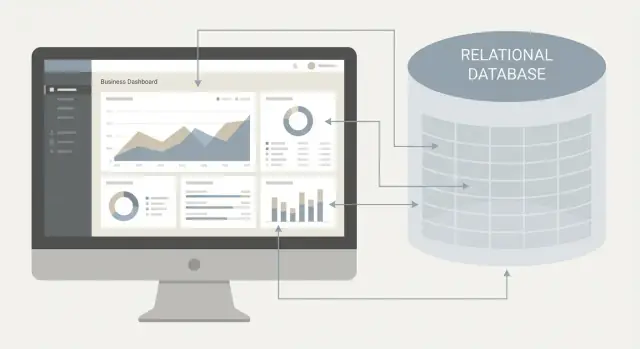
A relational database stores information in tables—think spreadsheets with stricter rules. Each table has rows (individual records) and columns (fields like customer name, order date, or price). Tables connect to each other using keys: a customer ID in the Customers table can be referenced by the Orders table, so the system knows which orders belong to which customer.
That structure sounds simple, but it’s powerful: it lets a business app keep data organized even when many people and processes touch it at once.
Why relational became the default
Relational databases became the standard foundation for business applications for a few practical reasons:
- Consistency: rules and relationships help prevent “two versions of the truth” for customers, invoices, or stock levels.
- Querying: SQL makes it straightforward to ask business questions—totals, trends, exceptions—without writing custom code for every report.
- Standards: shared concepts (tables, keys, SQL, transactions) made it easier for vendors to build ERP and CRM systems that could run in many organizations.
What to expect in this article
Relational systems have clear strengths—especially data integrity and reliable transactions—but they also have trade-offs in flexibility and scaling. We’ll cover why they fit classic OLTP work so well, where alternatives shine, and what’s changing with managed cloud databases and new data needs.
Before Relational Databases: The Limits of File-Based Data
Before relational databases became common, most business data lived in a patchwork of files: spreadsheets on shared drives, flat text files exported from accounting tools, and custom file formats created by vendors or in-house developers.
This worked when a company was small and only a few people needed access. But as soon as sales, finance, and operations all depended on the same information, file-based storage started to show cracks.
A quick snapshot of early “data storage”
Many organizations relied on:
- Individual spreadsheets for customers, invoices, and inventory
- Separate files per department (sales vs. billing vs. fulfillment)
- Application-specific files that couldn’t easily be queried or combined
- Periodic exports/imports to “sync” systems (often by email or shared folders)
The everyday problems businesses ran into
The biggest issue wasn’t just inconvenience—it was trust. Duplicated data was everywhere: the same customer might appear three times with slightly different names, addresses, or payment terms.
Updates were inconsistent because they depended on people remembering to change every copy. A new phone number might get updated in the sales spreadsheet but not in billing, leading to missed payments or shipment delays.
Reporting was hard because files weren’t designed for questions like “Which customers are overdue and also have open orders?” Answering meant manual lookups, long chains of spreadsheet formulas, or custom scripts that broke whenever file layouts changed.
Why scaling and multi-user access was difficult
Files don’t handle concurrent edits well. Two people updating the same record could overwrite each other, and “locking” a file often meant everyone else had to wait. Performance also degraded as files grew, especially over networks.
What businesses needed next
Companies needed a shared source of truth with rules (so data stayed valid) and reliable updates (so changes either fully happen or don’t happen at all). That pressure set the stage for relational databases—and the shift from “data in documents” to “data as a managed system.”
The Relational Model: A Simpler, More Reliable Way to Organize Data
In 1970, IBM researcher Edgar F. “Ted” Codd proposed the relational model—an idea that reshaped how companies store and use data. The breakthrough wasn’t a new storage device or a faster computer. It was a simpler way to think about data so it could be managed consistently, even as business needs changed.
Data as relations (tables), with clear rules
At the center of the relational model is a plain concept: organize information into relations, which most people understand today as tables. A table contains rows (records) and columns (fields). Customers go in one table, invoices in another, products in another.
What made this powerful wasn’t just the table format—it was the rules around it:
- Each row represents one thing (one customer, one order).
- Each column has a defined meaning (email, order date, total).
- Data can be connected across tables through shared identifiers.
That structure made data easier to validate, easier to combine, and harder to accidentally contradict.
Separating data from application code
Earlier systems often “baked” business rules and data formats into the application itself. If you changed the software, you risked breaking how files were read. If you changed the file format, you had to rewrite parts of the software.
The relational model encouraged a clean separation: the database manages data and its integrity; applications request data and update it through well-defined operations.
This separation matters because businesses rarely stand still. Pricing rules change, customer fields evolve, and reporting requirements grow. With a relational database, many changes can happen in the database schema or queries without rebuilding the whole application.
Portability and long-term maintainability
Once data is stored in tables with consistent rules, it becomes more portable and durable:
- You can migrate to new hardware or vendors without reinventing your data model.
- Multiple applications (billing, support, reporting) can share the same source of truth.
- New features can be added by creating new tables/relationships instead of inventing new file formats.
This is why the relational model became a natural fit for business software: it turned messy, app-specific data into an organized system that could survive years of growth and change.
Keys and Relationships: The Core Idea Behind Consistent Business Data
Relational databases earned trust in business because they give data a dependable “identity” and a controlled way to connect records. That identity is the key—and the connections are relationships.
Primary keys: a stable ID for each record
A primary key uniquely identifies a row in a table. In a Customers table, that might be CustomerID.
Customers(CustomerID, Name, Email)Orders(OrderID, CustomerID, OrderDate, Total)
Here, CustomerID is the customer’s stable identifier, not something that changes (like a name) or something that might not be unique (like an email).
Foreign keys: the “link” between tables
A foreign key is a field that references a primary key in another table. In Orders, CustomerID points back to Customers.CustomerID.
This structure avoids repeating customer details on every order. Instead of copying Name and Email into every order row, you store them once and link orders to the right customer.
Relationships enable joining data (without duplication)
Because the database knows how tables relate, you can join them to answer everyday questions:
- “Show all orders with the customer name.”
- “Total revenue by customer this month.”
You get complete results by combining tables at query time, rather than maintaining multiple copies of the same facts.
Referential integrity: stopping bad links
Relational databases can enforce referential integrity: an order cannot reference a customer that doesn’t exist. That prevents orphan records (orders with no valid customer) and blocks accidental deletions that would leave broken connections.
Practical outcome: fewer mystery errors
When keys, relationships, and integrity rules are in place, reports stop disagreeing with operations. Totals don’t shift because of duplicated customer rows, and support teams spend less time chasing “mystery errors” caused by missing or mismatched IDs.
Normalization: Reducing Duplication and Update Mistakes
Normalization is essentially structuring data to avoid duplicate facts. It’s a set of design habits that keep the same piece of information from being copied into multiple places—because every copy is another chance for it to drift out of sync.
A simple example: the “same address everywhere” problem
Imagine a business app that stores orders. If each order row includes the customer’s full shipping address, that address gets repeated over and over. When the customer moves, someone has to update every past and future order record (or the app has to guess which rows to update). Miss just one, and reports start showing two different “truths” for the same customer.
With normalization, you typically store the customer’s address once in a Customers table, then have each order reference the customer via an ID. Now there’s one place to update, and every order stays consistent.
Common patterns you’ll see in normalized databases
A few building blocks show up in most business systems:
- Lookup tables: Small tables for repeatable values (e.g.,
order_statuswith “Pending,” “Shipped,” “Cancelled”). They reduce typos and make changes controlled. - Junction tables (many-to-many): When one thing can relate to many of another (e.g., an order can include many products, and a product can be in many orders). A separate
OrderItemstable ties them together cleanly.
The trade-off: clarity vs. query complexity
More normalization usually improves consistency, but it can mean more tables and more joins. Over-normalizing can make some queries harder to write and slower to run—so teams often balance “clean structure” with the practical reporting and performance needs of the application.
SQL Became the Universal Language for Business Queries
Relational databases didn’t just store data neatly—they made it askable in a common way. SQL (Structured Query Language) gave businesses a shared language to pull answers from tables without rewriting custom programs for every new report.
One language, many tools
Before SQL became widely adopted, querying data often meant using vendor-specific commands or building one-off scripts that only a few people understood. A standard query language changed that. Analysts, developers, and reporting tools could all “speak” to the same database using the same core vocabulary.
This standardization reduced friction between teams. A query written for finance could be reused by operations. A reporting tool could connect to different databases with minimal changes. Over time, SQL skills became transferable across jobs and industries—helping it spread even faster.
The kinds of questions businesses ask every day
SQL shines because it maps closely to real business questions:
- Sales by month: “Show total revenue grouped by month for the last year.”
- Unpaid invoices: “List invoices past due, including customer name, amount, and days overdue.”
- Inventory alerts: “Which items are below reorder level by warehouse?”
- Customer activity: “How many orders did each customer place this quarter?”
These are fundamentally questions about filtering, sorting, grouping, and joining related data—exactly what SQL was designed to do.
Reporting and analytics grew up around SQL
As SQL became common, an ecosystem formed around it: BI dashboards, scheduled reports, spreadsheet connectors, and later data warehouses and ETL tools. Even when companies added specialized analytics systems, SQL often remained the bridge between operational data and decision-making—because it was already the language everyone could rely on.
Transactions and ACID: Why Businesses Trust RDBMS for Core Records
When a business app “feels reliable,” it’s usually because the database can handle change safely—especially when money, inventory, and customer commitments are involved.
A transaction, explained with an order
Picture an online order:
- The customer pays
- The order is created
- Inventory is reduced
- A receipt is recorded for accounting
A transaction means all of those updates are treated as one unit of work. If something fails halfway (payment declined, system crash, out-of-stock), the database can roll back and leave your records in a clean, consistent state—no “paid but no order,” no negative stock, no missing invoice.
ACID, without the jargon
Businesses trust relational databases because most support ACID behavior—simple rules that keep core records dependable:
- Atomic: the whole change happens, or none of it does.
- Consistent: the change can’t break basic rules (like “an invoice must reference a real customer”).
- Isolated: one user’s updates don’t scramble another user’s work mid-flight.
- Durable: once the database confirms the order is saved, it stays saved—even after a power loss.
Concurrency and data integrity in the real world
In business software, many people work at once: sales reps quoting, warehouse staff picking, finance closing books, support issuing refunds. Without strong concurrency control, two people could sell the last item or overwrite each other’s edits.
Data integrity is the practical result: finance totals reconcile, inventory counts match reality, and compliance reporting has a traceable record of what happened and when. That’s why RDBMS are the default home for “system of record” data.
Built for Day-to-Day Operations: Performance and OLTP Fit
Most business apps aren’t trying to answer “What happened this quarter?” every time someone clicks a button. They’re trying to do simple, frequent work: create an invoice, update a shipment status, reserve inventory, or record a payment. That pattern is called OLTP (Online Transaction Processing)—lots of small reads and writes from many users, all day long.
OLTP vs. analytics (why the difference matters)
In OLTP, the goal is fast, consistent interactions: “find this customer,” “add this line item,” “mark this order paid.” Queries usually touch a small part of the data and must return quickly.
Analytics workloads are different: fewer queries, but much heavier ones—aggregations, long scans, and joins across large ranges (“total revenue by region for the last 18 months”). Many organizations keep OLTP in an RDBMS and run analytics in separate systems or replicas to avoid slowing daily operations.
Indexes: speed with a trade-off
An index is like a table of contents for a database table. Instead of scanning every row to find customer_id = 123, the database can jump directly to the matching rows.
The trade-off: indexes must be maintained. Every insert/update may also update one or more indexes, so too many indexes can slow writes and increase storage. The art is indexing what you search and join on most often.
How RDBMS handle growth in real operations
As data and traffic grow, relational databases rely on query planning (choosing efficient ways to execute a query), constraints (keeping data valid so fixes don’t become expensive cleanup projects), and operational tools like backups and point-in-time recovery. Those “boring” features are often what keep day-to-day systems dependable as they scale.
Common performance pitfalls to avoid
Missing indexes on frequent filters/joins are the classic problem: pages that were fast at 10k rows become slow at 10M.
Application patterns matter too. N+1 queries (one query to list items, then one query per item to fetch details) can overwhelm the database. And over-joining—joining many tables “just in case”—often creates unnecessary work. Keeping queries purposeful, and measuring with real production-like data, is usually where the biggest wins come from.
How RDBMS Powered ERP and CRM—and Standardized Business Data
ERP and CRM didn’t adopt relational databases just because they were popular—they needed the kind of consistency that tables, keys, and relationships are designed to enforce.
Why business workflows fit relational tables
Most core business processes are structured and repeatable: a customer places an order, an invoice is issued, payment is recorded, items are picked, shipped, and returned. Each step naturally maps to entities you can describe in rows and columns—customers, products, invoices, payments, employees, locations.
Relational design also makes cross-checks straightforward. An invoice can’t exist without a customer; a shipment line should reference a real product; a payment should tie back to an invoice. ERP systems (finance, procurement, inventory) and CRM software (accounts, contacts, opportunities, support cases) rely on these “this must relate to that” rules to keep records aligned across teams.
Shared databases and clean interfaces
As organizations grew, they faced a choice:
- One shared database powering multiple modules (common in ERPs), so finance and inventory read the same order and stock tables.
- Separate systems with well-defined interfaces, where data is exchanged through integration jobs or APIs—still often backed by an RDBMS on each side.
Either approach benefits from clear schemas: when fields and relationships are explicit, it’s easier to synchronize customer IDs, product codes, and accounting dimensions without constant manual fixes.
Standard schemas + SQL reduced costs
Once ERP and CRM vendors converged on relational foundations, businesses gained portability in skills. Hiring an analyst who knows SQL—and training operations teams to run standardized reports—became far easier than teaching proprietary query tools.
This standardization lowered long-term costs: fewer custom data extracts, more reusable reporting patterns, and simpler handoffs between admins, consultants, and internal teams. For many companies, that’s what turned relational databases from a technical choice into an operational default.
Administration and Governance: Backup, Security, and Auditing
Relational databases didn’t win only because of data modeling—they also fit how organizations run production systems. From early on, RDBMS products shipped with predictable operating routines: scheduled backups, user roles, system catalogs, logs, and tools that made it practical to keep business data safe and accountable.
Backups, recovery, and “known-good” procedures
A business database is only as trustworthy as its ability to recover. RDBMS tools standardized approaches like full backups, incremental backups, and point-in-time recovery using transaction logs. That meant teams could test restore procedures, document them, and repeat them during incidents—critical for payroll, invoicing, inventory, and customer records.
Monitoring also became a normal part of operations: tracking storage growth, slow queries, lock contention, and replication health. When issues are measurable, they’re manageable.
Security: roles, least privilege, and separation of duties
Most RDBMS platforms made access control a first-class feature. Instead of handing out a shared password, admins can create accounts, group them into roles, and grant permissions at the database, table, or even row level (depending on the system).
Two governance basics are especially important:
- Least privilege: users and applications get only the permissions they need—no more.
- Separation of duties: the person who deploys app code shouldn’t automatically be the person who can read sensitive tables (and vice versa).
This structure supports compliance efforts without turning daily work into a constant exception process.
Auditing and change management
RDBMS auditing—via logs, system tables, and sometimes built-in audit features—helps answer “who changed what, and when?” That’s useful for troubleshooting, security investigations, and regulated workflows.
On the change side, mature teams rely on repeatable migrations: scripted schema changes reviewed in version control and applied consistently across environments. Combined with approvals and rollback plans, this reduces the risk of late-night “hot fixes” that quietly corrupt reporting or integrations.
Resilience: replication, failover, disaster recovery
Administration practices evolved into patterns businesses could standardize: replication for redundancy, failover for high availability, and disaster recovery setups that assume an entire data center (or cloud region) can be lost. These operational building blocks helped make relational databases a safe default for core systems.
The Cloud Era: Managed Relational Databases and New Demands
Cloud services didn’t replace relational databases so much as change how teams run them. Instead of buying servers, installing database software, and planning maintenance windows, many companies now use managed RDBMS offerings where the provider handles much of the operational work.
What “managed” really changed
Managed relational databases typically include automated backups, point-in-time restore (rewind the database to a moment before an error), built-in patching, and monitoring. For many business apps, that means fewer late-night recovery drills and more predictable disaster planning.
Scaling also became more flexible. You can often increase CPU, memory, and storage with a few settings rather than a hardware migration. Some platforms also support read scaling—adding read replicas so reporting dashboards and heavy searches don’t slow down order entry or customer support.
Replication and high availability, in plain terms
Replication means keeping copies of the database in sync. High availability uses replication to reduce downtime: if the primary database fails, a standby can take over. This matters for systems that must keep taking payments, recording shipments, or updating inventory even when something breaks.
New demands: global users and modern app architecture
As businesses serve global users, latency becomes a real business problem: the farther away customers are, the slower each request can feel. At the same time, microservices and event-driven systems split one “big app” into many smaller services, each with its own data needs and release cycles.
Hybrid patterns: relational plus specialized stores
Many teams keep the RDBMS as the source of truth for core records (customers, invoices, balances) and add other tools for specific jobs—search engines for fast text search, caches for speed, or analytics warehouses for large reporting. This keeps data integrity where it matters while meeting new performance and integration needs. For more on consistency, see /blog/transactions-and-acid.
In practice, this also shapes how teams build new internal tools. Platforms like Koder.ai lean into the “relational core + modern app” approach: you can vibe-code web apps (React), backends (Go), and PostgreSQL-backed systems of record via a chat interface—then iterate safely with snapshots and rollback when schemas, migrations, or workflows change.
Limits, Alternatives, and Why Relational Is Still a Default
Relational databases aren’t perfect for every workload. Their strength—strong structure, consistency, and predictable rules—can also be a constraint when the data or the usage pattern doesn’t fit neatly into tables.
Where relational databases can struggle
Some scenarios push against the RDBMS model:
- Semi-structured or fast-changing data (think varied event logs, user-generated attributes, nested documents). Designing and evolving a clean schema can slow teams down.
- Massive scale with simple access patterns, where you mostly read/write by a single key and need to spread data across many machines with minimal coordination.
- Low-latency global writes, where users in multiple regions must write at the same time and see immediate results. Coordinating strict consistency across distance can add delay.
Why NoSQL emerged (and what it’s good at)
NoSQL systems grew popular because they often make it easier to store flexible shapes of data and to scale horizontally. Many trade some consistency guarantees or query richness to achieve simpler distribution, faster writes, or easier schema evolution—useful for certain products, analytics pipelines, and high-volume event capture.
“Best of both” is common now
Modern business stacks mix approaches:
- RDBMS with JSON columns for flexible attributes alongside core tables.
- Columnar analytics systems for reporting, while the RDBMS stays the system of record.
- Caching layers to reduce load and speed up reads.
When RDBMS is still the right default
If you’re tracking money, orders, inventory, customer accounts, or anything needing clear rules and reliable updates, an RDBMS is usually the safest starting point. Use alternatives when the workload truly demands them—not just because they’re trendy.
FAQ
What makes relational databases a natural fit for business applications?
In business software, you need a single source of truth for things like customers, orders, invoices, payments, and inventory.
Relational databases are built to keep records consistent while many users and processes read/write at the same time—so reports match operations and “the numbers” reconcile.
What is a relational database in plain English?
A relational database stores data in tables (rows and columns) with rules.
Tables connect using keys (for example, Orders.CustomerID references Customers.CustomerID) so the database can reliably link related records without copying the same details everywhere.
Why did businesses move away from spreadsheets and flat files?
File-based storage breaks down when multiple departments need the same data.
Common issues include:
- Duplicate records (multiple versions of the same customer)
- Inconsistent updates (sales updates a phone number; billing doesn’t)
- Poor concurrency (people overwrite each other or lock each other out)
- Painful reporting (manual lookups and fragile spreadsheet formulas)
What are primary keys and foreign keys, and why do they matter?
A primary key is a unique, stable identifier for a row (like CustomerID).
A foreign key is a field that points to a primary key in another table (like Orders.CustomerID referencing Customers.CustomerID).
Together, they prevent “mystery links” and let you join data reliably.
What is referential integrity, and what problems does it prevent?
Referential integrity means the database enforces valid relationships.
Practically, it helps by:
- Preventing “orphan” records (an order can’t reference a missing customer)
- Blocking dangerous deletes/updates that would break links
- Keeping reporting consistent because relationships stay valid by design
What is normalization, and when is it useful?
Normalization is designing tables so you don’t store the same fact in multiple places.
A common example: store a customer’s address once in Customers, then reference it from orders via CustomerID. That way, one update fixes it everywhere and reduces drift between “copies of the truth.”
Why did SQL become the default language for business reporting?
SQL made business data askable in a standard way across vendors and tools.
It’s especially good for everyday questions that involve filtering, grouping, and joining, such as:
- Revenue by month
- Past-due invoices with customer details
- Inventory below reorder level
- Orders per customer in a time period
What is a database transaction, and why does it matter for orders and payments?
A transaction groups multiple updates into one all-or-nothing unit of work.
In an order flow, that might include creating the order, recording payment, and reducing inventory. If something fails halfway, the database can roll back so you don’t end up with “paid but no order” or negative stock.
What does OLTP mean, and why do RDBMS work well for it?
OLTP (Online Transaction Processing) is the pattern most business apps have: many small, fast reads/writes from lots of users.
Relational databases are optimized for this with features like indexes, concurrency control, and predictable query execution—so core workflows (checkout, invoicing, updates) stay reliable under daily load.
When should you consider alternatives to a relational database?
Relational databases can struggle with:
- Rapidly changing or semi-structured data where schema evolution is constant
- Massive horizontal scale with simple key-based access patterns
- Low-latency global writes across regions with strict consistency
Many teams use a hybrid approach: keep the RDBMS as the system of record, and add specialized stores (search, cache, analytics) where needed.