

How Database Sharding Works—and Why It’s Hard to Reason About
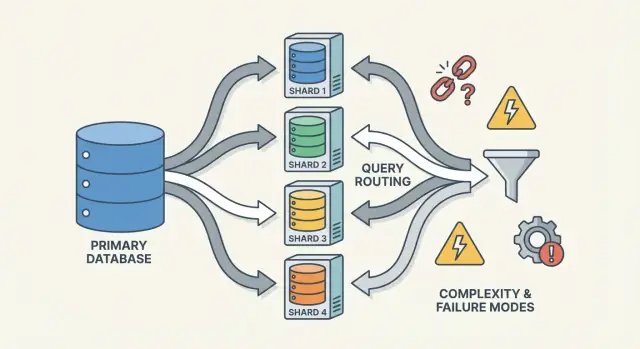
Sharding scales databases by splitting data across nodes, but it adds routing, rebalancing, and new failure modes that make systems harder to reason about.
What Sharding Is (and What It Isn’t)
Sharding (also called horizontal partitioning) means taking what looks like one database to your application and splitting its data across multiple machines, called shards. Each shard holds only a subset of the rows, but together they represent the full dataset.
One logical table, many physical places
A helpful mental model is the difference between logical structure and physical placement.
- Logical: you still have one “Users” table (same columns, same meaning).
- Physical: the rows for that table are stored in different places—maybe users with IDs 1–1,000,000 are on shard A, and the next million are on shard B.
From the app’s point of view, you want to run queries like it’s one table. Under the hood, the system must decide which shard(s) to talk to.
Not replication, not “buy a bigger box”
Sharding is different from replication. Replication creates copies of the same data on multiple nodes, mainly for high availability and read scaling. Sharding splits the data so each node holds different records.
It’s also different from vertical scaling, where you keep one database but move it to a bigger machine (more CPU/RAM/faster disks). Vertical scaling can be simpler, but has practical limits and can get expensive quickly.
What sharding doesn’t magically fix
Sharding increases capacity, but it doesn’t automatically make your database “easy” or every query faster.
- Joins can become expensive if related rows live on different shards.
- Transactions across shards are harder; “all-or-nothing” updates may require coordination.
- Operational complexity increases: routing, rebalancing, debugging, and failure handling become part of the system.
So sharding is best understood as a way to scale storage and throughput—not a free upgrade to every aspect of database behavior.
Why Teams Shard: The Problems It Tries to Solve
Sharding is rarely someone’s first choice. Teams usually reach for it after a successful system hits physical limits—or after operational pain becomes too frequent to ignore. The motivation is less “we want sharding” and more “we need a way to keep growing without one database becoming a single point of failure and cost.”
The pain points that push teams toward sharding
A single database node can run out of room in several different ways:
- Storage limits: tables and indexes grow until disk is tight, backups slow down, and maintenance operations become risky.
- Write throughput limits: CPU, WAL/redo, or lock contention caps how many writes per second you can sustain.
- Read throughput limits: even with caching and replicas, some workloads overwhelm the primary (or replicas become expensive to scale).
- Noisy neighbors: one tenant, customer, or workload pattern monopolizes resources and degrades everyone else.
When these issues show up regularly, the problem is often not a single bad query—it’s that one machine is carrying too much responsibility.
The goals: scale out, isolate, and control cost
Database sharding spreads data and traffic across multiple nodes so capacity grows by adding machines instead of vertically upgrading one. Done well, it can also isolate workloads (so one tenant’s spike doesn’t ruin latency for others) and control costs by avoiding ever-larger premium instances.
Early warning signs you’re nearing the ceiling
Recurring patterns include steadily rising p95/p99 latency during peak, longer replication lag, backups/restores exceeding your acceptable window, and “small” schema changes becoming major events.
Why sharding is usually a last step
Before committing, teams typically exhaust simpler options: indexing and query fixes, caching, read replicas, partitioning within a single database, archiving old data, and hardware upgrades. Sharding can solve scale, but it also adds coordination, operational complexity, and new failure modes—so the bar should be high.
The Core Pieces: Shards, Routers, and Metadata
A sharded database isn’t one thing—it’s a small system of cooperating parts. The reason sharding can feel “hard to reason about” is that correctness and performance depend on how these pieces interact, not just on the database engine.
Shards: independent partitions (with their own indexes)
A shard is a subset of the data, usually stored on its own server or cluster. Each shard typically has its own:
- storage (data files)
- indexes (so queries can be fast within that shard)
- local limits (CPU, memory, disk, connections)
From an application’s point of view, a sharded setup often tries to look like one logical database. But under the hood, a query that would be “one index lookup” in a single-node database might become “find the right shard, then do the lookup.”
Routers/coordinators: how requests reach the right shard
A router (sometimes called a coordinator, query router, or proxy) is the traffic cop. It answers the practical question: given this request, which shard should handle it?
There are two common patterns:
- Client-side routing: your application library knows the shard map and connects directly to the right shard.
- Proxy routing: the app connects to a router service, which forwards the request.
Routers reduce complexity in the app, but they can also become a bottleneck or a new failure point if not designed carefully.
Metadata/config service: shard map, ownership, and health
Sharding relies on metadata—a source of truth describing:
- the shard map (which shard owns which range/hash buckets/IDs)
- ownership (especially during migrations, when ownership may temporarily overlap)
- health and membership (which nodes are up, primary/replica roles, draining status)
This information often lives in a config service (or a small “control plane” database). If metadata is stale or inconsistent, routers can send traffic to the wrong place—even if every shard is perfectly healthy.
Background jobs: balancing, migrations, and backups
Finally, sharding depends on background processes that keep the system livable over time:
- rebalancing data when one shard grows faster than others
- migrations when moving ownership between shards
- backups/restore procedures that work across many shards (and match your recovery goals)
These jobs are easy to ignore early on, but they’re where many production surprises happen—because they change the shape of the system while it’s still serving traffic.
Choosing a Shard Key: The First Big Trade-off
A shard key is the field (or combination of fields) your system uses to decide which shard should store a row/document. That single choice quietly determines performance, cost, and even which features feel “easy” later—because it controls whether requests can be routed to one shard or have to fan out to many.
What makes a shard key “good”
A good key tends to have:
- High cardinality: lots of possible values (e.g., user_id rather than country).
- Even distribution: values spread writes and reads across shards instead of piling up on one.
- Stable access patterns: it matches how you most often query the data today and how you expect to query it next quarter.
A common example is sharding by tenant_id in a multi-tenant app: most reads and writes for a tenant stay on one shard, and tenants are numerous enough to spread load.
What makes a shard key “bad” (and why it hurts)
Some keys almost guarantee pain:
- Time-based monotonic keys (timestamps, auto-increment IDs): new data clusters on the “latest” shard, creating a write hotspot.
- Low-cardinality fields (status, plan_tier, country): too few distinct values means a few shards do most of the work.
- Changing identifiers (email, mutable usernames): if the key changes, moving data between shards becomes expensive and risky.
Even if a low-cardinality key seems convenient for filtering, it often turns routine queries into scatter-gather queries, because matching rows live everywhere.
The real trade-off: query convenience vs. distribution quality
The best shard key for load balancing isn’t always the best shard key for product queries.
- Pick a key aligned to your primary access pattern (e.g.,
user_id), and some “global” queries (e.g., admin reporting) become slower or require separate pipelines. - Pick a key aligned to reporting (e.g.,
region), and you risk hotspots and uneven capacity.
Most teams design around this trade-off: optimize the shard key for the most frequent, latency-sensitive operations—and handle the rest with indexes, denormalization, replicas, or dedicated analytics tables.
Common Sharding Strategies (Range, Hash, Directory)
There isn’t one “best” way to shard a database. The strategy you pick shapes how easy it is to route queries, how evenly data spreads, and what kinds of access patterns will hurt.
Range sharding
With range sharding, each shard owns a contiguous slice of a key space—for example:
- Shard A: customer_id 1–1,000,000
- Shard B: customer_id 1,000,001–2,000,000
Routing is straightforward: look at the key, choose the shard.
The catch is hotspots. If new users always get increasing IDs, the “last” shard becomes the write bottleneck. Range sharding is also sensitive to uneven growth (one range gets popular, another stays quiet). The upside: range queries (“all orders from Oct 1–Oct 31”) can be efficient because the data is physically grouped.
Hash sharding
Hash sharding runs the shard key through a hash function and uses the result to pick a shard. This typically spreads data more evenly, which helps avoid the “everything is going to the newest shard” problem.
Trade-off: range queries become painful. A query like “customers with IDs between X and Y” no longer maps to a small set of shards; it may touch many.
A practical detail teams often underestimate is consistent hashing. Instead of mapping directly to shard count (which reshuffles everything when you add shards), many systems use a hash ring with “virtual nodes” so adding capacity moves only a portion of keys.
Directory (lookup) sharding
Directory sharding stores an explicit mapping (a lookup table/service) from key → shard location. This is the most flexible: you can place specific tenants on dedicated shards, move one customer without moving everyone else, and support uneven shard sizes.
The downside is an extra dependency. If the directory is slow, stale, or unavailable, routing suffers—even if the shards are healthy.
Composite keys and sub-sharding
Real systems often blend approaches. A composite shard key (e.g., tenant_id + user_id) keeps tenants isolated while spreading load within a tenant. Sub-sharding is similar: first route by tenant, then hash within that tenant’s shard group to avoid a single “big tenant” dominating one shard.
How Queries Work: Routing vs Scatter-Gather
A sharded database has two very different “query paths.” Understanding which path you’re on explains most surprises in performance—and why sharding can feel unpredictable.
Single-shard queries: the fast path
The ideal outcome is routing a query to exactly one shard. If the request includes the shard key (or something the router can map to the shard), the system can send it straight to the right place.
That’s why teams obsess over making common reads “shard-key aware.” One shard means fewer network hops, simpler execution, fewer locks, and far less coordination. Latency is mostly the database doing the work, not the cluster arguing about who should do it.
Scatter-gather reads: fan-out and tail latency
When a query can’t be routed precisely (for example, it filters on a non-shard-key field), the system may broadcast it to many or all shards. Each shard runs the query locally, then the router (or a coordinator) merges results—sorting, deduplicating, applying limits, and combining partial aggregates.
This fan-out amplifies tail latency: even if 9 shards respond quickly, one slow shard can hold the whole request hostage. It also multiplies load: one user request can become N shard requests.
Cross-shard joins and aggregations
Joins across shards are expensive because data that would meet “inside” the database must now travel between shards (or to a coordinator). Even simple aggregations (COUNT, SUM, GROUP BY) can require a two-phase plan: compute partial results on each shard, then merge them.
Indexing limitations: local vs global
Most systems default to local indexes: each shard indexes only its own data. They’re cheap to maintain, but they don’t help routing—so queries may still scatter.
Global indexes can enable targeted routing on non-shard-key fields, but they add write overhead, extra coordination, and their own scaling and consistency headaches.
Writes and Transactions Across Shards
Writes are where sharding stops feeling like “just scaling” and starts changing how you design features. A write that touches one shard can be fast and simple. A write that spans shards can be slow, failure-prone, and surprisingly hard to make correct.
Single-shard writes: the happy path
If each request can be routed to exactly one shard (typically via a shard key), the database can use its normal transaction machinery. You get atomicity and isolation within that shard, and most operational issues look like familiar single-node problems—just repeated N times.
Multi-shard writes: where complexity spikes
The moment you need to update data on two shards in one “logical action” (e.g., transfer money, move an order between customers, update an aggregate stored elsewhere), you’re in distributed transaction territory.
Distributed transactions are hard because they require coordination between machines that can be slow, partitioned, or restarted at any time. Two-phase commit–style protocols add extra round trips, can block on timeouts, and make failures ambiguous: did shard B apply the change before the coordinator died? If the client retries, do you double-apply the write? If you don’t retry, do you lose it?
Patterns to avoid cross-shard writes
A few common tactics reduce how often you need multi-shard transactions:
- Data locality: co-locate related records on the same shard (e.g., everything for a customer).
- Request routing: ensure an operation is owned by one shard and treat others as read-only inputs.
- Denormalization: duplicate small pieces of data so updates don’t need to fan out.
Idempotency and retry safety
In sharded systems, retries aren’t optional—they’re inevitable. Make writes idempotent by using stable operation IDs (e.g., an idempotency key) and having the database store “already applied” markers. That way, if a timeout occurs and the client retries, the second attempt becomes a no-op instead of a double charge, duplicate order, or inconsistent counter.
Consistency and Replication: Keeping Data Correct
Sharding splits your data across machines, but it doesn’t remove the need for redundancy. Replication is what keeps a shard available when a node dies—and it’s also what makes “what is true right now?” harder to answer.
Replication inside each shard
Most systems replicate within each shard: one primary (leader) node accepts writes, and one or more replicas copy those changes. If the primary fails, the system promotes a replica (failover). Replicas can also serve reads to reduce load.
The trade-off is timing. A read replica may be a few milliseconds—or seconds—behind. That gap is normal, but it matters when users expect “I just updated it, so I should see it.”
Consistency models in simple terms
- Strong consistency: after a write succeeds, reads will reflect it (from the point of view the system promises). This usually means reading from the leader or waiting for replicas to confirm.
- Eventual consistency: the system will converge, but a read might temporarily return older data.
In sharded setups, you often end up with strong consistency within a shard and weaker guarantees across shards, especially when multi-shard operations are involved.
“Single source of truth” when data is split
With sharding, “single source of truth” typically means: for any given piece of data, there is one authoritative place to write it (usually the shard’s leader). But globally, there isn’t one machine that can instantly confirm the latest state of everything. You have many local truths that must be kept in sync through replication.
Global constraints: uniqueness, foreign keys, counters
Constraints are tricky when the data that needs to be checked lives on different shards:
- Uniqueness (e.g., username): enforcing “no duplicates anywhere” may require a centralized index, a dedicated “constraint shard,” or an application-level reservation workflow.
- Foreign keys: if parent and child rows are on different shards, the database can’t easily enforce referential integrity without cross-shard coordination.
- Counters (global totals, sequential IDs): naive approaches create a bottleneck. Common fixes include per-shard ranges, batching, or accepting approximate counts.
These choices aren’t just implementation details—they define what “correct” means for your product.
Rebalancing and Resharding Without Downtime
Rebalancing is what keeps a sharded database usable as reality changes. Data grows unevenly, a “balanced” shard key drifts into skew, you add new nodes for capacity, or you need to retire hardware. Any of those can turn one shard into the bottleneck—even if the original design looked perfect.
Why it’s hard
Unlike a single database, sharding bakes the location of data into routing logic. When you move data, you’re not just copying bytes—you’re changing where queries must go. That means rebalancing is as much about metadata and clients as it is about storage.
The online migration pattern (copy → overlap → cutover)
Most teams aim for an online workflow that avoids a big “stop the world” window:
- Copy: Backfill the target shard(s) from the source shard while the system is live.
- Dual-write (sometimes dual-read): During the transition, write new changes to both old and new locations. Reads may consult both (or use a “new wins” rule) until you’re confident.
- Cutover: Update the shard map so routers/clients send traffic to the new location.
- Cleanup: Stop dual-writes, remove the old copy, and compact/reclaim space.
Shard maps and client behavior
A shard map change is a breaking event if clients cache routing decisions. Good systems treat routing metadata like configuration: version it, refresh it frequently, and be explicit about what happens when a client hits a moved key (redirect, retry, or proxy).
Operational risks to plan for
Rebalancing often causes temporary performance dips (extra writes, cache churn, background copy load). Partial moves are common—some ranges migrate before others—so you need clear observability and a rollback plan (for example, flipping the map back and draining dual-writes) before starting the cutover.
Hotspots and Skew: When “Even Split” Breaks
Sharding assumes work will spread out. The surprise is that a cluster can look “even” on paper (same number of rows per shard) while behaving wildly uneven in production.
Hot partitions (hot keys)
A hotspot happens when a small slice of your keyspace gets most of the traffic—think a celebrity account, a popular product, a tenant running a heavy batch job, or a time-based key where “today” attracts all writes. If those keys map to one shard, that shard becomes the bottleneck even if every other shard is idle.
Skew: data size vs traffic
“Skew” isn’t one thing:
- Data skew: one shard holds more bytes/rows (storage pressure, longer backups, slower scans).
- Traffic skew: one shard handles more QPS or heavier queries (CPU saturation, queueing, latency spikes).
They don’t always match. A shard with less data can still be the hottest if it owns the most requested keys.
How to detect it quickly
You don’t need fancy tracing to spot skew. Start with per-shard dashboards:
- p95 latency per shard (a single shard’s p95 diverging is a red flag)
- QPS (and write QPS) per shard
- Storage used / table size per shard
If one shard’s latency rises with its QPS while others stay flat, you likely have a hotspot.
Mitigations
Fixes usually trade simplicity for balance:
- Choose a shard key that spreads traffic, not just records.
- Add bucketing/salting for hot keys (split one logical key across multiple physical buckets).
- Use caching for read-heavy hot items.
- Apply rate limits or per-tenant quotas to protect the cluster.
- Split hot shards (or move hot ranges) when one shard can’t be cooled down.
Failure Modes and Debugging in a Sharded System
Sharding doesn’t just add more servers—it adds more ways for things to go wrong, and more places to look when they do. Many incidents aren’t “the database is down,” but “one shard is down,” or “the system can’t agree on where data lives.”
Common failure modes
A few patterns show up repeatedly:
- A shard is unavailable (crash, disk full, long GC pauses), causing partial outages: some customers work, others fail.
- Router misroutes traffic, often after a config change or a bad deploy. Reads may silently return empty results if they’re sent to the wrong shard.
- Stale or inconsistent metadata (e.g., shard map, directory table). During moves or splits, different components may route the same key differently.
- Partial network issues: timeouts between routers and a subset of shards can look like “random” errors and trigger retries that amplify load.
How debugging changes
In a single-node database, you tail one log and check one set of metrics. In a sharded system, you need observability that follows a request across shards.
Use correlation IDs in every request and propagate them from the API layer through routers to each shard. Pair that with distributed tracing so a scatter-gather query shows which shard was slow or failed. Metrics should be broken down per shard (latency, queue depth, error rate), otherwise a hot shard hides inside fleet averages.
Data correctness incidents
Sharding failures often show up as correctness bugs:
- Duplicates after retries or non-idempotent writes.
- Missing rows when a migration moved data but routing still points to the old location.
- Split-brain writes if two metadata views accept writes for the same key range.
Backup, restore, and disaster recovery
“Restore the database” becomes “restore many parts in the right order.” You may need to restore metadata first, then each shard, then verify shard boundaries and routing rules match the restored point-in-time. DR plans should include rehearsals that prove you can reassemble a consistent cluster—not just recover individual machines.
When Not to Shard: Practical Alternatives and a Decision Checklist
Sharding is often treated as the “scaling switch,” but it’s also a permanent increase in system complexity. If you can meet your performance and reliability goals without splitting data across nodes, you’ll usually get a simpler architecture, easier debugging, and fewer operational edge cases.
Practical alternatives that often buy a lot of headroom
Before committing to sharding, try options that preserve a single logical database:
- Better indexing + query tuning: Fix slow paths first—missing indexes, unbounded queries, expensive joins, and N+1 patterns.
- Caching: Put read-heavy, stable responses behind a cache (app-level cache, CDN for public content, or an in-memory cache for hot keys).
- Read replicas: Offload read traffic without changing the write path (and accept replica lag where it’s OK).
- Partitioned tables on one node: Many databases support table partitioning that improves maintenance and query performance without cross-node routing.
Where tools help: prototyping shard-aware services without over-committing
One practical way to de-risk sharding is to prototype the plumbing (routing boundaries, idempotency, migration workflows, and observability) before you commit your production database to it.
For example, with Koder.ai you can quickly spin up a small, realistic service from chat—often a React admin UI plus a Go backend with PostgreSQL—and experiment with shard-key-aware APIs, idempotency keys, and “cutover” behaviors in a safe sandbox. Because Koder.ai supports planning mode, snapshots/rollback, and source code export, you can iterate on sharding-related design decisions (like routing and metadata shape) and then carry the resulting code and runbooks into your main stack when you’re confident.
When sharding fits (and when it doesn’t)
Sharding is a better fit when your dataset or write throughput clearly exceeds a single node’s limits and your query patterns can reliably use a shard key (few cross-shard joins, minimal scatter-gather queries).
It’s a poor fit when your product needs lots of ad-hoc queries, frequent multi-entity transactions, global uniqueness constraints, or when the team can’t support the operational workload (rebalancing, resharding, incident response).
A quick decision checklist
Ask:
- Workload: Is the bottleneck CPU, I/O, memory, or lock contention—and can it be fixed without sharding?
- Query patterns: Can 90%+ of critical queries be routed by a shard key?
- Team capacity: Who owns shard mapping, on-call runbooks, and cross-shard transaction behavior?
- SLOs: Can you tolerate partial degradation (one shard down) and longer tail latencies?
Plan for growth, not just a diagram
Even if you delay sharding, design a migration path: choose identifiers that won’t block a future shard key, avoid hard-coding single-node assumptions, and rehearse how you’d move data with minimal downtime. The best time to plan resharding is before you need it.
FAQ
What is database sharding, and how is it different from replication?
Sharding (horizontal partitioning) splits a single logical dataset across multiple machines (“shards”), where each shard stores different rows.
Replication, in contrast, keeps copies of the same data on multiple nodes—primarily for availability and read scaling.
Why not just scale up one database instead of sharding?
Vertical scaling means upgrading one database server (more CPU/RAM/faster disks). It’s simpler operationally, but you eventually hit hard limits (or steep cost).
Sharding scales out by adding more machines, but introduces routing, rebalancing, and cross-shard correctness challenges.
What problems does sharding actually solve?
Teams shard when one node becomes a recurring bottleneck, such as:
- Disk and index growth making backups/maintenance too slow
- Write throughput capped by CPU/WAL/lock contention
- Read load overwhelming primaries/replicas
- “Noisy neighbor” tenants degrading everyone else
Sharding spreads data and traffic so capacity increases by adding nodes.
What are the core components of a sharded database system?
A typical sharded system includes:
- Shards: independent partitions with their own storage and indexes
- Routers/coordinators: decide which shard(s) to query
- Metadata/config service: shard map, ownership, health, membership
- Background jobs: rebalancing, migrations, backup/restore workflows
Performance and correctness depend on these pieces staying consistent.
What is a shard key, and why does it matter so much?
A shard key is the field(s) used to decide where a row lives. It largely determines whether requests hit one shard (fast) or many shards (slow).
Good shard keys usually have high cardinality, even distribution, and match your common access patterns (e.g., tenant_id or user_id).
What makes a shard key “bad,” and what failures does it cause?
Common “bad” shard keys include:
- Monotonic/time-based keys (hotspot on the newest shard)
- Low-cardinality fields (too few values → uneven load)
- Mutable identifiers (changing the key forces risky data moves)
These often cause hotspots or turn routine queries into scatter-gather fan-outs.
What are range, hash, and directory sharding, and when should each be used?
Three common strategies are:
- Range sharding: easy routing; good for range queries; risk of hotspots/skew
- Hash sharding: even distribution; range queries become expensive; adding shards needs careful hashing (often consistent hashing)
- Directory/lookup sharding: flexible placement and migrations; adds a dependency on the directory service for routing correctness
Why do some queries get slower after sharding (scatter-gather)?
If a query includes the shard key (or something that maps to it), the router can send it to one shard—the fast path.
If it can’t be routed precisely, it may fan out to many/all shards (scatter-gather). One slow shard can dominate latency, and each user query becomes N shard queries.
How do transactions and writes work across shards?
Single-shard writes can use normal transactions on that shard.
Cross-shard writes require distributed coordination (often two-phase-commit-like behavior), which increases latency and failure ambiguity. Practical mitigations include:
- Keeping related data on the same shard (locality)
- Designing operations to be “owned” by one shard
- Using denormalization to avoid multi-shard updates
- Making writes idempotent with stable operation IDs so retries are safe
When should you avoid sharding, and what are practical alternatives?
Before sharding, try options that preserve a single logical database:
- Indexing and query tuning
- Caching hot reads
- Read replicas (accepting replica lag where OK)
- Table partitioning on one node
- Archiving old data
Sharding is a better fit when you’ve exceeded single-node limits and most critical queries can be shard-key-routed with minimal cross-shard joins/transactions.