

How to Build a Food Delivery or Pickup App: Step-by-Step
Learn how to build a food delivery or pickup app: choose a model, define MVP features, plan payments and dispatch, estimate costs, and launch with confidence.
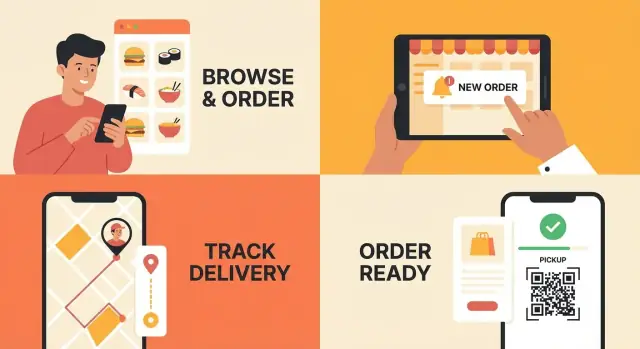
Start With the Business Model and Target Audience
Before you sketch screens or compare frameworks, decide what kind of business you’re building. A food delivery app and a pickup ordering app can share a lot of UI, but they behave very differently operationally—especially around timing, fees, and customer expectations.
Who is the app actually for?
Be explicit about your primary users. You can serve one group first and add others later, but you should know who you’re optimizing for on day one:
- Customers: people who browse menus, place orders, and track delivery or pickup
- Restaurants: partners who need a reliable restaurant ordering system to manage incoming orders
- Couriers: drivers who accept tasks, navigate, and confirm drop-offs (for on-demand delivery)
- Your own kitchens: if you run a virtual brand, you’ll care most about throughput and repeat orders
Delivery, pickup, or both?
Pick the main goal for the first version: delivery, pickup, or a clear mix.
- Delivery requires courier dispatch, delivery zones, and customer support for delays.
- Pickup is often simpler to launch and can validate demand faster.
“Both” is fine—but only if you can clearly explain why customers will use both options in your first area and how operations will support it.
Start small: your first service area
List the first cities or neighborhoods you will serve. Your initial footprint affects everything: restaurant density, delivery times, courier availability, and marketing cost. A tight zone is easier to make fast and consistent.
Define 90-day success metrics
Choose measurable targets, such as number of orders, repeat purchase rate, average delivery time, and cancellation rate. These metrics guide your food app MVP scope and your delivery app features roadmap.
How will you make money?
Decide your revenue model early: commission per order, restaurant subscriptions, delivery fees, service fees, or a hybrid. This choice shapes pricing, promos, and how you position your “build a delivery app” effort to restaurants and customers.
Choose Your App Type: Marketplace, Single Brand, or Hybrid
Before you design screens or pick features, decide what kind of app you’re building. This choice determines complexity, speed to launch, and unit economics.
Marketplace vs. single brand (and why it matters)
Marketplace apps list many restaurants. You’ll need onboarding tools, restaurant approvals, menu management across different kitchens, and customer support workflows for a wide range of issues. The upside is broader selection (often easier customer acquisition) and more order volume potential—if you can execute operations well.
Single-brand apps (one restaurant or a chain) are simpler. You control the menu structure, hours, prep times, and policies. It’s usually faster to ship and easier to maintain, and you can protect margins because you’re not funding a two-sided marketplace with heavy discounts.
A hybrid approach can start as single-brand and later add partner restaurants, or start as a marketplace but feature a “flagship” brand. Hybrid can work—but it often increases scope early.
Who does delivery: restaurants or your fleet?
You have two main models:
- Restaurant-delivered: restaurants (or their drivers) handle delivery. Your app needs order routing and status tracking, but less dispatch logic. Lower operational burden, lower control over delivery quality.
- Your courier fleet (on-demand delivery): you dispatch couriers. Expect more moving parts: courier availability, batching, distance rules, wait times, and support for failed handoffs.
Pickup-only changes features and costs
A pickup ordering app can be a great v1: no courier dispatch, fewer edge cases, simpler refunds, and clearer order status (“accepted → preparing → ready for pickup”). It also reduces support load.
Pick one model for v1 to avoid scope creep
For version 1, choose one primary path (e.g., single brand + pickup, or marketplace + restaurant-delivered). You can still design with expansion in mind, but committing to a focused model helps you launch sooner and learn from real orders instead of assumptions.
Map User Journeys for Customer, Restaurant, Courier, and Admin
Before you talk features, map the journeys. A “journey” is simply the set of steps a person takes to achieve a goal—placing an order, preparing it, delivering it, or managing the business. When you write these flows down, gaps show up early (for example: when do you collect a phone number, who can cancel, what happens if an item is out of stock?).
A useful rule: sketch simple screens first, then turn them into requirements. If you can’t sketch a screen for it, you probably don’t understand it yet.
Customer journey: discover → menu → cart → payment → tracking → support
Customers want certainty and speed. Your flow should answer: “What can I order, when will I get it, and what will it cost?”
Keep the steps tight: discover restaurants or a single brand, browse menu, customize items, review cart (fees, taxes, delivery/pickup time), pay, then track progress.
Support is part of the journey, not an afterthought. Add a clear path for “Where is my order?”, “Change address,” or “Cancel,” with rules that match your operations.
Restaurant journey: accept → prepare → update status → handoff
Restaurants need a reliable queue and clear timing. The core loop is:
- Accept or reject the order quickly (with a reason)
- Prepare with item modifiers clearly visible
- Update status (preparing → ready)
- Handoff (pickup shelf code, courier name, or customer pickup number)
Decide early how out-of-stock substitutions work and who contacts the customer. Avoid a flow that forces staff to call for every small issue.
Courier journey (if needed): accept job → navigation → proof of delivery
If you include on-demand delivery, keep courier steps minimal: accept a job, navigate to pickup, confirm pickup, navigate to drop-off, confirm delivery.
“Proof” can be a photo, a PIN code, or a signature. Pick one that matches your order types (leave-at-door vs. hand-to-customer) and doesn’t create friction.
Admin journey: onboarding, pricing rules, refunds, reporting
Admin is where the business runs day to day: onboarding restaurants, setting delivery zones and fees, managing promotions, issuing refunds, and viewing reporting.
Map who can do what. For example: can restaurant managers refund, or only admins? Can they change prep times? Clarifying permissions now prevents messy workarounds later.
Turn journeys into a shared checklist
Once each journey fits on one page, convert steps into your initial scope and assign owners. This keeps your food delivery app or pickup ordering app focused on real usage—not a wish list.
Define the MVP: The Minimum Features to Launch
Your MVP (minimum viable product) is the smallest version of your food delivery app or pickup ordering app that can take real orders reliably. The goal is simple: prove demand, validate operations, and learn what to improve—without spending months building “nice-to-haves.”
MVP for customers (must support a full order)
At launch, customers should be able to:
- Search or browse restaurants
- View menus with item details and modifiers (e.g., spice level, add-ons)
- Add to cart and edit quantities
- Checkout (delivery or pickup), including address/instructions
- Track order status (received → preparing → ready/picked up → delivered)
If any of these steps is clunky, conversion drops fast.
MVP for restaurants (keep kitchen flow smooth)
Restaurants need a simple restaurant ordering system that fits real service:
- Instant order notifications (tablet, web, or POS email/SMS fallback)
- Accept/decline orders (with a reason)
- Set or adjust prep time
- Update status (preparing, ready for pickup, handed to courier)
MVP for couriers (only what’s needed to complete jobs)
For on-demand delivery, the courier app can be minimal:
- Job list with key details (pickup, dropoff, payout)
- Pickup/dropoff confirmation steps
- Navigation link-out (Google/Apple Maps)
MVP for admins (operate day-to-day)
Your admin dashboard for restaurants should cover:
- Restaurant onboarding and management (hours, delivery zones, payouts)
- Order list with basic filters and manual support actions
- Basic reporting (orders, revenue, cancellations)
Save these for v2
To keep v1 focused, park features like loyalty, advanced promos, subscriptions, in-app chat, complex batching, and detailed analytics. Add them after you’ve validated the core delivery app features and unit economics.
Design the Menu, Pricing, and Order Rules
Your menu and ordering rules are where a food delivery app becomes “real.” If these foundations are messy, you’ll spend months fixing support tickets, refund disputes, and confusing totals.
Menu structure that’s easy to order from
Start with a predictable hierarchy: categories → items → options. Most restaurants need:
- Modifiers (size, toppings, add-ons) with clear defaults and limits (e.g., “Choose 1 sauce”).
- Combos / bundles (meal deals) where items are linked (main + side + drink).
- Special instructions as free text, but keep it optional and separate from modifiers so the kitchen can spot it quickly.
A simple rule: if an option changes price or inventory, make it a modifier—not a note.
Pricing rules customers won’t argue with
Define how totals are calculated and displayed, in this order:
- Item subtotal (including modifier price changes)
- Discounts / promo codes (if you offer them at launch)
- Taxes (based on location and tax category when needed)
- Fees: delivery fee, service fee, small-order fee
- Tip (customer-controlled)
Also decide your minimum order, how delivery radius impacts fees, and what happens when an order is partially refunded.
Operational rules that protect the kitchen
Set rules for hours, prep time, pickup windows, and item availability (per item and per modifier). If you support scheduled orders, define cutoffs (e.g., “order at least 60 minutes ahead”).
Edge cases to handle upfront
Plan for substitutions, sold-out items after purchase, and “no-contact” delivery notes. Define who can approve changes (restaurant, customer, support) and how price differences are handled.
Data you must store (for reporting and support)
At minimum, store a snapshot of: menu item names/options as ordered, price breakdown, tax/fee lines, timestamps (placed/accepted/ready/delivered), fulfillment type, address/geo, payment status, refunds, and a clear event log for disputes.
Plan a Simple UI/UX That Converts
A food app wins or loses on speed and clarity. People are often hungry, in a hurry, or ordering on a small screen with one hand. Your goal is simple: fewer decisions, fewer taps, fewer surprises.
Make signup feel optional (at first)
Don’t force a long account flow before users can browse. Let people explore menus immediately, then ask for login at checkout.
For authentication, phone OTP is usually the fastest for a food delivery app—no password to create, fewer “forgot password” drop-offs. Email can still be offered as a secondary option (some users prefer it for receipts or business orders). Keep it to one screen whenever possible.
Nail the location and address experience
Address UX is a top source of frustration, so make it forgiving:
- Support saved addresses (Home, Work) and quick switching.
- Allow map pin placement for tricky buildings.
- Add delivery notes (gate code, “call on arrival,” floor/unit).
Also show the delivery zone early. If an address is out of range, say so clearly and suggest pickup (or a nearby location) instead of a generic error.
Checkout: make the total obvious
Checkout is where trust is won. Present a clean summary with:
- Item subtotal
- Delivery fee (or pickup = $0)
- Service/processing fees (if any)
- Taxes
- Tip (with sensible presets)
- Final total in large type
Include a clear delivery vs pickup toggle near the top—users shouldn’t hunt for it after building a cart. If something changes the price (minimum order, surge delivery fee, unavailable items), explain it in plain language.
Accessibility basics that help everyone
Use readable font sizes, strong color contrast, and large tap targets (especially for quantity buttons and address fields). Don’t rely on color alone to indicate errors—add text like “Street address is required.”
Reduce abandonment with smart shortcuts
Make it easy to repeat good decisions: reorder from past orders, favorites for dishes and restaurants, and friendly error messages that tell users exactly what to do next. The fewer dead ends, the more completed orders.
Payments, Tips, Refunds, and Checkout Security
Checkout is where your app either earns trust—or creates support tickets. Keep the first version simple, but make the rules clear so customers, restaurants, and couriers know what will happen if something changes.
Payment options to support
Most food apps start with cards plus Apple Pay/Google Pay. Digital wallets reduce typing, improve conversion, and can lower fraud risk.
If your business supports it, add cash carefully. Cash can increase reach in some regions, but it also increases cancellation risk and complicates courier operations (change, no-shows). If you include cash, consider limiting it to trusted users, specific restaurants, or smaller order totals.
Authorize vs. charge: when to capture funds
You typically have two approaches:
- Authorize at checkout, charge after acceptance (or on dispatch): Good when items may be rejected or modified. It reduces refund volume because you capture only what’s finalized.
- Charge immediately at checkout: Simpler mental model for users, but you’ll process more refunds when restaurants cancel or change items.
Whatever you choose, define rules for common cases: restaurant rejects the order, courier can’t deliver, customer cancels, restaurant is late, or an item is out of stock. Put the policy on the confirmation screen and in your /help or /terms pages.
Tips, adjustments, and cancellations
Tips are part UX and part policy. Decide early:
- Tip before delivery, after delivery, or both
- Whether tips are editable (and for how long)
- Who receives the tip (courier only vs. split rules)
Also plan how you’ll handle order adjustments (e.g., out-of-stock substitutions). If totals can change, make the approval flow explicit: “Confirm new total” vs. “Auto-adjust up to $X.”
Refunds and partial refunds
Refunds are inevitable: missing items, wrong items, late delivery, or customer complaints.
Support:
- Full refunds (canceled before prep, failed delivery)
- Partial refunds (missing side dish, incorrect item)
Make partial refunds easy for support and operations—select items, quantities, and reason codes. This data helps you spot repeat problems with specific restaurants or couriers.
Checkout security basics
Your MVP should follow a strict rule: never store raw card data. Use a payment provider that supports tokenized payments so your app only handles tokens and payment status.
Protect the flow with:
- HTTPS everywhere
- Minimal sensitive data in logs
- Strong admin access controls (roles, 2FA for admins)
Receipts and invoicing
Send an itemized receipt to customers (email and/or in-app), including taxes, fees, discounts, and tip. Restaurants also need a clear breakdown: subtotal, platform fees/commission, payouts, and refund adjustments.
If you plan to support business orders later, design your receipt format now so it can evolve into proper invoices without rewriting the entire checkout system.
Delivery Dispatch and Pickup Logistics
Dispatch and pickup are where your app stops being “a nice ordering UI” and starts feeling reliable. The goal is simple: get the right order to the right person, on time, with minimal back-and-forth.
Dispatch: manual assignment vs. auto-assignment
Manual assignment works well for early-stage operations. An admin (or restaurant staff) can pick a courier based on location, vehicle type, or availability. It’s slower, but flexible when volumes are low or neighborhoods are tricky.
Auto-assignment rules are worth adding once you have consistent order flow. Keep it rule-based and explainable:
- Assign the nearest available courier within a radius
- Prefer couriers already heading toward the restaurant area
- Respect courier capacity (e.g., max active orders)
- Add a timeout: if not accepted in X seconds, offer to the next courier
Tracking: live map vs. status-only updates
A live map builds trust, but it adds complexity (battery, GPS accuracy, support for “stuck” dots). If you’re shipping an MVP, status-only updates can be enough: “Order accepted,” “Preparing,” “Picked up,” “Arriving,” “Delivered.”
You can still meet expectations by sending timely push notifications and accurate ETAs based on simple distance + buffer rules.
Proof of delivery (only as strict as you need)
Choose the lightest option that fits your risk level:
- Photo: good for “leave at door”
- PIN code: reduces fraud for high-value orders
- Signature: usually only for regulated deliveries
Handling delays without chaos
Delays happen—your product should make recovery routine:
- Auto-notify customers when prep or courier pickup exceeds a threshold
- Allow reassigning couriers if a courier is inactive or too far away
- Log reasons (traffic, restaurant delay, customer unreachable) for later improvements
Pickup logistics: time slots and queue management
Pickup orders need structure to avoid crowding and cold food. Support:
- Time slots (ASAP vs scheduled)
- “Ready for pickup” notifications
- A simple pickup queue view for restaurant staff (with clear order numbers/names)
Done well, dispatch and pickup reduce refunds, support tickets, and churn—without requiring complicated tech on day one.
Choose Your Tech Approach and Architecture (Without Overcomplicating)
Your tech stack should support the business you want to run—not the other way around. For most food delivery and pickup products, a simple, proven baseline is enough to launch and scale: mobile apps + a backend API + an admin dashboard.
A practical baseline (what most teams ship)
- Customer app (iOS/Android): browse menus, order, pay, track status.
- Restaurant portal (often a web dashboard or tablet view): accept orders, update prep time, manage menu availability.
- Courier app (only if you run delivery yourself): jobs, navigation, proof of delivery.
- Backend API: the “source of truth” for menus, orders, payments, and dispatch.
- Admin dashboard: operators handle refunds, cancellations, restaurant onboarding, and support tickets.
If you’re starting with pickup only, you can often delay the courier app and dispatch logic.
Native vs. cross-platform vs. web MVP
There’s no single “best” choice—pick based on your timeline and team:
- Native (Swift/Kotlin): best performance and platform feel, but usually higher cost and slower to build two apps.
- Cross-platform (React Native/Flutter): fastest way to ship iOS + Android with one codebase; a common choice for a food app MVP.
- Web-based MVP (responsive web app): quickest to validate demand and workflows, especially for pickup ordering. You can later add native apps once retention and repeat orders justify it.
A common approach is to launch a web ordering flow + a lightweight admin, then expand into mobile once unit economics make sense.
If you want to move faster: a “vibe-coding” build path
If your goal is to validate operations quickly (menus, checkout, order status, and an admin view) without spinning up a full engineering pipeline, a vibe-coding platform like Koder.ai can help you go from requirements to working screens and backend logic through chat.
For example, you can prototype a customer ordering flow, a restaurant dashboard, and a basic admin toolkit in one place, then iterate as real restaurants and customers expose gaps. Koder.ai also supports planning mode, snapshots/rollback, and source code export—useful if you start fast and later want to take the code in-house.
Integrations you’ll likely need
Most apps feel “smart” because of integrations, not custom code:
- Maps for addresses, delivery zones, ETAs, and route guidance
- SMS/email for confirmations and order updates (plus receipts)
- Push notifications for real-time status changes
- Analytics to measure conversion, drop-offs, and repeat purchase
Keep the first version focused: implement only what supports ordering, fulfillment, and customer support.
Data model basics (keep it clean)
Even a simple restaurant ordering system benefits from a clear core model:
- Users (customers, couriers, restaurant staff)
- Restaurants (hours, service areas, prep times)
- Menus (items, modifiers, availability, pricing rules)
- Orders (status timeline, totals, notes)
- Payments (auth/capture, refunds, tips)
- Delivery tasks (assignment, pickup/dropoff, proof)
Getting these entities right early reduces painful migrations later.
Keep it maintainable from day one
Two habits prevent chaos as orders grow:
- Clear roles and permissions (customer vs restaurant vs courier vs admin) so the right people can only do the right actions.
- Audit logs for key events (order status changes, refunds, menu edits). When something goes wrong, logs save hours—and protect you during disputes.
The goal isn’t fancy architecture. It’s a setup that’s easy to ship, easy to operate, and hard to break.
Build the Admin and Operations Toolkit
A food delivery app is only as good as the day-to-day tools behind it. The admin and operations toolkit is where you prevent small issues (wrong hours, missing modifiers, payment failures) from turning into support tickets and refunds.
Restaurant onboarding that doesn’t stall
Onboarding should feel like a checklist, not a back-and-forth email thread. Collect the essentials up front:
- Business documents (license/registration, address verification)
- Bank details for payouts (and tax info if applicable)
- Menu import process (CSV upload, POS export, or manual builder)
Make progress visible (“Step 2 of 4”) and allow restaurants to save and resume. The faster a restaurant gets a clean menu live, the faster you get repeat orders.
Core admin controls: menus, fees, promos, and hours
Your ops team needs the ability to change the things customers notice immediately:
- Menu management (items, modifiers, availability, photos)
- Pricing rules (delivery vs pickup pricing, surge/extra fees if you use them)
- Promos and discounts (codes, automatic deals, first-order offers)
- Operating hours and exceptions (holidays, temporary closures)
Add guardrails: warn if an item has no price, if modifier groups exceed reasonable limits, or if a restaurant is “open” but has no active couriers in the area.
Customer support workflows built into orders
Support is easiest when every action is tied to an order timeline. For refunds and order issues, include quick actions like:
- Partial/full refund (with a required reason)
- Resend receipt, reorder, or credit the account
- Chat/email ticketing linked to the order and restaurant
Keep communication templates short and consistent, and log every change (who did what, and when).
Monitoring that catches problems early
Set up an operations view that highlights exceptions rather than listing every order:
- Failed payments and payment retries
- Stuck orders (accepted but not progressing)
- Courier no-shows or long pickup waits
Simple alerts (email or in-app) can save hours: “10+ failed payments in 5 minutes” or “Restaurant accepting orders while marked closed.”
Tie ops to cost control
Admin tooling is also how you protect margins. Track refund rate by restaurant, promo usage by cohort, and average delivery time by zone.
If you’re comparing tooling options or deciding how much to invest in internal dashboards early on, it can help to look at platforms and plans side-by-side—point readers to /pricing.
Testing, Quality Checks, and a Real-World Beta
Testing is where a food delivery app stops being a demo and starts behaving like a business tool. You’re not just checking for bugs—you’re proving that customers can place an order, restaurants can fulfill it, and couriers can complete it without confusion or support tickets.
Test the core flows end-to-end
Before you worry about edge cases, make sure the “money paths” work every time:
- Sign up / log in (including password reset)
- Browse menu → add items → checkout → payment
- Order status updates (confirmed, preparing, ready, picked up, delivered)
- Cancellation rules (customer-initiated vs restaurant-initiated)
- Refund handling (full/partial), including tips
Run these flows as realistic scenarios: out-of-stock items, changing addresses, adding notes, and re-ordering.
Device and network reality checks
Food orders happen on older phones, spotty Wi‑Fi, and busy city networks. Test across screen sizes and OS versions, and simulate:
- Slow connections (timeouts, retries, loading states)
- Temporary offline moments (clear messaging, safe recovery)
- Backgrounding the app during checkout and returning later
Restaurant peak-hour stress tests
Restaurants don’t fail gracefully—tickets pile up. Stress test bursts (e.g., 20–50 orders in a few minutes) to confirm:
- Printer/KDS and tablet workflows stay responsive
- Prep times and throttling rules behave as expected
- Admin can pause orders or mark items unavailable quickly
Basic security and fraud checks
Do a pass on access control (who can see what), rate limits for login/OTP endpoints, and simple fraud flags (too many failed payments, repeated cancellations, unusual tip amounts).
Run a small real-world beta
Launch with a handful of real restaurants and a limited delivery area. Track where people hesitate (checkout drop-offs, restaurant acceptance delays) and fix those issues before opening the doors wider. If you have an ops dashboard, make sure it’s usable daily—not just in testing.
Launch, Marketing, and What to Improve After Release
Launching a food delivery app or pickup ordering app isn’t the finish line—it’s the moment you start learning from real behavior. Plan for a “version 1” release that’s stable, easy to understand, and supported by clear operations.
A practical launch checklist
Before you submit to the app stores, prepare the basics that reduce confusion on day one:
- App store assets: screenshots that show ordering, tracking/pickup, and support; a short, specific description; keywords that match your offer (delivery, pickup, cuisine types)
- Onboarding content: a 3–5 screen walkthrough, first-order promo (if you use one), and simple “how it works” pages
- Support hours and channels: in-app help, email, and a clear response window so customers know what to expect
Marketing that matches your business model
Early growth usually comes from local focus, not broad ads. If you’re a single-brand app, push ordering convenience to existing customers (in-store signage, receipts, email list). For a marketplace, your “marketing” is also supply: recruiting restaurants and ensuring their menus are accurate and live.
If you’re building in public, consider turning the build process into content: documenting decisions, MVP scope, and what changed after your beta can attract early users and partners. (As a side note, Koder.ai runs an earn-credits program for creators who publish content about what they built on the platform, and referrals can also earn credits—useful if you’re trying to keep MVP costs tight.)
Retention basics (without annoying users)
Start with gentle, useful triggers: reorder buttons, saved addresses, and status updates. Use push notifications carefully—order updates are welcome; daily promos are not. Keep promos simple and tied to measurable outcomes (first pickup order, win-back after 30 days).
Measure what matters, then iterate
Track a few metrics consistently:
- Conversion rate (menu view → checkout → paid)
- Repeat rate (7/30-day reorders)
- Delivery time or pickup readiness time
- Cancellations, refunds, and top support reasons
Turn that data into a roadmap: fix the biggest drop-off screens first, then the top support issues. If carts are dying at checkout, see /blog/how-to-reduce-cart-abandonment for ideas you can test quickly.
FAQ
What should I decide before designing a food delivery or pickup app?
Start by choosing your business model and primary user for v1:
- Delivery vs pickup (pickup is simpler)
- Marketplace vs single brand
- Who fulfills delivery (restaurant-delivered vs your courier fleet)
Then define a tight first service area and 90-day success metrics (orders, repeat rate, delivery/pickup time, cancellations).
Is it better to launch with pickup-only or delivery first?
Pickup is usually faster and cheaper to launch because you avoid:
- Courier dispatch and availability logic
- Delivery zones, batching, and reassignments
- Many “failed handoff” edge cases
You can validate demand and restaurant operations with a simpler status flow: accepted → preparing → ready for pickup.
What’s the difference between a marketplace app and a single-brand app?
A marketplace needs tools for onboarding and managing many partners, such as:
- Restaurant approvals and permissions
- Menu management across different kitchens
- Support workflows for varied issues
A single-brand app is simpler because you control menu structure, hours, prep times, and policies—so it’s usually easier to ship and maintain.
How do I map user journeys for customers, restaurants, couriers, and admins?
Map the journeys for each role and keep each flow to one page:
- Customer: discover → menu → cart → pay → tracking → support
- Restaurant: accept/reject → prepare → update status → handoff
- Courier (if needed): accept job → pickup → drop-off → proof
- Admin: onboarding, pricing rules, refunds, reporting
Gaps (like cancellations, out-of-stock items, or who contacts the customer) become clear when you write the steps down.
What are the minimum MVP features for a food ordering app?
Your MVP should reliably complete a full order.
Customer MVP:
- Browse/search
- Menu + modifiers
- Cart edits
- Checkout (delivery or pickup)
- Status tracking
Restaurant MVP:
- Instant notifications
- Accept/decline with reason
- Prep time adjustment
- Status updates
Admin MVP:
- Restaurant management
- Order list + basic actions
- Basic reporting
How should I structure menus, modifiers, and combos so orders are accurate?
Use a clear structure: categories → items → options.
Practical rules:
- If an option changes price or inventory, make it a modifier, not a note.
- Keep special instructions optional and separate so the kitchen can spot them.
- For bundles, link items clearly (main + side + drink) and enforce selection limits.
How do I make pricing and fees transparent at checkout?
Show totals in a predictable order:
- Item subtotal (including modifiers)
- Discounts
- Taxes
- Fees (delivery, service, small-order)
- Tip
Also define minimum order, delivery radius rules, and how partial refunds affect each line item. Clear breakdowns reduce disputes and support tickets.
What payment approach works best for a food delivery or pickup MVP?
Common v1 choices are cards + Apple Pay/Google Pay for speed and conversion.
For charging strategy:
- Authorize at checkout, capture after acceptance/dispatch to reduce refunds when orders change.
- Charge immediately if you want a simpler mental model, but expect more refunds.
Never store raw card data—use tokenized payments and lock down admin access (roles, 2FA).
How should I handle dispatch, tracking, and proof of delivery?
Start with either:
- Manual assignment (best at low volume; flexible for tricky areas)
- Simple auto-assignment rules (nearest courier, capacity limits, timeouts)
For tracking, status-only updates can be enough for an MVP. Add proof of delivery based on risk: photo (leave-at-door), PIN (high-value), signature (rare).
How do I test and run a real-world beta before scaling?
Focus on the “money paths” end-to-end:
- Browse → cart → checkout → payment
- Status updates and notifications
- Cancellations and full/partial refunds (including tips)
Then run a small beta in a limited area with a few restaurants. Use ops tools to catch exceptions (failed payments, stuck orders, long prep/pickup waits) and turn the top issues into your roadmap. For improving checkout drop-offs, see /blog/how-to-reduce-cart-abandonment.