

How to Build a Mobile E‑Commerce App: Plan, Design, Launch
A practical guide to building a mobile e-commerce shopping app: features, UX, payments, backend, security, testing, launch, and growth.
Start With Goals, Users, and a Clear MVP
Before you think about screens or features, get the app’s purpose clear enough that your team could repeat it from memory.
Define the idea in one sentence
Write a single sentence that includes who it’s for and what it sells. Examples:
- “A mobile shopping app for busy parents to reorder eco-friendly household essentials in under two minutes.”
- “A fashion app for students to find limited drops and check out with one tap.”
If you can’t write the sentence, your scope will drift.
Clarify the business goals (not just “more sales”)
E-commerce apps can optimize for different outcomes, and your choices will affect everything from onboarding to checkout:
- Revenue: increase total sales and reduce cart abandonment.
- Retention: get customers to come back weekly/monthly.
- Average order value (AOV): encourage bundles, add-ons, and higher-margin items.
- Repeat purchases: make reordering fast and reliable.
Pick 1–2 primary goals and treat the rest as secondary so you don’t build conflicting flows.
Decide MVP vs. full version
Your v1 should do one thing well: let real customers browse, buy, and receive order updates. Everything else is optional until it proves its value.
A practical MVP test is: “Can we start selling within 6–10 weeks with acceptable support effort?” If not, the scope is probably too large.
Set success metrics you’ll actually track
Define targets before development starts:
- Installs → first purchase conversion rate
- Checkout completion rate (step-by-step drop-off)
- Repeat order rate within 30/60/90 days
These metrics guide what you prioritize in v1—and what you delay without regret.
Research the Market and Define Your Differentiator
A shopping app succeeds when it serves a specific group of shoppers better than existing options. Before you plan features or pick an ecommerce app tech stack, get clear on who you’re building for and why they’ll choose you.
Pick a niche and target audience
Start with a tight definition of your ideal customer. Include practical details you can validate:
- Age range and lifestyle (students, new parents, professionals)
- Location (single city, a country, cross-border shoppers)
- Shopping habits (weekly essentials vs. occasional big purchases, deal-seekers vs. premium buyers)
- Main device behavior (commuting browsing, evening purchases, impulse buys)
A “shopping app for everyone” usually leads to generic decisions, especially in product catalog design and merchandising.
Map competitors and user sentiment
List 5–10 direct competitors (same category) plus 2–3 indirect ones (different category, similar audience). Then read reviews in the App Store/Google Play and capture patterns:
- What users praise: delivery speed, easy returns, product quality, customer support
- What users complain about: confusing navigation, search problems, hidden fees, checkout friction
Turn this into a simple table of strengths/weaknesses. These insights will later guide ecommerce app features and your app testing checklist.
Define your unique value (your “why us”)
Choose one primary differentiator and one supporting benefit. Examples:
- Better selection (hard-to-find brands, curated drops)
- Faster delivery (same-day in a limited area)
- Lower total cost (transparent fees, bundles, subscriptions)
- Loyalty perks (points, member pricing, early access)
Be specific enough that it changes real product decisions—onboarding, merchandising, checkout, promotions, or post-purchase.
Pricing and fulfillment model
Outline how orders will be fulfilled and how you’ll earn money:
- In-house inventory (more control, higher ops effort)
- Dropship (faster to launch, less control over delivery/quality)
- Marketplace (more sellers, requires strong moderation and support)
Decisions here shape your margins, delivery promises, refunds, and the post-purchase experience—so confirm them early.
Choose Platforms and the Right Development Approach
Choosing platforms isn’t a technical decision first—it’s a customer and budget decision. Start by looking at where your buyers already shop: iOS-heavy audiences are common in higher-income markets, while Android often dominates in many countries and price-sensitive segments. If your marketing plan focuses on one region or channel, that may narrow the choice quickly.
iOS, Android, or Both?
If you can afford it, launching on both platforms reduces friction for customers and makes paid acquisition easier. But if budget or timeline is tight, pick one platform for the first release—and design everything (brand, catalog, backend, analytics) so adding the second platform later is straightforward.
A practical option is a phased rollout: launch in a pilot region (or to a smaller customer segment), validate fulfillment, returns, and support workflows, then expand once operations are stable.
Native vs Cross-Platform
Native apps (Swift for iOS, Kotlin for Android) usually give the smoothest performance and the best access to device features (camera scanning, biometrics, Apple/Google Pay nuances). They can cost more because you maintain two codebases.
Cross-platform apps (like React Native or Flutter) can reduce development time and help you ship features faster with a shared codebase. For many shopping use cases—catalog browsing, search, cart, account—cross-platform is often a strong fit.
If your priority is speed from idea to a working MVP, teams also increasingly use “vibe-coding” platforms like Koder.ai to prototype and ship quickly from a chat-driven workflow. It can be a practical way to validate your catalog, checkout flow, and admin needs early—then export source code and continue with a traditional engineering pipeline when you’re ready.
Web + App Strategy
If you’re still validating demand, consider starting with a fast mobile web experience or a PWA, then move to a native or cross-platform app once repeat purchasing and retention justify the investment. This also lets you refine product catalog design and checkout flows before committing to app store releases.
Design the User Journey and App Structure
A shopping app succeeds or fails on how quickly people can find what they want, trust what they see, and complete a purchase without friction. Before visual design, define the journey in plain steps and make sure the structure of the app supports it.
Map the core shopping flows
Start with the “happy path” and keep it simple:
- Browse or search
- Product details
- Cart
- Checkout
- Order confirmation and tracking
Then add the common side paths that affect conversion: editing the cart, saving items for later, checking delivery costs, and returning to the product list without losing filters.
Navigation built for shopping
Your navigation should make product discovery effortless. Most e-commerce apps rely on a bottom tab bar (or similar) that highlights:
- Home / featured
- Search
- Categories
- Favorites (wish list)
- Cart / account
Within categories, invest in filters and sorting (price, rating, size, availability), and make them easy to clear. Favorites should be one tap from any product card—many users “shop later,” and this feature keeps them coming back.
Wireframe before you polish
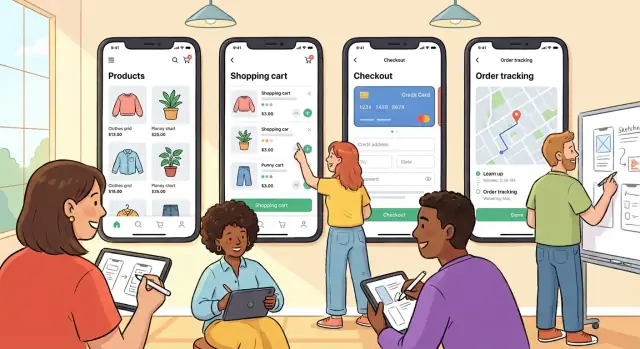
Create wireframes for key screens (home, search results, product page, cart, checkout, tracking). Wireframes help you verify hierarchy, key actions, and content density before branding, photography, and UI effects distract the team.
Accessibility basics to plan early
Set minimum text sizes, clear contrast, and consistent button styles. Ensure tap targets are comfortable (especially for “Add to cart” and checkout actions), and avoid hiding essential info behind tiny icons. Good accessibility also reduces support issues and improves conversion.
Define Must-Have E-Commerce Features
Before you choose a tech stack or start designing screens, decide what your first version must do well. The goal isn’t to cram in every idea—it’s to ship a shopping app that lets people find products, trust the details, and complete a purchase without friction.
Product catalog that’s easy to understand
Your catalog is the foundation of most ecommerce app features. Prioritize clear product pages and consistent data so everything else (search, recommendations, pricing) works smoothly.
Key essentials:
- Categories and collections that match how customers shop (not how your warehouse is organized)
- Variants like size/color with the right images and availability per option
- Inventory signals (in stock, low stock, backorder) to prevent disappointing checkouts
- Pricing rules such as sales, bundles, and region-based pricing—kept consistent across listing, product page, cart, and checkout
Search and discovery that reduce effort
Many users won’t browse—they’ll search. Strong discovery usually outperforms fancy animations.
Include:
- Autocomplete with popular queries and products
- Filters and sorting (price, size, rating, newest, availability)
- Lightweight recommendations like “Similar items” or “Frequently bought together” (start simple, improve later)
Cart that supports “not now” decisions
The cart isn’t only for buying—it’s also a staging area.
Make sure users can:
- Edit quantities and remove items easily
- Save for later (or move to a wishlist)
- Apply promo codes with clear success/error messages
- See a shipping estimate early enough to avoid surprises
Checkout essentials that convert
If you’re trying to build an ecommerce app that sells, checkout deserves extra attention.
At minimum, provide:
- Address entry with helpful validation
- Delivery options (standard/express, pickup if relevant)
- A clean order summary (items, taxes, shipping, discounts)
- A clear confirmation screen with order number and next steps
Accounts, Support, and Post-Purchase Experience
Your app isn’t “done” when the order is placed. The experience after checkout drives repeat purchases, ratings, and support costs.
Authentication: reduce friction, keep options open
Let people buy without hurdles. For many stores, guest checkout increases conversion because it removes a decision (“Do I want an account?”) at the worst moment.
Still, accounts are valuable—just introduce them at the right time:
- Offer “Continue as guest” and “Sign in / Create account”.
- After a successful purchase, prompt: “Save your details for next time” (one-tap account creation using the email already provided).
- Support social sign-in or passkeys if your audience expects it, but don’t make them the only path.
Profile essentials: make repeat buying effortless
Your user profile should be practical, not decorative. Prioritize:
- Addresses (multiple, with easy default selection)
- Saved payment methods (tokenized via your payment provider)
- Order history with clear statuses, receipts, and “Buy again”
- Returns and refunds: eligibility, labels, and current status
Keep editing flows fast—customers often update details right before purchasing.
Support that prevents churn
Start with self-serve, then make it easy to reach a human:
- An in-app FAQ tied to common order problems (late delivery, size exchanges, cancellations)
- Chat or email from the order screen, with the order number attached automatically
- A simple refund status and timeline so customers don’t have to ask
Notifications: helpful, not noisy
Use push notifications for events customers expect: order confirmation, shipping updates, delivery, and refund completion. For restocks or price drops, require explicit opt-in and add frequency controls—spam turns installs into uninstalls.
Payments and Checkout That Convert
Checkout is where you either earn money or lose it. The goal is simple: make paying feel quick, familiar, and safe—without surprises.
Offer the payment methods customers already use
Start with the basics: major credit/debit cards. Then add what your audience expects based on region and device habits—mobile wallets (Apple Pay/Google Pay), and local options where they’re common (for example, bank transfer flows, cash-on-delivery, or regional wallet providers).
A good rule: don’t make “payment method” a decision your customer has to solve. If your competitors offer two or three popular options, you should too.
Use a payment provider (and don’t store card data)
Use a trusted payment provider to handle sensitive payment details and reduce your compliance burden. This also speeds up development and lowers risk. Your app should never store raw card data—no card numbers, CVVs, or magnetic stripe data—anywhere in your database or logs.
Most providers support tokenization and hosted payment components so the customer enters details in a secure flow while your app receives a token to complete the charge.
Design a checkout flow that minimizes drop-offs
Small friction adds up on mobile. Keep forms short, use autofill, and avoid forcing account creation. Show a clear breakdown early (items, shipping, taxes, discounts) and keep it visible through the final step.
Trust signals help: recognizable payment logos, a clear returns policy link, and concise security messaging. Also make totals unambiguous—no last-second fees.
Handle the messy edge cases
Payments aren’t always instant or successful. Plan for:
- Failed payments (with a clear reason when possible) and an easy retry
- Pending or “processing” states (common with bank methods)
- Duplicate taps and network drops (idempotency is key)
- Refunds (full and partial), cancellations, and chargebacks
The post-payment screen should always confirm what happened (“Paid,” “Pending,” “Failed”) and what’s next. If you’re building an ecommerce app meant to scale, these details reduce support tickets and protect revenue.
Backend, Admin Panel, and Integrations
A shopping app is only the visible layer. Most of the work that keeps orders flowing happens behind the scenes—where products are managed, payments are verified, and shipping labels are created.
The core parts (and what each does)
At a minimum, plan for four building blocks:
- Mobile app: browsing, search, cart, checkout, order tracking.
- API (backend services): the “traffic controller” for catalog, pricing, inventory, users, and orders.
- Database: stores products, customer profiles, carts, order history, and operational data.
- Admin panel: your team’s control center for running the store day to day.
Build vs. buy: pick your foundation early
You can buy a commerce platform (faster setup), use a headless commerce backend (more flexibility with a custom app), or build custom services (maximum control, higher cost and maintenance). A practical approach is to start with a platform/headless backend, then add custom services only where you truly differentiate—like recommendations, bundling logic, or unique fulfillment rules.
Plan your admin dashboard like a product
If the admin tools are weak, operations become slow and error-prone. Your admin panel should cover:
- Product catalog: variants, images, pricing, categories
- Inventory: stock levels, reservations, low-stock alerts
- Orders: status workflow, refunds, returns, shipping updates
- Customers: profiles, notes, support history
- Promotions: discount codes, campaigns, featured collections
Integrations you’ll likely need
Even a simple MVP benefits from a clear integration plan:
- Shipping carriers (rates, tracking, label generation)
- Tax calculation tools (especially for multi-region sales)
- Email/SMS for receipts, shipping updates, abandoned cart
- CRM/helpdesk so support sees the full customer context
- Fraud tools to score risky orders and reduce chargebacks
Design these as replaceable components so you can switch providers without rewriting the app.
Security, Privacy, and Compliance Basics
Security isn’t a “nice to have” for a shopping app—it protects customers, reduces chargebacks, and prevents operational headaches. The goal is to keep data safe without adding friction to buying.
Security basics to build in early
Start with fundamentals that cover most real-world risks:
- Encryption in transit: use HTTPS/TLS everywhere (app ↔ API ↔ third parties) so logins and orders can’t be intercepted.
- Secure sessions: short-lived access tokens, refresh tokens, and automatic logout after inactivity help reduce account takeovers.
- Strong password handling: never store passwords directly—store salted hashes, support password reset securely, and consider passkeys or “magic link” login later.
Access control for your team
A common weak spot is the admin side. Use separate roles and “least access” permissions:
- Admins: configuration, refunds, permissions management.
- Support: view orders and customers, limited refund tools.
- Warehouse staff: pick/pack screens and shipping labels only.
Also require 2FA for staff accounts and audit key actions (refunds, price changes, exports).
Privacy fundamentals customers will notice
Collect only what you truly need to fulfill orders (shipping, contact, payment confirmation). Be clear about:
- Marketing consent: explicit opt-in for emails/SMS and easy opt-out.
- Data retention: don’t keep data “just in case.”
Operational safeguards (so you can recover)
Plan for failure: backups, centralized logging, monitoring/alerts, and a simple incident response plan (who investigates, who communicates, what gets shut off).
Compliance basics
If you process cards, align with PCI DSS (often easiest by using a compliant payment provider and not storing card data). If you sell in regulated regions, cover GDPR/CCPA basics (privacy policy, data access/deletion requests), and follow app store rules for permissions and tracking.
Performance and Scalability Planning
A shopping app can have great products and still lose sales if it feels slow or unstable. Performance isn’t something you “add” at the end—it’s a set of targets and habits you bake into design, development, and hosting from the start.
Set clear performance targets
Pick a few measurable goals you can track on real devices (not just a developer laptop):
- Fast first load: show something useful quickly (home screen, skeleton UI, cached content) while the rest loads.
- Smooth scrolling: aim for consistent, jitter-free product list scrolling.
- Quick search results: keep search responsive even with typos, filters, and sorting.
These targets make trade-offs easier (for example: fewer animations, smaller images, or simplified layouts on low-end phones).
Optimize images and product lists for mobile networks
Most e-commerce screens are image-heavy, so images are usually your biggest win:
- Serve the right size for each screen (don’t download a 3000px image to display a 300px thumbnail).
- Use modern formats where supported (like WebP/AVIF) and compress aggressively.
- Load lists efficiently with pagination/infinite scroll, and avoid rendering too many items at once.
- Add placeholders so the UI stays stable while images load.
Also consider a CDN for faster delivery and to reduce load on your servers.
Plan offline-friendly behavior
Offline doesn’t mean “fully usable without internet,” but it should fail gracefully:
- Cache recently viewed categories/products and basic account state where possible.
- Allow cart edits to be stored locally and synced later (with clear messaging).
- Show helpful errors (“No connection—try again”) instead of blank screens.
Scale for peak events
Traffic spikes happen: holidays, flash sales, email blasts, influencer mentions. Prepare by:
- Load testing key flows (home → product → search → checkout).
- Using caching for product catalog and search suggestions.
- Designing backend jobs (emails, inventory updates) with queues so spikes don’t slow checkout.
- Planning autoscaling and safe limits (rate limiting, graceful degradation) so the app stays usable under pressure.
Testing, QA, and Release Preparation
Your app is judged in seconds: does it load fast, feel stable, and let people buy without friction? Testing isn’t a final step—it’s how you protect revenue and reviews.
A practical testing checklist
Cover the happy path first, then the “messy real life” situations that cause most support tickets:
- Core flows: browse categories, search, product page, add to cart, apply promo, checkout, order confirmation, order tracking.
- Edge cases: out-of-stock mid-checkout, price change, expired coupon, partial refunds, cancelled orders, duplicate taps, interrupted payments.
- Device sizes & OS versions: small screens, tablets, notch devices, dark mode, accessibility font sizes.
- Poor network: slow 3G, offline mode behavior, switching Wi‑Fi to cellular, timeouts, retry logic.
Quality gates (what “good enough” means)
Define release thresholds before you start testing so decisions are objective:
- Crash-free sessions: set a target (e.g., 99.5%+) and block release if it drops.
- Payment success rate: monitor by method (card, wallet, BNPL) and investigate dips immediately.
- Order accuracy: verify totals (tax, shipping, discounts), inventory updates, and confirmation emails/receipts.
Beta testing and staged rollout
Run a simple progression:
- Internal testing: team members validate core flows daily.
- Invited users: loyal customers and support staff test real purchases (or sandbox payments).
- Staged rollout: release to a small percentage first, then expand as metrics stay healthy.
Release readiness
Before submitting to the stores, prepare:
- App store assets (screenshots, preview text, privacy details)
- Support docs/FAQs and a “known issues” note
- A rollback plan (previous build, feature flags, and clear stop conditions)
If you want fewer “big bang” releases, bake in safety mechanisms such as snapshots, quick rollback, and repeatable deployments. Platforms like Koder.ai include snapshot/rollback workflows and source code export, which can help teams iterate faster while keeping releases reversible.
Launch, Measure Results, and Improve Over Time
The first release is your baseline. From there, you learn what helps users discover products, trust checkout, and come back—and you ship improvements in small, measurable steps.
App Store Optimization (ASO) basics
Start with the store page: a clear title, accurate keywords, and screenshots that show the core flow (browse → product page → cart → checkout). Use short captions that explain benefits, not features.
After launch, actively earn reviews. Prompt only after a positive moment (for example, a successful delivery confirmation or a second purchase). Avoid interrupting checkout or first-time onboarding—those prompts often reduce conversions.
Set up analytics that match your funnel
Install analytics before release and track the full journey:
- Product list view → product view
- Add to cart → checkout started
- Payment attempted → purchase completed
Add events for key friction points (coupon applied, shipping calculated, address validation errors). This turns opinions into evidence: you can see whether issues are happening on specific devices, app versions, or payment methods.
Build growth loops carefully
Referrals, loyalty programs, and personalized offers can work well, but keep them simple and respectful. Make rewards easy to understand, set limits to prevent abuse, and be cautious with personalization—relevance matters more than frequency.
Create a post-launch roadmap
Review metrics and feedback weekly, then prioritize: fix conversion blockers first, then usability improvements, then new features. Keep a short “next release” list so you ship consistently.
If you’re deciding what to include next or need help scoping iterations, see /pricing for options.
FAQ
What’s the first thing I should define before designing an e-commerce app?
Start with one sentence that includes who it’s for and what it sells. Then pick 1–2 primary business goals (e.g., revenue, retention, AOV, repeat purchases) so you don’t build conflicting flows.
A simple check: if the team can’t repeat the purpose from memory, the scope will drift.
What should an MVP mobile shopping app include?
A practical v1 should let real customers:
- Browse/search products
- View product details
- Add to cart
- Checkout and pay
- Get order confirmation and basic tracking
Treat everything else (advanced recommendations, loyalty, complex personalization) as optional until it proves value.
Which success metrics matter most for a new e-commerce app?
Define targets before development so prioritization is objective. Common, useful metrics:
- Installs → first purchase conversion
- Checkout completion rate (by step)
- Repeat order rate in 30/60/90 days
Instrument events for key friction points (coupon errors, address validation failures, shipping cost shown) so you can diagnose drop-offs, not guess.
How do I pick a niche and differentiator for my shopping app?
Choose a narrow audience definition you can validate (location, habits, price sensitivity, device behavior). Then read competitor app reviews and look for repeated pain points (navigation, search, hidden fees, checkout issues).
Turn findings into a simple strengths/weaknesses list and pick one primary differentiator (e.g., faster delivery in a region, curated selection, transparent pricing).
Should I launch on iOS, Android, or both?
Base it on where your buyers are and your budget/timeline:
- Launching on both iOS and Android reduces acquisition friction.
- If constrained, pick the platform dominant in your target market and design your backend/analytics so adding the second platform later is straightforward.
- Consider a pilot region rollout to validate fulfillment, returns, and support before scaling.
Native vs cross-platform: which is better for an e-commerce app?
In general:
- Native (Swift/Kotlin): best performance and deepest device/payment integrations; higher cost due to two codebases.
- Cross-platform (React Native/Flutter): faster shipping with a shared codebase; often a strong fit for catalog, search, cart, and account flows.
Decide based on your timeline, budget, and any must-have device features (camera scanning, wallet nuances, biometrics).
What catalog and search features are must-haves in v1?
Make discovery and decision-making effortless:
- Categories/collections that match how people shop
- Variants (size/color) with correct images and availability
- Inventory signals (in stock/low stock/backorder)
- Search with autocomplete, filters, and sorting
Keep pricing consistent across list → product page → cart → checkout to avoid trust-breaking surprises.
How do I design checkout to minimize cart abandonment?
Reduce drop-offs by making checkout fast and predictable:
- Guest checkout (don’t force account creation)
- Short forms with validation and autofill
- Early, visible totals (items, shipping, taxes, discounts)
- Clear status on payment result: Paid / Pending / Failed
Plan for edge cases like failed payments, retries, pending bank methods, duplicate taps (idempotency), and partial refunds.
How should I handle payments safely in a mobile shopping app?
Use a trusted payment provider and never store raw card data (card number, CVV) in your database or logs. Prefer tokenization/hosted payment components so sensitive entry happens in a secure flow.
Offer the payment methods your customers already use (cards first, then Apple Pay/Google Pay and relevant local methods).
What backend, admin, and release-prep work do teams commonly underestimate?
Plan the “behind the scenes” parts early:
- Admin panel for products, inventory, orders, customers, promotions
- Integrations for shipping (rates/tracking/labels), tax, email/SMS receipts, helpdesk/CRM, fraud checks
- Staff roles (least privilege), 2FA for admin, and audit logs for refunds/price changes
Before release, run a staged rollout and set quality gates (crash-free sessions, payment success rate, order accuracy). If you need help scoping costs and iterations, see /pricing.