

How to Build a Mobile App for Quick Daily Checkpoints
Learn how to build a mobile app for quick daily checkpoints: define the MVP, design fast inputs, pick a tech stack, add reminders, and measure engagement.
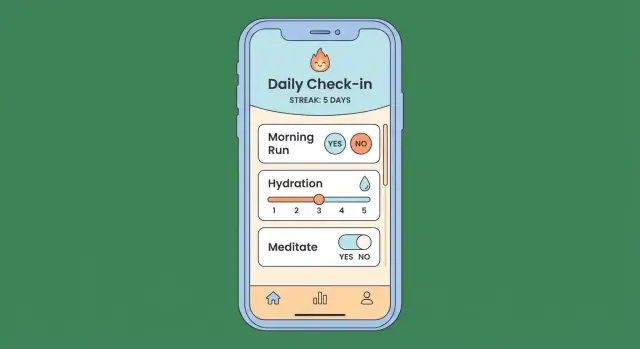
What a “Daily Checkpoints” App Should Do
A “daily checkpoints” app is a tiny, repeatable moment where someone records a few signals about their day—without turning it into a long journaling session. Think of it as micro journaling with structure: short, consistent inputs that are easy to keep doing.
What “daily checkpoints” can include
Daily checkpoints usually fall into a few familiar categories:
- Mood and wellbeing: “How do I feel?” (1–5), stress level, energy, sleep quality
- Habits: water, workout, reading, “went outside,” screen-time limits
- Medication or health routines: “took meds,” symptoms, pain level
- Tasks and intention: “top priority done,” “showed up for my plan,” “tomorrow focus”
The key isn’t the category—it’s the experience: each checkpoint is quick to answer and consistent day to day.
The promise: done in under 10 seconds
Your app should make a clear promise: log today in under 10 seconds. That means:
- Minimal typing (prefer taps, sliders, and one-tap defaults)
- A predictable flow (the same steps every day)
- Instant feedback (saved without extra confirmation screens)
If it feels like “work,” people will postpone it—and then skip it.
Who it’s for (and when they’ll use it)
Define a primary routine: morning, commute, or before bed. These moments have different constraints:
- Morning check-ins must be sleepy-proof.
- Commute check-ins must be one-handed.
- Bedtime check-ins must be low-light and calming.
Make one of these contexts your default, then ensure everything (inputs, notifications, screen brightness, copy tone) supports that context.
Common pain points to design around
Most daily check-in apps fail for the same reasons:
- Forgetfulness: people don’t remember until it’s too late.
- Too many taps: friction adds up fast for a daily action.
- Guilt from missed days: users quit when the app makes them feel behind.
A good daily checkpoints app reduces effort and emotional pressure—so returning tomorrow always feels easy.
Start With the MVP: One Core Habit, Not Ten
The easiest way to stall a daily check-in app is trying to support every habit style at once: mood tracking, workouts, meals, hydration, reflections, goals, and more. For v1, pick one primary use case and design everything around it.
Choose a single “daily checkpoint” format
Start with one clear promise, such as: “Answer 3 questions per day in under 30 seconds.” Three questions is enough to feel meaningful, but small enough that people will still do it on busy days.
Examples of tight v1 formats:
- 1–3 quick ratings (energy, stress, focus)
- A yes/no + one rating + optional note
- A short micro journaling prompt with a character limit
Define success before you build
Your MVP roadmap should include success metrics that tell you whether the product is genuinely useful, not just downloaded.
Focus on:
- Daily completion rate: what % of active users finish today’s check-in?
- Time-to-complete: how long does a check-in take from opening the app to done?
- 7-day retention: how many people come back a week later?
These metrics guide trade-offs. If time-to-complete rises, your UX for quick inputs likely needs simplification.
Decide your v1 constraints (and accept the trade-offs)
A few early decisions prevent weeks of rework:
- Offline-first vs online-only: offline-first improves reliability but adds sync complexity.
- Anonymous vs account-based: anonymous is faster to start; accounts help backup and multi-device use.
Pick constraints that match your promise for a daily check-in app.
Write a one-paragraph product brief
Keep a short brief visible to the whole team. Include: who it’s for, the one daily behavior you’re enabling, the “done in under X seconds” goal, and the metrics above.
When you’re unsure about a feature, the brief should make the answer obvious: does it protect speed and daily completion, or does it slow the core habit down?
Checkpoint Design: Questions, Inputs, and Daily Flow
Great checkpoint design is less about fancy features and more about removing friction. A daily checkpoint should feel like answering a few quick prompts, not filling out a form.
Choose checkpoint types that match the habit
Different questions need different inputs. Keep the set small and predictable so people can build muscle memory.
Common checkpoint types:
- Yes/No: perfect for “Did I do it?” habits (workout, medication).
- 1–5 scale: great for energy, mood, focus, stress—fast, expressive, easy to trend later.
- Short text: use sparingly for “one sentence” reflections (micro journaling).
- Multi-select tags: quick context like “Work / Family / Health” or “Tired / Busy / Motivated.”
A useful rule: every checkpoint should be answerable in under two seconds, except optional notes.
Design the daily flow: open → answer → done
Aim for a straight line with no decisions. When the app opens, it should immediately show today’s checkpoints in a single, scroll-light screen.
- Tap an answer once (or swipe for yes/no).
- Provide subtle feedback (e.g., a checkmark, brief haptic).
- Show a clear “Done” state so the user can exit confidently.
Avoid interruptions like popups, long tutorials, or “rate us” prompts during completion.
Plan skip options without shame
People miss days. Make skipping feel neutral so they return tomorrow.
Include a gentle option like “Not today” or “Skipped”, and never force a reason. If you ask why, make it optional and tag-based.
Add optional notes that never block completion
Notes are valuable, but they must be secondary. Offer a small “Add note” affordance after the main answers, and allow saving with zero text. The fastest path should always be: answer → done.
UX Patterns for Speed: Fewer Taps, Less Thinking
Speed is a feature in a daily check-in app. The best UX makes the “right” action feel effortless, even when the user is tired, busy, or distracted.
Make check-in a single screen
Aim for a one-screen flow where the user can complete today’s entry without navigating away. Keep the controls visible at once: questions, inputs, and a clear finish action.
Large tap targets matter more than fancy visuals. Use a thumb-friendly layout (primary controls in the lower half of the screen), generous spacing, and clear labels so users don’t have to aim carefully.
Minimize typing by default
Typing is slow and mentally expensive. Prefer quick inputs:
- Taps (Yes/No, 1–5 mood faces, quick tags)
- Sliders for intensity or energy
- Presets like “Same as yesterday” or “Repeat last answers”
If you allow text, keep it optional and lightweight: “Add a note (optional)” with a short field that can expand.
Make the primary action obvious
Users should never wonder what to do next. Put a prominent “Check in” button on the home screen, and a clear “Done” (or “Save”) action on the check-in screen.
Avoid secondary actions competing for attention; tuck settings and history behind smaller buttons.
Accessibility and clarity by default
Support dynamic text size, sufficient contrast, and screen reader labels for every input and button. Don’t rely on color alone to convey meaning (pair colors with icons or text).
Helpful empty states
When there’s no data yet, don’t add extra steps. Show a short, friendly explanation and a single action: “Do your first check-in.” Include an example entry so users instantly understand what “good” looks like.
Information Architecture and Screen Map
A daily check-in app succeeds when people can open it and finish in seconds. That starts with simple navigation and a small, predictable set of screens.
Keep navigation boring (that’s good)
Use four primary destinations:
- Today: the only place most users need day-to-day
- History: past entries and edits
- Insights: lightweight trends (not a full analytics suite)
- Settings: reminders, privacy, export, account
Avoid extra tabs like “Community” or “Challenges” early on. If a feature doesn’t help someone complete today’s checkpoint, it probably shouldn’t sit in the main navigation.
Core screen map
A practical screen map for an MVP:
- Onboarding
- Welcome + “what this is”
- Permission prompts (notifications) at the moment they make sense
- Choose or create the first checkpoint
- Create Checkpoints
- Name (short)
- Input type (yes/no, scale, quick note)
- Optional reminder time
- Daily Check-in (Today)
- A single scrollable list of today’s questions
- One clear “Done” state
- History
- Calendar or list view
- Tap a day to view entries (and optionally edit)
User journeys to design for
Day 1 (first success): Open app → see 1–3 checkpoints → answer → calm confirmation (“Saved”) → done. The goal is confidence, not motivation speeches.
Day 7 (forming a routine): The user expects Today to look identical each day. Keep the check-in flow stable. Put optional review (History/Insights) off the main path.
After a missed week (re-entry): Don’t greet them with failure. Show Today as normal, and place a small, non-judgmental note in History like “Last entry: 7 days ago.” Offer a single action: “Check in now.”
Streaks without pressure
If you show streaks, keep them subtle:
- Display as a small stat in Insights, not a giant banner on Today.
- Prefer language like “7 check-ins this month” over “You broke your streak.”
- Consider “best streak” and “consistency” views so one miss doesn’t feel like a reset to zero.
Tech Stack Choices: Native vs Cross-Platform
Your tech stack should match the app’s promise: fast daily inputs, reliable reminders, and data you can trust. The best choice is usually the one your team can ship and maintain with the least risk.
Native: Swift (iOS) and Kotlin (Android)
Native apps tend to feel “right” on each platform: smoother animations, best keyboard behavior, and fewer odd edge cases with notifications and background work.
Choose native if you expect heavy use of platform features (widgets, deep system integrations), or if you already have strong iOS/Android developers. The trade-off is building and maintaining two codebases.
Cross-platform: Flutter or React Native
Cross-platform can be a great fit for a daily check-in app because the UI is relatively simple and consistent across devices.
Pick Flutter if you want a highly consistent UI and performance with one codebase. Pick React Native if your team is comfortable with JavaScript/TypeScript and you want to share skills with web work. The trade-off is occasional platform-specific work (especially around notifications and background sync).
If you want to ship v1 faster: Koder.ai
If your biggest risk is time-to-first-release, a vibe-coding platform like Koder.ai can help you move from UX outline to a working prototype quickly. You describe the flow in chat (Today screen, 3 questions, reminders, History), and Koder.ai can generate a real app stack—web with React, backend in Go with PostgreSQL, and mobile in Flutter—then let you iterate in “planning mode” before changing code.
It’s especially useful for daily checkpoints because the product is defined by a handful of screens, a clean data model, and reliability features (offline queue, sync, export). You can also export source code, deploy/host, attach custom domains, and use snapshots/rollback to keep experiments safe while you tune retention.
Integrations you’ll likely need
At minimum: push notifications, analytics (to learn which screens slow people down), and crash reporting (to catch issues quickly). Treat these as first-class requirements, not add-ons.
Backend and data model basics
Even a simple app benefits from a backend for user profiles, checkpoint templates, multi-device sync, and exports.
A clean data model is: definitions (questions/checkpoint templates) plus events (daily check-ins with timestamps and answers). This structure makes sync and future insights much easier.
Reducing risk: effort and team fit
Estimate not just build time, but ongoing maintenance: OS updates, notification quirks, and sync bugs. If your team is strongest in one stack, leaning into that often beats a “perfect” technology choice.
Data Model and API Design for Daily Entries
Your data model should make daily check-ins fast to save, easy to query for insights, and resilient when you change questions later. A clean structure also makes offline sync much simpler.
Core entities (keep them small)
A practical starting set of entities:
- User: id, settings (time zone, notification prefs), createdAt
- CheckpointTemplate: a versioned “set of questions” (id, title, questions schema, version, activeFrom)
- DailyEntry: one completion for one local day (id, userId, templateId, localDate, startedAt, submittedAt)
- Answer: one response within an entry (entryId, questionId, type, value)
- Tag: optional labels (e.g., “work”, “health”) plus a join to entries
This separation lets you update templates without rewriting old history, and store answers in a flexible way (text, number, boolean, single-select, multi-select).
Local day boundaries and timestamps
Daily apps live or die by “what counts as today.” Store:
- A canonical timestamp (e.g., submittedAt in UTC)
- A localDate string (e.g.,
2025-12-26) computed using the user’s time zone at the moment of entry
Use localDate for streaks and “did I check in today?” logic. Use timestamps for ordering, sync, and debugging.
Plan for question changes (versioning)
Questions will change—wording tweaks, new options, new fields. Avoid breaking old entries by:
- Versioning CheckpointTemplate
- Storing answers keyed by questionId (stable identifier), not by display text
- Treating removed questions as “inactive” rather than deleting them
API surface (simple and sync-friendly)
Common endpoints:
- Fetch templates: get active templates + versions
- Submit entry: post an entry with answers (idempotent client-generated ids help)
- Sync history: pull entries updated since
lastSyncAt, push pending local entries - Export data: generate a file or return a structured export payload
Local caching for speed and resilience
Cache templates and recent entries on-device so the app opens instantly and works without a connection.
A queue of “pending submissions” plus conflict rules (often “latest submittedAt wins”) keeps sync predictable.
Offline Mode, Sync, and Reliability
If your app depends on a perfect connection, people will miss check-ins—and then they stop trusting the habit. Offline support isn’t a “nice to have” for daily checkpoints; it’s part of making the experience feel dependable.
Offline-first check-ins
Design the check-in flow so it always works, even with airplane mode on:
- Save every entry locally first (with a timestamp and a “pending sync” flag)
- Keep the UI identical online or offline—no extra steps, no scary error states
- Queue uploads quietly and retry later
A simple rule: if the user can see the “Saved” state, it should be saved somewhere durable on the device.
Background sync that stays out of the way
When connectivity returns, sync should happen automatically and politely:
- Use small payloads (only changed entries, not full history)
- Batch requests (send multiple pending entries in one call)
- Back off on failures (retry after 1 min, then 5, then 30) to protect battery
Be selective about sync triggers: opening the app, a short background task, or after a new check-in is usually enough.
Conflict resolution for multi-device users
If someone checks in on a phone and later edits on a tablet, you need a predictable rule. Common options:
- Last write wins: easiest to implement; can overwrite edits
- Merge rules: better for multi-field entries (e.g., merge mood + note if they were edited separately)
For daily checkpoints, a practical approach is last write wins plus a small “Edited” indicator, and (if you allow it) keeping the previous version in an internal history for recovery.
Reliability signals and recovery
Build trust with small touches:
- Clear “Synced / Pending” status that doesn’t interrupt the flow
- Safe handling of duplicates (idempotent uploads) so retries don’t create extra entries
- Optional export/backups (CSV/JSON) for users who care about ownership and safety
A checkpoint app succeeds when people stop thinking about the app and simply rely on it every day.
Reminders and Notifications That People Won’t Disable
Notifications are part product feature, part relationship. If they feel demanding or irrelevant, people turn them off—and they rarely come back on. The goal is to help users remember their own intent, with just enough prompting to make the daily checkpoint effortless.
Reminder types to include
Start with a small set of reminder types that cover most real-life routines:
- Daily scheduled reminder: a consistent time the user chooses (e.g., 8:30 PM)
- Smart nudges (optional): a gentle prompt within a preferred window if they haven’t checked in yet
- Missed-day follow-up: a single, non-guilting message the next day if they missed yesterday
Keep “smart” features opt-in. Many people prefer predictability.
Let users control timing (without making setup annoying)
Timing controls should be visible and easy to adjust later:
- Let users pick a reminder time during onboarding (with a sensible default).
- Add quiet hours (or “Do not disturb” windows) so reminders never arrive at awkward times.
- Offer a one-tap snooze (“In 30 min”, “Tonight”, “Tomorrow”). Snooze should feel like cooperation, not failure.
A good pattern: one primary daily reminder, plus a light backup nudge only inside the user’s chosen window.
Avoid spam with sensible defaults
Defaults matter more than settings screens. Aim for minimal interruption:
- Default to one reminder per day.
- If using missed-day follow-ups, keep it to one message, not a sequence.
- Explain the benefit plainly: “A quick reminder helps you keep the streak without thinking about it.”
Also give a clear in-app path to adjust reminders. If people can’t tune them, they disable them.
Notification copy guidelines (short, supportive, actionable)
Good notification text reduces decision-making. Treat it like a micro-UX surface:
- Short: one sentence is enough.
- Supportive: no guilt, no “you failed” framing.
- Actionable: hint that it’s quick (“30 seconds”) and name the action.
Examples:
- “Quick check-in: how did today go? (30 seconds)”
- “Ready for your daily checkpoint?”
- “Missed yesterday—want to log a quick note now?”
If you use multiple reminder types, vary the copy slightly so it doesn’t feel like a nagging loop.
Progress, Streaks, and Simple Insights
People stick with a daily check-in app when they can quickly answer two questions: “Did I do it?” and “Is it getting easier?” For v1, keep insights simple and tightly tied to daily entries.
Decide what insights mean in v1
Start with a small set that reinforces the habit:
- Completion streaks: current streak, best streak, and “last completed” date
- Weekly averages: “You checked in 5.1 days/week over the last 4 weeks.”
- Lightweight trends: a simple up/down signal for one or two metrics (e.g., mood, energy, focus) based on the last 7 vs. previous 7 days
If you add more than a few metrics, insight screens turn into dashboards—and dashboards are slow.
Keep charts readable (and optional)
Charts should be a quick glance, not a puzzle. Use:
- A small number of metrics per screen (1–3 max)
- Clear labels (“Sleep hours,” not “Rest”) and visible units
- Consistent time windows (7 days, 30 days) so comparisons make sense
Consider a “Show chart” toggle so the default view stays fast for people who only want to check in.
Explain changes without over-interpretation
Avoid telling users why something happened. Instead, describe what changed in plain language:
- “Energy is higher this week than last week (+1.2 on average).”
- “You checked in 3 fewer days than last week.”
Personal summaries that feel motivating
Use simple, human summaries near the top:
- “3/7 days completed this week”
- “2 days to beat your best streak”
These cues make progress feel real—without adding extra steps to the daily flow.
Privacy and Security Basics for Checkpoint Apps
A daily check-in app can feel “lightweight,” but it often stores highly personal information. Good privacy design isn’t only about compliance—it’s about earning trust and reducing your own risk.
Collect only what you need
Start by writing a minimal data policy for the MVP: what you store, why you store it, and how long you keep it. If a field doesn’t directly support the core experience (saving today’s checkpoint and showing the user their history), don’t collect it.
Also be careful with “accidental data,” like detailed device identifiers, precise location, or verbose analytics events. Keep logs sparse, and avoid sending raw user text to third parties.
Offer low-risk modes for sensitive use cases
Consider an anonymous mode where the user can use the app without creating an account. For some audiences, local-only storage (no server sync) is a feature, not a limitation.
If you do support accounts, make it optional and explain the trade-off: convenience versus exposure.
Protect data in transit and at rest
Use HTTPS for all network traffic and pin down insecure edge cases (no HTTP fallbacks). For stored data:
- On device: rely on OS-level encryption where possible and store sensitive fields in secure storage when appropriate.
- On backend: encrypt databases and backups, and lock down access by role.
Give users control: deletion and export
If you support accounts or server sync, add settings to delete data (and actually delete it, including backups on a clear schedule). Provide export in a simple format so users can take their entries with them. Clear controls reduce support burden and build confidence.
Testing, Analytics, and Iterating After Launch
Shipping is the start of the real work. A daily checkpoints app lives or dies on whether people can complete a check-in quickly, remember to return tomorrow, and still feel good about it a week later.
Define the funnel you’ll measure
Don’t track “everything.” Track the path that matters:
- Install → first open
- First open → first check-in completed
- Day 2 retention (did they come back tomorrow?)
- Day 7 retention (did it become a routine?)
If drop-off is steep between first open and first check-in, onboarding or first-run UI is the likely issue. If day 2 is weak, reminders and timing are usually the problem.
Instrument a few high-signal events
Analytics should help you answer “why,” not just “how many.” Events worth instrumenting:
- Completed check-in (include duration and number of taps if you can)
- Reminder delivered/opened/snoozed
- Created or edited a checkpoint template
Keep event names consistent and include simple properties (platform, app version, timezone offset) so you can compare releases.
Run careful A/B tests
Test one change at a time and decide success metrics up front. Good candidates include reminder time suggestions, notification copy, and small UI wording changes.
Avoid too many variants; you’ll dilute results and slow learning.
Test on real devices (and weird days)
Simulators miss real-world issues: delayed notifications, low-power mode, flaky networks, and background restrictions.
Cover edge cases like time zone changes, daylight saving time, and crossing midnight during a check-in.
Use a release checklist and an iteration cadence
Before each release, validate crash-free sessions, notification delivery rates, and that check-ins save correctly offline and after reconnecting.
After release, review metrics weekly, prioritize one or two improvements, ship, and repeat.
FAQ
What is a “daily checkpoints” app, and how is it different from journaling?
A daily checkpoints app is micro-journaling with structure: users answer a small, consistent set of prompts (often 1–3) in seconds.
The goal is a repeatable daily signal (mood, energy, a habit yes/no), not a long-form reflection.
What does “done in under 10 seconds” actually require in UX terms?
Design for a clear promise like “log today in under 10 seconds.” That usually requires:
- Tap/slider inputs instead of typing
- A predictable, same-every-day flow
- Instant save feedback (no extra confirmation screens)
If it feels like work, users will delay it—and then skip it.
When do people actually use daily check-ins, and how should that shape the design?
Start with one primary routine and optimize for its constraints:
- Morning: sleepy-proof defaults, minimal reading
- Commute: one-handed controls, big tap targets
- Before bed: low-light friendly UI, calming tone
Pick one as the primary and make everything else secondary.
Why do most daily check-in apps fail to keep users?
The most common reasons are:
- Forgetfulness (no timely reminder)
- Too many taps (friction compounds daily)
- Guilt after missed days (users churn when they feel behind)
Solve these with reminders, a one-screen check-in, and shame-free “Skipped/Not today” options.
Why should the MVP focus on one core habit instead of many?
Trying to support every habit style in v1 bloats setup, adds decisions, and slows completion.
A strong MVP is one tight format (e.g., 3 questions/day) that you can optimize for speed, reliability, and retention before expanding.
What success metrics matter most for a daily checkpoints MVP?
Use metrics that reflect whether the habit is easy and repeatable:
- Daily completion rate (of active users)
- Time-to-complete (open → done)
- 7-day retention (did it become a routine?)
These guide trade-offs: if completion time rises, simplify inputs and screens.
Which checkpoint question types work best for speed and consistency?
Choose input types that are answerable in ~2 seconds:
- Yes/No: “Did I take meds?”
- 1–5 scale: mood/energy/stress
- Multi-select tags: quick context
- Short text: optional and rare (one sentence max)
Keep the set small and consistent so users build muscle memory.
How should the app handle missed days without making users feel guilty?
Provide a neutral option like “Skipped” or “Not today” and don’t force an explanation.
If you ask for a reason, make it optional and tag-based. The product goal is re-entry tomorrow, not perfect streaks.
What’s a good data model for daily entries that can evolve over time?
A reliable model is:
- Definitions: versioned
CheckpointTemplate(questions schema) - Events:
DailyEntrykeyed bylocalDateplussubmittedAt(UTC) - Answers: stored by stable
questionId(not display text)
This supports question changes, clean sync, and simple insights without breaking history.
How do you handle offline mode, sync, and multi-device conflicts reliably?
Make check-ins offline-first: save locally immediately, mark as pending, and sync quietly later.
For conflicts, start with last write wins plus an “Edited” indicator. Ensure uploads are idempotent so retries don’t create duplicates.