

How to Build a School Web App for Students, Grades, and Messaging
Learn how to plan, design, and launch a school web app for student records, teacher tools, gradebooks, and secure messaging.
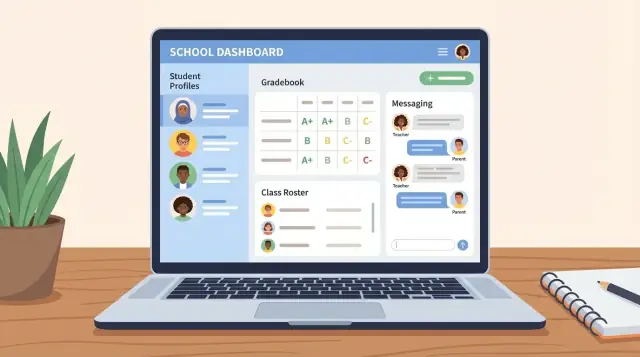
Start With Goals and Real School Workflows
Before you sketch screens or pick a tech stack, get specific about what kind of school you’re building for—and how work actually happens day to day. A “school management web app” for a small private school can look very different from one used by a K–12 district or an after-school program.
Define the school type and real users
Start by naming the environment: K–12, district-wide, private, charter, language school, tutoring center, or after-school. Then list who will touch the system (and how often): office admins, teachers, counselors, students, parents/guardians, principals, and sometimes district staff.
A quick way to validate this is to ask: “Who logs in daily, weekly, or only at semester end?” That answer should shape your priorities.
Identify the core jobs-to-be-done
Write down the essential tasks your app must support from day one:
- Enroll students and keep records up to date
- Create classes/sections and assign teachers
- Track attendance and basic progress
- Enter grades and publish them to families
- Message families and send announcements
Keep the wording concrete and action-based. “Improve communication” is vague; “send a class announcement to guardians in two clicks” is measurable.
Map pain points in the current process
Most schools already have a system—even if it’s informal:
- Spreadsheets for rosters and grades
- Long email threads that lose context
- Paper forms that get retyped (and misread)
- Different “official lists” across staff
Document where errors happen and where time is wasted. Those are your highest-leverage opportunities.
Decide what success means
Choose 2–4 success metrics you can track after launch, such as:
- Time to enroll a new student reduced from days to hours
- Fewer roster/grade errors (and fewer manual corrections)
- Higher guardian response rates to messages
These goals will guide trade-offs later when you scope the MVP and avoid building features that look impressive but don’t reduce real work.
Define Users, Roles, and Permissions Early
A school app succeeds or fails on trust: people need to know who can see what, who can change it, and who can contact whom. If you decide roles and permissions after building features, you’ll end up rewriting screens, reports, and even database rules.
Start with real roles (not “admin” vs “user”)
Most schools need more than four buckets. Map the roles you’ll support on day one—admins, office staff, teachers, counselors, students, and parents/guardians—and write down what each role can view, edit, export, and message.
Examples that often get missed:
- Office staff may edit demographics and enrollment, but shouldn’t change grades.
- Counselors may view schedules and notes, but only for assigned students.
- Teachers may message their classes, but not the entire school.
Decide the “relationship model” for guardians
Guardianship is rarely one-to-one. Plan for:
- Multiple guardians per student (and one guardian linked to multiple students)
- Preferred contact method per guardian (email vs SMS)
- Custody notes and restrictions (e.g., “no messaging to this contact”) visible only to authorized staff
This impacts everything from contact lists to notification preferences and audit logs.
Permissions that match school reality
Schools change constantly. Build permissions with time-based and temporary access in mind:
- Substitute teachers (limited access, automatic expiration)
- Mid-year transfers (records move; past teachers keep read-only history)
- Graduating students (student access may end; transcripts remain)
Finally, define “export” separately from “view.” A teacher seeing a gradebook is normal; downloading a full student roster with contact info should be tightly controlled and tracked.
Model the Data: Students, Classes, Grades, and More
A school app succeeds or fails on its data model. If the underlying “objects” don’t match how schools operate, every feature (gradebook, messaging, reports) will feel awkward.
Start with the core entities
At a minimum, plan for these entities and how they relate:
- Schools (if you support multiple sites or districts)
- Terms (years, semesters, quarters, grading periods)
- Classes/Sections (a specific offering of a course in a term)
- Enrollments (who is in which class, and when)
- Users (students, parents/guardians, teachers, staff/admin)
- Assignments and Grades (including multiple attempts, missing/late flags)
- Attendance (by day and/or by period)
- Messages/Announcements/Notifications (with recipients and delivery status)
A useful rule: treat relationships like Enrollments as first-class records, not just a list on the student. That’s what lets you handle transfers, schedule changes, and mid-term drops cleanly.
Choose identifiers that won’t break later
Give every student and staff member a unique internal ID that never changes. Avoid using email as the only identifier—students’ emails change, parents share emails, and some users may not have one. You can still store email as a login option.
Make grading configurable (but structured)
Schools grade differently. Model support for points vs. percentages, categories, weights, and late/missing policies as configuration per class (or per school), not hard-coded logic.
Decide what must be historical
Be explicit about what you keep long-term: past years, archived classes, grade history, and transcript-ready final marks. Plan for read-only archives so prior terms stay accurate even as policies change.
Scope an MVP You Can Ship and Improve
A school web app can quickly grow into “everything for everyone.” The fastest way to ship something schools will adopt is to define a small MVP that solves daily work, then expand based on real usage.
Pick the smallest feature set that still feels complete
For most schools, the minimum useful loop is:
- Roster/enrollment: who is in which class, and basic student details
- Gradebook: teachers can enter scores and publish them
- Messaging/announcements: staff can notify families and students
That combination creates immediate value for teachers, office staff, and parents without requiring advanced analytics or custom processes.
Choose 2–3 critical screens per role
Design your MVP around the screens people open every day. For example:
- Teacher: “My Classes” → “Grade Entry” → “Student Detail (quick context)”
- Admin: “Enroll Student” → “Manage Sections/Rosters” → “Search Student”
- Parent/Student: “Current Grades” → “Attendance/Assignments (if available)” → “Messages”
When a stakeholder asks for a feature, map it to a screen. If you can’t point to a daily-use screen, it might be a v2 item.
Set firm boundaries for v1
A good MVP has clear “not yet” decisions. Common examples:
- No custom report builder (offer a few fixed reports instead)
- No complex grading rules engine (support common grading types only)
- No full LMS features (assignments, file submissions, quizzes) unless required
Boundaries aren’t saying “no forever”—they protect the timeline and reduce rework.
Write acceptance criteria in plain language
For each feature, define what “done” means in terms non-technical staff can verify.
Example: Teacher grade entry acceptance criteria:
- A teacher can select a class and see the current roster.
- A teacher can enter scores for an assignment and save without losing work.
- Parents/students can only see grades after the teacher clicks “Publish.”
- If a score is missing, it displays as “Not graded” (not zero).
Clear acceptance criteria prevent misunderstandings and help you ship a reliable first version you can improve confidently.
Design Simple, Accessible Screens for Busy Users
School staff and families don’t judge your app by features—they judge it by how quickly they can finish a task between bells, meetings, and pickups. Start by sketching the handful of journeys people repeat every day:
- Add a student and confirm they’re in the right grade and homeroom
- Create a class, then enroll students
- Record an assignment and enter grades without losing your place
- Send an announcement to the right group (and know it went out)
Prioritize “fewer clicks” and clear defaults
Aim for screens that answer: “What do I do next?” Put primary actions where users expect them (top right or fixed bottom on mobile). Use sensible defaults like the current term, today’s date, and the teacher’s current class.
Avoid fancy UI patterns that hide information. Busy users often prefer a straightforward table with strong filtering over a beautiful dashboard they can’t operate quickly.
Accessibility basics that pay off immediately
Accessibility is a usability upgrade for everyone. Cover the fundamentals:
- Readable contrast and font sizes (especially for tables)
- Full keyboard navigation (tab order, visible focus state)
- Clear labels and error messages in simple language (avoid jargon)
Also design for interruption: autosave drafts, confirm destructive actions, and keep forms short.
Responsive layouts for mobile parents
Many parents will use phones. Keep the most common actions mobile-friendly: viewing grades, reading announcements, replying to messages, and updating contact info. Use large tap targets, avoid horizontal scrolling, and make notifications link directly to the relevant screen (not just the inbox).
A good rule: if a parent can’t understand a page in five seconds, simplify it.
Build the Student and Enrollment Module
This module is the source of truth for who a student is and where they belong. If it’s messy, everything downstream (gradebook, messaging, reporting) becomes frustrating.
Start with a practical student profile
Keep the profile focused on what staff actually use day to day:
- Demographics and identifiers: legal/preferred name, student ID, birthdate (if needed), grade level.
- Contacts: guardians, pickup permissions, emergency contacts, preferred language.
- Medical notes (only if required): store the minimum, and restrict access to the smallest group possible.
- Documents: upload items like enrollment forms or custody notes with clear visibility rules and an expiration/archival plan.
Design tip: separate “nice to have” fields from required ones so front-office staff can create a student quickly and fill details later.
Enrollment, placement, and schedules
Model enrollment as a timeline, not a single checkbox. Students transfer, change programs, or switch sections.
A simple structure that works well:
- School year enrollment record (active dates, status)
- Homeroom/advisory (one primary placement)
- Section enrollments (many classes, each with start/end dates)
This makes schedules, rosters, and historical reporting much easier.
Attendance basics (if it’s in scope)
Decide early whether you’re tracking daily attendance, period attendance, or both. Even a basic setup should handle:
- Present/absent/tardy
- Excused vs. unexcused
- Notes and attachments (optional)
Audit history for trust and accountability
For key changes—contacts, enrollment moves, withdrawals—store an audit log: who changed what, when, and (ideally) why. This reduces disputes and helps admins correct mistakes without guessing.
Implement the Gradebook Teachers Will Actually Use
A gradebook fails when it feels like extra paperwork. Your goal is speed, clarity, and predictable rules—so teachers can grade during a five-minute gap and trust what families will see.
Start from the class roster (and keep it reachable)
Make roster management the entry point: select a class, immediately see students, and keep navigation shallow.
Optional but useful: a seating chart or quick-notes panel (e.g., accommodations, participation notes). Keep these lightweight and private to staff.
Assignment creation that matches real grading habits
Teachers think in terms of categories (Homework, Quizzes, Labs), due dates, and scoring methods. Provide:
- Assignment templates with configurable categories and weights
- Due dates and visibility controls (draft/publish)
- Simple rubric support (levels + points), but don’t force rubrics for every assignment
Also support “no grade” items (practice work) so the gradebook can track learning without affecting averages.
Fast grade entry: treat it like a spreadsheet
The core screen should be a grid: students as rows, assignments as columns.
Include bulk actions (mark all present, set scores for a group), keyboard navigation, and autosave with clear status. Add missing/late/excused flags that don’t require entering fake zeros.
Keep calculations transparent: show how category weights, dropped scores, and overrides affect the total.
Student/parent view that explains changes
Families don’t just want a number—they want context. Show:
- What changed (new score, status updated, category reweight)
- When it changed and by whom (audit trail)
- A plain-language explanation of the current average
This reduces support emails and makes the gradebook feel fair.
Add Communication: Messaging, Announcements, and Notifications
Communication is where a school web app can either feel helpful or become noise. Start by supporting two high-value modes: direct messages (for sensitive, student-specific topics) and announcements (for predictable, one-to-many updates). Keep the rules obvious so staff don’t worry they’re messaging the wrong people.
Messaging vs. announcements (and who can reach whom)
Define recipient rules that match real operations:
- 1:1 messaging: teacher ↔ parent/guardian, teacher ↔ student (if allowed), admin ↔ staff.
- Class/group announcements: teacher → enrolled students/guardians; admin → school-wide.
Make recipients driven by enrollment and roles, not manual lists. That prevents mistakes when students transfer classes.
Templates and language support
Schools repeat the same messages: missing assignments, upcoming trips, schedule changes. Add message templates with editable placeholders (student name, due date) so teachers can send consistent notes quickly.
If the school serves multilingual families, plan for translation support. This can be as simple as storing a preferred language and allowing staff to send two versions, or integrating translation later—just don’t block the UI from handling multiple languages.
Attachments that won’t cause trouble
Attachments are useful (permission slips, PDFs), but need guardrails:
- Enforce size limits and accepted file types.
- Consider virus scanning and safe preview/download behavior.
- Keep storage organized by school and retention policy.
Notifications, delivery, and privacy choices
Notifications should be configurable: email, in-app, and (optionally) SMS.
Offer delivery status (sent/failed) by default. Add read receipts only if school policy allows and users actually want them—some communities find them uncomfortable, especially for student messaging.
Keep Communication Safe and Manageable
School messaging can quickly turn from helpful to chaotic if you don’t set guardrails. The goal is to make it easy for the right people to communicate, while preventing overload, harassment, or accidental sharing.
Define who can message whom
Start with clear, simple rules that match real school policies.
For example: teachers can message guardians and students in their classes; guardians can reply to staff but can’t message other families; students may only message teachers (or not at all) depending on age and school rules.
Make these rules configurable per school and per grade band, but keep the default options limited so admins aren’t forced to design a policy from scratch.
Add moderation and a reporting trail
Even with good rules, you need a “what happens when something goes wrong?” flow.
Include a Report action on messages and announcements. When someone reports content, record: the reporter, timestamp, message ID, participants, and a snapshot of the text. Decide who is alerted (e.g., principal, counselor, or a designated compliance inbox) and what they can do next (review, mute a sender, restrict messaging, or escalate).
Keep the system auditable: store moderation actions with who performed them and why.
Prevent spam without blocking normal use
Announcements are powerful—and easy to abuse accidentally.
Add rate limits such as “no more than X announcements per hour per sender” and “no more than Y recipients per batch.” Use simple safeguards like duplicate detection (“This looks identical to your last announcement”) and slowdowns after repeated sends.
Reduce notification overload
Busy users ignore noisy apps. Add quiet hours, per-channel preferences (email vs. push), and digests (e.g., “Send a daily summary at 5pm”). Also support “urgent” messages, but restrict that privilege to specific roles so everything doesn’t become urgent.
Security, Privacy, and Compliance Basics
Schools handle sensitive information: student identities, grades, attendance, health notes, and family contact details. Treat security and privacy as product features, not a checklist at the end. You don’t need to be a lawyer to build safer software, but you do need clear decisions and consistent enforcement.
Authentication and account recovery
Pick an approach that matches how the school already works:
- Email/password for smaller schools that don’t manage accounts centrally
- Google or Microsoft sign-in for districts already using those suites
- District SSO (SAML/OIDC) if required by IT policy
Make password reset and account recovery friendly for non-technical users. Use short, clear emails, avoid confusing security questions, and provide an admin-assisted recovery path for locked-out staff.
Roles, permissions, and auditability
Define roles (teacher, student, parent/guardian, admin, counselor) and enforce role-based access control on every API endpoint—not just in the UI. A teacher should only see students they teach; a parent should only see their own child.
Log key actions (grade changes, roster edits, message sends) with timestamps and who did them. This helps with investigations, disputes, and support.
Data minimization, retention, and deletion
Collect only what you truly need for the workflow. Then plan data retention and deletion rules with school leadership and document decisions (what’s kept, for how long, and who approves deletion). Include export options for administrators so schools can meet record requests.
If you’re aiming for FERPA-style privacy basics, focus on least-privilege access, clear consent boundaries, and secure handling of student records.
Pick a Maintainable Tech Stack and Architecture
Your best “school management web app” stack is the one your team can confidently run for years: hire for it, debug it at 8 a.m. during report cards, and upgrade it without fear.
Choose the stack you can support
For most teams, a boring, popular setup wins:
- Backend: Django/Rails/Laravel/.NET (or Node if your team truly lives in it)
- Database: PostgreSQL (great for a student information system and reporting)
- Frontend: a simple server-rendered UI or a modest React/Vue app for the teacher portal
Prefer clear conventions, good admin tooling, and predictable deployments over trendy complexity.
If you want to move faster in early iterations (especially for MVPs and internal pilots), a vibe-coding platform like Koder.ai can help you generate a working React + Go + PostgreSQL foundation from a chat-driven spec, then refine it with roles/permissions and the workflows described above. Because you can export the source code, it can still fit a maintainable, long-term architecture rather than locking you into a black box.
API design: predictable beats clever
If you need an API (mobile app, integrations, separate frontend), REST is usually the easiest to keep understandable. Use consistent resource names and patterns:
/students,/classes,/enrollments,/gradebooks,/messages
Document it from day one with OpenAPI/Swagger, add pagination and filtering, and version carefully (e.g., /v1/...). GraphQL can be great, but it adds operational and security overhead—choose it only if you have a real need.
File storage for documents and attachments
Grades and messages often include PDFs, IEP-related documents, and attachments. Store files in object storage (S3 or compatible), not in your database.
Use private buckets, short-lived signed URLs, and basic safety controls (size limits, allowed types, and malware scanning) so school messaging doesn’t turn into a security problem.
Plan for multi-school support early
Even if you start with one school, assume you may sell to more. Add a school_id (tenant) to core tables, and enforce it in every query. Keep per-school settings (grading scales, terms, permissions defaults) in a dedicated configuration layer so new schools don’t require custom code.
Integrations, Imports, and Reporting
Integrations are where school apps either save time—or create a new pile of work. Aim for a small set of high-impact connections that match how schools already operate.
Imports and exports that staff can actually use
Start with CSV import/export for your core records: students, guardians, classes/sections, and enrollments. Provide simple templates with clear column names (and examples) so office staff don’t have to guess formatting.
A practical approach is:
- A “Download template” button next to each import screen
- A preview step showing detected columns, missing fields, and row-level errors
- A safe “dry run” validation before anything is written
Also support exporting the same datasets. Even if your app is great, schools want an exit path and a way to share data with districts or auditors.
Notifications via providers (with preferences)
Instead of building email/SMS delivery yourself, integrate with a provider and keep your app focused on who gets what, and when. Make opt-in and preferences visible:
- Parents choose email vs SMS (and quiet hours)
- Students can opt into non-critical notifications
- Teachers can control reminders for assignments and announcements
This reduces complaints and helps with compliance expectations around consent.
Optional calendar sync
Calendar sync can be a “nice-to-have” that wins adoption: assignments, due dates, and events pushed to family calendars. Keep it optional and granular (per class, per child) so calendars don’t get spammed.
Reporting basics that answer real questions
Keep reporting lightweight but useful: grade summaries by class, attendance totals over time, and simple engagement metrics (logins, message reads). Prioritize filters (date range, class, student) and one-click exports to CSV for sharing.
If you want a deeper path, add a /reports hub later—but start with reports people can run in under a minute.
Launch, Onboard Schools, and Iterate
A school web app succeeds or fails at launch—not because of code, but because real people need to trust it, understand it, and fit it into their day. Plan your rollout like an operational change, not just a deployment.
Test what actually breaks schools
Before you invite users in, test the critical flows end-to-end with realistic data:
- Daily workflows: take attendance, enroll a student, enter grades, send an announcement, view a parent message.
- Permissions checks: verify that teachers can only see their classes, parents only see their children, and admins have the right oversight.
- Data integrity: confirm grades calculate correctly, enrollment changes don’t orphan records, and edits are auditable.
Use a simple checklist per role and re-run it on every release.
Pilot first, then expand
Start with one school—or even a small group of teachers—before a full rollout. A pilot helps you validate assumptions (like what a “term” means, how grading scales work, and who sends what messages) without risking trust across the whole district.
During the pilot, track a few practical metrics: login success rate, time to complete common tasks, and the top support questions.
Make training short and task-based
Busy users don’t want manuals. Provide:
- 2–3 minute videos per task ("Enter assignments", "Send a message")
- Role-specific checklists
- A first-week guide that focuses on essentials and what to ignore for now
Support and feedback loop
Set up a clear support workflow: how users report issues, expected response times, and how updates are communicated. Put contact options inside the app and on /contact.
Close the loop by sharing what you fixed and what’s next. If you offer tiers or add-ons, keep it transparent on /pricing.
If you’re building in an environment where stability matters, consider release tooling that makes rollbacks safe. Platforms like Koder.ai include snapshots and rollback (plus deployment/hosting and custom domains), which can reduce risk during a pilot when requirements are still settling.
Finally, iterate in small releases. Schools value stability, but they also love steady improvements that remove friction week by week.
FAQ
What should I define before choosing features or a tech stack?
Start by mapping real daily workflows and the people who do them (office admins, teachers, parents, students). Then define 2–4 measurable success metrics (e.g., “enroll a student in under 15 minutes,” “reduce roster corrections by 50%”). Those constraints make MVP decisions much easier than starting from features or UI.
What’s a realistic MVP for a school management web app?
A practical v1 is usually:
- Roster/enrollment (students, guardians, class/section membership)
- Gradebook (enter scores, calculate totals, publish to families)
- Messaging/announcements (role-based recipients + delivery status)
This covers the daily loop for staff and parents without forcing you into full LMS complexity.
How do I design roles and permissions without rework later?
List real roles (office staff, teacher, counselor, parent/guardian, student, admin) and document what each can view, edit, export, and message. Enforce these rules in the API (not just the UI), and add audit logs for sensitive actions like grade edits and roster changes.
How should I model parents/guardians and custody restrictions?
Model guardianship as many-to-many:
- Multiple guardians linked to one student
- One guardian linked to multiple students
- Per-guardian preferences (email/SMS, preferred language)
- Restricted contacts (e.g., “do not message”) visible only to authorized staff
This prevents contact-list errors and supports real custody and household scenarios.
How should I model student enrollment so transfers and schedule changes work?
Treat relationships like Enrollments as first-class records with start/end dates. That lets you handle transfers, section changes, and mid-term drops without corrupting history. A simple structure is:
- School-year enrollment (status + active dates)
- Homeroom/advisory placement
- Section enrollments per class with timelines
Should I use email as the primary identifier for students and staff?
Avoid using email as the only identifier. Create a unique internal ID per student and staff member that never changes. Emails can change, be shared, or be missing—especially for younger students and some families—so they should be login/contact attributes, not the primary key.
What makes a gradebook teachers will actually use?
Make the grade entry screen behave like a spreadsheet:
- Students as rows, assignments as columns
- Keyboard navigation and bulk actions
- Autosave with clear status
- Missing/late/excused flags (don’t force fake zeros)
Also separate “save” from “publish” so families only see grades when teachers intend to release them.
How do I prevent messaging the wrong families when rosters change?
Use enrollment-driven recipient rules rather than manual lists:
- Teacher announcements → current class students/guardians
- Admin announcements → school-wide
- Direct messages → only allowed role pairs (e.g., teacher↔guardian)
Add templates and delivery status to keep messaging fast, reliable, and less error-prone.
How can I keep school messaging safe and avoid spam or abuse?
Add guardrails:
- Clear “who can message whom” defaults (configurable per school)
- Rate limits and duplicate-send warnings for announcements
- Quiet hours and digest options to reduce overload
- A Report action plus audit trail for moderation (who reported, what, when, and what action was taken)
These controls keep communication useful instead of chaotic.
What security and privacy basics matter most for school apps?
Cover the basics early:
- Role-based access control on every endpoint
- Strong authentication (password or Google/Microsoft/SSO) + friendly recovery
- Audit logs for grade changes, roster edits, and message sends
- Data minimization + documented retention/deletion rules
If you’re targeting FERPA-style expectations, prioritize least-privilege access and clear boundaries around student records.