

How to Build a Web App for Content Approval Pipelines
Step-by-step guide to designing workflows, roles, statuses, UI, and integrations for a web app that routes content through reviews and approvals.
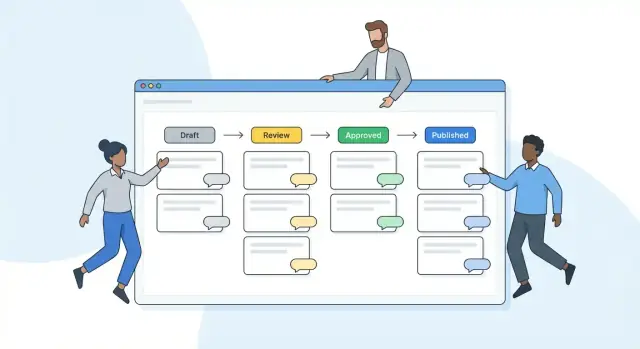
Define the Problem and the Users
Before you design screens or pick a database, get clear on what you’re building: a system that moves content from “someone started it” to “it’s approved and published,” with everyone knowing what happens next.
What a “content approval pipeline” means (plain terms)
A content approval pipeline is the set of steps content must pass through—drafting, review, approval, and publishing—plus the rules about who can move it forward. Think of it as a shared checklist with traffic lights: content has a current status, a next step, and a responsible person.
The goal isn’t to add bureaucracy. It’s to replace scattered emails, chat threads, and “latest_final_v7” files with one place where the current version and decision are obvious.
Typical users and what they need
Most teams fall into a few roles (your app can implement these as roles, groups, or permissions):
- Writers / creators need a simple way to draft, attach assets, respond to feedback, and know exactly what to change.
- Reviewers (editors, legal, brand, SEO) need to comment, request changes, and see what changed since last time.
- Approvers need a quick decision flow: approve, reject, or send back—often with required notes.
- Publishers need a clean handoff to the publishing step, with confidence the right version was approved.
- Admins need to configure workflow rules, manage users, and audit what happened.
Even if the organization chart is complex, your app should keep the day-to-day experience simple: “What’s waiting on me?” and “What do I do next?”
Common content types you should plan for
A pipeline app usually starts with one content type, then expands. Common types include:
- Articles and blog posts (long-form with headings, links, and metadata)
- Product pages (structured fields like features, pricing, compliance notes)
- Social posts and email copy (short-form with variants)
- Assets (images, PDFs, videos) that require approval alongside text
This matters because the workflow may be the same, but the data and UI differ. For example, product pages may need field-level review, while articles need rich text and editorial comments.
What success looks like
Define success in outcomes the team can feel:
- Fewer bottlenecks: less time spent asking “who has this?”
- Clear ownership: every item has a current assignee or responsible role
- Traceability: you can answer “who approved what, when, and why?” without digging through messages
If you can measure it, even better—cycle time from draft to approval, number of revision loops, and overdue reviews. These targets will guide your workflow design and reporting later.
Design the Workflow States and Transitions
A content approval app becomes easy to use when everyone can answer two questions at a glance: “What state is this in?” and “What can happen next?” Start by defining a small set of clear, mutually exclusive states, then decide the rules that move content between them.
Start with a simple, recognizable state model
A common baseline is:
Draft → Review → Revisions → Approved → Scheduled/Published
Keep state names user-friendly (“Needs changes” often reads better than “Revisions”), and make sure each state implies who should act next.
Single-step vs multi-step approvals
Decide whether “Approved” is one decision or the result of multiple checks.
If you need multi-step approval (for example, Legal then Brand), model it explicitly:
- Option A: Separate states (e.g., “Legal Review” → “Brand Review”)
- Option B: One “Review” state with required approvals (e.g., Legal = approved AND Brand = approved)
Option B keeps the state list shorter, but you’ll need to show progress clearly (e.g., “2 of 3 reviewers approved”).
Transition rules: what’s allowed, and when
Write down the allowed moves and enforce them consistently:
- When can an author submit Draft to Review?
- Who can send content back to Revisions?
- Can reviewers edit, or only comment?
- Can Approved content be changed without re-review?
Also decide whether “backward” transitions preserve approvals or reset them (most teams reset approvals when content changes).
Parallel vs sequential reviews
Parallel reviews are faster: multiple reviewers can approve at once, and you decide whether approval requires all reviewers or any one of them.
Sequential reviews are stricter: content must pass step-by-step (useful for compliance). If you support both, make it a per-workflow setting so teams can choose what fits their process.
Plan Roles, Permissions, and Ownership
A content approval workflow fails fastest when people aren’t sure what they’re allowed to do—or who’s responsible when something gets stuck. Before building features, define clear roles, what each role can do at every stage, and how ownership changes as content moves through review.
Start with role-based access
List the actions your app supports (create, edit, comment, request changes, approve, publish, archive) and map them to roles. A simple baseline might be:
- Author: create and edit drafts, respond to feedback
- Reviewer: comment and request changes, approve within scope
- Approver/Lead: final approval, override decisions when needed
- Publisher: schedule/publish and manage post-publication updates
Keep “publish” separate from “approve” if you want an extra safety check.
Make permissions granular, but predictable
Most teams need rules that vary by context:
- Team or project: Marketing can’t approve Legal’s content
- Content type: Blog posts vs. press releases vs. product pages
- Stage: Editing allowed in “Draft,” read-only in “In Review,” limited edits in “Approved”
Aim for a permission model that’s easy to explain in one sentence, like: “Permissions are assigned per project and enforced per workflow stage.” If users need a training session to understand it, it’s too complex.
Define ownership and delegation
For every item, store:
- Owner (who drives it forward)
- Current assignee (who must act next)
- Required approvers (individuals or groups)
Add delegation so approvals don’t stall during time off: allow backup approvers, temporary role handoffs, and an “auto-reassign after X days” rule.
Admin controls for exceptions
Admins need tools to keep work moving without breaking trust: manage roles, view permission checks, resolve conflicts (e.g., two approvers disagree), and reassign items with a required reason. Pair this with an audit-friendly record (covered later) so overrides are transparent.
Model the Data (Entities and Relationships)
Your data model is where an approval pipeline either stays flexible—or becomes painful to change. Aim for a structure that supports versioning, discussions, and traceability without forcing every future feature into a single “content” table.
Core entities to start with
A practical baseline usually includes:
- ContentItem: the “container” (e.g., Article, Landing Page, Press Release). Stores stable metadata like
id,type,owner_id, currentstatus, and timestamps. - Version: the editable snapshot of the content at a point in time (e.g.,
title,body,tags, structured fields). A ContentItem has many Versions. - Comment: discussion tied to either a ContentItem or a specific Version (often better on Version to avoid confusion). A ContentItem has many Comments.
- ReviewRequest: a request to review a specific Version, assigned to one or more reviewers with due dates and instructions.
- Approval: an individual reviewer’s decision on a ReviewRequest (approve/reject/request changes), ideally with a required note.
Relationships that keep you sane
Model relationships explicitly so reporting is easy later:
- ContentItem 1→N Version (and a pointer like
current_version_idfor fast reads) - Version 1→N Comment
- Version 1→N ReviewRequest
- ReviewRequest 1→N Approval (one per reviewer)
If you support files, add Attachment linked to a Version (or Comment) so assets follow the exact revision being reviewed.
Statuses: enum vs configurable table
If your workflow is fixed (Draft → In Review → Approved → Published), an enum is simple and fast.
If customers need custom states (“Legal Review”, “SEO Check”), use configurable tables like WorkflowState and WorkflowTransition, and store the current state as a foreign key. This costs more upfront but prevents a code deploy for every change.
Structured fields and references
Even simple content benefits from predictable structure: title, body, summary, tags, plus optional JSON for type-specific fields. Add Reference links (e.g., sources, tickets, or related pages) so reviewers can see context without digging elsewhere.
Build the Core UI for Drafting and Reviewing
The UI is where your approval pipeline becomes real for users. Aim for two primary surfaces—Drafting and Reviewing—with the workflow always visible so nobody has to guess what happens next.
Draft create/edit screen: make “where am I?” obvious
On the editor screen, reserve a consistent header area for workflow context:
- Current status (e.g., Draft, In Review, Needs Changes)
- Owner (who is responsible right now)
- Next step (what action moves it forward, and who can do it)
Keep actions contextual: “Submit for review” should only appear when the draft is valid enough, while “Revert to draft” should be restricted to allowed roles. Add lightweight checks (missing title, empty summary) that prevent accidental submissions without turning the editor into a form-filling chore.
Review screen: optimize for comments and change requests
Reviewers should spend their time reading and deciding—not hunting for buttons. Use a split layout: content on one side, review tools on the other. Make it easy to:
- Leave inline comments (anchored to a paragraph/selection)
- Create a change request with a clear checklist or required fields
- Resolve threads and summarize what’s blocking approval
Diff + change summary: reduce back-and-forth
When a revision is submitted, show a diff view between versions and a short change summary (“What changed since last review?”). This avoids repeated feedback and speeds up re-approval.
Batch actions: help busy reviewers move work along
For teams reviewing many items, add batch actions on list views: approve multiple, request changes on multiple, or assign to a different reviewer—while still requiring a short note when requesting changes to keep decisions traceable.
Notifications, Reminders, and Subscriptions
Notifications are where a content approval workflow feels “alive.” Done well, they keep reviews moving without forcing people to constantly check the app. Done poorly, they train users to ignore everything.
Channels: in-app first, then email, then chat hooks
Start with in-app notifications for real-time awareness (a bell icon, an inbox, unread counts). Keep messages short and actionable: what changed, who did it, what’s expected next.
Add email for events that matter when someone isn’t logged in: being assigned a review, being mentioned, or an upcoming deadline. If your audience uses chat heavily, offer optional Slack/Teams hooks via integrations like “post to channel when an item enters Review.” Make these opt-in per workspace or project.
Reminder rules for stalled items (SLA-based nudges)
Reminders should be tied to clear timing rules, not feelings.
For example:
- If an item sits in Needs Review for 48 hours, remind the assigned reviewer.
- If it sits for 72 hours, notify the reviewer’s backup or a project owner.
- If the due date is in 24 hours, send a “deadline approaching” note.
Make reminders smart: suppress them when a reviewer is out of office (if you track it), and stop nudging once a comment or decision is posted.
Subscriptions: follow what you actually care about
Let users subscribe at multiple levels:
- An item (draft/article) to track every change.
- A project/campaign to follow overall progress.
- A stage (e.g., everything entering Legal Review).
Subscriptions reduce “FYI” mentions and help stakeholders self-serve updates.
Prevent overload with preferences and digests
Give each user a notification settings page (link it from /settings/notifications) with:
- Per-channel toggles (in-app vs email vs chat)
- Per-event controls (assignment, status change, comment, approval/rejection)
- A daily or weekly digest option for lower-priority updates
Design principle: send fewer, clearer notifications—each one should answer “what happened?” and “what should I do next?”
Audit Trail and Version History
When content moves through review, the history is often more important than the current status. An audit trail protects you when someone asks, “Who approved this?” or “Why did we publish that version?” It also reduces internal friction by making decisions visible and accountable.
What to record (and how)
Start with an immutable event log: a chronological record that you append to, not overwrite. Each entry should answer four questions—who, what, when, and why.
- Immutable log: who changed status, when, and why (include optional “reason” fields for rejections or urgent approvals)
- Capture approval decisions, comments, and attachments (e.g., legal notes, screenshots, brand guidelines) alongside the event that prompted them
Keep the log readable for non-technical users: show human-friendly timestamps, names (not IDs), and the exact status transition (Draft → In Review → Approved). If you have a “request changes” step, record the requested changes as structured fields (category, severity) in addition to free-text comments.
Version history you can trust
Audit trails explain decisions; version history explains content changes. Save a new version whenever the content body, title, metadata, or critical fields change.
- Version history with restore/rollback options so editors can revert safely without copying and pasting from old emails
Make the UI diff-friendly: highlight what changed between versions (even a simple “before/after” view is enough to start).
Audit exports and retention
Audits happen outside your app too.
- Export logs for audits (CSV/PDF) where appropriate
Decide retention rules early (e.g., keep logs for 2–7 years) and make exports filterable by date range, content item, and workflow stage to avoid dumping thousands of lines into a spreadsheet.
Search, Filters, and Reporting Views
Once your approval pipeline has more than a handful of items, people stop “browsing” and start finding. Great search and views turn your app from a list into a reliable working tool.
Full‑text search that respects how teams work
Support full‑text search across the places reviewers actually reference: title, body, and comments. Make results feel predictable by showing highlighted matches and basic context (status, project, current assignee). If you store long content, index only what you need (for example, the latest version plus comments) so results are fast and relevant.
A small touch that helps: search operators that non-technical users understand, like quoting phrases ("brand voice") or filtering by tag right in the search bar.
Filters that map to real questions
Filters should answer “What do I need to do next?” and “What’s stuck?” Common filters include:
- Status (Draft, In review, Approved, Changes requested)
- Assignee and team
- Due date (overdue, due this week)
- Tags, project/campaign, requester
Combine filters freely, and show them as removable chips so users can see why an item is in the list.
Saved views for individuals and teams
Let users save a set of filters as a named view, like “Needs my review” or “Overdue for Legal.” Teams often want shared views pinned in the sidebar so everyone works from the same queue. Consider permissions here: a saved view should only surface items the viewer can access.
Reporting dashboards that reveal bottlenecks
Dashboards don’t need to be fancy to be useful. Start with a few clear metrics: items per status, average cycle time per stage, and where work piles up. If a stage is consistently slow, that’s a staffing or policy issue—your reporting should make it obvious.
API Design for Workflow Operations
Your API is the contract between the UI, integrations, and the workflow rules. If it’s consistent, the product feels predictable; if it’s inconsistent, every screen and integration becomes a one-off.
REST vs. GraphQL (and how to choose)
REST is usually the simplest fit for an approval pipeline web app because workflow actions map cleanly to resources (items, reviews, decisions) and you can keep caching, logs, and tooling straightforward.
GraphQL can be helpful when many screens need different “shapes” of the same content item (draft + reviewers + history in one call). If you go GraphQL, still model workflow actions explicitly (mutations), and keep naming consistent with your state machine.
Keep endpoints predictable
Design around two ideas: (1) the content item as the core resource, and (2) workflow actions as explicit operations.
A practical REST set might look like:
GET /content?status=in_review&cursor=...(lists)GET /content/{id}(details)POST /content/{id}/workflow/request-reviewPOST /content/{id}/workflow/decision(approve / request changes / reject)POST /content/{id}/workflow/transition(admin-only overrides, if allowed)
Keep request bodies boring and consistent:
{ "action": "approve", "comment": "Looks good.", "assignedTo": "user_123" }
Avoid endpoints like /approveContentNow or PUT /content/{id}/status without validation—those tend to bypass the rules that make a workflow trustworthy.
Idempotency for state changes (and webhooks)
Workflow operations often get retried (mobile networks, queue replays, webhook redelivery). Make state-changing requests idempotent by accepting an Idempotency-Key header and returning the same result for repeated calls.
Also consider optimistic concurrency:
- Include a
version(oretag) inGET /content/{id} - Require
If-Match(orversion) on decisions/transitions to prevent “last write wins” accidents
Rate limiting and pagination for list views
Approval tools live on list screens: “Needs review”, “Waiting on legal”, “My assignments”. Implement pagination from day one—cursor-based pagination is easier to keep stable as data changes.
GET /content?status=needs_changes&limit=50&cursor=...
Add sensible rate limits per token (especially for search-heavy endpoints) and return clear headers (e.g., remaining requests, reset time). This protects your workflow management system and makes integration failures easier to diagnose.
Integrations and Automation Hooks
Integrations are where an approval pipeline stops being “another tool” and starts fitting into how your team already creates, reviews, and ships content. The goal is simple: reduce copying-and-pasting, keep source files connected, and trigger the next step automatically.
Common integration targets
A practical content workflow app typically connects to a few systems:
- CMS (Contentful, WordPress, Webflow): push “approved” content into the publishing queue, or pull drafts in to be reviewed.
- Google Docs: import a Doc as a draft, sync comments, or snapshot the final text when it’s approved.
- GitHub: treat content like code—open a PR when a draft is ready, require approvals, and merge on publish.
- Figma: attach design comps to a content item so reviewers see the latest visuals alongside the copy.
- DAM (Bynder, Cloudinary, Brandfolder): link approved images and track usage rights and versions.
Webhooks and automation events
Expose a small set of reliable events so other tools can react without custom one-off work:
content.approvedcontent.rejectedcontent.publishedreview.requested
Each webhook should include the content ID, current status, timestamps, and URLs back to your app. Document the payloads and signing strategy in a simple reference like /docs/api.
Import/export for migration and backup
Teams rarely start from zero. Support:
- CSV/JSON import to create items, assign owners, and set initial states.
- Export of content + metadata + audit trail for reporting, compliance, or moving platforms later.
If you only build one “power feature” here, make it idempotent: importing the same file twice shouldn’t create duplicates.
Choose a Practical Tech Stack and Architecture
A content approval workflow app is mostly “business logic + permissions + auditability.” That’s good news: you don’t need exotic tech to get it right. Pick tools your team can ship and maintain confidently, then design the architecture around predictable workflow operations (create draft → request review → approve/reject → publish).
If you’re validating the product before investing in a full build, you can prototype the workflow UI, roles, and notifications quickly in a vibe-coding platform like Koder.ai. Because it generates full applications from chat (including React UIs and Go + PostgreSQL backends), it’s a practical way to turn the state machine and permission rules you define here into a working internal tool, with source code export available when you’re ready to take it further.
Frontend: optimize for speed and consistency
For the UI, React or Vue are both great fits—choose the one your team already knows. Pair it with a component library (for example, Material UI, Ant Design, Vuetify) so you can move fast on forms, tables, modals, and status badges.
Key UI needs are repetitive: state chips, reviewer queues, diff views, and comment threads. A component library helps you keep those screens consistent without spending weeks on styling.
Backend: pick what your team can operate
Any mainstream backend can handle an approval pipeline:
- Node/Express: fast iteration, lots of ecosystem options.
- Django: strong admin tooling, great for data-heavy workflow apps.
- Rails: excellent conventions for CRUD + workflows.
- .NET: strong enterprise fit, great tooling, good performance.
What matters most is how clearly you can implement workflow rules, enforce permissions, and record an audit trail. Prefer frameworks that make it easy to test business logic and keep controllers thin.
Data storage: Postgres + object storage
Use Postgres for relational workflow data: content items, versions, workflow states, assignments, comments, approvals, and permissions. Approval systems thrive on clear relationships and transactions.
For uploads (images, PDFs, attachments), use object storage (e.g., S3-compatible) and store only metadata + URLs in Postgres.
Background jobs: keep the app responsive
Notifications, reminders, and outbound webhooks should run in background workers, not in the request/response cycle. This avoids slow page loads and makes retries straightforward.
Typical jobs:
- Send email/Slack notifications when a review is requested
- Daily reminders for overdue reviews
- Deliver webhooks to integrations with retry and backoff
A simple architecture that scales with you
Start with a modular monolith: one backend service, one database, one job queue. Add clear boundaries (workflow engine, permissions, notifications) so you can split services later if needed. If you want a preview of what those boundaries look like from an API perspective, see /blog/api-design-for-workflow-operations.
Testing, Deployment, and Ongoing Maintenance
A content approval workflow is only “done” when it behaves predictably under real pressure: urgent edits, multiple reviewers, and lots of notifications. Treat testing and operations as part of the product, not an afterthought.
Test what can break trust
Start with unit tests around the rules that define your system’s integrity:
- Transition rules (e.g., Draft → In Review, In Review → Approved)
- Permission checks (who can submit, approve, request changes, or revert)
- Edge cases like “approve after changes requested,” or “two reviewers act at once”
Then add integration tests that run end-to-end approval flows. These should confirm that actions update status correctly, create the right tasks, and trigger notifications (email/in-app) at the right time—without duplicates.
Deploy like you expect real usage
Before production, maintain seed data and a staging environment that mirrors realistic review scenarios: multiple roles, example content types, and varied deadlines. This lets stakeholders validate the flow without guesswork and helps your team reproduce bugs quickly.
A practical deployment checklist includes:
- Database migrations tested on staging
- Background job workers scaled to expected volume
- Rollback plan (including how to handle partially processed approvals)
Monitor what users feel first
After launch, ongoing maintenance is mostly about noticing issues early:
- Error rates and slow endpoints (performance metrics)
- Queue backlogs (notifications, reminders, exports)
- Webhook failures for integrations and automations
Pair monitoring with lightweight operational routines: weekly review of failures, alert tuning, and periodic permission audits. If you later add workflow changes, ship them behind a feature flag so teams can adopt updates without disruption.
FAQ
What is a content approval pipeline in plain terms?
A content approval pipeline is a defined workflow that moves content through clear states (like Draft → Review → Approved → Published), with rules about who can advance it.
It replaces scattered feedback (email, chat, filenames) with a single source of truth for status, next step, and responsibility.
Which user roles should a content approval app support?
Most teams need at least five roles:
- Authors: draft and revise
- Reviewers: comment, request changes, approve within scope
- Approvers/Leads: final decision and conflict resolution
- Publishers: schedule/publish and manage post-publication updates
- Admins: configure workflows, permissions, and audits
You can implement these as roles, groups, or permissions, but the UI should always answer: “What’s waiting on me?”
What workflow states should I start with?
Start with a small, mutually exclusive set of states that clearly imply the next actor, for example:
- Draft
- In Review
- Needs Changes
- Approved
- Scheduled/Published
Keep names user-friendly (e.g., “Needs changes” instead of “Revisions”) and enforce allowed transitions so people can’t skip required checks.
When should I use single-step vs multi-step approvals?
Use single-step approval when one decision is enough (small teams, low risk).
Use multi-step approval when specific groups must sign off (legal, brand, compliance). Two common models:
- Separate states (Legal Review → Brand Review)
- One Review state with required approvals (e.g., 2 of 3 must approve)
If you choose the second, show progress explicitly (like “2/3 approvals complete”).
What transition rules matter most in an approval workflow?
Define transition rules up front and enforce them consistently:
- Who can submit Draft → Review?
- Who can send Review → Needs Changes?
- Can reviewers edit or only comment?
- Do changes reset previous approvals?
Most teams reset approvals whenever the reviewed content changes, to keep decisions tied to a specific version.
What core database entities do I need for a content approval pipeline?
Model the basics with entities that make versioning and traceability straightforward:
- ContentItem (container + stable metadata)
- Version (snapshot of editable fields)
- Comment (ideally tied to a Version)
- ReviewRequest (asks specific people to review a Version)
- Approval (each reviewer’s decision + required note)
This structure makes reporting and audits much easier later.
Should workflow statuses be an enum or configurable in the database?
If your workflow is fixed and won’t change, an enum is simple and fast.
If you expect custom states per customer/team (e.g., “SEO Check”, “Legal Review”), store workflow configuration in tables like WorkflowState and WorkflowTransition, and keep the current state as a foreign key.
Choose configurability when you want to avoid code deploys for workflow changes.
What UI features make reviewing and revisions faster?
Two key screens usually carry the product:
- Drafting/editing: show status, owner, and next step; gate “Submit for review” behind lightweight validation
- Reviewing: optimize for inline comments, clear change requests, and an obvious approve/request-changes decision
Add a diff view and a short “what changed” summary to reduce repeated feedback and speed re-approval.
How should notifications and reminders work without spamming users?
Use in-app notifications as the default, and add email/chat for higher-impact events.
Good reminders are SLA-based (e.g., nudge after 48 hours in review; escalate after 72). Include:
- Assignment notifications
- Due-date reminders
- Escalation to backup approvers
- User preferences and optional digests
Stop reminders once a reviewer acts, and avoid flooding users with FYI noise.
What are best practices for API endpoints that change workflow state?
Design your API around resources plus explicit workflow actions:
GET /content/{id}POST /content/{id}/workflow/request-reviewPOST /content/{id}/workflow/decision(approve/request changes/reject)
For reliability:
- Support
Idempotency-Keyfor retried state changes - Use concurrency controls (
etag/If-Matchor version fields) - Use cursor-based pagination on list endpoints
Avoid raw PUT /content/{id}/status updates that bypass validation.