

How to Build a Web App for API Docs and Changelogs
Learn how to plan, design, and build a web app that centralizes API docs and changelogs, with versioning, approvals, search, and alerts.
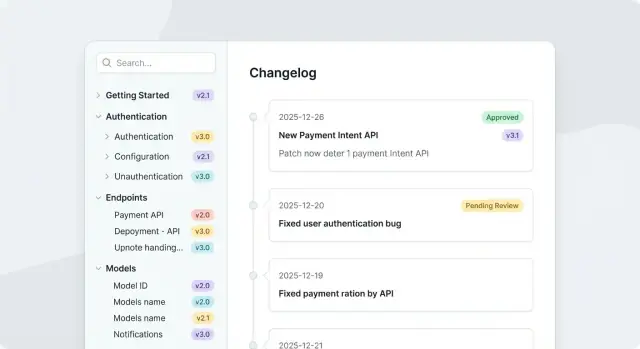
Define Goals and Users
Before you choose features or pick a tech stack, get precise about who this app serves and why it should exist. API docs and changelogs are only “good” when they help the right people find the right answers quickly.
Identify your primary audiences
Start by naming the groups that will use (or be affected by) the app:
- Internal teams (engineering, support, product): need a single source of truth and a fast way to publish updates.
- Partners: need stable documentation, clear access controls, and predictable release communication.
- Public developers: need easy discovery, trustworthy versioning, and simple upgrade guidance.
If you try to optimize for everyone equally, you’ll likely ship a confusing first release. Pick a primary audience and explicitly treat the others as secondary.
Capture the real pain points
Write down the specific problems you’re solving, using examples from recent incidents:
Scattered docs across wikis and repos, release notes posted in Slack but not preserved, endpoints that changed without a clear deprecation policy, multiple “latest” versions, or support tickets that boil down to “where is this documented?”
Turn these into statements you can validate, such as:
- “Developers can’t tell which version a code sample targets.”
- “Support can’t link customers to a canonical changelog entry.”
Set success metrics you can measure
Pick a small set of metrics tied to outcomes:
- Time to publish (draft → approved → live)
- Reduction in repetitive support questions (tag-related tickets)
- Adoption of the latest version (traffic to latest docs, upgrade completion)
Define how you’ll measure them (analytics, ticket tags, internal survey).
Decide on access: public, private, or mixed
Many teams need mixed access: public docs for core endpoints, private docs for partner-only features, and internal notes for support.
If you expect mixed access, treat it as a first-class requirement—your content structure and permissions model will depend on it.
Define “done” for the MVP
Clarify what the first release must achieve. For example:
“Support can share a stable link to versioned docs and a human-readable changelog, and the product team can publish within one business day.”
This definition will guide every tradeoff you make in the next sections.
Choose Features for an MVP
An MVP for an API documentation app should prove one thing: your team can publish accurate docs and changelogs quickly, and readers can reliably find what changed. Start by choosing features that support the core publishing loop, then add conveniences only if they directly reduce friction.
Must-have features (ship these first)
Focus on the smallest set that supports real documentation and real releases:
- Pages: a docs hierarchy (e.g., Overview → Guides → Reference) with drafts and published states.
- Changelog entries: structured posts with title, date, type (Added/Changed/Fixed/Deprecated), and affected endpoints.
- Version tags: attach a version (or date-based release) to both pages and changelog entries so users can filter what applies to them.
- Search: fast, forgiving search across page titles, headings, and changelog text.
- Roles: at minimum, Admin, Editor, and Viewer, so changes aren’t bottlenecked on a single person.
Content needs (so people actually use it)
Markdown is usually the quickest path to high-quality technical content while staying editor-friendly.
Ensure your editor supports:
- Markdown with preview
- Code blocks with syntax highlighting
- Tables (for parameters, error codes)
- Basic file management for assets (diagrams, UI screenshots)
Nice-to-have features (delay until the core loop works)
These are valuable, but they’re easy to overbuild early:
- Inline comments or “suggested edits” for collaboration
- Analytics (top pages, failed searches) to guide improvements
- Webhooks (e.g., notify Slack, trigger internal tooling)
- Multi-product support if you truly have separate APIs with separate audiences
Non-functional requirements (set expectations early)
Write down targets now so you don’t re-architect later:
- Uptime goal (e.g., 99.9%) and backup/restore expectations
- Performance targets (search results in < 300ms, page loads in < 2s on average)
- Accessibility baseline (aim for WCAG 2.1 AA for navigation and editor UI)
Compliance and security (only if relevant, but decide upfront)
If you sell to larger orgs, plan for:
- Audit trail (who changed what, and when)
- Retention rules for deleted content
- SSO (SAML/OIDC) and enforced MFA
If you’re unsure, treat audit logging as “small now, essential later.”
Plan the Architecture and Tech Stack
A clean architecture makes everything else easier: editing docs, publishing releases, searching, and sending notifications. For an API docs + changelog app, you can keep the first version simple while leaving room to grow.
A simple, scalable baseline
Start with four building blocks:
- Web frontend: the UI for writing docs, browsing versions, and reviewing changes.
- Backend API: handles authentication, permissions, workflow state, and content queries.
- Database: stores users, projects, doc metadata, versions, review status, and changelog entries.
- File/object storage: stores larger assets (attachments, exports) and optionally rendered HTML.
This separation lets you scale independently: a heavy search or rendering job shouldn’t slow down the editor.
Picking a stack (and how to decide)
You have several good options; the best choice is usually the one your team can ship and maintain confidently.
- Node.js (Express/NestJS): great ecosystem for web apps; strong Markdown tooling; easy real-time features.
- Python (FastAPI/Django): fast to build, strong typing options, and excellent background job support.
- Ruby on Rails: fast CRUD development; conventions help when building workflows and admin panels.
For the frontend, a common choice is React/Next.js for SEO-friendly docs pages and a smooth editor experience.
If your goal is to stand up a working portal quickly (and still end up with real source code), a vibe-coding platform like Koder.ai can be a practical accelerator. You can describe the docs workflow and permission rules in chat, generate a React frontend with a Go backend (PostgreSQL), and iterate in “planning mode” before committing to implementation details.
Where your docs “live”
Decide early, because it affects versioning and workflow later:
- Database-backed: easiest for WYSIWYG/Markdown editors and permissions.
- Git-backed: perfect for developer teams and PR reviews.
- Hybrid: database for drafts + Git export/import for long-term history.
Environments and future integrations
Plan local → staging → production from day one, even if staging is minimal. Also list likely integrations (CI to validate specs, ticketing for approvals, chat for release alerts) so you avoid choices that block them later.
Design the Data Model
A clean data model is what makes your docs, changelogs, and permissions feel “obvious” to users later. Aim for a schema that supports multiple products/APIs, predictable publishing states, and traceability.
Core entities
Most API documentation apps can start with these building blocks:
- Product: top-level grouping (e.g., “Payments”).
- API: a specific interface within a product (e.g., “Checkout API”).
- DocPage: the actual content units (guides, reference pages, tutorials).
- Version: semantic version or date-based release identifier.
- ChangelogEntry: a single change tied to an API/product and usually a version.
- User, Role: people and their access level.
Relationships that keep things navigable
Model content so it’s easy to answer common questions:
- A Product has many APIs.
- An API has many DocPages and many ChangelogEntries.
- A ChangelogEntry links to a Version (and optionally specific DocPages it affects).
DocPages usually need hierarchy. A simple approach is parent_id (tree) plus a position field for ordering. If you expect large trees and frequent reordering, consider a dedicated ordering strategy (like sortable lists) from day one.
Metadata you’ll be glad you stored
For each DocPage and ChangelogEntry, store:
- status:
draft/in_review/published - tags: for filtering and discovery
- visibility: public vs internal vs partner
- owners: one or more responsible users/teams
Audit trail and attachments
Track accountability with an audit log: actor_id, action, entity_type, entity_id, before, after, created_at.
For attachments, prefer object storage (S3/GCS/Azure Blob) and store only metadata in your DB (URL, mime type, size, checksum). Keeping large binaries out of the database typically improves performance and simplifies backups.
Set Up Auth, Roles, and Permissions
Authentication and authorization shape how safely your docs and changelogs can be managed. Get them right early so you don’t end up retrofitting rules after content and teams scale.
Define the roles (and what they can do)
Start with a small, clear set of roles:
- Reader: can view published documentation, changelogs, and release notes.
- Editor: can create and edit drafts (docs pages, changelog entries), but cannot publish.
- Reviewer: can comment, request changes, and approve items for publishing.
- Admin: can manage users, configure settings, and override workflow locks.
Keep permissions tied to actions (create/edit/approve/publish/archive) rather than UI screens. This makes your rules easier to audit and test.
Pick authentication that matches your audience
Common options:
- Email/password: simplest to ship; requires secure password storage (bcrypt/argon2) and password reset flows.
- OAuth (Google, GitHub): good for external contributors and developer communities.
- SSO/SAML: consider if you’re selling to enterprises and need centralized identity.
If your app will be used by multiple companies, design for organization/workspace membership from day one.
Authorization rules that protect your history
Docs systems often fail when older versions can be quietly rewritten. Add explicit rules such as:
- Only Admins (or a special “Maintainer” role) can edit published content.
- Older versions are read-only unless an admin creates a new patch version.
- Only Reviewers/Admins can approve; only Admins (or designated publishers) can publish.
Model these rules at the API level, not only in the frontend.
Security basics and content safety
Protect sessions with secure, httpOnly cookies, short-lived tokens, and proper logout. Add CSRF protection for cookie-based sessions. Apply rate limiting to login, password reset, and publish endpoints.
Finally, treat documentation as untrusted input. Sanitize HTML/Markdown output and block script injection (XSS). If you support embeds, use an allowlist and safe rendering defaults.
Build the Documentation Editor Experience
A docs platform lives or dies by its editor. Your goal is to make writing feel fast, predictable, and safe—authors should trust that what they see while editing is what readers will get.
Pick the right editor (Markdown, rich-text, or both)
Most API teams benefit from Markdown-first editing: it’s quick, diff-friendly, and works well with versioning. Still, some contributors prefer a rich-text experience for tables, callouts, and formatting.
A practical approach is dual-mode:
- Markdown mode for power users and precise control
- Rich-text mode for occasional contributors
- A single underlying format (store Markdown, render to HTML) to avoid mismatches
Make preview feel like the final page
Include a live preview that renders the page with the same components, fonts, and spacing used in production. Add a “Preview as reader” toggle that hides editor-only UI and shows navigation and sidebars.
Keep previews accurate for:
- code highlighting
- callouts (Note/Warning)
- tables and responsive layout
- embedded components like endpoint blocks
Use reusable blocks instead of copy-paste
Docs get inconsistent when everyone hand-writes the same patterns. Provide reusable components authors can insert:
- Code samples (language tabs, copy button)
- Endpoint blocks (method, path, auth, example request/response)
- Parameter tables (name, type, required, description)
This reduces formatting errors and keeps updates centralized.
Define linking rules (and enforce them)
Internal links should be easy and reliable:
- Autocomplete links to other pages (e.g., /docs/authentication)
- Allow linking directly to changelog entries (e.g., /changelog/2025-10-14)
- Warn on broken links before publishing
If you support anchors, generate them consistently so headings don’t “move” unexpectedly.
Establish a lightweight style guide
Add a short style guide accessible from the editor (e.g., /docs/style-guide) covering:
- heading hierarchy and naming (H2 for sections, H3 for subsections)
- tone (clear, active voice, avoid sarcasm)
- examples (always include a success case; add an error case when common)
Small constraints here prevent big cleanup projects later.
Implement Versioning and Deprecation Rules
Versioning is where API docs stop being “a set of pages” and become a reliable contract. Your app should make it obvious what’s current, what changed, and what’s no longer safe to build against.
Pick a versioning model
Two common approaches work well:
- Per-page versions: each page (endpoint, guide) can have its own history. This is flexible for fast-moving products, but it’s easier to end up with mismatched pages across the docs.
- Per-release snapshots: every release creates a frozen snapshot of the whole docs set (even if only one page changed). This is simpler for users: “v1.4 docs” always match “API v1.4”.
If your API is versioned as a whole, snapshots usually reduce confusion. If teams ship changes independently (SDKs, features, endpoints), per-page versioning can be more practical.
Define URL rules: latest vs pinned
Support both browsing styles:
- Latest:
/docs/latest/...for most readers. - Pinned:
/docs/v1/...,/docs/v1.4/...for customers who need stability.
Make “latest” a pointer, not a copy. That way you can update it without breaking pinned links.
Decide what triggers a new version
Write explicit rules into the app so authors don’t guess:
- New version: breaking changes, removed/renamed fields, changed auth requirements, new required parameters, behavior changes.
- Patch note: typo fixes, examples, clarifications, non-breaking additions.
Enforce this with a simple prompt during publishing: “Is this breaking?” plus a required justification.
Handle deprecations consistently
Deprecation needs structure, not just a warning paragraph.
Add first-class fields:
- Deprecated in (version/date)
- Removal date or removed in version
- Replacement (link to new endpoint/page)
Display a banner on affected pages and surface deprecations in changelogs and release notes so users can plan.
Plan migration from existing docs
Treat migration like importing history:
- Map existing tags/branches to your version model.
- Import older changelog entries as pinned releases (even if imperfect).
- Start with a clean “vNext/latest” and backfill only the versions customers still use.
This gives you usable versioning on day one without needing to rewrite everything.
Create a Publishing and Review Workflow
A clear workflow prevents broken docs, accidental releases, and “who changed this?” confusion. Treat docs pages and changelog entries like content that moves through predictable states, with visible ownership at each step.
Define statuses and responsibilities
Use a simple state machine that everyone understands: draft → in review → approved → published.
- Draft: the author can edit freely; it’s not visible to the public.
- In review: changes are frozen except for review fixes; reviewers are notified.
- Approved: ready to publish; optional final checks run (links, formatting, required metadata).
- Published: visible to users; changes require a new draft.
Add practical review tools
Reviews should be fast and specific. Include:
- Inline comments on the rendered page and/or diff view
- Change requests (block approval until addressed)
- Checklists (examples: “auth section updated”, “code sample runs”, “breaking change flagged”)
Keep the interface lightweight: a reviewer should be able to approve in minutes, not open a ticket elsewhere.
Build approval gates for high-impact content
For public pages and releases, require at least one reviewer (or a role like “Docs Maintainer”). Make gate rules configurable per space/team so internal docs can publish with fewer steps than public developer portal pages.
Support scheduling and quick rollback
Let authors choose publish now or publish later with a date/time (including timezone). For rollbacks, make it one click to restore the previous published version—especially for changelog entries tied to a release. Pair rollback with an audit note so the team knows why it happened.
If you’re building this on Koder.ai, consider mirroring the platform’s own approach to safety: snapshots and rollback are a proven UX pattern for fast iteration without fear, and the same idea maps well to docs publishing.
Design the Changelog and Release Notes System
A changelog is only useful if people can quickly answer two questions: what changed and does it affect me. The best systems enforce a consistent structure, connect changes back to the docs, and provide multiple ways to consume updates.
Start with a standard structure
Use a predictable taxonomy so entries are easy to scan and filter. A practical default is:
- Added: new endpoints, fields, SDK methods, new guides
- Changed: behavior changes, renamed parameters, new defaults
- Fixed: bug fixes, incorrect docs corrections (call these out clearly)
- Deprecated: still works, but will be removed later
- Removed: no longer available
- Security: auth changes, vulnerability fixes, required upgrades
Make each item a small, complete unit: what changed, where, impact, and what to do next.
Use templates to keep entries consistent
Provide a “New changelog entry” form with templates per category. For example, a Changed template might include:
- Summary (one sentence)
- Affected endpoints / resources
- Breaking change? (Yes/No)
- Migration steps
- Links (docs pages, reference endpoints, tickets)
Templates reduce back-and-forth in reviews and make release notes feel cohesive even across different authors.
Link changes to docs and endpoints
Changelog items should be more than text—they should be traceable. Let authors attach:
- The updated docs page(s) (e.g., /docs/authentication)
- Specific endpoint/reference nodes (e.g.,
POST /v1/payments) - Related versions (docs version and API version)
Then you can show “This page was updated in release 2025.12” on the docs page itself, and a changelog entry can automatically list the pages/endpoints it touched.
Support “what changed for me” by version
Users rarely want the whole history. Add a view that compares their current version to a target version and summarizes only relevant items:
- Breaking changes first
- Changes affecting endpoints they use (based on subscriptions or saved endpoints)
- Deprecations with timelines
Even a simple version-to-version diff with good filtering turns a long changelog into an actionable upgrade plan.
Offer exports and feeds
Different teams track updates differently, so provide multiple outputs:
- RSS/Atom feed per product/version or per tag
- JSON feed for dashboards and internal tooling
- Email-ready formatting (subject, intro, grouped sections)
Keep feed URLs stable and use relative links back to your portal pages so consumers can jump directly to details.
Add Search, Navigation, and Discovery
Search and navigation are where an API documentation app turns from “a set of pages” into a usable developer portal. Developers usually arrive with a problem (“How do I create a webhook?”) and your job is to help them reach the right answer quickly—without already knowing your site’s structure.
Full‑text search that feels instant
At minimum, support full‑text search across both documentation pages and changelog/release note entries. Treat them as one knowledge base so users can search “rate limits” and see the docs page and the release note where limits changed.
A practical approach is to index fields like title, headings, body, and tags, then boost results that match in titles or headings. Also consider showing a small snippet with the matched terms, so users can confirm they’ve found the right result before clicking.
Filters that match how teams work
Search results are more useful when users can narrow them down using filters that reflect your content model. Common filters include:
- Product (or API)
- Version (or doc set)
- Tags
- Status (draft, published, deprecated)
- Date range (especially for changelogs)
Avoid turning the UI into a wall of controls. A good pattern is “search first, then refine,” with filters tucked into a side panel and applied immediately.
Navigation basics: sidebar, breadcrumbs, and related pages
Navigation should support both browsing and orientation:
- Sidebar tree for exploring the doc hierarchy, with clear section labels and a visible “current page” state.
- Breadcrumbs so users can jump to parent sections and understand where they are.
- Related pages to reduce dead ends (e.g., from “Authentication” link to “Error codes,” “Rate limits,” and “SDK setup”).
Related pages can be driven by tags, shared parent section, or manual curation. For non-technical teams, manual curation often produces the best results.
Respect public vs. private visibility in results
Nothing breaks trust like search revealing private endpoints or unreleased features. Your search index and results need to enforce visibility rules consistently:
- If a user is not allowed to view a page, it should not appear in results.
- For mixed-access organizations, ensure indexing is permission-aware (or maintain separate indexes for public vs. private content).
- Be careful with snippets: even a partial excerpt can leak sensitive details.
SEO essentials for public documentation
If parts of your docs are public, bake in a few SEO fundamentals early:
- Unique, descriptive page titles and meta descriptions
- Stable URLs with a consistent structure across versions
- Canonical URLs to avoid duplicate content issues (especially with versioned docs)
- Avoid indexing drafts or private sections (noindex where needed)
Search and discovery aren’t just features—they’re how people experience your documentation. If users can reliably find the right page in seconds, everything else you build (workflows, versioning, approvals) becomes more valuable.
Ship Notifications and Subscriptions
Notifications are where your docs and changelog app turns into a product people rely on. The goal isn’t to send more messages—it’s to deliver the right update to the right audience, with a clear path back to the details.
Decide what people can subscribe to
Start with subscription scopes that map to how teams actually consume APIs:
- Per product (e.g., “Payments Platform”)
- Per API (e.g., “Transactions API”)
- Per version line (e.g., “v1.x” vs “v2.x”)
This lets a customer stay on v1 while still getting updates that matter to them, without being spammed by v2-only changes.
Offer channels: email, Slack, and webhooks
Support at least one “human” channel and one “machine” channel:
- Email for broad reach and digests
- Slack (or MS Teams) for team visibility in a shared channel
- Webhooks for automation (e.g., create a Jira ticket when a breaking change ships)
Each notification should deep-link to the relevant context, like /docs/v2/overview, /changelog, or a specific entry such as /changelog/2025-12-01.
Preferences that prevent alert fatigue
Let users control:
- Frequency: immediate vs daily/weekly digest
- Mute windows: temporarily pause (vacation mode)
- Severity filters: breaking changes only, or include fixes and improvements
A simple default works well: immediate for breaking changes, digest for everything else.
In-app notifications that support discovery
Add an in-app inbox with an unread count and short release highlights so users can scan what changed before diving into details. Pair it with “Mark as read” and “Save for later” actions, and always link back to the source entry and affected docs page.
Test, Deploy, and Maintain the App
Shipping an API docs and changelog app is less about a big launch and more about dependable iteration. A lightweight test suite, basic observability, and a repeatable deployment path will save you from late-night rollbacks.
A practical testing plan
Focus tests on what breaks trust: incorrect content, wrong permissions, and publishing mistakes.
- Unit tests for parsing/validation (Markdown rendering rules, link checking, frontmatter validation, version rules).
- API tests for critical endpoints (create/edit docs, publish release notes, search indexing, permissions checks).
- Key UI flows with a small end-to-end set: sign in, edit → preview, submit for review, approve → publish, and verify the public page updates.
Keep the end-to-end suite short and stable; cover edge cases at the unit/API level.
Observability you’ll actually use
Start with three signals and expand only if needed:
- Error tracking (frontend + backend) with alerts on spikes.
- Structured logs that include request IDs, user IDs (when safe), and content IDs (doc/changelog entry).
- Basic performance metrics: response time percentiles for public pages, editor autosave latency, search query timing.
Also log permission denials and publish events—these are gold for debugging “Why can’t I see this?” reports.
Deployment and CI
Pick the simplest deployment you can operate.
- Managed platform is usually fastest (built-in TLS, scaling, health checks).
- Containers make sense if you already run a cluster or need consistent environments.
A simple CI pipeline should: run tests, lint, build assets, run migrations in a controlled step, then deploy. Add a manual approval gate for production if your team is small.
If you’re trying to reduce time-to-first-deploy, Koder.ai can handle deployment and hosting as part of the workflow, while still letting you export the generated source code when you’re ready to move to your own pipeline.
Backups, recovery, and maintenance
Back up both database and file storage (uploads, exported assets) on a schedule, and rehearse a restore quarterly.
Maintain with a recurring checklist: remove stale drafts, detect broken links, archive or deprecate old versions, reindex search, and review user feedback to prioritize editor and workflow improvements.
FAQ
What should I clarify before picking features or a tech stack for an API docs + changelog app?
Start by choosing a primary audience (internal teams, partners, or public developers) and writing down the specific pain points you’re solving (e.g., “Support can’t link to a canonical changelog entry”). Then define measurable success metrics like:
- Draft → published cycle time
- Reduction in repetitive support tickets (by tag)
- Adoption of the latest version (traffic and upgrade completion)
Those constraints will drive the MVP feature set and permission model.
What are the must-have MVP features for an API documentation and changelog platform?
Ship only what supports the core publishing loop:
- Doc pages with hierarchy and
draft/published - Structured changelog entries (type, date, affected endpoints)
- Version tags applied to both docs and changelog
- Fast search across docs + changelog
- Basic roles (Admin/Editor/Viewer)
Delay collaboration extras (comments, analytics, webhooks) until teams can reliably publish accurate updates and readers can find what changed.
How do I decide whether the portal should be public, private, or mixed-access?
If you expect any mix of public, partner-only, and internal content, treat it as a first-class requirement:
- Model visibility explicitly (public/partner/internal) on every page and changelog item
- Ensure search indexing is permission-aware (don’t leak private snippets)
- Design roles and workflows so unpublished or restricted content can’t be published accidentally
It’s much harder to retrofit mixed access after content and URLs are already in use.
What’s a clean, scalable architecture for this kind of web app?
A simple baseline is:
- Web frontend (editor + portal)
- Backend API (auth, permissions, workflow, content queries)
- Database (users, pages, versions, changelog, metadata)
- Object storage (images/attachments, exported assets)
This separation keeps “heavy” work (search indexing, rendering, exports) from slowing down editing and publishing.
How should I choose the backend and frontend stack for a docs portal?
Pick the stack your team can ship and maintain confidently; the common options are all viable:
- Node.js (Express/NestJS) for strong web ecosystem and Markdown tooling
- Python (FastAPI/Django) for fast delivery and background job support
- Rails for rapid CRUD/workflow development
For the frontend, React/Next.js is a typical fit for SEO-friendly docs pages and a smooth editor experience.
Should documentation content live in the database, in Git, or both?
Each has a clear tradeoff:
- Database-backed: easiest for in-app editing, drafts, permissions, and workflows.
- Git-backed: great for PR reviews and developer-native workflows.
- Hybrid: database for drafts/workflow + Git import/export for history and portability.
Decide early because it affects versioning, review flow, and how you generate stable URLs.
What core data model entities do I need for docs, versions, and changelogs?
A practical starting schema includes:
- Product → API → DocPage
- Version
- ChangelogEntry (linked to API/product and usually a Version)
- User + Role
For DocPage hierarchy, parent_id + position is usually enough. Also store metadata you’ll rely on later: status (draft/review/published), visibility, tags, and owners.
What roles and permission rules help prevent accidental edits or releases?
Start with a small set of action-based roles:
- Reader: view published content
- Editor: create/edit drafts
- Reviewer: approve/request changes
- Admin: manage users/settings and publish/override
Protect history by making published content harder to edit (e.g., only Admins can modify published pages, older versions are read-only, and approvals/publishing are enforced in the backend API—not just the UI).
What versioning model and URL structure work best for API docs?
A good default for APIs that version “as a whole” is per-release snapshots (fewer mismatches). If different areas ship independently, per-page versions can work but need stricter UX to avoid inconsistent docs sets.
Support both URL styles:
- Latest pointer:
/docs/latest/... - Pinned versions:
/docs/v1/...or/docs/v1.4/...
Make “latest” a pointer (not a duplicated copy) so you can update it without breaking pinned links.
How do I set up a review and publishing workflow that teams will actually follow?
Use a simple state machine and make ownership visible:
draft→in_review→approved→published
Add lightweight review tools (inline comments or diff view), checklists for high-impact releases, and configurable approval gates (stricter for public docs than internal notes). For safety, support scheduling and one-click rollback to the previous published version—with an audit note explaining why.