

How to Build a Recruiting Web App That Matches Candidates
Learn how to build a recruiting web app that matches candidates to jobs. Covers core features, data model, matching logic, UX, integrations, and launch.
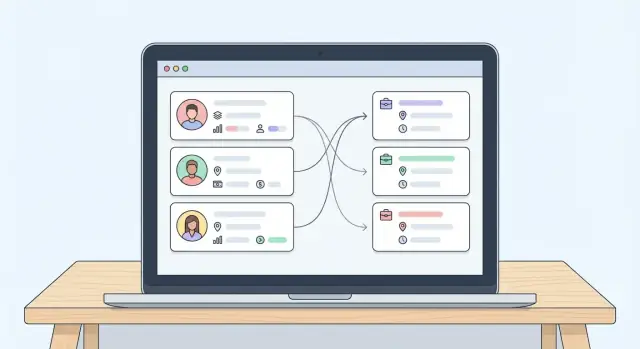
Define the Problem, Users, and MVP Scope
Before you sketch screens or pick a tech stack, get specific about what problem your recruiting web application solves—and for whom. “Candidate job matching” can mean anything from a simple keyword filter to a guided workflow that helps a recruiter move a role from intake to placement.
Name the primary users (and what they need)
Start with the people who will log in every day. For an app for recruiting agencies, these are usually:
- Recruiters: need to find qualified candidates quickly, keep notes, track outreach, and submit shortlists confidently.
- Agency admins: need visibility across the team, consistent processes, permissions, and reporting.
- Hiring managers (optional for v1): may want to review submitted candidates, give feedback, and see interview progress—but adding them changes UX, permissions, and notifications, so decide early.
A helpful exercise is to write 2–3 “top tasks” per user. If a task doesn’t support those, it’s probably not MVP.
Define success metrics you can actually measure
Avoid vague goals like “better matches.” Pick metrics that reflect business outcomes and reduce manual work:
- Time to first shortlist: how long it takes from job creation to sending a qualified list.
- Placement rate / fill rate: roles filled per roles worked.
- Manual steps removed: e.g., fewer copy-pastes from email into notes, fewer spreadsheets, fewer duplicate records.
- Recruiter throughput: roles handled per recruiter without quality dropping.
These metrics later inform your recruiting analytics and help validate whether your matching algorithm is improving results.
Map the agency workflow end-to-end
Recruitment workflow is more than matching. Document the stages and what data is created at each step:
Sourcing → Screening → Submitting → Interviewing → Offer → Placement
For each stage, note the “objects” involved (candidate, job, submission, interview), the key actions (log call, send email, schedule interview), and the decision points (reject, move forward, hold). This is where ATS and CRM features often overlap—be intentional about what you track.
Draw a hard line around MVP scope
Your MVP should deliver a usable loop: create a job requisition → add candidates (manual or basic resume parsing) → match → review → submit.
Common v1 inclusions:
- Candidate profile management (core fields, resume upload, notes)
- Job requisition management (title, requirements, location, salary range)
- Simple matching (rules + a score) with basic explainability (“matched because: Java, 5+ years, Berlin”)
- A minimal pipeline (e.g., New, Shortlisted, Submitted, Interview, Hired)
Common later features (nice-to-have at first):
- Integration with job boards and full ATS import/export
- Advanced resume parsing and enrichment
- Hiring manager portal with feedback loops
- Complex automation (sequenced outreach, SLAs, advanced alerts)
- Deep GDPR-ready recruitment software tooling (beyond essentials like consent and deletion)
By defining users, metrics, workflow, and scope upfront, you prevent the project from becoming “an everything ATS” and keep the build focused on faster, more confident shortlists.
Plan the Data Model (Candidates, Jobs, and Relationships)
A recruiting web application lives or dies by its data model. If candidates, jobs, and their interactions aren’t structured cleanly, matching gets noisy, reporting becomes unreliable, and the team ends up fighting the tool instead of using it.
Candidate records (what you store vs. what you search)
Start with a Candidate entity that supports both document storage and searchable fields. Keep the original resume/CV (file + extracted text), but also normalize key attributes you’ll need for candidate job matching:
- Skills (prefer a structured skills list plus free-text summary)
- Experience history (companies, titles, dates)
- Preferences (locations, remote/onsite, industries)
- Compensation (current/expected, currency, type)
- Availability (notice period, start date)
Tip: separate “raw” data (parsed text) from “curated” fields recruiters can edit. That prevents parsing errors from silently corrupting profiles.
Job records (the target the algorithm matches against)
Create a Job (requisition) entity with consistent fields: title, seniority, required vs. nice-to-have skills, location/remote policy, salary range, status (draft/open/on hold/closed), and hiring manager details. Make requirements structured enough to score, but flexible enough for real job descriptions.
Relationship entities (the real workflow)
Most activity happens between candidates and jobs, so model relationships explicitly:
- Submissions (candidate ↔ job) with status, timestamps, and ownership
- Interviews (stage, scheduled time, outcome)
- Notes and messages (linked to candidate, job, and submission)
- Tasks (follow-ups with due dates and assignees)
Permissions model (who can see what)
Define access early: agency-wide vs. team-only candidates, client-specific visibility, and edit rights by role (recruiter, manager, admin). Tie permissions to every read/write path so private candidates or confidential jobs don’t leak through search or matching results.
Design the Core UX for Recruiters
Recruiters move fast: they scan, filter, compare, and follow up—often between calls. Your UX should make those “next clicks” obvious and cheap.
Must-have screens (and what they should answer)
Start with four core pages plus a matching view:
- Candidate list: “Who should I look at next?” Show name, headline, key skills, location, current status, last activity, and a quick match indicator (if a job is selected).
- Job list: “What roles am I filling and what’s urgent?” Display role title, location/remote, priority, pipeline stage counts, and owner.
- Candidate detail: “Is this person viable, and what’s the next step?” Keep a clean layout: summary, skills, experience, compensation expectations, availability, notes, and activity timeline.
- Job detail: “What does ‘good’ look like?” Include requirements, nice-to-haves, salary range, interview stages, and who’s hiring.
- Match view: A side-by-side compare that explains why someone matches (and why not). Make it easy to act: shortlist, reject, request info, or schedule.
Fast search and filters that feel instant
Recruiters expect search to behave like a command bar. Provide global search plus filters for skills, location, years of experience, salary, status, and availability. Allow multi-select and saved filters (e.g., “London Java 5+ years under £80k”). Keep filters visible, with clear chips showing what’s active.
Bulk actions for real workflows
Bulk actions save hours when dealing with long lists. From candidate list or match view, support: tagging, changing status, adding to a job shortlist, and email export. Include an “undo” toast and show how many records will be changed before confirming.
Accessibility and mobile-friendly basics
Make the UI keyboard-friendly (focus states, logical tab order) and readable (good contrast, large tap targets). On mobile, prioritize the list → detail flow, keep filters in a slide-over panel, and ensure key actions (shortlist, email, status) are reachable with one thumb.
Build Matching Logic: Rules, Scoring, and Explainability
Matching is the engine of a recruiting web application: it decides who shows up first, who gets hidden, and what recruiters trust enough to act on. A good MVP starts simple—clear rules first, scoring second—then adds nuance as you learn from real hiring outcomes.
Start with rule-based “gates” (hard filters)
Begin with non-negotiables that must be true before a candidate is considered. These rules keep results relevant and prevent “high-scoring but impossible” matches.
Typical gates include required skills/certifications, location or work-authorization constraints, and salary overlap (e.g., candidate expectations must intersect with the job’s budget range).
Add scoring for ranking (soft signals)
Once a candidate passes the gates, compute a score to rank matches. Keep the first version transparent and adjustable.
A practical scoring mix:
- Skill match %: how many job skills are present in the candidate profile
- Recency: more weight for recently used skills or recent relevant roles
- Seniority fit: align years of experience and role level (junior/mid/senior)
- Keyword similarity: light text similarity between resume/profile and job description
You can express this as a weighted score (weights tuned over time):
score = 0.45*skill_match + 0.20*recency + 0.20*seniority_fit + 0.15*keyword_similarity
“Must-have” vs “nice-to-have” requirements
Model job requirements as two buckets:
- Must-have: fails the match if missing (used in gates)
- Nice-to-have: increases score if present (used in ranking)
This prevents strong candidates from being excluded over preferences, while still rewarding better fit.
Make matches explainable (and actionable)
Recruiters need to know why a candidate matched—and why someone didn’t. Show a short breakdown right on the match card:
- Passed/failed gates (e.g., “Salary range overlaps”, “Missing: AWS certification”)
- Score drivers (e.g., “8/10 skills matched”, “Recent React project: +12”)
- Suggestions to improve match quality (e.g., “Add preferred location” or “Mark skill last used”)
Good explainability turns matching from a black box into a tool recruiters can confidently use, tune, and defend to hiring managers.
Candidate Intake, Parsing, and Data Quality
Candidate data quality is the difference between “matching” and “guessing.” If profiles arrive in inconsistent formats, the best matching algorithm will still produce noisy results. Start by designing intake paths that are easy for recruiters and candidates, then progressively improve parsing and normalization.
Profile ingestion: three practical entry points
Offer multiple ways to create a candidate profile so teams don’t get blocked:
- Manual entry for quick leads and phone screens (name, contact details, current title, top skills, location, salary expectations).
- Resume upload (PDF/DOCX) for most inbound applicants.
- LinkedIn-style paste (where allowed): a plain-text paste box that captures summaries, experience, and skills without forcing a file upload.
Keep a clear “confidence” indicator on fields (e.g., “parsed,” “user-entered,” “verified by recruiter”) so recruiters know what to trust.
Resume parsing: start simple, then upgrade
In the MVP, prioritize reliability over perfect structure:
- Extract text from uploaded files and store the raw text alongside the original document.
- Light parsing with heuristics (email/phone detection, section splitting for Experience/Education, basic date recognition).
- Later, integrate a dedicated parsing service when volume justifies it, but keep your internal data model stable so swapping providers doesn’t break workflows.
Always let recruiters edit parsed fields, and keep an audit trail of changes.
Normalize skills and titles with a controlled vocabulary
Matching works better when “JS,” “JavaScript,” and “Javascript” map to the same skill. Use a controlled vocabulary with:
- Canonical skill/title names
- Synonyms and spelling variants
- Optional levels (e.g., junior/mid/senior) and categories (frontend, data, finance)
Apply normalization at save-time (and re-run it when the vocabulary updates) so search and matching stay consistent.
Prevent duplicates with a safe merge workflow
Duplicates will quietly poison your pipeline metrics. Detect potential duplicates using email and phone (plus optional fuzzy checks on name + company). When a conflict appears, show a guided merge screen that:
- Highlights field conflicts
- Chooses the most recent/verified values by default
- Preserves original resumes, notes, and activity history
This keeps the database clean without risking accidental data loss.
Job Requisitions and Hiring Pipeline Setup
A matching app is only as good as the jobs inside it. If requisitions are inconsistent, missing key details, or hard to update, recruiters stop trusting the results. Your goal is to make job intake fast, structured, and repeatable—without forcing users into long forms.
Job intake: fast paths that fit real workflows
Recruiters typically start jobs in three ways:
- Create from scratch for brand-new roles or urgent requests.
- Duplicate an older role (the most common time-saver) and edit only what changed.
- Import from an ATS later, once the core product is stable and you know which ATS systems matter most.
In the UI, treat “Duplicate job” as a first-class action on the jobs list, not a hidden option.
Structured requirements (what matching can actually use)
Free-text job descriptions are useful for humans, but matching needs structure. Capture requirements in consistent fields:
- Skills (with levels where possible), plus must-haves vs. “nice-to-haves”
- Screening questions (knockout vs. informational)
- Salary range (and whether it’s flexible)
Keep it lightweight: a recruiter should be able to add skills in seconds, then refine later. If you have a parsing step, use it only to suggest fields—not to auto-save them.
Pipeline stages per job
Make the hiring pipeline explicit and job-specific. A simple default works well:
New → Shortlisted → Submitted → Interview → Offer → Placed
Each candidate-job relationship should store the current stage, stage history, owner, and notes. This gives recruiters a shared source of truth and makes your analytics meaningful.
Job templates that reduce repeated work
Templates help agencies standardize intake for common roles (e.g., “Sales Development Rep” or “Warehouse Picker”). A template should prefill stages, screening questions, and typical must-have skills—while still allowing quick edits per client.
If you want a consistent flow, route job creation directly into matching and shortlisting, then into the pipeline, rather than scattering these steps across different screens.
User Accounts, Roles, and Security Basics
Security is easiest to get right when it’s designed into the first version. For a recruiting web application, the goal is simple: only the right people can access candidate data, and every important change is traceable.
Authentication (sign-in)
Start with email + password authentication, plus password reset and email verification. Even for an MVP, add a few practical safeguards:
- Rate limiting on login attempts to reduce brute-force attacks
- Optional multi-factor authentication (MFA) for admins (and later everyone)
- Sensible session timeouts, especially on shared office machines
For larger agencies, plan a future upgrade path to SSO (SAML/OIDC) so they can use Google Workspace or Microsoft Entra ID. You don’t have to build SSO on day one, but you should avoid choices that make it hard to add later.
Roles and permissions
At minimum, define two roles:
- Admin: manages users, roles, data retention settings, and integrations
- Recruiter: works with candidates, jobs, and pipeline stages
If your product includes an optional client/hiring manager portal, treat it as a separate permission set. Clients typically need limited access (e.g., only candidates submitted to their jobs, with restricted personal details depending on your privacy model).
A good rule: default to the least access needed, and add permissions intentionally (e.g., “can export candidates,” “can view compensation fields,” “can delete records”).
Audit trails (accountability)
Recruiting involves many handoffs, so a lightweight audit trail prevents confusion and builds trust internally. Log key actions like:
- Candidate/profile edits (who changed what and when)
- Submissions to jobs
- Pipeline stage changes and rejection reasons
Keep these logs searchable in-app, and protect them from being edited.
Secure file handling for resumes and documents
Resumes are highly sensitive. Store them in private object storage (not public URLs), require signed/expiring download links, and scan uploads for malware. Restrict access by role, and avoid sending attachments around by email when a secure in-app link will do.
Finally, encrypt data in transit (HTTPS) and at rest where possible, and make secure defaults non-optional for new workspaces.
Privacy, Compliance, and Candidate Trust
Recruiting apps handle highly sensitive data—CVs, contact details, compensation, interview notes. If candidates don’t trust how you store and share that information, they won’t engage, and agencies take on unnecessary legal risk. Treat privacy and compliance as core product features, not add-ons.
Consent and lawful basis (per agency)
Different agencies and regions rely on different lawful bases (consent, legitimate interest, contract). Build a configurable tracker on each candidate record that captures:
- The lawful basis used (selectable per agency)
- What the candidate agreed to (e.g., “share with client X” vs. “share with any client”)
- Timestamp, source, and evidence (form submission, email reply, import note)
Make consent easy to review and update, and ensure sharing actions (sending profiles to clients, exporting, adding to campaigns) check those settings.
Retention, deletion, and anonymization
Add retention settings at the agency level: how long to keep inactive candidates, rejected applicants, and interview notes. Then implement clear flows:
- Delete when you must remove personal data entirely
- Anonymize when you need to keep aggregate reporting but remove identifiers
Keep these actions auditable and reversible only when appropriate.
Data export for access requests
Support exporting a candidate’s record for access requests where applicable. Keep it simple: a structured JSON export plus a human-readable PDF/HTML summary can cover most needs.
Secure storage and least-privilege access
Use encryption in transit and at rest, separate environments, and strong session management. Default roles to least privilege: recruiters shouldn’t automatically see compensation, private notes, or every client submission.
Add an audit log for viewing/exporting/sharing candidate data, and link the policy details from /privacy so agencies can explain your safeguards to candidates.
Integrations: Email, Calendar, ATS, and Job Boards
Integrations decide whether your recruiting web application fits naturally into a recruiter’s day—or becomes “yet another tab.” Aim for a small set of high-impact connections first, and keep everything else behind a clean API layer so you can add more without rewriting core workflows.
Email integration (v1)
Start with email because it directly supports outreach and creates valuable activity history.
Connect to Gmail and Microsoft 365 to:
- Send outreach emails from within the app (templates + personalization tokens)
- Log inbound and outbound conversations to the candidate and job records
- Attach files and keep a searchable communication timeline
Keep it simple: store message metadata (subject, timestamp, participants) and a safe copy of the body for search. Make logging explicit so recruiters can choose which threads belong in your system.
Calendar integration (optional for v1)
Calendar can wait if it threatens your timeline, but it’s a strong upgrade. With Google Calendar / Outlook Calendar you can create interview events, propose times, and record outcomes.
For early versions, focus on: creating events + adding attendees + writing the interview details back to the candidate pipeline stage.
ATS connections and a clear API/webhooks layer
Many agencies already use an ATS/CRM. Provide webhooks for key events (candidate created/updated, stage changed, interview scheduled) and document your REST endpoints clearly so partners can connect fast. Consider a dedicated page like /docs/api and a lightweight “integration settings” screen.
Job boards (phase 2)
Job board posting and inbound applicants are powerful, but they introduce complexity (ad policies, duplicate applicants, source tracking). Treat them as phase 2:
- Post jobs to selected boards
- Ingest applicants into your candidate profile management flow
- Track source and attribute hires accurately
Design your data model now so “source” and “application channel” are first-class fields later.
Choose the Tech Stack and Architecture
Your tech stack should optimize for shipping a reliable MVP quickly, while leaving room for better search and integrations later. Recruiting apps have two distinct needs: transactional workflows (pipelines, permissions, audit logs) and fast search/ranking (matching candidates to jobs).
Stack options that ship fast
For a modern JavaScript stack, React + Node.js (NestJS/Express) is a common choice: one language across frontend and backend, lots of hiring-market libraries, and straightforward integration work.
If you want faster CRUD and strong conventions, Rails or Django are excellent for building the core ATS/CRM workflows with fewer decisions. Pair either with a lightweight frontend (Rails views, Django templates) or React if you need richer UI.
If your main bottleneck is speed-to-prototype (especially for internal tools or early validation), a vibe-coding platform like Koder.ai can help you build an end-to-end MVP from a structured chat spec: core screens, workflows, and a baseline data model. Teams often use it to iterate quickly with planning mode, then export the source code when they’re ready to take the project in-house. Snapshots and rollback also make it easier to test matching changes without breaking the app for recruiters.
Data storage: start relational
Use a relational database (usually PostgreSQL) as your source of truth. Recruiting data is workflow-heavy: candidates, jobs, stages, notes, tasks, emails, and permissions all benefit from transactions and constraints.
Model “documents” (resumes, attachments) as stored files (S3-compatible storage) with metadata in Postgres.
Search and ranking: grow in stages
Start with Postgres full-text search for keyword queries and filters. It’s often enough for an MVP and avoids running another system.
When matching and search become a bottleneck (complex ranking, synonyms, fuzzy queries, high volume), add Elasticsearch/OpenSearch as a dedicated index—fed asynchronously from Postgres.
Deployment: control risk and cost
Maintain separate staging and production environments so you can test parsing, matching, and integrations safely.
Set up automated backups, basic monitoring (errors, latency, queue depth), and cost controls (log retention, right-sized instances). This keeps the system predictable as you add more recruiters and more data.
Analytics and Feedback Loops to Improve Matching
Matching gets better when you measure outcomes and capture the “why” behind recruiter decisions. The goal isn’t vanity metrics—it’s a tight loop where every shortlist, interview, and placement makes your recommendations more accurate.
Track the KPIs that reflect real recruiting speed
Start with a small set of KPIs that map to agency performance:
- Time-to-shortlist: days from job creation to first qualified shortlist sent.
- Placements per recruiter: monthly/quarterly output, normalized by active requisitions.
- Source effectiveness: which channels produce candidates who reach interview/offer.
Keep KPIs filterable by client, role type, seniority, and recruiter. That makes the numbers actionable instead of average-and-vague.
Build a match quality feedback loop
Add lightweight feedback right where decisions happen (on the match list and candidate profile): thumbs up/down, plus optional reasons (e.g., “salary mismatch,” “missing certification,” “location/visa,” “industry experience,” “poor response rate”).
Tie feedback to outcomes:
- shortlists that were accepted
- interviews scheduled
- offers made
- placements
- rejections (and stated reason)
This lets you compare your scoring to reality and adjust weights or rules with evidence.
Reports recruiters will actually use
Create a few default reports:
- Pipeline health: stage counts, conversion rates, and bottlenecks.
- Aging candidates: strong profiles with no activity in X days.
- Job fill rate: open vs filled, plus average time in each stage.
Dashboards that are readable and exportable
Dashboards should answer “what changed this week?” in one screen, then allow drill-down. Make every table exportable to CSV/PDF for client updates and internal reviews, and keep the definitions visible (tooltip or /help) so everyone reads the same metrics the same way.
Testing, Launch, and Iteration Roadmap
A recruiting app succeeds when it works reliably on real roles, real candidates, and real timelines. Treat launch as the start of learning—not the finish line.
MVP launch checklist (what “ready” actually means)
Before inviting your first users, make sure the basics are not just built, but usable end-to-end:
- Seed data: 10–20 realistic candidates and 5–10 jobs that reflect your target niche (including messy resumes and incomplete profiles).
- Onboarding: a first-run flow that creates a job, imports candidates, and shows the first shortlist in under 10 minutes.
- Permissions: roles like Admin/Recruiter/Viewer, plus safe defaults (new users should see only what they must).
- Email templates: interview requests, candidate outreach, and “application received” style messages with consistent branding and variables.
Testing approach that protects matching quality
You don’t need a massive test suite, but you do need the right tests:
- Unit tests for scoring: lock in expected outcomes for key scenarios (must-have skills, location rules, salary ranges, dealbreakers). This prevents “silent” changes in ranking.
- End-to-end tests for workflows: create job → import candidate → run match → send email → move stage. These catch breakage across multiple screens.
Rollout plan: start small, learn fast
Pilot with 1–3 agencies (or internal teams) that will give weekly feedback. Define success metrics up front: time-to-shortlist, fewer back-and-forth emails, and recruiter confidence in match explanations.
Run a two-week cadence: collect issues, fix the top blockers, and ship improvements. Publish changes in a lightweight changelog (a simple /blog post works well).
Next milestones after MVP
Once the core workflow is stable, prioritize:
- Automation: reminders, follow-ups, stage nudges, duplicate detection.
- AI-assisted summaries: draft candidate highlights and job-to-candidate reasoning (with easy edits).
- Client portal: share shortlists, collect feedback, and approve interviews without long email threads.
As you add tiers (e.g., portal access, integrations, advanced analytics), keep packaging clear on /pricing.
FAQ
What’s the smallest MVP for a recruiting matching web app?
Start with a closed-loop workflow that a recruiter can complete daily:
- Create a job requisition
- Add candidates (manual entry + resume upload)
- Run matching with explainable results
- Shortlist and submit candidates
If a feature doesn’t directly support that loop (e.g., job board posting, complex automation, hiring manager portal), defer it to phase 2.
Who are the primary users I should design for first?
Pick 2–3 “top tasks” for each primary user and design around them.
- Recruiters: find candidates fast, track outreach, move people through stages
- Admins: manage users/permissions, reporting, consistent process
- Hiring managers (optional): review submitted candidates and give feedback (adds permissions + notifications)
If you include hiring managers in v1, plan the permission model and notification rules upfront.
Which success metrics best prove the product is working?
Use measurable, workflow-linked metrics rather than “better matches.” Good starters:
- Time to first shortlist (job created → shortlist sent)
- Fill/placement rate (roles filled per roles worked)
- Recruiter throughput (roles handled per recruiter)
- Manual steps removed (spreadsheets, copy-paste into notes, duplicate record cleanup)
These metrics also help you validate whether scoring changes improve outcomes.
What data model should I use for candidates, jobs, and pipeline activity?
Keep the core entities simple and model workflow as relationships:
- Candidate: curated fields + raw resume text/file
- Job: structured requirements (must-have vs nice-to-have), location, salary range, status
- Submission (candidate ↔ job): stage, timestamps, owner
- Interview/Notes/Tasks/Messages: linked to candidate + job (often via submission)
This structure keeps matching, reporting, and audit trails consistent as features grow.
How should I handle resumes and candidate profile data without creating a messy database?
Separate what you store from what you search.
- Store the original resume file plus extracted raw text
- Maintain curated, editable fields (skills, titles, compensation, availability)
- Track field confidence (parsed vs recruiter-verified)
This prevents parsing errors from silently overwriting recruiter-approved data and improves match quality over time.
How do I implement matching logic that recruiters will actually trust?
Start with transparent rules first, then add scoring.
- Gates (hard filters): must-have skills/certs, location/authorization, salary overlap
- Scoring (soft ranking): skill match %, recency, seniority fit, light text similarity
- Keep weights adjustable and show “matched because…” on every result
Explainability is what makes recruiters trust (and correct) the system.
How do I represent “must-have” vs “nice-to-have” requirements in jobs?
Model requirements in two buckets:
- Must-have: used in gates; missing it fails the match
- Nice-to-have: used in ranking; increases score but doesn’t exclude
This avoids filtering out strong candidates for preferences while still rewarding better fits.
What are the essential roles, permissions, and audit logs for v1?
Build permissions into every read/write path (including search and matching):
- Define roles (at least Admin and Recruiter)
- Decide on workspace/team boundaries (agency-wide vs team-only candidates)
- Restrict sensitive fields (compensation, private notes, exports)
- Add an audit trail for edits, submissions, and stage changes
Default to least privilege and add capabilities intentionally (e.g., “can export candidates”).
What privacy and GDPR-related features should be included early?
Treat compliance as product behavior, not a document.
- Track lawful basis/consent per candidate (scope, timestamp, source/evidence)
- Enforce consent on sharing/export actions
- Add retention settings and clear flows for delete vs anonymize
- Support data export for access requests
Link policies from a simple page like /privacy and keep all sensitive actions auditable.
How should I test and roll out the MVP without breaking matching quality?
Launch with reliability and learning in mind:
- Seed realistic data (messy resumes, incomplete profiles)
- Add unit tests for scoring (to prevent ranking regressions)
- Add end-to-end tests for the main loop (job → candidate → match → stage/email)
- Pilot with 1–3 agencies and review metrics every two weeks
Ship small changes frequently and keep a lightweight changelog (e.g., /blog).