

How to Build a Web App for Email Campaigns & Deliverability
Plan and build a web app to create email campaigns, send safely, track events, and improve deliverability with authentication, suppression, and monitoring.
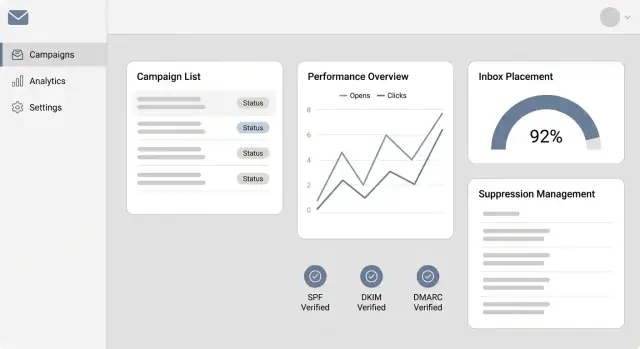
What the App Should Do (Scope and Outcomes)
Before you choose a provider, design your database, or build a sending queue, define what “success” looks like for your email campaign management app. A clear scope keeps the product useful for marketers and safe for deliverability.
Core goal: ship campaigns without harming deliverability
At a minimum, the app should let a team create, schedule, send, and analyze email campaigns while enforcing guardrails that prevent bad sending behavior (accidental blasts, ignoring opt-outs, or repeatedly sending to bouncing addresses).
Think of the outcome as: reliable delivery + trustworthy reporting + consistent compliance.
Clarify sender types (they behave differently)
Your scope should explicitly include (or exclude) these streams, because they have different content needs, cadence, and risk:
- Marketing blasts: promos, newsletters, announcements to large audiences.
- Product updates: feature releases, maintenance notices, community messages.
- Transactional: receipts, password resets, security alerts (usually must be fast and highly reliable).
- Lifecycle: onboarding, re-engagement, nurture sequences triggered by behavior.
If you support multiple types, decide early whether they share the same sender identity and suppression rules—or require separate configurations.
Identify key roles and what each must be able to do
Define permissions in plain terms so teams don’t step on each other:
- Admin: manages domains/senders, compliance settings, user access, and integrations.
- Marketer: builds audiences, creates content, schedules sends, runs A/B tests.
- Analyst: reads reports, exports data, validates attribution and trends.
- Support: investigates “why didn’t I get the email?”, handles complaints, resolves unsubscribes.
Pick success metrics that map to real outcomes
Avoid vanity metrics alone. Track a small set that reflects both deliverability and business impact:
- Inbox rate / placement signals (as available) and delivery success
- Complaint rate and unsubscribe rate
- Bounce rate (hard vs. soft)
- Engagement (opens/clicks with known limitations)
- Revenue or conversion attribution, where applicable
Set constraints up front (so architecture matches reality)
Write down your boundaries now:
- Budget (provider costs, data storage, analytics)
- Team size and skills (how much can you operate 24/7?)
- Compliance needs (unsubscribe rules, consent tracking, retention)
- Sending volume and growth (today vs. 12 months)
A practical deliverable for this section is a one-page “product contract” that states who the app is for, what kinds of messages it sends, and what metrics define success.
Core Architecture and Build-or-Buy Decisions
Before you draw boxes on a diagram, decide what you’re actually building: a campaign manager (UI + scheduling + reporting) or an email delivery system (MTA-level responsibility). Most teams succeed by building the product experience and integrating specialist infrastructure.
Build vs. integrate (what to outsource)
Sending: Use an email API/SMTP provider (SES, Mailgun, SendGrid, Postmark, etc.) unless you have a dedicated deliverability team. Providers handle IP reputation, feedback loops, warm-up tooling, and webhook event streams.
Link tracking & analytics: Many providers offer click/open tracking, but you may still want your own redirect domain and click logs for consistent reporting across providers. If you do build tracking, keep it minimal: a redirect service plus event ingestion.
Templates: Build the editing workflow, but consider integrating a mature HTML email editor (or at least MJML rendering). Email HTML is unforgiving; outsourcing the editor reduces support burden.
Baseline architecture: monolith + queue vs. services
For an MVP, a modular monolith works well:
- Web app (admin UI + public endpoints)
- Worker process for background jobs
- Message queue for send tasks and webhooks
Split into services later only if scale or org boundaries require it (e.g., a dedicated tracking service or dedicated webhook ingestion).
Data stores: “source of truth” vs. event firehose
Use a relational database as the system of record for tenants, users, audiences, campaigns, templates, schedules, and suppression state.
For sending and tracking events, plan an append-only event store/log (e.g., a separate table partitioned by day, or a log system). The goal is to ingest high-volume events without slowing down core CRUD.
Background jobs you should plan for
- Scheduling (fan-out campaign recipients into send tasks)
- Rate control and provider throttling
- Retries with backoff and idempotency keys
- Bounce/complaint processing from webhooks
- Daily rollups (deliverability and campaign summaries)
Multi-tenant decisions
If you support multiple brands/clients, define tenancy early: tenant-scoped data access, per-tenant sending domains, and per-tenant suppression rules. Even if you start single-tenant, design your schema so adding a tenant_id later isn’t a rewrite.
Speeding up the build (without locking yourself in)
If your main goal is to ship a working campaign manager quickly (UI, database, background workers, and webhook endpoints), a vibe-coding platform like Koder.ai can help you prototype and iterate faster while still keeping control of the architecture. You can describe the system in a chat-driven “planning mode,” generate a React-based web app with a Go + PostgreSQL backend, and then export the source code when you’re ready to own the repo and deployment pipeline.
This can be especially useful for building the “glue” parts—admin UI, segmentation CRUD, queue-backed send jobs, and webhook ingestion—while you continue to rely on a specialist email provider for deliverability-critical sending.
Data Model for Contacts, Campaigns, and Events
A clear data model is the difference between “we sent an email” and “we can explain exactly what happened, to whom, and why.” You’ll want entities that support segmentation, compliance, and reliable event processing—without painting yourself into a corner.
Core entities (and how they relate)
At minimum, model these as first-class tables/collections:
- Users: people who log in.
- Workspaces: accounts/organizations. Most objects belong to a workspace.
- Audiences: logical lists (e.g., “Newsletter”, “Customers”).
- Contacts: individual recipients.
- Segments: saved rules that select contacts from an audience.
- Campaigns: the “what we intend to send” (content + settings).
- Sends: the “execution” record for a specific campaign run.
- Events: the “what happened” timeline (delivery, bounce, unsubscribe, etc.).
A common pattern is: Workspace → Audience → Contact, and Campaign → Send → Event, with Send also referencing the audience/segment snapshot used.
Contact fields: keep identity stable, history explicit
Recommended contact fields:
email(normalized + lowercased), plus optionalnamestatus(e.g.,active,unsubscribed,bounced,complained,blocked)source(import, API, form name, integration)consent(more than a boolean): storeconsent_status,consent_timestamp, andconsent_sourceattributes(JSON/custom fields for segmentation: plan, city, tags)- timestamps:
created_at,updated_at, and ideallylast_seen_at/last_engaged_at
Avoid deleting contacts for “cleanliness.” Instead, change status and keep the record for compliance and reporting.
Campaign and send fields: separate content from execution
For campaigns, track:
subject,from_name,from_email,reply_totemplate_version(immutable snapshot reference)tracking_options(open/click tracking on/off, UTM defaults)
Then use a send record for operational details:
scheduled_at,started_at,completed_at- target definition: audience id + segment id, plus a stored “segment query” snapshot
- counts: intended recipients, sent, delivered, failed
Event model: one table, many types, strict auditability
Store events as an append-only stream with a consistent shape:
event_type:delivered,opened,clicked,bounced,complained,unsubscribed- foreign keys:
send_id,contact_id(and optionallymessage_id) - metadata: timestamp, IP/user-agent (where applicable), bounce codes, click URL
- idempotency fields: provider event id + hash to prevent duplicates
Design for auditability
For key objects (contacts, campaigns, segments), add created_by, updated_by, and consider a small change log table capturing who changed what, when, and before/after values. This makes support, compliance requests, and deliverability investigations dramatically easier.
Audience Management, Segmentation, and Consent
Audience management is where an email campaign app either earns trust—or creates problems. Treat contacts as long-lived records with clear rules for how they’re added, updated, and allowed to receive mail.
Imports that don’t pollute your list
CSV import should feel simple for users, but strict behind the scenes.
Validate required fields (at least email), normalize casing/whitespace, and reject obviously invalid addresses early. Add deduplication rules (typically by normalized email) and decide what happens on conflict: overwrite empty fields only, always overwrite, or “ask on import.”
Field mapping matters because real-world spreadsheets are messy (“First Name”, “fname”, “Given name”). Let users map columns to known fields and create custom fields when needed.
Segmentation: rules, not manual copies
Segmentation works best as saved rules that update automatically. Support filters based on:
- Attributes (location, plan, signup source)
- Engagement (opened last 30 days, clicked campaign X)
- Tags (VIP, webinar-registrant)
- Custom filters (any custom field + operators)
Keep segments explainable: show a preview count and a “why included” drill-down for a sample contact.
Consent and preferences per contact
Store consent as first-class data: status (opted-in, opted-out), timestamp, source (form, import, API), and, when relevant, which list or purpose it applies to.
Your preference center should let people opt out of specific categories while staying subscribed to others, and every change should be auditable. Link to your preference workflow from /blog/compliance-unsubscribe if you cover it elsewhere.
Internationalization details that reduce errors
Names and addresses aren’t one-size-fits-all. Support Unicode, flexible name fields, country-aware address formats, and a contact-level time zone for scheduling “9am local time” sends.
Eligibility checks before every send
Before enqueueing recipients, filter to eligible contacts only: not unsubscribed, not on suppression lists, and with valid consent for that message type. Make the rule visible in the UI so users understand why some contacts won’t receive the campaign.
Email Composition: Templates, Previews, and Content QA
A sending pipeline can be perfect and still underperform if the content is hard to read, inconsistent, or missing required elements. Treat composition as a product feature: it should make “good email” the default.
Templates that scale (blocks + versioning)
Start with a template system built from reusable blocks—header, hero, text, button, product grid, footer—so campaigns stay consistent across teams.
Add versioning to templates and blocks. Editors should be able to:
- create a new version (“Holiday footer v3”) without overwriting the old one
- see where a block is used (“used in 12 templates”)
- roll back when a change breaks rendering
Include test sends at both levels: send a template to yourself before it’s attached to a campaign, and send a campaign draft to a small internal list before scheduling.
Editor options: choose based on your users
Most email campaign management apps end up supporting multiple editing modes:
- Basic HTML for power users and imported designs
- Drag-and-drop for speed and guardrails (with strict layout constraints)
- Markdown-to-HTML for content-heavy newsletters (fast writing, predictable output)
Whichever you choose, store the “source” (HTML/Markdown/JSON blocks) and the rendered HTML separately so you can re-render after bug fixes.
Previews and plain-text
Provide previews for common breakpoints (desktop/mobile) and major client quirks. Even simple tools help: viewport toggles, dark-mode simulation, and a “show table borders” option.
Always generate and allow editing of a plain-text version. It’s helpful for accessibility, reduces friction with some spam filters, and improves readability for users who prefer text-only.
Link rewriting + content QA
If you track clicks, rewrite links in a way that stays readable (e.g., preserve UTM parameters and show the destination on hover). Keep internal links relative in your app UI (e.g., link to /blog/template-guide).
Before enabling send, run checks:
- spam-trigger phrases and excessive punctuation/caps
- broken links and missing alt text on key images
- missing unsubscribe address and company footer details
- inconsistent “from” name/address vs. campaign settings
Make the checker actionable: highlight the exact block, suggest fixes, and classify issues as “must fix” vs. “warning.”
Sending Pipeline: Queues, Scheduling, and Rate Control
A sending pipeline is the “traffic system” of your email app: it decides how mail is sent, when it’s released, and how fast it ramps up without hurting deliverability.
Choose your sending method
Most apps start with a provider API (SendGrid, Mailgun, SES, Postmark) because you get scaling, feedback webhooks, and reputation tooling with less effort. SMTP relays can work when you need compatibility with existing systems. A self-managed MTA offers maximum control, but it adds ongoing operational work (IP warm-up, bounce processing, abuse handling, monitoring).
Your data model should treat the sender as a configurable “delivery channel” so you can swap methods later without rewriting campaigns.
Queue-first architecture (with safety rails)
Don’t send directly from a web request. Instead, enqueue recipient-level jobs (or small batches) and let workers deliver them.
Key mechanics:
- Rate limiting: global limits plus limits per sender, per campaign, and per domain.
- Backoff and retry: temporary failures (4xx, timeouts) should retry with exponential backoff; permanent failures (5xx, hard bounces) should stop.
- Idempotency keys: ensure a job replay doesn’t send duplicates. Use a key like
{campaign_id}:{recipient_id}:{variant_id}.
Scheduling and throttling that respects inboxes
Scheduling should support time zones (store a user’s preferred zone; convert to UTC for execution). For deliverability, throttle by recipient domain (e.g., gmail.com, yahoo.com). This lets you slow down “hot” domains without blocking the entire campaign.
A practical approach is to maintain domain buckets with independent token-bucket limits and adjust dynamically when you see deferrals.
Separate streams to protect reputation
Keep transactional and marketing sends in separate streams (ideally separate subdomains and/or IP pools). That way a high-volume campaign won’t delay password resets or order confirmations.
Log per-recipient outcomes
Store an immutable event trail per recipient: queued → sent → delivered/soft bounce/hard bounce/complaint/unsubscribe. This supports customer support (“why didn’t I get it?”), compliance audits, and accurate suppression behavior later.
Deliverability Essentials: SPF, DKIM, DMARC, and Domains
Email deliverability starts with proving to mailbox providers that you’re allowed to send “as” your domain. The three core checks are SPF, DKIM, and DMARC—plus how your domains are set up.
SPF (who can send)
SPF is a DNS record that lists which servers are allowed to send mail for your domain. Practical takeaway: if your app (or your ESP) sends from yourbrand.com, SPF should include the provider your app uses.
Your UI should generate an SPF value (or an “include” snippet) and clearly warn users not to create multiple SPF records (a common configuration break).
DKIM (message integrity)
DKIM adds a cryptographic signature to each email. The public key lives in DNS; the provider uses it to confirm the email wasn’t altered and is associated with your domain.
In the app, offer “Create DKIM” per sending domain, then show the exact DNS host/value to copy-paste.
DMARC (policy + reporting)
DMARC tells inboxes what to do when SPF/DKIM checks fail—and where to send reports. Start with a monitoring policy (often p=none) to collect reports, then tighten to quarantine or reject once everything is stable.
DMARC is also where alignment matters: the domain in the visible “From” address should align with SPF and/or DKIM.
Domain alignment, return-path, and tracking domains
Encourage users to keep the From domain aligned with the authenticated domain. If your provider lets you configure a custom return-path (bounce domain), steer users toward the same organizational domain (e.g., mail.yourbrand.com) to reduce trust issues.
For click/open tracking, support a custom tracking domain (CNAME like track.yourbrand.com). Require TLS (HTTPS) and auto-check certificate status to avoid broken links and browser warnings.
Automatic verification + warnings
Build a “Verify DNS” button that checks propagation and flags:
- Missing SPF/DKIM/DMARC
- Multiple SPF records
- DMARC present but not aligned
- Tracking domain misconfigured or no valid TLS
Link users to a setup checklist like /blog/domain-authentication-checklist for faster troubleshooting.
Bounce, Complaint, and Unsubscribe Handling
If you don’t treat bounces, complaints, and unsubscribes as first-class product features, they’ll quietly drain deliverability. The goal is simple: ingest every event from your sending provider, translate it into one internal format, and apply suppression rules automatically—and quickly.
Ingest events via webhooks (and expect duplicates)
Most providers send webhooks for events like delivered, bounced, complained, and unsubscribed. Your webhook endpoint should be:
- Idempotent: the same event may be delivered multiple times, out of order, or retried.
- Fast: acknowledge the provider quickly (often within seconds), then process asynchronously.
A common approach is to store a unique provider event ID (or a hash of stable fields) and ignore repeats. Also log the raw payload for audit/debugging.
Normalize provider events into one schema
Different providers name the same thing differently. Normalize into an internal event model, for example:
event_type: delivered | bounce | complaint | unsubscribeoccurred_atprovider,provider_message_id,provider_event_idcontact_id(or email),campaign_id,send_idbounce_type: soft | hard (if applicable)reason/smtp_code/category
This makes reporting and suppression consistent even if you change providers later.
Suppression rules: soft vs. hard bounces
Treat hard bounces (invalid address, non-existent domain) as immediate suppression. For soft bounces (mailbox full, temporary failure), suppress only after a threshold—such as “3 soft bounces within 7 days”—then cool down or suppress permanently depending on your policy.
Keep suppression at the email identity level (email + domain), not just per campaign, so one bad address doesn’t keep getting retried.
Complaints and unsubscribes: suppress immediately
Complaints (from feedback loops) are a strong negative signal. Apply instant suppression and stop all future sends to that address.
Unsubscribes should also be immediate and global for the list scope you promise. Store unsubscribe metadata (source, timestamp, campaign) so support can answer “why did I stop receiving emails?” without guesswork.
If you want, link suppression behavior to your user-facing settings page (e.g., /settings/suppression) so teams can understand what’s happening behind the scenes.
Tracking Opens, Clicks, and Conversions (With Caveats)
Tracking helps you compare campaigns and spot issues, but it’s easy to over-interpret the numbers. Build analytics that are useful for decisions—and honest about uncertainty.
Open tracking: helpful, but increasingly fuzzy
Open tracking is typically done with a tiny “pixel” image. When an email client loads that image, you record an open event.
Limitations you should design around:
- Many clients block images by default, so a real read may look like “no open.”
- Privacy features (notably Apple Mail Privacy Protection) can pre-fetch images, creating opens that don’t mean the person actually read the email.
Practical approach: treat opens as a directional signal (e.g., “this subject line performed better”), not proof of attention.
Click tracking: redirects, UTMs, and bot filtering
Click tracking is more actionable. Common pattern: replace links with a tracking URL (your redirect service), then redirect to the final destination.
Best practices:
- Append UTM parameters (source, medium, campaign) so analytics tools can attribute traffic.
- Add basic bot filtering (known scanner user agents, “clicked immediately after delivery,” repeated hits without cookies). You won’t catch everything, but you can reduce obvious inflation.
Store link stats and engagement timelines
Model analytics at two levels:
- Per-link stats (unique clicks, total clicks, first/last click timestamps) for campaign reporting.
- Per-recipient engagement timeline (delivered → opened? → clicked → converted) to support segmentation and follow-ups.
Be clear in your UI: “unique” is best-effort, and “open rate” is not a read rate.
Conversions and what metrics can’t prove
If you track conversions (purchase, signup), connect them via UTM parameters or a lightweight server-side endpoint. Still, attribution is not perfect (multiple devices, delayed actions, ad blockers).
Exports and API access
Provide CSV exports and an API for events and aggregated stats so teams can use their BI tools. Keep endpoints simple (by campaign, date range, recipient) and document rate limits at /docs/api.
Monitoring, Reporting, and Deliverability Alerts
You can’t improve deliverability if you can’t see what’s happening. Monitoring in an email campaign app should answer two questions quickly: are messages being accepted by mailbox providers, and are recipients engaging. Build your reporting so a non-technical marketer can spot problems in minutes, not hours.
Dashboards that tell the truth
Start with a simple “deliverability health” panel that combines:
- Delivery rate (accepted vs. bounced)
- Complaint rate (spam reports)
- Unsubscribe rate
- Engagement trends (opens/clicks where available)
- Top campaigns and biggest movers week-over-week
Avoid vanity charts that hide issues. A campaign with high opens but rising complaints is a future blocking problem.
Inbox placement signals (without pretending you know)
True inbox placement is hard to measure directly. Use proxy metrics that correlate strongly:
- Hard bounce spikes (bad list quality or sudden blocking)
- Complaint spikes (content or targeting issues)
- Deferrals/throttling (a provider slows you down)
If you integrate provider feedback loops or postmaster tools, treat them as “signals,” not absolute truth.
Alerts that wake the right person
Alerts should be actionable and tied to thresholds and time windows:
- Bounce spike per campaign or per sending domain
- Complaint spike (especially above 0.1% depending on volume)
- Authentication failures (SPF/DKIM/DMARC misalignment)
- Webhook downtime or event backlog (tracking gaps can hide incidents)
Send alerts to email + Slack, and link directly to a filtered view (e.g., /reports?domain=gmail.com&window=24h).
Per-domain performance views
Break metrics down by recipient domain (gmail.com, outlook.com, yahoo.com). Throttling or blocking usually starts with one provider. Show send rate, deferrals, bounces, and complaints per domain to pinpoint where to slow down or pause.
Incident log for institutional memory
Add an incident log with timestamps, scope (campaign/domain), symptoms, suspected cause, actions taken, and outcome. Over time, this becomes your playbook—and makes “we fixed it once” repeatable.
Security, Privacy, and Compliance Safeguards
Security and compliance aren’t add-ons for an email campaign management app—they shape how you store data, how you send, and what you’re allowed to do with recipient information.
Account security (who can do what)
Start with clear roles and permissions: for example, “Owner,” “Admin,” “Campaign Creator,” “Viewer,” and a limited “API-only” role for integrations. Make risky actions explicit and auditable (exporting contacts, changing sending domains, editing suppression lists).
Add 2FA for interactive users, and treat API access as a first-class feature: scoped API keys, rotation, expiration, and per-key permissions. If your customers are enterprise-focused, include IP allowlists for both the admin UI and API.
Data security (protecting what you store)
Encrypt sensitive data at rest (especially contact identifiers, consent metadata, and any custom fields). Keep secrets out of your database when possible: use a secrets manager for SMTP credentials, webhook signing secrets, and encryption keys.
Apply least privilege everywhere: the “sending service” shouldn’t be able to read full contact exports, and reporting jobs shouldn’t be able to write to billing. Also log access to sensitive endpoints and exports so customers can investigate suspicious activity.
Privacy & compliance (what you must respect)
Unsubscribe handling must be immediate and reliable. Store suppression records (unsubscribes, bounces, complaints) in a durable suppression list, retain them long enough to prevent accidental re-mailing, and keep evidence: timestamp, source (link click, webhook event, admin action), and campaign.
Track consent in a way you can prove later: what the user agreed to, when, and how (form, import, API). For more on authentication foundations tied to trust and compliance, see /blog/email-authentication-basics.
Safe sending defaults (protect new senders)
Respect sending limits and provide a “safe mode” for new accounts: lower daily caps, enforced warm-up schedules, and warnings before large blasts. Pair this with transparent plan limits and upgrade paths on /pricing.
MVP to Production: Testing, Launch, and Next Features
Your first release should prove the full loop: build an audience, send a real campaign, and correctly process what happens afterward. If you can’t trust the event stream (bounces, complaints, unsubscribes), you don’t have a production system yet.
MVP checklist (the “minimum complete” loop)
Aim for a tight feature set that supports real usage:
- Import contacts (CSV + basic validation), store consent status, and apply a suppression list
- Create a template, preview it, and send a test email to yourself
- Schedule and send a campaign through your sending pipeline (queues + rate control)
- Receive provider webhooks for delivery events (bounce, complaint, unsubscribe) and update contact status
- Basic reports: sent, delivered, bounced, complained, unsubscribed (per campaign)
Testing plan that prevents painful surprises
Treat segmentation and webhook processing as mission-critical.
- Unit tests: segmentation rules, consent logic, suppression precedence, unsubscribe handling
- Integration tests: webhook signatures, idempotency (duplicate events), mapping provider events to your internal schema
- Load tests: queue throughput, concurrency limits, database hot spots, and retry behavior during provider slowdowns
Operational plan (what keeps it healthy)
Production stability is mostly operations:
- Structured logging with correlation IDs (
campaign_id,message_id) - Metrics and alerts (queue depth, send rates, error rates, webhook lag)
- Backups and restore drills for your primary database
- Clear retry policies and dead-letter queues for poison messages
- Runbooks: “webhook backlog,” “sending paused,” “high complaint rate,” “sudden bounce spike”
Rollout approach and safe scaling
Start with internal campaigns, then a small pilot cohort, and ramp volume gradually. Enforce conservative rate limits at first and expand only when bounce/complaint rates stay within targets. Keep a “kill switch” to pause sends globally.
Next features to plan (but not block launch)
Once the core loop is reliable, add A/B tests, automation journeys, a preference center, and multi-language templates. A lightweight onboarding guide at /blog/deliverability-basics also reduces early sender mistakes.
If you’re iterating fast, features like snapshots and rollback can also reduce risk as you ship changes to segmentation, suppression logic, or webhook processing. (For example, Koder.ai supports snapshots so teams can revert quickly after a regression—useful when you’re scaling from MVP to production.)
FAQ
What should the first version of an email campaign management app actually do?
Start by defining “success” as reliable delivery + trustworthy reporting + consistent compliance. Practically, that means you can create content, schedule sends, process bounces/complaints/unsubscribes automatically, and explain exactly what happened to any recipient.
A good one-page scope includes: message types supported, required roles/permissions, core metrics, and constraints (budget, compliance, volume growth).
Do I need to support marketing, transactional, and lifecycle emails in the same system?
Treat them as separate “streams” because they differ in urgency, risk, and volume:
- Marketing blasts: high volume, higher complaint risk
- Transactional: must be fast and dependable
- Lifecycle: behavior-triggered, needs accurate event data
If you support multiple streams, plan separate configurations (and ideally separate subdomains/IP pools) so marketing spikes don’t delay receipts or password resets.
Should we build our own email delivery infrastructure or integrate an ESP?
Most teams should integrate an email provider (SES, SendGrid, Mailgun, Postmark) and focus on the product experience (UI, scheduling, segmentation, reporting). Providers already handle reputation tooling, feedback loops, and scalable delivery.
You usually only “build the MTA” if you have dedicated deliverability and operations capacity (warm-up, abuse handling, monitoring, and constant tuning).
What data stores do we need for campaigns versus delivery events?
Use a relational database as the system of record (tenants, users, contacts, audiences, campaigns, sends, suppression state). For high-volume events (delivered/opened/clicked/bounced), use an append-only event log (tables partitioned by time or a log pipeline) so event ingestion doesn’t slow core CRUD.
Keep raw provider payloads for debugging and audits.
What’s the minimum data model for contacts, campaigns, and reporting?
Model both the intent and the execution:
- Campaign: content + settings (subject, from, template snapshot, tracking options)
- Send: operational run (schedule/start/end timestamps, audience/segment snapshot, counts)
- Event: append-only timeline (delivered, bounced, complained, unsubscribed, etc.)
This separation makes support questions (“what happened to this recipient?”) answerable and keeps reporting consistent.
How do we prevent sending to unsubscribed or suppressed contacts?
Before enqueueing recipients, filter to eligible contacts only:
- Not unsubscribed
- Not suppressed due to bounces/complaints
- Has valid consent for that message type
Make the rule visible in the UI (and ideally show “why excluded” for a sample) to reduce confusion and prevent accidental non-compliant sends.
How should we handle bounces, complaints, and unsubscribes reliably?
Use webhooks from your provider, but assume duplicates and out-of-order delivery. Your webhook handler should:
- Acknowledge quickly, process async
- Be idempotent using provider event IDs or a stable hash
- Store normalized events plus the raw payload
Then apply suppression rules automatically (hard bounce, complaint, unsubscribe) and update contact status immediately.
What does a safe sending pipeline look like for an MVP?
Plan a queue-first pipeline:
- Enqueue recipient jobs (or small batches), never send from a web request
- Rate-limit globally and per sender/campaign/domain
- Retry temporary failures with exponential backoff
- Use idempotency keys like
{campaign_id}:{contact_id}:{variant_id}to avoid duplicates
Also separate transactional and marketing queues so critical mail isn’t blocked by large campaigns.
What deliverability DNS features should the app help users configure?
Support SPF, DKIM, and DMARC with a guided setup:
- Generate exact DNS records to copy/paste
- Warn about common breakages (like multiple SPF records)
- Provide a Verify DNS button for propagation and alignment checks
If you do click/open tracking, offer a custom tracking domain (CNAME) and enforce TLS to prevent broken redirects and trust issues.
How should we track opens, clicks, and conversions without misleading users?
Treat opens as directional and clicks as more actionable:
- Opens can be inflated by privacy prefetching and reduced by image blocking
- Clicks need redirect tracking, UTM support, and basic bot/scanner filtering
In the UI, label metrics honestly (e.g., “unique = best effort”) and provide exports/API access so teams can validate results in their own BI tools.