

How to Build a Web App for Multi-Step User Onboarding
Learn how to design and build a web app that creates, tracks, and improves multi-step user onboarding flows with clear steps, data models, and testing.
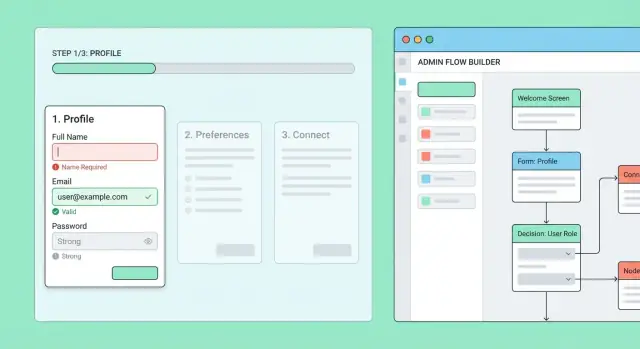
What a Multi-Step Onboarding Flow Needs to Do
A multi-step onboarding flow is a guided sequence of screens that helps a new user go from “signed up” to “ready to use the product.” Instead of asking for everything at once, you break setup into smaller steps that can be completed in one sitting or over time.
You need multi-step onboarding when setup is more than a single form—especially when it includes choices, prerequisites, or compliance checks. If your product requires context (industry, role, preferences), verification (email/phone/identity), or initial configuration (workspaces, billing, integrations), a step-based flow keeps things understandable and reduces errors.
Common onboarding flows you’ve already seen
Multi-step onboarding is everywhere because it supports tasks that naturally happen in stages, such as:
- Account setup: create workspace, invite teammates, choose plan
- Profile completion: name, role, goals, preferences
- Verification: email/phone confirmation, KYC/ID checks, 2FA setup
- Tutorials and first-use guidance: product tour, sample project creation, “do this first” checklist
What “success” should look like
A good onboarding flow is not “finished screens,” it’s users reaching value quickly. Define success in terms that match your product:
- Activation: the user completes the key action that predicts long-term retention (e.g., creates first project, connects data source)
- Completion rate: what percentage of users finish required steps (and optional steps, if relevant)
- Time-to-value: how long it takes a new user to reach the first meaningful outcome
The flow should also support resume and continuity: users can leave and return without losing progress, and they should land on the next logical step.
Typical risks to design against
Multi-step onboarding fails in predictable ways:
- Drop-offs: too many steps, unclear benefits, or asking for sensitive info too early
- Confusing steps: vague labels (“Setup”), hidden requirements, or inconsistent navigation
- Data loss: refresh/back button issues, session timeouts, partial saves not handled
Your goal is to make onboarding feel like a guided path, not a test: clear purpose per step, reliable progress tracking, and an easy way to pick up where the user left off.
Define Goals, Users, and the “Done” Criteria
Before you draw screens or write any code, decide what your onboarding is trying to achieve—and for whom. A multi-step flow is only “good” if it reliably gets the right people to the right end state with minimal confusion.
Identify your key user types
Different users arrive with different context, permissions, and urgency. Start by naming your primary entry personas and what’s already known about them:
- New user (self-serve signup): typically needs account creation, email verification, basic profile, and first-value actions.
- Invited user: often already belongs to an organization and should skip org creation; may need to accept terms, set password, and confirm role.
- Admin-created account: may have pre-filled fields and mandatory security steps (MFA, password reset on first login).
For each type, list constraints (e.g., “can’t edit company name”), required data (e.g., “must choose a workspace”), and potential shortcuts (e.g., “already verified via SSO”).
Define what “done” looks like
Your onboarding end state should be explicit and measurable. “Done” is not “completed all screens”; it’s a business-ready status, such as:
- Profile meets minimum completeness
- Organization/workspace is configured
- Billing is set (or explicitly deferred)
- User reaches the first meaningful action (e.g., creates a project)
Write the completion criteria as a checklist your backend can evaluate, not a vague goal.
Required vs optional steps, dependencies, and skip rules
Map which steps are required for the end state and which are optional enhancements. Then document dependencies (“can’t invite teammates until workspace exists”).
Finally, define skip rules with precision: which steps can be skipped, by which user type, under which conditions (e.g., “skip email verification if authenticated via SSO”), and whether skipped steps can be revisited later in settings.
Design the Flow Map: Steps, Branches, and Entry Points
Before you build screens or APIs, draw the onboarding as a flow map: a small diagram that shows every step, where a user can go next, and how they can return later.
1) Start with a concrete step list
Write the steps as short, action-focused names (verbs help): “Create password,” “Confirm email,” “Add company details,” “Invite teammates,” “Connect billing,” “Finish.” Keep the first pass simple, then add detail like required fields and dependencies (e.g., billing can’t happen before plan selection).
A helpful check: each step should answer one question—either “Who are you?” “What do you need?” or “How should the product be configured?” If a step tries to do all three, split it.
2) Decide linear vs. conditional branches
Most products benefit from a mostly linear backbone with conditional branches only when the experience truly differs. Typical branch rules:
- Role: admin vs. member
- Plan: free vs. paid
- Region: VAT requirements, privacy consent
- Use case: personal vs. business
Document these as “if/then” notes on the map (e.g., “If region = EU → show VAT step”). This keeps the flow understandable and avoids building a maze.
3) Define entry points (how onboarding starts)
List every place a user might enter the flow:
- First login after signup
- Invite link acceptance
- “Complete setup” reminder from settings (
/settings/onboarding)
Each entry should land the user on the right next step, not always step one.
4) Plan re-entry (resume behavior)
Assume users will leave mid-step. Decide what happens when they return:
- Resume at the last incomplete step
- Preserve partial fields (draft) vs. clear on exit
- Handle “stale” steps if the flow changes later
Your map should show a clear “resume” path so the experience feels reliable, not fragile.
UX Patterns for Clear, Low-Friction Onboarding
Good onboarding feels like a guided path, not a test. The goal is to reduce decision fatigue, make expectations obvious, and help users recover quickly when something goes wrong.
Pick a pattern that matches the job
A wizard works best when steps must be completed in order (e.g., identity → billing → permissions). A checklist fits onboarding that can be done in any order (e.g., “Add logo,” “Invite teammates,” “Connect calendar”). Guided tasks (embedded tips and callouts inside the product) are great when learning happens by doing, not by filling forms.
If you’re unsure, start with a checklist + deep links to each task, then gate only the truly required steps.
Show progress without pressure
Progress feedback should answer: “How much is left?” Use one of:
- Step count (e.g., Step 2 of 5) for linear wizards
- Milestones (e.g., Account → Team → Integrations) for grouped tasks
- Percent only if it’s honest and stable (avoid jumps)
Also add a “Save and finish later” cue, especially for longer flows.
Labels, microcopy, and friendly defaults
Use plain labels (“Business name,” not “Entity identifier”). Add microcopy that explains why you’re asking (“We use this to personalize invoices”). Where possible, prefill from existing data and choose safe defaults.
Error states and recovery
Design errors as a path forward: highlight the field, explain what to do, keep user input, and focus the first invalid field. For server-side failures, show a retry option and preserve progress so users don’t repeat completed steps.
Mobile and accessibility from day one
Make tap targets large, avoid multi-column forms, and keep sticky primary actions visible. Ensure full keyboard navigation, visible focus states, labeled inputs, and screen-reader-friendly progress text (not just a visual bar).
Data Model: Users, Steps, Progress, and Versions
A smooth multi-step onboarding flow depends on a data model that can answer three questions reliably: what the user should see next, what they’ve already provided, and which definition of the flow they’re following.
Core entities (what to store)
Start with a small set of tables/collections and grow only when needed:
- User: your existing user record.
- OnboardingFlow: a named flow (e.g., “Default onboarding”, “Enterprise onboarding”).
- Step: a single step definition (title, type, order, required fields, help text). Steps should belong to a specific flow version.
- StepResponse: the user’s saved data for a step (the answers), plus validation status.
- Completion (or OnboardingProgress): a summary record that links a user to a flow version and tracks overall status.
This separation keeps “configuration” (Flow/Step) cleanly apart from “user data” (StepResponse/Progress).
Versions: don’t break in-progress users
Decide early whether flows are versioned. In most products, the answer is yes.
When you edit steps (rename, reorder, add required fields), you don’t want users mid-onboarding to suddenly fail validation or lose their place. A simple approach is:
- Flow has
idandversion(or immutableflow_version_id). - Progress points to a specific
flow_version_idforever. - New users get the latest version; existing users continue on their assigned version unless migrated intentionally.
Partial progress and timestamps
For saving progress, choose between autosave (save as the user types) and explicit “Next” saves. Many teams combine both: autosave drafts, then mark the step “complete” only on Next.
Track timestamps for reporting and troubleshooting: started_at, completed_at, and last_seen_at (plus per-step saved_at). These fields power onboarding analytics and help support teams understand where someone got stuck.
Workflow Logic: State and Transitions
A multi-step onboarding flow is easiest to reason about when you treat it like a state machine: the user’s onboarding session is always in one “state” (current step + status), and you only allow specific transitions between states.
Model the flow as allowed transitions
Instead of letting the frontend jump to any URL, define a small set of statuses per step (for example: not_started → in_progress → completed) and a clear set of transitions (for example: start_step, save_draft, submit_step, go_back, reset_step).
This gives you predictable behavior:
- Users can’t skip required steps unless the flow rules allow it.
- “Resume onboarding” is just loading the last known state.
- Branches are explicit: a transition can move you to different next steps based on stored answers.
Step completion rules (validation + server checks)
A step is only “completed” when both conditions are met:
- Client validation passes (required fields, formats, etc.).
- Server checks pass (business rules and external verification), such as “this email isn’t already used,” “tax ID matches country,” or “company name is allowed.”
Store the server’s decision alongside the step, including any error codes. This avoids cases where the UI thinks a step is done but the backend disagrees.
Handling invalidation when earlier answers change
An easy-to-miss edge case: a user edits an earlier step and makes later steps wrong. Example: changing “Country” can invalidate “Tax details” or “Available plans.”
Handle this by tracking dependencies and re-evaluating downstream steps after each submit. Common outcomes:
- Mark affected steps as
needs_review(or revert toin_progress). - Clear specific fields that are no longer applicable.
- Recompute the next step based on the new branch condition.
Back navigation and re-validation
“Back” should be supported, but it must be safe:
- Allow navigation to previous steps without losing data.
- When the user returns to a later step, re-run validation using current answers and current server rules.
This keeps the experience flexible while ensuring the session’s state remains consistent and enforceable.
Backend API Design for Step-Based Onboarding
Your backend API is the “source of truth” for where a user is in onboarding, what they’ve entered so far, and what they’re allowed to do next. A good API keeps the frontend simple: it can render the current step, submit data safely, and recover after refreshes or network hiccups.
Core endpoints you’ll usually need
At minimum, design for these actions:
- Get current step (and progress)
GET /api/onboarding→ returns current step key, completion %, and any saved draft values needed to render the step.
- Save step data (draft or final)
PUT /api/onboarding/steps/{stepKey}with{ "data": {…}, "mode": "draft" | "submit" }
- Move next / previous (optional if you infer next from saved state)
POST /api/onboarding/steps/{stepKey}/nextPOST /api/onboarding/steps/{stepKey}/previous
- Complete onboarding
POST /api/onboarding/complete(server verifies all required steps are satisfied)
Keep responses consistent. For example, after saving, return the updated progress plus the server-decided next step:
{ "currentStep": "profile", "nextStep": "team", "progress": 0.4 }
Idempotency: protect progress from double-submits
Users will double-click, retry on poor connections, or your frontend may re-send requests after a timeout. Make “save” safe by:
- Accepting an
Idempotency-Keyheader forPUT/POSTrequests and deduplicating by(userId, endpoint, key). - Treating
PUT /steps/{stepKey}as a full overwrite of that step’s stored payload (or clearly documenting partial merge rules). - Optionally adding a
version(oretag) to prevent overwriting newer data with stale retries.
Clear errors and field-level validation
Return actionable messages the UI can display next to fields:
{
  "error": "VALIDATION_ERROR",
  "message": "Please fix the highlighted fields.",
  "fields": {
    "companyName": "Company name is required",
    "teamSize": "Must be a number"
  }
}
Also distinguish 403 (not allowed) from 409 (conflict / wrong step) and 422 (validation) so the frontend can react correctly.
Authentication and authorization
Separate user and admin capabilities:
- User endpoints require a logged-in session and must only access the caller’s onboarding state.
- Admin endpoints (e.g.,
GET /api/admin/onboarding/users/{userId}or overrides) must be role-gated and audited.
This boundary prevents accidental privilege leaks while still enabling support and operations to help users who get stuck.
Frontend Implementation: Routing, Resume, and Reliability
The frontend’s job is to make onboarding feel smooth even when the network isn’t. That means predictable routing, reliable “resume” behavior, and clear feedback when data is being saved.
Routing: one URL per step vs. a single page
One URL per step (e.g. /onboarding/profile, /onboarding/billing) is usually the simplest to reason about. It supports browser back/forward, deep linking from emails, and makes it easy to refresh without losing context.
A single page with internal state can be fine for very short flows, but it raises the stakes for refreshes, crashes, and “copy link to continue” scenarios. If you use this approach, you’ll want strong persistence (see below) and careful history management.
Progress persistence: the server is the source of truth
Store step completion and the latest saved data on the server, not just in local storage. On page load, fetch the current onboarding state (current step, completed steps, and any draft values) and render from that.
This enables:
- Refresh safety
- Cross-device continuation
- A consistent view after admins change the flow
Optimistic UI without confusing users
Optimistic UI can reduce friction, but it needs guardrails:
- Show a clear Saving… / Saved / Error status near the primary button.
- Disable the submit button while a request is in-flight to prevent double submits.
- If you auto-save, debounce changes and surface failures (“Couldn’t save. Retry”).
Resume onboarding, politely
When a user returns, don’t dump them at step one. Prompt with something like: “You’re 60% done—continue where you left off?” with two actions:
- Continue (links to the next required step)
- Finish later (takes them to the app, with a persistent banner linking back to
/onboarding)
This small touch reduces abandonment while respecting users who aren’t ready to complete everything immediately.
Validation Strategy and Handling Partial Data
Validation is where onboarding flows either feel smooth or frustrating. The goal is to catch mistakes early, keep users moving, and still protect your system when data is incomplete or suspicious.
Validate in the browser (fast feedback)
Use client-side validation to prevent obvious errors before a network request. This reduces churn and makes each step feel responsive.
Typical checks include required fields, length limits, basic formatting (email/phone), and simple cross-field rules (password confirmation). Keep messages specific (“Enter a valid work email”) and place them next to the field.
Validate on the server (correctness and security)
Treat server-side validation as the source of truth. Even if the UI validates perfectly, users can bypass it.
Server validation should enforce:
- Authorization (the user can only edit their own onboarding)
- Allowed values (enums, country codes, document types)
- Data integrity (unique constraints, foreign keys)
- Security controls (rate limits, input sanitization)
Return structured errors per field so the frontend can highlight exactly what needs fixing.
Support asynchronous checks
Some validations depend on external or delayed signals: email uniqueness, invitation codes, fraud signals, or document verification.
Handle these with explicit statuses (e.g., pending, verified, rejected) and a clear UI state. If a check is pending, let the user continue where possible and show when you’ll notify them or what step will unlock next.
Decide how to handle partial failures
Multi-step onboarding often means partial data is normal. Decide per step whether to:
- Save draft: store partial inputs and allow navigation away; mark the step “in progress.”
- Block progress: require a minimum set of fields before moving to the next step.
A practical approach is “save draft always, block only on step completion.” This supports session resume without lowering your data quality bar.
Analytics: Measure Completion and Find Drop-Off Points
Analytics for multi-step onboarding should answer two questions: “Where do people get stuck?” and “What change would improve completion?” The key is to track a small set of consistent events across every step, and make them comparable even when the flow changes over time.
Event tracking you can trust
Track the same core events for every step:
step_viewed(user saw the step)step_completed(user submitted and passed validation)step_failed(user attempted submission but failed validation or server checks)flow_completed(user reached the final success state)
Include a minimal, stable context payload with each event: user_id, flow_id, flow_version, step_id, step_index, and a session_id (so you can separate “one sitting” from “over multiple days”). If you support resume, also include resume=true/false on step_viewed.
Drop-off and time-per-step
To measure drop-off per step, compare counts of step_viewed vs. step_completed for the same flow_version. To measure time spent, capture timestamps and compute:
- time from
step_viewed→step_completed - time from
step_viewed→ nextstep_viewed(useful when users skip)
Keep time metrics grouped by version; otherwise improvements can be hidden by mixing old and new flows.
Experiment hooks without breaking metrics
If you A/B test copy or reorder steps, treat it as part of the analytics identity:
- add
experiment_idandvariant_idto every event - keep
step_idstable even if display text changes - when reordering, keep
step_idthe same and rely onstep_indexfor position
Dashboards and exports for stakeholders
Build a simple dashboard that shows completion rate, drop-off by step, median time per step, and “top failed fields” (from step_failed metadata). Add CSV exports so teams can review progress in spreadsheets and share updates without needing direct access to your analytics tool.
Admin Tools: Flow Builder, Rollouts, and Overrides
A multi-step onboarding system will eventually need day-to-day operational control: product changes, support exceptions, and safe experimentation. Building a small internal admin area prevents engineering from becoming the bottleneck.
Flow builder: create and edit steps without redeploys
Start with a simple “flow builder” that lets authorized staff create and edit onboarding flows and their steps.
Each step should be editable with:
- Title and short helper text
- Step type (form, checklist, document upload, scheduling, etc.)
- Required fields and validation rules
- Optional branching rules (e.g., “If user selects Company, show VAT step”)
Add a preview mode that renders the step as an end user would see it. This catches confusing copy, missing fields, and broken branching before it reaches real users.
Versioning and safe rollout
Avoid editing a live flow in place. Instead, publish versions:
- Draft: editable, previewable
- Published: immutable definition used by users
- Archived: retained for support and audits
Rollouts should be configurable per version:
- New users only: existing users keep their current version
- Gradual percentage: start at 5–10%, then increase as metrics look healthy
- Targeting (optional): by plan, region, partner, or invite campaign
This reduces risk and gives you clean comparisons when you measure completion and drop-off.
Overrides for support and ops
Support teams need tools to unblock users without manual database edits:
- Mark a step complete (with a reason)
- Reset a user’s flow to the beginning or a specific step
- Move a user back one step after a mistake
- Resend invite / magic link / verification email tied to onboarding
Audit logs and permissions
Every admin action should be logged: who changed what, when, and the before/after values. Restrict access with roles (view-only, editor, publisher, support override) so sensitive actions—like resetting progress—are controlled and traceable.
Testing, Security, and Monitoring Before Launch
Before you ship a multi-step onboarding flow, assume two things will happen: users will take unexpected paths, and something will fail mid-way (network, validation, permissions). A good launch checklist proves the flow is correct, protects user data, and gives you early warning signals when reality diverges from your plan.
Test the flow map, not just the UI
Start with unit tests for your workflow logic (states and transitions). These tests should verify that each step:
- can be entered only from allowed previous steps
- produces the expected next step given a specific answer/role/plan
- handles edge cases (skips, back navigation, expired sessions)
Then add integration tests that exercise your API: saving step payloads, resuming progress, and rejecting invalid transitions. Integration tests are where you catch “works locally” issues like missing indexes, serialization bugs, or version mismatches between frontend and backend.
End-to-end tests for critical paths
E2E tests should cover at least:
- the happy path from start → completion
- common failures: validation errors, server 500, timeout/retry, and resume after closing the browser
Keep E2E scenarios small but meaningful—focus on the few paths that represent most users and the most revenue/activation impact.
Protect sensitive data by default
Apply least privilege: onboarding admins shouldn’t automatically get full access to user records, and service accounts should only touch the tables and endpoints they need.
Encrypt where it matters (e.g., tokens, sensitive identifiers, regulated fields) and treat logs as a data leak risk. Avoid logging raw form payloads; log step IDs, error codes, and timing instead. If you must log payload snippets for debugging, redact fields consistently.
Monitoring that catches issues early
Instrument onboarding like a product funnel and an API.
Track errors by step, save latency (p95/p99), and resume failures. Set alerts for sudden drops in completion rate, spikes in validation failures on a single step, or elevated API error rates after a release. This lets you fix the broken step before support tickets pile up.
Where Koder.ai Fits (if You Want to Build This Faster)
If you’re implementing a step-based onboarding system from scratch, most time goes into the same building blocks described above: step routing, persistence, validations, progress/state logic, and an admin interface for versioning and rollouts. Koder.ai can help you prototype and ship these pieces faster by generating full-stack web apps from a chat-driven spec—typically with a React frontend, a Go backend, and a PostgreSQL data model that maps cleanly to flows, steps, and step responses.
Because Koder.ai supports source code export, hosting/deployment, and snapshots with rollback, it’s also useful when you want to iterate on onboarding versions safely (and recover quickly if a rollout hurts completion).
FAQ
When do I actually need a multi-step onboarding flow instead of a single signup form?
Use a multi-step flow when setup is more than a single form—especially if it includes prerequisites (e.g., workspace creation), verification (email/phone/KYC), configuration (billing/integrations), or branching by role/plan/region.
If users need context to answer correctly, splitting it into steps reduces errors and drop-off.
What does “successful onboarding” mean, and how should I measure it?
Define success as users reaching value, not finishing screens. Common metrics:
- Activation: completion of the key action that predicts retention (e.g., first project created).
- Completion rate: % finishing required steps (and optionally, optional steps).
- Time-to-value: time from signup to first meaningful outcome.
Also track resume success (users can leave and continue without losing progress).
How do I design onboarding for different user types (new, invited, admin-created) without making a maze?
Start by listing user types (e.g., self-serve new user, invited user, admin-created account) and define for each:
- Required data and mandatory security/compliance steps
- Constraints (fields they can’t edit)
- Shortcuts (e.g., already verified via SSO)
Then encode skip rules so each persona lands on the right next step, not step one.
How do I define clear “done criteria” for onboarding that engineering and the backend can enforce?
Write “done” as backend-checkable criteria, not UI completion. For example:
- Minimum profile completeness met
- Workspace/org configured
- Billing set or explicitly deferred
- First meaningful action completed
This lets the server reliably decide whether onboarding is complete—even if the UI changes over time.
Should onboarding be linear, or should it branch based on user choices?
Start with a mostly linear backbone and add conditional branches only when the experience truly differs (role, plan, region, use case).
Document branches as explicit if/then rules (e.g., “If region = EU → show VAT step”), and keep step names action-focused (“Confirm email,” “Invite teammates”).
Is it better to implement onboarding as one page or as multiple routes (one URL per step)?
Prefer one URL per step (e.g., /onboarding/profile) when the flow is more than a couple screens. It supports refresh safety, deep linking (from emails), and browser back/forward.
Use a single page with internal state only for very short flows—and only if you have strong persistence to survive refreshes/crashes.
How should I handle resume behavior so users can leave and return without losing progress?
Treat the server as the source of truth:
- Store step completion and saved data server-side
- On page load, fetch current state and render from it
- Save drafts (autosave or explicit) and mark “completed” only on submit
This enables refresh safety, cross-device continuation, and stability when flows get updated.
What data model should I use to store steps, responses, and progress (and handle versions)?
A practical minimal model is:
- OnboardingFlow + Step (definitions)
- StepResponse (user’s saved data + validation status)
- OnboardingProgress/Completion (overall status for a user)
Version your flow definitions so in-progress users don’t break when you add/reorder steps. Progress should reference a specific flow_version_id.
How do I prevent users from skipping steps and keep workflow logic consistent (especially with back navigation)?
Treat onboarding as a state machine with explicit transitions (e.g., start_step, save_draft, submit_step, go_back).
A step is “completed” only when:
- Client validation passes
- Server-side business rules/external checks pass
When earlier answers change, re-evaluate dependencies and mark downstream steps as needs_review or revert them to in_progress.
What backend API endpoints and reliability features are essential for step-based onboarding?
A solid baseline API includes:
GET /api/onboarding(current step + progress + drafts)PUT /api/onboarding/steps/{stepKey}withmode: draft|submitPOST /api/onboarding/complete(server verifies all requirements)
Add idempotency (e.g., Idempotency-Key) to protect against retries/double-clicks, and return structured field-level errors (use 403/409/422 meaningfully) so the UI can respond correctly.