

How to Create a Mobile App for Appointment Reminders
Learn how to build a mobile app for appointment reminders: features, notification channels, UX, tech choices, data/privacy basics, testing, and launch steps.
What an Appointment Reminder App Should Solve
Appointment reminders aren’t just “nice to have.” They’re a practical fix for predictable problems: people forget, schedules change, and businesses lose time and money when a slot goes unused.
The real problems you’re fixing
A good appointment reminder app focuses on reducing three common issues:
- Missed appointments (no-shows): the customer forgets or mixes up the time.
- Last-minute cancellations: the customer remembers too late, leaving no time to fill the slot.
- Silent changes: the business reschedules, the customer misses the update, and both sides get frustrated.
This is why “send a notification” isn’t the whole solution. The app has to make it easy for people to act on the reminder.
Who it’s for (and why that matters)
Different businesses have different reminder needs, but the core audience is similar: any service with time-based bookings.
- Clinics and dental practices: appointments are long, high-value, and often recurring.
- Salons and spas: back-to-back bookings, frequent repeat clients, and a constant risk of empty slots.
- Tutors and instructors: lots of weekly sessions, schedule shifts, and parent/student coordination.
- Field and service businesses: home visits, travel time, and frequent reschedules.
Knowing the audience influences everything: the tone of messages, the timing cadence, and whether Confirm or Reschedule should be the primary call-to-action.
The outcome: timely reminders + easy actions
Your success criteria should be simple: the app helps people show up—or quickly free the slot so someone else can take it.
That means reminders must be paired with one-tap actions like:
- Confirm (so the business can trust the schedule)
- Reschedule (without a phone call)
- Cancel (early enough to reduce losses)
Set expectations: start with an MVP
Many teams try to launch with every feature: multi-location logic, complex rules, advanced analytics, and deep calendar sync. That slows delivery and makes reliability harder.
A strong MVP does one job extremely well: send reminders that reach users and let them respond instantly. Once that works consistently, you can expand into richer scheduling, segmentation, and automation.
Define Users, Use Cases, and Success Metrics
Before you plan features, get clear on who the app serves and what “success” means. Appointment reminders are simple on the surface, but different users care about different outcomes—and those differences affect everything from wording to timing rules.
Primary users
Customers/patients want reminders that are timely, easy to act on, and respectful. Their core jobs are to confirm, reschedule, or get directions without hunting for information.
Staff/admins (reception, schedulers, clinic managers, service coordinators) need fewer no-shows and less manual follow-up. They also need visibility: who was reminded, who confirmed, and who needs outreach.
Key journeys to map
Start with the shortest end-to-end flows and document the “happy path” plus common exceptions:
- Book → reminder → confirm → attend/complete: the core loop.
- Book → reminder → reschedule/cancel: should free the slot and reduce last-minute surprises.
- Reminder → no response → escalation: e.g., additional reminder, staff task, or alternative channel.
- Post-appointment → rebook: optional, but often a major driver of revenue and retention.
Write these as simple storyboards: what the user sees, what action they take, and what the system records.
Constraints you must decide early
Time handling is where many reminder apps break down. Decide early how you’ll handle:
- Time zones (user vs. business location; travel; daylight saving changes).
- Recurring appointments (weekly therapy, monthly maintenance) and how far ahead reminders are generated.
- Multiple locations/providers (different addresses, hours, and messaging).
Success metrics (what to measure)
Pick a few metrics you can track from day one:
- No-show rate (primary outcome)
- Confirmation rate (and time-to-confirm)
- Reschedule/cancel rate (ideally earlier, not last-minute)
- Rebooking rate after completion
Define baselines and targets per location/provider so improvements are measurable, not just “felt.”
Choose the Right MVP Feature Set
An appointment reminder app succeeds when it reduces no-shows with as little friction as possible. Your MVP should focus on the smallest set of features that reliably gets appointments into the system, reminds people, and captures their response.
Core MVP: what users must be able to do
Start with a tight loop that supports day-to-day usage:
- Appointment list that’s easy to scan (today, upcoming, past), with key details like time, location, and provider/service.
- Reminders tied to each appointment (even if the timing is basic at first).
- One-tap actions: confirm, cancel, or request reschedule. The outcome should be visible immediately so people trust the app.
This is the minimum to prove value: reminders go out, and patients/clients can respond without calling.
Admin basics: what the business needs on day one
On the staff side, keep it practical:
- Create and edit appointments quickly (including contact details and notes).
- View status at a glance (confirmed, pending, canceled, reschedule requested).
- Export or simple reports (e.g., weekly no-show count, confirmations by day). Even a basic CSV export can support real operations.
Optional v1.1 (only after the MVP works)
Once reliability and usage are proven, add enhancements that deepen results:
- Waitlist to fill canceled slots.
- Follow-up messages (post-visit instructions, review requests).
- Intake forms to collect information ahead of time.
Keep scope small
Avoid building payments or a full CRM in the MVP unless your business can’t operate without it. These features add edge cases, support needs, and compliance work—often delaying the one thing you’re trying to validate: fewer no-shows through better reminders.
Pick Notification Channels and Delivery Rules
Your reminder app lives or dies on delivery. The best approach is usually multi-channel: choose a primary channel per user, then define fallback rules when something fails.
Compare the main channels
Push notifications are low-cost and great for active app users, but delivery isn’t guaranteed (offline devices, disabled permissions, OS throttling).
SMS reminders have the highest reach and are ideal for time-sensitive reminders, but they add per-message cost and require explicit opt-in.
Email is best for detailed information (prep instructions, forms, receipts) and non-urgent confirmations, but it’s easy to miss.
In-app notifications are useful for a notification center and history, but they only work when someone opens the app.
Phone calls can be reserved for high-value appointments or accessibility needs, but they don’t scale well.
When to use what
A practical default:
- Use push for engaged users who installed the app and granted permissions.
- Use SMS for urgent reminders (same-day) or for users who don’t reliably open the app.
- Use email for confirmations and “everything in one place” details.
Delivery rules and fallbacks
Define what happens when a message doesn’t land:
- If push isn’t delivered (or permission is off), send SMS only if the user opted in.
- If SMS fails, log it and surface a task for staff (or try email).
- Always store a simple delivery-status timeline so support can answer “Did you remind me?”
Avoid spam: caps and quiet hours
Set frequency caps (e.g., max 2 reminders per appointment per day) and quiet hours (e.g., no messages 9pm–8am in the user’s time zone). Let users choose their preferred channels and adjust them in Settings.
Design Reminder Timing That People Actually Like
Bad reminder timing annoys customers, while good timing quietly reduces no-shows. The goal is to be helpful without feeling pushy.
Start with a simple, proven cadence
A practical default for many services is a three-step sequence:
- 24 hours before: enough time to reschedule, arrange childcare, or plan travel.
- 2 hours before: a “get ready” nudge.
- 15 minutes before: a last-mile prompt with location/parking details.
Use this as a baseline and refine it by business type (e.g., dentists vs. salons vs. fitness classes).
Get time zones and daylight saving time right
Timing breaks trust faster than a reminder arriving an hour late. Store each appointment with:
- the appointment’s time zone (often the business location), and
- the exact local start time, letting your system compute the correct send time even across daylight saving time changes.
Also consider travelers: if a user is in a different time zone than the appointment, the message should still reflect the appointment’s local time (and optionally show both).
Let people choose (and remember)
Support user preferences for both channel and timing:
- “Text me only” vs. push/email
- “Remind me 48h instead of 24h”
- Quiet hours (e.g., no messages after 9pm)
Save these per user, and allow quick edits from the reminder settings screen.
Add smart logic without being creepy
Simple rules can feel surprisingly personal:
- First-time clients: earlier reminders (e.g., 48h + 3h) and extra prep info.
- Recurring clients: fewer reminders (e.g., 24h + 1h).
- High no-show risk slots (early morning, Mondays): add the 15-minute prompt.
Keep it transparent: “You can change reminder timing anytime in Settings.”
Plan the Mobile UX and Key Screens
The best appointment reminder app UX makes the “next step” obvious. When a reminder arrives, people should be able to act in seconds—without hunting through menus or re-entering information.
Core screens to design first
Start with a small set of user-facing screens that cover the full reminder journey:
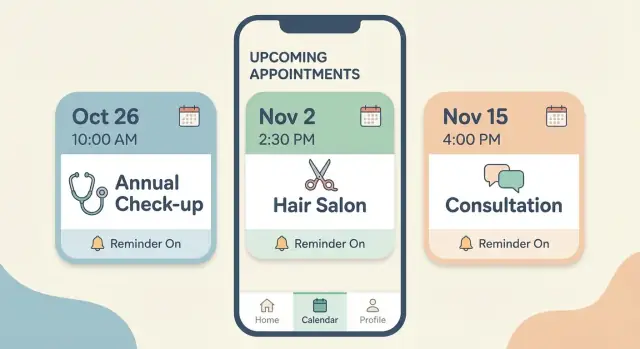
- Upcoming appointments: a simple list showing date/time, business name, and status (e.g., “Needs confirmation”). Keep this screen scannable—people usually open it while busy.
- Appointment details: everything needed to decide and act: service type, location, staff member (if relevant), policies (e.g., cancellation window), and any prep notes.
- Communication entry points: a clear way to contact the business from the details screen (call, text, email—depending on your offering).
Aim for a layout where users can understand the appointment at a glance, then either confirm or change it.
Make key actions truly one-tap
Reminders reduce no-shows only when the action is frictionless. Put the primary actions as prominent buttons on the details screen (and optionally inline on the upcoming list):
- Confirm
- Reschedule
- Cancel
- Contact business
Design these actions to work with minimal typing. For example, “Reschedule” can open a short list of available times (or a lightweight picker) instead of sending users into a long form.
Calendar integration without complexity
Many users rely on their phone calendar as the single source of truth. Add an Add to calendar option that creates an event in Google Calendar or Apple Calendar with:
- appointment title (business + service)
- time and timezone
- location and notes (parking, prep instructions)
- a link back to the appointment details (deep link)
This is also a trust signal: users feel more in control when the appointment is visible in their calendar.
Accessibility basics that prevent support issues
Even an MVP should meet a few non-negotiables:
- Readable text with good contrast and sensible font sizes
- Clear labels (avoid icon-only actions for critical flows)
- Large tap targets (especially for confirm/cancel)
These choices don’t just help users with accessibility needs—they reduce mis-taps, confusion, and “I couldn’t find the button” complaints.
Build the Scheduling and Data Foundations
If reminders are the “voice” of your product, scheduling data is its “memory.” Before you worry about message templates, make sure you can reliably answer simple questions: What exactly is booked, by whom, where, and has anything changed since it was created?
Decide where bookings live
Start with a clear source of truth:
- Your own booking system: you control the full flow (services, availability, cancellations), but you must build and maintain it.
- Sync from an existing tool (Google Calendar, Outlook, a practice-management platform): faster to launch, but you’ll need to handle mismatches, duplicates, and limited data fields.
For an MVP, many teams begin with one primary source and add syncing later. Mixing multiple sources too early can create confusing edge cases.
Data model basics that keep you out of trouble
At minimum, design your data model around:
- Users (customers, staff) with contact methods and notification preferences
- Appointments (start/end time, time zone, assigned staff, notes)
- Services (duration, buffers, price category if needed)
- Locations (address, room, telehealth link)
- Statuses (booked, confirmed, rescheduled, canceled, no-show)
Small detail, big impact: store the appointment’s time zone explicitly, especially if you support multiple locations.
Prevent double booking
Double booking usually happens when two actions occur “at the same time.” Use conflict checks plus a short-lived lock when someone is selecting a time slot, and always re-check availability at final confirmation.
Keep an audit trail
Track who changed what and when (created, rescheduled, canceled, edited contact info). This is invaluable for support (“Why did I get two reminders?”) and for resolving disputes with customers or staff.
Set Up Notification Infrastructure (Push, SMS, Email)
Your reminder system is only as good as its delivery. Treat notifications like a product feature, not a last-minute integration: they need stable providers, clear fallback rules, and measurable outcomes.
Push notifications: APNs and FCM
For mobile push, you’ll typically rely on the platform gateways:
- Apple Push Notification service (APNs) for iOS
- Firebase Cloud Messaging (FCM) for Android (and often a unified layer for both)
Even if your app uses a single “send push” API internally, keep separate configuration and certificates/keys per platform.
Plan for quiet failure modes: a user may disable notifications, uninstall the app, or have an expired device token. Your system should automatically remove bad tokens to keep costs and error rates down.
SMS and email: choose reputable providers and verify numbers
SMS and email work well when push isn’t available (or for critical reminders), but they introduce compliance and deliverability concerns. Use reputable messaging providers with strong deliverability and support.
Verification matters:
- Verify phone numbers (and confirm consent) during onboarding or when a user updates their profile.
- Validate email addresses and handle bounces/complaints to protect your sender reputation.
Reliability: retries, backoff, and a dead-letter queue
Delivery failures are normal: carrier delays, temporary provider outages, rate limits, or network timeouts. Implement a retry strategy focused on transient failures:
- Retry with exponential backoff (increasing delays between attempts)
- Cap the total retry window so reminders don’t arrive after the appointment
- Route undeliverable messages to a dead-letter queue so you can inspect and fix issues without blocking everything else
Delivery tracking for analytics
Track outcomes so you can reduce no-shows with evidence:
- Sent (your system accepted it)
- Delivered (provider confirms delivery, where available—common for SMS)
- Opened (often available for push, sometimes for email)
Store these events per reminder and aggregate them into dashboards. This helps you spot provider issues, refine timing, and prove that your appointment reminder app is improving attendance.
Handle Security, Privacy, and Consent Correctly
Security and privacy aren’t “nice to have” for an appointment reminder app—they determine whether people will trust your notifications and whether you can safely scale to more clinics, salons, or service teams. Make these decisions early, because they affect data models, UI, and how you send messages.
Consent and communication preferences
Treat consent as a first-class feature, not a legal footer:
- Provide clear opt-in/opt-out per channel (push, SMS, email), with simple toggles in Settings.
- Explain what each channel is used for (e.g., “Reminders only” vs. “Reminders + promotions”).
- Store consent history (timestamp, channel, source) so you can prove what the user agreed to.
Practical rule: if a user turns off SMS, the system should instantly stop scheduling SMS for future reminders.
Privacy basics and data minimization
Collect only what you need to schedule and remind: name, contact details for chosen channels, appointment time, and maybe provider/location. Avoid storing sensitive notes in reminder payloads.
Encrypt data in transit (HTTPS/TLS) and at rest (database encryption). Also reduce what appears in notifications—use neutral wording on lock screens (e.g., “You have an appointment tomorrow at 3:00 PM”) instead of detailed service descriptions.
Compliance pointers (GDPR/CCPA/HIPAA)
If you serve users in regulated regions, check requirements for consent, deletion requests, data export, and retention policies (GDPR/CCPA). If reminders involve health information, verify whether HIPAA applies and design accordingly (business associate agreements, audit trails, stricter access control).
Operational safety for staff access
Staff portals are a common weak spot:
- Use role-based access (front desk vs admin) and the minimum permissions needed.
- Add secure password reset (short-lived tokens, rate limits, and email/SMS verification).
- Log key actions (editing contact info, changing reminder settings) for accountability.
Publishing a short, plain-language policy page (e.g., /privacy) will reduce support load later.
Choose a Tech Stack That Fits Your Budget and Timeline
Your tech stack isn’t about picking the “best” tools—it’s about matching your constraints: time to launch, team skills, compliance needs, and ongoing costs (especially messaging).
Mobile app: native vs cross-platform
If you need the fastest path to a single codebase, cross-platform frameworks can be a strong fit:
- Native (Swift for iOS, Kotlin for Android): best platform feel and deepest OS features, but you’ll build and maintain two apps.
- Cross-platform (Flutter, React Native): one team and shared UI, usually faster for an MVP. Ideal for an appointment reminder app where most screens are forms, lists, and settings.
A practical rule: if you don’t have an existing mobile team, cross-platform often reduces timeline and hiring complexity.
Backend: managed services vs custom API
Your backend needs to store appointments, users, consent, and delivery history—and expose it reliably to the app:
- Managed database + serverless functions (e.g., Firebase/Supabase + serverless): quicker setup, less infrastructure work, good for MVPs.
- Traditional API (Node.js, Django, Rails) + hosted database: more control and clearer architecture at scale, but more engineering time.
For reminders, reliability matters more than exotic architecture. Prioritize stable scheduling (queues/cron), audit logs, and retries.
A faster path to an MVP with Koder.ai
If your main constraint is time-to-launch, a vibe-coding platform like Koder.ai can help you get to a working reminder MVP sooner—especially when the app is mostly CRUD screens plus notification workflows.
With Koder.ai, teams can describe the app in chat (user roles, appointment statuses, reminder cadence, and admin views) and generate a real implementation using a modern stack—typically React on the web, Go on the backend with PostgreSQL, and Flutter for mobile. It also supports planning mode (useful for locking requirements before you generate), snapshots and rollback (safer iteration), plus deployment/hosting, custom domains, and source code export if you want to take over the codebase later. Pricing ranges from free to pro, business, and enterprise, so you can start small and scale when you have proof that reminders reduce no-shows.
Integrations that prevent manual work
Most reminder apps become far more valuable with integrations:
- Calendar APIs (Google/Microsoft) for syncing appointments and avoiding double-booking.
- CRM/scheduling tools (or your existing booking system) so reminders reflect real-time changes.
- Webhook support so external systems can create/update/cancel appointments instantly.
Choose tools with good SDKs and documentation to keep integration work predictable.
Know your biggest cost drivers upfront
Budget isn’t just development hours:
- SMS reminders: typically the largest variable cost (priced per message). Estimate volume early.
- Push notifications: usually low-cost, but require a well-maintained token system.
- Hosting + logs: databases, background jobs, and notification delivery logs can grow quickly.
If you’re cost-sensitive, design your stack so you can default to push/email and use SMS only when it materially reduces no-shows.
Test the App and Notification Reliability
Reminders only reduce no-shows if they fire at the right time, to the right person—even when phones are offline, schedules change, or your system is under load. Treat testing as a product feature: you’re proving that your appointment reminder app can be trusted.
1) Test scheduling edge cases (the stuff that breaks quietly)
Start with a “schedule torture test” suite that covers scenarios real customers hit:
- Time zones and DST: booking in one time zone, viewing in another; daylight saving time shifts; travel scenarios.
- Recurring appointments: weekly/monthly rules, “every 2 weeks,” end dates, skipped occurrences.
- Reschedules and cancellations: reminders should update or retract instantly; no “ghost reminders” after cancel.
- Calendar integration: verify updates flow both ways (if you support it) and handle duplicates.
A practical approach is to define expected behavior in plain language (e.g., “If an appointment is moved, all pending reminders use the new time”) and then back it with automated tests.
2) Test notifications across real device states
Notification bugs often show up only on physical devices:
- Offline and poor network: send while offline, then reconnect—confirm delivery happens once, not multiple times.
- Do Not Disturb / Focus modes: confirm what the OS allows and how you explain “silent delivery” to users.
- App killed / background restrictions: especially on Android; verify push is still received.
- Token refresh & permission changes: user reinstalls, revokes notifications, changes phone number/email—your system must detect and recover.
Include matrix testing for iOS/Android versions you support, plus at least one older device.
3) Load and reliability under bursty traffic
Reminder traffic is spiky: many appointments start on the hour or half-hour. Stress-test “top of the hour” bursts so your queue, SMS provider, and push service don’t back up.
Measure:
- time from “scheduled send” to “provider accepted”
- delivery failures by channel (push notifications vs SMS reminders vs email)
- retries, duplicates, and out-of-order sends
4) Create a support checklist (so issues don’t linger)
When something goes wrong, support needs quick, consistent steps:
- Confirm appointment status (active/rescheduled/canceled) and reminder rules applied
- Check notification permission, token status, and last successful delivery
- Verify time zone on account and device
- Review provider logs (SMS/email) and push response codes
- Offer a user-facing fix: re-enable permissions, update contact info, or switch channels temporarily
Launch, Monitor Results, and Improve Over Time
Launching an appointment reminder app isn’t the finish line—it’s when you start learning what actually reduces no-shows and keeps users happy. A thoughtful rollout and measurement plan will save you from guesswork and prevent avoidable app store rejections.
App store basics (what to prepare)
Before submitting, make sure your app clearly explains why it needs notification permissions. If you request push notifications at first launch, add a short rationale screen (“We use reminders to confirm or reschedule appointments”) so the prompt doesn’t feel random.
Also double-check your privacy disclosures:
- What data you collect (name, phone/email, appointment metadata)
- What you share (ideally nothing; if you use vendors, disclose them)
- How users can opt out of reminders or delete their data
If your app includes SMS reminders, confirm you have explicit consent and an easy opt-out path.
Phased rollout: start small, then scale
Instead of launching everywhere on day one, run a pilot with one location, team, or service line. This makes it easier to:
- Validate reminder timing and wording
- Catch edge cases (time zones, last-minute reschedules, double bookings)
- Train staff on handling replies, cancellations, and confirmations
Once the pilot hits your target outcomes, expand gradually.
Measure, iterate, and keep a tight feedback loop
Track a few metrics consistently:
- No-show rate (primary outcome)
- Conversion on reminders (e.g., confirmation rate, reschedule rate)
- Churn/opt-out rate (people disabling notifications or unsubscribing)
Add lightweight in-app feedback (“Was this reminder helpful?”) and review support tickets weekly to spot patterns.
Smart upgrades to plan next
After you’ve proven the MVP, the best improvements tend to be:
- Two-way SMS (confirm, cancel, reschedule by replying)
- Message templates by service type and brand voice
- Personalization (preferred channel, language, quiet hours)
- Automation (waitlists, follow-ups, and rules based on appointment type)
Treat each upgrade as an experiment: ship, measure impact on no-shows, and keep what works.
FAQ
What problems should an appointment reminder app actually solve?
An appointment reminder app should reduce:
- No-shows by helping people remember and confirm.
- Late cancellations by prompting earlier action (cancel/reschedule).
- Missed reschedule updates by keeping both sides aligned when details change.
The key is pairing reminders with one-tap actions so users can respond immediately.
Who are the primary users of an appointment reminder app?
Start by mapping two roles:
- Customers/patients: need timely reminders, clear details, and fast actions (confirm/reschedule/cancel).
- Staff/admins: need visibility into statuses, fewer manual follow-ups, and an audit trail of changes.
Design messaging tone and timing around the service type (e.g., clinic vs salon vs field service).
What is the best MVP feature set for an appointment reminder app?
A reliable MVP usually includes:
- An upcoming appointments list with key details (time, location, status).
- Automated reminders per appointment.
- One-tap confirm/cancel/request reschedule with immediate status updates.
- A basic staff view to create/edit appointments and see confirmation states.
Avoid payments/CRM features until reminders and responses work consistently.
Which notification channels should I support (push, SMS, email)?
Most apps do best with a multi-channel approach:
- Push for engaged app users (low cost, but not guaranteed delivery).
- SMS for urgent reminders and highest reach (cost + consent required).
- Email for detailed info (prep instructions, summaries) but lower immediacy.
Implement clear fallback rules (e.g., push → SMS if opted-in when push isn’t available).
What reminder timing cadence works best without annoying users?
A practical default cadence for many services is:
- 24 hours before (time to plan or reschedule)
- 2 hours before (get-ready nudge)
- 15 minutes before (last-mile info like location/parking)
Then refine by business type and user behavior, and enforce quiet hours and frequency caps to avoid spam.
How do I handle time zones and daylight saving time correctly?
Store each appointment with:
- The appointment’s time zone (often the business location)
- The exact local start time
Compute send times from that canonical data, and test DST transitions. If users travel, display the appointment’s local time (and optionally the user’s current time zone) to reduce confusion.
What screens and UX patterns matter most for reducing no-shows?
Design for “decide and act in seconds”:
- Put Confirm / Reschedule / Cancel as prominent buttons on the appointment details screen (and optionally inline in the list).
- Show essentials at a glance: time, address/telehealth link, provider, prep notes, policies.
- Keep rescheduling lightweight (e.g., a short list of available slots instead of a long form).
What data model and scheduling foundations do I need?
At minimum, model:
- Users (contact methods + notification preferences)
- Appointments (start/end, timezone, location, provider)
- Statuses (booked, confirmed, rescheduled, canceled, no-show)
- An audit trail of changes (who/what/when)
To prevent double booking, add conflict checks and re-check availability at final confirmation (especially if multiple staff edit schedules).
How should I handle consent, privacy, and sensitive notification content?
Treat consent as a feature, not a checkbox:
- Provide opt-in/opt-out per channel (push/SMS/email) and honor changes immediately.
- Store consent history (timestamp, channel, source).
- Minimize lock-screen details in notifications (neutral wording).
If you publish policies, keep them accessible via relative paths like /privacy and /terms.
How do I test and monitor notification reliability in production?
Build reliability into delivery:
- Use proper gateways (APNs for iOS, FCM for Android) and remove invalid tokens.
- For SMS/email, verify contacts and handle bounces/complaints.
- Implement retries with exponential backoff and a dead-letter queue.
- Track events like sent/delivered/opened (where available) to diagnose issues and measure impact on no-shows.
Also stress-test “top of the hour” traffic bursts so reminders don’t arrive late.