

How to Create a Mobile App for Micro-Task Completion
Learn how to plan, design, build, and launch a mobile app for micro-task completion—from MVP features and UX to payments, safety, and growth.
What a Micro-Task App Is (and What It Isn’t)
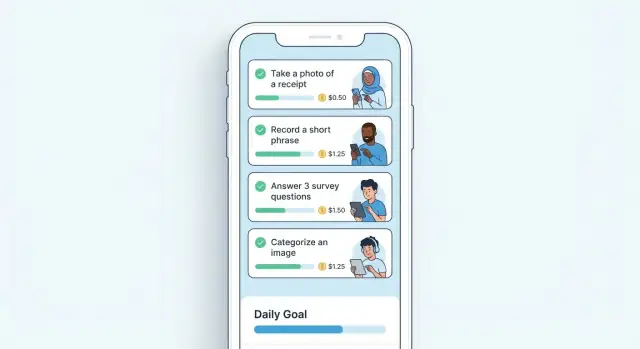
A micro-task app is a mobile marketplace for small, well-defined pieces of work that can be completed quickly—often in minutes. “Micro” doesn’t mean “low value”; it means the task has a clear scope, repeatable steps, and an objective outcome (for example: “Upload 3 photos of the store entrance,” “Tag 20 images,” or “Confirm this address exists”).
The two-sided marketplace
Micro-task apps are typically two-sided:
- Task posters (businesses or individuals) create tasks, set requirements, and pay for completed work.
- Task completers (workers) browse available tasks, complete them, and receive payouts.
Your app’s job is to match these two sides efficiently, while keeping instructions, proof, and approvals simple.
Common use cases
Micro-tasks usually fall into a few practical categories:
- Surveys and short feedback (quick opinion or usability checks)
- Photo verification (store displays, real-world conditions, proof of visit)
- Light delivery / pick-up errands (small, local jobs)
- Data tagging and labeling (categorizing photos, products, text)
- Simple services (basic help that can be standardized)
What it isn’t
A micro-task app is not a general freelancing platform for long projects, complex negotiations, or custom scoping. If each job requires detailed discovery calls and bespoke pricing, it’s not a micro-task marketplace.
Success depends on balance
These apps only work when supply and demand stay in sync: enough quality tasks to keep workers engaged, and enough reliable workers to deliver results quickly.
Typical monetization options
Most micro-task marketplaces earn revenue through:
- Platform fees (a percentage per completed task)
- Subscriptions (monthly plans for frequent posters)
- Featured listings / boosts (pay to prioritize tasks)
Pick a model that matches how often tasks are posted and how time-sensitive they are.
Pick a Clear Niche and Validate Demand
A micro-task app lives or dies on repeatable demand: the same types of tasks posted frequently, completed quickly, and paid fairly. Before you design screens or write code, get specific about who you’re helping and why they’ll switch from their current workaround.
Identify target users and pain points
Start by naming two sides of your marketplace:
- Task posters (who needs quick help?): small retailers, property managers, busy parents, field sales teams, event organizers.
- Task workers (who can do it reliably?): students, part-time workers, freelancers between gigs, people looking for local flexible income.
Interview 10–15 people on each side. Ask what slows them down today (finding someone, trust, pricing, coordination, no-shows) and what “success” looks like (time saved, predictability, safety, getting paid fast).
Choose an initial niche and geography (start narrow)
Pick a niche where tasks are:
- Simple to verify (photo proof, checklist, GPS timestamp)
- Low training required (no licensing)
- Frequent enough (weekly, not once a year)
Then choose a small starting area (one city, one campus, a few neighborhoods). Density matters: too wide and you’ll have long wait times and cancellations.
Research competitors and note gaps
Look at direct micro-task apps and indirect alternatives (Facebook groups, Craigslist, local agencies). Document gaps in:
- Pricing clarity (hidden fees, confusing payouts)
- UX speed (too many steps to post/accept)
- Trust (weak profiles, no dispute handling)
- Task quality (poor task templates, vague requirements)
Define your value proposition in one sentence
Example: “A same-day photo-verified task marketplace for local retailers to handle quick in-store checks within 2 hours.” If you can’t say it in one sentence, your scope is too broad.
Decide success criteria for v1
Set measurable goals for your first release, such as:
- Activation: % of new posters who publish a task within 24 hours
- Completion rate: % of accepted tasks completed successfully
- Time to match: median minutes from post to first acceptance
These metrics keep you focused while validating real demand.
Design the Marketplace Flow End to End
A micro-task app lives or dies by how smoothly work moves from “posted” to “paid.” Before screens and features, map the marketplace flow end to end for both sides (posters and workers). This reduces confusion, support tickets, and abandoned tasks.
Map the two core journeys
For posters, the critical path is: post → match → completion → approve → payout.
For workers, it’s: discover → accept → complete → get approved → receive payout.
Write these as short step-by-step stories, including what the user sees, what the system does in the background, and what happens when something goes wrong.
Define what “done” means (per task)
Every task should specify proof requirements up front. Common “done” signals include:
- A photo (with optional rules like “must show receipt and storefront”)
- Text input (notes, survey answers)
- Location verification (GPS radius or check-in)
- Timestamp (completed within a window)
Be explicit about accept/reject criteria so approvals feel fair and predictable.
Pick a matching model
Decide how workers get tasks:
- Open board: anyone can grab tasks; simple and transparent.
- Invite-only: posters select workers; better for quality-sensitive work.
- Recommendations: the app suggests tasks based on skills, proximity, and past performance.
Start with one model and add another later, but avoid mixing rules in the MVP.
Plan notification moments
Notifications should support action, not noise: new tasks, deadlines, acceptance confirmations, approval/rejection, and payout status. Also consider reminders when a task is accepted but not started.
Design failure states upfront
List the biggest breakdowns—no-shows, incomplete proof, missed deadlines, and disputes—and define the app response (reassign, partial payment, escalation, or cancellation). Make these rules visible in the task details so users trust the system.
Define MVP Features That Actually Ship
An MVP for a micro-task app isn’t “a smaller version of everything.” It’s the minimum set of features that lets two groups—task posters and workers—successfully complete a task, get paid, and feel safe enough to return.
MVP features for task posters
At launch, posters need a clean path from idea to approved submission:
- Create a task: title, description, category, location/remote, deadline
- Set requirements: who can do it, instructions, acceptable proof (photo, text, link), do’s/don’ts
- Budget and quantity: pay per task, number of slots, total spend cap
- Review submissions: approve/reject with a short reason, request a resubmission (one step)
- Basic messaging (optional but helpful): one thread per task for clarifications
Keep task creation opinionated. Provide templates (e.g., “Take a shelf photo,” “Verify address,” “Transcribe receipt”) so posters don’t write vague tasks that cause disputes.
MVP features for workers
Workers should be able to earn without friction:
- Onboarding: account creation, basic profile, payout method setup
- Browse tasks: filter by category, location, payout, time estimate
- Accept/reserve a task: clear time window and rules to avoid “sniping”
- Submit proof: upload photo/video, add notes, attach links or text
- Earnings view: pending vs. approved, payout status, simple history
Clarity beats cleverness: show payout, steps, and proof requirements before a worker commits.
Trust basics to prioritize early
Trust is an MVP feature in a marketplace:
- Ratings/reviews after completion (simple thumbs up + optional comment)
- Basic verification (email/phone; add ID checks later if needed)
- Clear rules: task acceptance, rejection reasons, refund policy, dispute window
What to postpone (on purpose)
To ship, push these to v2:
- Advanced matching and personalization
- Referral programs and influencer loops
- Complex analytics dashboards (start with a few core metrics)
- Multi-level worker tiers, badges, and gamification
- Automation-heavy moderation
MVP scope checklist (anti–feature creep)
Before building any feature, confirm:
- Does it help post → do → verify → pay?
- Can it be explained in one sentence?
- Can it ship in 1–2 weeks with your team?
- Do you have a default if users don’t configure it?
- What breaks if you don’t build it now? If “nothing critical,” postpone.
If you can reliably complete real tasks end-to-end with these basics, you have an MVP that can launch, learn, and improve.
If you want to reduce the time from “spec” to “shippable MVP,” a vibe-coding platform like Koder.ai can help you iterate on screens, flows, and backend APIs via a chat interface—useful when you’re validating a marketplace and expect to change requirements weekly.
UX and UI for Fast, Low-Friction Task Completion
A micro-task app wins or loses in the first 30 seconds. People open it in a queue, on a break, or between errands—so every screen should help them start, complete, and get paid with minimal thinking.
Write tasks that are hard to misread
Confusion creates disputes and drop-offs. Treat task creation like filling out a proven template, not a blank page. Provide task templates with:
- Title that says what “done” looks like (“Take 3 photos of the storefront sign”)
- Steps as short, numbered actions
- Acceptance criteria (what the requester will approve or reject)
Add small helpers (examples, character limits, and required fields) so posters can’t accidentally publish vague tasks.
Make status visible everywhere
Users should always know what’s next. Use a consistent set of statuses across lists, task details, and notifications:
Available → In progress → Submitted → Approved → Paid
Pair each status with one primary action button (e.g., “Start task,” “Submit proof,” “View payout”) to reduce decision fatigue.
Design for speed on a phone
Micro-tasks should be doable with one hand and a few taps:
- Large, thumb-friendly buttons and tap targets
- Short forms with smart defaults (date/time, location, common options)
- Built-in capture flows (camera upload, quick text, checkboxes)
If a user needs to scroll past long instructions, show a sticky checklist or “Steps” drawer they can reference while working.
Accessibility basics that help everyone
Use readable font sizes, strong contrast, and simple language. Avoid relying on color alone for status (add labels/icons). Keep error messages specific (“Photo is required”) and show them near the field.
Empty states that teach without lecturing
Your “no data yet” screens are onboarding. Plan guidance for:
- First task: suggest an easy, high-success starter task
- First post: show a sample task template and expected turnaround
A single sentence plus a clear button (“Browse available tasks”) beats paragraphs of instructions.
Choose Your Tech Approach and App Architecture
Your tech approach should match your budget, timeline, and how quickly you need to iterate. A micro-task app lives or dies on speed: fast posting, fast claiming, fast proof submission, and fast payout.
Native vs. cross-platform
Native (Swift iOS + Kotlin Android) is best when you need top-tier performance, polished UI, and deep OS integrations (camera, background uploads, location). It typically costs more because you maintain two codebases.
Cross-platform (Flutter / React Native) is often the best fit for an MVP: one codebase, quicker delivery, and simpler feature parity across iOS/Android. Performance is usually more than enough for task feeds, chat, and photo uploads. If budget and speed matter most, start here.
High-level architecture (what you’re actually building)
Plan these parts upfront:
- Mobile app for task posters and workers (often the same app with role-based screens).
- Backend API to handle accounts, tasks, matching, messaging, and status changes.
- Database for users, tasks, bids/acceptances, proofs, payouts, and audit logs.
- Admin panel for moderation, dispute handling, KYC checks (if needed), payouts review, refunds, and support tooling.
- Payments provider (e.g., Stripe/Adyen) for taking customer payments and sending worker payouts.
If you’re building quickly, consider tooling that generates consistent web and backend scaffolding from product requirements. For example, Koder.ai focuses on chat-driven app creation and commonly targets a React web front end with a Go backend and PostgreSQL—handy for moving from “MVP flow” to a working task marketplace without spending weeks on boilerplate.
Files and retention
Photos, receipts, and ID docs should go to object storage (e.g., S3/GCS) rather than your database. Decide retention by file type: task proof might be kept 90–180 days; sensitive verification documents often need shorter retention with strict access controls.
Non-technical requirements (don’t skip these)
Set clear targets early: 99.9% uptime for core APIs, <300 ms average API response for common actions, and defined support SLAs. These goals guide hosting, monitoring, and how much caching you’ll need from day one.
Backend and Data Model Essentials
Your backend is the “source of truth” for who can do what, when, and for how much. If you get the data model right early, you’ll ship faster and avoid messy edge cases when real money and deadlines are involved.
Core data objects (keep them boring and clear)
Start with a small set of entities you can explain on a whiteboard:
- Users: role (poster/worker/admin), profile, verification status, rating summary.
- Tasks: title, instructions, payout, slots, deadline, location requirements, status.
- Applications / Assignments: who requested or claimed the task, current state (applied/assigned/submitted/approved/rejected), timestamps.
- Submissions: proof of work (text, photos, files), metadata, review notes.
- Payments: charge records (poster → platform), payout records (platform → worker), fees, refunds.
APIs you’ll rely on every day
Plan endpoints around the real workflow:
- List/search tasks (filters, sorting, pagination)
- Apply/claim task; cancel; mark “in progress”
- Submit work; edit resubmission (if allowed)
- Review/approve/reject with reasons
- Messaging tied to a task/assignment (with moderation hooks)
Audit trails, disputes, and “who changed what?”
Marketplaces need accountability. Store an event log for key actions: task edits, assignment changes, approvals, payout triggers, and dispute outcomes. This can be a simple audit_events table with actor, action, before/after, and timestamp.
Concurrency: stop double-claims
If a task has limited slots (often just one), enforce it at the database level: use transactions/row locks or atomic updates so two workers can’t claim the same slot during a race condition.
Location-based tasks (only if it matters)
If tasks require being on-site, store latitude/longitude, support distance filters, and consider geofencing checks at claim or submission time. Keep it optional so remote tasks stay friction-free.
Payments, Payouts, and Marketplace Economics
Payments are where micro-task apps succeed or fail: the experience has to feel simple for posters, predictable for workers, and safe for you as the marketplace.
Choose a payment flow (escrow vs. instant rules)
Most micro-task marketplaces start with escrow/hold funds: when a poster creates a task, you authorize or capture the payment and hold it until the task is approved. This reduces “I did the work but never got paid” disputes and makes refunds clearer when a task is rejected.
You can support instant pay rules, but define them tightly—for example: only for repeat posters, only below a small amount, or only for tasks with clear objective proof (e.g., geo-check-in + photo). If you allow instant pay too broadly, you’ll eat more chargebacks and “work not delivered” claims.
Fees: who pays and how you show it
Decide whether fees are paid by the poster, the worker, or split:
- Poster pays: simpler for workers (“earn $X”), but posters see higher checkout totals.
- Worker pays: posters like predictable pricing, but workers feel the cut immediately.
- Split: can look fair, but is harder to explain.
Whatever you choose, show fees early (task posting + checkout) and repeat them on receipts. Avoid surprises.
Payouts: frequency, thresholds, and methods
Workers care about getting paid fast, but you need controls. Common patterns:
- Payout schedule: daily/weekly, with faster payouts unlocked after successful history.
- Minimum threshold: e.g., $10–$25 to reduce transaction costs.
- Methods: bank transfer, debit card payout, PayPal-style wallets (varies by region).
Build this into worker onboarding so expectations are set before the first task.
Fraud checks and dispute costs
Plan basic checks from day one: duplicate accounts (same device, phone, bank), suspicious task patterns (same poster-worker pairs repeatedly), abnormal GPS/photo metadata, and chargeback monitoring. Add lightweight holds or manual review when signals spike.
Receipts and payout history screens
Make “money screens” self-serve:
- Poster receipt: task price, fees, taxes (if applicable), status (held/paid/refunded).
- Worker history: earnings, platform fee (if any), payout status, payout reference IDs.
Clear records reduce support tickets and build trust.
Trust, Safety, and Basic Security
A micro-task app only works when both sides feel safe: posters trust that work is real, and workers trust they’ll be paid and treated fairly. You don’t need enterprise-grade controls on day one, but you do need clear rules and a few reliable safeguards.
Account verification (right-sized for your niche)
Start with lightweight verification like email + phone confirmation to reduce spam and duplicate accounts. If tasks involve in-person work, higher payouts, or regulated categories, consider optional or required ID checks.
Keep the flow simple: explain why you’re asking, what you store, and how long you keep it. Drop-off here hurts supply, so only add friction when it meaningfully reduces risk.
Moderation tools you can actually use
Give users easy ways to protect themselves:
- Report task / report user with a short reason list (spam, unsafe, misleading, non-payment).
- Block user so they can’t message or book tasks again.
- Keyword filters to flag risky content (e.g., “wire transfer,” “adult,” “crypto”), sending listings to review or preventing posting.
On the admin side, make moderation fast: search by user, task, or phrase; view history; and take clear actions (warn, unlist, suspend).
Disputes: define steps and acceptable evidence
Disputes should follow a predictable sequence: attempt resolution in chat, escalate to support, then a decision with a clear outcome (refund, payout, partial split, or ban).
Define what counts as evidence: in-app messages, timestamps, photos, location check-ins (if enabled), and receipts. Avoid relying on “he said/she said” decisions.
Basic security hygiene
Protect user data with fundamentals: encryption in transit (HTTPS), encryption at rest for sensitive fields, least-privilege staff access, and audit logs for admin actions. Don’t store payment card data yourself—use a payment provider.
Simple community rules
Write short, plain rules that set expectations: accurate task descriptions, fair pay, respectful communication, no illegal or dangerous requests, and no off-platform payment requests. Link them during posting and onboarding so quality stays high.
QA, Pilot Testing, and Iteration Plan
Quality assurance for a micro-task app is mostly about protecting the “money paths” and the “time paths”: can someone complete a task quickly, and can you pay them correctly. A good plan pairs structured test cases with a small real-world pilot, then turns learnings into short iteration cycles.
Build test cases around critical flows
Start by writing simple, repeatable test cases for the core marketplace journey:
- Accept a task → confirm it appears in “In Progress”
- Submit work → verify attachments, notes, and timestamps are saved
- Approve/reject → ensure clear status changes and notifications
- Payout → confirm eligibility rules, payout amount, and history entries
Also test edge cases: expired tasks, double-accept attempts, disputes, partial completion, and cancellations.
Test bad network and offline behavior
Micro-tasks often happen on the move. Simulate poor connectivity and confirm the app behaves predictably:
- Draft submissions saved locally when offline
- Clear “pending upload” states with retry controls
- No duplicate submissions after reconnect
- Safe handling of app kills/restarts during upload
Plan device and OS coverage
Define your “must-test” device set based on your audience: small screens, low-memory devices, and older OS versions. Focus on layout breakpoints, camera/upload performance, and notification delivery.
Run a small pilot with real tasks
Recruit a handful of posters and workers and run 1–2 weeks of real tasks. Measure whether task instructions are understandable, how long tasks actually take, and where users hesitate.
Capture crashes and feedback from day one
Set up crash reporting and in-app feedback before the pilot. Tag feedback by screen and task ID so you can spot patterns, prioritize fixes, and ship weekly improvements without guessing.
Launch Checklist for App Stores and Early Users
A micro-task app lives or dies in the first week: early users decide whether tasks feel “real,” payouts feel “safe,” and support feels responsive. Before you submit to the stores, make sure the experience is not just working—it’s understandable.
App Store assets that set expectations
Prepare your store listing to reduce confusion and low-quality sign-ups:
- Screenshots that show the full loop: browse tasks → accept → submit proof → get paid.
- A 10–20 second preview video showing one task from start to finish.
- A description that’s specific about: task types, payout timing, what proof is required, and where the app is available.
First-run onboarding that prevents mistakes
Your onboarding should teach users how to succeed, not just collect permissions.
Include:
- First-time tips: how to pick tasks, how to avoid rejections, typical turnaround times.
- A sample task (or a guided demo) that shows what “good submission” looks like.
- Safety reminders: don’t share passwords, avoid off-platform payment requests, report suspicious tasks.
Operational readiness checklist
Before inviting real users, verify the “boring” parts that create trust:
- Support channels: in-app contact form + a monitored email address.
- Moderation coverage: who reviews task reports, and how fast (set internal SLAs).
- Payout readiness: payout provider live, KYC/verification flows tested, payout timing published.
- Incident playbook: what you do if payouts fail or spam tasks spike.
Roll out by region (on purpose)
Start with one region or city so you can balance task supply and worker demand. A controlled rollout also keeps support volume manageable while you tune pricing, categories, and anti-fraud rules.
A lightweight help center
Add a simple help hub with FAQs and clear escalation paths (e.g., payment issues, rejected submissions, reporting a task). Link it from onboarding and settings, such as /help and /help/payments.
Metrics, Growth, and How to Scale Responsibly
If you don’t measure the marketplace, you’ll “grow” into confusion: more users, more support tickets, and the same stalled transactions. Pick a small set of metrics that explain whether tasks are getting posted, accepted, and completed smoothly.
The core marketplace metrics to watch
Start with a simple funnel for both sides:
- Activation: % of new posters who publish a task; % of new workers who pass onboarding and are eligible to accept.
- Time-to-first-task: how long it takes a poster to get their first task accepted, and a worker to complete their first task.
- Completion rate: accepted tasks that reach “done” without disputes or cancellations.
- Retention: posters who post again in 7/30 days; workers who complete again in 7/30 days.
These numbers show where friction lives. For example, a low completion rate often means unclear requirements, mismatched pricing, or weak verification—not “lack of marketing.”
Balance supply and demand (and fix bottlenecks)
Micro-task apps fail when one side outruns the other. If posters wait too long, they churn; if workers see empty feeds, they churn.
Tactics to rebalance:
- Temporarily limit new poster acquisition in thin geographies.
- Use waitlists or “invite only” for workers where tasks are scarce.
- Seed the marketplace with repeatable task types (e.g., photo checks, short deliveries) to stabilize volume.
Improve task quality to reduce support load
Quality scales better than moderation.
Use task templates, pricing guidance, and short “what good looks like” tips at posting time. Educate posters with examples and lightweight rules, then link to deeper guidance in /blog.
Test growth loops responsibly
Try growth loops that reinforce completion:
- Referrals that reward after a completed task (not signup).
- Repeat-task shortcuts (“post again”) for posters.
- Subscriptions for posters who post frequently (bundled support, faster matching).
If you do add referrals later, consider tying rewards to real value creation (a completed task or a funded first task). Platforms like Koder.ai also run programs that reward users for sharing content or referrals—an approach you can mirror once your own marketplace has stable completion quality.
Roadmap for scaling
As volume grows, prioritize: automation (fraud flags, dispute triage), smarter matching (skills, proximity, reliability), and enterprise features (team accounts, invoicing, reporting). Scale what increases successful completions, not just installs.
FAQ
What is a micro-task app, in plain terms?
A micro-task app is a marketplace for small, well-defined tasks that can be completed quickly (often in minutes) with objective proof (e.g., photos, checklists, tags, GPS/time evidence). It’s not meant for long, custom-scoped projects with ongoing negotiation and bespoke pricing.
How do I validate demand before building anything?
Start by interviewing 10–15 task posters and 10–15 workers. Validate that tasks are:
- Repeatable (posted weekly, not once a year)
- Easy to verify (photo/checklist/GPS)
- Low training (no licensing)
Then pilot in a tight geography (one city/campus) and track completion rate and time-to-match.
What niche should I start with for a micro-task app?
Narrow your MVP to one niche + one area where density is achievable. Examples include photo verification for local retailers, address checks for property managers, or simple tagging tasks for small e-commerce teams. A tight niche makes templates, pricing guidance, and verification rules much easier.
What are the core user flows I should map end-to-end?
Use a single, clear flow on both sides:
- Posters: post → match → completion → approve → payout
- Workers: discover → accept → complete → get approved → receive payout
Design the steps and failure states (no-shows, missed deadlines, incomplete proof) before designing screens.
How do I define task completion criteria so approvals feel fair?
Define “done” inside the task itself using verifiable requirements such as:
- Photo(s) with explicit rules (what must be visible)
- Text answers with required fields
- GPS radius check-in (if on-site)
- Timestamp or time window
Also publish accept/reject criteria so approvals feel predictable and disputes drop.
Which matching model should I choose: open board, invite-only, or recommendations?
Pick one model for MVP:
- Open board (anyone can claim): simplest and fast
- Invite-only (poster selects worker): better control for quality-sensitive tasks
- Recommendations: great later, but adds complexity early
Avoid mixing rules in v1; confusion creates cancellations and support tickets.
What features must be in the MVP to actually launch?
MVP essentials usually include:
- Create task with templates, requirements, location/remote, deadline, payout
- Task browsing with filters (category, location, payout)
- Accept/reserve with a clear time window
- Proof submission (photo/video/text/links)
- Review approve/reject with reasons (and optional one-step resubmission)
- Earnings + payout status
Everything else should be judged against: post → do → verify → pay.
How do I build trust and safety without overbuilding v1?
Ship “trust basics” early:
- Email/phone verification (add ID checks later if needed)
- Ratings/reviews after completion
- Clear rules for rejection reasons, disputes, and cancellations
- Report/block tools and admin moderation workflows
- Audit logs for key actions (who changed what, when)
Trust isn’t a “nice to have” in a paid marketplace.
What’s the safest payment and payout setup for a micro-task marketplace?
Most marketplaces start with escrow/held funds: the poster pays when posting, funds are held until approval, then the worker is paid. It reduces “work completed but unpaid” issues and makes refunds clearer.
Set expectations upfront on:
- Payout schedule (daily/weekly)
- Minimum payout threshold
- Available payout methods
Make money screens self-serve (receipts, payout history, reference IDs).
What metrics tell me if my micro-task app is working (and scaling responsibly)?
Track a small set of marketplace metrics:
- Activation (poster publishes; worker becomes eligible)
- Time-to-match and time-to-first-completion
- Completion rate (accepted → approved)
- Retention (7/30-day repeat posters and workers)
If one side outruns the other, rebalance with controlled regional rollout, waitlists, and seeding repeatable task types.