

How to Create a Mobile App for Simple Personal Logs
Step-by-step guide to plan, design, build, and publish a simple mobile personal log app with offline storage, search, reminders, and privacy basics.
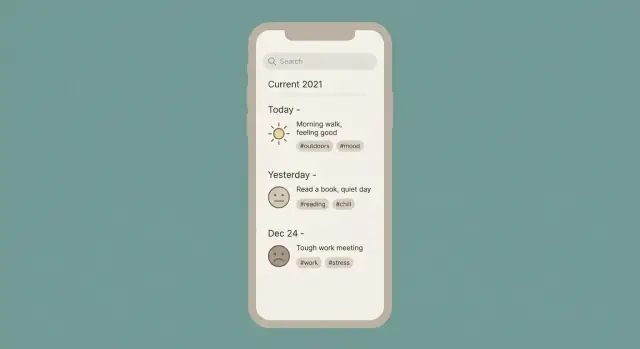
What a “Simple Personal Log” App Should Do
A “simple personal log” app is a place to capture small, frequent entries without turning it into a full journaling project. Think: a sentence, a number, or a quick choice—saved instantly with a timestamp. You can optionally add a tag (like “work” or “headache”) or a short note, but the default should be: open app → log → done.
What “simple” means in practice
At its core, each entry should have:
- A timestamp (added automatically, editable when needed)
- A short value (text, number, or a quick selection)
- Optional context (tags, a brief note, maybe an attachment later)
Anything that slows down the moment—mandatory categories, long forms, too many screens—stops it from being a log and turns it into a data-entry tool.
Example use cases you should support
People use simple logs to spot patterns or remember details later. Common examples include:
- Mood tracking (e.g., “3/5, anxious,” tagged “work”)
- Symptoms (e.g., “migraine,” intensity 7, time taken meds)
- Meals (e.g., “late lunch: sandwich,” tagged “café”)
- Workouts (e.g., “run 25 min,” optional distance)
- Spending (e.g., “$12.40 groceries,” tagged “food”)
- Study notes (e.g., “flashcards: biology ch. 4,” tagged “exam”)
Notice the pattern: quick capture now, review later.
Success criteria (what “good” looks like)
Define success early so you don’t overbuild:
- Fast entry: a new log should take seconds, ideally one screen.
- Easy review: users can find “that thing from last Tuesday” without effort.
- Safe data: protected by the phone’s lock and stored sensibly.
- Minimal setup: usable with zero configuration; customization is optional.
Scope expectations: start small, expand later
Your first version doesn’t need charts, complex templates, or social features. Start with the smallest app that reliably records entries and lets people browse them. Once you see how users actually log (and what they search for), you can add features like reminders, attachments, summaries, and export.
Choose Your MVP: The Smallest Useful App
An MVP isn’t a “worse” version of your app—it’s the first version that reliably solves one problem. For a simple personal log, the biggest risk is trying to support every type of entry (mood, habits, meals, workouts, symptoms, notes) from day one.
Pick one primary log type
Choose a single log that you want to record most often. Examples:
- Mood log: a quick rating + optional note
- Habit tracker: a checklist of habits per day
- Daily log: one short text entry per day
Everything else can become optional fields later. One primary log type keeps your screens, data, and testing simple.
Decide who you’re building for
If it’s just for you, you can optimize for your routine: fewer settings, a single reminder time, and your preferred categories.
If you’re building for a broader audience, you’ll likely need more customization (time zones, accessibility, multiple reminder schedules, onboarding) and clearer wording. Be honest here—audience size changes scope fast.
Write 3–5 core user stories
Keep them plain and testable:
- Add a new entry in under 10 seconds.
- Edit or delete an entry without confusion.
- Search entries by keyword (or filter by date/type).
- Review a week/month at a glance.
- See a simple trend (optional): e.g., average mood this week.
Decide what you won’t build yet
Make a “not now” list to protect your timeline: accounts and sync across devices, social sharing, AI analysis, complex dashboards, tags-with-tags, integrations, and anything that requires a backend.
If you want to move fast without committing to a full engineering pipeline, you can also prototype the MVP flow using a vibe-coding platform like Koder.ai—describe the screens and data model in chat, generate a working React/Go/PostgreSQL app, then refine the “quick add” UX from real usage.
If the MVP feels almost too small, you’re probably doing it right.
Design the Log Entry Data You’ll Store
Your app will feel “simple” or “fussy” largely because of the data you ask people to enter. A good entry model captures what matters, while keeping the default flow fast.
Start with a small, flexible set of fields
Most personal log entries can be represented with a few common fields:
- Date/time (when the thing happened)
- Title (optional short label)
- Note (free text)
- Rating (e.g., 1–5 or 1–10)
- Numeric value (useful for habits like water, steps, spending)
- Photos/attachments (stored as file references)
- Tags (for organizing and filtering)
The key is to store them as separate fields, not all jammed into the note, so search and filters can work later.
Optional vs. required: optimize for “quick add”
Require as little as possible. A common approach:
- Required:
timestamp(auto-filled) - Optional: everything else
You can still encourage richer entries with gentle UI defaults: remember the last-used tag, offer one-tap ratings, and keep “add photo” behind a button rather than a required step.
Add metadata you’ll be glad you have
Even a simple app benefits from a few behind-the-scenes fields:
- created_at / updated_at (sync, sorting, history)
- pinned/favorite (surface important items)
- archived flag (hide without deleting)
These don’t clutter the interface, but they make the app easier to manage over time.
Plan for future changes (without breaking old entries)
Assume you’ll add fields later (like mood, location, or multiple values). Include a schema version on each entry so the app can interpret older items safely.
Example shape (conceptually):
{
  "id": "uuid",
  "schema_version": 1,
  "timestamp": "2025-12-26T09:30:00Z",
  "title": "Morning run",
  "note": "Felt easier today",
  "rating": 4,
  "value": 5.2,
  "value_unit": "km",
  "tags": ["exercise"],
  "attachments": [{"type": "photo", "uri": "file:///..."}],
  "pinned": false,
  "archived": false,
  "created_at": "2025-12-26T09:31:12Z",
  "updated_at": "2025-12-26T09:31:12Z"
}
This gives you a clean base for browsing, searching, and exporting later—without forcing users to type more than they want to.
Wireframe a Simple, Fast User Experience
Wireframing is where your personal log app becomes real—not in pixels, but in decisions. Your goal is a flow that feels effortless enough to use every day, even when you’re tired or in a hurry.
Sketch the core screens (keep it small)
Start with five simple screens and draw them on paper or in a low-fidelity tool:
- Entries list: the home screen people see 90% of the time.
- Add/Edit entry: a focused place to type, tag, and save.
- Entry detail: reading view with edit, share/export (if needed), and delete.
- Calendar: jump to a day quickly (especially useful for “daily log” behavior).
- Settings: reminders, backups/export, privacy options.
Make the Entries list the hub. From there, everything should be one or two taps away.
Prioritize one-tap actions
On your wireframe, mark the actions that deserve “prime real estate”:
- Quick Add button always visible (floating button or bottom bar).
- Recent tags chips (e.g., “Work”, “Health”, “Mood”) so tagging is fast.
- Templates for recurring entries (e.g., “Daily check-in”, “Medication”, “Workout”).
A useful trick: when the Add screen opens, place the cursor in the main text field immediately and keep optional fields collapsible.
If you’re using a build-assist workflow (for example, generating an initial React UI and Go API with Koder.ai), these wireframes become your contract: the app should match the one-screen, one-tap intent—not “helpfully” add extra steps.
Accessibility and calm UI (built into the sketch)
Design for comfort: readable font sizes, clear contrast, and tap targets that aren’t tiny (aim for ~44px). Keep screens uncluttered—one primary action per view, generous spacing, and minimal decoration—so logging feels like a small, pleasant habit rather than a chore.
Decide on Offline Storage and Backups
An offline-first personal log app is useful the moment it’s installed: you can add, edit, and browse entries with no internet connection. Sync can be optional later, but the core experience shouldn’t depend on a server.
Make local data the source of truth
Set one simple rule early: the data stored on the device is the source of truth. That means:
- Creating and editing entries always writes to local storage first.
- If you later add sync, it should mirror local changes, not replace them.
- The app should remain fully usable even if sync is turned off or fails.
This rule prevents confusing edge cases (“Where did my entry go?”) and keeps the app feeling fast.
Pick a local storage option (high-level)
For most log apps, you’ll choose between:
- SQLite: A proven on-device database. Great for structured data (entries, tags, timestamps), fast search, and filtering. It’s the “classic” option and scales well.
- Local database wrappers (built on top of SQLite or other engines): Libraries that make storage easier by providing models, migrations, and simpler queries. They can speed up development and reduce boilerplate.
If your app includes browsing, search, and filters, a database approach (SQLite or a wrapper) is usually the smoothest path.
Plan backups before you ship
Backups protect users from lost phones, broken devices, or accidental deletions. You can support multiple levels:
- Device backups: Let the operating system include your app data in device-level backups when possible.
- Manual export: Offer an “Export” action (for example, a file the user can save) so they control where copies live.
- Optional cloud sync later: Add it only when the offline-first core is stable.
If you build export early, it also helps you test and migrate data between versions without panic.
Privacy and Security Basics for Personal Data
A personal log is often more sensitive than people expect: routines, locations, health notes, relationships, and photos can reveal a lot. Even if your MVP is small, plan for privacy and security from day one—retrofits are harder.
Lock the app (without adding friction)
Start with an optional app lock so users can protect entries even if the phone is unlocked.
- Passcode/PIN as a baseline.
- Biometric unlock (Face ID / fingerprint) for convenience.
- Auto-lock timer (e.g., immediately, 1 minute, 5 minutes) and lock on app background.
Make it easy to turn on during onboarding, but don’t force it—some users will prefer speed.
Protect data at rest
On modern mobile platforms, storing data in the app’s private storage already gives you a strong foundation. Then add the next layer when available:
- Use system-provided secure storage for secrets (like encryption keys).
- Enable on-device encryption for the database/files if your chosen storage supports it (many mobile databases and “secure storage” libraries do).
A practical rule: if someone copies the app’s files off the device, they should not be able to read entries as plain text.
Collect as little as possible
Write down what you collect and why, in simple language. For an offline-first personal log app, the best default is:
- No account required
- No location tracking
- No third-party analytics by default
If you do add analytics later, avoid sending log content, attachment names, or searchable text. Prefer aggregate events like “created entry” and let users opt in.
If you add a backend later
If you later support sync or cross-device access, keep the security model straightforward:
- Use secure authentication (sign-in with email + verification, or a trusted identity provider).
- Enforce per-user data access rules (a user can only read/write their own entries).
- Encrypt data in transit (HTTPS/TLS) and consider end-to-end encryption if you want the server to never see entry content.
If you do go the hosted route, choose infrastructure that supports regional deployment and data residency needs. For example, Koder.ai runs on AWS globally and can deploy apps in different regions—useful if your audience has strict trans-border data rules.
Privacy isn’t a feature you bolt on; it’s a set of defaults that earn trust every time someone writes a private note.
Core Features: Quick Add, Reminders, and Attachments
The heart of a personal log app is how quickly someone can capture an entry without thinking. If logging feels “heavy,” people stop using it.
Quick Add: reduce typing to almost nothing
Start with a prominent Quick Add button that creates an entry in one tap, then lets the user add details only if they want.
A few small choices make Quick Add feel instant:
- Templates for common entries (e.g., “Mood,” “Workout,” “Symptom,” “Expense”). Templates can pre-fill a title, prompt, and default tags.
- Default values like “Now” for time, a default category, or a preselected rating scale.
- Last-used tags and fields so the app remembers what the user just did (e.g., yesterday’s “Back pain” tag appears first today).
Keep the main screen focused on entry creation; advanced fields can live behind “More.”
Reminders: helpful, not nagging
Reminders should feel flexible and forgiving. Instead of a single rigid time, allow time windows (e.g., “Evening: 7–10 PM”) so users don’t miss the moment.
When a reminder fires, give three clear actions:
- Log now
- Snooze (10 minutes, 1 hour, or custom)
- Skip today (and don’t guilt-trip with extra prompts)
Also consider “quiet hours” so notifications never appear during sleep.
Attachments: only if they serve the log
If your use case benefits from it, support simple attachments like one photo or a file per entry. Be upfront: attachments increase storage and can slow backups. Offer an option to store attachments locally only, or include them in backups.
Settings: one page, the essentials
A minimal Settings page should cover units (if relevant), reminder times/windows, and backup/export options. Keep it short—people want to log, not configure.
Browsing, Search, and Filtering That Actually Helps
People won’t keep a personal log if they can’t reliably find what they wrote. Browsing and search are the “trust builders” of your app: they turn a pile of entries into something useful.
Search that matches how people remember
Start with a simple search bar, then support the most common ways users recall an entry:
- Text search across title/body (with highlighted matches).
- Tag search (type a tag name or pick from a list).
- Date range (e.g., “last week,” “this month,” or custom).
- Rating/value if you store one (mood 1–5, energy, pain level, etc.).
Keep the UI forgiving: allow combining criteria (e.g., tag + date range) without making users open five screens.
Filters and sorting that feel immediate
Add a “Filter” sheet that can be applied and cleared in one tap. Include:
- Sorting: Newest, Oldest, Pinned first
- Filters: Pinned, specific tags, rating/value range, attachments only
Show active filters as small “chips” at the top so users always understand why the list looks the way it does.
Calendar or timeline navigation
A calendar view works well for daily logs; a timeline works well for irregular notes. Either way, allow jumping to a date quickly and show small indicators (dot/count) for days with entries.
Performance as entries grow
Even a “simple” log can reach thousands of entries. Plan for it:
- Use paging/infinite scroll instead of loading everything at once.
- Render lightweight previews (title, first line, date, tag) and load full content on tap.
- Consider precomputed fields (like “search text”) to keep searches fast.
If browsing is fast and predictable, users will trust the app with more of their life.
Optional Insights: Simple Summaries and Trends
Insights are optional, but they can make a personal log app feel rewarding without adding complexity. The trick is to keep them small, honest, and easy to understand—more like a “status check” than a prediction engine.
Start with the simplest useful metrics
Begin with summaries that come “for free” from your existing entries:
- Counts per day/week (How many entries were logged?)
- Streaks (How many consecutive days had at least one entry?)
- Averages (Average entries per day over the last 7 or 30 days)
If your logs include categories (e.g., “mood,” “workout,” “symptom”), you can also show simple breakdowns like “Top categories this week.”
Charts: only when they clarify
A chart should answer a question at a glance. If it doesn’t, skip it.
Good beginner charts include:
- A 7-day bar chart of entries per day
- A line chart for a single numeric field (e.g., pain level 1–10)
Avoid clutter: no 3D effects, no tiny legends, and don’t stack multiple metrics on one chart. If you add charts, keep a “Details” view so the main screen stays clean.
Compare ranges without overpromising
A gentle comparison can help users notice changes:
- This week vs. last week (total entries, average rating)
- Last 7 days vs. previous 7 days
Use cautious language like “higher/lower than previous period.” Don’t claim causation (“you improved because…”)—just show the numbers.
Be clear about limitations
Add a short note near insights such as: “Logs are self-reported and may be incomplete. Trends reflect what was entered, not everything that happened.” This sets expectations and builds trust.
If you want, you can later expand insights behind a toggle in Settings (see /blog/feature-flags) so users who prefer a plain log can keep it simple.
Export, Import, and Data Portability
If your personal log app is going to earn trust, users need to know they can leave at any time—without losing their history. Portability also makes upgrades, phone changes, and “oops” moments far less stressful.
Export: give people formats they can actually use
Aim for two exports:
- CSV for spreadsheets (easy to open in Excel/Google Sheets). Great for lists, dates, tags, and basic fields.
- JSON for a faithful backup (keeps structure like attachments metadata, custom fields, and nested details).
A good rule: CSV is for reading and analysis; JSON is for restoring the app.
Also offer a readable backup file option that users can store anywhere: device storage, a USB drive, an encrypted cloud folder, or send to themselves. The key is that the file is theirs and not trapped in your service.
Import: restore and move devices without pain
Import should support at least your own JSON export so people can:
- restore after reinstalling
- move from an old phone to a new one
- merge or bring back an archived log
Keep it simple: “Import from file” with a clear preview (how many entries, date range, whether attachments will be included). If there’s a conflict, prefer safe options like “keep both” or “skip duplicates,” and explain what will happen before the user confirms.
Data retention: clear controls, not surprises
Personal logs are sensitive, so users should be able to manage retention easily:
- Per-entry deletion (with an undo toast if possible)
- Delete all data (a clearly labeled, irreversible option with a confirmation step)
If you keep any recycled bin or “recently deleted,” say so plainly and let users empty it. If you don’t keep anything, be explicit: deletion means it’s gone.
Portability features are rarely flashy, but they’re a major reason people stick with an app—and recommend it.
Testing: Make It Reliable and Comfortable to Use
Testing is where a “simple” personal log app proves it’s actually dependable. Your goal isn’t to create a massive QA program—it’s to make sure the everyday actions feel smooth, predictable, and safe for real entries.
Test the key flows that define the app
Start with the actions people will repeat hundreds of times. Run through them on real devices (not only simulators) and in both “happy path” and slightly messy situations.
Focus on these core flows:
- Add a log entry (including very short and very long notes)
- Edit and delete entries (and confirm undo/confirm dialogs behave as expected)
- Search and filter (make sure results update quickly and correctly)
- Export (verify file contents and formatting; try importing into a fresh install)
- Reminders (confirm scheduling, tapping notifications, and “snooze” behavior if you have it)
Keep a tiny edge-case checklist
A few edge cases cause most of the frustrating bugs in logging apps. Maintain a short checklist you can re-run before each release:
- Time zones and daylight saving changes (entries still show on the right day)
- Empty states (first launch, no search results, no exported data yet)
- Large content (very long notes, many entries, lots of tags)
- Interruption handling (incoming call, app backgrounded mid-edit, low battery mode)
Do lightweight usability testing (2–5 people is enough)
You can learn a lot without a formal study. Ask 2–5 people to complete simple tasks like “add an entry, attach something, find it later, and export a week of logs.” Watch where they hesitate.
If you can’t recruit testers, use your own daily routine for a week and write down every moment you feel friction—especially around adding an entry quickly and finding it later.
Track crashes and slowdowns without collecting sensitive content
Crash and performance monitoring helps you fix problems early, but a personal log app should avoid capturing entry text or attachments in analytics.
Prefer collecting only:
- Crash stack traces
- App version, device model, OS version
- Performance metrics (launch time, search latency)
And treat logs carefully: scrub anything that might include user content, and document your approach in your privacy notes (see /privacy-policy if you have one).
Publish the App and Plan the Next Iteration
Shipping your first version is less about perfection and more about making a small promise—and keeping it. A “simple personal log” app should feel trustworthy on day one: clear, stable, and honest about what it does (and doesn’t) do.
Choose a Release Approach
If you want the fastest path to learning, pick one primary platform first.
- iOS first: great if your target audience is iPhone-heavy and you want fewer device variations.
- Android first: great reach and flexible testing (internal/beta tracks), but more device diversity to validate.
- Cross-platform first (Flutter/React Native): best when you need both stores quickly and can accept some platform polish trade-offs.
If you’re aiming to accelerate the build-and-iterate loop, a platform like Koder.ai can help you go from user stories and wireframes to a deployable app faster—while still letting you export source code, ship snapshots, and roll back safely as you test what users actually want.
Prepare Store Assets (and Set Expectations)
Keep your store page simple and specific:
- Screenshots: show the “add entry” flow first, then browsing/search, then settings/export.
- Short description: one sentence on the core job (“Log anything in seconds—offline.”), then 3–5 bullets.
- Privacy notes: plainly state what’s stored on-device, what’s collected (ideally nothing), and what’s optional.
Plan a Simple Onboarding
On first launch, aim for a 20–30 second setup:
- What the app is for (one screen).
- How to add your first entry (one screen).
- A button that opens a pre-filled sample entry the user can save or delete.
A Version 2 Roadmap That Users Will Feel
Write down what you’ll build next and why:
- Sync (optional, user-controlled) and device-to-device migration.
- Widgets for quick add and “last log” glance.
- Integrations (calendar/health shortcuts) only if they stay optional.
- Richer analytics that summarize without nagging or judging.
After release, watch the basics: crash rate, cold-start time, and how many people create a second entry. That’s your real signal.
FAQ
What’s the difference between a simple personal log app and a journaling app?
A simple personal log app optimizes for frequency and speed: quick, timestamped entries you can review later.
A journal usually encourages longer writing, prompts, and reflection. A log focuses on capturing small facts fast (a sentence, a rating, a number, or a quick selection).
What fields should each log entry include in an MVP?
A strong baseline is:
id(UUID)schema_versiontimestamp(auto-filled, editable)- Optional fields:
title,note,rating,value,value_unit,tags,attachments - Metadata:
created_at,updated_at,pinned,archived
Keep the required fields minimal (often just timestamp) so “open → log → done” stays true.
Which fields should be required vs. optional to keep logging fast?
Treat almost everything as optional.
A practical rule:
- Required:
timestamp(auto) - Optional: note/title, rating/value, tags, attachments
Use UI nudges instead of requirements: remember last-used tags, provide one-tap rating chips, and keep advanced fields behind a “More” section.
How do I choose the right “primary log type” for my MVP?
Pick the log type you expect users to enter most often, because it dictates your screens and defaults.
Examples:
- Mood: rating + optional note
- Habit: daily checklist
- Daily log: one short text entry per day
Everything else can start as optional fields or templates, so you don’t overbuild the first release.
What UI choices make “Quick Add” actually feel instant?
Aim for one-screen entry:
- Put the cursor in the main field immediately
- Provide a prominent Quick Add action
- Offer templates (e.g., Mood, Workout, Medication) that prefill title/tags
- Show recent tags as one-tap chips
- Save instantly, with optional details expandable
If adding an entry regularly takes more than a few seconds, adoption drops quickly.
What should I use for offline storage in a personal log app?
For offline-first logging with search and filters, SQLite (or a wrapper on top of it) is usually the simplest reliable choice.
It handles:
- Fast queries by time range
- Tag filtering
- Full-text or keyword search (depending on implementation)
- Scaling to thousands of entries
Avoid designing around a backend early; keep local storage as the source of truth.
How should backups, export, and import work for a log app?
Ship at least one user-controlled export early.
A practical combo:
- CSV for spreadsheets and analysis
- JSON for faithful backups/restores (structure, tags, attachment metadata)
Also support OS-level device backups where possible, and keep “Import from file” simple with a preview (count, date range, attachments included).
What are the minimum privacy and security features I should include?
Start with privacy-by-default:
- No account required
- No location tracking by default
- No third-party analytics by default
Add optional app lock (PIN/biometrics) and protect data at rest (private app storage plus database/file encryption where supported). If you later add monitoring, avoid collecting entry text; document what you collect in something like /privacy-policy.
What search and filtering features matter most in a “simple” log?
Implement search the way people remember things:
- Keyword search across title/note
- Tag filtering
- Date ranges (last week/month/custom)
- Rating/value ranges (if you store them)
Make filters easy to apply and clear, show active filter “chips,” and keep list performance strong with paging/infinite scroll rather than loading everything at once.
What features should I avoid building in version 1 to keep scope under control?
A small “not now” list keeps your MVP shippable.
Common deferrals:
- Accounts and multi-device sync
- Social sharing
- AI analysis
- Complex dashboards
- Deep integrations that require a backend
Ship the smallest version that reliably captures, edits, searches, and exports logs. Add extras only after you see real usage (feature-flagging optional sections can help; see /blog/feature-flags).