

How to Create a Website for a Research & Analytics Report Hub
Learn how to plan, structure, and launch a research or analytics report hub with clear navigation, strong SEO, fast performance, and a scalable content workflow.
Clarify goals, audiences, and what “report hub” means
A report hub isn’t just a page with PDFs. It’s a destination people return to because it reliably answers a few core questions: what you’ve published, what’s new, and what matters to them. Before you touch design, define the hub’s job in plain language (for example: “Help prospects evaluate our expertise” or “Give clients a self-serve library for quarterly insights”).
Identify the primary audience (and the secondary ones)
Different audiences look for different signals of credibility and value:
- Clients want speed, versions, and clear takeaways.
- Analysts/media need quotable highlights, methodology notes, and shareable links.
- Internal teams care about enablement (sales-ready summaries, consistent naming).
Write down your #1 audience and what a “successful visit” looks like for them (e.g., “find the latest benchmark for their industry and subscribe for updates”).
List the report types you’ll publish
Be explicit about formats so you don’t build a hub that only works for one asset type:
- PDFs (full reports, one-page briefs)
- Web articles (key findings)
- Interactive dashboards (embedded analytics)
- Datasets or CSV downloads
This list will influence navigation, preview behavior, and gating decisions.
Define success metrics and gating rules
Pick a small set of metrics tied to outcomes, not vanity:
- Report downloads (by topic)
- Demo requests after reading
- Newsletter signups from report pages
Decide what’s public vs. gated vs. internal-only using a simple rule: public for discoverability, gated for high-intent assets, internal for anything that creates risk (client-only benchmarks, draft data).
Map the journey from discovery to next action
Sketch the path: search/social → report landing page → preview/key takeaways → read/download → next step (subscribe, request demo, related report). If you can’t describe that path in one sentence, the hub’s purpose isn’t clear yet.
Design the information architecture and content model
A report hub succeeds when people can predict where things live and what each page is “about.” Start by defining your core content types (the things you will publish and maintain) and the relationships between them (how users browse and how search filters work).
Pick core content types (and what each one stores)
Keep the first version simple and explicit. Most hubs benefit from these content types:
- Report: title, publish date, executive summary, key findings, methodology snapshot, download/read options, related topics/industries, author(s), and a clear CTA.
- Topic: a curated landing page that explains the topic and lists the most relevant reports.
- Industry: similar to Topic, but framed around an industry audience.
- Author: bio + all authored reports.
- Methodology: reusable page describing a research approach referenced by many reports.
- Dataset: what it contains, coverage, update frequency, and which reports use it.
Use a URL pattern people can understand
Choose a consistent structure early so you don’t need messy redirects later. A straightforward example:
/reports/<topic-name>/<report-title>
If a report is better grouped by industry, you can still keep reports under /reports/ and rely on metadata (topics/industries) for browsing—URLs don’t need to encode every category.
Define the report detail page content (the “fields”)
Make every report page complete and consistent by standardizing what it includes:
- Summary (who it’s for, what question it answers)
- Key findings (scannable bullets)
- Links (PDF, web version, data appendices, related assets)
- CTA (subscribe, request a demo, contact, or download)
This content model is what enables reliable search, filters, “related reports,” and clean SEO.
Handle versions, updates, and naming conventions
Decide whether updates create a new edition page or update in place. Either way, show a clear “Last updated” date and an edition label (e.g., “Q3 2025” or “2025 Edition”).
Set rules for titles and dates so sorting works:
YYYY-MMfor monthsYYYY-Q#for quarters- Consistent capitalization (avoid “Report:” prefixes)
Create taxonomy: categories, tags, and filters that work
A report hub succeeds or fails on whether people can find what they need in a few clicks. Taxonomy is the system behind that discovery: categories (broad shelves), filters (narrowing controls), and tags (lightweight cross-links).
Start with 5–10 categories people recognize
Pick 5–10 top-level categories that a first-time visitor can understand instantly. Use user language (what customers say) rather than internal team language (what departments say). If you’re unsure, scan:
- Your nav labels and top-performing pages
- Sales/CS call notes (“I’m looking for…”)
- The way competitors group similar reports
A good rule: if a category needs a paragraph to explain, it’s not a category—it’s a filter or a tag.
Filters should match how people search
Filters work best when they reflect common decision variables. Prioritize a small set that covers most needs:
- Date (year, quarter, “last 12 months”)
- Region (country, market, global)
- Industry (or vertical)
- Format (PDF, web report, dashboard, webinar)
Keep filter values consistent (for example, “United States” vs “USA” vs “US” will create messy duplicates). This is also where an “All” option and sensible defaults reduce friction.
Use tags carefully (and sparingly)
Tags are helpful for cross-cutting themes (e.g., “pricing,” “forecast,” “consumer behavior”), but they can spiral into hundreds of near-duplicates. Put guardrails in place:
- Maintain an approved tag list (with owners)
- Merge synonyms (“ecommerce” vs “e-commerce”)
- Retire tags that don’t drive clicks or search usage
Add a glossary for specialized terms
If filters include niche terminology (methodologies, industry jargon, acronyms), create a small glossary that defines each term in plain English. Link to it from filter tooltips or a “What do these mean?” link near the filters.
Make “related reports” automatic
Ensure every report can surface related reports via at least one clear rule: same topic/category, same industry, or same year. This boosts discovery without asking users to restart their search.
Plan the key page templates users will rely on
Your report hub will feel “easy” (or frustrating) largely because of a handful of repeatable page templates. Get these right early, and every new report you publish becomes simpler to ship and easier to find.
Hub homepage
Treat the homepage as a guided entry point, not a dumping ground. Include:
- Featured reports (editor’s picks or flagship research)
- Trending topics (based on recent views or subscriptions)
- Quick filters (e.g., industry, region, year) so users can jump straight into browsing
- A clear newsletter CTA for people who aren’t ready to download yet
Report listing pages
Listing pages are where most discovery happens, so they should feel predictable and fast.
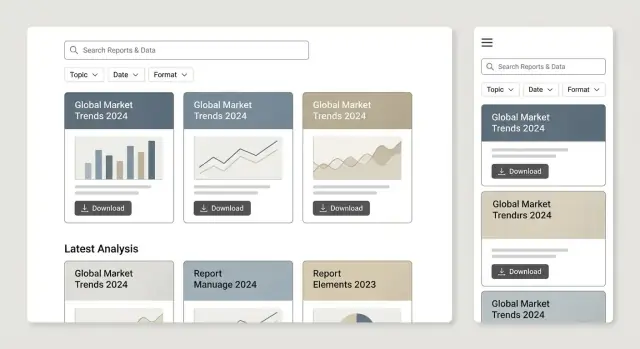
Show sorting (Newest, Most popular, A–Z), pagination (or “Load more”), and a clear result count (“42 reports”). Each card should include title, date, topic, and a one-line takeaway—enough to decide whether to click.
Report detail page (the UX pattern)
This is the decision page. Include an executive summary near the top, a preview of key charts or findings, and obvious download/read options (PDF, web version, interactive dashboard embed if you have one). Also add “Related reports” to keep people moving.
Topic pages
Topic pages act as mini-hubs. Write a short intro defining the topic, highlight “Best reports,” show “Latest updates,” and add internal links to related topics (e.g., /topics/customer-retention).
Author or team pages (optional)
If credibility matters (it often does), author/team pages help. Include a short bio, areas of expertise, and all reports contributed—useful for trust and for repeat visitors following specific analysts.
Build search and discovery features people actually use
Search is often the main navigation for a report hub—especially when you have dozens (or hundreds) of publications. The goal isn’t “fancy search,” it’s quick answers with minimal friction.
Make search fast and forgiving
People will misspell acronyms, shorten report names, and forget exact titles. If your platform allows it, add typo tolerance (fuzzy matching) and synonyms (e.g., “AI” ↔ “artificial intelligence”). Even small touches—highlighting matched terms and showing results instantly—make search feel reliable.
Index what users actually remember
At minimum, support search across:
- Report title (including subtitles)
- Topics and keywords
- Author or team name
- Short summary/abstract
If you publish recurring series, index the series name too—users often search for “Q2 outlook” more than a formal title.
Combine search and filters in one experience
Don’t force visitors to choose between a “Search page” and a “Browse with filters” page. Let them search and narrow results with filters (topic, date, format, region, industry, etc.) in the same view.
Keep filters sticky and show active chips so people can undo choices quickly.
Design helpful “no results” states
A dead-end “No results” message wastes attention. Instead, offer:
- Suggested spellings or broader terms
- A one-click reset for filters
- Links to popular categories or the latest reports
Use search data to steer your roadmap
Track on-site search queries and zero-result searches. These are direct signals for new content, missing tags, or confusing naming. Add this to your monthly review alongside traffic and conversions so the hub improves continuously, not just at launch.
Choose report formats and make content readable
The best report hub isn’t just a folder of files—it’s a reading experience. Format choices affect searchability, accessibility, and how easily someone can skim, share, and cite your work.
PDF viewer, HTML pages, or both?
PDF-only is fastest to publish and preserves layout, but it’s harder to read on mobile and harder to link to specific sections.
HTML report pages are ideal for scanning, responsive charts, and deep-linking to headings. They also make it easier to add “related reports” blocks and update small sections without re-exporting a full document.
Both is often the sweet spot: publish an HTML summary (or full HTML report) and offer the PDF as a downloadable artifact.
Make downloads obvious (and trustworthy)
Use clear, consistent file naming that matches what users see on the page, e.g.:
2025-q2-saas-benchmarks.pdf(notfinal_v7.pdf)
Add prominent download buttons with file size and format (“Download PDF • 4.2 MB”). If you offer supporting data, label it plainly (“Download CSV (cleaned)”).
Accessibility and readability basics
Structure pages with real headings (H2/H3), descriptive link labels (“Download the full report (PDF)”), and sufficient color contrast. If you include images (like a chart screenshot), provide meaningful alt text—or mark purely decorative images as decorative.
Keep charts legible on mobile: avoid tiny axis labels, prefer simplified “mobile” versions, and consider letting users tap to enlarge. Offer image downloads only when it helps reuse (e.g., press kits), and ensure the context/citation travels with the image.
Build trust with context
Every report should include:
- Citations and sources (with dates)
- Methodology notes (sample size, collection method, limitations)
- A short “How to interpret this” section so non-experts don’t misread metrics
These elements reduce support questions and make your research easier to reference in meetings, articles, and procurement reviews.
Set up SEO for report hubs (without stuffing keywords)
SEO for a report hub is less about chasing phrases and more about making each report easy to understand, index, and navigate. If a human can quickly grasp what a report is about and find related material, search engines usually can too.
Write page titles and meta descriptions that match intent
Give every report page a unique, specific title—think “2025 Retail Pricing Index: Q2 Findings (PDF + Dashboard)” rather than “Research Report.” Your meta description should summarize the value in one or two sentences: what the report covers, the geography/industry, and who it’s for.
For topic pages (collections like “Customer churn” or “Supply chain”), use titles that describe the theme and the benefit: “Churn Benchmarks and Retention Research” instead of repeating the same keyword across pages.
Structure each report page for skimming
Use descriptive headings (H2/H3) and include a short summary near the top. A simple pattern works well:
- What this report answers
- What’s inside (data sources, methodology note, timeframe)
- Key findings (bullets are fine)
- Related reports
This creates clear “chunks” that can appear in search snippets and helps users decide whether to download, read online, or share.
Use internal links like a librarian
Internal linking is how you teach both readers and crawlers what belongs together.
Link between:
- Reports → their topic pages
- Topic pages → the best/most recent reports
- Reports → relevant glossary terms (e.g., “NPS,” “CAGR,” “cohort”) and back
Also publish supporting articles in /blog or /insights that interpret findings and point to the source report. Example: /blog/what-the-data-shows-2025. These posts can target broader questions while your report pages target high-intent searches.
Make indexing clean: sitemaps + canonical URLs
Generate XML sitemaps that include report pages and topic pages, and keep URLs stable. If the same report can be accessed via multiple paths (filters, campaigns, UTM links), set a canonical URL to the primary version so authority doesn’t split across duplicates.
Gating, lead capture, and conversion flows
Gating can help you fund research and build a qualified audience—but it can also frustrate users if it feels like a trap. The goal is simple: only gate when it genuinely matches the value being exchanged, and make the “what happens next” crystal clear.
Decide what to gate (and what to leave open)
Not everything should sit behind a form. Consider a tiered approach that supports both discovery and conversion.
- Keep the report landing page open (summary, key findings, methodology snapshot). This helps users assess relevance and improves shareability.
- Gate the “high-cost” assets: full PDF, raw data tables, benchmarks, or interactive dashboards.
- Gate only premium research if you publish frequently. For example, monthly flagship reports gated; shorter briefs open.
A practical test: if someone can’t tell whether the report is useful without downloading it, you’re gating too early.
Make the form feel fair (and friction-light)
Keep forms short and set expectations. Ask for the minimum required to deliver the asset and route the lead.
Explain:
- What they’ll receive (PDF, dataset access, a link to the portal)
- How often you’ll email (and what kinds of updates)
- How to opt out (unsubscribe or manage preferences)
If you need more fields for sales, consider progressive profiling later rather than on the first download.
Always offer an alternative CTA
Some visitors aren’t ready to trade details yet. Provide a clear secondary action near the primary gate:
- Subscribe to a newsletter
- Request a demo
- Contact sales or the research team
This keeps the page useful even for people who bounce off gating.
Use thank-you pages as the next step—not the end
After form submission, send users to a dedicated thank-you page with:
- A prominent download/access button (and an emailed copy)
- Related reports in the same category/tag set
- A lightweight next step (newsletter, demo, “See the methodology”)
This is also a great place to track conversions cleanly.
Document lead routing and ownership
Decide—before launch—where leads go and who follows up:
- CRM (and which pipeline/stage)
- Email platform list/segment
- Ownership rules (research team vs sales vs marketing)
If routing is unclear, gates generate busywork instead of revenue.
Performance, security, and maintenance essentials
A report hub lives or dies on trust and speed. People arrive to answer a question quickly—if pages feel heavy or files seem risky, they leave.
Set clear performance targets
Pick a few measurable goals and treat them as non-negotiable:
- Fast initial load: aim for a lightweight page shell (navigation, summary, filters) that appears quickly, even on mobile.
- Charts that don’t block reading: load interactive charts only when needed and keep the default view simple.
- Optimized PDFs: keep file sizes reasonable so downloads don’t stall on slower connections.
Make previews fast (and still useful)
Report hubs often rely on thumbnails, cover images, and preview pages. Keep them quick:
- Compress images (WebP/AVIF where supported) and serve appropriately sized versions.
- Use lazy loading for below-the-fold previews and related-report cards.
- If you show embedded PDF previews, consider loading a static snapshot first, then the full viewer on interaction.
Basic security you can’t skip
Even a public report library needs solid fundamentals:
- Enforce HTTPS everywhere.
- Protect forms with spam controls (rate limiting, CAPTCHA where necessary).
- Use role-based access for admin/editor accounts, and require strong authentication.
- For gated assets, ensure the direct file URL isn’t trivially accessible without permission.
Backups, version control, and file hygiene
Treat report files like product releases:
- Keep version control for source documents and a clear naming convention for published files.
- Run automated backups (site + database + asset storage) and test restores.
Retention and broken-link prevention
Old reports still attract traffic.
- Define retention rules: what stays, what gets archived, and what gets removed.
- When URLs change, use redirects—not deletions—to protect bookmarks and SEO.
- Add link checks to catch broken downloads and missing attachments before users do.
Content workflow: from draft to publish to updates
A report hub lives or dies by consistency. A clear workflow keeps each release easy to find, easy to trust, and easy to maintain—especially when multiple teams contribute.
Define roles (and don’t blur them)
Assign named owners for each step so work doesn’t stall in “someone will do it” limbo:
- Author: writes the report and provides source files (doc, slides, charts, data notes).
- Editor: checks structure, clarity, and factual consistency.
- Designer: prepares figures, layout, and any web-friendly assets (cover/hero, charts).
- Reviewer: validates methodology, claims, and approvals (legal/comms if needed).
- Publisher: builds the web page, applies metadata/taxonomy, and pushes live.
Use a publishing checklist (every time)
Create a checklist that’s short enough to follow and strict enough to prevent messy releases. Typical items:
- Title, subtitle, and one-paragraph summary written for scanning
- Correct category/tags, industry/topic filters, and publication date
- Featured/hero image (or cover) and alt text
- Download links (PDF, CSV, slides) and “how to cite”/version notes if applicable
- Internal links to related reports and a clear next step (newsletter, contact, demo)
Consider keeping the checklist in your CMS template or in a shared doc linked from /blog.
QA that matches how people consume reports
Before publishing, run quick QA focused on real usage:
- Mobile: headings, tables, charts, and download buttons are usable
- Accessibility: headings in order, link text is descriptive, sufficient contrast
- Tracking: verify download tracking and outbound link tracking fire correctly
Plan cadence with an editorial calendar
Use an editorial calendar for recurring releases (weekly insights, quarterly reports, annual indexes). Include deadlines for review and design so launch dates are predictable.
Update without breaking URLs
Document a rule: never change the original report URL. When updating, keep the page and add a visible “Updated on” note, a changelog section, and (if needed) a link to an archived PDF version. This preserves citations, bookmarks, and long-term trust.
Analytics and continuous improvement for the hub
If you don’t measure how people find, evaluate, and use reports, you’ll end up optimizing for opinions. A report hub is ideal for simple, repeatable analytics: every report is a “product page” with clear actions (read, download, share, cite, subscribe).
Instrument the events that matter
Track a small set of key events consistently across every template:
- Report views (including time-on-page or scroll depth)
- Downloads (PDF, spreadsheet, slide deck)
- Form submits (newsletter, gated report access, “request the full dataset”)
- Search queries (what people type, and whether they click a result)
- Filter usage (which topics, industries, regions, and formats are actually used)
This lets you answer practical questions like: “Do people who search convert more?” and “Which filters cause drop-off?”
Build dashboards by topic and format
Create dashboards that your content and marketing teams can read at a glance:
- Performance by topic/category (views, downloads, assisted conversions)
- Performance by format (PDF vs web report vs dashboard embed)
- Engagement by audience segment (new vs returning, geography, device)
A useful pattern is a “top reports” table plus “rising reports” (last 7–14 days) to spot trends early.
Attribute distribution with UTM discipline
Use UTM-tagged links for campaigns, partner emails, and social posts so you can see which channels drive not just traffic, but meaningful actions (downloads and qualified form submits). Keep naming conventions short and consistent.
Experiment and review on a cadence
Run small experiments: swap homepage modules, test CTA copy and placement, and compare gating rules (e.g., gate only the PDF, not the web summary). Then review quarterly: prune unused tags, merge confusing categories, and refresh internal links on your top-performing pages to keep the hub compounding over time.
Launch plan and scalable roadmap
Launching a report hub is less about a “big reveal” and more about getting a solid version in front of real users quickly—then improving with evidence.
Start with a minimum viable hub
Aim for a hub that feels complete without being exhaustive: roughly 20–50 reports, organized into 5–10 topics, with simple filters (topic, year/quarter, format, and “new/updated”). That’s enough content for visitors to explore patterns, while small enough to maintain quality.
Keep the first release focused on what users expect:
- Clear topic pages and report landing pages
- A consistent layout and readable summaries
- Basic search + a couple of reliable filters
Prioritize templates and SEO basics first
Before investing in advanced features, make sure your core templates are consistent and your fundamentals are covered: descriptive titles, clean URLs, indexable landing pages, and internal linking between related reports and supporting articles (for example, /blog/how-we-ran-the-survey).
If you gate some reports, ensure there’s still enough public context for users (and search engines) to understand what the report contains.
Build faster with a platform (optional)
If you want to ship a functional hub quickly—without wiring up React pages, Go services, PostgreSQL schemas, search, auth, and gating from scratch—tools like Koder.ai can help you scaffold and iterate via chat.
Koder.ai is a vibe-coding platform that can generate a report-hub foundation (web + backend + database), then refine details like taxonomy, gated downloads, and admin workflows. It also supports source code export, deployment/hosting, custom domains, and safer iteration with snapshots and rollback—useful when you’re evolving templates and metadata rules after launch.
Use a launch checklist and soft-launch
Do a soft-launch with internal stakeholders (research, marketing, sales, support). Ask them to complete tasks like “find the latest report on X” or “compare reports from 2023 vs 2024,” and log where they get stuck.
A practical checklist includes: analytics tracking, redirects, PDF checks, form testing (if gated), mobile review, and page-speed sanity checks.
Promote with a repeatable cadence
Treat launch as the start of a publishing cycle: newsletter announcements, social posts, partner sharing, and a handful of relevant /blog posts that point into the hub.
Plan phase 2 (scalable roadmap)
Once the hub is stable, expand intentionally: interactive dashboards, datasets/APIs, localization, and member areas. Only add what you can support long-term with ownership, documentation, and a maintenance schedule.
FAQ
What is a “report hub,” and how do I define what mine should do?
Start with one sentence that defines the hub’s job (e.g., “Help clients self-serve quarterly insights”). Then specify:
- primary audience and what a “successful visit” means
- asset types you’ll publish (PDF, HTML, dashboards, datasets)
- the expected next action (subscribe, request demo, download)
If you can’t describe the path from discovery → report page → next step, the purpose isn’t clear yet.
How do I choose the primary audience for my report hub (clients vs. media vs. internal teams)?
Pick a clear #1 audience and optimize the default experience for them:
- clients: fast access, clear takeaways, version/edition clarity
- analysts/media: quotable highlights, methodology notes, stable share links
- internal teams: consistent naming, sales-ready summaries, predictable structure
Then add secondary affordances (filters, author pages, press-friendly citations) without cluttering the core journey.
What content types should a report hub include in its first version?
Use a simple content model with reusable page types:
- Report (the core unit)
- Topic and/or Industry (collection pages)
- Author/team (credibility + navigation)
- Methodology (referenced across reports)
- Dataset (if you publish data downloads)
Define what fields each type stores (date, summary, key findings, format links, topics/industries) so templates and filters stay consistent as you scale.
What URL structure works best for reports and topic pages?
Choose a stable, human-readable pattern early, such as:
/reports/<topic-name>/<report-title>
Keep URLs simple and rely on metadata (topics, industries, regions) for browsing instead of encoding every category into the URL. If you later reorganize, use redirects and keep one canonical URL per report to avoid SEO dilution.
How should I handle report versions, updates, and naming conventions?
Decide upfront whether you:
- update in place (same URL) with a visible “Last updated” date, or
- publish new editions (separate pages) with clear edition labels (e.g.,
2025-Q3)
Either way, standardize naming so sorting and search work (e.g., YYYY-MM or YYYY-Q#), and avoid vague filenames like final_v7.pdf in favor of publish-ready names.
How do I design categories, filters, and tags without creating a messy taxonomy?
Keep taxonomy small and user-centered:
- 5–10 top-level categories people recognize
- a short, high-signal filter set (date, region, industry, format)
- tags only for cross-cutting themes, with a controlled list and synonym merging
If filters include specialized terms, add a small glossary and link to it from tooltips or a “What do these mean?” link near filters.
What search features matter most for a report hub with lots of publications?
Make search fast and forgiving, and combine it with filters in one results view:
- typo tolerance and synonyms (e.g., “AI” ↔ “artificial intelligence”)
- index titles, summaries, topics, authors, and series names
- show active filter “chips” so people can undo selections quickly
Also design “no results” states to suggest broader queries, reset filters, and point to popular or recent reports.
Should I publish reports as PDFs, HTML pages, or both?
A practical default is “both”:
- HTML page for scanning, accessibility, deep-linking, and internal linking
- PDF for offline reading and exact layout preservation
Make downloads trustworthy by showing file size/format and keeping filenames aligned with the page (e.g., 2025-q2-saas-benchmarks.pdf). If you offer CSVs/datasets, label them clearly (e.g., “Download CSV (cleaned)”).
When should I gate reports, and how do I avoid frustrating users?
Use tiered gating so discovery still works:
- keep the landing page open (summary, key findings, methodology snapshot)
- gate only high-value assets (full PDF, benchmarks, raw tables, dashboards)
- keep forms short and explain what happens next (delivery method, email frequency, opt-out)
Always provide an alternative CTA (newsletter, contact, demo) so the page is still useful if someone won’t fill out the form.
What analytics should I track to improve the hub over time?
Instrument the same core events across all templates:
- report views + engagement (scroll/time)
- downloads by format (PDF/CSV)
- form submits (gated access, newsletter)
- on-site search queries and zero-result searches
- filter usage and drop-off
Use those insights to prune unused tags, fix confusing naming, adjust gating, and refresh internal links on top pages so the hub improves continuously—not only at launch.