

How Vector Databases Power Semantic Search for AI Apps
Learn how vector databases store embeddings, run fast similarity search, and support semantic search, RAG chatbots, recommendations, and other AI apps.
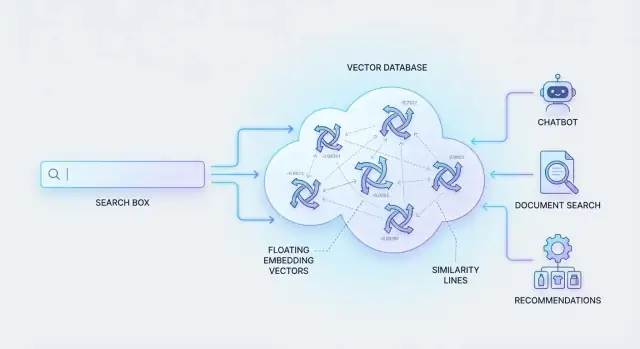
What Semantic Search Means (Without the Jargon)
Semantic search is a way of searching that focuses on what you mean, not just the exact words you type.
If you’ve ever searched for something and thought, “the answer is clearly in here—why can’t it find it?”, you’ve felt the limits of keyword search. Traditional search matches terms. That works when the wording in your query and the wording in the content overlap.
Why keyword search often misses the point
Keyword search struggles with:
- Synonyms and phrasing: “cancel” vs “close” vs “terminate” an account.
- Intent: “how do I stop being billed?” is really about canceling a subscription.
- Context: “apple charger” (brand) vs “apple tree charger” (nonsense, but you get the idea).
It can also overvalue repeated words, returning results that look relevant on the surface while ignoring the page that actually answers the question using different wording.
A simple example
Imagine a help center with an article titled “Pause or cancel your subscription.” A user searches:
“stop my payments next month”
A keyword system might not rank that article highly if it doesn’t contain “stop” or “payments.” Semantic search is designed to understand that “stop my payments” is closely related to “cancel subscription,” and bring that article to the top—because the meaning aligns.
Where vector databases fit in
To make this work, systems represent content and queries as “meaning fingerprints” (numbers that capture similarity). Then they need to search through millions of these fingerprints quickly.
That’s what vector databases are built for: storing these numeric representations and retrieving the most similar matches efficiently, so semantic search feels instant even at large scale.
Embeddings: Turning Content Into Meaningful Vectors
An embedding is a numeric representation of meaning. Instead of describing a document with keywords, you represent it as a list of numbers (a “vector”) that captures what the content is about. Two pieces of content that mean similar things end up with vectors that sit near each other in that numeric space.
What an embedding actually looks like
Think of an embedding as a coordinate on a very high-dimensional map. You usually won’t read the numbers directly—they’re not meant to be human-friendly. Their value is in how they behave: if “cancel my subscription” and “how do I stop my plan?” produce nearby vectors, a system can treat them as related even when they share few (or zero) words.
Text, images, and audio can all become vectors
Embeddings aren’t limited to text.
- Text embeddings represent sentences, paragraphs, support tickets, product descriptions, and more.
- Image embeddings represent visual similarity and concepts (e.g., “red running shoes”).
- Audio embeddings can represent speakers, tone, or the meaning of spoken words when paired with speech models.
This is how a single vector database can support “search with an image,” “find similar songs,” or “recommend products like this.”
Generated by models—not written by hand
Vectors don’t come from manual tagging. They’re produced by machine learning models trained to compress meaning into numbers. You send content to an embedding model (hosted by you or a provider), and it returns a vector. Your app stores that vector alongside the original content and metadata.
Why embedding choice affects quality and cost
The embedding model you pick strongly influences results. Larger or more specialized models often improve relevance but cost more (and may be slower). Smaller models can be cheaper and faster, but may miss nuance—especially for domain-specific language, multiple languages, or short queries. Many teams test a few models early to find the best trade-off before scaling.
How Vector Databases Store Data
A vector database is built around a simple idea: store “meaning” (a vector) alongside the information you need to identify, filter, and show results.
The basic data model
Most records look like this:
- ID: a unique identifier you control (e.g.,
doc_18492or a UUID) - Vector (embedding): an array of numbers representing the content’s meaning
- Metadata: key–value fields such as title, URL, tags, author, language, created_at, or tenant_id
For example, a help-center article might store:
- ID:
kb_123 - Vector: 768 floating-point numbers (for a common embedding model)
- Metadata:
{ "title": "Reset your password", "url": "/help/reset-password", "tags": ["account", "security"] }
The vector is what powers semantic similarity. The ID and metadata are what make results usable.
Why metadata matters (more than people expect)
Metadata does two jobs:
- Filtering before/after vector search: “Only show results from product X,” “Only English,” “Only documents the user can access,” or “Only items newer than 90 days.” This is essential for relevance and access control.
- Display and actions: When you present a result, users don’t want a vector—they want a title, a snippet, and a link (URL). Metadata provides the details your UI needs.
Without good metadata, you may retrieve the right meaning but still show the wrong context.
Common vector sizes and storage implications
Embedding size depends on the model: 384, 768, 1024, and 1536 dimensions are common. More dimensions can capture nuance, but they also increase:
- Storage (each record stores more numbers)
- Memory pressure for fast search
- Index build time (especially with ANN indexing)
As a rough intuition: doubling dimensions often pushes up cost and latency unless you compensate with indexing choices or compression.
Update patterns: inserts, changes, and deletions
Real datasets change, so vector databases typically support:
- Insert: add new content with its embedding and metadata
- Update: change metadata (e.g., tags) or replace the vector if the content changed
- Delete: remove outdated or revoked content
- Re-embed: recompute vectors when you switch embedding models, change chunking, or significantly edit text
Planning for updates early prevents a “stale knowledge” problem where search returns content that no longer matches what users see.
Similarity Search: Finding “Closest Meaning” Fast
Once your text, images, or products are converted into embeddings (vectors), search becomes a geometry problem: “Which vectors are nearest to this query vector?” This is called nearest-neighbor search. Instead of matching keywords, the system compares meaning by measuring how close two vectors are.
Nearest neighbors in plain English
Picture each piece of content as a point in a huge multi-dimensional space. When a user searches, their query is turned into another point. Similarity search returns the items whose points are closest—your “nearest neighbors.” Those neighbors are likely to share intent, topic, or context, even if they don’t share exact words.
Common similarity metrics
Vector databases typically support a few standard ways to score “closeness”:
- Cosine similarity: compares the angle between vectors (great when you care about direction/meaning more than magnitude).
- Dot product: related to cosine, but also influenced by vector length; often used with normalized embeddings.
- Euclidean distance: the straight-line distance between points (useful in some models and domains).
Different embedding models are trained with a particular metric in mind, so it’s important to use the one recommended by the model provider.
Exact search vs approximate (ANN)
An exact search checks every vector to find the true nearest neighbors. That can be accurate, but it gets slow and expensive as you scale to millions of items.
Most systems use approximate nearest neighbor (ANN) search. ANN uses smart indexing structures to narrow the search to the most promising candidates. You usually get results that are “close enough” to the true best matches—much faster.
The latency vs recall trade-off
ANN is popular because it lets you tune for your needs:
- Lower latency (faster responses) by searching fewer candidates.
- Higher recall (finding more of the true top matches) by searching more.
That tuning is why vector search works well in real apps: you can keep responses snappy while still returning highly relevant results.
The Semantic Search Workflow End to End
Semantic search is easiest to reason about as a simple pipeline: you turn text into meaning, look up similar meaning, then present the most useful matches.
1) Embed the query
A user types a question (for example: “How do I cancel my plan without losing data?”). The system runs that text through an embeddings model, producing a vector—an array of numbers that represents the query’s meaning rather than its exact words.
2) Search the vector database
That query vector is sent to the vector database, which performs similarity search to find the “closest” vectors among your stored content.
Most systems return top-K matches: the K most similar chunks/documents.
- Why K is configurable: a smaller K is faster and often good enough (e.g., K=5).
- A larger K increases recall (you’re less likely to miss the right answer), but it may include more “almost relevant” results (e.g., K=50).
3) (Optional) Rerank for precision
Similarity search is optimized for speed, so the initial top-K can contain near-misses. A reranker is a second model that looks at the query and each candidate result together and re-sorts them by relevance.
Think of it as: vector search gives you a strong shortlist; reranking picks the best order.
4) Return results (or feed downstream)
Finally, you return the best matches to the user (as search results), or you pass them to an AI assistant (for example, a RAG system) as the “grounding” context.
If you’re building this kind of workflow into an app, platforms like Koder.ai can help you prototype quickly: you describe the semantic search or RAG experience in a chat interface, then iterate on the React front end and Go/PostgreSQL back end while keeping the retrieval pipeline (embedding → vector search → optional rerank → answer) as a first-class part of the product.
A quick “keywords vs semantic” example
If your help center article says “terminate subscription” and the user searches “cancel my plan,” keyword search may miss it because “cancel” and “terminate” don’t match.
Semantic search will typically retrieve it because the embedding captures that both phrases express the same intent. Add reranking, and the top results usually become not just “similar,” but directly actionable for the user’s question.
Hybrid Search and Metadata Filters for Better Results
Pure vector search is great at “meaning,” but users don’t always search by meaning. Sometimes they need an exact match: a person’s full name, a SKU, an invoice ID, or an error code copied from a log. Hybrid search solves this by combining semantic signals (vectors) with lexical signals (traditional keyword search like BM25).
What “hybrid search” actually does
A hybrid query typically runs two retrieval paths in parallel:
- Vector search: finds content that’s conceptually similar, even if wording differs.
- Keyword/BM25 search: finds content that shares the same tokens, rewarding exact terms and rare words.
The system then merges those candidate results into one ranked list.
When hybrid is the better default
Hybrid search shines when your data includes “must-match” strings:
- Product names with specific modifiers (e.g., “Pro Max”, “Gen 2”)
- IDs (order numbers, ticket IDs, part numbers)
- Error codes (“E0421”, “ORA-00933”) and command flags
- Rare domain terms where synonyms would be risky
Semantic search alone may return broadly related pages; keyword search alone may miss relevant answers phrased differently. Hybrid covers both failure modes.
Using metadata filters to narrow the search space
Metadata filters restrict retrieval before ranking (or alongside it), improving relevance and speed. Common filters include:
- Language (return only English documents)
- Date range (most recent policy, latest release notes)
- Category or source (docs vs. tickets; “billing” vs. “security”)
- Access control tags (only what this user is allowed to see)
How scoring works (high level)
Most systems use a practical blend: run both searches, normalize scores so they’re comparable, then apply weights (e.g., “lean more on keywords for IDs”). Some products also rerank the merged shortlist with a lightweight model or rules, while filters ensure you’re ranking the right subset in the first place.
RAG: Using Vector Databases to Ground LLM Responses
Retrieval-Augmented Generation (RAG) is a practical pattern for getting more reliable answers from an LLM: first retrieve relevant information, then generate a response that is tied to that retrieved context.
The RAG idea in one sentence
Instead of asking the model to “remember” your company docs, you store those docs (as embeddings) in a vector database, retrieve the most relevant chunks at question time, and pass them into the LLM as supporting context.
Why a vector database helps reduce hallucinations
LLMs are excellent at writing, but they will confidently fill gaps when they don’t have the needed facts. A vector database makes it easy to fetch the closest-meaning passages from your knowledge base and supply them to the prompt.
That grounding shifts the model from “invent an answer” to “summarize and explain these sources.” It also makes answers easier to audit because you can keep track of which chunks were retrieved and optionally show citations.
Chunking basics (so retrieval actually works)
RAG quality often depends more on chunking than on the model.
- Chunk size: Aim for chunks that contain a complete thought (often a short section). Too small loses meaning; too large pulls in noise.
- Overlap: Add a small overlap so important details at boundaries aren’t split away from their context.
- Keep context: Preserve titles, headings, and identifiers (doc name, section, date) as metadata so results are understandable and filterable.
Simple RAG pipeline diagram (description)
Picture this flow:
User question → Embed question → Vector DB retrieve top-k chunks (+ optional metadata filters) → Build prompt with retrieved chunks → LLM generates answer → Return answer (and sources).
The vector database sits in the middle as the “fast memory” that supplies the most relevant evidence for each request.
Common AI Use Cases Powered by Vector Databases
Vector databases don’t just make search “smarter”—they enable product experiences where users can describe what they want in natural language and still get relevant results. Below are a few practical use cases that show up again and again.
Customer support: find answers beyond keywords
Support teams often have a knowledge base, old tickets, chat transcripts, and release notes—but keyword search struggles with synonyms, paraphrasing, and vague problem descriptions.
With semantic search, an agent (or a chatbot) can retrieve past tickets that mean the same thing even if the wording is different. That speeds up resolution, reduces duplicated work, and helps new agents ramp faster. Pairing vector search with metadata filters (product line, language, issue type, date range) keeps results focused.
Product discovery: search catalogs the way people talk
Shoppers rarely know exact product names. They search for intents like “small backpack that fits a laptop and looks professional.” Embeddings capture those preferences—style, function, constraints—so the results feel closer to a human sales assistant.
This approach works for retail catalogs, travel listings, real estate, job boards, and marketplaces. You can also blend semantic relevance with structured constraints such as price, size, availability, or location.
Recommendations: “similar items” and content discovery
A classic vector-database feature is “find items like this.” If a user views an item, reads an article, or watches a video, you can retrieve other content with similar meaning or attributes—even when categories don’t match perfectly.
This is useful for:
- “More like this” modules
- Related articles and knowledge base suggestions
- Duplicate or near-duplicate detection (for content moderation or cleanup)
Internal search with permissions: policies, docs, meeting notes
Inside companies, information is scattered across docs, wikis, PDFs, and meeting notes. Semantic search helps employees ask questions naturally (“What’s our reimbursement policy for conferences?”) and find the right source document.
The non-negotiable part is access control. Results must respect permissions—often by filtering on team, document owner, confidentiality level, or an ACL list—so users only retrieve what they’re allowed to see.
If you want to take this further, this same retrieval layer is what powers grounded Q&A systems (covered in the RAG section).
Data Pipelines: Ingestion, Chunking, and Updates
A semantic search system is only as good as the pipeline that feeds it. If documents arrive inconsistently, are chunked poorly, or never get re-embedded after edits, results drift from what users expect.
A simple ingestion flow (that works)
Most teams follow a repeatable sequence:
- Collect data (docs, PDFs, tickets, chat logs, wiki pages, product data).
- Clean it (remove boilerplate, fix encoding, normalize whitespace, extract main text).
- Chunk it (split into bite-sized passages users would actually want to retrieve).
- Embed it (generate vectors with your chosen embedding model).
- Upsert it (write vectors + metadata into the vector database, replacing when needed).
The “chunk” step is where many pipelines win or lose. Chunks that are too large dilute meaning; too small lose context. A practical approach is to chunk by natural structure (headings, paragraphs, Q&A pairs) and keep a small overlap for continuity.
Keeping embeddings current
Content changes constantly—policies get updated, prices change, articles are rewritten. Treat embeddings as derived data that must be regenerated.
Common tactics:
- Store a source document ID, chunk ID, and a content hash. If the hash changes, re-embed that chunk.
- Use soft deletes (mark old chunks inactive) to avoid ghost results.
- Rebuild selectively instead of re-embedding everything.
Batch vs. streaming updates
- Batch fits large backfills, nightly syncs, and predictable content (documentation, knowledge bases).
- Streaming fits fast-changing sources (support tickets, user-generated content, inventory). It reduces staleness but requires stronger monitoring and cost control.
Multiple languages and multiple models
If you serve multiple languages, you can either use a multilingual embedding model (simpler) or per-language models (sometimes higher quality). If you experiment with models, version your embeddings (e.g., embedding_model=v3) so you can run A/B tests and roll back without breaking search.
How to Evaluate Quality and Performance
Semantic search can feel “good” in a demo and still fail in production. The difference is measurement: you need clear relevance metrics and speed targets, evaluated on queries that look like real user behavior.
Relevance metrics that reflect user satisfaction
Start with a small set of metrics and stick to them over time:
- Precision / Recall: Precision tells you how many returned results are actually relevant; recall tells you how many relevant items you managed to retrieve at all. Use these when you have a clear definition of “relevant.”
- MRR (Mean Reciprocal Rank): Great when users expect one “best” answer. It rewards putting the right document near the top.
- nDCG: Useful when multiple results can be relevant at different levels (highly relevant vs. somewhat relevant).
- Latency (p50/p95): Track both average and tail latency. A fast p50 with a slow p95 still feels sluggish to users.
Build a test set you can trust
Create an evaluation set from:
- Real queries from search logs or support tickets (anonymized).
- Expected documents (gold labels) agreed upon by domain experts.
- Edge cases: short queries (“refund”), long questions, ambiguous terms, rare product names, and “no-result” queries where the correct behavior is to say “nothing found.”
Keep the test set versioned so you can compare results across releases.
A/B testing and feedback loops
Offline metrics don’t capture everything. Run A/B tests and collect lightweight signals:
- Thumbs up/down on results
- Click-through and dwell time
- “Refine search” events
Use this feedback to update relevance judgments and spot failure patterns.
Monitoring drift over time
Performance can change when:
- You switch embedding models or update how you chunk content.
- Your corpus shifts (new products, policy changes, seasonal terms).
Re-run your test suite after any change, monitor metric trends weekly, and set alerts for sudden drops in MRR/nDCG or spikes in p95 latency.
Security, Privacy, and Access Control Considerations
Vector search changes how data is retrieved, but it shouldn’t change who is allowed to see it. If your semantic search or RAG system can “find” the right chunk, it can also accidentally return a chunk the user wasn’t authorized to access—unless you design permissions and privacy into the retrieval step.
Access control: enforce it at retrieval time
The safest rule is simple: a user should only retrieve content they’re allowed to read. Don’t rely on the app to “hide” results after the vector database returns them—because by then the content already left your storage boundary.
Practical approaches include:
- Per-document (or per-chunk) ACLs: store permission fields alongside each vector so every query can enforce them.
- Tenant isolation: for multi-tenant apps, separate data by tenant (logical partitions, namespaces, or separate indexes) to avoid cross-tenant leakage.
Metadata filters for permissions
Many vector databases support metadata-based filters (e.g., tenant_id, department, project_id, visibility) that run alongside similarity search. Used correctly, this is a clean way to apply permissions during retrieval.
A key detail: ensure the filter is mandatory and server-side, not optional client logic. Also be careful with “role explosion” (too many combinations). If your permission model is complex, consider precomputing “effective access groups” or using a dedicated authorization service to mint a query-time filter token.
PII and sensitive data: decide what never gets embedded
Embeddings can encode meaning from the original text. That doesn’t automatically reveal raw PII, but it can still increase risk (e.g., sensitive facts becoming easier to retrieve).
Guidelines that work well:
- Avoid embedding highly sensitive fields (SSNs, payment details, medical identifiers) when possible.
- Redact before embedding if the text must be searchable (replace exact values with placeholders).
- Store originals separately and retrieve them only after permission checks.
Operational needs: backups, retention, and audit
Treat your vector index as production data:
- Backups and recovery: indexes can be expensive to rebuild; plan snapshots or a rebuild path from source data.
- Retention policies: delete vectors when source documents expire or user requests deletion.
- Auditability: log who queried what (at least query context and document IDs returned) to support investigations and compliance.
Done well, these practices make semantic search feel magical to users—without becoming a security surprise later.
Pitfalls, Costs, and a Practical Selection Checklist
Vector databases can feel “plug-and-play,” but most disappointments come from the surrounding choices: how you chunk data, which embedding model you pick, and how reliably you keep everything up to date.
Common failure modes (and how to spot them)
Poor chunking is the #1 cause of irrelevant results. Chunks that are too large dilute meaning; chunks that are too small lose context. If users often say “it found the right document but the wrong passage,” your chunking strategy likely needs work.
The wrong embedding model shows up as consistent semantic mismatch—results are fluent but off-topic. This happens when the model isn’t suited to your domain (legal, medical, support tickets) or your content type (tables, code, multilingual text).
Stale data creates trust issues fast: users search for the latest policy and get last quarter’s version. If your source data changes, your embeddings and metadata must update too (and deletions must actually delete).
Cold-start and empty-results handling
Early on, you may have too little content, too few queries, or not enough feedback to tune retrieval. Plan for:
- Fallbacks: keyword search or curated “top answers” when semantic results are weak.
- Empty-result UX: show related categories, ask a clarifying question, or broaden filters.
- Warm-up queries: test with a small set of representative questions before launch.
Cost drivers to budget for
Costs usually come from four places:
- Embedding compute (one-time backfill + ongoing updates)
- Storage (vectors, metadata, and indexes)
- Query volume (reads, network egress, and concurrency)
- Reranking (optional but powerful; can add per-query model cost)
If you’re comparing vendors, ask for a simple monthly estimate using your expected document count, average chunk size, and peak QPS. Many surprises happen after indexing and during traffic spikes.
A practical selection checklist
Use this short checklist to choose a vector database that fits your needs:
- Search quality: Does it support hybrid search (keyword + vectors) and metadata filters? Can you add reranking?
- Performance: ANN indexing options, predictable latency at your peak traffic, and easy scaling.
- Data operations: Upserts, deletes, re-indexing, versioning, and backfills without downtime.
- Observability: Query logs, recall/latency metrics, and tools to debug “why this result.”
- Security: Encryption, tenant isolation, role-based access, and filter-by-permission patterns.
- Integration: SDKs, supported languages, and connectors for your storage (S3, databases, docs).
- Total cost: Transparent pricing for storage, writes, reads, and any managed compute.
Choosing well is less about chasing the newest index type and more about reliability: can you keep data fresh, control access, and maintain quality as your content and traffic grow?
FAQ
What is semantic search, in simple terms?
Keyword search matches exact tokens. Semantic search matches meaning by comparing embeddings (vectors), so it can return relevant results even when the query uses different phrasing (e.g., “stop payments” → “cancel subscription”).
What does a vector database actually do in a semantic search system?
A vector database stores embeddings (arrays of numbers) plus IDs and metadata, then performs fast nearest-neighbor lookups to find items with the closest meaning to a query. It’s optimized for similarity search at large scale (often millions of vectors).
What is an embedding, and why is it important?
An embedding is a model-generated numeric “fingerprint” of content. You don’t interpret the numbers directly; you use them to measure similarity.
In practice:
- Convert documents (or chunks) into embeddings
- Convert the user’s query into an embedding
- Retrieve the most similar embeddings as results
What data should I store for each item in a vector database?
Most records include:
- ID (you control it)
- Vector (the embedding)
- Metadata (e.g.,
title,url,tags,language,created_at,tenant_id)
The vector powers semantic similarity; metadata makes results usable (filtering, access control, display).
Why is metadata so important for relevance and security?
Metadata enables two critical capabilities:
- Filtering: limit results to the right subset (language, product, date range, permissions)
- Presentation: show a title/snippet/link instead of just returning an internal ID
Without metadata, you can retrieve the right meaning but still show the wrong context or leak restricted content.
Which similarity metric should I use (cosine, dot product, Euclidean)?
Common options are:
- Cosine similarity (compares direction; often used for text)
- Dot product (related to cosine; can depend on normalization)
- Euclidean distance (straight-line distance)
You should use the metric the embedding model was trained for; the “wrong” metric can noticeably degrade ranking quality.
What’s the difference between exact search and ANN (approximate) search?
Exact search compares a query to every vector, which becomes slow and expensive at scale. ANN (approximate nearest neighbor) uses indexes to search a smaller candidate set.
Trade-off you can tune:
- Faster responses (lower latency)
- Better coverage of true best matches (higher recall)
When should I use hybrid search instead of pure vector search?
Hybrid search combines:
- Vector search for meaning and paraphrases
- Keyword/BM25 search for exact tokens (IDs, error codes, SKUs, names)
It’s often the best default when your corpus includes “must-match” strings and natural-language queries.
How does a vector database support RAG for LLM apps?
RAG (Retrieval-Augmented Generation) retrieves relevant chunks from your data store and supplies them as context to an LLM.
A typical flow:
- Embed user question
- Retrieve top-K chunks from the vector DB (with metadata filters)
- Insert chunks into the prompt
- LLM generates an answer grounded in those sources
What are the most common pitfalls when building semantic search with vector databases?
Three high-impact pitfalls:
- Poor chunking: too large adds noise; too small loses context
- Stale embeddings: content updates without re-embedding leads to outdated results
- No permission filtering at retrieval: can return restricted chunks before your app can hide them
Mitigations include chunking by structure, versioning embeddings, and enforcing mandatory server-side metadata filters (e.g., tenant_id, ACL fields).