

From Idea to Deployed App in One AI-Assisted Workflow
A practical, end-to-end narrative showing how to move from an app idea to a deployed product using one AI-assisted workflow—steps, prompts, and checks.
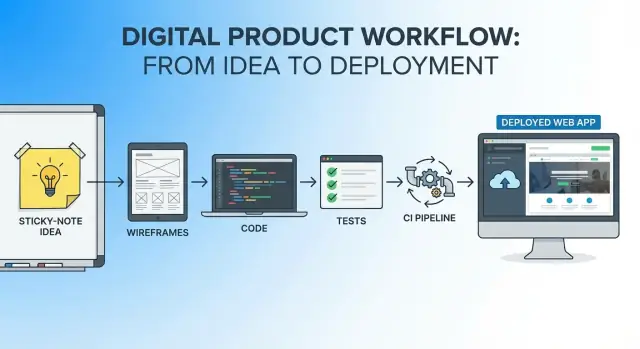
The Goal: One Continuous Path from Idea to Live App
Picture a small, useful app idea: a “Queue Buddy” that lets a café staffer tap one button to add a customer to a waiting list and automatically text them when their table is ready. The success metric is simple and measurable: reduce average wait-time confusion calls by 50% in two weeks, while keeping staff onboarding under 10 minutes.
That’s the spirit of this article: pick a clear, bounded idea, define what “good” looks like, and then move from concept to a live deployment without constantly switching tools, docs, and mental models.
What “single workflow” means
A single workflow is one continuous thread from the first sentence of the idea to the first production release:
- One place where decisions are recorded (what we’re building and why)
- One evolving set of artifacts (requirements → screens → tasks → code → tests → deployment notes)
- One feedback loop (every change can be traced back to the goal and the metric)
You’ll still use multiple tools (editor, repo, CI, hosting), but you won’t “restart” the project at each phase. The same narrative and constraints carry forward.
The AI’s role: assistant, not autopilot
AI is most valuable when it:
- Drafts options quickly (requirements wording, user flows, API shapes)
- Generates starter code and tests you can review in small chunks
- Points out edge cases you might miss (validation, permissions, logging)
But it doesn’t own the product decisions. You do. The workflow is designed so you’re always verifying: Does this change move the metric? Is it safe to ship?
The end-to-end path we’ll follow
Over the next sections, you’ll go step by step:
- Clarify the problem, users, and a “small win” you can ship.
- Turn the idea into a lightweight requirements doc.
- Sketch the user journey and key screens.
- Choose a sensible version-1 architecture.
- Bootstrap a working repo skeleton.
- Build core features in thin, reviewable slices.
- Add safety basics: validation, permissions, logging.
- Add tests that protect the happy path and the risky parts.
- Set up builds, CI, and quality gates.
- Deploy with a clear, reversible process.
- Monitor, learn, and iterate—without breaking the thread.
By the end, you should have a repeatable way to move from “idea” to “live app” while keeping scope, quality, and learning tightly connected.
Start with Clarity: Problem, Users, and a Small Win
Before you ask an AI to draft screens, APIs, or database tables, you need a crisp target. A little clarity here saves hours of “almost right” outputs later.
One-paragraph problem statement
You’re building an app because a specific group of people repeatedly hits the same friction: they can’t complete an important task quickly, reliably, or with confidence using the tools they have. The goal of version 1 is to remove one painful step in that workflow—without trying to automate everything—so users can get from “I need to do X” to “X is done” in minutes, with a clear record of what happened.
Target users and their top 3 jobs-to-be-done
Pick one primary user. Secondary users can wait.
- Primary user: Busy operators/owners who manage the process end-to-end (not specialists).
- Top jobs-to-be-done:
- Capture the request (or input) fast, without missing key details.
- Track status at a glance and know what to do next.
- Share an outcome (confirmation, summary, or export) that others can trust.
Assumptions (what must be true)
Assumptions are where good ideas quietly fail—make them visible.
- Users will trade a small amount of setup for a repeatable workflow.
- The needed data exists (or can be entered) with reasonable accuracy.
- A lightweight audit trail is enough; full compliance features are not required for v1.
- The “AI help” improves speed, but users still want final control.
Definition of done for the first release
Version 1 should be a small win you can ship.
- A user can complete the core flow in under 3 minutes.
- Data is validated and stored, with basic permissions and an activity log.
- One shareable output exists (email, PDF, or link) and is consistent.
- You can deploy, roll back, and answer: “Is it working?”
Turn the Idea into a Lightweight Requirements Doc
A lightweight requirements doc (think: one page) is the bridge between “cool idea” and “buildable plan.” It keeps you focused, gives your AI assistant the right context, and prevents the first version from ballooning into a months-long project.
Draft a one-page PRD (the parts that matter)
Keep it tight and skimmable. A simple template:
- Problem: What pain are we solving, in one sentence?
- Target users: Who experiences this pain most often?
- Scope (Version 1): What you will build now.
- Non-goals: What you explicitly won’t build yet (this is where scope creep goes to die).
- Constraints: Budget, timeline, tech constraints, compliance, devices, data sources.
- Success metric: What does “it worked” look like (even a simple proxy metric is fine).
Define and rank 5–10 core features
Write 5–10 features max, phrased as outcomes. Then rank them:
- Must-have (the app fails without it)
- Should-have (high value, but can wait)
- Nice-to-have (park it)
This ranking is also how you guide AI-generated plans and code: “Only implement must-haves first.”
Add acceptance criteria for top features
For the top 3–5 features, add 2–4 acceptance criteria each. Use plain language and testable statements.
Example:
- Feature: Create an account
- User can sign up with email and password
- Password must be at least 12 characters
- After signup, user lands on the dashboard
- Duplicate email shows a clear error message
Capture open questions for quick validation
Finish with a short “Open Questions” list—things you can answer with one chat, one customer call, or a quick search.
Examples: “Do users need Google login?” “What’s the minimum data we must store?” “Do we need admin approval?”
This doc isn’t paperwork; it’s a shared source of truth you’ll keep updating as the build progresses.
Sketch the User Journey and Key Screens
Before you ask AI to generate screens or code, get the story of the product straight. A quick journey sketch keeps everyone aligned: what the user is trying to do, what “success” looks like, and where things can go wrong.
Map the main user flows (happy path + key edge cases)
Start with the happy path: the simplest sequence that delivers the main value.
Example flow (generic):
- User signs up / logs in
- User creates a new Project
- User adds Tasks
- User marks a Task complete
- User sees progress / confirmation
Then add a few edge cases that are likely and costly if mishandled:
- User abandons signup halfway (what happens to partial data?)
- User loses access (expired session, revoked permission)
- Empty state (no projects yet)
- Failed save (network error) and retry behavior
You don’t need a big diagram. A numbered list plus notes is enough to guide prototyping and code generation.
List key screens/pages and what each must accomplish
Write a short “job to be done” for each screen. Keep it outcome-focused rather than UI-focused.
- Login / Signup: get the user in; explain errors clearly; enable password reset
- Dashboard: show current items and next action; handle empty state gracefully
- Project Detail: display project info; allow adding/editing tasks; show status
- Task Editor (modal/page): create or update a task; validate required fields
- Settings / Account: manage profile; sign out; handle delete account if needed
If you’re working with AI, this list becomes great prompt material: “Generate a Dashboard that supports X, Y, Z and includes empty/loading/error states.”
Define data entities at a high level
Keep this at the “napkin schema” level—enough to support screens and flows.
- User: id, email, name, role
- Project: id, ownerId, title, createdAt
- Task: id, projectId, title, status, dueDate
Note relationships (User → Projects → Tasks) and anything that affects permissions.
Identify where trust and safety matter
Mark the points where mistakes break trust:
- Authentication and session handling
- Permissions (who can view/edit a project?)
- Destructive actions (delete project/task) and confirmations
- Auditability (basic logging for edits and deletions)
This isn’t about over-engineering—it’s about preventing the kinds of surprises that turn a “working demo” into a support headache after launch.
Choose a Sensible Architecture for Version 1
Version 1 architecture should do one thing well: let you ship the smallest useful product without painting yourself into a corner. A good rule is “one repo, one deployable backend, one deployable frontend, one database”—and only add extra pieces when a clear requirement forces it.
Pick the simplest stack that fits
If you’re building a typical web app, a sensible default is:
- Frontend: React (or Next.js if you want routing + basic server rendering out of the box)
- Backend: Node.js + a minimal framework (Express/Fastify) or Next.js API routes if the API is small
- Database: Postgres (reliable, flexible, and supported almost everywhere)
Keep the number of services low. For v1, a “modular monolith” (well-organized codebase, but one backend service) is usually easier than microservices.
If you prefer an AI-first environment where the architecture, tasks, and generated code stay tightly connected, platforms like Koder.ai can be a good fit: you can describe the v1 scope in chat, iterate in “planning mode,” and then generate a React frontend with a Go + PostgreSQL backend—while still keeping review and control in your hands.
Outline your API like a contract
Before generating code, write a tiny API table so you and the AI share the same target. Example shape:
GET /api/projects→{ items: Project[] }POST /api/projects→{ project: Project }GET /api/projects/:id→{ project: Project, tasks: Task[] }POST /api/projects/:id/tasks→{ task: Task }
Add notes for status codes, error format (e.g., { error: { code, message } }), and any pagination.
Decide on authentication (or avoid it)
If v1 can be public or single-user, skip auth and ship faster. If you need accounts, use a managed provider (email magic link or OAuth) and keep permissions simple: “user owns their records.” Avoid complex roles until real usage demands it.
Set first-launch performance and reliability targets
Document a few practical constraints:
- Expected traffic (even a rough number)
- Basic response-time goal (e.g., “most requests under 300ms”)
- Minimal logging (requests, errors, and key business events)
- Backups and a rollback plan
These notes guide AI-assisted code generation toward something deployable, not just functional.
Bootstrap the Repo: From Empty Folder to Working Skeleton
The fastest way to kill momentum is to debate tools for a week and still have no runnable code. Your goal here is simple: get to a “hello app” that starts locally, has a visible screen, and can accept a request—while staying small enough that every change is easy to review.
Ask the AI for a practical skeleton (not a finished product)
Give the AI a tight prompt: framework choice, basic pages, a stub API, and the files you expect. You’re looking for predictable conventions, not cleverness.
A good first pass is a structure like:
/README.md
/.env.example
/apps/web/
/apps/api/
/package.json
If you’re using a single repo, ask for basic routes (e.g., / and /settings) and one API endpoint (e.g., GET /health or GET /api/status). That’s enough to prove the plumbing works.
If you’re using Koder.ai, this is also a natural place to start: ask for a minimal “web + api + database-ready” skeleton, then export the source when you’re satisfied with the structure and conventions.
Generate a minimal UI wired to a stub backend
Keep the UI intentionally boring: one page, one button, one call.
Example behavior:
- The homepage renders “App is running.”
- A button calls the backend endpoint.
- The response is displayed on the page.
This gives you an immediate feedback loop: if the UI loads but the call fails, you know exactly where to look (CORS, port, routing, network errors). Resist adding auth, databases, or complex state here—you’ll do that after the skeleton is stable.
Add environment variables and local dev instructions
Create a .env.example on day one. It prevents “works on my machine” issues and makes onboarding painless.
Example:
WEB_PORT=3000
API_PORT=4000
API_URL=http://localhost:4000
Then make the README runnable in under a minute:
- install dependencies
- copy
.env.exampleto.env - start web + api
- open the browser URL
Keep changes tiny and commit early
Treat this phase like laying clean foundation lines. Commit after each small win: “init repo,” “add web shell,” “add api health endpoint,” “wire web to api.” Small commits make AI-assisted iteration safer: if a generated change goes sideways, you can revert without losing a day of work.
Build the Core Features in Thin, Reviewable Slices
Once the skeleton runs end-to-end, resist the urge to “finish everything.” Instead, build a narrow vertical slice that touches the database, API, and UI (if applicable), then repeat. Thin slices keep reviews fast, bugs small, and AI assistance easier to verify.
Start with the main data model (and migrations)
Pick the one model your app can’t function without—often the “thing” users create or manage. Define it plainly (fields, required vs optional, defaults), then add migrations if you’re using a relational database. Keep the first version boring: avoid clever normalization and premature flexibility.
If you use AI to draft the model, ask it to justify each field and default. Anything it can’t explain in one sentence probably doesn’t belong in v1.
Build primary endpoints with validation rules
Create only the endpoints needed for the first user journey: typically create, read, and a minimal update. Put validation close to the boundary (request DTO/schema), and make rules explicit:
- Required fields, formats, and allowed ranges
- Ownership/permission checks (“can this user access this record?”)
- Consistent response shapes (success and failure)
Validation is part of the feature, not polish—it prevents messy data that slows you down later.
Error handling that helps humans
Treat error messages as UX for debugging and support. Return clear, actionable messages (what failed and how to fix it) while keeping sensitive details out of client responses. Log the technical context server-side with a request ID so you can trace incidents without guesswork.
Use AI suggestions—then review every change
Ask AI to propose incremental PR-sized changes: one migration + one endpoint + one test at a time. Review diffs like you would a teammate’s work: check naming, edge cases, security assumptions, and whether the change truly supports the user’s “small win.” If it adds extra features, cut them and keep moving.
Make It Safe Enough: Validation, Permissions, and Logging
Version 1 doesn’t need enterprise-grade security—but it does need to avoid the predictable failures that turn a promising app into a support nightmare. The goal here is “safe enough”: prevent bad input, restrict access by default, and leave a trail of useful evidence when something goes wrong.
Input validation + basic abuse protection
Treat every boundary as untrusted: form fields, API payloads, query parameters, and even internal webhooks. Validate type, length, and allowed values, and normalize data (trim strings, convert casing) before storing.
A few practical defaults:
- Server-side validation (always), even if you also validate in the UI.
- Rate limits for login, password reset, and any expensive endpoints.
- File upload checks: size caps, allowed MIME types, and virus scanning if you accept public uploads.
- Safe error messages: tell users what to fix, but don’t leak stack traces or internal identifiers.
If you’re using AI to generate handlers, ask it to include validation rules explicitly (e.g., “max 140 chars” or “must be one of: …”) rather than “validate input.”
Permissions: start small, deny by default
A simple permission model is usually enough for V1:
- Anonymous: can only access public pages.
- Signed-in user: can create and view their own data.
- Owner/editor (optional): can edit shared records.
Make ownership checks central and reusable (middleware/policy functions), so you don’t sprinkle “if userId == …” throughout the codebase.
Logging that helps you debug quickly
Good logs answer: what happened, to whom, and where? Include:
- Request ID (propagate it through services)
- User ID (when authenticated)
- Action + resource (e.g.,
update_project,project_id) - Timing (duration for slow requests)
Log events, not secrets: never write passwords, tokens, or full payment details.
A quick “common mistakes” checklist
Before calling the app “safe enough,” check:
- Auth required on every non-public route
- Authorization checks (not just authentication)
- Rate limits on auth and write-heavy endpoints
- Validation on server for all inputs
- Secrets stored in env/secret manager (not in repo)
- Consistent, non-sensitive logging with request IDs
Add Tests that Protect the Happy Path and the Risks
Testing isn’t about chasing a perfect score—it’s about preventing the kinds of failures that hurt users, break trust, or create expensive fire drills. In an AI-assisted workflow, tests also act as a “contract” that keeps generated code aligned with what you actually meant.
Start with the highest-risk logic
Before you add lots of coverage, identify where mistakes would be costly. Typical high-risk areas include money/credits, permissions, data transformations, and edge-case validation.
Write unit tests for these pieces first. Keep them small and specific: given input X, you expect output Y (or an error). If a function has too many branches to test cleanly, that’s a hint it should be simplified.
Add one or two integration tests for the main flow
Unit tests catch logic bugs; integration tests catch “wiring” bugs—routes, database calls, auth checks, and the UI flow working together.
Pick the core journey (the happy path) and automate it end-to-end:
- Create an account / sign in
- Complete the primary action your app is built for
- Confirm the result appears where the user expects (screen, email, dashboard)
A couple of solid integration tests often prevent more incidents than dozens of tiny tests.
Use AI to draft tests—then make them meaningful
AI is great at generating test scaffolding and enumerating edge cases you might miss. Ask it for:
- boundary cases (empty values, maximum lengths, time zones)
- negative cases (unauthorized access, invalid states)
- realistic data examples (not just “foo/bar”)
Then review every generated assertion. Tests should verify behavior, not implementation details. If a test would still pass after a bug, it’s not doing its job.
Set a small coverage goal and optimize for reliability
Pick a modest target (for example, 60–70% on core modules) and use it as a guardrail, not a trophy. Focus on stable, repeatable tests that run fast in CI and fail for the right reasons. Flaky tests erode confidence—and once people stop trusting the suite, it stops protecting you.
Prepare for Automation: Builds, CI, and Quality Gates
Automation is where an AI-assisted workflow stops being “a project that works on my laptop” and becomes something you can ship with confidence. The goal isn’t fancy tooling—it’s repeatability.
Start with one repeatable build command
Pick a single command that produces the same result locally and in CI. If you’re using Node, that might be npm run build; for Python, a make build; for mobile, a specific Gradle/Xcode build step.
Also separate development and production config early. A simple rule: dev defaults are convenient; production defaults are safe.
{
  "scripts": {
    "lint": "eslint .",
    "format": "prettier -w .",
    "test": "vitest run",
    "build": "vite build"
  }
}
Add linting and formatting as quality gates
A linter catches risky patterns (unused variables, unsafe async calls). A formatter prevents “style debates” from showing up as noisy diffs in reviews. Keep the rules modest for version 1, but enforce them consistently.
A practical gate order:
- format → 2) lint → 3) tests → 4) build
Set up basic CI: run tests on every push
Your first CI workflow can be small: install dependencies, run the gates, and fail fast. That alone prevents broken code from quietly landing.
name: ci
on: [push, pull_request]
jobs:
  test:
    runs-on: ubuntu-latest
    steps:
      - uses: actions/checkout@v4
      - uses: actions/setup-node@v4
        with:
          node-version: 20
      - run: npm ci
      - run: npm run format -- --check
      - run: npm run lint
      - run: npm test
      - run: npm run build
Define secret handling (and make it hard to mess up)
Decide where secrets live: CI secret store, a password manager, or your deployment platform’s environment settings. Never commit them to git—add .env to .gitignore, and include a .env.example with safe placeholders.
If you want a clean next step, connect these gates to your deployment process in the next section, so “green CI” is the only path to production.
Deploy to Production with a Clear, Reversible Process
Shipping isn’t a single button click—it’s a repeatable routine. The goal for version 1 is simple: pick a deployment target that matches your stack, deploy in small increments, and always have a way back.
Pick the right deployment target (don’t overbuy)
Choose a platform that fits how your app runs:
- Static site + serverless API: Vercel / Netlify
- Docker-based web app: Render / Fly.io
- Traditional VM needs: a small VPS (only if you truly need it)
Optimizing for “easy to redeploy” usually beats optimizing for “maximum control” at this stage.
If your priority is minimizing tool switching, consider platforms that bundle build + hosting + rollback primitives. For example, Koder.ai supports deployment and hosting along with snapshots and rollback, so you can treat releases as reversible steps rather than one-way doors.
Use a deployment checklist every time
Write the checklist once and reuse it for every release. Keep it short enough that people actually follow it:
- Confirm environment variables and secrets are set
- Run database migrations (or confirm none are needed)
- Build and start the app in the production configuration
- Run a smoke test of the main user flow
- Verify logs are flowing and errors are visible
If you store it in the repo (for example in /docs/deploy.md), it naturally stays close to the code.
Add
Add health checks and a status endpoint
Create a lightweight endpoint that answers: “Is the app up and can it reach its dependencies?” Common patterns are:
GET /healthfor load balancers and uptime monitorsGET /statusreturning basic app version + dependency checks
Keep responses fast, cache-free, and safe (no secrets or internal details).
Plan rollback before you need it
A rollback plan should be explicit:
- How to redeploy the previous version (tag, release, or image)
- What to do about migrations (backward-compatible first; reversible only when necessary)
- Who decides to roll back, and what signals trigger it (error rate, failed health checks)
When deployment is reversible, releasing becomes routine—and you can ship more often with less stress.
Close the Loop: Monitor, Learn, and Iterate in the Same Workflow
Launching is the start of the most useful phase: learning what real users do, where the app breaks, and which small changes move your success metric. The goal is to keep the same AI-assisted workflow you used to build—now pointed at evidence instead of assumptions.
Set up basic monitoring (uptime, errors, performance)
Begin with a minimum monitoring stack that answers three questions: Is it up? Is it failing? Is it slow?
Uptime checks can be simple (a periodic hit to a health endpoint). Error tracking should capture stack traces and request context (without collecting sensitive data). Performance monitoring can start with response times for key endpoints and front-end page load metrics.
Have AI help by generating:
- a logging format and correlation IDs so one user action can be traced end-to-end
- alert thresholds (initially conservative) and an “on-call” checklist for what to do first
Add product analytics tied to the success metric
Don’t track everything—track what proves the app is working. Define one primary success metric (for example: “completed checkout,” “created first project,” or “invited a teammate”). Then instrument a small funnel: entry → key action → success.
Ask AI to propose event names and properties, then review them for privacy and clarity. Keep events stable; changing names every week makes trends meaningless.
Turn user feedback into the next iteration plan
Create a simple intake: an in-app feedback button, a short email alias, and a lightweight bug template. Triage weekly: group feedback into themes, connect themes to analytics, and decide on the next 1–2 improvements.
Keep the workflow continuous post-launch
Treat monitoring alerts, analytics drops, and feedback themes like new “requirements.” Feed them into the same process: update the doc, generate a small change proposal, implement in thin slices, add a targeted test, and deploy via the same reversible release process. For teams, a shared “Learning Log” page (linked from /blog or your internal docs) keeps decisions visible and repeatable.
FAQ
What does “single workflow” mean in practice?
A “single workflow” is one continuous thread from idea to production where:
- decisions are recorded in one place
- artifacts evolve together (requirements → screens → tasks → code → tests → deploy notes)
- every change can be traced back to the goal and success metric
You can still use multiple tools, but you avoid “restarting” the project at each phase.
How should AI fit into the workflow without becoming “autopilot”?
Use AI to generate options and drafts, then you choose and verify:
- ask for requirements wording, flows, or API shapes
- request starter code in small, reviewable chunks
- have it enumerate edge cases (validation, permissions, logging)
Keep the decision rule explicit: Does this move the metric, and is it safe to ship?
How do I decide what to ship in version 1 without scope creep?
Define a measurable success metric and a tight v1 “definition of done.” For example:
- one primary user
- one core flow that completes in under 3 minutes
- validated, stored data with basic permissions and an activity log
- one shareable output (link/email/PDF)
- deploy + rollback + “is it working?” visibility
If a feature doesn’t support those outcomes, it’s a non-goal for v1.
What should a lightweight requirements doc (PRD) include?
Keep it to a skimmable, one-page PRD that includes:
- Problem (one sentence)
- Target users
- Scope (v1)
- Non-goals (explicitly)
- Constraints (time, budget, devices, compliance)
- Success metric
Then add 5–10 core features max, ranked Must/Should/Nice. Use that ranking to constrain AI-generated plans and code.
How do I write acceptance criteria that actually help build and test?
For your top 3–5 features, add 2–4 testable statements each. Good acceptance criteria are:
- written in plain language
- unambiguous (pass/fail)
- tied to a user outcome (not an implementation)
Example patterns: validation rules, expected redirects, error messages, and permission behavior (e.g., “unauthorized users see a clear error and no data leaks”).
What user flows and edge cases should I map before generating screens or code?
Start with a numbered happy path and then list a few high-likelihood, high-cost failures:
- abandoned signup / partial data handling
- expired session or revoked permission
- empty states (no data yet)
- failed saves (network errors) and retry behavior
A simple list is enough; the goal is to guide UI states, API responses, and tests.
What’s a sensible version-1 architecture for most web apps?
Default to a “modular monolith” for v1:
- one repo
- one deployable frontend
- one deployable backend
- one database (often Postgres)
Only add services when a requirement forces it. This reduces coordination overhead and makes AI-assisted iteration easier to review and revert.
How do I outline APIs so the frontend, backend, and tests stay aligned?
Write a tiny “API contract” table before code generation:
- endpoints + request/response shape
- status codes
- consistent error format (e.g.,
{ error: { code, message } }) - pagination notes if needed
This prevents mismatches between UI and backend and gives tests a stable target.
What’s the fastest way to bootstrap a repo skeleton without overbuilding?
Aim for a “hello app” that proves the plumbing works:
- one visible page
- one button that calls a stub backend endpoint (e.g.,
/health) - display the response
- include
.env.exampleand a README that runs in under a minute
Commit small milestones early so you can safely revert if a generated change goes wrong.
What tests and CI gates matter most for an AI-assisted workflow?
Prioritize tests that prevent expensive failures:
- unit tests for high-risk logic (permissions, validation, data transforms)
- 1–2 integration tests for the core happy path (sign in → primary action → confirm result)
In CI, enforce simple gates in a consistent order:
- format → 2) lint → 3) tests → 4) build
Keep tests stable and fast; flaky suites stop protecting you.