

Turn an intake form into a workflow app step by step
Learn how to turn an intake form into a workflow app by adding status tracking, approvals, alerts, and exports only when teams start to need them.
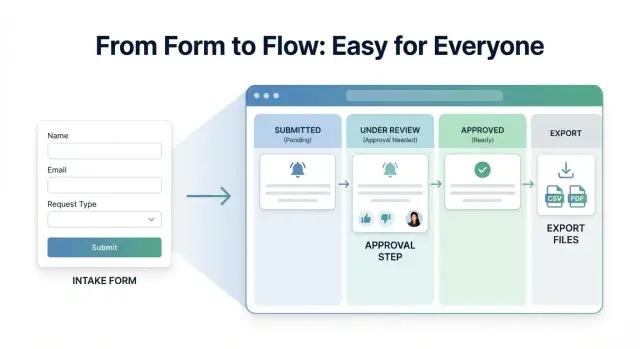
Why a simple form stops being enough
A simple form is a good place to start. It gives people one way to send requests and cuts down on scattered messages. For a while, that can feel like a big improvement.
The problem starts after submission. The request comes in through the form, but the real work moves into email, chat, meetings, and spreadsheets. Someone copies details into a tracker. Someone else asks a follow-up question in a message. A manager keeps a separate list to see what is still waiting.
At that point, the form is not the system. It is only the front door.
This happens all the time with internal requests. A team uses a form for a new landing page, a budget approval, or a support issue. The form collects the basics, but the team still has to decide who owns it, what stage it is in, and what is blocking it. If that information is not visible, people start asking the same question again and again: "What is the status?"
That is usually the first sign that the form needs to grow into a workflow app. The form did not fail. The work around it just got bigger.
The mistake is trying to add everything at once. If you rush into approvals, notifications, dashboards, and exports too early, the process gets heavier before the team has proved it needs that structure. More fields appear. More clicks appear. Simple requests start to feel slow.
A better test is repeated friction. If requests are tracked in more than one place, people keep asking for updates, ownership is unclear, or the team has to re-enter the same information somewhere else, the form is only doing part of the job.
That is the moment to expand, but carefully. Add one useful step at a time.
What to put in the first version
If you want to turn an intake form into a workflow app, the first version should still feel simple. People should be able to open it, fill it out, and submit a request without asking for help.
Start with one request type. Do not mix purchase requests, time off, IT issues, and vendor onboarding into the same first build. Pick the request your team handles most often, or the one that creates the most back-and-forth right now.
Only ask for information people actually use. If a field never changes what happens next, it probably does not belong in version one.
A strong first version usually includes:
- a short request title
- the key details needed to act on it
- one owner or team responsible
- the submission date
- a simple confirmation that it was received
That is often enough to start collecting real requests and learn what is missing.
Keep submission easy on day one. Long forms may look thorough, but they push people away. A short form with plain labels teaches you more in a week than a perfect form nobody wants to use.
If your team is collecting software access requests, for example, you probably only need the tool name, who needs access, why they need it, and when they need it by. You likely do not need cost center, manager notes, security notes, and department code unless someone uses those fields every time.
If you are building in Koder.ai, keep the first prompt narrow. Ask for one form, one submit flow, and one basic request list. That makes it much easier to test the app, rename fields, and remove anything people ignore.
The goal of the first version is not completeness. It is learning. A small app is easier to fix, easier to explain, and much easier to grow once real usage shows what should come next.
How to expand it step by step
Start with one clear path: someone submits a request, and one person or team receives it. If people can send requests without confusion, you already have something useful.
Then watch what happens next. Do people ask the same follow-up questions every time? Does someone copy details into a spreadsheet, send manual reminders, or chase updates in chat? Those repeated behaviors tell you what the app needs.
The safest way to grow a workflow app is to add features only when a real problem appears more than once. Not because it might happen someday. Not because another tool has it. Only because your team keeps running into the same friction.
Add one missing step at a time
A sensible order often looks like this:
- Start with submission and a shared place to review requests.
- Add a status field when people begin asking what happened.
- Add a handoff step when work regularly moves from one person to another.
- Add reminders only after missed follow-ups become common.
Each step should remove a specific bit of manual work. If a new feature does not save time, reduce mistakes, or make ownership clearer, it can wait.
Imagine an equipment request form. At first, the admin team simply collects requests. A few weeks later, people keep asking whether their laptop order is approved or still pending. That is the right moment to add status tracking. Later, if finance must confirm requests above a certain amount, add one approval step. No more than that.
This step-by-step approach is especially useful in a builder like Koder.ai, where you can adjust the flow as patterns appear instead of trying to design the whole system up front.
Review usage every few weeks. Look at what people actually submit, where work slows down, and which rules nobody follows. That review usually makes the next change obvious.
When to add status tracking
Add status tracking when the same question keeps coming up: "Did you get my request?" or "What happens next?" A simple form works well at first, but once requests start piling up, people want visibility.
A good rule is simple: if updates are happening in chat, email, or someone else's memory, move them into the app. That saves time, cuts down on follow-up messages, and helps people trust the process.
Start with a very short set of statuses. For most teams, four is enough:
- New
- In review
- Needs info
- Done
Keep each status easy to understand. If two people would explain it differently, it is too vague.
Ownership matters just as much as status. Every request should show who is responsible right now, even if that is just one person or one team. Without an owner, a status label does not help much because nobody knows who is supposed to move the work forward.
A simple example: a team collects internal software requests through a form. At first, the manager checks the inbox and replies manually. After a few weeks, employees start asking for updates, and some requests sit untouched. Adding a status field and an owner clears up most of the confusion without adding approvals or anything more complicated.
Avoid building a long chain of statuses too early. Ten labels may look organized, but they usually slow people down. Teams end up debating whether a request is "under assessment" or "pending review" instead of finishing it.
If a request can move from submitted to finished in a few real steps, the status model should be just as small.
When approvals actually help
Approvals are useful when someone needs to make a real decision, not when a team simply wants more control. If every request must be approved out of habit, the app gets slower without getting better.
Add an approval step when the outcome affects money, risk, access, or a shared team resource. Good examples include purchases above a set amount, access to private data or admin tools, time off that affects staffing, or contracts that commit the company to spend.
If a request is routine and low risk, approval often adds delay with no real benefit. In those cases, a clear form and visible status are usually enough.
Keep the approver list short. One clear owner is better than three people who all think someone else will decide. If you need a backup approver, define that up front so requests do not sit untouched.
It also helps to be specific about what is being approved. Is the approver saying yes to the full request, the budget, the dates, or only the next step? If that is blurry, people approve things they did not mean to approve and the team ends up sorting it out later.
Record the decision in the same place as the request. The app should show who approved it, when they approved it, and any note they left. That way nobody has to dig through email or chat to understand what happened.
A simple setup works well for many teams: small software purchases go straight to review, while larger purchases need one manager approval. The request, comment, and final decision all stay on the same record. That keeps the process clear and easy to trust.
When notifications and exports make sense
Notifications help when something important needs action. Good examples are a request sitting too long, an approval being accepted or rejected, or a task moving from one team to another. Those moments create a clear next step, so an alert is useful instead of noisy.
The mistake is sending a message for every tiny update. If people get pinged each time someone fixes a typo, changes a tag, or adds an internal note, they stop paying attention. After that, even useful alerts get ignored.
A simple rule works well:
- send alerts for delays
- send alerts for decisions
- send alerts for handoffs
- skip alerts for minor edits
Exports follow the same logic. You do not need them on day one just because they sound helpful. Add exports when someone has a real reason to take the data outside the app. Usually that means a manager needs regular reporting or another team needs a handoff file for finance, support, or compliance.
When you do add exports, keep them small. Most teams do not need every field, every comment, and every status change in one file. They usually need a short, reliable set of data they can sort or share.
That often means just a few fields:
- request ID or name
- current status
- owner
- date submitted
- final decision or completion date
Picture a small operations team handling equipment requests. They may not need alerts when someone edits the description, but they do need one when a request waits five days without review. They may not need a full database export either, but a weekly file with status, owner, and approval result can help a manager spot delays quickly.
If you are building this in Koder.ai, it helps to stay disciplined here. Add notifications and exports only after people ask for them more than once.
A simple example from a real team
A small operations team at a growing company needed a better way to handle purchase requests. They did not start by trying to build a full workflow system. They began with one simple form asking for the item, the reason, the cost, and the date it was needed.
At first, one person reviewed every submission by hand. She checked the details, asked follow-up questions when something was missing, and replied to the requester with the outcome. That worked while only a few requests came in each week.
How the process grew
The first real problem was not the form. It was the constant checking. People kept sending messages like, "Did you see my request?" and "Has anything happened yet?"
So the team made one small change. They added status tracking with a few clear stages: New, Under review, Approved, and Ordered. That gave requesters a way to check progress on their own.
The result was immediate. Fewer update messages came in, and the reviewer spent less time answering the same question over and over.
A few months later, another pattern appeared. Small requests were easy to approve, but expensive ones needed a manager to sign off. Instead of adding approval for everything, the team kept it narrow. Requests above a set amount went to the right manager. Lower-cost items stayed on the faster path.
That kept the process simple. Most requests stayed quick, while larger purchases got the extra review they actually needed.
Only later did they add exports. The trigger was practical: finance started asking for a monthly report of purchases by team, amount, and approval status. At that point, exporting data solved a real reporting need.
That is what steady growth looks like. Start with one form. Add status, approvals, notifications, or exports only when people are feeling a real problem. Each step should earn its place.
Common mistakes that make the app heavy
The easiest mistake is adding too much too early. A simple request form becomes slow, confusing, and harder to trust when people see fields and steps they do not need.
The first problem is overbuilding the form. Teams often add every field they might need one day: budget, department code, priority, legal notes, vendor details, and more. In real use, many of those fields stay empty or get filled with random text just to get the request submitted. A better first version asks only for what helps someone take the next action.
Approvals are another common trap. It sounds safe to require approval for every request, but that often creates delay instead of control. If low-risk requests need the same sign-off as expensive or sensitive ones, people start waiting for no good reason.
Status design can get messy fast too. Teams create labels like "Open," "Under review," "Pending internal review," "In progress," and "Being processed," then wonder why nobody updates them correctly. Good statuses should be plain and few. If a new person cannot understand the difference in ten seconds, the list is too long.
Notifications cause similar trouble. At first they feel helpful. Then every submission, comment, update, and status change sends a message to everyone. People stop reading them. Send alerts only when someone needs to act, or when a requester truly needs an update.
Exports are often treated like a default feature even before anyone has asked for them. That is usually wasted effort. Before you build them, ask one question: who will use this file, and what decision will it support? If there is no clear answer, leave it for later.
A simple rule helps:
- Add a field only after you have needed it several times.
- Add approval only where risk is real.
- Keep status names short and obvious.
- Send fewer notifications than you think you need.
- Build exports only for a clear reporting need.
The lighter app usually wins because people actually use it.
A quick check before you add the next feature
Before you add anything new, check whether the current version is already doing its job. The goal is not to pile on features. The goal is to remove the next real point of friction.
A useful rule is this: if a problem shows up once, note it. If it shows up every week, fix it.
Ask these five questions
- Can one person submit a request in a minute or two?
- Can the team see who owns the next step?
- Do people ask for updates often enough to justify status tracking?
- Is there a real approval decision that needs to be recorded?
- Does anyone already need reports or exported data?
If the form takes too long, do not add more fields or steps yet. Cut friction first.
If nobody knows who acts next, fix ownership before anything else. Many teams think they need automation, but the real problem is that requests land in a shared inbox and sit there. One visible owner often solves more than a new feature does.
Status tracking helps when people keep asking, "What happened to my request?" If that question comes up a few times a day, a simple status field can save time for everyone. If it almost never happens, status may just create extra work.
Approvals are useful only when someone must make a real yes or no decision. If approval is just a habit, it slows the process without adding value. Record approvals when they matter for budget, risk, access, or policy.
Exports and reports make sense when the team already uses the data outside the app. If a manager pulls weekly numbers into a spreadsheet or finance needs a monthly record, export becomes practical. If nobody is asking for that yet, leave it off the list.
A small test helps. Watch one requester submit a form, then watch one teammate handle it. If both can finish their part without stopping to ask questions, your next feature can probably wait. If not, the bottleneck usually shows up quickly.
Your next steps
The best way to turn an intake form into a workflow app is to start smaller than you think. Pick one request process that already happens every week, such as content requests, equipment requests, or new client intake. If people are sending the same details over and over, that is usually the right place to begin.
Build the first version around one goal: capture the request clearly and keep it moving. Do not add approvals, alerts, or exports yet unless the team already feels real pain without them. A small app that people actually use is far better than a bigger one that needs training and workarounds.
A simple path looks like this:
- Choose one form tied to repeated, predictable requests.
- Run the basic version for 2 to 4 weeks.
- Add only one new feature when a clear pattern shows up.
- Write down what improved after each change.
That last step matters. If you add status tracking, check whether fewer people ask for updates. If you add approvals, see whether decisions happen faster or whether you just created another waiting point. If you add notifications, check whether they reduce follow-up messages or simply add noise.
Say a marketing team starts with a campaign request form. After two weeks, they notice the same question keeps coming up: "Has this been reviewed yet?" That is a good reason to add a simple status field. If nobody is asking for reports, exports can wait.
If you want to test and adjust quickly, Koder.ai can be a practical option. It lets non-technical teams build web, server, or mobile apps from plain-language chat, which makes it easier to start with a basic request flow and improve it as real usage shows what is missing.
The next good move is rarely the biggest feature. It is the smallest change that removes a repeat problem.
FAQ
How do I know a form is no longer enough?
Start when the form is no longer the whole process. If requests are being tracked in email, chat, and spreadsheets after submission, you need a simple workflow app, not just a form.
What kind of request should I start with?
Begin with one request type that happens often and creates repeated back-and-forth. Good first choices are equipment requests, software access, content requests, or purchase requests.
What should be in version one?
Keep it small. Ask only for details people actually use to take the next step, such as a title, the main request details, who it is for, and a needed-by date.
Should I include every field I might need later?
No. Long forms slow people down and lead to bad data. If a field does not change what happens next, leave it out for now and add it later only if it becomes clearly useful.
When should I add status tracking?
Add status tracking when people keep asking for updates or when requests start sitting without clear visibility. A short set like New, In review, Needs info, and Done is usually enough.
When do approvals actually make sense?
Only add approvals when someone must make a real decision about budget, risk, access, or policy. If approval is just habit, it usually adds delay without helping much.
Why is ownership so important?
Every request should show who is responsible for the next step. Even a simple owner field removes confusion and often fixes more problems than extra automation.
What notifications are worth adding?
Send notifications only when someone needs to act or when a requester truly needs an update. Useful triggers include delays, decisions, and handoffs. Skip alerts for minor edits and small changes.
When should I build exports or reports?
Add exports when someone already needs the data outside the app for reporting, finance, or compliance. Keep the export focused on a few reliable fields instead of dumping everything.
How can Koder.ai help me build this step by step?
Start with one form, one submit flow, and one basic request list. In Koder.ai, keeping the prompt narrow makes it easier to test the app, rename fields, and add the next feature only after real usage shows the need.