

Internationalization architecture for chat-built apps
Internationalization architecture for chat-built apps: define stable string keys, plural rules, and one translation workflow that stays consistent on web and mobile.
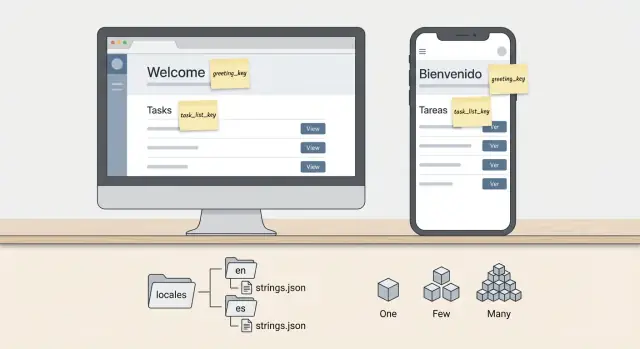
What breaks first when you add more languages
The first thing that breaks is not the code. It is the words.
Chat-built apps often start as a fast prototype: you type “Add a button that says Save”, the UI appears, and you move on. Weeks later, you want Spanish and German, and you discover those “temporary” labels are scattered across screens, components, emails, and error messages.
Copy changes are also more frequent than code changes. Product names get renamed, legal text changes, onboarding gets rewritten, and support asks for clearer error messages. If text lives directly inside UI code, every small wording change turns into a risky release, and you will miss places where the same idea is phrased differently.
Here are the early symptoms that signal you are building translation debt:
- Mixed languages in one screen (some strings translated, others still in English).
- The same label duplicated with small differences (“Sign up”, “Sign Up”, “Create account”).
- Broken layouts when text gets longer (buttons overflow, headings wrap badly).
- Mobile and web drifting apart (different words for the same action).
- Support content and system messages lagging behind the UI.
A realistic example: you build a simple CRM in Koder.ai. The web app says “Deal stage”, the mobile app says “Pipeline step”, and an error toast says “Invalid status”. Even if all three are translated, users will feel the app is inconsistent because the concepts do not match.
“Consistent” does not mean “same characters everywhere”. It means:
- The same concept uses the same key and the same meaning across screens.
- Web and mobile share the same source of truth for translations.
- Tone and terminology are stable (formal vs casual, “customer” vs “client”).
- UI layouts are designed to handle longer and shorter phrases.
Once you treat text as product data, not decoration, adding languages stops being a scramble and becomes a routine part of building.
Basic concepts and a simple goal to aim for
Internationalization (i18n) is the work you do so an app can support many languages without rewrites. Localization (l10n) is the actual content for a specific language and region, like French (Canada) with the right words, date formats, and tone.
A simple goal to aim for: every piece of user-facing text is selected by a stable key, not typed directly into UI code. If you can change a sentence without opening a React component or a Flutter widget, you are on the right track. This is the core of an internationalization architecture for chat-built apps, where it is easy to accidentally ship hard-coded copy generated during a chat session.
User-facing text is broader than most teams expect. It includes buttons, labels, validation errors, empty states, onboarding tips, push notifications, emails, PDF exports, and any message a user can see or hear. It usually does not include internal logs, database column names, analytics event IDs, feature flags, or admin-only debug output.
Where should translations live? In practice, it is often both frontend and backend, with a clear boundary.
- Frontend owns UI chrome: navigation, forms, menus, and most screen text.
- Backend owns messages it generates: transactional emails, server-side validation errors, and anything returned as an error response.
- Shared domains (like order status labels) should come from one source of truth, so web and mobile do not drift.
The mistake to avoid is mixing responsibilities. If the backend returns fully written English sentences for UI errors, the frontend cannot localize them cleanly. A better pattern is: backend returns an error code (and maybe safe parameters), and the client maps that code to a localized message.
Copy ownership is a product decision, not a technical detail. Decide early who can change words and approve tone.
If product owns copy, treat translations like content: version it, review it, and give product a safe way to request changes. If engineering owns copy, set a rule that any new UI string must come with a key and default translation before it can ship.
Example: if your signup flow says “Create account” in three different screens, make it one key used everywhere. That keeps meaning consistent, makes translators faster, and prevents small wording changes from turning into a multi-screen cleanup later.
How to structure string keys so they stay stable
Keys are the contract between your UI and your translations. If that contract keeps changing, you get missing text, rushed fixes, and inconsistent wording across web and mobile. A good internationalization architecture for chat-built apps starts with one rule: keys should describe meaning, not the current English sentence.
Use stable IDs as keys (like billing.invoice.payNow) instead of the full copy (like "Pay now"). Sentence keys break the moment someone tweaks wording, adds punctuation, or changes case.
A practical pattern that stays readable is: screen (or domain) + component + intent. Keep it boring and predictable.
Examples:
auth.login.titleauth.login.emailLabelbilling.checkout.payButtonnav.settingserrors.network.offline
Decide when to reuse a key versus creating a new one by asking: “Is the meaning identical in every place?” Reuse keys for truly generic actions, but split keys when context changes. For example, “Save” in a profile screen might be a simple action, while “Save” in a complex editor might need a more specific tone in some languages.
Keep shared UI text in dedicated namespaces so it does not get duplicated across screens. Common buckets that work well:
common.actions.*(save, cancel, delete)common.status.*(loading, success)common.fields.*(search, password)errors.*(validation, network)nav.*(tabs, menu items)
When wording changes but meaning stays the same, keep the key and only update the translated values. That is the whole point of stable IDs. If the meaning changes (even subtly), create a new key and leave the old one in place until you confirm it is unused. This avoids “silent” mismatches where an old translation is technically present but now wrong.
A small example from a Koder.ai-style flow: your chat generates both a React web app and a Flutter mobile app. If both use common.actions.save, you get consistent translations everywhere. But if the web app uses profile.save and mobile uses account.saveButton, you will drift over time, even if the English looks the same today.
Where strings live and how to organize translation files
Treat your source language (often English) as the single source of truth. Keep it in one place, review it like code, and avoid letting strings appear in random components “just for now”. This is the fastest way to avoid hard-coded UI copy and later rework.
A simple rule helps: the app may display text from the i18n system only. If someone needs new copy, they add a key and a default message first, then use that key in the UI. This keeps your internationalization architecture for chat-built apps stable even when features move around.
A folder layout that stays sane
If you ship both web and mobile, you want one shared catalog of keys, plus room for feature teams to work without stepping on each other. One practical layout:
- /i18n
- /i18n/locales/en.json (source)
- /i18n/locales/es.json, /i18n/locales/fr.json, ...
- /i18n/features/billing.json, /i18n/features/auth.json, ...
- /i18n/shared.json (buttons, common labels, errors)
Keep keys identical across platforms, even if the implementation differs (React on web, Flutter on mobile). If you use a platform like Koder.ai to generate both apps from chat, exporting source code is easier to maintain when both projects point to the same key names and the same message format.
Versioning and reviews that prevent translation debt
Translations change over time. Treat changes like product changes: small, reviewed, and trackable. A good review focuses on meaning and reuse, not just spelling.
- Require PR review for any change in the source locale
- Block deleting keys without a search and a plan
- Add notes for translators when text is ambiguous
- Use a simple “missing translations” check in CI
To stop keys from drifting between teams, make keys owned by features (billing., auth.), and never rename keys just because wording changes. Update the message, keep the key. Keys are identifiers, not copy.
Pluralization and grammar without hacks
Plural rules change by language, so the simple English pattern (1 vs everything else) breaks fast. Some languages have separate forms for 0, 1, 2-4, and many. Others change the whole sentence, not just the noun. If you bake plural logic into the UI with if-else, you will end up duplicating copy and missing edge cases.
A safer approach is to keep one flexible message per idea and let the i18n layer pick the right form. ICU-style messages are made for this. They keep grammar decisions in the translation, not in your components.
Here is a small example that covers the cases people forget:
itemsCount = "{count, plural, =0 {No items} one {# item} other {# items}}"
That single key covers 0, 1, and everything else. Translators can replace it with the right plural forms for their language without you touching code.
When you need gender or role-based wording, avoid creating separate keys like welcome_male and welcome_female unless the product truly requires it. Use select so the sentence stays one unit:
welcomeUser = "{gender, select, female {Welcome, Ms. {name}} male {Welcome, Mr. {name}} other {Welcome, {name}}}"
To avoid painting yourself into a corner with grammatical cases, keep sentences as complete as possible. Do not stitch together fragments like "{count} " + t('items') because many languages cannot reorder words that way. Prefer one message that includes the number, noun, and surrounding words.
A simple rule that works well in chat-built apps (including Koder.ai projects) is: if a sentence contains a number, a person, or a status, make it ICU from day one. It costs a little more upfront and saves a lot of translation debt later.
Keeping web and mobile translations consistent
If your React web app and Flutter mobile app each keep their own translation files, they will drift. The same button ends up with different wording, a key means one thing on web and another on mobile, and support tickets start to mention “the app says X but the website says Y”.
The simplest fix is also the most important: pick one source of truth format and treat it like code. For most teams, that means a single shared set of locale files (for example, JSON using ICU-style messages) that both web and mobile consume. When you build apps through chat and generators, this matters even more, because it is easy to accidentally create new text in two places.
One shared source of truth
A practical setup is a small “i18n package” or folder that contains:
- Locale files for each language (same keys everywhere)
- Message format rules (ICU for plurals and placeholders)
- A short README that explains how to add keys
React and Flutter then become consumers. They should not invent new keys locally. In a Koder.ai style workflow (React web, Flutter mobile), you can generate both clients from the same key set, and keep changes under review like any other code change.
Backend alignment is part of the same story. Errors, notifications, and emails should not be hand-written English strings in Go. Instead, return stable error codes (like auth.invalid_password) plus any safe parameters. Then the clients map codes to translated text. For server-sent emails, the server can render templates using the same keys and locale files.
Rules that keep you in sync
Create one small rulebook and enforce it in code review:
- New UI text requires a new key in the shared locale files first
- Keys must include a clear namespace and intent (not screen positions)
- Every key must have placeholders defined once and used the same way everywhere
- If two phrases differ in meaning, they must never share a key
- If two keys mean the same thing, delete one and pick a single winner
To prevent duplicate keys with different meanings, add a “description” field (or a comment file) for translators and future you. Example: billing.trial_days_left should explain whether it is shown as a banner, an email, or both. That one sentence often stops the “close enough” reuse that creates translation debt.
This consistency is the backbone of an internationalization architecture for chat-built apps: one shared vocabulary, many surfaces, and no surprises when you ship the next language.
Step-by-step setup you can follow on a real project
A good internationalization architecture for chat-built apps starts simple: one set of message keys, one source of truth for copy, and the same rules on web and mobile. If you build fast (for example, with Koder.ai), this structure keeps speed without creating translation debt.
A practical setup (web + mobile)
Pick your locales early and decide what happens when a translation is missing. A common choice is: show the user’s preferred language when available, otherwise fall back to English, and log missing keys so you can fix them before the next release.
Then put this into place:
- Define locales and fallback: Decide supported languages, default locale, and a clear fallback order. Also agree on how you will detect locale (browser/app setting, user profile).
- Create a translation function and key convention: Use stable, meaning-based keys (not full sentences). For example:
billing.plan_name.proorauth.error.invalid_password. Keep the same keys everywhere. - Wire it into React and Flutter: In React, wrap your app with an i18n provider and use
t("key")in components. In Flutter, use a localization wrapper and call the same key-based lookup in widgets. The goal is the same keys, not the same library. - Support variables and plural rules from day one: Use ICU-style messages for pluralization and placeholders, like “{count, plural, one {# file} other {# files}}” and “Hello, {name}”. This avoids hacks like
if (count === 1)scattered across screens. - Add a lightweight copy review step: Before shipping, review new or changed strings: check key naming, remove hard-coded UI copy, confirm placeholders match, and make sure web and mobile both picked up the change.
Finally, test one language with longer words (German is a classic) and one with different punctuation. This quickly reveals buttons that overflow, headings that wrap badly, and layouts that assume English word length.
If you keep translations in a shared folder (or generated package) and treat copy changes like code changes, your web and mobile apps stay consistent even when features are built quickly in chat.
Dynamic content: dates, numbers, and user text
Translated UI strings are only half of the problem. Most apps also show changing values like dates, prices, counts, and names. If you treat those values like plain text, you will get weird formats, wrong time zones, and sentences that sound “off” in many languages.
Start by formatting numbers, currency, and dates with locale rules, not custom code. A user in France expects “1 234,50 €”, while a user in the US expects “$1,234.50”. The same applies to dates: “03/04/2026” is ambiguous, but locale formatting makes it clear.
Time zones are the next trap. Servers should store timestamps in a neutral form (usually UTC), but users expect to see times in their own zone. For example: an order created at 23:30 UTC might be “tomorrow” for someone in Tokyo. Decide one rule per screen: show user-local time for personal events, and show a fixed business time zone for things like store pickup windows (and label it clearly).
Avoid building sentences by concatenating translated fragments. It breaks grammar because word order changes by language. Instead of:
“{count} ” + t("items") + “ ” + t("in_cart")
use one message with placeholders, like: “{count} items in your cart”. The translator can then reorder words safely.
Right-to-left (RTL) languages
RTL is not just text direction. Layout flow flips, some icons need mirroring (like back arrows), and mixed content (Arabic plus an English product code) can render in surprising order. Test real screens, not just a single label, and make sure your UI components support direction changes.
User-generated content
Never translate what the user wrote (names, addresses, support tickets, chat messages). You can translate labels around it, and you can format surrounding metadata (dates, numbers), but the content itself must stay as-is. If you add auto-translation later, make it an explicit feature with a clear “original/translated” toggle.
A practical example: a Koder.ai-built app might show “{name} renewed on {date} for {amount}”. Keep it as one message, format {date} and {amount} by locale, and display it in the user’s time zone. This one pattern prevents a lot of translation debt.
Quick rules that usually prevent bugs:
- Store timestamps in UTC, format for the viewer’s locale and time zone.
- Use placeholders inside full sentences, never glued-together fragments.
- Format currency with locale rules and the correct currency code.
- Test at least one RTL locale on real screens.
- Do not translate user-generated text by default.
Common mistakes that create translation debt
Translation debt usually starts as “just one quick string” and turns into weeks of cleanup later. In chat-built projects, it can happen even faster because UI text gets generated inside components, forms, and even backend messages.
The problems that hurt later
The most expensive issues are the ones that spread across the app and become hard to find.
- Hard-coding copy inside UI components, including placeholders, empty states, and button labels. You cannot audit or reuse it, and small wording changes require code edits.
- Letting backend validation and API errors return English sentences. The UI ends up showing mixed languages, and you cannot reliably map errors to translated messages.
- Using the full English sentence as the translation key. It feels convenient until copy changes, then keys churn, old keys linger, and you lose translation memory.
- Copying keys between web and mobile and editing them separately. Over time, “same” screens drift and users notice inconsistent wording.
- Postponing plural rules until you add the first non-English language. Then you find dozens of “1 items” bugs and awkward grammar that cannot be fixed with simple if-statements.
A quick example (what it looks like in real life)
Imagine a React web app and a Flutter mobile app both show a billing banner: “You have 1 free credit left”. Someone tweaks the web text to “You have one credit remaining” and keeps the key as the whole sentence. Mobile still uses the old key. Now you have two keys for one concept, and translators see both.
A better pattern is stable keys (like billing.creditsRemaining) and pluralization with ICU messages so the grammar is correct across languages. If you are using a vibe-coding tool like Koder.ai, add a rule early: any user-facing text produced in chat should land in translation files, not inside components or server errors. This small habit protects your internationalization architecture for chat-built apps as the project grows.
Quick checklist, a realistic example, and next steps
When internationalization feels messy, it’s usually because the basics were never written down. A small checklist and one concrete example can keep your team (and future you) out of translation debt.
Here’s a quick checklist you can run on every new screen:
- Stable keys: one key per meaning, not per wording (example:
billing.invoice.paidStatus, notbilling.greenLabel). - Fallbacks: define a clear default language, and decide what happens when a key is missing (show fallback text, log it, or block release).
- Plural rules: use ICU-style messages for counts (0, 1, many) instead of string hacks.
- Formatting: format dates, money, and numbers by locale (and keep currency separate from language).
- RTL check: test at least one right-to-left language early so layout problems show up before you have 200 screens.
A simple example: you’re launching a billing screen in English, Spanish, and Japanese. The UI has: “Invoice”, “Paid”, “Due in 3 days”, “1 payment method” / “2 payment methods”, and a total like “$1,234.50”. If you build this with an internationalization architecture for chat-built apps, you define keys once (shared across web and mobile), and every language only fills values. “Due in {days} days” becomes an ICU message, and money formatting comes from a locale-aware formatter, not from hard-coded commas.
Roll language support out feature by feature, not as a big rewrite:
- Start with one high-traffic flow (billing, onboarding, or checkout).
- Move hard-coded UI copy into translation files and replace with keys.
- Add plural messages and formatting for the same flow.
- Expand to the next feature only after missing keys are near zero.
Document two things so new features stay consistent: your key naming rules (including examples) and a “definition of done” for strings (no hard-coded copy, ICU for plurals, formatting for dates/numbers, added to shared catalogs).
Next steps: if you’re building in Koder.ai, use Planning Mode to define screens and keys before you generate UI. Then use snapshots and rollback to safely iterate on copy and translations across web and mobile without risking a broken release.
FAQ
How should I name translation keys?
Use stable, meaning-based keys such as billing.invoice.payNow, not the English sentence itself. You can then change the wording without changing code references or creating duplicate translations.
What text needs to go into translation files?
Keep every user-facing string in your translation system, including errors, empty states, emails, notifications, and onboarding tips. Internal logs, analytics IDs, and database fields usually do not need translation.
How do I keep web and mobile wording consistent?
Use one shared catalog of keys and locale messages for both clients. React and Flutter can use different libraries, but they should refer to the same key names and message rules.
Should the backend return translated error messages?
Let the backend return a stable error code plus safe values, then let the client show the localized message. For example, return auth.invalid_password instead of an English sentence.
How should I handle plurals in different languages?
Use ICU-style plural messages so each language can apply its own grammar rules. Put the full sentence in one message instead of adding a number to a separately translated noun.
Where should translation files live?
Keep the source locale, often English, as the source of truth and review changes with code. Group messages by feature and reserve shared namespaces for common actions, fields, navigation, and errors.
Do I need a new key every time copy changes?
Keep the existing key if the meaning stays the same, even when the wording changes. Create a new key only when the meaning or context changes, then remove the old key after confirming that nothing uses it.
How should I localize dates, money, and time zones?
Store timestamps in UTC, then format dates, times, numbers, and currency for the viewer's locale and time zone. Use locale-aware formatters instead of hard-coded commas, currency signs, or date patterns.
What should I test for right-to-left languages?
Design full screens in an RTL locale, not just labels. Flip layout direction where needed, mirror directional icons such as back arrows, and test mixed Arabic and Latin text such as product codes.
What is the simplest way to add i18n to an existing app?
Start with one busy flow such as onboarding, billing, or checkout. Move its hard-coded copy into shared messages, add plural and formatting support, test longer translations, then repeat for the next feature.