

Inventory accuracy for small teams: available, reserved, sold
Inventory accuracy for small teams starts with clear stock states. Learn available vs reserved vs sold, plus clean payment timeouts to prevent oversells.
Why small teams struggle with inventory accuracy
If you run a small store or ship a limited set of products, it feels like inventory should be simple: you count what’s on the shelf, and that’s what you can sell. Yet oversells still happen, even when your numbers are correct.
The main reason is timing. Your “count” can be right at 10:00:00, but wrong at 10:00:05, because two people tried to buy the same last unit, a payment was slow, or a staff member adjusted stock while checkout was in progress. With small teams, these moments are easy to miss because you do not have a dedicated ops person watching edge cases all day.
When stock is wrong, customers feel it immediately:
- They place an order, then get a cancellation email later.
- They pay, then wait for a refund when you realize you cannot ship.
- They contact support asking what happened and when their money will be returned.
- They lose trust and may not come back.
On your side, it creates busywork: apologizing, refunding, re-checking counts, and answering tickets. That is why inventory accuracy for small teams is less about perfect counting, and more about clear rules for what “in stock” means during checkout.
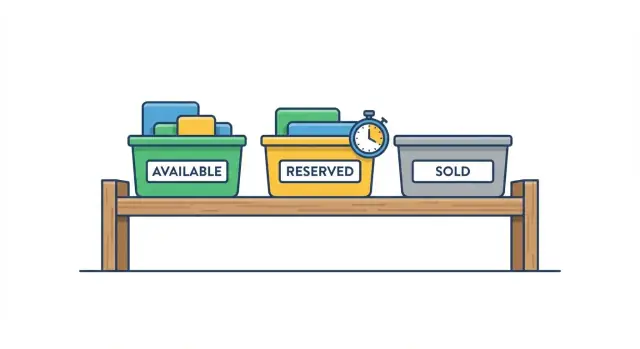
The core idea is to treat inventory as a few clear states, not one number. “Available” is what you can promise right now. “Reserved” is what someone is trying to buy but has not finished paying for. “Sold” is what has been paid for and should be fulfilled.
This guide sticks to simple, practical rules: how items move between those states, when to reserve, and how to handle payment timeouts without leaving stock stuck or double-sold. It does not cover complex forecasting, warehouse layouts, or advanced multi-location planning.
Available vs reserved vs sold: simple definitions
These three words look like simple labels, but they are three different promises you make to customers. If you mix them up, you either oversell (two people pay for one item) or undersell (you hide stock you could have sold).
Available means “a customer can still start checkout for this item right now.” It is the portion of your on hand stock that is not already committed to someone else. Think of it as your public number.
Reserved means “we are holding this item for a specific customer for a short time.” A reservation is usually created when a shopper has clearly shown intent (for example, they started checkout). Reserved stock is not sold yet, but you treat it as temporarily unavailable to everyone else so you do not double-book it.
Sold means “the purchase is confirmed.” This is when you can safely count the item as no longer available for sale. In many shops, “sold” starts at payment success (or when an order is placed on a pay-later method you trust) and ends when it ships.
One key point: available is not the same as on hand. On hand is what you physically have. Available is what you are willing to promise to new buyers.
Here’s a tiny example with 5 units on hand:
- On hand: 5
- Reserved: 2 (two customers are in checkout)
- Sold: 1 (one paid order)
- Available: 2 (5 minus 2 minus 1)
Notice how all three numbers can be true at the same time. If you only track “on hand,” your site may still show 5 and let five people try to buy, even though you can only confidently fulfill two more right now.
How stock moves: the basic lifecycle
Inventory gets messy when the “count” is treated as one number. For inventory accuracy for small teams, think in states that follow a simple path. Each state answers a different question: can someone still buy it, is it being held for a checkout, or is the sale final.
The typical lifecycle looks like this:
- Available -> Reserved: created when a customer starts checkout (or clicks “Pay”) and you decide to hold the item for them.
- Reserved -> Sold: happens only after payment is confirmed (or after you accept an offline payment).
- Reserved -> Available: happens when checkout is abandoned, payment times out, or the customer cancels before paying.
“Sold” should be the moment you make a real commitment. In many setups, that’s also when you reduce the physical stock count, because the item is no longer yours to sell. If you ship later (common for small teams), you can still treat “sold” as final, and track shipping separately. The key is: don’t mark an item sold just because someone reached the payment page.
Be strict about who can change each state:
- Checkout system can create a reservation and extend it (within limits).
- Payment confirmation can convert reserved to sold.
- Admin can cancel a reservation, refund (which may create a rest benches: sold -> available only if you truly restock), or correct stock when you receive new units.
Finally, state changes must look the same everywhere. Your storefront, admin panel, and any customer support view should all read from the same inventory status rules, or you’ll “fix” an oversell in one place and recreate it in another.
When to create a reservation during checkout
The moment you create a reservation decides how often you oversell and how often you frustrate shoppers. Too early, and you “hold” items for people who were just browsing. Too late, and you sell the same last item twice.
A simple rule that works for most small teams: reserve when the shopper commits to checkout, not when they open the product page.
Here are the common options, from earliest to latest:
- At checkout start (when they click “Checkout”): best for fast-selling items, but you need short expiry times.
- After the address step: reduces fake holds and still protects you before payment.
- At payment start (when you create a payment intent or redirect to a provider): often the cleanest point because “payment in progress” is a real commitment.
- After payment success: safest for shopper experience, but highest risk of oversells.
Whatever you choose, each reservation should store only what you need to enforce it: the item (SKU), quantity, a cart or order ID, who placed it (session/user), and an expiry time. Also store the reason or stage (checkout, payment) so support can understand what happened later.
Multi-item carts need one extra decision: do you reserve everything at once, or per item? Reserving per item is usually safer. If one item goes out of stock, you can release only that item’s hold instead of blocking the whole cart.
Make the hold visible in plain language. A small notice like “We’re holding these items for 10 minutes while you finish checkout” is enough. In a last-item case, be direct: “Only 1 left. It’s held for you until 3:42 PM.” A timer can help, but it’s optional if your message is clear.
If you’re building the flow in Koder.ai, treat “reserve” as a first-class step (API call + database row) so the UI and backend always agree on what’s currently held.
Step by step: reserving stock and preventing oversells
If you want inventory accuracy for small teams, make the system boring and predictable. The key is to decide what each number means, and to change it only in one place.
Start by picking a single source of truth for inventory. That might be one database table, or one service that all checkouts must call. Spreadsheets, admin edits, and “quick fixes” in two systems are where oversells are born.
Here’s a simple flow that works for most stores:
- Choose your truth for counts. Track “on hand” as the real physical stock. Then define “available” as either a stored number you update or a calculated number: on hand minus reserved.
- Create a reservation when the shopper commits. Do it at the point they click “Pay” (or when you create the payment intent), not when they view the cart. Reservations made too early lock stock for browsers who never purchase.
- Make the reservation reduce availability right away. If you store “available,” decrement it in the same action that creates the reservation. If you calculate “available,” add a reserved record and let the math do the work.
- On confirmed payment, convert reserved to sold. Mark the reservation as “sold” (or create an order line) and reduce on hand. This is the moment you stop treating the item as reversible.
- On failure or timeout, release the reservation. If payment fails, expires, or the shopper closes the page, set the reservation to “released” and make the units available again.
Finally, log every state change with time, reason, and IDs (cart, payment, order). When a customer asks “why was it out of stock?” support needs a clear timeline, not guesswork. If you’re building this flow in an app (for example, with Koder.ai), treat these states and logs as first-class data, not just UI labels.
Handling payment timeouts cleanly
A payment timeout is the point where you stop waiting for a checkout to finish and you release the reserved stock back to “available.” You need it because some shoppers never complete payment, and without a timeout your “reserved” pile grows until real buyers get blocked or you start manual fixes.
Pick a timeout that matches what actually happens with your payment provider. Card payments often confirm quickly, but 3D Secure, bank redirects, and wallet flows can take longer. If your timeout is too short, you will release stock while the customer is still paying. If it is too long, you will hold stock for people who have already left. For many small shops, 10 to 20 minutes is a reasonable starting point, then adjust based on your logs.
When a shopper closes the tab or loses connection, assume nothing. The payment might still succeed in the background, or it might never start. That is why the inventory system should not depend on the browser to “tell you” what happened.
Make cleanup automatic so you are not babysitting orders. A simple approach is a periodic sweep that expires old reservations and records why it happened.
- Store a reservation with an explicit expires_at timestamp
- Run a scheduled job every 1 to 5 minutes to find expired reservations
- Release stock by moving quantities from “reserved” back to “available”
- Mark the checkout/order as “expired” so you can support customers later
- Log counts of expirations so you can tune the timeout
Decide upfront what you will do if payment arrives late, after the timeout. There is no perfect answer, but you need one consistent rule. Common options are: accept payment only if stock is still available (otherwise auto-refund), or extend the reservation while payment is pending if your provider can prove it is in progress.
For inventory accuracy for small teams, the key is making timeouts predictable, automatic, and visible, so “reserved” never becomes a black hole.
Keeping payment and inventory in sync
Payment systems do not always send a single, clean “paid” message. You might receive the same confirmation twice, see a delayed webhook, or get a capture that happens minutes after the customer thinks they are done. If your inventory updates are not prepared for that, you can sell the same unit twice.
The simplest anchor is one order id that follows the whole story: the reservation, each payment attempt, and the final sale. When anything happens, you look up the order id first, then decide what to do next.
Here are a few rules that keep inventory accuracy for small teams without adding complexity:
- Make inventory updates idempotent: if the same “payment confirmed” event is processed twice, the second time changes nothing.
- Mark the reservation as “converted to sale” once, and only once, for that order id.
- Record each payment attempt under the same order id, even if the customer retries with a new card.
- Only move stock from reserved to sold after you have a clear, final payment result (authorized and captured, or whatever “final” means for your business).
Idempotent is just a fancy word for “safe to repeat.” Think of it like stamping a ticket: the first stamp matters, the second stamp does not.
Refunds and chargebacks should not automatically put items back into available stock. If the item already shipped, the inventory should stay sold, while your accounting shows a refund. Only restock when the item is actually returned and inspected.
Partial captures and split payments need a simple policy. For example: keep the item reserved until the total captured amount reaches the order total, then mark it sold. If the customer only pays part and times out, release the reservation like any other failed checkout.
Common mistakes that cause oversells
Most oversells are not caused by bad math. They happen when the team uses the same words to mean different things, or when one part of the checkout flow updates inventory differently than another. If you care about inventory accuracy for small teams, the fixes are usually simple, but they must be consistent.
A common mistake is reserving too early. If you reserve the moment someone opens a product page or adds to cart, you end up blocking real buyers for people who are just browsing, comparing prices, or getting interrupted. Reservations should be tied to clear intent, like starting checkout or creating a payment session.
Another slow leak is reservations that never expire. A handful of abandoned checkouts per day can quietly eat your sellable stock. You need a time limit and an automatic release when that limit hits, even if nothing else happens.
Here are the mistakes that show up most often:
- Reserving stock before checkout, so inventory gets locked by browsers, not buyers.
- Missing an expiry, so old reservations pile up and availability keeps shrinking.
- Letting multiple systems change counts (admin edits, bulk imports, returns) without one rule for how statuses move.
- Mixing meanings: treating “sold” as “paid” in one place and “shipped” in another.
- Releasing a reservation without recording why, which makes support issues hard to trace.
That last point matters more than it sounds. When a customer says, “I paid but it says out of stock,” your team needs an audit trail that answers: when was it reserved, when was it released, and was it released because of a payment timeout, a manual cancel, or a refund.
A simple habit helps: whenever inventory changes, record the reason and the source (checkout, admin, import, support). If you’re building the flow in Koder.ai, bake those reasons into your data model and enforce them in one place so every feature follows the same rules.
Quick checklist before you ship changes
Before you push new checkout or inventory logic, make sure everyone on the team can say what each status means without adding extra rules. “Available” is what can still be reserved, “reserved” is promised to a specific checkout until it expires, and “sold” is paid and final.
A simple stock reservation system lives or dies on time and cleanup. Reservations must have a clear expiry time (for example, 10-15 minutes), and you need a job or trigger that releases expired holds so stock returns to available.
Run through this pre-ship checklist:
- Confirm checkout only promises items that are reserved, not items that are merely sitting in a cart.
- Ensure creating a reservation is atomic (two people cannot reserve the last item at the same time).
- Verify payment confirmation converts reserved to sold exactly once (idempotent handling for retries and webhooks).
- Define what happens when payment is late after the reservation expires: honor it, cancel it, or mark it as backorder. Pick one rule and apply it every time.
- Test the timeout path end to end: reservation expires, inventory returns to available, and the customer sees a clear message.
Support needs visibility, not guesses. For any order, you should be able to see a timeline of state changes with timestamps so disputes are easy to handle.
Support timeline must answer three questions
- When was the reservation created and when did it expire?
- When did payment succeed or fail, and was it before or after expiry?
- When was stock released or converted to sold, and by which system event?
If you are building this logic in a code generator or vibe-coding platform like Koder.ai, write these rules down first, then implement them as explicit states and events. It keeps edge cases from sneaking in later.
Example: two customers, one last item
You have 1 unit left of a popular item. Two shoppers hit checkout almost at the same time.
12:00:00 - Store shows Available: 1, Reserved: 0, Sold: 0.
12:00:05 - Shopper A clicks “Pay”. Your system creates a reservation for 1 unit that lasts 10 minutes. The product page now effectively shows Available: 0 (because that last unit is held), while the back office shows Reserved: 1.
12:00:20 - Shopper B adds the same item to cart and goes to checkout.
- What Shopper B sees: “Out of stock” or “Not available right now.”
- What support/admin sees: Available 0, Reserved 1 (held for Shopper A), Sold 0.
12:03:10 - Shopper A’s payment succeeds.
You convert the reservation into a sale:
- Sold increases to 1.
- Reserved drops back to 0.
- Available stays 0 because there is no physical stock left.
Now the counts are Available: 0, Reserved: 0, Sold: 1. Shopper A gets an order confirmation. Shopper B still can’t buy.
Alternative ending: payment timeout
Same start, but Shopper A never completes payment.
12:10:05 - Reservation expires (timeout). You release the stock.
- Counts become Available: 1, Reserved: 0, Sold: 0.
- Shopper B can now check out, and you can create a new reservation for B.
Variant: payment succeeds after timeout
Sometimes a payment provider reports success late (network lag, delayed confirmation).
Your rule should be simple: once a reservation expires, it can’t be revived. So when a late “success” arrives for Shopper A, you do one of these:
- If the reservation is expired, do not mark the item sold. Put the order into “needs review” and refund or ask the shopper to reorder.
- If a new reservation already exists for Shopper B, B keeps priority because B has the active hold.
This one rule prevents oversells and makes support outcomes predictable.
Next steps: turn the rules into a simple system
Inventory accuracy for small teams gets much easier when everyone uses the same words the same way. Write down your definitions for available, reserved, and sold in one place, and make sure they match what your store shows customers, what support tells customers, and what your team sees in admin.
Keep your policy short: decide exactly when a reservation is created (for example, when checkout starts or when payment begins) and how long it can hold stock before expiring. Put the timeout rule in plain language, including what happens if the customer comes back after it expires.
Before you change anything in checkout, sketch the states and transitions first. You should be able to point to each event and say what it does to stock.
A simple, practical baseline
Most teams do fine with these five actions as the backbone:
- Reserve: create a hold for a specific cart or order
- Release: remove the hold when the customer cancels or the timeout hits
- Convert to sold: finalize the reservation when payment is confirmed
- Fail safely: if you are not sure, do not mark sold
- Reconcile: fix rare mismatches with a manual or scheduled check
Add basic observability so you can debug the rare edge cases without guessing. Log every reserve, release, and convert-to-sold event with an order ID, a reason (timeout, cancel, payment success), a timestamp, and the before and after quantity.
Build it fast, then harden it
If you need to prototype or adjust this flow quickly, Koder.ai can help you map the states in chat, generate the reservation and timeout logic, and then export source code for deployment when you are ready. The key is not fancy tooling, it is making the rules clear and consistent, then enforcing them everywhere checkout touches inventory.
FAQ
What does available stock mean?
Available stock is the amount you can promise to new shoppers right now. It equals your physical stock after you account for units already reserved or sold.
What is reserved inventory?
Reserved stock is held for one shopper while they finish checkout. It stays unavailable to everyone else for a short, defined time, but it is not a completed sale.
When should an item move to sold?
Mark stock as sold when payment reaches the final status you accept for fulfillment. Do not mark it sold just because a shopper opened checkout or reached the payment page.
When should I reserve stock during checkout?
Create a reservation when the shopper starts a meaningful checkout step, often when they click Pay or you create a payment session. Holding items from the product page or cart usually locks stock too early.
How long should a stock reservation last?
Give every reservation an expiry time and release it automatically when that time passes. Many small shops start with 10 to 20 minutes, then adjust the limit using real checkout data.
How do I stop two customers buying the last item?
Use one inventory source and make the reserve action atomic. When two people try to reserve the last unit, the system must let only one reservation succeed.
What should happen when a customer abandons checkout?
Do not rely on the shopper's browser to release stock. Run a scheduled cleanup job that finds expired reservations, changes them to released, and returns their quantity to available stock.
What if payment succeeds after the reservation expires?
Keep the expired reservation closed. If stock is still available, you can accept the payment under a clear rule; if another shopper already has an active hold, send the late payment for review and refund it when you cannot fulfill the order.
How do I keep payment and inventory in sync?
Use the order ID to tie reservations, payment attempts, and sales together. Make payment handling safe to repeat, so a duplicate webhook cannot reduce inventory twice.
What should an inventory audit log include?
Record the time, reason, order or cart ID, and quantity before and after every reserve, release, and sale. That history lets support explain cancellations and lets your team find mismatches quickly.