

Joe Beda’s Early Kubernetes Decisions That Shaped Platforms
A clear look at Joe Beda’s early Kubernetes choices—declarative APIs, control loops, Pods, Services, and labels—and how they shaped modern app platforms.
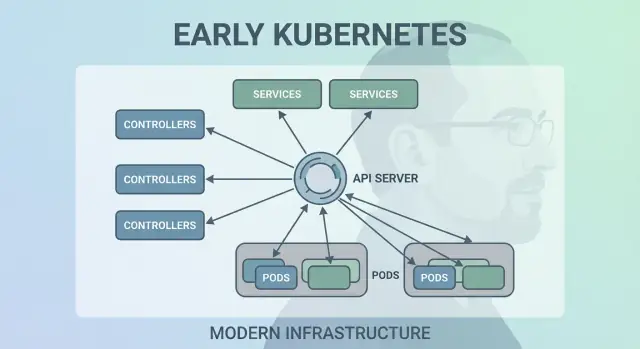
Why Joe Beda’s Early Kubernetes Choices Still Matter
Joe Beda was one of the key people behind Kubernetes’ earliest design—alongside other founders who carried lessons from Google’s internal systems into an open platform. His influence wasn’t about chasing trendy features; it was about choosing simple primitives that could survive real production chaos and still be understandable by everyday teams.
Those early decisions are why Kubernetes became more than “a container tool.” It turned into a reusable kernel for modern application platforms.
Container orchestration, in plain terms
“Container orchestration” is the set of rules and automation that keeps your app running when machines fail, traffic spikes, or you deploy a new version. Instead of a human babysitting servers, the system schedules containers onto computers, restarts them when they crash, spreads them out for resilience, and wires up networking so users can reach them.
The mess before Kubernetes
Before Kubernetes became common, teams often stitched together scripts and custom tools to answer basic questions:
- Where should this container run right now?
- What happens if a node dies at 2 a.m.?
- How do we deploy safely without downtime?
- How do services find each other when IPs keep changing?
Those DIY systems worked—until they didn’t. Every new app or team added more one-off logic, and operational consistency was hard to achieve.
What this post covers
This article walks through early Kubernetes design choices (the “shape” of Kubernetes) and why they still influence modern platforms: the declarative model, controllers, Pods, labels, Services, a strong API, consistent cluster state, pluggable scheduling, and extensibility. Even if you’re not running Kubernetes directly, you’re likely using a platform built on these ideas—or struggling with the same problems.
The Problem Kubernetes Set Out to Solve
Before Kubernetes, “running containers” usually meant running a few containers. Teams stitched together bash scripts, cron jobs, golden images, and a handful of ad-hoc tools to get things deployed. When something broke, the fix often lived in someone’s head—or in a README nobody trusted. Operations was a stream of one-off interventions: restarting processes, re-pointing load balancers, cleaning up disk, and guessing which machine was safe to touch.
Containers at scale created new failure modes
Containers made packaging easier, but they didn’t remove the messy parts of production. At scale, the system fails in more ways and more often: nodes disappear, networks partition, images roll out inconsistently, and workloads drift from what you think is running. A “simple” deploy can turn into a cascade—some instances updated, some not, some stuck, some healthy but unreachable.
The real issue wasn’t starting containers. It was keeping the right containers running, in the right shape, despite constant churn.
A consistent model across infrastructure
Teams were also juggling different environments: on‑prem hardware, VMs, early cloud providers, and various network and storage setups. Each platform had its own vocabulary and failure patterns. Without a shared model, every migration meant rewriting operational tooling and retraining people.
Kubernetes set out to offer a single, consistent way to describe applications and their operational needs, regardless of where the machines lived.
What “platform” expectations looked like
Developers wanted self-service: deploy without tickets, scale without begging for capacity, and roll back without drama. Ops teams wanted predictability: standardized health checks, repeatable deployments, and a clear source of truth for what should be running.
Kubernetes wasn’t trying to be a fancy scheduler. It was aiming to be the foundation for a dependable application platform—one that turns messy reality into a system you can reason about.
Decision 1: A Declarative, Desired-State Model
One of the most influential early choices was making Kubernetes declarative: you describe what you want, and the system works to make reality match that description.
Desired state, explained like a thermostat
A thermostat is a useful everyday example. You don’t manually turn the heater on and off every few minutes. You set a desired temperature—say 21°C—and the thermostat keeps checking the room and adjusting the heater to stay close to that target.
Kubernetes works the same way. Instead of telling the cluster, step by step, “start this container on that machine, then restart it if it fails,” you declare the outcome: “I want 3 copies of this app running.” Kubernetes continuously checks what’s actually running and corrects drift.
Fewer manual steps, fewer surprises
Declarative configuration reduces the hidden “ops checklist” that often lives in someone’s head or in a half-updated runbook. You apply the config, and Kubernetes handles the mechanics—placement, restarts, and reconciling changes.
It also makes change review easier. A change is visible as a diff in configuration, not a series of ad-hoc commands.
Repeatability across environments
Because the desired state is written down, you can reuse the same approach in dev, staging, and production. The environment may differ, but the intent stays consistent, which makes deployments more predictable and easier to audit.
The tradeoffs
Declarative systems have a learning curve: you need to think in “what should be true” rather than “what do I do next.” They also depend heavily on good defaults and clear conventions—without them, teams can produce configs that technically work but are hard to understand and maintain.
Decision 2: Control Loops (Controllers) as the Engine
Kubernetes didn’t succeed because it could run containers once—it succeeded because it could keep them running correctly over time. The big design move was to make “control loops” (controllers) the core engine of the system.
What a controller is
A controller is a simple loop:
- Look at the current state (what’s actually running)
- Compare it to the desired state (what you asked for)
- Take action until the two match
It’s less like a one-time task and more like autopilot. You don’t “babysit” workloads; you declare what you want, and controllers keep steering the cluster back to that outcome.
Handling crashes, node loss, and drift
This pattern is why Kubernetes is resilient when real-world things go wrong:
- Container crashes: the controller notices fewer running instances than desired and starts replacements.
- Node loss: when a node disappears, controllers reschedule pods elsewhere to restore the desired count.
- Configuration drift: if someone changes or deletes resources, controllers reconcile the difference and correct it.
Instead of treating failures as special cases, controllers treat them as routine “state mismatch” and fix them the same way every time.
Why it scales better than scripts
Traditional automation scripts often assume a stable environment: run step A, then B, then C. In distributed systems, those assumptions break constantly. Controllers scale better because they’re idempotent (safe to run repeatedly) and eventually consistent (they keep trying until the goal is reached).
Everyday examples: Deployments and ReplicaSets
If you’ve used a Deployment, you’ve relied on control loops. Under the hood, Kubernetes uses a ReplicaSet controller to ensure the requested number of pods exist—and a Deployment controller to manage rolling updates and rollbacks predictably.
Decision 3: Pods as the Atomic Scheduling Unit
Kubernetes could have scheduled “just containers,” but Joe Beda’s team introduced Pods to represent the smallest deployable unit the cluster places on a machine. The key idea: many real applications aren’t a single process. They’re a small group of tightly coupled processes that must live together.
Why Pods instead of individual containers?
A Pod is a wrapper around one or more containers that share the same fate: they start together, run on the same node, and scale together. This makes patterns like sidecars natural—think of a log shipper, proxy, config reloader, or security agent that should always accompany the main app.
Instead of teaching every app to integrate those helpers, Kubernetes lets you package them as separate containers that still behave like one unit.
What Pods enabled for networking and storage
Pods made two important assumptions practical:
- Networking: containers in a Pod share a network identity (one IP and port space). The main app can talk to the sidecar over
localhost, which is simple and fast. - Storage: containers in a Pod can share volumes. A helper can write files that the main app reads (or the other way around), without awkward external hops.
These choices reduced the need for custom glue code, while keeping containers isolated at the process level.
Where Pods confuse newcomers
New users often expect “one container = one app,” then get tripped up by Pod-level concepts: restarts, IPs, and scaling. Many platforms smooth this over by providing opinionated templates (for example, “web service,” “worker,” or “job”) that generate Pods behind the scenes—so teams get the benefits of sidecars and shared resources without having to think about Pod mechanics every day.
Decision 4: Labels and Selectors for Loose Coupling
A quietly powerful early choice in Kubernetes was to treat labels as first-class metadata and selectors as the primary way to “find” things. Instead of hard-wiring relationships (like “these exact three machines run my app”), Kubernetes encourages you to describe groups by shared attributes.
Labels: flexible tags on everything
A label is a simple key/value pair you attach to resources—Pods, Deployments, Nodes, Namespaces, and more. They act like consistent, queryable “tags”:
app=checkoutenv=prodtier=frontend
Because labels are lightweight and user-defined, you can model your organization’s reality: teams, cost centers, compliance zones, release channels, or whatever matters to how you operate.
Selectors: relationships without tight dependencies
Selectors are queries over labels (for example, “all Pods where app=checkout and env=prod”). This beats fixed host lists because the system can adapt as Pods are rescheduled, scaled up/down, or replaced during rollouts. Your configuration stays stable even when the underlying instances are constantly changing.
Dynamic grouping at scale
This design scales operationally: you don’t manage thousands of instance identities—you manage a few meaningful label sets. That’s the essence of loose coupling: components connect to groups that can change membership safely.
Labels power more than grouping
Once labels exist, they become a shared vocabulary across the platform. They’re used for traffic routing (Services), policy boundaries (NetworkPolicy), observability filters (metrics/logs), and even cost tracking and chargeback. One simple idea—tag things consistently—unlocks a whole ecosystem of automation.
Decision 5: Services for Stable Networking
Kubernetes needed a way to make networking feel predictable even though containers are anything but. Pods get replaced, rescheduled, and scaled up and down—so their IPs and even the specific machines they run on will change. The core idea of a Service is simple: provide a stable “front door” to a shifting set of Pods.
Stable access to changing Pods
A Service gives you a consistent virtual IP and DNS name (like payments). Behind that name, Kubernetes continuously tracks which Pods match the Service’s selector and routes traffic accordingly. If a Pod dies and a new one appears, the Service still points to the right place without you touching application settings.
Service discovery that simplified configuration
This approach removed a lot of manual wiring. Instead of baking IPs into config files, apps can depend on names. You deploy the app, deploy the Service, and other components can find it via DNS—no custom registry required, no hard-coded endpoints.
Built-in load balancing for reliability
Services also introduced default load-balancing behavior across healthy endpoints. That meant teams didn’t have to build (or rebuild) their own load balancers for every internal microservice. Spreading traffic reduces the blast radius of a single Pod failure and makes rolling updates less risky.
Limits—and how Ingress/Gateway extend it
A Service is great for L4 (TCP/UDP) traffic, but it doesn’t model HTTP routing rules, TLS termination, or edge policies. That’s where Ingress and, increasingly, the Gateway API fit: they build on Services to handle hostnames, paths, and external entry points more cleanly.
Decision 6: An API as the Product Surface
One of the most quietly radical early choices was treating Kubernetes as an API you build against—not a monolithic tool you “use.” That API-first stance made Kubernetes feel less like a product you click through and more like a platform you can extend, script, and govern.
Why API-first changed platform building
When the API is the surface area, platform teams can standardize how applications are described and managed, regardless of which UI, pipeline, or internal portal sits on top. “Deploying an app” becomes “submitting and updating API objects” (like Deployments, Services, and ConfigMaps), which is a much cleaner contract between app teams and the platform.
Tooling, UIs, and automation without special access
Because everything goes through the same API, new tooling doesn’t need privileged backdoors. Dashboards, GitOps controllers, policy engines, and CI/CD systems can all operate as normal API clients with well-scoped permissions.
That symmetry matters: the same rules, auth, auditing, and admission controls apply whether the request came from a person, a script, or an internal platform UI.
Versioning and compatibility for long-lived clusters
API versioning made it possible to evolve Kubernetes without breaking every cluster or every tool overnight. Deprecations can be staged; compatibility can be tested; upgrades can be planned. For organizations running clusters for years, this is the difference between “we can upgrade” and “we’re stuck.”
What kubectl really represents
kubectl is not Kubernetes—it’s a client. That mental model pushes teams to think in terms of API workflows: you can swap kubectl for automation, a web UI, or a custom portal, and the system stays consistent because the contract is the API itself.
Decision 7: Centralized Cluster State (etcd) and Consistency
Kubernetes needed a single “source of truth” for what the cluster should look like right now: which Pods exist, which nodes are healthy, what Services point to, and which objects are being updated. That’s what etcd provides.
What etcd does (in plain terms)
etcd is the database for the control plane. When you create a Deployment, scale a ReplicaSet, or update a Service, the desired configuration is written to etcd. Controllers and other control-plane components then watch that stored state and work to make reality match it.
Why consistency matters when everything acts at once
A Kubernetes cluster is full of moving parts: schedulers, controllers, kubelets, autoscalers, and admission checks can all react simultaneously. If they’re reading different versions of “the truth,” you get races—like two components making conflicting decisions about the same Pod.
etcd’s strong consistency ensures that when the control plane says “this is the current state,” everyone is aligned. That alignment is what makes control loops predictable instead of chaotic.
How it affects backups, upgrades, and disaster recovery
Because etcd holds the cluster’s configuration and history of changes, it’s also what you protect during:
- Backups: without an etcd snapshot, you can’t reliably restore cluster objects.
- Upgrades: careful etcd health and snapshotting reduces upgrade risk.
- Disaster recovery: restoring etcd is often the fastest path to getting the control plane back with the same intent.
Practical guidance
Treat control-plane state like critical data. Take regular etcd snapshots, test restores, and store backups off-cluster. If you run managed Kubernetes, learn what your provider backs up—and what you still need to back up yourself (for example, persistent volumes and app-level data).
Decision 8: Pluggable Scheduling and Resource Awareness
Kubernetes didn’t treat “where a workload runs” as an afterthought. Early on, the scheduler was a distinct component with a clear job: match Pods to nodes that can actually run them, using the cluster’s current state and the Pod’s requirements.
How the scheduler matches workloads to nodes
At a high level, scheduling is a two-step decision:
- Filter: remove nodes that don’t meet hard constraints (not enough CPU/memory, missing required labels, incompatible taints, ports already taken, etc.).
- Score: rank the remaining nodes by preferences (spread across zones, pack for efficiency, avoid noisy neighbors, honor affinity rules).
This structure made it possible to evolve Kubernetes scheduling without rewriting everything.
Separation of concerns: scheduler vs. runtime vs. networking
A key design choice was keeping responsibilities clean:
- The scheduler decides placement.
- The container runtime (and kubelet) performs execution on the chosen node.
- The networking layer provides connectivity once things are running.
Because these concerns are separated, improvements in one area (say, a new CNI networking plugin) don’t force a new scheduling model.
Constraints and priorities grew naturally
Resource awareness started with requests and limits, giving the scheduler meaningful signals instead of guesswork. From there, Kubernetes added richer controls—node affinity/anti-affinity, pod affinity, priorities and preemption, taints and tolerations, and topology-aware spreading—built on the same foundation.
Modern impact: multi-tenant and cost-efficient placement
This approach enables today’s shared clusters: teams can isolate critical services with priorities and taints, while everyone benefits from higher utilization. With better bin-packing and topology controls, platforms can place workloads more cost-effectively without sacrificing reliability.
Decision 9: Extensibility Over “One Built-In Way”
Kubernetes could have shipped with a full, opinionated platform experience—buildpacks, app routing rules, background jobs, config conventions, and more. Instead, Joe Beda and the early team kept the core focused on a smaller promise: run and heal workloads reliably, expose them, and provide a consistent API to automate against.
Why Kubernetes didn’t try to be a full PaaS
A “complete PaaS” would have forced one workflow and one set of trade-offs on everyone. Kubernetes targeted a broader foundation that could support many platform styles—Heroku-like developer simplicity, enterprise governance, batch + ML pipelines, or barebones infrastructure control—without locking in a single product philosophy.
How extensions let platforms add features safely
Kubernetes’ extensibility mechanisms created a controlled way to grow capabilities:
- CRDs (CustomResourceDefinitions) let you add new API types (for example,
CertificateorDatabase) that look and feel native. - Controllers/operators reconcile those new resources using the same desired-state pattern as built-in components.
- Admission controllers/webhooks enforce policy (security, naming, quotas) and mutate defaults at the API boundary.
This means internal platform teams and vendors can ship features as add-ons, while still using Kubernetes primitives like RBAC, namespaces, and audit logs.
Benefits—and the main risk
For vendors, it enables differentiated products without forking Kubernetes. For internal teams, it enables a “platform on Kubernetes” tailored to organizational needs.
The trade-off is ecosystem sprawl: too many CRDs, overlapping tools, and inconsistent conventions. Governance—standards, ownership, versioning, and deprecation rules—becomes part of the platform work.
How These Decisions Shaped Modern Application Platforms
Kubernetes’ early choices didn’t just create a container scheduler—they created a reusable platform kernel. That’s why so many modern internal developer platforms (IDPs) are, at their core, “Kubernetes plus opinionated workflows.” The declarative model, controllers, and a consistent API made it possible to build higher-level products—without reinventing deployment, reconciliation, and service discovery each time.
Kubernetes as a shared control plane
Because the API is the product surface, vendors and platform teams can standardize on one control plane and build different experiences on top: GitOps, multi-cluster management, policy, service catalogs, and deployment automation. This is a big reason Kubernetes became the common denominator for cloud native platforms: integrations target the API, not a specific UI.
What stayed hard (Day-2 reality)
Even with clean abstractions, the toughest work is still operational:
- Security: identity, network policy, secrets, and supply chain trust
- Upgrades: Kubernetes versions, CRDs, and add-ons moving at different speeds
- Reliability: debugging controllers, misconfigurations, and noisy neighbors
How to evaluate a Kubernetes-based platform
Ask questions that reveal operational maturity:
- How are upgrades handled, and what’s the rollback story?
- Which parts are standard Kubernetes vs. proprietary extensions?
- What guardrails exist (policy, defaults, templates) to prevent foot-guns?
- How observable is the system (events, logs, audit trails), and who owns incidents?
A good platform reduces cognitive load without hiding the underlying control plane or making escape hatches painful.
One practical lens: does the platform help teams move from “idea → running service” without forcing everyone to become Kubernetes experts on day one? Tools in the “vibe-coding” category—like Koder.ai—lean into this by letting teams generate real applications from chat (web in React, backends in Go with PostgreSQL, mobile in Flutter) and then iterate quickly with features like planning mode, snapshots, and rollback. Whether you adopt something like that or build your own portal, the goal is the same: preserve Kubernetes’ strong primitives while reducing the workflow overhead around them.
Key Takeaways and Practical Lessons
Kubernetes can feel complicated, but most of its “weirdness” is intentional: it’s a set of small primitives designed to compose into many kinds of platforms.
Clear up two common misconceptions
First: “Kubernetes is just Docker orchestration.” Kubernetes isn’t primarily about starting containers. It’s about continuously reconciling desired state (what you want running) with actual state (what’s really happening), across failures, rollouts, and changing demand.
Second: “If we use Kubernetes, everything becomes microservices.” Kubernetes supports microservices, but it also supports monoliths, batch jobs, and internal platforms. The units (Pods, Services, labels, controllers, and the API) are neutral; your architecture choices aren’t dictated by the tool.
Where the complexity really comes from
The hard parts usually aren’t YAML or Pods—they’re networking, security, and multi-team usage: identity and access, secrets management, policies, ingress, observability, supply-chain controls, and creating guardrails so teams can ship safely without stepping on each other.
Decision-level takeaways you can use
When planning, think in terms of the original design bets:
- Prefer declarative workflows and automation that can reconcile drift.
- Use labels/selectors to keep coupling low between teams and components.
- Treat the API as a product: versioning, conventions, and clear ownership matter.
A practical next step
Map your real requirements to Kubernetes primitives and platform layers:
-
Workloads → Pods/Deployments/Jobs
-
Connectivity → Services/Ingress
-
Operations → controllers, policies, and observability
If you’re evaluating or standardizing, write this mapping down and review it with stakeholders—then build your platform incrementally around the gaps, not around trends.
If you’re also trying to speed up the “build” side (not just the “run” side), consider how your delivery workflow turns intent into deployable services. For some teams that’s a curated set of templates; for others it’s an AI-assisted workflow like Koder.ai that can produce an initial working service quickly and then export source code for deeper customization—while your platform still benefits from Kubernetes’ core design decisions underneath.
FAQ
What does “container orchestration” mean in plain terms?
Container orchestration is the automation that keeps apps running as machines fail, traffic changes, and deployments happen. In practice it handles:
- Scheduling containers onto nodes
- Restarting failed workloads
- Scaling up/down
- Wiring networking so services can find each other
- Rolling updates and rollbacks
Kubernetes popularized a consistent model for doing this across different infrastructure environments.
What problem did Kubernetes originally set out to solve?
The main problem wasn’t starting containers—it was keeping the right containers running in the right shape despite constant churn. At scale you get routine failures and drift:
- Nodes disappear or become unhealthy
- Deployments become partially applied
- IPs change as Pods are replaced
- Humans “fix” things in ways that don’t get documented
Kubernetes aimed to make operations repeatable and predictable by giving a standard control plane and vocabulary.
Why is Kubernetes “declarative,” and what does desired state buy you?
In a declarative system you describe the outcome you want (for example, “run 3 replicas”), and the system continuously works to make reality match.
Practical workflow:
- Put intent in config (YAML or generated manifests)
- Apply it (
kubectl applyor GitOps) - Let controllers reconcile failures and drift
This reduces “hidden runbooks” and makes changes reviewable as diffs instead of ad-hoc commands.
What are Kubernetes controllers, and why are they central to reliability?
Controllers are control loops that repeatedly:
- Observe current state
- Compare to desired state
- Take action until they match
That design makes common failures routine instead of special-case logic. For example, if a Pod crashes or a node disappears, the relevant controller simply notices “we have fewer replicas than desired” and creates replacements.
Why does Kubernetes use Pods instead of scheduling individual containers?
Kubernetes schedules Pods (not individual containers) because many real workloads need tightly coupled helper processes.
Pods enable patterns like:
- Sidecars (proxy, log shipper, config reloader)
- Shared networking (containers talk over
localhost) - Shared storage via volumes
Rule of thumb: keep Pods small and cohesive—only group containers that must share lifecycle, network identity, or local data.
How do labels and selectors reduce tight coupling in Kubernetes?
Labels are lightweight key/value tags (for example app=checkout, env=prod). Selectors query those labels to form dynamic groups.
This matters because instances are ephemeral: Pods come and go during reschedules and rollouts. With labels/selectors, relationships are stable (“all Pods with these labels”) even when members change.
Operational tip: standardize a small label taxonomy (app, team, env, tier) and enforce it with policy to avoid chaos later.
What does a Kubernetes Service do, and when should I use one?
A Service provides a stable virtual IP and DNS name that routes to a changing set of Pods matching a selector.
Use a Service when:
- Backends are replicated and Pods will be replaced
- Clients should depend on a stable name, not Pod IPs
- You want built-in load spreading across endpoints
For HTTP routing, TLS termination, and edge rules, you typically layer Ingress or Gateway API on top of Services.
Why is “API-first” such a big Kubernetes design decision?
Kubernetes treats the API as the primary product surface: everything is an API object (Deployments, Services, ConfigMaps, etc.). Tools—including kubectl, CI/CD, GitOps, dashboards—are just API clients.
Practical benefits:
- Consistent auth, auditing, and policy via the API
- Easier automation (no “special” backdoors)
- Versioning/compatibility for long-lived clusters
If you’re building an internal platform, design workflows around API contracts, not around a specific UI tool.
What is etcd, and what should teams do about backups and recovery?
etcd is the control plane’s database and the cluster’s source of truth for desired and current state. Controllers and other components watch etcd and reconcile based on that state.
Practical guidance:
- Treat etcd like critical data
- Take regular snapshots
- Test restores (not just backups)
In managed Kubernetes, learn what your provider backs up—and what still needs separate backup (for example, persistent volumes and application data).
How does Kubernetes extensibility (CRDs/operators) shape modern platforms, and what should you watch for?
Kubernetes stays small at the core and lets you add features via extensions:
- CRDs to define new API types
- Controllers/operators to reconcile them
- Admission webhooks to enforce or default policy
This enables “platform on Kubernetes,” but it can lead to tool sprawl. To evaluate a Kubernetes-based platform, ask:
- What’s standard Kubernetes vs proprietary?
- How are upgrades handled (and rolled back)?
- What guardrails prevent common misconfigurations?
- Who owns day-2 operations (observability, incident response)?