

Key-Value Stores for Caching, Sessions, and Fast Lookups
Learn how key-value stores power caching, user sessions, and instant lookups—plus TTLs, eviction, scaling options, and practical trade-offs to watch.
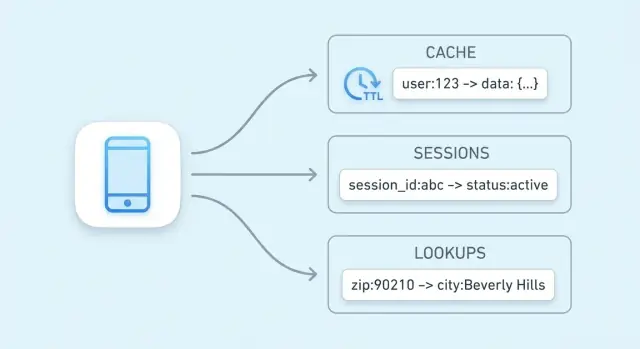
Why key-value stores are used for speed
The main goal of a key-value store is simple: reduce latency for end users and reduce load on your primary database. Instead of running the same expensive query or recomputing the same result, your app can fetch a precomputed value in a single, predictable step.
Fast because the access path is simple
A key-value store is optimized around one operation: “given this key, return the value.” That narrow focus enables a very short critical path.
In many systems, a lookup can often be handled with:
- an in-memory index (so there’s no disk seek)
- direct hashing from key → location (so there’s little searching)
- fewer CPU-heavy features than a general-purpose database query engine
The result is low and consistent response times—exactly what you want for caching, session storage, and other high-speed lookups.
Fast because it avoids work elsewhere
Even if your database is well-tuned, it still has to parse queries, plan them, read indexes, and coordinate concurrency. If thousands of requests ask for the same “top products” list, that repeated work adds up.
A key-value cache shifts that repeated read traffic away from the database. Your database can spend more time on requests that truly require it: writes, complex joins, reporting, and consistency-critical reads.
Not every workload is a fit
Speed isn’t free. Key-value stores typically trade away rich querying (filters, joins) and may have different guarantees around persistence and consistency depending on configuration.
They shine when you can name data with a clear key (for example, user:123, cart:abc) and want quick retrieval. If you frequently need “find all items where X,” a relational or document database is usually a better primary store.
Key-value fundamentals: keys, values, and lookups
A key-value store is the simplest kind of database: you store a value (some data) under a unique key (a label), and later you fetch the value by providing the key.
What a “key” and a “value” really are
Think of a key as an identifier that’s easy to repeat exactly, and a value as the thing you want back.
- Coat check: your ticket number is the key; your coat is the value.
- Contacts app: “Alice Chen” (or a contact ID) is the key; the phone number and details are the value.
- Sessions: a random session token is the key; the user ID and login state are the value.
Keys are usually short strings (like user:1234 or session:9f2a...). Values can be small (a counter) or larger (a JSON blob).
How constant-time lookups work (high level)
Key-value stores are built for “give me the value for this key” queries. Internally, many use a structure similar to a hash table: the key is transformed into a location where the value can be found quickly.
That’s why you’ll often hear constant-time lookups (often written as O(1)): performance depends much more on how many requests you do than on how many total records exist. It’s not magic—collisions and memory limits still matter—but for typical cache/session use, it’s very fast.
Typical deployments: in-memory, on-disk, or hybrid
- In-memory: fastest reads/writes; data may be lost on restart unless persisted.
- On-disk: slower than RAM but holds more data and survives restarts.
- Hybrid: keeps hot data in memory while writing to disk for recovery.
What “hot data” means (and why it matters)
Hot data is the small slice of information requested repeatedly (popular product pages, active sessions, rate-limit counters). Keeping hot data in a key-value store—especially in memory—avoids slower database queries and keeps response times predictable under load.
Caching 101: what to cache and why
Caching means keeping a copy of frequently needed data somewhere faster to reach than the original source. A key-value store is a common place to do this because it can return a value in a single lookup by key, often in a few milliseconds.
When caching helps most
Caching shines when the same questions get asked over and over: popular pages, repeated searches, common API calls, or expensive calculations. It’s also useful when the “real” source is slower or rate-limited—like a primary database under heavy load or a third-party API you pay for per request.
What to cache (practical examples)
Good candidates are results that are read often and don’t need to be perfectly up-to-the-second:
- User profile summaries (name, avatar URL, preferences)
- Product lists and category pages
- Computed results (recommendations, totals, report snippets)
- Configuration and feature flags read by every request
- External API responses that are safe to reuse for a short period
A simple rule: cache outputs you can regenerate if needed. Avoid caching data that changes constantly or must be consistent across all reads (for example, a bank balance).
Why caching reduces pressure on databases and APIs
Without caching, every page view might trigger multiple database queries or API calls. With a cache, the application can serve many requests from the key-value store and only “fall back” to the primary database or API on a cache miss. That lowers query volume, reduces connection contention, and can improve reliability during traffic spikes.
Risks: stale data and inconsistent reads
Caching trades freshness for speed. If cached values aren’t updated quickly, users may see stale information. In distributed systems, two requests might briefly read different versions of the same data.
You manage these risks by choosing appropriate TTLs, deciding which data can be “slightly old,” and designing your application to tolerate occasional cache misses or refresh delays.
Common cache patterns and when to use them
A cache “pattern” is a repeatable workflow for how your app reads and writes data when a cache is involved. Picking the right one depends less on the tool (Redis, Memcached, etc.) and more on how often the underlying data changes and how much stale data you can tolerate.
Cache-aside (lazy loading)
With cache-aside, your application controls the cache explicitly:
- Read from the cache by key.
- If it’s a miss, read from the database/source of truth.
- Put the result into the cache with a TTL.
- Return the result.
Best fit: data that is read often but changes infrequently (product pages, configuration, public profiles). It’s also a good default because failures degrade gracefully: if the cache is empty, you can still read from the database.
Read-through vs write-through
Read-through means the cache layer fetches from the database on a miss (your app reads “from cache,” and the cache knows how to load). Operationally, it simplifies app code, but it adds complexity to the cache tier (you need a loader integration).
Write-through means every write goes to the cache and the database synchronously. Reads are usually fast and consistent, but writes are slower because they must complete two operations.
Best fit: data where you want fewer cache misses and simpler read consistency (user settings, feature flags), and where write latency is acceptable.
Write-back / write-behind
With write-back, your app writes to the cache first, and the cache flushes changes to the database later (often in batches).
Benefits: very fast writes and reduced database load.
Added risk: if the cache node fails before flushing, you can lose data. Use this only when you can tolerate loss or have strong durability mechanisms.
How to choose based on change frequency
If data changes rarely, cache-aside with a sensible TTL is usually enough. If data changes frequently and stale reads are painful, consider write-through (or very short TTLs plus explicit invalidation). If write volume is extreme and occasional loss is acceptable, write-behind can be worth the trade.
Freshness controls: TTLs, expiration, and invalidation
Keeping cached data “fresh enough” is mostly about choosing the right expiration strategy for each key. The goal isn’t perfect accuracy—it’s preventing stale results from surprising users while still getting the speed benefits of caching.
TTLs and expirations: what they do (and how to pick them)
A TTL (time to live) sets an automatic expiry on a key so it disappears (or becomes unavailable) after a duration. Short TTLs reduce staleness but increase cache misses and backend load. Longer TTLs improve hit rate but risk serving outdated values.
A practical way to choose TTLs:
- Match how often the underlying data changes. Product prices might need minutes; a user profile could be hours.
- Consider business impact. Stale “likes count” is usually fine; stale “account balance” is not.
- Add small randomness (jitter). If many keys share the same TTL, they may expire at once, causing traffic spikes.
Active invalidation: delete or update when data changes
TTL is passive. When you know data has changed, it’s often better to actively invalidate: delete the old key or write the new value immediately.
Example: after a user updates their email, delete user:123:profile or update it in the cache right away. Active invalidation reduces staleness windows, but it requires your application to reliably perform those cache updates.
Versioned keys: simple, low-risk invalidation
Instead of deleting old keys, include a version in the key name, like product:987:v42. When the product changes, bump the version and start writing/reading v43. Old versions naturally expire later. This avoids races where one server deletes a key while another is writing it.
Handling cache stampedes
A stampede happens when a popular key expires and many requests rebuild it at the same time.
Common fixes include:
- Request coalescing / locking: only one request recomputes; others wait.
- Serve stale while revalidating: return the last value briefly while refreshing in the background.
- Early refresh: refresh slightly before TTL ends (especially for hot keys).
Session storage with a key-value store
Session data is the small bundle of information your app needs to recognize a returning browser or mobile client. At minimum, that’s a session ID (or token) that maps to server-side state. Depending on the product, it can also include user state (logged-in flags, roles, CSRF nonce), temporary preferences, and time-sensitive data like cart contents or a checkout step.
Why key-value stores fit sessions
Key-value stores are a natural match because session reads and writes are simple: look up a token, fetch a value, update it, and set an expiration. They also make it easy to apply TTLs so inactive sessions disappear automatically, keeping storage tidy and reducing risk if a token is leaked.
A common flow:
- On login: create a new random session token and store session data under that key.
- On each request: read by token, refresh TTL if you use sliding expiration.
- On logout (or suspicious activity): delete the key immediately.
Session key design
Use clear, scoped keys and keep values small:
- Naming:
sess:<token>orsess:v2:<token>(versioning helps with future changes). - User scoping: optionally maintain
user_sess:<userId> -> <token>to enforce “one active session per user” or to revoke sessions by user. - Size limits: avoid stuffing entire profiles into the session. Store only what you must; keep larger data in your primary database and reference it.
Logout and rotation
Logout should delete the session key and any related indexes (like user_sess:<userId>). For rotation (recommended after login, privilege changes, or periodically), create a new token, write the new session, then delete the old key. This narrows the window where a stolen token remains useful.
High-speed lookups beyond caching
Caching is the most common use case for a key-value store, but it’s not the only way it can speed up your system. Many applications rely on fast reads for small, frequently referenced pieces of state—things that are “source of truth adjacent” and need to be checked quickly on nearly every request.
Authorization data: permissions and entitlements
Authorization checks often sit on the critical path: every API call may need to answer “is this user allowed to do this?” Pulling permissions from a relational database on every request can add noticeable latency and load.
A key-value store can hold compact authorization data for quick lookups, for example:
perm:user:123→ a list/set of permission codesentitlement:org:45→ enabled plan features
This is especially useful when your permissions model is read-heavy and changes relatively infrequently. When permissions do change (role updates, plan upgrades), you can update or invalidate a small set of keys so the next request reflects the new access rules.
Feature flags and configuration reads
Feature flags are small, frequently read values that need to be available quickly and consistently across many services.
A common pattern is storing:
flag:new-checkout→true/falseconfig:tax:region:EU→ JSON blob or versioned config
Key-value stores work well here because reads are simple, predictable, and extremely fast. You can also version values (for example, config:v27:...) to make rollouts safer and allow quick rollback.
Rate limiting and throttling with counters
Rate limiting often boils down to counters per user, API key, or IP address. Key-value stores typically support atomic operations, which let you increment a counter safely even when many requests arrive at once.
You might track:
rl:user:123:minute→ increment each request, expire after 60 secondsrl:ip:203.0.113.10:second→ short-window burst control
With a TTL on each counter key, limits reset automatically without background jobs. This is a practical foundation for throttling login attempts, protecting expensive endpoints, or enforcing plan-based quotas.
Idempotency keys for retry-safe endpoints
Payments and other “do it exactly once” operations need protection from retries—whether caused by timeouts, client retries, or message re-delivery.
A key-value store can record idempotency keys:
idem:pay:order_789:clientKey_abc→ stored result or status
On the first request, you process and store the outcome with a TTL. On later retries, you return the stored outcome instead of executing the operation again. The TTL prevents unbounded growth while covering the realistic retry window.
These uses aren’t “caching” in the classic sense; they’re about keeping latency low for high-frequency reads and coordination primitives that need speed and atomicity.
Useful data structures and atomic operations
A “key-value store” doesn’t always mean “string in, string out.” Many systems offer richer data structures that let you model common needs directly inside the store—often faster and with fewer moving parts than pushing everything into application code.
Hashes/maps: multiple fields under one key
Hashes (also called maps) are ideal when you have a single “thing” with several related attributes. Instead of creating many keys like user:123:name, user:123:plan, user:123:last_seen, you can keep them together under one key, such as user:123 with fields.
This reduces key sprawl and lets you fetch or change only the field you need—useful for profiles, feature flags, or small configuration blobs.
Sets and sorted sets: membership and ranking
Sets are great for “is X in the group?” questions:
- Has this user already redeemed a coupon?
- Which product IDs are in the “summer-sale” collection?
Sorted sets add ordering by a score, which fits leaderboards, “top N” lists, and ranking by time or popularity. For example, you can store scores as view counts or timestamps and quickly read the top items.
Atomic increments and conditional writes
Concurrency problems often show up in small features: counters, quotas, one-time actions, and rate limits. If two requests arrive at the same time and your app does “read → add 1 → write,” you can lose updates.
Atomic operations solve this by performing the change as a single, indivisible step inside the store:
- Atomic increment for counters (views, retries, API calls)
- Conditional write (only set if missing, only update if version matches) to prevent double-processing
Why atomic operations simplify counters and limits
With atomic increments, you don’t need locks or extra coordination between servers. That means fewer race conditions, simpler code paths, and more predictable behavior under load—especially for rate limiting and usage caps where “almost correct” quickly turns into customer-facing issues.
Scaling for traffic: replication, sharding, and availability
When a key-value store starts handling serious traffic, “making it faster” usually means “making it wider”: spreading reads and writes across multiple nodes while keeping the system predictable under failure.
Scaling reads and writes: replication vs sharding
Replication keeps multiple copies of the same data.
- For read-heavy workloads (typical for caching), replicas can serve reads in parallel.
- Writes usually go to a primary node (or a leader) and then copy to replicas, which can introduce small delays before replicas reflect the latest value.
Sharding splits the keyspace across nodes.
- Each node owns a subset of keys (for example, determined by hashing the key).
- Sharding increases both read and write throughput because the work is distributed, but it also adds operational complexity (rebalancing shards, handling “hot keys,” and tracking which node owns which keys).
Many deployments combine both: shards for throughput, replicas per shard for availability.
High availability and failover in practice
“High availability” generally means the cache/session layer keeps serving requests even if a node fails.
- Failover is the automatic promotion of a replica to become the new primary when the primary dies.
- In practice, your app should tolerate brief errors or retries during the switchover, and accept that some recent writes might not survive if they weren’t replicated yet.
Client-side vs server-side routing
With client-side routing, your application (or its library) computes which node holds a key (common with consistent hashing). This can be very fast, but clients must learn about topology changes.
With server-side routing, you send requests to a proxy or cluster endpoint that forwards them to the right node. This simplifies clients and rollouts, but adds a hop.
Capacity planning: memory, headroom, and growth
Plan memory from the top down:
- Estimate working-set size (what you actually expect to keep “hot”), plus metadata overhead.
- Add headroom (often 20–50%) for traffic spikes, rebalancing, and uneven key distribution.
- Validate eviction-policy behavior under load so the system degrades gracefully instead of thrashing.
Reliability and trade-offs to understand
Key-value stores feel “instant” because they keep hot data in memory and optimize for fast reads/writes. That speed has a cost: you’re often choosing between performance, durability, and consistency. Understanding the trade-offs up front prevents painful surprises later.
Persistence: how much data can you afford to lose?
Many key-value stores can run with different persistence modes:
- None (pure in-memory): fastest and simplest—until a restart wipes everything. Great for caches where data can be recomputed.
- Snapshots: periodic saves to disk. If the node crashes, you lose changes since the last snapshot.
- Append-only logs: writes are recorded sequentially. Recovery is slower than pure in-memory, but you can usually lose less data than with snapshots.
Pick the mode that matches the data’s purpose: caching tolerates loss; session storage often needs more care.
Consistency expectations: “did my write really stick?”
In distributed setups, you may see eventual consistency—reads might briefly return an older value after a write, especially during failover or replication lag. Stronger consistency (for example, requiring acknowledgements from multiple nodes) reduces anomalies but increases latency and can reduce availability during network issues.
When memory is full: eviction and behavior under pressure
Caches fill up. An eviction policy decides what gets removed: least-recently-used, least-frequently-used, random, or “don’t evict” (which turns “full memory” into write failures). Decide whether you prefer missing cache entries or errors under pressure.
If the store is down: plan for degraded mode
Assume outages happen. Typical fallbacks include:
- Bypass the cache and read from the primary database (with rate limits).
- Serve slightly stale data when safe.
- Fail closed for sensitive operations (for example, auth tokens), while allowing non-critical features to degrade.
Designing these behaviors intentionally is what makes the system feel reliable to users.
Security, monitoring, and cost basics
Key-value stores often sit on the “hot path” of your app. That makes them both sensitive (they may hold session tokens or user identifiers) and expensive (they’re usually memory-heavy). Getting the basics right early prevents painful incidents later.
Security: keep access tight
Start with clear network boundaries: place the store in a private subnet/VPC segment, and only allow traffic from the application services that truly need it.
Use authentication if the product supports it, and follow least privilege: separate credentials for apps, admins, and automation; rotate secrets; and avoid shared “root” tokens.
Encrypt data in transit (TLS) whenever possible—especially if traffic crosses hosts or zones. Encryption at rest is product- and deployment-dependent; if supported, enable it for managed services and verify backup encryption too.
Monitoring: what to watch daily
A small set of metrics tells you whether the cache is helping or hurting:
- Hit rate: falling hit rate can mean poor cache keys, overly short TTLs, or churn from evictions.
- Latency (p95/p99): spikes often indicate saturation, network issues, or large values.
- Memory usage & evictions: sustained high memory plus evictions usually means your data doesn’t fit or your eviction policy is mismatched.
- Errors/timeouts: even brief outages can cascade into slower databases and user-facing failures.
Add alerts for sudden changes, not just absolute thresholds, and log key operations carefully (avoid logging sensitive values).
Cost: what drives the bill
The biggest drivers are:
- Memory footprint: large values, too many keys, or storing “nice-to-have” data.
- Traffic: read/write volume and cross-zone transfer.
- Replicas & high availability: more nodes for resilience increases cost.
- Retention: long TTLs keep data around and inflate memory needs.
A practical cost lever is reducing value size and setting realistic TTLs, so the store holds only what’s actively useful.
Implementation checklist and next steps
A practical rollout checklist
Start by standardizing key naming so your cache and session keys are predictable, searchable, and safe to operate on in bulk. A simple convention like app:env:feature:id (for example, shop:prod:cart:USER123) helps avoid collisions and makes debugging faster.
Define a TTL strategy before you ship. Decide which data is safe to expire quickly (seconds/minutes), what needs longer lifetimes (hours), and what should never be cached at all. If you’re caching database rows, align TTLs with how often the underlying data changes.
Write down an invalidation plan for each cached item type:
- Time-based expiration (TTL-only) for “good enough” freshness
- Event-based invalidation when you know exactly what changed (e.g., product update)
- Versioned keys (e.g.,
product:v3:123) when you want simple “invalidate everything” behavior
How to measure success
Pick a few success metrics and track them from day one:
- Cache hit rate targets by endpoint (for many apps, 70–95% is a useful range)
- Database load reduction (queries/sec, CPU, or read replica utilization)
- Latency changes at p95/p99, not just averages
Also monitor eviction counts and memory usage to confirm your cache is sized appropriately.
Common pitfalls to avoid
Oversized values increase network time and memory pressure—prefer caching smaller, precomputed fragments. Avoid missing TTLs (stale data and memory leaks) and unbounded key growth (for example, caching every search query forever). Be careful caching user-specific data under shared keys.
Next steps
If you’re evaluating options, compare a local in-process cache versus a distributed cache and decide where consistency matters most. For implementation details and operational guidance, review /docs. If you’re planning capacity or need pricing assumptions, see /pricing.
If you’re building a new product (or modernizing an existing one), it can help to design caching and session storage as first-class concerns from the start. On Koder.ai, teams often prototype an end-to-end app (React on the web, Go services with PostgreSQL, and optionally Flutter for mobile) and then iterate on performance with patterns like cache-aside, TTLs, and rate-limiting counters. Features like planning mode, snapshots, and rollback make it easier to try cache key designs and invalidation strategies safely, and you can export the source code when you’re ready to run it in your own pipeline.
FAQ
Why are key-value stores so fast compared to traditional databases?
Key-value stores optimize for one operation: given a key, return a value. That narrow focus enables fast paths like in-memory indexing and hashing, with less query planning overhead than general-purpose databases.
They also speed up your system indirectly by offloading repeated reads (popular pages, common API responses) so your primary database can focus on writes and complex queries.
What exactly are “keys” and “values” in a key-value store?
A key is a unique identifier you can repeat exactly (often a string like user:123 or sess:<token>). The value is whatever you want back—anything from a small counter to a JSON blob.
Good keys are stable, scoped, and predictable, which makes caching, sessions, and lookups straightforward to operate and debug.
What should I cache in a key-value store?
Cache results that are read frequently and safe to regenerate if missing.
Common examples:
- Public or semi-static page fragments (category pages, “top products”)
- Computed outputs (recommendations, totals, report snippets)
- Feature flags and configuration read on every request
- Short-lived copies of third-party API responses
Avoid caching data that must be perfectly current (e.g., financial balances) unless you have a strong invalidation strategy.
What is the cache-aside pattern and when is it a good choice?
Cache-aside (lazy loading) is usually the default:
- Read
keyfrom cache. - On miss, fetch from the database/source of truth.
- Store in cache with a TTL.
- Return the result.
It degrades gracefully: if the cache is empty or down, you can still serve requests from the database (with appropriate safeguards).
How do read-through and write-through caching differ?
Use read-through when you want the cache layer to automatically load on misses (simpler application reads, more cache-tier integration).
Use write-through when you want reads to be more consistently warm because every write updates both cache and database synchronously—at the cost of higher write latency.
Pick them when you can accept the operational complexity (read-through) or the extra write time (write-through).
How do I choose a good TTL for cached data?
A TTL automatically expires a cached value after a duration. Short TTLs reduce staleness but raise miss rates and backend load; longer TTLs improve hit rate but increase the risk of serving outdated data.
Practical tips:
- Align TTL with how often the underlying data changes.
- Use jitter (small randomness) to avoid many keys expiring at once.
- Prefer active invalidation (delete/update) when you know data changed.
What is a cache stampede and how can I prevent it?
A cache stampede happens when a hot key expires and many requests recompute it simultaneously.
Common mitigations:
- Request coalescing/locking: one request rebuilds, others wait.
- Serve stale while revalidating: return the last value briefly while refreshing.
- Early refresh: refresh before the TTL ends for hot keys.
These reduce sudden spikes to your database or external APIs.
How should I use a key-value store for session storage?
Sessions are a strong fit because access is simple: read/write by token and apply expiration.
Good practices:
- Use scoped keys like
sess:<token>(versioning likesess:v2:<token>helps migrations). - Keep session values small; store only what you must.
- On logout or compromise, delete the session key immediately.
- Rotate tokens after login or privilege changes to narrow the impact of token theft.
How do key-value stores help with rate limiting?
Many key-value stores support atomic increment operations, which makes counters safe under concurrency.
A typical pattern:
rl:user:123:minute→ increment per request- Set the key to expire after 60 seconds
If the counter exceeds your threshold, throttle or reject the request. TTL-based expiration resets limits automatically without background jobs.
What reliability trade-offs should I understand before adopting a key-value store?
Key trade-offs to plan for:
- Persistence: pure in-memory is fastest but loses data on restart; snapshots/logs reduce loss but add overhead.
- Consistency: replication can introduce brief staleness (replication lag), especially during failover.
- Eviction: when memory fills, policies (LRU/LFU/random/no-evict) determine whether you lose cache entries or start failing writes.
Design for degraded mode: be ready to bypass cache, serve slightly stale data when safe, or fail closed for sensitive operations.