

How Languages, Databases, and Frameworks Work as One System
Learn how languages, databases, and frameworks work as one system. Compare tradeoffs, integration points, and practical ways to choose a coherent stack.
Why These Aren’t Separate Choices
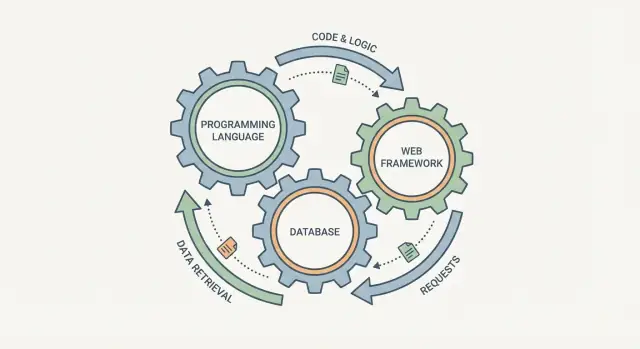
It’s tempting to pick a programming language, a database, and a web framework as three independent checkboxes. In practice, they behave more like connected gears: change one, and the others feel it.
A web framework shapes how requests are handled, how data is validated, and how errors are surfaced. The database shapes what “easy to store” looks like, how you query information, and what guarantees you get when multiple users act at once. The language sits in the middle: it determines how safely you can express rules, how you manage concurrency, and what libraries and tooling you can rely on.
What “one system” means
Treating the stack as a single system means you don’t optimize each part in isolation. You choose a combination that:
- Represents your data naturally (so you’re not constantly fighting conversions)
- Supports your consistency needs (so bugs don’t hide in edge cases)
- Fits your team’s workflow (so shipping and maintaining is predictable)
This article stays practical and intentionally non-technical. You don’t need to memorize database theory or language internals—just see how choices ripple across the whole application.
A quick example: using a schema-less database for highly structured, report-heavy business data often leads to scattered “rules” in application code and confusing analytics later. A better fit is pairing that same domain with a relational database and a framework that encourages consistent validation and migrations, so your data stays coherent as the product evolves.
When you plan the stack together, you’re designing one set of tradeoffs—not three separate bets.
A Simple Mental Model: Request In, Data Out
A helpful way to think about a “stack” is as a single pipeline: a user request enters your system, and a response (plus saved data) comes out. The programming language, web framework, and database aren’t independent picks—they’re three parts of the same journey.
The journey of one request
Imagine a customer updates their shipping address.
- Request in: The framework receives an HTTP request. Routing decides which handler runs (e.g.,
/account/address). Validation checks the input is complete and sane. - Work happens: Your application code (written in your chosen language) runs the business rules: “Is the user logged in?”, “Is this address format acceptable?”, “Should we mark this order for re-check?”
- Data out: The database layer reads and writes records—often within a transaction—so the update is either fully applied or not applied at all.
- Response out: The framework formats the result (HTML/JSON), sets status codes, and returns it to the user.
- Afterwards: Background jobs may run (send confirmation email, update search index, notify warehouse).
What each choice is really responsible for
- Language: How code runs (runtime/concurrency model), how easy it is to test and debug, and whether your team’s skills and tooling make changes safe and fast.
- Framework: The “traffic control” for requests—routing, validation, authentication hooks, error handling, and built-in patterns for background jobs.
- Database: How data is stored and queried, what constraints prevent bad data, and how transactions keep related updates consistent.
When these three align, a request flows cleanly. When they don’t, you get friction: awkward data access, leaky validation, and subtle consistency bugs.
Data Model First: The Hidden Driver of Stack Fit
Most “stack” debates start with language or database brand. A better starting point is your data model—because it quietly dictates what will feel natural (or painful) everywhere else: validation, queries, APIs, migrations, and even team workflow.
Data shapes: objects, rows, documents, events
Applications usually juggle four shapes at once:
- Objects in code (classes, structs, typed records)
- Rows in relational tables
- Documents in JSON-style storage or APIs
- Events in logs/streams (“OrderPlaced”, “EmailSent”)
A good fit is when you don’t spend your days translating between shapes. If your core data is highly connected (users ↔ orders ↔ products), rows and joins can keep logic simple. If your data is mostly “one blob per entity” with variable fields, documents can reduce ceremony—until you need cross-entity reporting.
Schema vs flexible structure (and where rules live)
When the database has a strong schema, many rules can live close to the data: types, constraints, foreign keys, uniqueness. That often reduces duplicated checks across services.
With flexible structures, rules shift upward into the application: validation code, versioned payloads, backfills, and careful reading logic (“if field exists, then…”). This can work well when product requirements change weekly, but it increases the burden on your framework and testing.
How modeling choices affect code complexity
Your model decides whether your code is mostly:
- Querying and joining (relational-heavy)
- Transforming nested JSON (document-heavy)
- Replaying and aggregating events (event-heavy)
That, in turn, influences language and framework needs: strong typing can prevent subtle drift in JSON fields, while mature migration tooling matters more when schemas evolve frequently.
Examples: user profile, orders, audit log
- User profile: often document-like (preferences, optional fields) but benefits from relational constraints for identity and uniqueness.
- Orders: typically relational (line items, totals, statuses) because consistency and reporting matter.
- Audit log: naturally event-shaped—append-only entries you rarely update, optimized for querying by time, actor, or entity.
Pick the model first; the “right” framework and database choice often becomes clearer after that.
Transactions and Consistency: Where Bugs Often Start
Transactions are the “all-or-nothing” guarantees your app quietly depends on. When a checkout succeeds, you expect the order record, the payment status, and the inventory update to either all happen—or none happen. Without that promise, you get the hardest kind of bugs: rare, expensive, and hard to reproduce.
What transactions actually do
A transaction groups multiple database operations into a single unit of work. If something fails midway (a validation error, a timeout, a crashed process), the database can roll back to the previous safe state.
This matters beyond money flows: account creation (user row + profile row), publishing content (post + tags + search index pointers), or any workflow that touches more than one table.
Consistency vs speed (in plain terms)
Consistency means “reads match reality.” Speed means “return something quickly.” Many systems make tradeoffs here:
- Strong consistency: users see the latest committed data, fewer surprises, often higher coordination cost.
- Eventual consistency: updates propagate over time, usually faster and easier to scale, but your app must handle temporary mismatches.
The common failure pattern is choosing an eventually consistent setup, then coding as if it were strongly consistent.
How frameworks and ORMs influence outcomes
Frameworks and ORMs don’t create transactions automatically just because you called multiple “save” methods. Some require explicit transaction blocks; others start a transaction per request, which can hide performance issues.
Retries are tricky too: ORMs may retry on deadlocks or transient failures, but your code must be safe to run twice.
Common pitfalls
Partial writes happen when you update A, then fail before updating B. Duplicate actions happen when a request is retried after a timeout—especially if you charge a card or send an email before the transaction commits.
A simple rule helps: make side effects (emails, webhooks) happen after the database commit, and make actions idempotent (safe to repeat) by using unique constraints or idempotency keys.
The Database Access Layer: ORM, Queries, and Migrations
This is the “translation layer” between your application code and your database. The choices here often matter more day-to-day than the database brand itself.
ORM vs query builder vs raw SQL (plain terms)
An ORM (Object-Relational Mapper) lets you treat tables like objects: create a User, update a Post, and the ORM generates SQL behind the scenes. It can be productive because it standardizes common tasks and hides repetitive plumbing.
A query builder is more explicit: you build a SQL-like query using code (chains or functions). You still think in “joins, filters, groups,” but you get parameter safety and composability.
Raw SQL is writing the actual SQL yourself. It’s the most direct and often the clearest for complex reporting queries—at the cost of more manual work and conventions.
How language features shape access patterns
Languages with strong typing (TypeScript, Kotlin, Rust) tend to push you toward tools that can validate queries and result shapes early. That can reduce runtime surprises, but it also pressures teams to centralize data access so types don’t drift.
Languages with flexible metaprogramming (Ruby, Python) often make ORMs feel natural and fast to iterate with—until hidden queries or implicit behavior become hard to reason about.
Migrations: keeping code and schema in sync
Migrations are versioned change scripts for your schema: add a column, create an index, backfill data. The goal is simple: anyone can deploy the app and get the same database structure. Treat migrations as code you review, test, and roll back when needed.
When “easy” abstractions hurt
ORMs can quietly generate N+1 queries, fetch huge rows you don’t need, or make joins awkward. Query builders can become unreadable “chains.” Raw SQL can get duplicated and inconsistent.
A good rule: use the simplest tool that keeps intent obvious—and for critical paths, inspect the SQL that actually runs.
Performance Is a System Property, Not a Database Property
People often blame “the database” when a page feels slow. But most user-visible latency is the sum of multiple small waits across the whole request path.
Where latency really comes from
A single request typically pays for:
- Network time (client → load balancer → app → database and back)
- Query time (slow SQL, missing indexes, too many round trips)
- Serialization/deserialization (JSON encoding, ORM object mapping, compression)
- App logic (validation, permissions, template rendering, external API calls)
Even if your database can answer in 5 ms, an app that makes 20 queries per request, blocks on I/O, and spends 30 ms serializing a huge response will still feel sluggish.
Connection pooling: the quiet performance multiplier
Opening a new database connection is expensive and can overwhelm the database under load. A connection pool reuses existing connections so requests don’t pay that setup cost repeatedly.
The catch: the “right” pool size depends on your runtime model. A highly concurrent async server can create massive simultaneous demand; without pool limits, you’ll get queueing, timeouts, and noisy failures. With pool limits that are too strict, your app becomes the bottleneck.
Caching: what it fixes—and what it doesn’t
Caching can sit in the browser, a CDN, an in-process cache, or a shared cache (like Redis). It helps when many requests need the same results.
But caching won’t rescue:
- Inefficient write paths
- Highly personalized responses
- Slow endpoints dominated by external API calls
Runtime matters: threads vs async
Your programming language runtime shapes throughput. Thread-per-request models can waste resources while waiting on I/O; async models can increase concurrency, but they also make backpressure (like pool limits) essential. That’s why performance tuning is a stack decision, not a database decision.
Security and Reliability: Shared Responsibility Across the Stack
Security isn’t something you “add” with a framework plugin or a database setting. It’s the agreement between your language/runtime, your web framework, and your database about what must always be true—even when a developer makes a mistake or a new endpoint is added.
Authentication vs. Authorization: Different layers, same outcome
Authentication (who is this?) usually lives at the framework edge: sessions, JWTs, OAuth callbacks, middleware. Authorization (what are they allowed to do?) must be enforced consistently in both app logic and data rules.
A common pattern: the app decides intent (“user can edit this project”), and the database enforces boundaries (tenant IDs, ownership constraints, and—where it makes sense—row-level policies). If authorization exists only in controllers, background jobs and internal scripts can accidentally bypass it.
Validation: Framework, database, or both?
Framework validation gives fast feedback and good error messages. Database constraints provide a final safety net.
Use both when it matters:
- Framework: required fields, formatting, friendly messages.
- Database: uniqueness, foreign keys, CHECK constraints, NOT NULL.
This reduces “impossible states” that otherwise appear when two requests race or a new service writes data differently.
Secrets, encryption, and auditing
Secrets should be handled by the runtime and deployment workflow (env vars, secret managers), not hardcoded in code or migrations. Encryption can happen in the app (field-level encryption) and/or in the database (at-rest encryption, managed KMS), but you need clarity on who rotates keys and how recovery works.
Auditing is shared too: the app should emit meaningful events; the database should keep immutable logs where appropriate (e.g., append-only audit tables, restricted access).
Typical failure modes
Over-trusting app logic is the classic one: missing constraints, silent nulls, “admin” flags stored without checks. The fix is simple: assume bugs will happen, and design the stack so the database can refuse unsafe writes—even from your own code.
Scaling Paths: What Each Choice Unlocks or Blocks
Scaling rarely fails because “the database can’t handle it.” It fails because the whole stack reacts poorly when load changes shape: one endpoint becomes popular, one query turns hot, one workflow starts retrying.
When traffic grows, the pain shows up in specific places
Most teams hit the same early bottlenecks:
- Hot queries: one “top page” or dashboard query runs constantly and dominates CPU/IO.
- Lock contention: updates pile up behind a few rows (inventory counters, “last_seen”, queue tables), slowing everything down.
- Connection pressure: app workers open too many DB connections; the database spends time managing sessions rather than work.
Whether you can respond quickly depends on how well your framework and database tooling expose query plans, migrations, connection pooling, and safe caching patterns.
Read replicas, sharding, and queues: when they appear
Common scaling moves tend to arrive in an order:
- Read replicas when reads outnumber writes and you can tolerate slightly stale data. Your ORM/framework must support read/write splitting (or make it easy to route queries).
- Queues/background jobs when “do it now” work starts hurting request latency (emails, exports, billing calls). This is also where retries and deduplication become real requirements.
- Sharding/partitioning when a single primary can’t keep up with write throughput or storage growth. This demands careful data modeling: shard keys, cross-shard queries, and transaction boundaries.
Background work and idempotency are framework features, not afterthoughts
A scalable stack needs first-class support for background tasks, scheduling, and safe retries.
If your job system can’t enforce idempotency (the same job runs twice without double-charging or double-sending), you’ll “scale” into data corruption. Early choices—like relying on implicit transactions, weak uniqueness constraints, or opaque ORM behaviors—can block the clean introduction of queues, outbox patterns, or exactly-once-ish workflows later.
Early alignment pays off: pick a database that matches your consistency needs, and a framework ecosystem that makes the next scaling step (replicas, queues, partitioning) a supported path rather than a rewrite.
Developer Experience and Operations: One Workflow
A stack feels “easy” when development and operations share the same assumptions: how you start the app, how data changes, how tests run, and how you know what happened when something breaks. If those pieces don’t line up, teams waste time on glue code, brittle scripts, and manual runbooks.
Local development speed
Fast local setup is a feature. Prefer a workflow where a new teammate can clone, install, run migrations, and have realistic test data in minutes—not hours.
That usually means:
- One command to boot the app and dependencies (often via containers).
- Migrations that run reliably on every machine.
- Seed data that matches production shape (not just “hello world” rows).
If your framework’s migration tooling fights your database choice, every schema change becomes a small project.
Testing pyramid that matches your stack
Your stack should make it natural to write:
- Unit tests that don’t require a database.
- Integration tests that hit the real database schema and queries.
- End-to-end tests that exercise the full request path.
A common failure mode: teams lean on unit tests because integration tests are slow or painful to set up. That’s often a stack/ops mismatch—test database provisioning, migrations, and fixtures aren’t streamlined.
Observability across app and database
When latency spikes, you need to follow one request through the framework and into the database.
Look for consistent structured logs, basic metrics (request rate, errors, DB time), and traces that include query timing. Even a simple correlation ID that appears in app logs and database logs can turn “guessing” into “finding.”
Operational fit: safe change and recovery
Operations isn’t separate from development; it’s the continuation of it.
Choose tooling that supports:
- Backups and restores you’ve tested (not just configured).
- Schema changes that can roll forward safely (and occasionally roll back).
- A clear path for “what happens during deploy” so releases don’t depend on tribal knowledge.
If you can’t confidently rehearse a restore or a migration locally, you won’t do it well under pressure.
A Practical Checklist to Choose a Coherent Stack
Choosing a stack is less about picking “best” tools and more about picking tools that fit together under your real constraints. Use this checklist to force alignment early.
1) Quick checklist (fit before features)
- Team skills: What can your team ship and maintain confidently for 12–24 months?
- Domain shape: Mostly workflows and records, or complex rules, or heavy reporting?
- Data needs: Relational integrity, flexible documents, time-series, full-text search, analytics?
- Constraints: Compliance, latency targets, deployment model, budget, existing infrastructure.
- Failure tolerance: Can you accept eventual consistency, or do you need strict transactions?
2) Map your product to common patterns
- CRUD-heavy app (internal tools, back office, early SaaS): A conventional web framework + relational DB is usually the fastest path because migrations, transactions, and admin workflows are straightforward.
- Analytics-heavy (dashboards, event tracking): Plan for an OLAP store or warehouse early; trying to “make Postgres a BI system” can slow both queries and product work.
- Real-time (chat, collaboration, streaming): Prioritize WebSocket support, pub/sub, and predictable concurrency. Your language/runtime choice affects how painful this is.
- SaaS multi-tenant: Decide upfront: separate databases, schemas, or row-level tenancy. This choice cascades into auth, migrations, and support operations.
3) Run a small proof of concept (without overbuilding)
Time-box to 2–5 days. Build one thin vertical slice: one core workflow, one background job, one report-like query, and basic auth. Measure developer friction, migration ergonomics, query clarity, and how easily you can test.
If you want to accelerate this step, a vibe-coding tool like Koder.ai can be useful for quickly generating a working vertical slice (UI, API, and database) from a chat-driven spec—then iterating with snapshots/rollback and exporting the source code when you’re ready to commit to a direction.
4) Write a one-page decision record
Title:
Date:
Context (what we’re building, constraints):
Options considered:
Decision (language/framework/database):
Why this fits (data model, consistency, ops, hiring):
Risks & mitigations:
When we’ll revisit:
Common Mismatches (and How to Avoid Them)
Even strong teams end up with stack mismatches—choices that look fine in isolation but create friction once the system is built. The good news: most are predictable, and you can avoid them with a few checks.
Smells to watch for
A classic smell is choosing a database or framework because it’s trending while your actual data model is still fuzzy. Another is premature scaling: optimizing for millions of users before you can reliably handle hundreds, which often leads to extra infrastructure and more failure modes.
Also watch for stacks where the team can’t explain why each major piece exists. If the answer is mostly “everyone uses it,” you’re accumulating risk.
Integration risks that bite later
Many problems show up at the seams:
- Mismatched drivers and features: your language driver doesn’t fully support the database features you assumed (types, streaming, retries).
- Weak migrations: schema changes are managed manually, or migration tools don’t match how the app evolves, causing drift between environments.
- Poor connection pooling: frameworks that open too many connections, or deployments that multiply pools across processes/containers, leading to timeouts under load.
These aren’t “database issues” or “framework issues”—they’re system issues.
How to simplify (and de-risk)
Prefer fewer moving parts and one clear path for common tasks: one migration approach, one query style for most features, and consistent conventions across services. If your framework encourages a pattern (request lifecycle, dependency injection, job pipeline), lean into it instead of mixing styles.
When to revisit decisions—and change safely
Revisit choices when you see recurring production incidents, persistent developer friction, or when new product requirements fundamentally change your data access patterns.
Change safely by isolating the seam: introduce an adapter layer, migrate incrementally (dual-write or backfill when needed), and prove parity with automated tests before flipping traffic.
Wrap-Up: Treat the Stack as One System
Choosing a programming language, a web framework, and a database isn’t three independent decisions—it’s one system design decision expressed in three places. The “best” option is the combination that aligns with your data shape, your consistency needs, your team’s workflow, and the way you expect the product to grow.
What to take away
- Pick the stack around your core data model and the operations you perform most often.
- Consistency and transactions are application concerns too—design them end-to-end, not database-only.
- Performance bottlenecks usually cross boundaries (schema, queries, caching, serialization, queues).
- Security and reliability are shared responsibilities across code, configuration, and operations.
- Developer experience matters because it determines how fast you can ship safely.
Document assumptions (before they become constraints)
Write down the reasons behind your choices: expected traffic patterns, acceptable latency, data retention rules, failure modes you can tolerate, and what you’re explicitly not optimizing for right now. This makes tradeoffs visible, helps future teammates understand “why,” and prevents accidental architecture drift when requirements change.
Next steps
Run your current setup through the checklist section and note where decisions don’t line up (for example, a schema that fights the ORM, or a framework that makes background work awkward).
If you’re exploring a new direction, tools like Koder.ai can also help you compare stack assumptions quickly by generating a baseline app (commonly React on the web, Go services with PostgreSQL, and Flutter for mobile) that you can inspect, export, and evolve—without committing to a long build cycle upfront.
For deeper follow-up, browse related guides on /blog, look up implementation details in /docs, or compare support and deployment options on /pricing.
FAQ
Why shouldn’t I choose a language, framework, and database as separate checkboxes?
Treat them as a single pipeline for every request: framework → code (language) → database → response. If one piece encourages patterns the others fight (e.g., schema-less storage + heavy reporting), you’ll spend time on glue code, duplicated rules, and hard-to-debug consistency issues.
What’s the best starting point for picking a coherent stack?
Start with your core data model and the operations you’ll do most often:
- Highly connected data + reporting → relational tables and joins
- “One blob per entity” with variable fields → documents (until reporting needs grow)
- Append-only history and traceability → events/audit log patterns
Once the model is clear, the natural database and framework features you need usually become obvious.
Where should data “rules” live: in the database schema or in application code?
If the database enforces a strong schema, many rules can live close to the data:
- Types,
NOT NULL, uniqueness - Foreign keys and relationship integrity
CHECKconstraints for valid ranges/states
With flexible structures, more rules move into application code (validation, versioned payloads, backfills). That can speed early iteration, but increases testing burden and the chance of drift across services.
When do transactions matter most, and what breaks if I ignore them?
Use transactions whenever multiple writes must succeed or fail together (e.g., order + payment status + inventory change). Without transactions, you risk:
- Partial writes (A updated, B not)
- Hard-to-reproduce race bugs under load
- Inconsistent reads that break workflows
Also keep side effects (emails/webhooks) after commit and make operations idempotent (safe to retry).
How do I choose between an ORM, a query builder, and raw SQL?
Pick the simplest option that keeps intent obvious:
- ORM: fastest for common CRUD; can hide N+1 queries and implicit behavior
- Query builder: explicit joins/filters with safety and composability
- Raw SQL: clearest for complex reporting and performance-critical queries, but needs conventions to avoid duplication
For critical endpoints, always inspect the SQL that actually runs.
What migration practices prevent schema drift and risky deploys?
Keep schema and code in sync with migrations you treat like production code:
- Version migrations, review them, and run them in CI
- Prefer reversible or roll-forward-safe changes
- Separate “add column” from “backfill” when needed
- Test migrations on realistic data sizes
If migrations are manual or flaky, environments drift and deploys become risky.
Why is performance a system property, not a database property?
Profile the entire request path, not just the database:
- Network hops and round trips
- Number of queries per request (often the real killer)
- Serialization/ORM mapping overhead
- External API calls and template rendering
A database that answers in 5 ms won’t help if the app makes 20 queries or blocks on I/O.
What’s the role of connection pooling, and how can it go wrong?
Use a connection pool to avoid paying connection setup costs per request and to protect the database under load.
Practical guidance:
- Set a hard max pool size per process/container
- Ensure total pools across replicas don’t exceed DB capacity
- Align pool sizing with your runtime model (high-concurrency async can overwhelm the DB without backpressure)
Mis-sized pools often show up as timeouts and noisy failures during traffic spikes.
Should validation happen in the framework, the database, or both?
Use both layers:
- Framework validation for fast feedback and friendly errors (required fields, formatting)
- Database constraints as a safety net (uniqueness, foreign keys,
NOT NULL,CHECK)
This prevents “impossible states” when requests race, background jobs write data, or a new endpoint forgets a check.
How can I evaluate a stack quickly without overbuilding?
Time-box a small proof of concept (2–5 days) that exercises the real seams:
- One core workflow (request → write → response)
- One background job with retries/idempotency
- One report-like query
- Basic auth + authorization checks
Then write a one-page decision record so future changes are intentional (see related guides at /docs and /blog).