

Lightweight approval workflow for safe chat-based releases
Use a lightweight approval workflow to turn chat-made changes into safe releases with clear proposals, simple diff checks, and predictable deploy steps.
Why chat changes still need a release workflow
Chat-based building feels fast because you can describe what you want and see the app change right away. The risk is that “fast” can turn into “unclear” when nobody knows what changed, what to check, or who should say yes before users see it.
Without a handoff, small mistakes slip through. The change might be correct in your head, but the app follows the exact words you gave it, plus whatever assumptions the generator made. That is why a lightweight approval workflow matters: it keeps speed, but adds a simple pause to confirm the change is safe.
Here are common ways chat-driven updates go wrong in real products:
- Wrong copy in a key place (pricing, legal text, onboarding steps)
- Broken login or sign-up after a “small” UI tweak
- Missing fields in a form or database change that drops user data
- Bad permissions (an admin-only page becomes visible to everyone)
- A new feature works, but an older flow breaks (password reset, checkout, export)
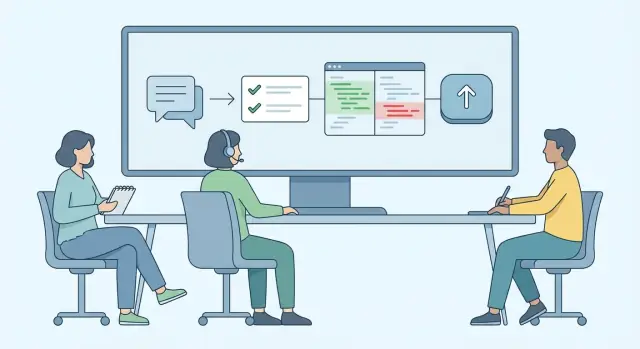
The goal is not to slow you down. The goal is faster changes without surprises. A clear “propose → review → merge → deploy” flow gives everyone the same checkpoints: what was intended, what changed, what was checked, and who approved it.
This matters even more on platforms like Koder.ai, where a single chat can generate updates across the UI, backend APIs, and database. You do not need to read every line of code, but you do need a repeatable way to confirm the right files changed and the risky parts (auth, data, payments) did not accidentally drift.
Set expectations: this workflow is best for small to medium changes, like a new form field, a dashboard tweak, or a new settings page. Deep rewrites still need more planning, longer reviews, and extra testing. The lightweight flow is the everyday default for safe, frequent releases.
The propose-review-merge-deploy flow in plain words
A lightweight approval workflow is just a simple way to make sure chat-made changes are understandable, checked by another person, and shipped on purpose (not by accident). You do not need heavy process. You need four clear steps that everyone follows.
The 4 steps
Propose: One person describes the change in plain language, plus what success looks like. Keep it to one page of notes: what you changed, where it shows up, how to test it, and any risks (for example, “touches login” or “changes pricing page”).
Review: Someone else reads the notes and checks the generated diffs. The goal is not to “audit every line”, but to catch surprises: changed behavior, missing edge cases, or anything that looks unrelated to the request. A short review window is usually enough (often 15 to 30 minutes for small changes).
Merge: You make a clear decision: approved or not approved. If approved, merge with a short message that matches the proposal (so you can find it later). If not approved, send it back with one or two specific fixes.
Deploy: Release it with a quick smoke test and a rollback plan. Deploy should be a deliberate step, not something that happens just because code exists.
What “done” means at each step
- Propose is done when the change has a clear goal, test steps, and a named owner.
- Review is done when at least one reviewer says “approved” and calls out any risks.
- Merge is done when the decision is recorded in a simple trail (notes + final message).
- Deploy is done when the change is live and a basic check passes.
One simple rule keeps this flow honest: no deploy without at least one reviewer. Even on small teams, that single pause prevents most bad releases.
Who does what (so reviews do not stall)
A lightweight approval workflow only stays “lightweight” when everyone knows their job. If roles are fuzzy, reviews turn into long chats, or worse, nobody feels safe saying “yes”.
Start with three simple roles. In small teams, one person can wear two hats, but the responsibilities should stay separate.
- Proposer: describes the change, generates it, and packages it for review (clear summary, screenshots if relevant, and the diff).
- Reviewer: checks the diff and tests the change in a safe environment. They look for surprises, not perfection.
- Approver: makes the call to merge and deploy, and owns the risk if something goes wrong.
Ownership is what keeps reviews fast. Decide who signs off on:
- Product behavior (does it do the right thing for users?)
- Data safety (could this delete, expose, or corrupt data?)
- Branding and tone (copy, colors, legal text, emails)
Approval should also match the size of the risk. A small UI tweak might be approved by the product owner. Anything that touches auth, payments, permissions, or customer data should require a stronger approver (and sometimes a second reviewer).
Timeboxes prevent “waiting forever.” A practical rule is same-day review for low-risk changes, and a longer window for risky ones. If you use Koder.ai, you can make this easier by agreeing that every proposal includes a short summary plus the generated diff, so reviewers do not have to reconstruct what changed from chat history.
Step 1 - Propose a change that is easy to review
A good proposal reads like a small ticket anyone can understand. Start with a 2 to 3 sentence summary in user language: what the user will notice, and why it matters. If you are using Koder.ai, paste that summary into the chat first so the generated code and diffs stay focused.
Next, write acceptance criteria as simple checkboxes. These are the only things the reviewer needs to confirm after the change is built and before it ships.
- Users can complete the task end to end without errors
- The screen text matches the new wording (no old copy left behind)
- Existing users can still log in and see their data
- The change works on mobile and desktop layouts
- If something fails, the app shows a clear message instead of a blank page
Then call out scope, in one short paragraph: what is intentionally not changing. This avoids surprise diffs like extra UI tweaks, new fields, or “while I was here” refactors.
Add a quick risk note. Keep it practical: what could break, and how a normal user would notice. Example: “Risk: sign-up may fail if the new required field is missing. Users would see a validation error and cannot create an account.”
Concrete example proposal:
“Change the checkout button label from ‘Pay now’ to ‘Place order’ to reduce drop-offs. Do not change pricing, taxes, or the payment provider. Risk: if the button is renamed in one place but not another, users may see inconsistent labels on mobile.”
Step 2 - Review the generated diffs (what to look for)
Start by reading the change as a user would. What screens change, what button clicks behave differently, and what happens after success or failure? If you cannot explain the user impact in two sentences, ask for a smaller change. A lightweight approval workflow works best when each review has a clear, human-sized goal.
Next, scan the file list before you read any code. Even if you are not an engineer, file names tell you what kind of risk you are taking on. A change that touches only a React page is usually easier than one that also touches Go services, database migrations, environment config, or anything that looks like secrets.
Quick scan for risky areas
Look for diffs that mention these areas, and slow down if you see them:
- Login, permissions, roles, admin routes, or auth middleware
- Payments, pricing, credits, invoices, or subscription logic
- Email sending, SMS, notifications, or webhook callbacks
- Database changes (new tables, migrations, indexes, large backfills)
- Config and keys (env files, token names, third-party credentials)
After that, check the user-facing details in the diff. Labels, helper text, error messages, and empty states are where most “small” changes feel broken. Confirm the new copy matches the intent, and that errors tell the user what to do next.
Finally, look for hidden costs. New API calls on every page load, heavy queries, or extra background jobs can create slow pages and surprise bills. If the diff adds a polling loop, a big “select all” query, or a new job that runs often, ask: “How often does this run, and what does it cost at scale?”
If you are using Koder.ai, ask the author to include a short note with the diff: what changed, what did not change, and how they tested it. That single note makes reviews faster and safer.
Diff deep checks for safety (without being an engineer)
A lightweight approval workflow works best when reviewers know what can break users, even if they cannot explain the code. When you open the generated diff, look for changes that touch data, access, and inputs. Those are the places where small edits cause big surprises.
1) Backend and data: changes that can affect every user
If you see database migration files or edits to models, slow down. Check whether new fields have safe defaults, whether fields that used to be required became nullable (or the other way around), and whether an index was added for anything that will be searched or filtered often.
A simple rule: if the change could affect existing records, ask “What happens to the data already in production?” If the answer is unclear, request a short note in the PR description.
2) Safety checks: security, validation, and permissions
Use this quick scan to catch the most common release risks:
- Security: new endpoints, admin-only routes, CORS or auth changes, and any secrets (API keys, tokens) that appear in plain text.
- Validation: required fields, input length limits, and server-side checks (not just UI checks).
- Error handling: user messages that make sense, plus logs that do not include passwords, tokens, or full personal data.
- Access control: for each resource, confirm who can read, create, update, and delete it.
- Performance hints: any new “list all” queries or loops over records that might grow over time.
If you are building in Koder.ai, ask the author to show the exact app screen or API call this change supports, then confirm the diff matches that intent. A good review is often just matching “what we asked for” to “what changed,” and flagging anything that quietly expands access or touches existing data.
Step 3 - Merge with a clear decision trail
Merging is the moment you turn “a good idea” into “the new truth.” Keep it boring and documented. One person should make the final call, even if the review had many voices.
Start by picking one of three outcomes: approve, request changes, or split the work. Splitting is often the safest choice when a chat-generated update touches too many files or mixes unrelated goals (for example, a UI tweak plus a database change).
Write a single short merge note that answers two questions: what you checked, and what you did not check. This protects you later when someone asks, “Why did we ship this?” It also sets expectations if a risk was accepted on purpose.
A simple merge note can look like this:
- Decision: Approved / Changes requested / Split into two changes
- Checked: key user flow, error messages, env vars, migration plan
- Not checked: performance under load, edge cases outside the ticket
- Acceptance criteria: restated in 1-2 sentences
- Change log since proposal: 2-4 bullets
If you request changes, restate the acceptance criteria in plain words. Avoid “fix it” or “make it better.” Say exactly what “done” means (example: “The signup form must show a clear error if the email is already used, and it must not create a user record on failure”).
Keep a tiny change log that tracks what changed from the original proposal. On Koder.ai, this can be as simple as noting which snapshot or diff set replaced the earlier one, plus the reason (example: “Removed unused API call; added validation message; renamed button label”).
Step 4 - Deploy without surprises (and be ready to roll back)
Deploying is where small mistakes become public. The goal is simple: ship the change, check the basics fast, and have a clear way to undo it. If you keep this step consistent, your lightweight approval workflow stays calm even when you move quickly.
If you have a safe environment (preview or staging), deploy there first. Treat it like a dress rehearsal: same settings, same data shape (as close as you can), and the same steps you will use for production. On Koder.ai, this is also a good moment to take a snapshot before the release so you can return to a known-good state.
Do a 5-minute smoke test right after deploy. Keep it boring and repeatable:
- Can you log in and log out?
- Can you reach the key pages without errors?
- Does the main form submit (and show a success message)?
- If you have payments, can you complete a test purchase or payment step?
- Do you see the expected record/update in the admin or dashboard?
Pick a low-risk time window (often early in the day, not late at night) and name one owner for the release. The owner watches the first signals and makes the call if anything looks off.
After production deploy, confirm real-world signals, not just “the page loads”. Check that new submissions still arrive, payment events still happen, emails still send, and dashboards or reports still update. A quick spot-check in your inbox, payment provider view, and your app’s admin screen catches issues that automated checks miss.
Have a rollback plan before you press deploy: decide what “bad” looks like (spike in errors, drop in signups, wrong totals) and what you will revert. If you used snapshots or rollback on Koder.ai, you can return quickly, then reopen the change with notes on what failed and what you observed.
Common traps that make lightweight workflows fail
Most “lightweight” workflows break for the same reason: the steps are simple, but the expectations are not. When people are unsure what “done” means, review turns into a debate.
One common failure is skipping clear acceptance criteria. If the proposal does not say what should change, what should not change, and how to confirm it, reviewers end up arguing about preferences. A simple sentence like “A user can reset their password from the login screen, and existing login still works” prevents a lot of back and forth.
Another trap is reviewing only what you can see. A chat-generated change might look like a tiny UI tweak, but it can also touch backend logic, permissions, or data. If your platform shows diffs, scan for files outside the screen you expected (API routes, database code, auth rules). If you see unexpected areas changing, pause and ask why.
Large mixed changes are also a workflow killer. When one change includes UI updates plus auth changes plus a database migration, it becomes hard to review and hard to roll back safely. Keep changes small enough that you can explain them in two sentences. If not, split them.
Approving with “it looks fine” is risky without a quick smoke test. Before merge or deploy, confirm the main path works: open the page, do the key action, refresh, and repeat once in a private/incognito window. If it touches payments, login, or sign-up, test those first.
Finally, deployments fail when nobody is clearly on point. Make one person the deploy owner for that release. They watch the deploy, verify the smoke test in production, and decide quickly: fix forward or roll back (snapshots and rollback make this much less stressful on platforms like Koder.ai).
A quick pre-deploy checklist (copy and paste)
Copy this into your release note or chat thread and fill it in. Keep it short so it actually gets used.
Proposal (2-3 sentences):
- What is changing?
- Who is it for?
- What problem does it solve?
Acceptance criteria (3-7):
- [ ]
- [ ]
- [ ]
Before you deploy, do one fast pass on the generated diff. You are not trying to judge code style. You are checking for risk.
Diff review (tick what you checked):
- Permissions and access: who can see/edit/delete after this change?
- Data changes: new fields, deleted fields, migrations, defaults, data backfills
- Config and secrets: environment variables, API keys, feature flags, CORS, rate limits
- External integrations: payments, email, analytics, webhooks, SSO, storage buckets
Then check what users will read. Small copy mistakes are the most common reason for "safe" releases to feel broken.
Copy review:
- Key screens: headings, button text, empty states, errors
- Emails/notifications: subject line, sender name, links, unsubscribe or preferences text (if applicable)
Write a tiny smoke test plan. If you cannot describe how you will verify it, you are not ready to ship it.
Smoke tests (3-5):
- [ ]
- [ ]
- [ ]
Finally, name the rollback path and the person who will do it. On Koder.ai, that can be as simple as "rollback to the last snapshot".
Rollback plan:
- Owner: @________
- Trigger to roll back (what would make us revert?): ________
- How to roll back: ________
- How we will confirm recovery: ________
Example: a non-engineer ships a safe change end to end
Maya is a marketing manager. She needs three updates on the site: refresh the pricing table, add a lead form to the Pricing page, and update the confirmation email that new leads receive. She uses Koder.ai to make the change, but still follows a lightweight approval workflow so the release is safe.
1) Propose (make the intent reviewable)
Maya writes a short proposal in one message: what should change, what should not change, and the edge cases. For example: pricing numbers must match the latest doc, the lead form should require a real email, and existing subscribers should not get duplicate confirmations.
She also calls out tricky cases: missing email, obvious spam text, and repeated submissions from the same address.
2) Review the generated diffs (focus on risk)
Her reviewer does not need to read every line. They scan for the parts that can break revenue or trust:
- Form validation: required fields, clear error messages, basic spam protection
- Email sending: correct template, subject, and “from” name; no accidental blasts
- Data storage: where submissions are saved, what fields are collected, and whether anything sensitive is stored by mistake
- Duplicates: what happens if the same email submits twice
If something is unclear, the reviewer asks for a small change that makes the diff easier to understand (for example, renaming a variable from data2 to leadSubmission).
3) Merge and deploy (verify like a user)
After approval, Maya deploys and runs a quick reality check:
- Submit the form with a real email and a fake email
- Confirm the confirmation email arrives and reads correctly
- Check the admin list (or stored entries) to ensure the submission appears once
If submissions drop suddenly or confirmation emails fail, that is the rollback trigger. With Koder.ai snapshots and rollback, she reverts to the last known good version first, then fixes forward with a smaller follow-up change.
Next steps: make this the default flow for your team
Make the workflow a habit by starting small. You do not need a review for every wording change. Begin by requiring a second set of eyes only when the change can break logins, money, or data. That keeps speed high while still protecting the risky parts.
A simple rule that teams stick to:
- Review required for backend logic, database changes, auth, and payments
- No review needed for copy, layout tweaks, and small UI polish
- If you are unsure, treat it as review-required
To reduce messy requests, require a written proposal before any build work starts. On Koder.ai, Planning Mode is a good forcing function because it turns a chat request into a clear plan that someone else can read and approve. Keep the proposal short: what changes, what stays the same, and how you will test it.
Make safety the default at deploy time, not an afterthought. Use snapshots before each release, and agree that rollback is not a failure, it is the fastest fix when something feels off. If a deploy surprises you, roll back first, then investigate.
Finally, keep releases easy to reproduce. Exporting the source code when needed helps with audits, vendor reviews, or moving work to another environment.
If you use Koder.ai as a team, write this flow into your day-to-day across any tier (free, pro, business, or enterprise). One shared habit matters more than a long policy document.
FAQ
What is a lightweight approval workflow?
Use four steps: propose the change, have someone review it, record an approval decision, then deploy and run a short smoke test. This adds a clear pause without turning a small release into a long process.
Why do chat-based app changes need review?
Chat can change the UI, APIs, and database in one request. A release workflow makes the intended change, the actual diff, the checks, and the approver visible before users see it.
What should a change proposal include?
Include the user-facing goal, what will not change, a few acceptance criteria, test steps, a named owner, and any risks. Keep the proposal short enough that another person can understand it quickly.
Who should approve a release?
For a small, low-risk change, another teammate can review the diff and test the main flow. Changes involving login, payments, permissions, or customer data need an owner with authority over that risk, and sometimes a second reviewer.
What should I check in a generated diff?
Start with the file list, then compare the change with the original request. Pay extra attention to authentication, permissions, database migrations, environment settings, payment flows, emails, and unexpected files.
Do non-engineers need to understand every line of code?
No. A reviewer should confirm the user impact, check for unrelated or risky changes, and test the important path. If the change affects data or access, ask the author to explain exactly what happens to existing users and records.
What is a smoke test after deployment?
Test the main user journey after release: log in, open the affected page, submit the main form or action, and confirm the expected result appears. Add a focused check for payments, emails, or stored data when the change touches them.
What if one chat request changes too many files?
Do not deploy it yet. Ask the author to split the work into smaller changes, such as a UI update and a database change. Smaller diffs are easier to test, approve, and roll back.
How should we prepare for a rollback?
Create a snapshot before release, decide what signals trigger a revert, and name the person who will make that call. Koder.ai supports snapshots and rollback, so teams can return to a known-good version before investigating the issue.
Which changes always need review?
Make a proposal and review mandatory for backend logic, database changes, authentication, permissions, payments, and customer data. You can usually skip formal review for isolated copy or layout changes, unless the change affects legal or pricing text.