

Preorders for limited drops: waitlists, deposits, fair rules
Preorders for limited drops: a practical flow for waitlists, deposits, allocation windows, and fair cancellations so customers know what to expect.
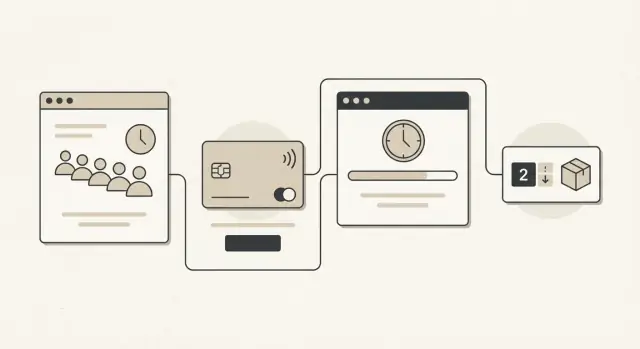
What makes preorders tricky for limited drops
Limited drops combine high demand with low supply, so small mistakes turn into big problems fast. The biggest operational risk is overselling: your store takes more orders than you can fulfill, then you spend days refunding, answering emails, and trying to calm people down.
Even when you don’t oversell, people get upset when the rules feel unclear. If customers can’t tell whether they’re guaranteed a unit, when they’ll be charged, or how long they have to complete payment, they assume the worst.
A good preorder setup tries to balance four goals that often pull against each other: fairness (everyone understands how slots are assigned), clear timelines (dates and time zones up front), cash flow (collect some money without refund chaos), and fewer refunds and chargebacks (no one feels tricked).
It also helps to use consistent terms. These are the ones that usually cause confusion:
- Waitlist: a ranked or randomized queue of interested buyers who haven’t been allocated stock yet.
- Deposit: a partial payment that reserves a chance to buy (or reserves a unit, if you say so clearly).
- Allocation window: a set period when a customer can complete the purchase before the slot moves to the next person.
- Capture: when you actually charge the remaining balance (or the full amount) and confirm the order.
- Cancellation: the customer or you end the reservation, triggering a refund based on the policy.
You can’t remove disappointment from a hype drop. You can only manage it well. If 2,000 people want 500 units, some people will miss out. The difference between “angry” and “disappointed but okay” is usually simple: clear rules, visible timing, and predictable handling when someone backs out.
Pick a preorder model that fits your drop
A limited drop can sell out in minutes, but production still takes weeks. The preorder model you choose decides who gets certainty, who gets speed, and how many support tickets you’ll handle.
Three common models (and what they signal)
Pick based on how stable your supply and dates are, not just how much hype you expect.
- Waitlist only (no payment): people raise their hand and you notify them later. Best when your ship date or final cost is still changing.
- Deposit hold (partial payment): people pay a small amount to reserve a spot. Best when you need proof of demand to place an order, but want to keep commitment fair.
- Full prepay: people pay upfront for guaranteed allocation. Best when quantity and ship window are highly predictable, and your audience expects firm confirmation.
Waitlist-only feels friendly, but it can be noisy: lots of signups, low follow-through. Full prepay gives the most certainty, but it also creates the fastest backlash if you miss dates or change specs.
Decide what you are selling: a quantity or a time window
Choose one framing and stick to it.
If supply is capped (for example, 500 units), run a fixed-quantity preorder. Once allocations are filled, everyone else goes to the waitlist. If supply can scale but timing can’t, run a capped time window (for example, 24 hours) and commit to making every paid order in that window.
Fixed quantity closes fast and feels exciting. A time window usually feels fairer and reduces the “I refreshed and still lost” complaints. The tradeoff is risk: fixed quantity can undershoot demand, while a time window can oversell your capacity if you don’t set limits carefully.
Example: if your factory confirms 500 units and a 4-week lead time, fixed quantity plus either a deposit or full prepay is safer. If lead time is stable and quantity can scale, a 24-hour time window with a deposit can balance hype with fairness.
Write clear allocation rules before you open
The fastest way to lose trust is to make allocation decisions while orders are already coming in. Write the rules first, publish them in plain language, and follow them exactly.
Pick the fairness method and stick to it
Choose one approach and avoid mixing methods mid-drop.
First-come-first-served feels simple, but it punishes people in different time zones or with slow checkouts. A lottery can feel fairer, but only if the entry window and selection rules are clear. Tiered priority (for example, early access for past customers or members) can work too, but only when the tiers are public and you state how many units are reserved for each tier.
Prevent quiet unfairness: limits, households, and variants
Set limits that match your goals. “1 per customer” is common, but define what you mean by customer. If you also block duplicate addresses, cards, or phone numbers, say so upfront. If you don’t enforce household rules, don’t imply you will.
Variants can create hidden unfairness. If some sizes or colors are far more limited, publish that early (even roughly) or separate allocation by variant. Otherwise, people assume every option had equal odds.
Keep a short “supply change” policy in writing. Production slips happen. State what you’ll do if supply goes up (who gets added) or goes down (who gets refunded first). A simple rule set is usually enough:
- Allocation method and timing (including time zone)
- Per-person and household enforcement signals you use
- Variant handling (pooled vs per-size/per-color)
- What happens if supply increases or decreases
- How you notify people and how long they have to act
Allocation windows: how to time them and keep them fair
Allocation windows are the short periods where you turn “interest” into “a real spot.” This is where most complaints start, so keep the rules simple and time-based.
Separate two states clearly: a waitlist is only a place in line, not a promise. An allocation means a unit is reserved for you temporarily, but only if you confirm in time.
A practical setup looks like this:
- Allocation window: 24 to 72 hours to send invites and hold inventory for invited customers
- Confirmation deadline: 12 to 24 hours from the moment each invite is sent
- Close rule: at the end of the allocation window, any unclaimed units move to the next group
Keep it fair by using a reallocation loop. When someone misses their confirmation deadline, their unit goes back into the pool and the next person gets an invite right away. Do this in clear waves (for example, every 2 hours) so people see movement and you avoid silent gaps.
Edits are another fairness issue. Let customers edit shipping details (name, address) until they confirm payment, then lock it. For variants (size, color), allow changes only while inventory is still flexible. After a set cutoff (often when they confirm), changes should require canceling and rejoining the waitlist.
Example: you allocate at 10:00 AM, hold the item until 10:00 PM, and send an automatic reminder at 6:00 PM. At 10:01 PM, if they didn’t confirm, the invite expires and the next person gets a fresh 12-hour hold.
A step-by-step preorder flow you can reuse
A reusable flow keeps hype from turning into chaos. The goal is simple: collect real demand, block obvious abuse, allocate fairly, and make the money steps easy to understand.
The flow (from interest to delivery)
Start with a waitlist that captures what you need to allocate correctly: email, phone, country (for shipping and taxes), and the exact variant (size, color, bundle). Make it clear that joining the list is not a purchase.
Next, do basic verification before you take money. Use one account per buyer, flag duplicate emails or phones, and run quick bot checks. If something looks off, route it to manual review instead of silently canceling later.
Then take either a deposit or a payment authorization. On the same screen, show the terms in plain language: deposit amount, whether it’s refundable, when the balance is due, and what happens if they miss the deadline.
After that, run allocation in a fixed window. Communicate how you allocate (for example: first verified deposit, then waitlist order) and send confirmations with a clear deadline to complete the next step. Deadlines should be the same for everyone in that batch.
Finally, capture the remaining balance, lock the order, and move to fulfillment. Send shipping updates, and give support a short script for common questions (missed deadline, address change, refund timing). Close the loop with a final message confirming delivery and how to get help if something is wrong.
If you document this once, each new drop becomes a repeatable playbook instead of a one-off fire drill.
Deposits and partial payments that customers understand
Deposits work when customers can answer three questions quickly: how much do I pay today, when do I pay the rest, and what happens if I change my mind. If any of those feel fuzzy, expect support tickets, chargebacks, and angry comments.
Start by picking a deposit style that matches the drop. Smaller deposits usually increase signups, but larger deposits reduce no-shows.
- A flat deposit (for example $20) is easy to understand and feels low risk.
- A percent deposit (for example 20%) scales fairly across sizes and bundles.
- A high deposit (40% to 60%) fits extremely tight inventory when you need serious intent.
Be precise about timing. A common, clear setup is deposit at signup, then charge the balance when the customer is allocated a unit (not when they join the waitlist). If you charge at shipment instead, say that plainly and explain that allocation still reserves their unit.
Cover edge cases in one sentence each, upfront. If shipping is calculated later, say when it will be collected. If taxes depend on the final shipping address, say they may change. If you sell in multiple currencies, state which currency is charged and who pays conversion fees. If you might adjust price (rare, but it happens), commit to a rule like “no increase after deposit” or “you can cancel for a full refund if price changes.”
Make refundability simple: deposit fully refundable until allocation, optionally partially refundable for a short window after allocation, and non-refundable only if you can justify it and you state it clearly.
Here is the math customers expect to see:
Item price:        $120.00
Deposit today:     $30.00
Balance later:     $90.00
Shipping (later):  calculated at checkout for the balance
Tax:              based on shipping address at time of balance payment
Cancellations, refunds, and chargeback prevention
Limited drops create stress when people change their mind, miss a deadline, or place two orders by mistake. Fair rules up front save you hours of arguing later and make the preorder feel safer.
Set clear cancellation windows
Use simple time-based rules tied to your allocation steps, then repeat them everywhere (checkout, confirmation email, reminders).
- Before allocation: cancel anytime for a full refund (including the deposit). No questions.
- After allocation but before final payment capture: allow cancellation, but define the cost (for example, deposit kept as an admin fee) or offer a full refund if you can quickly reassign the unit.
- After final payment capture: allow returns only under your normal return policy (damaged or defective, wrong item), not because the hype cooled off.
Define refunds with exact timing
State what gets refunded (deposit, shipping, taxes) and how fast you process it. A clear promise like “refunds are issued within 3 business days” reduces angry tickets. Also say what happens if a bank takes longer to post the refund (you issue it fast; the bank may take additional days).
Handle common edge cases consistently. If someone misses a final payment deadline, auto-cancel and refund based on your window rules. If someone double-orders, merge or cancel the extra order immediately and refund the extra payment in full.
Reduce chargebacks
Most chargebacks happen when customers feel surprised. Send a receipt for every payment, send at least one reminder before any deadline, and keep proof of consent (timestamped terms acceptance, clear line items, and the exact amount and date of the next charge).
Keep support guidance short and consistent:
- Cancel before allocation: approve and refund in full.
- Cancel after allocation: apply the stated rule and reassign the unit.
- Missed payment deadline: auto-cancel, notify, refund per policy.
- Duplicate order: verify, cancel the extra, refund.
- Threatened chargeback: resend receipts and terms, offer the policy option, escalate only if fraud signs appear.
Customer messaging that reduces complaints
Most complaints come from silence and surprises. Your messages should make two things obvious: what happens next, and what you’ll do if plans change.
Publish a simple timeline and repeat it across email, SMS, and the account area: join waitlist (no guarantee, no charge unless stated), allocation time (and how you decide), payment capture (deposit now, remainder later, or full charge), address lock date, and ship window (best estimate, plus what can move it).
Use short templates that answer the same questions every time: Did I get one? How long do I have? What do I do now?
Templates that calm people down
Waitlist confirmation: “You’re on the list. Allocation happens on [date/time]. If selected, you’ll have [X] hours to complete payment. If not selected, you’ll be notified and any deposit rules below apply.”
Allocated: “You have an allocation. Complete payment by [time]. You can update your shipping address until [address lock date].”
Not allocated: “This round is full. You were not allocated. If more stock frees up from cancellations, we’ll re-run allocation on [date/time] (if applicable).”
If someone is traveling, give a clear path: allow an address change in account until the lock date, or offer a one-time support request after lock for a fee-free redirect (if you can handle it). Also state what you can’t do, like changing country after taxes are calculated.
Be honest about odds without making promises. “Most drops allocate fewer than 1 in 3 waitlist entries” is better than vague hype. In the account area, a simple status summary helps: current status, next date/time, payment state, and the cancellation and refund rules.
Common mistakes that cause backlash
Most blowups have the same root cause: customers feel the rules changed after they committed money.
A common failure is overselling because inventory is split across places (your site, a pop-up, influencers, wholesale) without one shared number. Customers don’t care why it happened. They only see you took payment for something you can’t ship.
Another trigger is vague language like “limited quantities” with no hard dates. Spell out the allocation deadline, when the remaining balance is due, and what happens if stock ends or shipping slips. “We’ll email you” isn’t a policy.
Long allocation windows cause “ghost inventory.” If holds sit for days, real buyers see “sold out,” then later it returns. That looks like manipulation even when it’s just expired holds. Keep windows tight and release unclaimed units on a predictable schedule.
Mistakes that most often turn into public backlash:
- Splitting stock across channels without a single source of truth
- Missing deadlines (allocation, payment, shipping estimate) and refund terms
- Holds that run too long, slowing restocks and confusing buyers
- Ignoring fraud signals (reshippers, repeated cards, many accounts to one address)
- Changing price, fees, or terms mid-drop without explicit opt-in
Fraud is worth calling out. Limited drops attract people who use multiple accounts, reuse the same payment method, or ship to forwarding addresses. Without basic limits (per person, per address, per card), real fans lose.
If costs truly change after deposits are taken, give a clean choice: accept the new terms or cancel for a full refund. Quietly pushing new terms is a fast path to chargebacks.
Quick checklist before the drop goes live
Before you publish the preorder page, lock the rules. If you change them mid-drop, even for a good reason, people will read it as unfair.
Write the allocation method in plain language. Say whether spots are first-come, lottery, or tiered. One clear sentence beats a long FAQ.
Final check:
- Allocation and limits: confirm the exact rule, the per-customer cap, and what happens if someone places multiple orders. Test duplicate detection (same email, address, card, or suspicious repeats).
- Money and timing: set the deposit or partial payment amount, list what is refundable, and state how long refunds take. Make sure checkout repeats this, not just a policy page.
- Windows and deadlines: define the preorder open period, the time customers have to complete payment or confirm details, and how often you reallocate unclaimed stock.
- Messages for every outcome: prepare short templates for confirmation, allocation, “deadline soon,” waitlist, reallocation, and “refund started.”
- Supply change plan: decide what you’ll do if units change (up or down), production is late, or shipping costs rise. Write the update schedule you’ll follow.
Do a quick dry run with a small internal group: one person places a preorder, one misses the deadline, and one cancels. If your team can’t explain the outcome in 10 seconds, customers won’t accept it either.
Example flow: a 500-unit merch drop with deposits
You have 500 units total across two sizes (S and L). Preorders run for 3 days. Customers pay a 20% deposit to hold a spot, then pay the balance only if they get allocated.
Timeline (waitlist to final charge)
- Day -7: Waitlist opens. People pick size (S or L) and confirm email/phone. No payment yet.
- Day 0 (10:00): Preorder window opens for 72 hours. Deposits are taken and time-stamped. You show an estimate like “allocation results 24 hours after the window ends.”
- Day 3 (10:00): Window closes. You lock inventory counts (for example: 300 S and 200 L based on production).
- Day 4 (10:00): Allocation emails go out. Allocated buyers get a 24-hour balance payment window. Non-allocated buyers are told they’re waitlisted with a clear cutoff time.
- Day 5 (10:00): Unpaid allocations expire. Stock rolls to the next people on the waitlist. Balance capture opens for them for 12 hours.
Two outcomes
Allocated buyer: Sam placed a deposit for size S on Day 1. On Day 4, Sam gets an allocation email: “Pay the remaining 80% by tomorrow 10:00.” Sam pays, gets an order confirmation, and later gets shipping updates.
Waitlisted buyer not allocated: Jamie placed a deposit for size L near the end of Day 3. Demand was higher than supply, and Jamie is not allocated. Jamie gets a message: “You keep your spot in case of expirations. If you are not allocated by Day 6, your deposit is automatically refunded.”
Cancellation case: Sam pays the full balance, then cancels 2 days later before production is locked. You refund the 80% balance right away and keep the 20% deposit as a clearly stated cancellation fee. If production is already locked, you allow cancellation only if you can resell the slot from the waitlist within 24 hours; otherwise the order stands.
After the drop, track a few numbers: deposit-to-allocation conversion rate, balance payment completion rate within the window, refund and cancellation rate, support tickets per 100 preorders, and chargeback rate with reasons.
Next steps: implement, test, and iterate
Treat your preorder rules like a product. The fastest way to spot gaps is to turn the rules into screens customers can see and admins can run. If someone can’t tell where they stand in 10 seconds, expect support tickets.
Map each rule to a page or state: waitlist signup, deposit checkout, allocation pending, allocated with a pay-by deadline, and not allocated (with what happens next). A simple status page helps: current step, deadlines, and what the customer can do now.
On the admin side, keep tooling minimal but complete: run allocation (manual trigger and scheduled), allow overrides with a reason, keep an audit log, generate exportable reports (payments, deadlines, cancellations), and send messages (allocation notices, reminders).
Run one small drop on purpose. Pick a size where you can read every complaint. Afterward, review what failed: unclear deadlines, missed payment windows, confusion about deposits, or customers thinking “waitlist” meant “guaranteed.” Tighten the wording and update the screens before the next drop.
If you need to build a custom preorder system quickly, Koder.ai (koder.ai) can help you prototype the flow through a chat-driven build process, then export the source code when you’re ready to own it.
Before your next drop, test rule changes safely. Use snapshots and rollback so you can try a new allocation window or cancellation rule, run a quick rehearsal, and revert if the experience gets worse.
FAQ
When should I use a waitlist instead of taking payment?
Use a waitlist when your stock, ship date, or final price may still change. It lets people register interest without treating a signup as a confirmed order.
What should a preorder deposit clearly explain?
A deposit should say exactly what it reserves. State the amount due today, when the remaining balance is charged, and whether the deposit is refundable at each stage.
Should I cap preorders by quantity or by time?
Use a fixed quantity when production has a firm cap, such as 500 units. Use a time window when you can make every paid order received during a set period without exceeding capacity.
How can I allocate limited stock fairly?
Pick one method before the drop opens: first-come-first-served, lottery, or published priority tiers. Show the method, time zone, limits, and any reserved inventory before customers pay.
How long should an allocation window last?
Give each allocated customer a short, equal deadline, usually 12 to 24 hours. Send a reminder before it expires, then release unpaid stock in scheduled waves to the next eligible buyers.
What is the difference between a waitlist and an allocation?
Say that waitlist entry does not guarantee an item. An allocation temporarily reserves a unit, but the customer must complete payment before the stated deadline.
How do I stop duplicate orders and resellers?
Set limits before launch and explain how you enforce them. You can limit orders by account, email, phone, payment card, or shipping address, but customers should know the rules in advance.
What is a fair preorder cancellation policy?
Offer a full refund before allocation whenever possible. After allocation, apply the published cancellation rule consistently, then state when you issue the refund and that banks may take extra time to post it.
How can I reduce preorder chargebacks?
Send a receipt for every charge, remind customers before payment deadlines, and keep timestamped proof that they accepted the terms. Clear amounts, dates, and refund rules reduce surprise and make disputes easier to resolve.
What should I tell customers during a limited drop?
Track each customer’s current status, next deadline, payment state, and refund rule in one place. Use the same wording in checkout, emails, SMS, and support replies so customers do not receive conflicting information.