

Lost pet alert page for neighborhoods that actually helps
Create a lost pet alert page neighbors can share fast: photo, last seen location, contact options, safe tips, and a clear update when your pet is found.
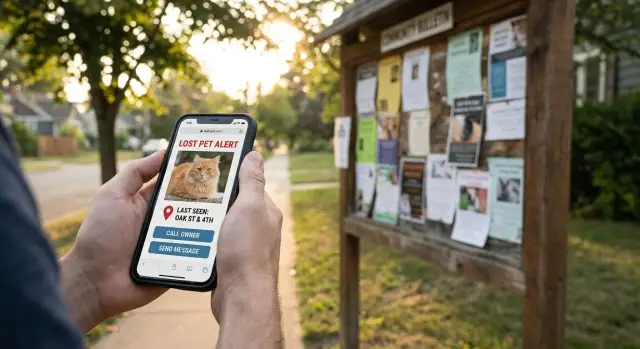
Why a single alert page works better than scattered posts
A lost pet search often starts with one frantic post, then turns into half-matching updates across group chats, neighborhood apps, and social feeds. The effort is there. The problem is that social posts get buried fast. New comments push key details down, screenshots cut off phone numbers, and people keep sharing older versions without noticing.
A single lost pet alert page keeps the truth in one place. Anyone who wants to help can check it quickly and trust they’re looking at the latest info, not a repost from yesterday.
Most neighbors need three things in the first 10 seconds: a clear photo, where the pet was last seen, and how to reach you right now. If they have to scroll through a long thread to find your number or the cross street, they may give up or contact the wrong person.
One page also cuts down on confusion and repeat questions. Instead of replying to the same “What time?” and “Any collar?” comments in five places, you update once and everyone sees it.
A good lost pet alert page answers fast questions up front: what the pet looks like (including any unique markings), when and where they were last seen, how to contact you, whether people should approach or only report sightings, and any safety notes (shy, may bite, runs from cars).
The “update when found” part matters more than people expect. When you clearly mark the pet as found, you stop wasted searching, reduce false alarms, and make the community more likely to take future alerts seriously.
Example: three neighbors share different screenshots of a missing dog flyer online, and one person drives to the wrong park. With one page, the owner updates the location to “spotted two blocks north,” and everyone shifts to the same area within minutes.
What information to collect before you publish
A lost pet alert page works best when it answers what neighbors will ask immediately: What does the pet look like, where exactly was it last seen, and how should I contact you if I spot it?
Start with photos. Use one clear, recent image where the pet’s face is visible, plus another that shows the full body. Good light matters more than fancy camera gear. If your pet has a unique marker (a white paw, a patch over one eye, a crooked tail), make sure at least one photo shows it.
Add the details that help someone confirm it’s the same animal without turning the page into a biography. Include the pet’s name (if they respond to it), a breed guess if you know it, and a simple size note (“small, about 10 lb” or “medium, knee-high”). Mention collar or harness info because people remember that quickly. If the pet is microchipped, it’s fine to say “microchipped,” but don’t post the chip number.
Location is where many alerts fail. “Near the park” is too vague. Write the closest cross streets and, if you have it, the direction of travel (“last seen at Pine St and 3rd Ave, heading toward the river”). If you use a lost cat map pin or similar marker, place it as accurately as you can.
Temperament notes can prevent bad encounters and improve the quality of sightings. Keep it short and practical: shy and may hide, friendly to dogs but not people, might run if chased, may bite if cornered, scared of loud noises.
For safety, avoid posting your home address, your daily routine, or any full ID numbers (microchip, license, or document numbers). For contact, a phone number is common. If you can, use a secondary number as backup and clearly say whether call or text is best.
The page layout neighbors can scan quickly
A good lost pet alert page should feel like a poster you can read in five seconds. Put the most important facts above the scroll, and keep everything else tight.
Start with one strong hero photo at the top, cropped so the face and markings are clear. Put the pet’s name right next to it in large text. If you have two excellent photos, use one close-up and one full body, but skip big galleries that push details down.
Add a bold status banner under the photo and keep it consistent: Missing, Sighted, Found, Reunited. Color can help, but the words matter most.
Put “Last seen” front and center
Make the next block impossible to miss: “Last seen,” the date and time, and a simple location line (nearest cross street, park entrance, building number). People often remember cues like “near the blue playground gate” better than a full address.
If you include a map, keep it simple: one pin and one short direction line.
Make contact options big and easy to tap on a phone. A neighborhood pet search fails when people can’t reach you fast. Keep it simple: one preferred method and one backup.
End with a short “What to do if you spot them” box: don’t chase, take a photo, note the direction of travel, and contact you right away.
Step by step: create your lost pet alert page
A good page is simple: one page, one goal, fast action.
- Add 2-5 clear photos and choose one strong cover image (full body, face visible, good light). If there’s a unique marking, include one close-up.
- Write “Last seen” details in plain words: date, time window, exact spot, and direction of travel if known.
- Drop a map pin for the last seen location using a specific landmark (corner, trailhead, building entrance).
- Add contact info a stranger can use safely: one phone number and one backup option. Say whether texts are best.
- Publish with a short, shareable title, such as: “LOST DOG: Bella, gray husky mix, last seen Oak + 3rd (Tue 7pm).” If you can, add a QR code that points to the page for printed flyers.
Before you share, add a small “How to help” box. Keep it calm and specific: don’t chase, don’t shout the name, offer food from a distance, and call or text the number listed. If your pet is scared or may bite, say so clearly.
Do the 15-second phone test
Open the page on your phone and pretend you’re a passerby who just spotted the pet. In under 15 seconds, can you answer these?
- What does the pet look like?
- Where should I look right now?
- How do I contact you?
- What should I do (and not do) if I see them?
- Is this alert current?
If any answer takes scrolling and guessing, shorten the text and move the essentials higher.
Make it easy to read and share on any device
A lost pet alert page only works if someone can understand it in 10 seconds while standing outside, on a phone, with spotty signal. Design for that moment first.
Phone-first layout
Use big, clear headings and short lines so key facts don’t get buried. Keep the top of the page focused: one photo, pet name, last seen area, and the best contact method.
A simple structure that reads well on small screens:
- One headline (LOST DOG or LOST CAT + neighborhood)
- One clear photo with a short caption
- Last seen location in plain words (street + nearby landmark)
- One clear call to action (Call or text + number)
- A visible timestamp (posted date and last updated)
If your neighborhood is multilingual, add a second language version right below the first. Keep both versions short and in the same order.
Accessibility and lightweight loading
Make the page usable for everyone. Add alt text that describes the pet and distinguishing marks. Use high-contrast text and avoid tiny font sizes. Buttons should be easy to tap.
Keep it fast on slow connections. Use one or two photos, not a full gallery, and compress images so they load quickly. A neighbor on an older phone should still be able to open your missing dog flyer online without waiting.
If you’ll print flyers, create a printable view with only the essentials: the main photo, last seen details, contact info, and a QR code that points back to the page.
Collect sightings without turning it into chaos
Sightings can quickly narrow the search, but they can also flood you with guesses and duplicate tips. A good page makes reports simple, time-stamped, and easy to review.
A simple way to collect sightings
If you can, add a “Report a sighting” form near the top, right under the photo and last seen details. Keep it short so people actually use it. Ask for location (address or nearest cross street), time seen, brief notes (including direction of travel), an optional photo, and a way to contact them.
Avoid auto-publishing reports. Send them to you (or a trusted helper) for review first. Then share a short “Latest sightings” list with timestamps, like: “7:40 pm, Oak St near the park, ran north.” This keeps everyone aligned without turning the page into a messy comment thread.
Keep the thread calm and useful
Public comments can spiral. Instead of a free-for-all, post only reviewed sightings and provide a quiet way to flag spam.
When tips conflict, label them clearly. A simple split works well:
- Confirmed: photo evidence, two independent reports close in time, or you verified the spot
- Unconfirmed: still visible, but clearly marked
How to update the page when your pet is found
The fastest way to stop worry (and stop people searching in the wrong place) is a clear status change. Put a big banner at the top that says FOUND or REUNITED, plus the date and a general area.
Keep the first screen simple: one sentence confirming your pet is safe, and one sentence asking people to stop sharing the missing version. Many outdated shares happen because the page still looks active.
What to share (and what to keep private)
Share enough to close the loop, but keep some details private to protect yourself and your pet.
Good to share:
- Date found and a general location (like “near Oak and 3rd”)
- A short note on how they were found (sighting, shelter, microchip scan)
- Any urgent safety note for the area (“please secure gates in the alley”)
Better to keep private:
- Your full home address
- Proof details someone could use to claim your pet (unique markings, tag numbers, microchip numbers)
A quick thank-you helps neighbors feel good about helping. If one thing made the difference, say it.
Finally, make an archiving plan so the page doesn’t keep circulating. Keep the found banner up for 7-14 days, then add “CLOSED” to the title or move the page into an archived section.
Common mistakes and safety traps to avoid
A lost pet alert page only helps if people can act fast and trust what they see. Most problems come from small omissions that send neighbors to the wrong place or make you an easy target.
Don’t overshare. Skip your full home address, daily schedule, and any personal info that isn’t needed to help.
Keep the alert clearly current. Add a visible “Last updated” timestamp near the top. Without it, someone may assume the pet was found days ago and stop looking, or they may keep sharing an old alert.
Be specific about location. “Near the park” is vague. “Near Oak St and 3rd Ave, heading east toward the grocery store” gives helpers a real search area. If you use a map pin, make sure it matches the text.
Make contact simple. Too many options slow people down. Pick one preferred method and one backup, and say that plainly.
Use usable photos and identifiers. A blurry image, or no note about unique markings, leads to false leads.
Scam and safety basics
Scammers sometimes send “I found your pet” messages to get money or personal info.
- Ask for a photo or short video before sharing details
- Don’t send a reward upfront or share verification info (like microchip numbers)
- Meet in a public place, ideally with a friend
- Keep rewards vague (“Reward offered”) until you confirm
- End the conversation if it feels off
Quick checklist before you share
Before you hit post, take two minutes to make sure strangers can understand the page and act.
- Use one clear, recent photo where face and body markings are visible. If it’s an older photo, say “older photo” on the page.
- Write last seen with a date, time, and cross streets (not just a neighborhood name).
- Highlight one main contact method and place it high on the page. Put backup contact lower.
- Add one short temperament note so people don’t scare your pet away.
- Put the status at the top in big text: MISSING or FOUND. If found, add a clear “Do not share missing version” note.
Then do the phone test: open it on mobile data and see if the key facts are readable without zooming.
Example: a simple neighborhood search that ends well
Mina’s indoor cat, Pepper, slipped out at dusk when a delivery arrived. Mina searched the house twice, then walked the block calling his name. After 20 minutes, she switched to one clear lost pet alert page instead of juggling multiple posts.
Within the first hour, her page included a bright photo and one line (“Pepper, black cat with a small white chin spot”), a specific last seen note (“6:40 pm, Maple St near #18, ran east toward Oak Park”), one simple contact (“text is best after 9 pm”), and a safety note (“Please don’t chase. Take a photo, note the time, and message me”).
Two neighbors reported sightings in the same format, which made them easy to compare. At 7:25 pm, someone wrote: “Saw a black cat under the bench by Oak Park playground, stayed low, then moved toward the hedge.” At 8:05 pm, another neighbor added: “Black cat near the park’s south entrance by the trash cans, then crossed toward Pine Alley.” Mina focused on the park edge and the alley instead of searching the whole neighborhood.
By 9:10 pm, Pepper was found hiding behind a shed off Pine Alley. Mina updated the page headline to “FOUND - safe at home” and added the time and general area. That one change stopped well-meaning neighbors from continuing to reshare an outdated alert.
Next steps: turn this into a reusable page for your community
If your neighborhood has to start from scratch every time, you lose time when minutes matter. The easiest upgrade is a reusable template that anyone can copy, fill in, and publish in one sitting.
A good template keeps the must-have parts fixed (photo, last seen, contact) and makes the change-every-time parts obvious (date, time window, notes). If you want a chat-based way for non-technical neighbors to generate and edit pages quickly, Koder.ai (koder.ai) is designed for building simple web pages and updating them through a chat interface.
Keep the template healthy with a few simple habits: confirm the status is correct, refresh contact info occasionally, and archive old alerts so they don’t keep circulating.
FAQ
Why should I use a single lost pet alert page instead of multiple social posts?
Use one page when you want everyone to see the same, current details. Social posts get buried, screenshots crop out key info, and older versions keep circulating, so a single page reduces confusion and keeps updates consistent.
What are the three most important things to put at the top of the page?
Put the essentials at the top: one clear photo, “Last seen” with cross streets plus date/time, and a big contact method people can use immediately. Add a short note on what to do if they spot your pet so helpers don’t waste time guessing.
How specific should the location be on a lost pet page?
Use “Last seen” with the nearest cross streets and one easy landmark someone can recognize on foot. If you know it, add direction of travel, because “heading toward the river” is much more useful than a vague neighborhood name.
How many photos should I include, and what kind work best?
Share one close-up where the face and markings are obvious, plus one full-body photo that shows size and color clearly. Good light and a simple background matter more than having lots of pictures.
What pet details help people identify them without oversharing?
Include only details that help a stranger confirm it’s the same animal: name (if they respond), approximate size, collar/harness, and any unique markings. If your pet is microchipped, you can say “microchipped,” but don’t post the chip number.
What information should I NOT publish for safety?
Avoid your home address, your daily routine, and any full ID numbers like microchip or license numbers. Keep rewards vague until you confirm the person really has your pet, and don’t send money upfront.
Do I really need temperament notes, and what should they say?
Add a short, practical note like “shy, may hide,” “might run if chased,” or “may bite if cornered.” This helps neighbors choose the right approach and prevents well-meaning people from accidentally scaring your pet farther away.
What’s the best way to handle contact info so people can reach me quickly?
Make contact simple and fast: one preferred method (usually text or call) and one backup. Place it high on the page in large, easy-to-tap text so someone outside on a phone can reach you in seconds.
How do I collect sightings without the page becoming chaotic?
Ask for the basics: where, when, direction of travel, a short note, and an optional photo, then review reports before posting any “Latest sightings” summary. This keeps the page useful without turning it into a noisy comment thread.
What should I do on the page once my pet is found?
Change the status at the top to FOUND or REUNITED and add the date plus a general area. Keep it brief, and include a clear line asking people to stop sharing the missing version so outdated alerts don’t keep spreading.