

Managing State Across Frontend and Backend in AI Apps
Learn how UI, session, and data state move between frontend and backend in AI apps, with practical patterns for syncing, persistence, caching, and security.
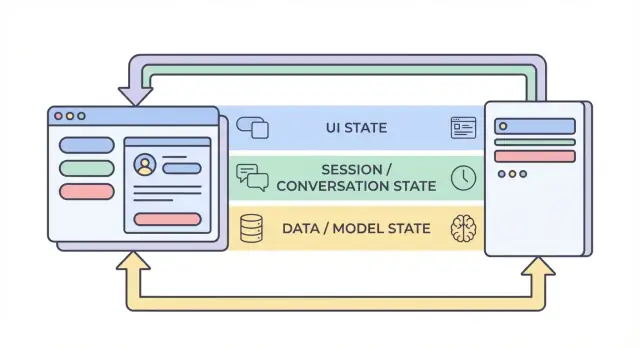
What “state” means in an AI-built application
“State” is everything your app needs to remember in order to behave correctly from one moment to the next.
If a user clicks Send in a chat UI, the app shouldn’t forget what they typed, what the assistant already replied, whether a request is still running, or what settings (tone, model, tools) are enabled. All of that is state.
State, in plain terms
A useful way to think about state is: the current truth of the app—values that affect what the user sees and what the system does next. That includes obvious things like form inputs, but also “invisible” facts like:
- Which conversation the user is in
- Whether the last response is streaming or finished
- The list of messages and their order
- Tool calls and tool results (search results, database lookups, file extracts)
- Errors, retries, and rate-limit backoff
Why AI apps have more moving parts
Traditional apps often read data, show it, and save updates. AI apps add extra steps and intermediate outputs:
- A single user action can trigger multiple backend operations (LLM call, tool call, another LLM call).
- Responses can arrive incrementally (streaming tokens), so the UI must manage partial state.
- Context matters: the system may need to keep conversation memory, tool outputs, and model settings consistent across requests.
That extra motion is why state management is often the hidden complexity in AI applications.
What this guide will cover
In the sections ahead, we’ll break state into practical categories (UI state, session state, persisted data, and model/runtime state), and show where each should live (frontend vs. backend). We’ll also cover syncing, caching, long-running jobs, streaming updates, and security—because state is only helpful if it’s correct and protected.
Quick example scenario
Imagine a chat app where a user asks: “Summarize last month’s invoices and flag anything unusual.” The backend might (1) fetch invoices, (2) run an analysis tool, (3) stream a summary back to the UI, and (4) save the final report.
For that to feel seamless, the app must keep track of messages, tool results, progress, and the saved output—without mixing up conversations or leaking data between users.
The four layers of state: UI, session, data, and model
When people say “state” in an AI app, they often mix together very different things. Splitting state into four layers—UI, session, data, and model/runtime—makes it easier to decide where something should live, who can change it, and how it should be stored.
1) UI state (what the user is doing right now)
UI state is the live, moment-to-moment state in the browser or mobile app: text inputs, toggles, selected items, which tab is open, and whether a button is disabled.
AI apps add a few UI-specific details:
- Loading indicators and “thinking” states
- Streamed tokens (partial text appearing as it’s generated)
- Local draft messages (before they’re sent)
UI state should be easy to reset and safe to lose. If the user refreshes the page, you may lose it—and that’s usually fine.
2) Session / conversation state (shared context for a user’s flow)
Session state ties a user to an ongoing interaction: user identity, a conversation ID, and a consistent view of message history.
In AI apps, this often includes:
- Message history (or references to it)
- Tool traces (what functions/tools were called and with what results)
- “Working set” choices like the current project/document, selected model, or workspace
This layer often spans frontend and backend: the frontend holds lightweight identifiers, while the backend is the authority for session continuity and access control.
3) Data state (durable records in storage)
Data state is what you store intentionally in a database: projects, documents, embeddings, preferences, audit logs, billing events, and saved conversation transcripts.
Unlike UI and session state, data state should be:
- Durable (survives restarts)
- Queryable (you can search/filter it)
- Auditable (you can understand what happened later)
4) Model / runtime state (how the AI is configured right now)
Model/runtime state is the operational setup used to produce an answer: system prompts, tools enabled, temperature/max tokens, safety settings, rate limits, and temporary caches.
Some of it is configuration (stable defaults); some is ephemeral (short-lived caches or per-request token budgets). Most of it belongs on the backend so it can be controlled consistently and not exposed unnecessarily.
Why separation reduces bugs
When these layers blur, you get classic failures: the UI shows text that wasn’t saved, the backend uses different prompt settings than the frontend expects, or conversation memory “leaks” between users. Clear boundaries create clearer sources of truth—and make it obvious what must persist, what can be recomputed, and what must be protected.
What lives on the frontend vs. the backend (and why)
A reliable way to reduce bugs in AI apps is to decide, for every piece of state, where it should live: in the browser (frontend), on the server (backend), or in both. This choice affects reliability, security, and how “surprising” the app feels when users refresh, open a new tab, or lose network connection.
Frontend state: fast, temporary, and user-driven
Frontend state is best for things that change quickly and don’t need to survive a refresh. Keeping it local makes the UI responsive and avoids unnecessary API calls.
Common frontend-only examples:
- Draft message text the user is typing
- Local filters and sort order in a table
- Modal open/closed state, selected tab, hover states
If you lose this state on refresh, it’s usually acceptable (and often expected).
Backend state: authoritative, sensitive, and shared
Backend state should hold anything that must be trusted, audited, or consistently enforced. This includes state that other devices/tabs need to see, or that must remain correct even if the client is modified.
Common backend-only examples:
- Permissions and roles (what the user is allowed to do)
- Billing/subscription status and usage limits
- Long-running jobs (document indexing, large exports, fine-tune runs) and their status
A good mindset: if incorrect state could cost money, leak data, or break access control, it belongs on the backend.
Shared state: coordinated, but with one source of truth
Some state is naturally shared:
- Conversation title
- Selected knowledge sources for a chat
- User profile fields used across devices
Even when shared, pick a “source of truth.” Typically, the backend is authoritative and the frontend caches a copy for speed.
Rule of thumb (and a common anti-pattern)
Keep state closest to where it’s needed, but persist what must survive refresh, device changes, or interruptions.
Avoid the anti-pattern of storing sensitive or authoritative state only in the browser (for example, treating a client-side isAdmin flag, plan tier, or job completion state as truth). The UI can display these values, but the backend must verify them.
A typical AI request lifecycle: from click to completion
An AI feature feels like “one action,” but it’s really a chain of state transitions shared between the browser and the server. Understanding the lifecycle makes it easier to avoid mismatched UI, missing context, and duplicated charges.
1) User action → frontend prepares intent
A user clicks Send. The UI immediately updates local state: it may add a “pending” message bubble, disable the send button, and capture current inputs (text, attachments, selected tools).
At this point the frontend should generate or attach correlation identifiers:
- conversation_id: which thread this belongs to
- message_id: the client’s ID for the new user message
- request_id: unique per attempt (useful for retries)
These IDs let both sides talk about the same event even when responses arrive late or twice.
2) API call → server validates and persists
The frontend sends an API request with the user message plus the IDs. The server validates permissions, rate limits, and payload shape, then persists the user message (or at least an immutable log record) keyed by conversation_id and message_id.
This persistence step prevents “phantom history” when the user refreshes mid-request.
3) Server reconstructs context
To call the model, the server rebuilds context from its source of truth:
- Fetch recent messages for the conversation_id
- Pull any related records (documents, preferences, tool outputs)
- Apply conversation policies (system prompts, memory rules, truncation)
The key idea: don’t rely on the client to provide the full history. The client can be stale.
4) Model/tool execution → intermediate state
The server may call tools (search, database lookup) before or during model generation. Each tool call produces intermediate state that should be tracked against the request_id so it can be audited and retried safely.
5) Response (streaming or not) → UI completion
With streaming, the server sends partial tokens/events. The UI incrementally updates the pending assistant message, but still treats it as “in progress” until a final event marks completion.
6) Failure points to plan for
Retries, double-submits, and out-of-order responses happen. Use request_id to dedupe on the server, and message_id to reconcile in the UI (ignore late chunks that don’t match the active request). Always show a clear “failed” state with a safe retry that does not create duplicate messages.
Sessions and conversation memory: keeping context without chaos
A session is the “thread” that ties a user’s actions together: which workspace they’re in, what they last searched for, which draft they were editing, and which conversation an AI reply should continue. Good session state makes the app feel continuous across pages—and ideally across devices—without turning your backend into a dumping ground for everything the user ever said.
Session state goals
Aim for: (1) continuity (a user can leave and come back), (2) correctness (the AI uses the right context for the right conversation), and (3) containment (one session can’t leak into another). If you support multiple devices, treat sessions as user-scoped plus device-scoped: “same account” doesn’t always mean “same open work.”
Cookies vs. tokens vs. server sessions
You’ll usually pick one of these ways to identify the session:
- Cookies: simplest for web apps because the browser sends them automatically. Great for traditional sessions, but you must set secure flags (
HttpOnly,Secure,SameSite) and handle CSRF appropriately. - Tokens (e.g., JWT): good for APIs and mobile apps because the client can attach them explicitly. They scale well, but revocation and rotation require extra design (and you shouldn’t stuff sensitive state inside the token).
- Server sessions: the server stores session data (often in Redis), and the client holds only an opaque session ID. Easiest to revoke and update, but you must run and scale the session store.
Conversation memory strategies
“Memory” is just state you choose to send back into the model.
- Full history: most accurate, but gets expensive and can surface old sensitive content.
- Summarized history: keep a running summary plus a few recent turns; cheaper and usually “good enough.”
- Windowed context: only the last N messages; simplest, but can lose important earlier decisions.
A practical pattern is summary + window: it’s predictable and helps avoid surprising model behavior.
Tool calls: repeatable and auditable
If the AI uses tools (search, database queries, file reads), store each tool call with: inputs, timestamps, tool version, and the returned output (or a reference to it). This lets you explain “why the AI said that,” replay runs for debugging, and detect when results changed because a tool or dataset changed.
Privacy guardrails
Don’t store long-lived memory by default. Keep only what you need for continuity (conversation IDs, summaries, and tool logs), set retention limits, and avoid persisting raw user text unless there’s a clear product reason and user consent.
Syncing state safely: sources of truth and conflict handling
State gets risky when the same “thing” can be edited in more than one place—your UI, a second browser tab, or a background job updating a conversation. The fix is less about clever code and more about clear ownership.
Define sources of truth
Decide which system is authoritative for each piece of state. In most AI applications, the backend should own the canonical record for anything that must be correct: conversation settings, tool permissions, message history, billing limits, and job status. The frontend can cache and derive state for speed (selected tab, draft prompt text, “is typing” indicators), but it should assume the backend is right when there’s a mismatch.
A practical rule: if you’d be upset losing it on refresh, it probably belongs in the backend.
Optimistic UI updates (use with care)
Optimistic updates make the app feel instant: toggle a setting, update the UI immediately, then confirm with the server. This works well for low-stakes, reversible actions (e.g., starring a conversation).
It causes confusion when the server might reject or transform the change (permission checks, quota limits, validation, or server-side defaults). In those cases, show a “saving…” state and update the UI only after confirmation.
Handling conflicts (two tabs, one conversation)
Conflicts happen when two clients update the same record based on different starting versions. Common example: Tab A and Tab B both change the model temperature.
Use lightweight versioning so the backend can detect stale writes:
updated_attimestamps (simple, human-debuggable)- ETags /
If-Matchheaders (HTTP-native) - Incrementing revision numbers (explicit conflict detection)
If the version doesn’t match, return a conflict response (often HTTP 409) and send back the latest server object.
Design APIs to reduce mismatch
After any write, have the API return the saved object as persisted (including server-generated defaults, normalized fields, and the new version). This lets the frontend replace its cached copy immediately—one source-of-truth update instead of guessing what changed.
Caching and performance: speeding up without stale state
Caching is one of the quickest ways to make an AI app feel instant, but it also creates a second copy of state. If you cache the wrong thing—or cache it in the wrong place—you’ll ship a UI that feels fast and confusing at the same time.
What to cache on the client
Client-side caches should focus on experience, not authority. Good candidates include recent conversation previews (titles, last message snippet), UI preferences (theme, selected model, sidebar state), and optimistic UI state (messages that are “sending”).
Keep the client cache small and disposable: if it’s cleared, the app should still work by refetching from the server.
What to cache on the server
Server caches should focus on expensive or frequently repeated work:
- Tool results that are safe to reuse (e.g., a weather lookup for the same city within 5 minutes)
- Embedding lookups and vector search results for repeated queries (often with short TTLs)
- Rate-limit state and throttling counters (to protect your API and costs)
This is also where you can cache derived state such as token counts, moderation decisions, or document parsing outputs—anything deterministic and costly.
Cache invalidation basics (without getting fancy)
Three practical rules:
- Use clear cache keys that encode inputs (
user_id, model, tool parameters, document version). - Set TTLs based on how quickly the underlying data changes. Short TTL beats clever logic.
- Bypass cache when correctness matters more than speed: after a user updates a document, changes permissions, or requests a refresh.
If you can’t explain when a cache entry becomes wrong, don’t cache it.
Don’t cache secrets or personal data in shared caches
Avoid putting API keys, auth tokens, raw prompts containing sensitive text, or user-specific content into shared layers like CDN caches. If you must cache user data, isolate by user and encrypt at rest—or keep it in your primary database instead.
Measure impact: speed vs. stale UI
Caching should be proven, not assumed. Track p95 latency before/after, cache hit rate, and user-visible errors like “message updated after rendering.” A fast response that later contradicts the UI is often worse than a slightly slower, consistent one.
Persistence and long-running work: jobs, queues, and status state
Some AI features finish in a second. Others take minutes: uploading and parsing a PDF, embedding and indexing a knowledge base, or running a multi-step tool workflow. For these, “state” isn’t just what’s on the screen—it’s what survives refreshes, retries, and time.
What to persist (and why)
Persist only what unlocks real product value.
Conversation history is the obvious one: messages, timestamps, user identity, and (often) which model/tooling was used. This powers “resume later,” audit trails, and better support.
User and workspace settings should live in the database: preferred model, temperature defaults, feature toggles, system prompts, and UI preferences that should follow the user across devices.
Files and artifacts (uploads, extracted text, generated reports) are usually stored in object storage with database records pointing to them. The database holds metadata (owner, size, content type, processing state), while the blob store holds the bytes.
Background jobs for long tasks
If a request can’t reliably finish within a normal HTTP timeout, move the work to a queue.
A typical pattern:
- Frontend calls an API like
POST /jobswith inputs (file id, conversation id, parameters). - Backend enqueues a job (extraction, indexing, batch tool runs) and immediately returns a
job_id. - Workers process jobs asynchronously and write results back to persistent storage.
This keeps the UI responsive and makes retries safer.
Status state the UI can trust
Make job state explicit and queryable: queued → running → succeeded/failed (optionally canceled). Store these transitions server-side with timestamps and error details.
On the frontend, reflect status clearly:
- Queued/running: show a spinner and disable duplicate actions.
- Failed: show a concise error, plus a Retry button.
- Succeeded: load the resulting artifact or update the conversation.
Expose GET /jobs/{id} (polling) or stream updates (SSE/WebSocket) so the UI never has to guess.
Idempotency keys: retries without duplicate writes
Network timeouts happen. If the frontend retries POST /jobs, you don’t want two identical jobs (and two bills).
Require an Idempotency-Key per logical action. The backend stores the key with the resulting job_id/response and returns the same result for repeated requests.
Cleanup and expiration policies
Long-running AI apps accumulate data fast. Define retention rules early:
- Expire old conversations after N days (or let users configure).
- Delete derived artifacts when the source is deleted.
- Periodically purge failed jobs and intermediate files.
Treat cleanup as part of state management: it reduces risk, cost, and confusion.
Streaming responses and real-time updates: managing partial state
Streaming makes state trickier because the “answer” isn’t a single blob anymore. You’re dealing with partial tokens (text arriving word by word) and sometimes partial tool work (a search starts, then finishes later). That means your UI and your backend must agree on what counts as temporary vs. final state.
Backend: stream typed events, not just text
A clean pattern is to stream a sequence of small events, each with a type and a payload. For example:
token: incremental text (or a small chunk)tool_start: a tool call began (e.g., “Searching…”, with an id)tool_result: tool output is ready (same id)done: the assistant message is completeerror: something failed (include a user-safe message and a debug id)
This event stream is easier to version and debug than raw text streaming, because the frontend can render progress accurately (and show tool status) without guessing.
Frontend: append-only updates, then a final commit
On the client, treat streaming as append-only: create a “draft” assistant message and keep extending it as token events arrive. When you receive done, perform a commit: mark the message final, persist it (if you store locally), and unlock actions like copy, rate, or regenerate.
This avoids rewriting history mid-stream and keeps your UI predictable.
Handling interruptions (cancel, drops, timeouts)
Streaming increases the chance of half-finished work:
- User cancels: send a cancel signal; stop rendering tokens; keep the draft visibly canceled.
- Network drops: stop the stream; show “reconnecting…” and don’t assume completion.
- Server timeouts/errors: finalize the draft as failed, and provide a retry that starts a new request (don’t silently stitch streams together).
Rehydration: reload and reconstruct stable state
If the page reloads mid-stream, reconstruct from the latest stable state: the last committed messages plus any stored draft metadata (message id, accumulated text so far, tool statuses). If you can’t resume the stream, show the draft as interrupted and let the user retry, rather than pretending it completed.
Security and privacy: protecting state end-to-end
State is not just “data you store”—it’s the user’s prompts, uploads, preferences, generated outputs, and the metadata that ties everything together. In AI apps, that state can be unusually sensitive (personal info, proprietary docs, internal decisions), so security needs to be designed into each layer.
Keep secrets on the server
Anything that would let a client impersonate your app must stay backend-only: API keys, private connectors (Slack/Drive/DB credentials), and internal system prompts or routing logic. The frontend can request an action (“summarize this file”), but the backend should decide how it’s executed and with which credentials.
Authorize every write (and most reads)
Treat each state mutation as a privileged operation. When the client tries to create a message, rename a conversation, or attach a file, the backend should verify:
- The user is authenticated.
- The user owns the resource (conversation, workspace, project).
- The user is allowed to perform that action (role, plan limits, org policy).
This prevents “ID guessing” attacks where someone swaps a conversation_id and accesses another user’s history.
Never trust the browser: validate and sanitize
Assume any client-provided state is untrusted input. Validate schema and constraints (types, lengths, allowed enums), and sanitize for the destination (SQL/NoSQL, logs, HTML rendering). If you accept “state updates” (e.g., settings, tool parameters), whitelist allowed fields rather than merging arbitrary JSON.
Audit trails for critical actions
For actions that change durable state—sharing, exporting, deleting, connector access—record who did what and when. A lightweight audit log helps with incident response, customer support, and compliance.
Data minimization and encryption
Store only what you need to deliver the feature. If you don’t need full prompts forever, consider retention windows or redaction. Encrypt sensitive state at rest where appropriate (tokens, connector creds, uploaded documents) and use TLS in transit. Separate operational metadata from content so you can restrict access more tightly.
Practical reference architecture and a build checklist
A useful default for AI apps is simple: the backend is the source of truth, and the frontend is a fast, optimistic cache. The UI can feel instant, but anything you’d be sad to lose (messages, job status, tool outputs, billing-relevant events) should be confirmed and stored server-side.
If you’re building with a “vibe-coding” workflow—where a lot of product surface area gets generated quickly—the state model becomes even more important. Platforms like Koder.ai can help teams ship full web, backend, and mobile apps from chat, but the same rule still holds: rapid iteration is safest when your sources of truth, IDs, and status transitions are designed up front.
Reference architecture (one you can ship)
Frontend (browser/mobile)
- UI state: open panels, draft prompt text, selected model, temporary “typing” indicators.
- Cached server state: recent conversations, last known job status, partial stream buffer.
- A single request pipeline that always attaches:
session_id,conversation_id, and a newrequest_id.
Backend (API + workers)
- API service: validates input, creates records, issues streaming responses.
- Durable store (SQL/NoSQL): conversations, messages, tool calls, job status.
- Queue + workers: long-running tasks (RAG indexing, file parsing, image generation).
- Cache (optional): hot reads (conversation summaries, embeddings metadata), always keyed with versions/timestamps.
Note: one practical way to keep this consistent is to standardize your backend stack early. For example, Koder.ai-generated backends commonly use Go with PostgreSQL (and React on the frontend), which makes it straightforward to centralize “authoritative” state in SQL while keeping the client cache disposable.
Design your state model first
Before building screens, define the fields you will rely on in every layer:
- IDs and ownership:
user_id,org_id,conversation_id,message_id,request_id. - Timestamps and ordering:
created_at,updated_at, and an explicitsequencefor messages. - Status fields:
queued | running | streaming | succeeded | failed | canceled(for jobs and tool calls). - Versioning:
etagorversionfor conflict-safe updates.
This prevents the classic bug where the UI “looks right” but can’t reconcile retries, refreshes, or concurrent edits.
Use consistent API shapes
Keep endpoints predictable across features:
GET /conversations(list)GET /conversations/{id}(get)POST /conversations(create)POST /conversations/{id}/messages(append)PATCH /jobs/{id}(update status)GET /streams/{request_id}orPOST .../stream(stream)
Return the same envelope style everywhere (including errors) so the frontend can update state uniformly.
Add observability where state can break
Log and return a request_id for every AI call. Record tool-call inputs/outputs (with redaction), latency, retries, and final status. Make it easy to answer: “What did the model see, what tools ran, and what state did we persist?”
Build checklist (to avoid common state bugs)
- Backend is the source of truth; frontend cache is clearly labeled and disposable.
- Every write is idempotent (safe to retry) using
request_id(and/or an Idempotency-Key). - Status transitions are explicit and validated (no silent jumps from
queuedtosucceeded). - Streaming updates merge by IDs/sequence, not by “last message wins.”
- Conflicts are handled via
version/etagor server-side merge rules. - PII and secrets are never stored in client state; redact logs by default.
- One dashboard view exists for debugging: requests, tool calls, job status, and errors.
When you adopt faster build cycles (including AI-assisted generation), consider adding guardrails that enforce these checklist items automatically—schema validation, idempotency, and evented streaming—so “moving fast” doesn’t turn into state drift. In practice, that’s where an end-to-end platform like Koder.ai can be useful: it speeds up delivery, while still allowing you to export source code and keep state-handling patterns consistent across web, backend, and mobile builds.
FAQ
What does state mean in an AI app?
State is the information an app remembers so it can respond correctly. In an AI chat, that includes messages, the active conversation, streaming progress, enabled tools, and errors.
What state should live on the frontend?
Keep temporary, user-driven details in the frontend, such as a draft prompt, an open panel, or a loading indicator. Store anything sensitive, shared, or needed after a refresh on the backend.
What state belongs on the backend?
The backend should own permissions, billing limits, conversation history, job status, and model settings. It can validate every change and keep the same record available across devices.
How do frontend and backend state stay in sync?
Use the backend as the source of truth. The frontend can cache a copy for speed, then replace or reconcile that copy with the server response after each write.
How should an app handle streaming AI responses?
Create a pending assistant message and append incoming text to it as events arrive. Mark it complete only after the server sends a final completion event, so partial text never looks like a finished answer.
Why do AI requests need IDs?
Give each conversation, message, and request its own ID. The server can use those IDs to reject duplicate requests, and the UI can ignore late updates from an older request.
What is a practical way to manage conversation memory?
Keep a short recent-message window plus a maintained summary of older turns. This usually preserves useful context while limiting cost and reducing the chance that old details affect the reply.
How should AI apps handle long-running jobs?
Send the task to a background queue and return a job ID right away. Store clear statuses such as queued, running, succeeded, failed, and canceled so the user can safely refresh or retry.
How do I protect sensitive state in an AI app?
Treat every browser value as untrusted. The backend must verify the user, resource ownership, permissions, payload fields, and limits before it reads or changes stored state.
What happens when two tabs edit the same conversation?
Use version numbers, timestamps, or ETags when clients update shared records. If the submitted version is old, return the current server record and ask the client to refresh or resolve the conflict.