

Meilisearch for Instant Server-Side Search in Your Apps
Learn how to add Meilisearch to your backend for fast, typo-tolerant search: setup, indexing, ranking, filters, security, and scaling basics.
What instant server-side search should deliver
Server-side search means the query is processed on your server (or a dedicated search service), not inside the browser. Your app sends a search request, the server runs it against an index, and returns ranked results.
This matters when your dataset is too large to ship to the client, when you need consistent relevancy across platforms, or when access control is non-negotiable (for example, internal tools where users should only see what they’re allowed to see). It’s also the default choice when you want analytics, logging, and predictable performance.
What users expect (and notice immediately)
People don’t think about search engines—they judge the experience. A good “instant” search flow usually means:
- Fast feedback: results update quickly as the user types, without awkward pauses.
- Typos don’t break it: misspellings, swapped letters, and partial words still find the right items.
- Useful controls: filtering (category, status, price range), sorting (newest, cheapest), and facets (counts per filter) feel natural.
- Relevant ordering: the “best” results appear first, not just the newest or the most keyword-stuffed.
If any of these are missing, users compensate by trying different queries, scrolling more, or abandoning search entirely.
What this guide will help you do
This article is a practical walkthrough for building that experience with Meilisearch. We’ll cover how to set it up safely, how to structure and sync your indexed data, how to tune relevancy and ranking rules, how to add filters/sorting/facets, and how to think about security and scaling so search stays fast as your app grows.
Where server-side search shines
Meilisearch is a strong fit for:
- Documentation and knowledge bases (find pages fast, tolerate typos)
- Product catalogs and marketplaces (filters and sorting are essential)
- Internal tools (permission-aware search across records)
- Content sites (search across articles, guides, FAQs)
The goal throughout: results that feel immediate, accurate, and trustworthy—without turning search into a major engineering project.
Meilisearch overview in plain language
Meilisearch is a search engine you run alongside your app. You send it documents (like products, articles, users, or support tickets), and it builds an index optimized for fast searching. Your backend (or frontend) then queries Meilisearch through a simple HTTP API and gets back ranked results in milliseconds.
What you get out of the box
Meilisearch focuses on the features people expect from modern search:
- Typo tolerance so “iphnoe” can still find “iPhone”.
- Relevancy controls (ranking rules) so you can decide what “best match” means for your business.
- Filters, sorting, and facets so users can narrow results by attributes like category, price range, availability, or tags.
It’s designed to feel responsive and forgiving, even when a query is short, slightly wrong, or ambiguous.
What Meilisearch is not
Meilisearch is not a replacement for your primary database. Your database remains the source of truth for writes, transactions, and constraints. Meilisearch stores a copy of the fields you choose to make searchable, filterable, or displayable.
A good mental model is: database for storing and updating data, Meilisearch for finding it quickly.
Performance expectations (what affects speed)
Meilisearch can be extremely fast, but results depend on a few practical factors:
- Data size and shape (number of documents, number of fields, and how much text you index)
- Hardware (CPU, RAM, disk)
- Configuration (which attributes are searchable/filterable/sortable, and how often you reindex)
For small-to-medium datasets, you can often run it on a single machine. As your index grows, you’ll want to be more deliberate about what you index and how you keep it updated—topics we’ll cover in later sections.
Planning your indexes and data model
Before you install anything, decide what you’re actually going to search. Meilisearch will feel “instant” only if your indexes and documents match how people browse your app.
Map entities to indexes
Start by listing your searchable entities—typically products, articles, users, help docs, locations, etc. In many apps, the cleanest approach is one index per entity type (e.g., products, articles). That keeps ranking rules and filters predictable.
If your UX searches across multiple types in one box (“search everything”), you can still keep separate indexes and merge results in your backend, or create a dedicated “global” index later. Don’t force everything into one index unless the fields and filters are truly aligned.
Choose a primary key and document shape
Each document needs a stable identifier (primary key). Pick something that:
- never changes (or changes extremely rarely)
- is unique across the index
- already exists in your database (e.g.,
id,sku,slug)
For the document shape, prefer flat fields when you can. Flat structures are easier to filter and sort on. Nested fields are fine when they represent a tight, unchanging bundle (e.g., an author object), but avoid deep nesting that mirrors your whole relational schema—search documents should be read-optimized, not database-shaped.
Classify fields: searchable, filterable, displayed
A practical way to design documents is to tag each field with one role:
- Searchable: text people type (title, name, description)
- Filterable: attributes used as constraints (category, price range, status, tags)
- Displayed: what you return to the UI (title, thumbnail URL, short snippet)
This prevents a common mistake: indexing a field “just in case” and later wondering why results are noisy or filters are slow.
Plan for multilingual content
“Language” can mean different things in your data:
- the document’s language (each article has
lang: "en") - the user’s locale (UI language)
- mixed-language fields (product names in multiple languages)
Decide early whether you’ll use separate indexes per language (simple and predictable) or a single index with language fields (fewer indexes, more logic). The right answer depends on whether users search within one language at a time and how you store translations.
Installing and running Meilisearch safely
Running Meilisearch is straightforward, but “safe by default” takes a few deliberate choices: where you deploy it, how you persist data, and how you handle the master key.
Deployment options (pick what you can operate)
- Docker (most common): quick to start, easy to upgrade, consistent across environments. Pair it with a persistent volume.
- VM or bare metal: good when you already have a standard Linux deployment pipeline (systemd, log rotation, backups).
- Managed hosting: if your team doesn’t want to maintain servers, look for a managed Meilisearch provider or a platform offering it as an add-on. You’ll trade flexibility for simpler operations.
Environment basics: storage, memory, backups, monitoring
Storage: Meilisearch writes its index to disk. Put the data directory on reliable, persistent storage (not ephemeral container storage). Plan capacity for growth: indexes can expand quickly with large text fields and many attributes.
Memory: allocate enough RAM to keep search responsive under load. If you notice swapping, performance will suffer.
Backups: back up the Meilisearch data directory (or use snapshots at the storage layer). Test restore at least once; a backup you can’t restore is just a file.
Monitoring: track CPU, RAM, disk usage, and disk I/O. Also monitor process health and log errors. At minimum, alert if the service stops or disk space runs low.
Set and store the master key securely
Always run Meilisearch with a master key in anything beyond local development. Store it in a secret manager or encrypted environment variable store (not in Git, not in a plain-text .env committed to your repo).
Example (Docker):
docker run -d --name meilisearch \
  -p 7700:7700 \
  -v meili_data:/meili_data \
  -e MEILI_MASTER_KEY="$(openssl rand -hex 32)" \
  getmeili/meilisearch:latest
Also consider network rules: bind to a private interface or restrict inbound access so only your backend can reach Meilisearch.
First-start checklist
- Choose a deployment method (Docker/VM/managed) and ensure persistent storage is configured.
- Set MEILI_MASTER_KEY using a secure secret store.
- Start the service and confirm it’s reachable from the right network.
- Verify health/version response:
curl -s http://localhost:7700/version
- Confirm logs are collected and basic alerts are in place (process down, low disk).
- Take an initial backup (even before real data) and document the restore steps.
Indexing documents and keeping them in sync
Meilisearch indexing is asynchronous: you send documents, Meilisearch queues a task, and only after that task succeeds will those documents become searchable. Treat indexing like a job system, not a single request.
A simple indexing flow (add → wait → verify)
- Add documents (make sure each one has a stable unique id, usually
id).
curl -X POST 'http://localhost:7700/indexes/products/documents?primaryKey=id' \
  -H 'Content-Type: application/json' \
  -H 'Authorization: Bearer YOUR_WRITE_KEY' \
  --data-binary @products.json
- Wait for the task. The API response includes a
taskUid. Poll until it’ssucceeded(orfailed).
curl -X GET 'http://localhost:7700/tasks/123' \
  -H 'Authorization: Bearer YOUR_WRITE_KEY'
- Verify counts and basic search. Confirm the index has the expected number of documents and that a simple query returns results.
curl -X GET 'http://localhost:7700/indexes/products/stats' \
  -H 'Authorization: Bearer YOUR_WRITE_KEY'
If counts don’t match, don’t guess—check the task error details first.
Batching that won’t surprise you later
Batching is about keeping tasks predictable and recoverable.
- Start with 1,000–10,000 documents per batch, or cap by payload size (for many apps, 5–15 MB per request is a comfortable range).
- Prefer many smaller batches over a single huge upload; it’s easier to retry and easier to pinpoint bad data.
- If you have frequent changes, index continuously in batches (e.g., every minute) instead of rebuilding everything.
Updates vs full reindex
addDocuments acts like an upsert: documents with the same primary key are updated, new ones are inserted. Use this for normal updates.
Do a full reindex when:
- you changed the shape of documents significantly,
- you need to recompute derived fields,
- your sync has drifted and you want a clean reset.
For removals, explicitly call deleteDocument(s); otherwise old records can linger.
Idempotency: safe retries when jobs fail
Indexing should be retryable. The key is stable document ids.
- If a batch upload times out, you can resend the same batch: upsert + stable ids means you won’t create duplicates.
- Persist the returned
taskUidalongside your batch/job id, and retry based on task status. - If you run a queue, make the worker “at-least-once” safe: duplicates should be harmless.
Seed data for a quick pre-production test
Before production data, index a small dataset (200–500 items) that matches your real fields. Example: a products set with id, name, description, category, brand, price, inStock, createdAt. This is enough to validate task flow, counts, and update/delete behavior—without waiting on a massive import.
Relevancy and ranking rules you can control
Search “relevancy” is simply: what shows up first, and why. Meilisearch makes this adjustable without forcing you to build your own scoring system.
Start with the right attributes
Two settings shape what Meilisearch can do with your content:
searchableAttributes: the fields Meilisearch looks into when a user types a query (for example:title,summary,tags). Order matters: earlier fields are treated as more important.displayedAttributes: the fields returned in the response. This matters for privacy and payload size—if a field isn’t displayed, it won’t be sent back.
A practical baseline is to make a few high-signal fields searchable (title, key text), and keep displayed fields to what the UI needs.
How ranking rules affect result order
Meilisearch sorts matching documents using ranking rules—a pipeline of “tie-breakers.” Conceptually, it prefers:
- results that match the query well (including typo tolerance), then
- results where matches are stronger (closer words, match in more important attributes), then
- results that fit your business logic (custom sorting like recency or popularity).
You don’t have to memorize the internals to tune it effectively; you mainly choose which fields matter most and when to apply custom sorting.
Common tuning goals (with examples)
Goal: “Title matches should win.” Put title first:
{
  "searchableAttributes": ["title", "subtitle", "description", "tags"]
}
Goal: “Newer content should appear first.” Add a sort rule and sort at query time (or set a custom ranking):
{
  "sortableAttributes": ["publishedAt"],
  "rankingRules": ["sort", "typo", "words", "proximity", "attribute", "exactness"]
}
Then request:
{ "q": "release notes", "sort": ["publishedAt:desc"] }
Goal: “Promote popular items.” Make popularity sortable and sort by it when appropriate.
Evaluate changes with a simple before/after test
Pick 5–10 real queries users type. Save the top results before changes, then compare after.
Example:
- Before: query
"apple"→Apple Watch band,Pineapple slicer,Apple iPhone case - After (title-first + exactness): query
"apple"→Apple iPhone case,Apple Watch band,Pineapple slicer
If the “after” list better matches user intent, keep the settings. If it hurts edge cases, adjust one thing at a time (attribute order, then sorting rules) so you know what caused the improvement.
Filters, sorting, and facets for real-world search
A good search box isn’t just “type words, get matches.” People also want to narrow results (“only available items”) and order them (“cheapest first”). In Meilisearch, you do this with filters, sorting, and facets.
Filters and facets (same idea, different UI)
A filter is a rule you apply to the result set. A facet is what you show in the UI to help users build those rules (often as checkboxes or counts).
Non-technical examples:
- Category: “Shoes”, “Jackets”, “Accessories”
- Price: “Under $50”, “$50–$100”
- Status: “In stock”, “Backorder”, “Archived”
So a user might search “running” and then filter to category = Shoes and status = in_stock. Facets can show counts like “Shoes (128)” and “Jackets (42)” so users understand what’s available.
Configure filterable and sortable fields (or they won’t work)
Meilisearch needs you to explicitly allow fields used for filtering and sorting.
- Mark fields as filterable when you’ll use them in filters:
category,status,brand,price,created_at(if you filter by time),tenant_id(if you isolate customers). - Mark fields as sortable when you’ll order results by them:
price,rating,created_at,popularity.
Keep this list tight. Making everything filterable/sortable can increase index size and slow updates.
Pagination and limits to keep searches fast
Even if you have 50,000 matches, users only see the first page. Use small pages (often 20–50 results), set sensible limit, and paginate with offset (or the newer pagination features if you prefer). Also cap maximum page depth in your app to prevent expensive “page 400” requests.
Synonyms and stop words (optional, use carefully)
- Synonyms help when different words mean the same thing (e.g., “hoodie” ↔ “sweatshirt”). Add them gradually and review search analytics—too many synonyms can create surprising matches.
- Stop words remove common words (“the”, “and”). They can reduce noise, but they can also hurt exact searches like product names (“The Who”, “A Team”). Only customize stop words if you have a clear issue to fix.
Integrating Meilisearch into your application backend
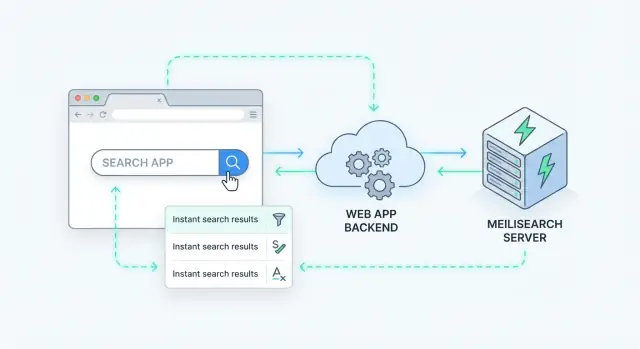
A clean way to add server-side search is to treat Meilisearch like a specialized data service behind your API. Your app receives a search request, calls Meilisearch, then returns a curated response to the client.
A simple backend pattern
Most teams end up with a flow like this:
- Client calls your endpoint (for example,
GET /api/search?q=wireless+headphones&limit=20). - Your backend validates inputs, applies business rules, and decides which index to query.
- Backend calls Meilisearch’s Search API with the user query plus filters/sort.
- Backend post-processes results (hide private fields, merge with DB data, apply permissions).
- Backend returns a stable response shape to the client.
This pattern keeps Meilisearch replaceable and prevents frontend code from depending on index internals.
If you’re building a new app (or rebuilding an internal tool) and want this pattern implemented quickly, a vibe-coding platform like Koder.ai can help scaffold the full flow—React UI, a Go backend, and PostgreSQL—then integrate Meilisearch behind a single /api/search endpoint so the client stays simple and your permissions stay server-side.
Frontend vs backend querying (and why backend is safer)
Meilisearch supports client-side querying, but backend querying is usually safer because:
- Secrets stay private: you don’t risk exposing privileged API keys.
- Authorization is consistent: your backend can enforce “what this user is allowed to see” before returning hits.
- You control query complexity: limit filters, sort options, and pagination to protect performance.
Frontend querying can still work for public data with restricted keys, but if you have any user-specific visibility rules, route search through your server.
Caching popular queries without breaking relevance
Search traffic often has repeats (“iphone case”, “return policy”). Add caching at your API layer:
- Cache the full response for short periods (e.g., 10–60 seconds) for anonymous traffic.
- Normalize cache keys (trim whitespace, lowercase, include filters/sort).
- Invalidate carefully: for fast-changing indexes, keep TTLs short rather than trying to purge aggressively.
Rate limiting and abuse controls
Treat search as a public-facing endpoint:
- Apply per-IP or per-user rate limits.
- Set maximum
limitand a maximum query length. - Consider soft-blocking obvious bots while still allowing real users.
Security basics: keys, access control, and multi-tenancy
Meilisearch is often placed “behind” your app because it can return sensitive business data fast. Treat it like a database: lock it down, and expose only what each caller should see.
API keys: master vs scoped (least privilege)
Meilisearch has a master key that can do everything: create/delete indexes, update settings, and read/write documents. Keep it server-only.
For applications, generate API keys with limited actions and limited indexes. A common pattern:
- Backend jobs: a key that can write documents and update settings, but only on specific indexes.
- App server: a read-only key for search.
- Client (if you must): a tightly scoped search-only key with strict filters.
Least privilege means a leaked key can’t delete data or read from unrelated indexes.
Multi-tenancy: separate indexes or filter by tenantId
If you serve multiple customers (tenants), you have two main options:
1) One index per tenant.
Simple to reason about and reduces risk of cross-tenant access. Downsides: more indexes to manage, and settings updates must be applied consistently.
2) Shared index + tenant filter.
Store a tenantId field on every document and require a filter like tenantId = "t_123" for all searches. This can scale well, but only if you ensure every request always applies the filter (ideally via a scoped key so callers can’t remove it).
Preventing data leaks: control what can be returned
Even if search is correct, results can leak fields you didn’t intend to show (emails, internal notes, cost prices). Configure what’s retrievable:
- Limit displayed/retrievable attributes to a safe allowlist.
- Keep sensitive fields indexed only if absolutely necessary—and avoid returning them in results.
Do a quick “worst-case” test: search for a common term and confirm no private fields appear.
Basic operational security
- Restrict network access: bind to localhost or a private network, and allow inbound traffic only from your app servers.
- Put Meilisearch behind a reverse proxy if you need TLS and rate limiting.
- Store keys in a secrets manager (not in source control or frontend bundles) and rotate them periodically.
If you’re unsure whether a key should be client-side, assume “no” and keep search server-side.
Performance and scaling without guesswork
Meilisearch is fast when you keep two workloads in mind: indexing (writing) and search queries (reading). Most “mystery slowness” is simply one of these competing for CPU, RAM, or disk.
Where performance usually bottlenecks
Indexing load can spike when you import large batches, run frequent updates, or add many searchable fields. Indexing is a background task, but it still consumes CPU and disk bandwidth. If your task queue grows, searches may start to feel slower even if query volume hasn’t changed.
Query load grows with traffic, but also with features: more filters, more facets, larger result sets, and more typo tolerance can increase work per request.
Disk I/O is the quiet culprit. Slow disks (or noisy neighbors on shared volumes) can turn “instant” into “eventually.” NVMe/SSD storage is the typical baseline for production.
Practical scaling steps
Start with simple sizing: give Meilisearch enough RAM to keep indexes hot and enough CPU to handle peak QPS. Then separate concerns:
- If indexing interferes with reads, schedule bulk imports off-peak and prefer larger batches over many tiny updates.
- Add replicas for high availability and read capacity (your app can load-balance search requests across replicas).
- Sharding: Meilisearch doesn’t do automatic distributed sharding. If you outgrow a single node, you can partition data at the application level (for example, per tenant, region, or time range) into multiple indexes or clusters.
What to monitor (so you don’t guess)
Track a small set of signals:
- Search latency (p50/p95) and throughput
- Task queue length / task processing time (a rising queue means indexing can’t keep up)
- CPU, RAM, disk usage and disk I/O wait
- Error rates (timeouts, 4xx/5xx, failed tasks)
Backups and upgrade planning
Backups should be routine, not heroic. Use Meilisearch’s snapshot feature on a schedule, store snapshots off-box, and periodically test restores. For upgrades, read release notes, stage the upgrade in a non-prod environment, and plan for reindexing time if a version change affects indexing behavior.
If you already use environment snapshots and rollback in your app platform (for example, via Koder.ai’s snapshots/rollback workflow), align your search rollout with the same discipline: snapshot before changes, verify health checks, and keep a quick path back to a known-good state.
Troubleshooting and a practical rollout checklist
Even with a clean integration, search problems tend to fall into a few repeatable buckets. The good news: Meilisearch gives you enough visibility (tasks, logs, deterministic settings) to debug quickly—if you approach it systematically.
Frequent issues (and what they usually mean)
- “My filters don’t work”: the field wasn’t added to
filterableAttributes, or the documents store it in an unexpected shape (string vs array vs nested object). - “Results are ranked strangely”: ranking rules, synonyms, stop words, or a missing
sortableAttributes/rankingRulestweak is pushing the “wrong” items up. - “Search shows old data”: indexing tasks are still processing, you’re writing to a different index than you read from, or your sync pipeline dropped updates/deletes.
Debugging workflow that stays sane
Start by checking whether Meilisearch successfully applied your last change.
- Inspect task status: every settings change and document update creates an async task. If a task failed, fix that first (bad payloads, wrong field types, oversized documents).
- Use logs with a single question in mind: “Did the server accept my request?” then “Did it finish processing?” Avoid scanning everything at once.
- Create a minimal reproducible query:
- Pick one index.
- Use a query that returns a small, stable set.
- Add constraints one by one:
filter, thensort, thenfacets.
If you can’t explain a result, temporarily strip your configuration back: remove synonyms, reduce ranking rule tweaks, and test with a tiny dataset. Complex relevance issues are much easier to spot on 50 documents than on 5 million.
Rollout strategy: reduce blast radius
- Test index first: build
your_index_v2in parallel, apply settings, and replay a sample of production queries. - Canary rollout: route a small percentage of search traffic to the new index or new settings, compare click-through and “no results” rates.
- Fallback behavior: decide what users see if search is slow or unavailable—cached results, a simplified query, or a friendly “try again” state. Don’t let search failures break the whole page.
Next steps checklist
- Verify
filterableAttributesandsortableAttributesmatch your UI requirements. - Confirm indexing tasks finish successfully after every deployment.
- Add a small “search health” monitor (latency + task failures).
- Practice a rollback: switch traffic back to the previous index.
Related guides: /blog (search reliability, indexing patterns, and production rollout tips).
FAQ
What is server-side search, and when should I use it?
Server-side search means the query runs on your backend (or a dedicated search service), not in the browser. It’s the right choice when:
- Your dataset is too large to ship to clients
- You need consistent relevancy across platforms
- Access control is required (users must only see permitted records)
- You want logging/analytics and predictable performance
What does “instant” search need to feel good to users?
Users notice four things immediately:
- Fast feedback while typing (low latency)
- Typo tolerance (misspellings still work)
- Practical controls like filters, sorting, and facet counts
- Relevant ordering (best matches first, not random recency)
If one is missing, people retype queries, over-scroll, or abandon search.
Is Meilisearch a database replacement?
Treat it as a search index, not your source of truth. Your database handles writes, transactions, and constraints; Meilisearch stores a copy of selected fields optimized for retrieval.
A useful mental model is:
- Database: store and update
- Meilisearch: find quickly
How should I decide between one index or multiple indexes?
A common default is one index per entity type (e.g., products, articles). This keeps:
- Ranking rules coherent
- Filters/sorting predictable
- Document fields consistent
If you need “search everything,” you can query multiple indexes and merge results in your backend, or add a dedicated global index later.
How do I choose a primary key and why does it matter?
Pick a primary key that is:
- Stable (rarely/never changes)
- Unique within the index
- Already present in your database (e.g.,
id,sku,slug)
Stable IDs make indexing idempotent: if you retry an upload, you won’t create duplicates because updates become safe upserts.
How do I decide which fields to index and return to the UI?
Classify each field by purpose so you don’t over-index:
- Searchable: text users type against (title, name, description)
- Filterable: constraints (category, status, tags, tenantId)
- Displayed: what the UI needs returned (title, thumbnail, snippet)
Keeping these roles explicit reduces noisy results and prevents slow or bloated indexes.
Why don’t my documents show up immediately after indexing?
Indexing is asynchronous: document uploads create a task, and documents become searchable only after that task succeeds.
A reliable flow is:
- Upload documents (often as upserts)
- Poll task status until
succeededorfailed - Verify with index stats and a basic search
If results look stale, check task status before debugging anything else.
What batch size should I use when indexing documents?
Use many smaller batches instead of one huge upload. Practical starting points:
- 1,000–10,000 documents per batch, or
- roughly 5–15 MB payload per request
Smaller batches are easier to retry, easier to debug (find bad records), and less likely to time out.
What are the simplest ways to improve relevancy in Meilisearch?
Two high-impact levers are:
searchableAttributes: which fields are searched, and in what priority order- Ranking/sort behavior: whether you allow sorting by fields like
publishedAt,price, orpopularity
A practical approach is to take 5–10 real user queries, record top results “before,” change one setting, then compare “after.”
Why don’t my filters or sorting work?
Most filter/sort issues come from missing configuration:
- A field must be in
filterableAttributesto filter on it - A field must be in
sortableAttributesto sort by it
Also verify field shape and types in documents (string vs array vs nested object). If a filter fails, inspect the last settings/task status and confirm the indexed documents actually contain the expected field values.