

How Microsoft Built a Compounding Empire: Enterprise, Dev Tools, Cloud
A clear look at how Microsoft combined enterprise distribution, developer tools, and cloud subscriptions to create a compounding growth loop.
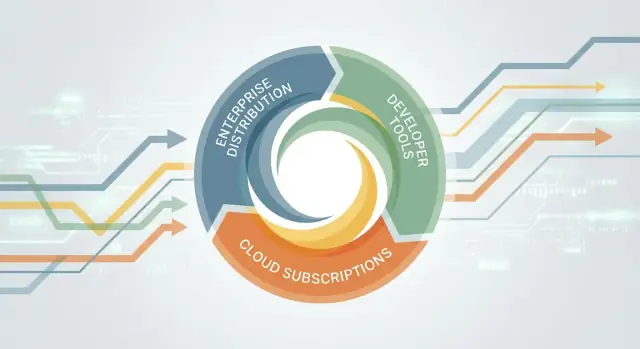
The Compounding Loop: A Simple Mental Model
“Compounding” in a software business isn’t mainly about quarterly revenue spikes. It’s about building a system where each cycle makes the next cycle easier and more valuable. Practically, that means three forces working together:
- Retention: customers keep using the product because it’s embedded in daily work.
- Expansion: usage spreads—more seats, more teams, more workloads, more features.
- Ecosystem pull: third parties (developers, partners, integrators) add value around the product, making it the default choice.
When those forces align, growth becomes less dependent on constant reinvention and more about reinforcing loops.
The three compounding engines we’ll use
This article looks at Microsoft through a simple “three-engine” lens:
- Enterprise distribution: getting into organizations at scale, then becoming the standard.
- Developer tooling: turning developers into multipliers who build on your platform and recommend it.
- Subscriptions (especially cloud): creating ongoing relationships where value increases over time, not just at purchase.
The point is not that Microsoft “won” because of one product. It’s that Microsoft repeatedly connected products into a compounding loop.
What this article is (and isn’t)
This is a strategy walkthrough, not a financial deep dive. We’ll stay at the level of incentives, buying behavior, and product packaging—how choices in licensing, toolchains, and platform design can make adoption easier and switching harder.
Why this matters for modern B2B SaaS and IT buyers
For product teams, compounding explains why “better features” isn’t always enough. The winners often reduce friction in adoption, expand naturally across an org, and attract complementary solutions.
For IT buyers, understanding compounding helps you spot when you’re entering an ecosystem that will shape future options—sometimes for the better (lower integration work, consistent security) and sometimes with trade-offs (higher switching costs, vendor dependence).
The rest of the article breaks down how Microsoft built these loops—and what to learn from them.
Enterprise Distribution: Becoming the Default Choice
Microsoft’s early compounding advantage wasn’t just “better software.” It was distribution: getting Windows and Office into organizations as the standard setup for everyday work.
Standard PCs made buying decisions repeatable
As companies standardized on PCs, enterprise IT started to look for repeatable, supportable choices: one operating system, one office suite, one set of file formats. That preference turned software selection from a constant debate into a policy decision.
Once a standard is written into procurement checklists, onboarding guides, help-desk scripts, and training materials, changing it becomes a project. Even before explicit “lock-in,” the simple weight of internal process pushes teams to stick with the default.
Preinstallation and OEMs put Microsoft on the desk first
A major accelerator was preinstallation. When PCs arrived with Windows already installed (through OEM relationships), Microsoft didn’t need to win every user one by one. It started the relationship at the moment the hardware entered the building.
That matters because most organizations don’t “adopt” an operating system the way they adopt a new app. They accept what arrives, then build processes around it—imaging, updates, security tools, and employee training.
“Default” removes adoption friction
Being the default reduces friction in quiet but powerful ways:
- New employees already know the tools, so training costs drop.
- IT can hire for common skills, and vendors can assume a baseline.
- Compatibility questions are easier: “Does it work on Windows?” becomes the first filter.
When the easiest path is also the most common, adoption becomes a series of small yeses rather than a big decision.
Broad distribution creates long-term negotiating power
Wide reach also changes the balance in enterprise negotiations. If a product is already embedded across departments, the vendor isn’t pitching a pilot—it’s discussing terms for something the business already relies on.
That negotiating power compounds over time: the more standardized the environment, the more valuable compatibility, support, and continuity become—and the harder it is for alternatives to justify the disruption required to replace the default.
Standardization and Switching Costs in Enterprise IT
Enterprise IT standardization is less about picking “the best tool” and more about minimizing friction across thousands of people. Once a company standardizes on an operating system, an office suite, and a set of admin tools, the organization begins to behave like a single platform—where consistency becomes a feature.
Compatibility: the hidden power of file formats
Compatibility sounds technical, but it’s really social. A document format is a promise that work will survive handoffs: from employee to manager, from legal to finance, from vendor to customer.
When most teams create and exchange the same types of files, the “default” tool gets reinforced. It’s not only that files open correctly—it’s that templates, macros, embedded comments, and version history behave predictably. That predictability lowers the cost of collaboration, and it quietly penalizes alternatives that require conversions or lose subtle formatting and metadata.
Network effects inside companies: shared workflows and training
Network effects don’t only happen between customers; they happen inside a single enterprise. Once teams share the same shortcuts, training materials, onboarding checklists, and internal “how-to” docs, the tools become part of the company’s operating rhythm.
A new hire learns a standardized workflow faster. Help desks solve issues once and reuse the fix. Power users create reusable assets—spreadsheets, add-ins, scripts—that spread across departments. The more the organization standardizes, the more valuable the standard becomes.
Switching costs are mostly operational (not financial)
License price is often the smallest part of a switch. The larger costs are:
- Change management: retraining staff, updating internal documentation, rewriting processes
- Downtime and productivity dips: “small” UI differences add up across hundreds of hours
- Risk: compatibility surprises, data migration errors, audit and compliance gaps
- Integration rewiring: connectors to identity, email, document management, and line-of-business systems
Even if a replacement is cheaper, the transition can introduce business risk that leaders can’t easily justify.
Incremental improvements preserve trust and continuity
Enterprises value continuity. When a vendor ships incremental improvements—new security features, better collaboration, smoother admin controls—without breaking core workflows, it preserves trust.
This is a compounding pattern: stability encourages standardization, standardization increases dependence, and dependable upgrades make renewal and expansion feel safer than starting over. Over time, the “cost to change” becomes less about any single product and more about disrupting the organization’s shared way of working.
Developer Tooling: Turning Builders into Multipliers
Microsoft’s most durable growth channel wasn’t an ad campaign or a sales script—it was developers choosing a toolchain and then bringing it with them from project to project.
When a developer builds something successfully on a platform, they rarely stop at one app. They reuse patterns, share snippets, recommend libraries, and influence what their team standardizes on. That creates a compounding effect: each “builder” can turn into a multiplier of future decisions.
Why developers are a distribution channel
Developers sit at the start of software demand. If the easiest path to shipping a working product runs through your stack, you don’t need to “sell” every project from scratch—your tooling becomes the default starting point.
This is especially powerful inside companies: a single developer’s preference can shape hiring (“we need .NET experience”), architecture (“we’re standardized on this framework”), and procurement (“we need these licenses to support the codebase”).
Lowering the cost to build
SDKs, APIs, and clear documentation reduce the friction between an idea and a working prototype. Good tooling does three things:
- Makes common tasks easy (templates, scaffolding, sensible defaults)
- Makes hard tasks possible (debugging, performance profiling, testing)
- Makes success repeatable (stable releases, predictable compatibility)
Over time, this lowers the perceived risk of choosing the platform.
A modern extension of this idea is “vibe-coding” and agentic development: tools that compress the path from intent to working software. Platforms like Koder.ai apply this by letting teams create web, backend, and mobile apps through a chat interface (with planning mode, snapshots, and rollback), while still supporting source-code export. The strategic parallel is the same: shorten feedback loops, make success repeatable, and developers naturally pull the tool into more projects.
Community as long-tail acquisition
Tutorials, sample projects, forums, and certifications keep attracting new builders long after a product launch. The “learning surface area” becomes a funnel: people discover the platform by trying to solve a specific problem.
Developer-friendly vs. developer-dependent
Being developer-friendly means your platform reduces effort and respects time. Being developer-dependent means the platform only works if developers do extra work to compensate for gaps. The former earns loyalty; the latter creates churn the moment a better alternative shows up.
Visual Studio and the Toolchain Effect
Visual Studio wasn’t just an editor—it was a productivity system that tightened the loop between “write code” and “see if it works.” When that loop gets shorter, teams ship faster, learn faster, and standardize on the tool that makes it feel effortless.
Shorter feedback loops: IDE + language + debugging
Visual Studio bundled the essentials that remove friction from daily work: code completion that understands your project, refactoring tools that reduce fear of change, and debuggers that make issues visible instead of mysterious.
The practical impact is less about features on a checklist and more about time-to-answer: How quickly can a developer reproduce a bug, inspect variables, step through execution, and validate a fix? When the tool makes those steps smooth, it quietly becomes the default.
Plug-ins, extensions, and marketplaces
Extensions turn an IDE into a platform. They let the community and third parties add support for frameworks, testing tools, cloud services, linters, database clients, and UI designers—without Microsoft building everything.
This creates a compounding effect: more extensions make the IDE more useful, which attracts more developers, which attracts more extension authors. Over time, the “best” workflow often becomes the one that integrates most cleanly inside the tool people already use.
Team workflows: the toolchain, not the single tool
Developer productivity is a pipeline: coding, source control, builds, tests, releases, and collaboration. Visual Studio’s advantage grew as it connected to the rest of the toolchain—version control integrations, build systems, test runners, and deployment workflows—so teams could standardize.
What “enterprise-ready” developer tools include
Enterprise teams typically expect:
- Policy-friendly configuration (proxies, certificates, managed updates)
- Integrated debugging and profiling for performance and reliability
- Security features (code scanning support, signed packages, access controls)
- Collaboration hooks (work item tracking, code review, CI/CD integration)
Once a company’s build and release routines are shaped around a toolchain, switching isn’t just “install a new IDE.” It’s retraining, re-integrating, and re-proving the workflow—exactly the kind of inertia that drives long-term adoption.
Licensing and Procurement: Making Renewals the Path of Least Resistance
Microsoft didn’t just sell software; it shaped how large organizations buy software. The licensing model became a quiet compounding engine: every renewal cycle reinforced the prior decision, expanded usage, and made alternatives feel like extra work.
Enterprise agreements: fewer decisions, more momentum
Enterprise Agreements (and later Microsoft Customer Agreements) simplify purchasing by turning many individual product buys into one negotiated contract. For procurement teams, that means fewer vendors to manage, clearer terms, and predictable timelines. For IT, it means standardized entitlements across departments.
That simplicity matters because “doing nothing” becomes a rational choice: if the contract already covers what people use, renewing is easier than re-evaluating dozens of tools under pressure.
Seat-based licensing rewards footprint expansion
Seat-based licensing aligns incentives toward broad deployment. Once an organization licenses a baseline number of users, the internal conversation shifts from “Should we buy this?” to “How do we get value from what we already paid for?”
Over time, teams add more seats, upgrade editions, and adopt adjacent products. This is compounding in slow motion: a larger licensed base increases the payoff of training, templates, and support processes—making the next expansion feel natural.
Compliance and audit readiness as sticky features
At enterprise scale, procurement isn’t only about price; it’s about risk. Centralized licensing, admin reporting, and clear audit trails reduce the fear of non-compliance. When a vendor helps you stay audit-ready—with documented entitlements and predictable renewal terms—switching isn’t just a migration project; it’s a governance project.
Bundling: less complexity for buyers, higher switching costs
Bundling suites can genuinely reduce tool sprawl: one contract, one vendor relationship, integrated services, fewer exceptions. But it also raises switching costs. Replacing one app is manageable; replacing a bundle that touches email, documents, identity, and security requires coordinated change across many teams—making renewal the path of least resistance.
From Perpetual Software to Subscriptions
Microsoft’s early growth leaned heavily on perpetual licenses: a large upfront sale, followed by occasional paid upgrades. That model rewards closing the deal and shipping the next version. Subscriptions flip the incentives. When revenue depends on staying useful every month, reliability, ongoing improvements, and customer outcomes stop being “nice to have” and become the business.
Why the shift changes incentives
With one-time sales, the biggest risk is failing to win the purchase. With subscriptions, the biggest risk is churn—customers quietly leaving at renewal time or gradually reducing seats. That changes priorities inside the company:
- Product teams focus more on continuous value (not just big releases).
- Support and service quality become tied directly to revenue.
- Security and compliance work moves from cost center to growth enabler.
For buyers, the shift also changes budgeting. Subscriptions often move spend from irregular capital outlays to predictable operating expense—easier to plan, but harder to “set and forget.”
The core subscription dynamics
A subscription business compounds when three forces work together:
- Retention: keeping customers year after year is the foundation.
- Expansion: growth from adding users, upgrading tiers, or adopting adjacent products.
- Usage growth: as the product becomes part of daily workflows, it feels more essential.
You can see the same mechanics in newer SaaS categories too—where pricing tiers and “expand paths” (more seats, more environments, more apps) are designed to be friction-light. For example, Koder.ai’s free/pro/business/enterprise tiers and built-in deployment/hosting options are explicitly set up to support land-and-expand: start small, then grow usage without rebuilding the workflow.
Customer success, support, and reliability as revenue drivers
Subscriptions make service quality measurable. Outages, poor onboarding, or slow issue resolution are no longer isolated incidents—they translate into renewal risk. This is where investments in customer success programs, enterprise support, and uptime engineering become directly monetizable.
It also encourages ongoing compatibility work: staying current with devices, operating systems, identity providers, and compliance requirements. For enterprise IT, that reduces friction and makes the renewal decision feel like the path of least resistance.
Subscription metrics to reference (without hype)
When discussing subscription businesses, it’s common to reference a few high-level metrics:
- Retention / renewal rate: Are customers staying?
- Churn: Who leaves, and why?
- Expansion (net revenue retention): Are existing customers spending more over time?
- Adoption and active usage: Do people actually use what they pay for?
You don’t need exact figures to understand the strategy: subscriptions reward companies that keep delivering value after the sale—and punish those that treat the contract as the finish line.
Cloud Subscriptions: Azure as a New Compounding Engine
Azure didn’t just give Microsoft a new product line—it changed the business mechanics. Instead of a one-time “install and forget” sale, cloud services create a living account: usage grows, configurations evolve, and the vendor is present in daily operations. That shift turns infrastructure into an ongoing relationship where retention and expansion can compound over time.
Why cloud adoption accelerated
Companies moved to cloud for three practical reasons that map neatly to enterprise incentives:
- Scalability and speed: teams can spin up environments in minutes rather than waiting for hardware cycles.
- Governance: centralized policy, monitoring, and access control are easier to standardize across departments.
- Cost model flexibility: shifting from capital expense to pay-as-you-go (or reserved capacity) lets finance align spend with demand—especially for variable workloads.
These benefits made cloud a default option for new projects, not just a migration target for old ones.
From infrastructure to recurring relationships
With cloud subscriptions, value is delivered continuously: uptime, performance, security updates, backup policies, and cost controls are part of the service, not a separate project. That creates more touchpoints where a customer can deepen commitment—adding databases, analytics, AI services, or disaster recovery—without reopening a fresh vendor search each time.
Azure’s model also supports land-and-expand behavior: start with a small workload, prove reliability, then standardize. As more workloads run in the same environment, the “mental cost” of choosing something else rises—even before any contractual friction kicks in.
The real glue: identity, security, and management
In practice, cloud “stickiness” often comes less from compute and more from the layers that sit above it: identity, security policies, device management, logging, and compliance reporting. Rather than repeat those mechanics here, we’ll unpack them in the dedicated section on identity, security, and management below.
Partners and marketplaces extend reach
Azure’s growth also compounds through partners: systems integrators, managed service providers, and ISVs that package repeatable solutions. The marketplace reduces procurement friction by letting buyers adopt vetted offerings within existing billing and governance. Each partner-delivered workload increases Azure usage, which attracts more partners—a reinforcing loop that scales beyond direct sales.
Bundling and Suite Economics: More Value, More Stickiness
Bundling is one of Microsoft’s quiet superpowers: sell a suite that’s “good enough” across many needs, and you reduce the number of vendors an IT team must evaluate, onboard, secure, and support. For buyers, that can feel like relief. For Microsoft, it increases share of wallet and makes the renewal conversation simpler.
Why suites reduce vendor sprawl
Every additional point solution adds contracts, security reviews, integrations, user provisioning, and a support path. A suite (think Microsoft 365 plus adjacent services) can replace several smaller tools with one admin surface, one identity plane, and fewer moving parts. Even if each component isn’t the category leader, the total cost of managing fewer products can outweigh feature gaps.
The cross-sell ladder: productivity → security → management → cloud
Microsoft often starts with end-user productivity (email, documents, meetings). Once those are entrenched, the natural next steps are:
- Security: protect the same users, devices, and data already in Microsoft apps.
- Device management: enforce policies and manage endpoints that access those apps.
- Cloud: host workloads where the identity, security, and governance policies already connect.
This creates a compounding path: each add-on both solves a real problem and increases the value of what’s already deployed.
The trade-off: simplicity vs. best-of-breed
Bundles can reduce complexity, but they also narrow optionality. Best-of-breed stacks may deliver stronger features or faster innovation, yet they require more integration work and a clearer operating model. Many enterprises split the difference: standardize on a suite for common needs, then selectively add point solutions where the business case is strong.
How to tell if a bundle is real value (not just lock-in)
A suite is earning its keep when you can point to measurable outcomes: fewer tools and contracts, faster onboarding/offboarding, reduced help-desk tickets, cleaner compliance reporting, and simpler incident response. If the bundle only “wins” because switching is painful, value will show up as workarounds, shadow IT, and rising dissatisfaction—not operational gains.
Identity, Security, and Management as the Glue
A big reason Microsoft products “stick” together in large organizations isn’t just feature overlap—it’s shared identity, security controls, and centralized management. Once those foundations are in place, adding another Microsoft workload often feels less like adopting something new and more like extending what IT already runs.
Identity as the connective tissue
Microsoft’s identity and access management (IAM)—think a single directory, single sign-on, and consistent role-based access—ties products together at the user level. When employees can use one account to access email, files, chat, devices, and cloud apps, friction drops.
For IT, the real benefit is control: onboarding and offboarding become policy-driven rather than tool-by-tool. The moment identity is centralized, the organization naturally prefers products that “speak” the same identity language.
Admin consoles that lock in habits (without feeling like lock-in)
Admin portals, policy engines, audit logs, and reporting are underrated reasons software remains adopted. They turn a product from “something people use” into “something IT can operate.”
Once administrators have built groups, conditional access rules, device compliance policies, retention settings, and dashboards, switching is no longer a simple comparison of end-user features. It becomes a migration of governance.
Security and compliance as accelerators
In enterprises, adoption often follows risk reduction. Centralized security posture—identity protection, device controls, data loss prevention, eDiscovery, and unified auditing—makes it easier to satisfy internal security teams and external regulators.
This creates a compounding effect: when one product improves the organization’s compliance story, adjacent products that integrate with the same controls are easier to approve. Procurement moves faster because security reviews have fewer unknowns.
Why governance drives expansion
“Governance features” sound boring, but they unlock rollouts at scale. The ability to set policies once, monitor continuously, and prove compliance through reporting often matters more than new end-user capabilities.
That’s how identity, security, and management become the glue: they turn an ecosystem into an operating model—and operating models are hard to replace.
Partners and Channels: Scaling Beyond Direct Sales
Microsoft didn’t win enterprise accounts by selling only from headquarters. A huge part of the compounding effect came from building an army of intermediaries—system integrators, resellers, managed service providers (MSPs), and consultants—who made Microsoft the “safe” and familiar choice inside boardrooms.
Partners as the trust layer
Large companies rarely adopt a platform because a vendor brochure is persuasive. They adopt because a trusted local partner is willing to put their name on the line: scoping the project, estimating risk, staffing it, and being accountable when something breaks. When those partners standardize on Microsoft technologies, their default recommendation often becomes Microsoft too—Windows/Office historically, and later Dynamics, Microsoft 365, and Azure.
Certifications and training as ecosystem fuel
Microsoft turned know-how into a scalable channel asset through certifications, training, and partner programs. Certifications do two things at once:
- They help customers shortlist vendors (“we need a certified team”).
- They encourage professionals to invest career capital in Microsoft tools, increasing supply of implementers.
That supply matters: the easier it is to hire people who already know the stack, the lower the perceived adoption risk.
Incentives that pay for momentum
Partners don’t just “recommend” software; they sell, implement, and operate it. Microsoft designed incentives across that lifecycle—margins on licenses, services revenue opportunities, and recurring income from managed operations.
The more a partner could earn by deploying and running Microsoft solutions, the more energy they put into pipeline creation, proof-of-concepts, and renewals.
Reducing risk for enterprises
For IT buyers, partners act as a risk buffer: they translate product capability into a working deployment plan, provide migration paths, and stay on-call after go-live. That reduces the internal cost of change—often the biggest barrier—and makes standardizing on Microsoft feel less like a bet and more like a managed project.
Lessons for Product Teams and IT Buyers
Microsoft’s compounding effect wasn’t magic—it was a series of choices that made adoption easier, usage broader, and renewal the default. Whether you’re building software or buying it, the same mechanics show up again and again.
What product teams can learn
Distribution is a product feature. If you can become the “default pick” through integrations, procurement fit, and clear onboarding, growth becomes less dependent on constant selling.
Developer empathy matters. Great tooling, docs, and predictable APIs turn individual builders into internal champions who pull the product into more teams and workflows.
Retention design isn’t just “add more features.” It’s making the product dependable, easy to administer, and hard to replace because it’s embedded in daily work—without trapping customers.
A useful benchmark here is whether your product reduces end-to-end delivery time in a measurable way. For instance, Koder.ai focuses on collapsing the build cycle—from idea to a deployed React + Go/PostgreSQL (or Flutter) app—through a chat-based workflow, plus operational primitives like snapshots and rollback. Whether you’re building dev tools or SaaS, that “time-to-first-value” focus is often what turns adoption into habit.
Common pitfalls to avoid
- Forced bundling can inflate short-term numbers but create resentment and invite churn once alternatives mature.
- Neglecting reliability is expensive: outages and security incidents break the trust that renewals depend on.
- Confusing pricing is a silent killer. If customers can’t forecast spend, they’ll cap usage or start shopping.
If you’re choosing a platform, ask
- Who becomes successful (users, admins, finance), and what do they need to say “yes” each year?
- How portable is your data and identity? What are the real switching costs (training, integrations, governance)?
- What does “all-in” cost over 3 years, including support and migration?
A simple compounding-loop checklist
- Clear first value in <30 minutes
- One-click expansion paths (more seats, teams, workloads)
- Admin controls that reduce IT workload
- Transparent packaging and renewal-friendly procurement
- Strong partner/community ecosystem
- Measurable outcomes tied to business metrics
If you’re building a product, consider adding a “compounding-friendly” operating layer early: exportable assets (so customers feel safe adopting), fast rollback (so admins fear changes less), and deployment/hosting options that reduce the last-mile friction. Those are the kinds of details that quietly turn a tool into a default.
FAQ
What does “compounding” mean in a software business (beyond revenue growth)?
In this article, compounding means building reinforcing loops where each cycle makes the next one easier:
- Retention: customers keep using it because it’s embedded in daily work.
- Expansion: usage spreads to more seats, teams, or workloads.
- Ecosystem pull: partners and developers add complements that make the platform more valuable.
The goal is to reduce reliance on constant reinvention and increase the “default” momentum of adoption and renewal.
How can I tell if a product has a real compounding loop?
Use a quick diagnostic:
- Retention: Is the product part of a daily workflow, and do renewals feel low-risk?
- Expansion: Are there natural reasons to add seats/teams/tier upgrades without a new buying cycle?
- Ecosystem: Are there credible third parties building integrations, extensions, or services that customers rely on?
If only one engine is strong (e.g., sales-driven distribution), growth tends to be more fragile.
Why is being the enterprise “default choice” so powerful?
“Default” reduces friction because it’s already assumed in processes:
- Procurement checklists and onboarding guides include it.
- Help-desk playbooks, training, and hiring align around it.
- Vendors and internal teams design compatibility around it.
Once something is operationalized at scale, replacing it becomes a coordinated change project, not a simple product swap.
Why are enterprise switching costs usually operational, not financial?
Most switching costs show up as operational disruption rather than license delta:
- Retraining and change management
- Workflow rewrites and documentation updates
- Integration rewiring (identity, email, document systems)
- Migration risk (data loss, compliance gaps, downtime)
A cheaper alternative can still lose if the organization can’t justify the transition risk.
How do file formats and compatibility create lock-in without explicit contracts?
File formats create collaboration expectations: templates, macros, comments, and version behavior must survive handoffs.
If conversions lose subtle details or break workflows, teams pay a “tax” every time they exchange documents. That ongoing tax often outweighs feature comparisons and nudges organizations back toward the dominant, most compatible standard.
Why are developers considered a distribution channel?
Developers influence what gets built and standardized because they:
- Choose the fastest path to ship (tooling, SDKs, docs)
- Carry preferences across projects and jobs
- Shape hiring requirements and architecture norms
If your stack makes success repeatable (debugging, testing, stable releases), developers become internal champions who pull the platform into more teams.
What made Visual Studio (and the broader toolchain) a compounding advantage?
A strong toolchain shortens the loop between writing code and validating results:
- Integrated debugging and profiling reduce time-to-answer.
- Refactoring and code intelligence reduce fear of change.
- Extensions/plug-ins let the ecosystem fill gaps and add niche workflows.
The practical outcome is team standardization: once builds, tests, and deployments are tuned around a toolchain, switching requires re-proving the whole workflow.
How do licensing and procurement models drive compounding?
Enterprise agreements and seat-based licensing make renewal and expansion feel “pre-approved”:
- One negotiated contract reduces repeated vendor evaluations.
- Broad entitlements shift the internal question to “how do we use what we already paid for?”
- Centralized reporting and audit readiness reduce compliance risk.
This turns renewal into the path of least resistance—especially when many departments rely on the same contract.
What changes when a company moves from perpetual licenses to subscriptions?
Subscriptions shift incentives from “close the deal” to “keep delivering value”:
- Churn becomes the core risk, so reliability and support matter more.
- Continuous improvements and compatibility work become revenue-protecting.
- Expansion paths (more seats, add-ons) matter because growth continues after initial purchase.
For buyers, it often means more predictable spend—but also a need to monitor adoption so you’re not paying for shelfware.
Why does cloud (e.g., Azure) create stronger compounding than traditional software?
Focus on the “glue” and the expansion surface:
- Identity and governance (SSO, policies, audit logs) make the platform operationally central.
- Land-and-expand is easier: start small, then add workloads without a new vendor search.
- Partners and marketplaces reduce procurement and implementation friction.
As more workloads share the same security and management plane, switching becomes a governance redesign—not just a hosting move.