

Create a Micro-SaaS Website With Minimal Pages and Clear Value
Learn how to build a micro-SaaS website with only the pages you need: clear messaging, simple structure, pricing, FAQs, and CTAs that convert.
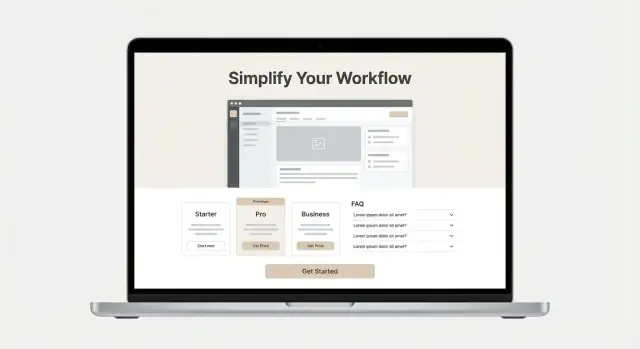
Start With One Clear Value Proposition
A minimal micro-SaaS site only works when visitors instantly understand what you do, who it’s for, and why it matters. Before you write pages or pick a template, lock in one clear value proposition you can repeat everywhere.
1) Define one problem (not a category)
Avoid broad labels like “analytics,” “automation,” or “AI.” Pick a single painful problem you can describe in everyday words.
Good: “Stop chasing teammates for status updates.”
Too vague: “Improve team productivity.”
2) Name the target user in plain language
Your best prospects should be able to self-identify in one glance. Use a job role or a real situation.
Examples:
- “For freelance designers who send proposals weekly”
- “For Shopify store owners handling returns alone”
- “For customer support leads managing a small team”
3) Write a one-sentence promise: outcome + time/effort saved
Use this formula:
“<Product> helps <target user> <achieve outcome> without <common headache>, in <time / effort saved>.”
Example: “AcmeNotes helps busy therapists write session notes in under 2 minutes, without copy-pasting templates.”
4) Pick 3–5 must-have features (and cut the rest)
Features are proof, not the headline. Choose only what directly supports the promise. If a feature doesn’t make the outcome faster, easier, cheaper, or less risky—save it for later.
A simple check: if you can’t tie a feature to the core problem in one sentence, it doesn’t belong on the minimal site yet.
5) Decide the one primary action
Every element should drive one primary next step (not five). Typical choices:
- Start a free trial
- Book a demo
- Join a waitlist
Once you pick it, keep it consistent across the site and in your header button. Secondary links are fine, but they should never compete with the main action.
Choose the Minimal Page Set (What to Include and Skip)
A micro-SaaS site should answer the questions that block a decision. If a page doesn’t reduce uncertainty or help someone take the next step, it’s noise.
The minimal set (works for most)
Home, Pricing, FAQ, and Contact cover nearly every early-stage need.
- Home → “What is this, who is it for, and what do I get?”
- Pricing → “How much does it cost, what’s included, and which plan fits me?”
- FAQ → “What are the edge cases, constraints, and common worries?”
- Contact (optional) → “What if I have a question, need a demo, or run into an issue?”
If you already have in-app support (chat widget, helpdesk link), “Contact” can be as small as an email address in the footer.
When a single-page site is enough
A one-page SaaS website is often enough when:
- You have one core use case and one buyer type.
- Pricing is simple (1–2 tiers, no long comparison needed).
- You don’t need heavy compliance copy.
In that case, structure the page as: problem → promise → proof → pricing → FAQ → CTA.
When you should split into separate pages
Create separate pages when any section becomes “scroll fatigue”:
- Multiple pricing tiers, add-ons, or annual vs monthly details.
- FAQs that are essential for purchase (security, data handling, integrations).
- You want cleaner ad/SEO destinations (e.g., /pricing for intent traffic).
Legal pages: add only what you must
Add /privacy and /terms only if required by your payment provider, analytics/email tools, or customer expectations. Keep them plain-English and short; link them in the footer.
Pages to skip (until you have a reason)
Avoid extra pages that don’t support decisions—especially a generic “About.” Create it only if you need it to: explain credibility (regulated niche), clarify who’s behind the product, or meet procurement requirements.
Design a Simple Homepage That Explains and Sells
A minimal SaaS landing page works best when it guides a visitor through one clear story: what this micro-SaaS does, who it’s for, and what to do next—without making them hunt for meaning.
Start with a focused hero section
Your hero should do four jobs, immediately:
- Headline: what you help people do (not what you are)
- Subhead: who it’s for + how it works at a high level
- Primary CTA: one action (e.g., “Start free” or “Book a demo”)
- One visual: a single screenshot or simple mock that proves the product exists
Keep the hero tight. If you need a paragraph to explain it, the structure is off.
Use a problem-to-solution flow
After the hero, move in a straight line:
- The pain: name the frustrating situation your customer recognizes.
- Your approach: explain the simplest “how” in 2–3 sentences.
- The result: describe the outcome in plain language (time saved, fewer errors, faster turnaround).
This flow supports your SaaS value proposition without forcing visitors to assemble it themselves.
Benefits first, features second
Lead with 3–5 short benefits (the “so what”). Then add a small features section that supports those benefits—no full spec sheet. Think: “automatically sends reminders” (feature) backing up “stop chasing people for updates” (benefit).
Make it scannable—and repeat the CTA
Use clear headings and short blocks of text. After any major section (benefits, how it works, or proof), repeat the same CTA so the next step is always one scroll away.
If you want an even simpler option, you can model your homepage after a one-page SaaS website and link out only to /pricing and /faq.
Write Copy That Makes the Value Obvious in 10 Seconds
If a visitor can’t explain what you do after a quick glance, they’ll default to “I’ll look later.” Your job is to make the offer instantly clear: who it’s for, what outcome they get, and why your approach is different.
Use a simple headline formula (who + outcome + how)
Pick one primary audience and one measurable result. Then add the mechanism.
Examples:
- For {who}: {outcome} without {painful alternative}
- {Outcome} for {who} using {how}
- Automate {task} for {who} in {time}
Headline ideas you can adapt:
- “Weekly KPI reports for Shopify stores—generated automatically from your data.”
- “Book more client calls—follow-ups that send themselves from Gmail.”
- “Close your books faster—categorize transactions with rules you control.”
Write a subheadline that removes ambiguity
Your subheadline should answer: What is it? For whom? Avoid clever wording.
Example template:
A lightweight {product type} for {specific user} that {primary job}, so you can {benefit}.
Add 3–5 benefits with measurable language
Skip generic claims like “easy” or “powerful” unless you explain what makes it easy.
- Cut {task} time from ~{before} to ~{after} with automated imports.
- Reduce errors by {x}% using validation checks before you send.
- Get results in {timeframe} with a guided setup and templates.
- Track {metric} in one view instead of juggling {tools}.
- Stay compliant with export-ready records for {system/standard}.
Add a tiny “How it works” in 3 steps
Keep it concrete and action-based.
- Connect your {tool/data source} (takes ~{minutes}).
- Set rules for {what the product decides/does}.
- Review & ship: get {output} on {schedule} or on demand.
Before you move on, read your hero section out loud. If it sounds like it could describe five other tools, it’s still too vague.
Show the Product With One Strong Visual (Not a Gallery)
A micro-SaaS site doesn’t need a carousel of screenshots. One strong visual can do the job better: it reduces decision fatigue and forces you to show the “aha” moment that matches your promise.
Pick one visual that proves the main benefit
Choose either:
- One crisp screenshot (best for simple tools with a clear dashboard)
- One short demo GIF/video loop (best for workflows, automations, or “before → after” results)
Whatever you pick, make sure it directly supports your headline. If you claim “turn meeting notes into tasks,” your visual should show that exact transformation—not a settings screen.
Annotate with 2–3 outcome-focused callouts
Add two to three small callouts on top of the visual. Keep them benefit-led and specific:
- “Auto-detects action items”
- “Assigns owners + due dates”
- “Syncs to your task tool in one click”
Avoid labeling UI parts (“This is the sidebar”). The callouts should tell visitors what they gain.
Show the workflow, not just the UI
A single image can still show motion and progress. Frame your visual around a mini workflow:
- Input → Processing → Output
For example, show a document going in on the left and the finished result on the right. This helps non-technical buyers understand value instantly.
Optimize for speed and clarity
Heavy visuals slow down the page and hurt conversions.
- Export screenshots at the exact size you display.
- Use modern formats (like WebP) and compress aggressively.
- Keep GIFs short; consider a lightweight MP4 loop if the file gets big.
Add alt text that describes what users see and gain
Alt text should be descriptive and useful, not stuffed with keywords. Example:
“Dashboard showing weekly churn trend and an alert highlighting the top cancellation reason.”
That tells both what it is and why it matters.
Build a Pricing Page That Helps People Decide
A good pricing page doesn’t “sell harder”—it makes the decision easier. The goal is clarity: what it costs, what you get, and what happens next.
Keep tiers simple (and explain the difference)
For a micro-SaaS, complexity usually hurts conversion. Pick one of these structures:
- Free trial → one paid plan (best when your product fits most customers)
- Two plans max (good when you have clear “Solo vs Team” needs)
- Free plan only if you can support it and it leads to paid upgrades
Whatever you choose, spell out exactly what changes between tiers. Avoid vague labels like “Pro features.” Instead, use concrete differences such as:
- Limits (projects, seats, automations, usage)
- Key features (integrations, exports, advanced settings)
- Support (email vs priority, SLA if relevant)
Make the recommended option obvious—without tricks
It’s fine to highlight one plan as “Recommended,” especially if it matches your ideal customer. Keep it honest:
- Highlight the plan that fits most users
- Don’t hide essential features behind higher tiers
- Don’t use confusing price anchoring or fake discounts
Answer objections right on the page
Place short, skimmable answers near the pricing table so people don’t have to hunt:
- Cancel anytime (and how)
- Refund policy (plain language)
- What happens after the trial
- Billing details (monthly vs annual, taxes/VAT, invoices)
Match your CTA to your funnel
Use a single primary action that matches the next step:
- If you have a trial: “Start free trial”
- If you require a demo: “Book a demo”
- If it’s self-serve: “Create account”
Keep the CTA wording consistent with your homepage and signup flow so users feel they’re on a straightforward path—not being redirected into something unexpected.
Create an FAQ Page That Reduces Friction
A good FAQ page isn’t a dumping ground for leftover details. It’s a decision-helper: it answers the objections people hesitate to ask on a sales call, and it prevents the wrong customers from buying.
Start with real pre-sale questions (not guesses)
Before writing anything, collect the top 10 questions prospects ask before they sign up. Pull them from:
- Sales and onboarding emails
- Support tickets (even from a previous product)
- Reddit, G2 reviews of competitors, and niche forums
If you can’t find 10, you probably haven’t talked to enough potential users yet.
Keep answers short, and earn the click
Aim for 2–5 sentences per answer. Only link to longer docs when it truly helps someone evaluate (not when you want to avoid explaining).
Example: “Yes—supports Slack and Zapier. For the full list and setup steps, see /docs/integrations.”
Cover the questions that block buying
Most micro-SaaS buyers have the same “can this work for me?” concerns. Make sure your FAQ addresses:
- Setup time: what’s required, what’s optional, typical time-to-first-result
- Integrations: the 3–5 tools your audience expects; be specific
- Security basics: where data is stored, encryption, backups, access controls (plain language)
- Billing: refunds, trials, invoices, cancellations, and what happens when a payment fails
Add “Who it’s for / not for” to reduce mismatches
This is one of the highest-leverage FAQ entries. It builds trust and reduces churn.
- For: “Solo consultants who need client-ready reports in minutes.”
- Not for: “Teams that require on-prem hosting or custom procurement workflows.”
Place a CTA after the most convincing answers
After you’ve answered setup time and “who it’s for,” add a simple next step:
Ready to try it? Go to /pricing or /signup.
Add Trust Signals Without Overclaiming
People don’t just buy features—they buy confidence that your micro-SaaS will work for them, and that you’ll be around if something goes wrong. The trick is to build trust with evidence you can stand behind, not hype.
Use social proof you can verify
Start with the easiest proof to validate:
- Customer quotes with a real name, role, and company (or “Name, Role” if they request privacy). Keep them specific: “Cut weekly reporting from 2 hours to 20 minutes.”
- Tiny case snippets (3–5 sentences) describing the before/after and the use case.
- Metrics you can back up (e.g., “1,200 reports generated”) rather than vague claims like “10x productivity.”
- Logos only with permission. If you can’t get explicit approval, skip it.
If you’re early-stage, you can still communicate momentum—just be precise. “Built for freelance accountants” is safer than “Trusted by accountants everywhere.” “Used by 12 teams” is fine if it’s true.
Add basic credibility signals
A minimal SaaS landing page can feel anonymous. Fix that with a few lightweight details:
- A founder name (and optionally a short bio)
- A clear contact method (email or a simple form)
- A location if it helps (optional)
You don’t need a big “About” page; a short block in the footer often works.
Cover security and privacy without big promises
Include the basics people look for: data ownership, backups, and how you handle personal data. If you have a /privacy and /terms page, link them in the footer.
Avoid overreaching statements like “bank-grade security” unless you can explain what that means. Simple, accurate phrasing builds more trust than grand claims.
Make CTAs and Contact Options Simple and Consistent
A micro-SaaS site works best when every page answers one question: “What should I do next?” If your buttons compete (Start Trial vs. Book Demo vs. Contact vs. Subscribe), visitors pause—and many leave.
Pick one primary CTA (and repeat it everywhere)
Choose one action you want most visitors to take:
- Start free trial (best when self-serve onboarding is ready)
- Book a demo (best for higher price points or complex setups)
- Join the waitlist (best pre-launch)
Use the same label, color, and placement across pages: top navigation, hero section, and near the end of each page. Consistency builds confidence and reduces decision fatigue.
Use a secondary CTA only when it’s truly different
A secondary CTA is useful only if it serves a different audience with a different intent—typically “Contact sales” or “Email us”. Keep it visually quieter (outline button or text link) so it doesn’t steal attention from the primary CTA.
Good pairing examples:
- Primary: Start free trial · Secondary: Contact sales
- Primary: Book a demo · Secondary: Try the product (only if both paths are real and supported)
Keep contact options simple—and set expectations
Your contact page can be minimal and still reassuring:
- A short form (name, email, message)
- A direct email address
- One clear promise: “We reply within 1 business day.”
That response-time line does more than a long “support” paragraph.
Automate confirmation and next steps
After any submission (trial, demo, or contact), show a confirmation message and send an email that answers:
- “What happens next?”
- “When should you expect a response?”
- “What should you do now?” (e.g., read /faq, prepare 2–3 details for the demo)
If you’re using a waitlist, explain the process
Don’t just collect emails. Add one sentence near the waitlist CTA:
- “We’ll email you when your spot opens (usually within 2–3 weeks).”
- “Early access users get onboarding help and a discounted plan.”
Clear CTAs plus clear follow-through make a small site feel dependable—and make conversion easier without adding more pages.
Choose Tools and Build Fast (Without Overengineering)
Your website is a sales tool, not a long-term engineering project. The goal is to ship something clear, fast, and easy to update—then improve it based on real usage.
Pick a lightweight stack that matches your reality
Choose the simplest option that you (or your team) can maintain without friction:
- Static site (fastest, cheapest, hardest to “break”): great if pages rarely change.
- No-code: great if you want to edit copy and sections without touching code.
- Minimal CMS: useful if multiple people will publish updates or you expect frequent revisions.
A good rule: if you’re already shipping a product, don’t take on a whole new web stack “just because.” Use what you can confidently update in 10 minutes.
If you’re trying to go from idea → working app → marketing site quickly, a vibe-coding platform like Koder.ai can compress the build phase: you can describe the product in chat and generate a React web app with a Go + PostgreSQL backend, then export the source code, deploy, and iterate. The same “minimal pages, clear CTA” principles still apply—you’re just removing weeks of setup work.
Use templates—then customize the parts that actually sell
Templates save time, but they also make many SaaS sites look identical. Keep the template structure, but tailor the two sections visitors judge you by immediately:
- Hero section: a clear headline, one sentence on who it’s for, and a single primary CTA.
- Pricing section/page: simple plan names, a short “best for” line, and a direct path to start.
Everything else (feature grids, animations, fancy transitions) is optional and often slows you down.
Build for mobile and accessibility from day one
Most visitors will see your site on a phone, and many will skim. Before you publish, check:
- Font sizes that don’t require zooming
- Buttons that are easy to tap (not tiny text links)
- High contrast for readability
- Keyboard navigation for forms and CTAs
If you want a quick sanity check: open the site on your phone, hold it at arm’s length, and see if the main CTA is still obvious.
Track only what you need (and nothing you don’t)
You don’t need a complex analytics setup to learn what’s working. Track a small set of events:
- Homepage CTA clicks (e.g., “Start free”)
- Pricing page visits and plan button clicks
- Sign-up completion (conversion)
This keeps decisions grounded without turning your site into a tracking project.
Keep load times fast by default
Speed is part of clarity. A minimal site should feel instant:
- Compress images before uploading
- Avoid heavy scripts and large UI libraries unless they’re truly necessary
- Limit third-party widgets (they often add seconds)
Fast pages reduce bounce, especially on mobile connections—and they make your product feel more trustworthy before anyone even reads your copy.
Measure, Test, and Improve the Minimal Site
A minimal site is only “done” when it reliably turns the right visitors into activated users. The goal isn’t more pages—it’s a cleaner path from first impression to meaningful product use.
Define success as a simple funnel
Pick a few metrics that reflect your onboarding reality, not vanity traffic. A practical baseline is:
Visits → CTA clicks → signups → activated users
“Activated” should be a concrete moment (e.g., created first project, connected an integration, exported a report). If you don’t define activation, you’ll optimize for the wrong wins.
Track the actions that explain why people drop off
Set up events for key actions so you can pinpoint friction. At minimum, track:
- Pricing click (from homepage)
- Trial start / signup submit
- Contact form submit (or email click)
This tells you whether the problem is clarity (few CTA clicks), confidence (many pricing views but few trials), or onboarding (signups without activation).
Run small copy tests that change outcomes
Keep tests lightweight: one change at a time, measured over a consistent time window. Good candidates:
- Homepage headline (value clarity)
- CTA text (intent and commitment level)
- Pricing phrasing (e.g., “No credit card” placement, annual discount wording)
If you need inspiration, keep a short swipe file of your own options and test the top two.
Ask visitors what stopped them
Add a one-question prompt on key pages (pricing, signup, or exit intent): “What stopped you from starting today?” Or send a short post-visit survey to new signups who didn’t activate.
Build a simple improvement loop
Schedule one focused upgrade per week: rewrite one section, tighten one FAQ answer, or adjust one CTA. Small, consistent iterations compound—and your minimal site stays minimal while getting sharper.
Launch Checklist and Next Steps
A minimal micro-SaaS site should feel “done” quickly—then improve based on real usage. Before you hit publish, run this checklist to make sure the essentials are covered and nothing important is missing.
Quick launch checklist (15–30 minutes)
Pages
Make sure your header links point to the core decision pages:
- /pricing
- /faq
- /contact
If you collect any personal data (even email signups), add a small footer with legal links:
- /privacy
- /terms
Copy
Read your homepage hero section out loud. A visitor should understand:
- Who it’s for
- What problem you solve
- The result they get
- What to do next (primary CTA)
Also check that your buttons use the same wording everywhere (for example: “Start free trial” or “Get started”—pick one).
Visuals
Confirm you’re showing one strong product visual (or one short demo) that matches your main promise. If your screenshot doesn’t clearly show the outcome, swap it for something more obvious (a before/after, a generated report, a dashboard with a highlighted metric).
CTAs and contact options
- Your primary CTA should appear on the homepage at least twice (top + near the end).
- /contact should be easy: a simple form or email is enough.
- If you’re not ready for live chat, don’t add it—use an email promise like “We reply within 1 business day.”
Speed and tracking
- Test on mobile. If anything feels slow or cramped, fix that first.
- Add basic analytics and set up one or two key events (pricing page view, signup, trial start).
Optional: 2–3 blog topics that actually match intent
If you want search traffic, start with a small set of posts tied to “ready to buy” questions. Examples:
- “How to [achieve outcome] in [tool/workflow] (without [common pain])”
- “Best way to [do task] for [audience]: a simple checklist”
- “Template: [deliverable] for [audience] (free download)”
Keep posts focused and link naturally to /pricing and /faq.
Next steps after launch (what to prepare)
If users ask “how does this work?”, don’t rewrite the whole site—add one link to a short product tour or help doc. This can be a lightweight page (or even a single doc) you share from /faq or after signup.
Then review your analytics weekly: which page is losing people, which questions repeat, and which promise gets clicks. Small edits—headline clarity, one better screenshot, a clearer price explanation—usually beat big redesigns.
FAQ
How do I write a clear value proposition for a micro-SaaS website?
Start with one sentence that covers three things: the problem, the specific user, and the promised outcome.
Use: “{Product} helps {target user} {achieve outcome} without {common headache}, in {time/effort saved}.” Then reuse that exact wording on your homepage hero, pricing page, and signup flow.
What pages should a minimal micro-SaaS site include?
For most early-stage micro-SaaS products, the minimal set is:
- / (Home): what it is, who it’s for, and the primary CTA
- /pricing: cost, what’s included, which plan fits
- /faq: objections, constraints, edge cases
- /contact (optional): a simple way to reach you (or just an email in the footer)
Add more pages only when they reduce uncertainty or support a clear traffic goal.
When is a one-page SaaS website enough?
A one-page site is enough when you have:
- One main use case and one buyer type
- Simple pricing (1–2 tiers)
- No heavy compliance or procurement needs
A practical layout is: problem → promise → proof → pricing → FAQ → CTA.
When should I split content into separate pages instead of one long homepage?
Split into separate pages when the scroll becomes work—especially for decision-heavy sections.
Common triggers:
- Pricing needs detail (tiers, add-ons, annual vs monthly)
- FAQs are essential (security, data handling, integrations)
- You want clean destinations for intent traffic (like /pricing)
If a section is critical and long, give it its own page.
How do I choose the right primary CTA for my micro-SaaS site?
Pick one primary action and make everything support it.
Good defaults:
- Start free trial (self-serve onboarding is ready)
- Book a demo (higher price or complex setup)
- Join the waitlist (pre-launch)
Keep the CTA label consistent across the header, hero, pricing, and footer so visitors never have to re-decide what to do next.
What should my homepage hero section include?
Your hero should answer in seconds:
- What you help people do (headline)
- Who it’s for + how it works (subhead)
- One primary CTA
- One visual that proves the main benefit
If you need a full paragraph to explain it, tighten the promise or narrow the audience.
How do I balance benefits vs features on a minimal SaaS landing page?
Lead with benefits (outcomes) and use features as proof.
A simple structure:
- 3–5 benefits with measurable language (time saved, fewer errors, faster turnaround)
- A short features block that directly supports those benefits
If you can’t connect a feature to the core promise in one sentence, leave it off the minimal site for now.
How do I show the product without adding a big screenshot gallery?
Use one strong visual that matches your headline and shows the “aha” outcome.
Options:
- One crisp screenshot (simple dashboards)
- One short loop (workflows, automations, before → after)
Add 2–3 callouts focused on outcomes (not UI labels), and keep the file lightweight so it doesn’t slow down the page.
What makes a good pricing page for a micro-SaaS?
Keep pricing simple and decision-friendly:
- Trial → one paid plan, or two plans max
- Clear differences (limits, key features, support)
- Objections answered near the table (cancel anytime, refunds, billing details, what happens after trial)
Highlight a “Recommended” plan only if it honestly fits most of your ideal customers.
Do I need Privacy Policy and Terms pages for a minimal micro-SaaS site?
Include only what you must, and keep it readable.
- Add /privacy and /terms if required by your payment provider, analytics/email tools, or customer expectations.
- Link them in the footer.
- Avoid vague claims like “bank-grade security” unless you explain specifics.
For many micro-SaaS sites, plain-English basics (data handling, backups, ownership) are enough to build trust without overpromising.