

Modern HTTPS Deployment: Adam Langley and TLS Improvements
A plain-English story of Adam Langley’s TLS work and the shift to HTTPS-by-default, plus habits for modern HTTPS deployment: auto certs, headers, and rotation.
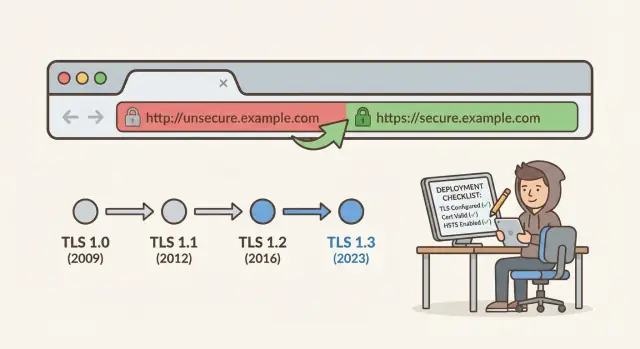
Why HTTP stopped being acceptable
Plain HTTP is like sending a postcard through the mail. Anyone who handles it along the way can read it. Worse, they can sometimes change it before it reaches the other side. That’s not a rare edge case. It’s a normal risk whenever traffic crosses Wi-Fi networks, office routers, mobile carriers, or shared hosting.
What people lose isn’t just “privacy.” They can lose control. If someone can read traffic, they can collect logins, session cookies, emails, and form entries. If someone can change traffic, they can inject ads, swap a download for malware, or quietly redirect payments. Even a simple contact form can reveal names, phone numbers, and business details that visitors didn’t mean to share with strangers.
“Just a small site” isn’t a safe zone. Attackers don’t pick targets one by one. They scan and automate. Any HTTP page is an easy opportunity for cookie theft, fake login boxes, content injection that damages trust, and redirects to look-alike sites.
Here’s a small, realistic example: someone checks a cafe menu site on public Wi‑Fi. If that page loads over HTTP, a nearby attacker can alter it to add a “special offer” button that installs a shady app. The owner may never see it, but customers will.
That’s why the goal of modern HTTPS deployment is simple: make protection the default. HTTPS shouldn’t be a “security project” you schedule later. It should be the starting point for every environment, every domain, and every release, so users get encryption and integrity without having to think about it.
Adam Langley’s role in pushing safer TLS
Adam Langley is one of the best-known names behind the quiet security work done in browser teams, especially at Google on Chrome. That mattered because browsers are gatekeepers of the web. They decide what “safe enough” looks like, what gets warnings, and what old options get turned off.
When you type a site address, your browser and the server do a short hello conversation before any real content loads. They agree on an encrypted connection, the server proves its identity with a certificate, and the browser checks that proof before it shows you a page you can trust.
For most people, that handshake feels like magic, but it used to be fragile. If either side allowed outdated settings, attackers could sometimes downgrade the connection or take advantage of older, weaker behavior.
Langley helped push improvements that made the secure path the easy path, including work that influenced how modern TLS is designed and rolled out in browsers. He also backed ideas that made mis-issued or suspicious certificates harder to hide, shifting HTTPS from “hope the system works” to “verify and monitor the system.”
Small protocol and policy changes can produce huge safety wins. You don’t need to understand the cryptography math to feel the outcomes: fewer chances to fall back to weak options, faster secure connections so HTTPS feels “free,” clearer certificate checks, and stronger defaults that reduce human error.
That shift is a big reason modern HTTPS deployment became the default expectation. The browser stopped treating HTTPS as a bonus and started treating it as the baseline, which pushed servers, hosts, and deployment tools to follow.
TLS changes that made HTTPS easier to trust
HTTPS became normal partly because TLS got safer by default and less painful to run. The details can get deep fast, but a few changes made a practical difference for everyday teams.
Safer sessions, even if a key leaks
Forward secrecy means this: if someone steals your server’s private key tomorrow, they still shouldn’t be able to decrypt traffic they recorded last month. Each connection uses short-lived keys that are thrown away after the session.
Operationally, this nudges you toward key hygiene: regular rotation, sensible certificate lifetimes, and fewer “we’ll replace it later” situations. It also reduces the blast radius of a leak, because old captured traffic isn’t automatically exposed.
Faster, simpler, harder to misconfigure
TLS handshakes got faster and simpler over time. Speed mattered because it removed a common excuse to avoid HTTPS and reduced the temptation to keep risky performance hacks.
TLS 1.3 was also a cleanup. It removed many old choices that were easy to get wrong and easier to attack. Fewer knobs means fewer accidental weak settings.
Certificate Transparency helped trust in a different way. It made it easier to spot suspicious certificates issued for a domain, so bad or mistaken issuance is more likely to be noticed early.
Browsers reinforced all of this by nudging the ecosystem toward safer defaults. Warnings got louder, insecure options got disabled, and “secure by default” became the path of least resistance.
If you’re shipping an app on a custom domain, these improvements mean you can spend less time hand-tuning crypto and more time on the basics that actually prevent outages and incidents: automatic certificate renewal, sane security headers, and a clear plan for key and certificate rotation.
How HTTPS became the default expectation
For years, HTTPS was treated like an upgrade: nice to have for logins and payments, optional for everything else. That mindset broke when browsers started treating plain HTTP as a risk, not a neutral choice. Once the address bar began to warn people, users didn’t need to understand TLS to feel uneasy. They just saw a red flag and left.
Search and platform policies added pressure. Teams learned that “we will add HTTPS later” turns into support tickets, lower conversion, and awkward questions from partners. Even internal tools started to feel wrong over HTTP, because the same network risks apply whether the app is public or behind a VPN.
The result is a new baseline: encryption by default, certificates that renew themselves, and monitoring that catches problems before customers do. The big change isn’t a single feature. It’s a cultural shift. HTTPS is now part of “the app works,” like backups or uptime.
In practice, “expected” usually means:
- Every environment uses HTTPS, not just production.
- Certificate renewal is automatic, with alerts if it fails.
- You track expiry dates and handshake errors as normal metrics.
- You review TLS and redirect settings when you change domains, CDNs, or load balancers.
- There’s a clear owner for TLS and certificates, not “whoever has time.”
A common failure mode looks like this: a team launches a marketing site on a custom domain. The site loads, but the certificate chain is wrong, so some browsers show warnings. Even if most visitors can click through, trust is gone. With automation and monitoring, this becomes a non-event: the right cert is issued, renewed on schedule, and an alert fires if anything drifts.
Security isn’t a one-time setup. It’s a habit you keep every time you deploy, rotate infrastructure, or add a new domain.
Step-by-step: set up automatic certificates
Automatic certificates are the difference between “HTTPS works today” and an HTTPS setup you can trust next month. The goal is straightforward: every hostname gets a cert, renewals happen without people, and you find out quickly when something breaks.
1) Start with a full domain inventory
Write down every domain and subdomain your users might hit, including “www”, API hosts, and any tenant or preview subdomains. Decide which ones must be covered now, and which ones you can block or redirect.
2) Choose how you will prove domain control
Most teams use ACME (the protocol behind popular auto-issuing CAs). You typically pick one of two checks:
- HTTP challenge: your server answers a special file over plain HTTP. Simple, but you must control port 80 and routing.
- DNS challenge: you add a short-lived DNS record. Better for wildcard certs and locked-down networks, but it requires DNS automation.
Pick the method that matches how your DNS and routing actually work, not how you wish they worked.
3) Automate renewal and test it before production
Set renewal on a schedule (for example, a daily job) and test using a staging or dry-run mode first. Confirm the job still works after a deploy, a config change, and a restart. A renewal process that only works on your laptop isn’t a process.
4) Decide where TLS ends
TLS can terminate at the edge (CDN), at a load balancer, or inside the app server. Keep it consistent. If you terminate at the edge, make sure the connection from edge to origin is also encrypted, especially for logins and APIs.
5) Add logs and alerts for the boring failures
Track renewals, renewal errors, and upcoming expiry. A practical rule is to alert at 30 days, 7 days, and 1 day. If your API cert fails to renew because a DNS token update stopped working, you want the alert on day one, not during an outage.
Secure headers you should set with HTTPS
HTTPS encrypts traffic, but the browser still needs guidance on what’s allowed and what isn’t. That’s what security headers do. Set them at the edge (load balancer, reverse proxy, hosting config) so they ship with every deploy and don’t depend on a specific app build.
A small set that rarely causes surprises:
- Strict-Transport-Security (HSTS):
max-age=31536000; includeSubDomains(addpreloadonly when you’re sure) - X-Content-Type-Options:
nosniff - Referrer-Policy:
strict-origin-when-cross-origin - X-Frame-Options:
DENY(orSAMEORIGINif you truly need framing) - Permissions-Policy: disable what you don’t use (for example, camera, mic, geolocation)
HSTS needs extra care. Once a browser learns it, users will be forced onto HTTPS for that domain until the max-age expires. Before you turn it on, confirm that every redirect goes to HTTPS (no loops), all subdomains are HTTPS-ready if you plan to use includeSubDomains, and your certificate coverage matches your domain plan (including www and API subdomains).
Content Security Policy (CSP) without breaking your app
CSP is powerful, and it’s also the header most likely to break logins, payment pages, analytics, or embedded widgets. Roll it out in steps: start with a reporting-only mode in staging, watch what would be blocked, then tighten rules gradually.
A practical example: if your app loads a third-party auth widget and a couple of script bundles, a strict CSP can block the auth flow and make sign-in fail only on certain pages. Catch that in staging by testing the full login journey, password reset, and any embedded content.
Keep header settings next to deployment configuration, in the same place you manage TLS and domains. If you use a platform like Koder.ai to deploy a custom domain, treat headers as part of the release checklist, not something hidden inside application code.
Rotation plans that do not fall apart
A rotation plan keeps security from turning into a calendar reminder everyone ignores. It also helps prevent the 2 a.m. outage when a certificate expires or a key leaks.
Start by being clear about what you rotate. Teams often focus on TLS certificates, but the private key matters just as much, and so do the secrets behind the app.
A typical rotation list includes TLS certificates and their private keys, API keys and webhook signing secrets, database passwords and service accounts, session signing keys and encryption keys, and third-party tokens (payments, email, analytics).
Next, set ownership and a simple schedule. Pick one person (or role) who is accountable, and one backup. Make the schedule realistic: frequent enough to reduce risk, not so frequent that people skip it. When you can, prefer short-lived credentials that renew automatically, and write down the few exceptions that can’t be short-lived yet.
A rotation plan only works if you can prove it worked. Treat each rotation like a small deployment: verify the new value is in use, and confirm the old value is no longer accepted.
A short runbook helps keep it repeatable:
- Create the new credential and store it in the approved secret system.
- Deploy the change safely (supporting both old and new during a brief overlap).
- Verify with a real check (login, API call, handshake, database query).
- Revoke the old credential and confirm it no longer works.
- Record what changed, why, and who approved it.
Finally, practice failure. Bad rotations happen: wrong certificate chain, missed intermediate, a typo in a secret name. Have a rollback option that is quick and boring. If you’re deploying with a platform that supports snapshots and rollback (like Koder.ai), rehearse restoring the last known good version and re-checking the TLS handshake. That habit turns modern HTTPS deployment from a one-time setup into a stable routine.
Common HTTPS and TLS mistakes teams still make
Even with modern tools, teams still get tripped up by a few repeat offenders. Most aren’t “hard crypto” problems. They’re everyday habits that turn a secure setup into a fragile one.
Mixed content is the classic example: the page loads over HTTPS, but a script, image, font, or analytics tag still comes over HTTP. Browsers may block it, or worse, load it and create an opening for tampering. A quick check in the browser console plus a scan of third-party embeds catches this early.
Another quiet failure is turning off certificate verification in clients “just for now” to make a test environment work. That temporary flag often ships to production in a mobile build or a background service. If you need to test, fix the trust chain properly (use the right hostname, a valid certificate, and correct time settings), and treat verification as non-negotiable.
Certificate expiry is still common because renewals are automated but not monitored. Automation needs a backstop: alerts when renewal fails, and a simple way to see days-to-expiry per domain.
Be careful with strict policies like HSTS. Enabling it too early can lock users out if you misconfigure a subdomain or break a certificate. Roll it out gradually, start with a short max-age, and confirm you have a recovery plan.
Finally, avoid using a single wildcard certificate everywhere. If it leaks or needs emergency replacement, everything goes down at once. A safer default is to separate certificates by app or environment.
If you export and deploy a new app from Koder.ai on a custom domain, keep the same discipline: confirm third-party assets are HTTPS, keep client verification on, and set alerts so renewals and replacements never surprise you.
Quick checklist before you ship
The last mile is where HTTPS mistakes hide. A site can look fine in your main browser and still be broken for real users, crawlers, or mobile apps. Before you call a release done, run a few checks as part of your modern HTTPS deployment.
Last-mile checks
Run through this list once per domain, and again after any CDN, load balancer, or DNS change:
- Validate the certificate chain end-to-end, and confirm every expected name is covered (apex vs www, plus any subdomains you actually serve).
- Confirm redirects behave exactly as you intend: HTTP always goes to HTTPS, and one canonical host wins (no redirect loops, no double hops).
- Check security headers are present on the final HTTPS response and not duplicated across layers (common when both the app and the edge add them).
- Test from a clean browser profile (no cached HSTS or old cert state) and on a real mobile device using cellular data.
- Verify monitoring is in place: alerts for upcoming expiry, sudden handshake failures, and spikes in 4xx/5xx that may hide TLS or redirect issues.
A simple scenario: you add a custom domain and the certificate covers it, but your redirect still sends users from example.com to www.example.com over HTTP. Everything looks “secure” on one URL, but the first hop downgrades and breaks login cookies.
If you deploy on a hosted platform such as Koder.ai, still do the same checks. Hosting and automatic certificates reduce effort, but they don’t replace verifying the exact domain names, redirects, and headers your users will see. When something fails, having snapshots and rollback ready can save you from a long outage while you fix the edge settings.
Example: launching a new app on a custom domain
Picture a small SaaS launch: a public landing page (marketing site) and a logged-in dashboard where customers manage their account. You want a clean custom domain like app.yourbrand.com, and you want HTTPS to be the default from day one.
Start by connecting the custom domain in your hosting setup and making sure every request ends up on HTTPS. Test both the bare domain and the www version (if you use it), plus your dashboard subdomain. The goal is one canonical URL, and every other version redirects to it.
Next, watch for mixed content. This is a quiet way HTTPS breaks: the page loads over HTTPS, but a script, image, font, or API call still uses http://. Your browser might block it, or it might load with warnings. Check your landing page assets, analytics snippets, and any API endpoints your dashboard calls.
Only after redirects are correct and all subdomains are known should you enable HSTS. Roll it out carefully: start with a short max-age, confirm nothing needs HTTP, then increase it. If you plan to include subdomains, confirm every subdomain is HTTPS-ready first.
For a modern HTTPS deployment, treat certificates as automatic plumbing, not a calendar reminder. Set up auto-renewal and at least one alert (email or pager) for upcoming expiry and renewal failures. If you’re using a platform like Koder.ai with custom domains and hosting, make “renewal verified” part of your release routine.
A good weekly maintenance routine is short but consistent:
- Scan for mixed content on key pages (landing, login, dashboard).
- Confirm certificate expiry is comfortably far out (and alerts are working).
- Review recent changes to redirects and proxy rules.
- Spot-check security headers in the browser for your main pages.
- Record any TLS or domain changes so rotation isn’t a mystery later.
Next steps: make secure defaults part of every deployment
Secure HTTPS is easiest to maintain when it’s boring. The goal is to turn these practices into habits that happen every time, not a special project that depends on one person remembering the details.
Turn your checklist into a release template. Use the same steps for every environment (staging and production), so modern HTTPS deployment looks the same no matter which app you ship.
A practical template usually includes confirming automatic certificate renewal and alerts, verifying key headers are present (HSTS, CSP where possible, and no sniffing), checking redirects and TLS settings match your policy, running a quick post-deploy test in a clean browser plus a basic TLS check, and recording exactly what changed and how you verified it.
Expect mistakes, and plan to recover fast. A bad header or TLS tweak can break logins, embedded content, or API calls, so make rollback a first-class step. If you build with Koder.ai, Planning Mode, deployment and hosting, and snapshots and rollback can help you stage changes and return to a known-good state quickly. Exportable source code also helps if you need to reproduce the same setup elsewhere.
Keep short deployment notes in the same place every time. Write what you changed (for example, “enabled HSTS preload” or “rotated intermediate chain”), what you expected to happen, and the exact checks you ran after release.
Finally, schedule a small monthly review so certificates and rotation plans don’t drift. Skim renewal events and near-expiry warnings, header changes and related bug reports, certificate rotation logs and key ownership, and any unexpected TLS handshake failures in monitoring.
Small, regular checks beat emergency fixes on a Friday night.
FAQ
Why isn’t plain HTTP “good enough” for a small site?
HTTP sends data in a way that can be read or modified by anyone on the path (public Wi‑Fi, routers, proxies, carriers). HTTPS adds encryption and integrity, so logins, cookies, forms, and downloads can’t be casually intercepted or altered.
What can actually go wrong on an HTTP page besides “privacy”?
A passive attacker can steal session cookies and take over accounts. An active attacker can inject or replace content (fake login forms, swapped downloads, payment redirects, unwanted ads). The scary part is automation: scanners look for HTTP pages at scale.
Which TLS settings matter most for a modern HTTPS setup?
Keep it simple:
- Use TLS 1.3 (and TLS 1.2 only if you must for compatibility).
- Disable legacy protocols and weak ciphers.
- Make sure your server sends the full certificate chain correctly.
Most teams should prefer “safe defaults” rather than hand-tuning crypto settings.
What does “forward secrecy” really protect me from?
Forward secrecy means old traffic stays protected even if your server’s private key is stolen later. It reduces the damage from a key leak because past recorded sessions are not automatically decryptable.
What is Certificate Transparency, and why should I care?
Certificate Transparency makes certificate issuance more visible, which helps detect mis-issued certificates for your domain. Practically, it improves monitoring and accountability in the certificate ecosystem, even if you never look at the logs yourself.
Should I use the ACME HTTP challenge or DNS challenge for certificates?
Default choice: HTTP-01 if you control port 80 and routing and want the simplest setup.
Use DNS-01 when you need wildcard certs (*.example.com), can’t open port 80, or have complex edge routing. DNS-01 is great, but only if you can automate DNS updates reliably.
What should I monitor so certificate automation doesn’t fail silently?
At minimum, monitor:
- Days to certificate expiry (alerts at 30/7/1 days)
- Renewal failures (alert immediately)
- TLS handshake errors (spikes can mean chain or config issues)
- Redirect loops and HTTP→HTTPS behavior (often breaks logins)
Automation without alerts still fails silently until users complain.
Which security headers should I set first after enabling HTTPS?
Start with a small set that rarely breaks things:
Strict-Transport-Security(use a short max-age first)X-Content-Type-Options: nosniffReferrer-Policy: strict-origin-when-cross-originX-Frame-Options: DENY(orSAMEORIGINif needed)Permissions-Policyto disable unused features
Add HSTS gradually so you don’t lock users out if a subdomain or cert is misconfigured.
How do I add a Content Security Policy without breaking my app?
Roll it out in steps:
- Start with report-only in staging.
- Test the full journey: login, reset password, checkout, embedded widgets.
- Tighten rules iteratively until you can remove report-only.
CSP breaks most often because of third-party scripts, auth widgets, and inline scripts that weren’t planned for.
What’s a practical rotation plan for TLS certificates and keys?
Treat rotation like a small deployment:
- Generate new cert/key (or secret) and store it in your secret system.
- Deploy with a short overlap where both old and new work.
- Verify with a real check (handshake, login, API call).
- Revoke the old one and confirm it no longer works.
If you deploy on a platform like Koder.ai, use Planning Mode to stage changes and snapshots/rollback to revert quickly if a chain or header change causes outages.