

Multi-tenant SaaS permissions: orgs, teams, roles made clear
Multi-tenant SaaS permissions explained with simple org, team, role, and ownership rules plus checklists and examples that scale safely.
Why SaaS permissions get confusing so fast
Permissions problems usually start as small annoyances. A ticket comes in: "I'm an admin but I can't see invoices." Another: "Why can my teammate edit settings?" People click around, guess, and sometimes share a single "owner" login because it feels faster than sorting out access.
Then the workarounds pile up. Teams invent roles like "Admin 2" or "Manager (no delete)." Engineers add one-off checks like "if user is in Sales, allow export" because it fixes today's bug. A month later, nobody can tell which rules are intentional and which are accidents.
It gets worse as soon as you add more customers. A rule that felt fine for one company account ("admins can see all data") breaks when you have hundreds of orgs with different expectations. One customer wants strict separation between departments. Another wants a shared workspace. Some want a contractor to access one project and nothing else. If your model isn't clear, every new customer becomes a new exception.
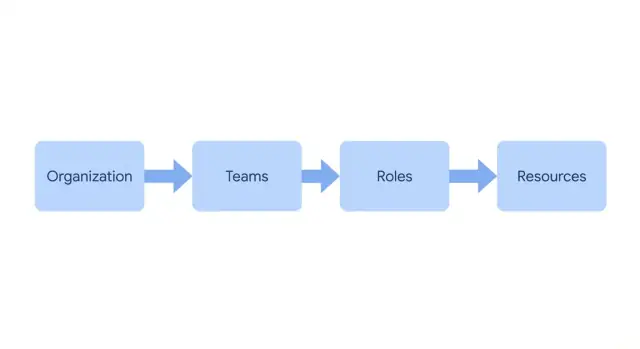
The target is simple: predictable access rules you can explain in one minute. For example: "Your org owns the data. Teams group people. Roles define actions. Resources belong to an org, and sometimes to a team. Sharing follows a few defaults." If you can't say it plainly, it will be hard to build, hard to test, and scary to change.
A promise worth keeping is: fewer roles, clearer ownership, safer defaults. Start with a small set of roles tied to real jobs, make ownership obvious for every resource, and default to least access. Then allow sharing on purpose, not by accident.
Plain-language map: orgs, teams, users, and resources
If your app serves more than one customer, get the mental map right before you write rules. Most confusion in multi-tenant SaaS permissions comes from drifting definitions, where the same word means different things in different parts of the product.
Pick one meaning for your tenant boundary and stick to it. Many products use "organization" as the tenant: all data lives inside an org, and nothing crosses that line unless you explicitly build sharing.
A simple vocabulary that stays clear as you grow:
- Organization (tenant): the customer account and the hard data boundary.
- User (identity): a person with one login.
- Membership: the link that says a user belongs to an org, plus their role(s).
- Team (optional): a grouping inside an org for day-to-day work.
- Resource: anything you must protect (projects, invoices, tickets, API keys).
"One person, many orgs" is normal. A consultant might belong to three customer orgs, each with a different role. That's why "user" and "membership" need to be separate. Your checks usually depend on the membership, not the user.
Teams help when they reflect real grouping like "Support" or "Finance." They add noise when they become a second permission system. A useful test is whether you can explain the team in one sentence without mentioning a specific feature rule.
Example: Maria logs in once, then switches between Org A and Org B. In Org A she is in Finance and can view invoices. In Org B she is a Viewer and can only read projects. Same user, different memberships, consistent resource types, clear boundaries.
Roles, permissions, and scopes without jargon
Multi-tenant SaaS permissions stay understandable when you separate three things:
- Roles: a label describing responsibility.
- Permissions: what someone can do.
- Scope: where they can do it.
RBAC in plain English
RBAC (role-based access control) means: you give a user a role, and that role grants allowed actions. Role names should describe responsibility, not status. "Billing Admin" is clear. "Power User" usually creates arguments.
Treat permissions like verbs and keep them consistent across the product:
- View (read)
- Create
- Edit
- Delete
- Manage (invite, settings, export, and other special actions)
Then add scope so the same verb can apply in different places. This is how you avoid creating 20 slightly different roles.
Common scopes that stay readable:
- Org-wide
- Team-only
- Own items
- Assigned
When ownership beats adding another role
If you catch yourself creating roles like "Project Editor" and "Project Editor (Own)," it's usually a scope problem, not a role problem.
Example: In a CRM, let "Sales Rep" create and edit deals, but restrict scope to "own items." Let "Sales Manager" keep similar verbs with "team-only" or "org-wide" scope. You get fewer roles, clearer rules, and less surprise when someone changes teams.
A solid default is: roles grant verbs, and ownership (or assignment) limits where those verbs work.
A simple rule set that scales to hundreds of orgs
If your model works for one customer but breaks at ten, you probably mixed "who can see" with "who can do" and "who owns." Keep those separate and the system stays predictable.
A rule set that scales:
- Every record (project, invoice, ticket, API key) has exactly one home organization.
- A user can only see data for orgs where they're an active member. If they're not a member, the UI and API should behave as if the org doesn't exist.
- Roles control actions (create, edit, delete, export), but only within orgs the user can already see.
- Ownership is a tie-breaker. It can grant extra rights inside an allowed scope (edit your draft, manage your own API token) without expanding access to other data.
- Admin access is a narrow, explicit exception. Define what "admin" can do and keep admin-level roles few.
Example: Sam belongs to Org A and Org B. In Org A, Sam is a Member and can create and edit their own reports but can't change billing. In Org B, Sam is a Billing Manager and can update payment methods and download invoices, but still can't view private projects unless their membership includes that area.
This makes growth boring in a good way. Adding a new org is just adding memberships and roles. The core rules stay the same.
Step-by-step: design your permission model on one page
Write a single page a teammate can read in two minutes. If you can explain permissions without opening code, you're in a good place.
1) Write the inputs before the rules
Keep the parts deliberately small:
- Pick four user types you can explain: owner, admin, member, viewer.
- List 3-6 resources people touch daily (projects, customers, reports, billing).
- For each resource, list 2-4 actions (view, create, edit, delete, invite, export).
- Decide what a new member gets by default (usually viewer or member, not admin).
- Decide what "team" changes. Keep it to visibility, assignment, and reporting, not surprise powers.
2) Put the rules in a simple table
Use scope to avoid role explosion. Many products only need three scopes: own, team, org.
| Role | View | Edit | Invite users | Billing | Scope note |
|---|---|---|---|---|---|
| Owner | Yes | Yes | Yes | Yes | Org-wide, can transfer ownership |
| Admin | Yes | Yes | Yes | No/Yes | Org-wide, no ownership changes |
| Member | Yes | Limited | No | No | Own + team (where assigned) |
| Viewer | Yes | No | No | No | Read-only in assigned scope |
Sanity check: show this page to a non-technical teammate and ask, "Can a Support member edit a Sales report?" If they hesitate, your scopes or your team definition isn't clear.
Resource ownership and sharing rules that stay sane
To keep permissions understandable, decide who owns each resource, then keep sharing options limited.
Default ownership model
Make most resources org-owned. Customers usually think in company terms: invoices, projects, contacts, tickets, and automations belong to the organization, not to an individual.
Teams can still be useful, but treat a team as a workflow label for routing and visibility defaults, not as secret security logic. A team tag can drive filters, dashboards, notifications, or queues, while access still comes from roles and scope.
User-owned resources should be the exception, reserved for items that are truly personal: drafts, private notes, saved views, API tokens, or personal settings. If a user leaves, decide what happens: delete, transfer, or keep private.
A small set of sharing rules that stays readable:
- Org-owned by default: store items under one organization ID.
- Team-tagged for workflows: tag to one team for routing, not for hard access control.
- User-owned for personal items: private unless explicitly shared.
- Sharing levels only: Private (owner), Team, Org. Avoid custom per-item ACLs early.
- Separate "assigned to" from "can access": assignment is responsibility, not permission.
Sharing that stays simple
When someone says "I need access," push for which level it is: their private item, their team's work, or the whole org. If it doesn't fit those three, it's often a sign your scopes are unclear, not that you need a new sharing mode.
Example: a support ticket can be org-owned (so managers can report on all tickets), team-tagged to Support (so it shows in the right queue), and assigned to Jordan (so Jordan is accountable). Assignment should not block other permitted roles from viewing it.
Invites, membership changes, and switching orgs
Permissions often break during "people events": inviting someone, moving them between teams, or removing access. These flows decide whether your model stays predictable.
Invitations
Treat an invite as a request to create a membership, not as access by itself. The invite should state the org, team (optional), and role that will be granted if accepted.
Keep the rules tight:
- Only specific roles can invite (for example, Owner and Admin). If you support team leads, limit them to inviting into their own teams.
- An inviter can grant only roles at or below their own level.
- Expired invites do nothing.
- If the email already has an account, acceptance attaches them to the org. If not, acceptance creates the account and then attaches it.
Temporary access fits here too. Instead of inventing a "temp user" role, allow a role grant to have an end date. When it hits, access drops automatically and the audit trail stays clean.
Join and leave, without losing ownership
When someone leaves an org, don't guess what to do with their resources. If your rule is "resources are owned by the org," stick to it. The person can remain the creator for history, but the org stays the owner.
If you do have user-owned resources, require transfer before removal for anything sensitive (projects, documents, API keys).
Switching orgs safely
One login can belong to many orgs, but the app must always have a single "current org." Make it obvious in the UI and scope every action to it.
Deactivation usually beats deletion. It removes access now while keeping past actions auditable.
Common mistakes and traps to avoid
Most permission models fail because they grow faster than the rules. Protect the basics (tenant boundary, ownership, scope) and treat everything else as detail.
Role explosion is the classic trap. An edge case appears and you create a new role instead of a clearer permission or scope. After a few months, nobody knows what "Manager Plus" means. If you need a special case often, make it a first-class permission. If you need it rarely, handle it with a temporary grant that expires.
Permission drift is quieter but worse. Someone adds "just one exception" and forgets to update the one-page model. A year later, the written rules and the real system disagree. Update the model first, then implement.
Teams as fake security boundaries cause constant confusion. If resources can be shared across teams inside one org, say so clearly. If they can't, enforce it in code, not in naming.
Red flags to catch early:
- A "super admin" that can see data across all customer orgs by default
- UI-only protection (hidden buttons) instead of server-side checks
- API keys and service accounts that bypass membership rules
- Roles defined by job titles, not by actions
- Exceptions that can't be explained in one sentence
If support needs to help a customer, "give them global admin for a minute" is a tenant leak waiting to happen. Prefer explicit, logged access with tight scope (one org, specific time window, specific actions).
Quick checks before you ship permissions
Every request should resolve the active organization first (from subdomain, header, session, or route) and reject anything that doesn't match it.
After org context, keep checks in a consistent order: membership first (are they in this org?), then role (what are they allowed to do here?), then ownership or sharing (do they have access to this record?). If you do ownership checks before membership, you can leak information about what exists.
Run a small set of end-to-end tests using real accounts, not just unit tests:
- Brand-new member tries to view, create, and export data
- Team lead tries to manage only their team, not the whole org
- Org admin changes roles, then tries a sensitive action (delete, export)
- Removed user keeps an old tab open and retries actions
- Invited (not accepted) user follows an old invite and attempts access
Add basic audit events for actions that change power or move data: role changes, membership removals, exports, deletes, settings updates. It doesn't need to be perfect on day one, but it needs to answer "who did what, when?"
Review defaults. New orgs and new members should start with the least access that still lets them succeed. A short internal permission FAQ for support and sales also helps, with examples like "Can a team lead see other teams?" and "What happens to access after removal?"
Example: from one org to hundreds without redesigning
Start with a small, real setup: one customer company (one org) with two teams, Sales and Ops. Everyone signs in once, then chooses the org they belong to. Sales needs customer records and quotes. Ops needs billing and internal settings.
Stage 1: one org, two teams
Keep teams as grouping and workflow, not as the main permission switch. They can influence defaults and routing, but they shouldn't be the only gate.
Stage 2: stable roles, predictable scopes
Pick a small set of roles and keep them stable as features ship: Admin, Member, Viewer. The role answers "What can you do in this org?" The scope answers "Where can you do it?"
Stage 3: ownership makes editing decisions easy
Add one ownership rule: each resource has an org and an owner (often the creator). Editing is allowed if you're Admin, or if you're the owner and your role includes "edit own." Viewing is allowed if your role includes "view" for that resource type.
Example: a Sales Member creates a quote. Another Sales Member can view it, but can't edit unless it's shared with the team or reassigned. An Ops Viewer can see it only if your rules allow Ops to view Sales resources.
Stage 4: 200 orgs, same rules
When you onboard 200 customer orgs, you reuse the same roles and the same ownership rules. You change memberships, not the model.
Support requests like "Can you grant access to X?" become a checklist: confirm the org and resource, check the user's role in that org, check ownership and sharing, then change the role or share the resource. Avoid one-off exceptions, and leave an audit note.
Next steps: implement, test, and iterate safely
Treat your one-page model as the contract. Only implement rules you can enforce in every API call and every UI screen, otherwise permissions drift into "it depends."
Start small: a few roles, clear scopes, and simple ownership. When a new request comes in ("Can we add an Editor-Manager role?"), tighten ownership or scope first. New roles should be rare.
For every new resource you add, make the basics consistent:
- Stores
org_id(andteam_idif teams apply) - Has a visibility rule (private, team, org)
- Records audit events for sensitive actions (invites, role changes, exports)
- Is filtered by scope in every query (not just in the UI)
- Has predictable defaults (who can see it right after creation)
Test real flows before you polish edge cases: invites, switching orgs, admin pages, and what happens when someone loses access mid-session.
If you're building with a chat-based app builder, it helps to write the permission model in plain language first and keep it alongside the product spec. On Koder.ai (koder.ai), Planning Mode plus snapshots and rollback are a practical way to trial these scenarios and confirm the rules behave the same across web, backend, and mobile.
FAQ
What is an organization in a multi-tenant SaaS app?
An organization is the customer account and the hard boundary for its data. Put every protected record in one organization, then check membership before you show or change it.
Why should users and memberships be separate?
A user is one person with one login. A membership records that person's role inside a particular organization, so the same person can have different access in different customer accounts.
When should I create teams?
Use teams for everyday grouping, routing, and reporting inside an organization. Do not let a team become an unexplained second permission system.
What is the difference between a role, permission, and scope?
Roles describe responsibility, permissions describe actions, and scope limits where those actions apply. For example, a Sales Rep may edit deals they own, while a manager may edit team deals.
How many roles should a SaaS product start with?
Start with a small set such as Owner, Admin, Member, and Viewer. Add scopes like own, team, or organization before you add another role.
Who should own resources in the app?
Make most business records organization-owned, including projects, invoices, tickets, and contacts. Reserve user ownership for genuinely personal items such as drafts, saved views, and API tokens.
How should resource sharing work?
Keep sharing levels simple: private, team, and organization. Treat assignment as responsibility for work, not automatic permission to view or edit every related record.
What should happen when I invite someone?
Create access only after the invitee accepts an invitation that names the organization, role, and optional team. Let inviters grant only roles at or below their own level, and expire unused invites.
What happens when someone leaves an organization?
Remove the membership or deactivate it immediately, while keeping the person's past actions in your audit history. Transfer any sensitive user-owned items before removal instead of guessing who should receive them.
What checks should every permission request make?
Resolve the current organization first, then check membership, role, and finally ownership or sharing. Enforce the same order in every API request, not only in the interface.