

Musician/Band Websites: Tour Dates, EPKs, and Merch Setup
Learn how to build a musician/band website that sells tickets and merch: tour dates, EPK essentials, press assets, and a simple merch setup.
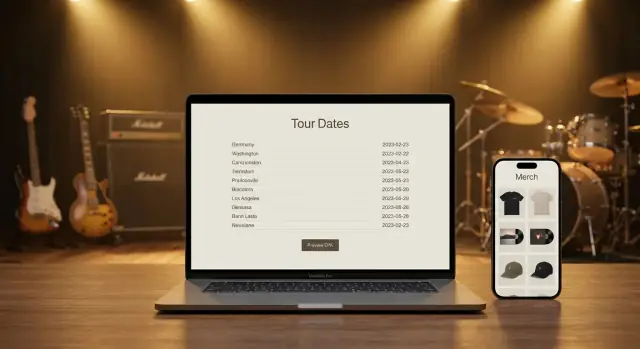
What Your Band Website Needs to Do (and Why)
A good musician website isn’t just a prettier version of your socials. It’s the one place you control—where information stays accurate, links don’t break because an algorithm changed, and fans, press, and promoters can all get what they need in seconds.
Your site’s real job: inform, convert, and help booking
Inform: People land on your site with a specific question: “Where are you playing?”, “How do I listen?”, “What do you sound like?”, “How do I contact you?”, “Where’s the merch?” Your pages should answer those questions without digging.
Convert: A visitor should have a clear next step—buy a ticket, follow/stream, join your email list, or grab merch. If your website doesn’t guide actions, it’s just a brochure.
Help booking: Promoters and venues don’t want a scavenger hunt through Instagram highlights. They want a clean EPK, a quick way to verify draw and music style, and a contact path that doesn’t require a DM.
Why social platforms aren’t enough
Social is great for discovery, but it’s not built for reliability. Posts disappear in feeds, links get buried, and you can’t present a complete, organized press package. For tour announcements and booking, clarity beats virality.
The three core pillars to build around
- Tour Dates: a readable, always-updated show list with ticket links.
- EPK (Electronic Press Kit): bio, music, photos, video, and key facts in one place.
- Merch: a simple store flow that makes buying feel effortless.
By the end of this guide, you’ll have a practical structure for those three pillars—plus the supporting pages and setup details that make your band website work like a tool, not a placeholder.
Plan Your Site Structure Before You Build
A band website works best when it answers two questions quickly: “What should I do next?” (for fans) and “Can I book you?” (for promoters). That clarity starts with a simple structure—before you choose a theme, upload photos, or write a bio.
If you’re building fast (or iterating between releases), a structured approach matters more than the tool you use. Whether you’re hand-coding, using a CMS, or using a vibe-coding platform like Koder.ai to generate a React-based site from a chat brief, you’ll get better results when the pages and calls to action are decided upfront.
Keep the main navigation to 5–7 pages
More pages usually means more confusion. A clean top menu also performs better on mobile.
A solid default structure:
- Home
- Tour Dates
- Music (or Listen)
- Merch
- Videos (optional)
- EPK (or Press)
- Contact / Booking
If you’re not actively touring, you can swap Tour Dates for Shows or hide it until you have listings.
Recommended navigation order (fans vs. promoters)
You can’t build two separate sites, but you can prioritize what each group needs.
Fan-first order (good for most bands):
Home → Tour Dates → Music → Merch → Videos → Contact
Promoter-first order (if you’re booking hard):
Home → EPK → Tour Dates → Music → Contact → Merch
Tip: even with a fan-first menu, place a visible Booking link in your header or footer that jumps straight to the right contact details.
Mobile-first checks to do before launch
Most visitors will arrive from Instagram, TikTok, or a text message—on their phone.
- Tap targets: buttons and links should be easy to hit with a thumb (especially ticket links).
- Load time: avoid huge background videos and uncompressed images.
- Readable type: good contrast, comfortable font sizes, and short line lengths.
Decide your core calls to action
Every page should make the next step obvious. Choose 3–4 primary CTAs and use them consistently:
- Listen (streaming links or embedded player)
- Tickets (or “See Tour Dates”)
- Contact (booking email + form)
- Merch (shop link)
When your structure is set, building becomes mostly “filling in” content—without endless redesigns later.
Homepage Essentials That Convert Visitors
Your homepage has one job: tell a new visitor who you are and give them a clear next step—without making them hunt.
Above the fold: identity + one primary action
Within the first screen (especially on mobile), make these obvious:
- Band/artist name (not just a logo)
- A one-line “genre vibe” that sets expectations (think “alt-pop with 90s guitars” or “dark electronic + cinematic vocals”)
- One primary CTA button that matches your current goal: Listen, Get Tickets, or Join the Mailing List
If you’re in an active release cycle, “Listen” usually wins. If you’re touring heavily, “Get Tickets” can be the better default.
Add quick links that remove friction
Don’t force people to scroll for basics. Add a slim row of quick links right under the hero section:
- Tickets → /tour
- Merch → /merch
- Contact/Booking → /contact
This doesn’t replace your navigation—it’s a shortcut for people who already know what they want.
Embed audio/video without slowing the page
Media sells the story, but heavy embeds can tank load time (and conversions). Keep it fast by:
- Featuring one standout track or video, not a whole playlist
- Using a thumbnail + click-to-play for video instead of auto-loading multiple players
- Avoiding autoplay with sound (many visitors bounce)
A simple “Featured” block with one track and one video link often outperforms a crowded media wall.
Mailing list signup: place it where it gets seen
Email is still your most reliable channel. Put a signup:
- Near the top (after your hero/CTA)
- Again in the footer for people who scroll
Offer a small incentive that fits your audience: a free download, unreleased demo, early ticket access, or 10% off merch. Keep the form minimal (email only), and say what they’ll get and how often you’ll send it.
Tour Dates Page: A Clear, Bookable Show List
Your tour dates page has one job: help someone decide to attend (or book) a show in seconds. If it’s hard to scan, missing ticket links, or unclear about timing, you’ll lose momentum.
Lead with what’s next
Put upcoming shows first, in chronological order. Past dates are optional—helpful for social proof, but keep them collapsed behind a “Past shows” toggle so they don’t bury the important stuff.
A simple structure works best:
- Upcoming shows (default view)
- Past shows (optional, archived)
What to include for every show
Aim for a consistent, repeatable layout so fans don’t have to “re-learn” your page each time.
At minimum, each listing should include:
- Date (include the day of week if you can)
- City + country/state
- Venue name
- Doors time (and/or show time—label clearly)
- A prominent Tickets link/button
If the show has support acts or special notes (18+, early show/late show), add a short secondary line—don’t cram it into the venue field.
Sold out, postponed, canceled: handle it clearly
Don’t delete dates when plans change. Update them with an obvious status so fans don’t travel on bad info:
- Sold out: keep the ticket button, but change the label to “Sold Out” and link to the official ticket page (for legitimacy).
- Postponed: replace the ticket button with “Postponed — new date TBA” and keep the original details for context.
- Canceled: mark it as “Canceled” and include a brief note about refunds (link to the ticketing provider).
Calendar links + time zone clarity
Add “Add to Calendar” links (Google, Apple/ICS) so fans can save the date instantly.
For livestreams or virtual events, always show the time zone (e.g., “8:00 PM ET / 5:00 PM PT”) and avoid vague language like “tonight.”
Make it effortless on mobile
Most fans will view this on a phone. Use a single-column layout, generous spacing, and a ticket button that’s easy to tap. If someone has to zoom to find the venue or the link, you’ve already made it too hard.
Ticketing Links and Tracking Without the Headache
Ticket links are where excitement turns into action—so make them obvious, consistent, and easy to measure.
Where to place ticket links
For most bands, the cleanest setup is one primary ticket button per show plus a single global Tickets button in your site header.
- Per date: On your /tour page, each listing should have one clear CTA (e.g., “Tickets”). If there are multiple sellers, use one “Tickets” button that opens a simple choice (two or three options max).
- Global button: In the main navigation, link “Tickets” to /tour (not an external vendor). That way, fans always land in the same place, and you control the message if a date sells out or changes.
Keep the button label consistent (“Tickets” beats “Buy Now” in a mixed context) and add a smaller “Info” link for venue details, ages, doors time, and support.
UTM tracking basics for ticket partners
UTMs let you see which links actually drive sales in analytics dashboards.
Use the same structure everywhere:
utm_source=where the click happened (website, newsletter)utm_medium=the channel (referral, email)utm_campaign=the tour or run (spring_2026)
Example:
https://tickets.example.com/event123?utm_source=band_website&utm_medium=referral&utm_campaign=spring_2026
If a ticket partner strips UTMs, route clicks through your own short URL first (e.g., /tix/chicago) and redirect to the vendor.
VIP upgrades without confusing fans
If VIP is a separate purchase, don’t make fans choose too early.
- Primary button: Tickets
- Secondary option (smaller): VIP Upgrade with one-line clarity (“Requires a ticket”) and what’s included.
Local show promos that help sharing
For each date, add a compact promo block: a poster thumbnail (optional), Share buttons (copy link, Facebook event link if relevant), and a short, readable URL like /tix/toronto. Short links also look better on flyers and stage announcements.
EPK: What to Include, What to Skip, and a Practical Checklist
An EPK (Electronic Press Kit) is a quick “this is who we are” package that helps other people say yes faster. Promoters use it to decide if your band fits a bill, press uses it to write accurate coverage, and playlist curators/bloggers use it to verify your story and grab the right links.
The goal: answer the core questions in under two minutes—who you are, what you sound like, what you look like, and how to book or cover you.
One-page EPK vs. PDF vs. both
- One-page EPK (recommended default): best for sharing a single link in DMs, email, and your /contact page. Easy to update.
- PDF EPK: useful when someone requests an attachment or needs offline access. Keep it to 1–2 pages.
- Both: ideal if you tour often—host the one-page EPK and provide a “Download PDF” button.
EPK essentials (copy/paste friendly)
Keep it focused on decision-making:
- One-liner + short bio (50–100 words): genre/vibe, location, and what makes you distinct.
- Long bio (optional, 200–400 words): origin, recent milestones, and a sentence on live show energy. Keep it factual—no “best band in…” claims.
- Music links (Spotify/Apple/Bandcamp) plus a streamable embed if it doesn’t slow the page.
- Video: lead with one strong live/performance clip; add 1–2 more only if they’re equally strong.
- Press photos (2–5): at least one horizontal and one vertical, clearly labeled, with photo credit.
- Highlights (selective): notable support slots, festivals, radio/press quotes—only the strongest and verifiable.
- Clear contact for booking and press (name + email; optional phone/agent).
Access and speed matter more than design tricks
Your EPK should load fast and work on mobile. Avoid forcing logins (Google Drive permissions, gated downloads). Host assets with direct links, and use sensible file sizes.
If you’re rebuilding your site often between tour legs, tools that support quick iteration and rollback can help you keep the EPK current without breaking links. For example, Koder.ai supports snapshots and rollback, which is useful when you need to update assets quickly before a run of shows.
What to skip (common mistakes)
Skip anything that slows decisions: long autobiographies, outdated shows, every review you’ve ever had, giant uncompressed images, and broken/private links. If it doesn’t help someone book you or cover you, it doesn’t belong here.
Press Assets: Make It Easy to Download and Use
Journalists, bloggers, and venue marketers often work on tight deadlines. A clean “Press Assets” area lets them grab what they need in one visit—without emailing back and forth or pulling low-res images from Instagram.
Build a press-friendly downloads area
Offer two options:
- One ZIP download (everything they might need)
- Individual files for quick grabs (logo only, one photo, etc.)
Keep it simple: a short intro line, then clear buttons like “Download Press Photos (ZIP)” and “Download Logo Pack.” If you already have an EPK page, link to this section from it (and vice versa).
Use naming conventions that prevent confusion
Make filenames descriptive and consistent so they don’t get renamed to “IMG_2049.jpg” in someone’s folder.
Examples:
BandName_PressPhoto_2025_Credit-Name_01.jpgBandName_Logo_Black_RGB.pngBandName_Logo_White_Transparent.png
Include a tiny text file in the ZIP (or a short note on the page) with photo credits and your preferred band name formatting.
Technical specs that help editors
Spell out what you’re providing:
- Photos: JPG, 3000px+ on the long edge when possible; include web-sized versions if you want
- Logos: PNG (transparent) + SVG/PDF for print
- Audio: 320kbps MP3 and/or WAV (if you’re comfortable)
- Video: link out to YouTube/Vimeo (avoid huge downloads)
Add a simple usage note
One sentence is enough: “Press photos may be used for coverage and show promotion with credit to [Photographer Name].”
Keep assets current
Update the pack each album or tour cycle: swap in the current lineup photo, refresh logos/branding, and remove outdated posters so press doesn’t accidentally promote the wrong era.
Merch Setup: Products, Photos, and Checkout Flow
Your merch page should feel like the easiest table in the venue to buy from—clear options, great visuals, and a checkout that doesn’t make people think.
How to add merch (without clutter)
Most band sites do best with a dedicated /merch shop page plus a few featured items on the homepage (for new drops or bestsellers). If you have a small catalog, consider bundles (tee + sticker pack, vinyl + poster) to raise average order value without adding more browsing work.
Product info that prevents returns
Fans buy faster when the details answer common questions:
- Sizes & fit notes: unisex vs. fitted, “runs small/true to size,” model height + size worn
- Materials & care: fabric weight, wash instructions, whether prints are delicate
- Shipping expectations: where you ship, typical dispatch time, tracking availability, and any tour-related delays
If you offer tour-only items online, say so plainly: “Limited stock from the current run.”
Photos that sell
Aim for a consistent set per product:
- Clean front and back shots
- A close-up of print/embroidery and fabric texture
- At least one real-life photo (worn on a person or in a natural setting)
Keep backgrounds simple and lighting even so the design is the focus.
Limited drops and pre-orders
For drops, add a short timeline: when it ships, whether restocks are planned, and what “limited” means (limited run vs. limited time). For pre-orders, include cutoff date, estimated ship window, and a note that ship dates can shift slightly.
Checkout flow: fewer steps, more conversions
Minimize friction: show price + shipping early, allow guest checkout, and keep the cart visible. Fewer pop-ups, fewer redirects, and one clear “Checkout” button beat fancy extras every time.
Digital Merch and Add-Ons Fans Actually Want
A good band merch store isn’t only shirts and vinyl. Digital items and small add-ons can raise your average order value without adding much inventory stress—especially when you’re on the road.
Digital goods people actually buy
Digital merch works best when it’s specific, useful, and instantly delivered. Popular options include:
- Downloads: live recordings, deluxe versions, demo bundles, “tour edition” EPs
- Stems: a limited pack for remixers or producers (clearly label tempo/key where possible)
- Sample packs: one-shots, drum hits, textures—great if your audience overlaps with producers
- Tabs/notation: PDFs for guitar/bass, or a “play-along” bundle with backing tracks
Keep file sizes reasonable, name files clearly, and include a simple license note (e.g., personal use vs. commercial).
Grow your list with digital freebies (with clear consent)
A free download can be your best email collector, but only if it’s transparent. Use a short form that says what subscribers will receive (tour updates, new releases, merch drops) and include an unchecked checkbox for marketing consent.
Offer one focused freebie—like a single live track or a rehearsal-room demo—then deliver it automatically via your email platform.
Add-ons that boost orders without complicating fulfillment
Add-ons are easiest when they’re lightweight and easy to pack:
- Stickers (single or bundle)
- Signed inserts (pre-signed cards sized for mailers)
- Tour posters (numbered runs can create urgency)
In your cart, present add-ons as optional upgrades (“Add a signed insert for $5”) rather than forcing bundles.
Taxes and shipping info: keep it simple
Don’t write legal essays. Instead, collect only what you need at checkout: shipping address for physical goods, and billing info for payment processing.
For digital-only orders, hide shipping fields entirely. For taxes, use your platform’s built-in tax settings and add a plain note like “Tax calculated at checkout where applicable.” If you ship internationally, show estimated shipping costs early to avoid abandoned carts.
Contact and Booking: Reduce Friction for Promoters
Promoters, venues, and journalists shouldn’t have to hunt for a way to reach you. If they can’t find the right contact in seconds, they may move on to the next act.
Put the link where people already look
Make Contact a top-level link in your header nav (not buried in a footer menu). Then repeat the most important contact option in your EPK footer (for people who land on your EPK first and scroll).
A simple pattern works well:
- Header: Contact
- EPK footer: Book us + email/form
Use separate routes for different requests
Different inquiries need different answers (and different response times). Create dedicated emails or forms for:
- Booking (shows, holds, support slots)
- Press (interviews, premieres, reviews)
- Merch support (orders, sizing, shipping issues)
If you’re a solo operation, the inbox can still forward to the same place—what matters is that the sender feels confident they’ve used the right channel.
What to include on a booking contact page
Keep it brief, but actionable:
- Your based-in location (city + country)
- Availability windows (e.g., “weekends only” or “routing dates in May”)
- Optional: a one-line tech rider note (e.g., “simple backline-friendly setup; full tech rider on request”)
Reduce spam without adding friction
Skip captchas if you can. Instead, use:
- A short form (name, email, message, date/venue)
- A hidden honeypot field (bots fill it; humans don’t)
- Clear field labels (so real promoters don’t guess what you need)
If you want to go one step further, add a line like: “For bookings, include date, venue, capacity, and budget range.” It sets expectations and cuts follow-up emails.
SEO, Accessibility, and Maintenance Checklist
A band website isn’t “done” when it launches. The best musician website stays findable, fast, and easy for every fan, promoter, and journalist to use—especially on a phone, five minutes before doors.
Basic SEO (the non-sleazy kind)
Search engines mostly reward clarity. A few small choices can make a band website show up for the exact queries you want.
- Write specific page titles and headings. Each page should clearly say what it is: “Tour Dates,” “Electronic Press Kit,” “Merch,” “Contact.” Avoid cute labels that hide meaning.
- Use city/venue keywords on your tour dates page. Include the city and venue in plain text (not only inside an embedded widget). Fans search “Band Name + Chicago” or “Band Name + The Metro.” Give your tour dates page that language.
- Keep one URL per core page. Don’t split Tour into multiple confusing pages unless you have a reason. Consistency helps both fans and search.
Accessibility quick wins
Accessibility improvements usually help everyone—especially mobile users and people scanning quickly.
- Alt text for key images. Add short, descriptive alt text for press photos, merch product photos, and any image that contains essential info.
- Color contrast and readable type. If your text sits on top of a photo, make sure it’s still readable. Use a solid background or overlay when needed.
- Keyboard navigation. You should be able to tab through your menu, buttons, and forms in a logical order—especially on the contact/booking page.
Performance basics (speed that doesn’t kill your vibe)
A fast music website design keeps people from bouncing before they click tickets.
- Compress images before uploading, especially merch and press photos.
- Lazy-load long pages (tour archives, merch grids) so the first screen appears quickly.
- Use fewer embeds. Multiple players and social embeds can slow things down. If you need them, keep them lower on the page and prioritize your main calls to action.
What to update monthly
Put a recurring reminder on your calendar:
- Tour dates: add new shows, remove past dates, confirm ticket links.
- EPK assets: swap in new music/video, update bio milestones, refresh press photos when your look changes.
- Merch inventory: mark sold-out items, update variants, and fix any broken product photos.
Simple analytics goals
You don’t need complex dashboards. Track a few actions that map to real outcomes:
- Ticket clicks from the tour dates page
- Merch adds to cart and checkout starts
- Contact/booking form submits (and which page they came from)
If those numbers improve, your site is doing its job—even if your design stays simple.
FAQ
What is the main job of a band website?
A musician website should do three things:
- Inform (tour dates, music, merch, contact)
- Convert (tickets, streams, email signups, purchases)
- Help booking (EPK + clear booking contact)
If it doesn’t quickly answer questions and guide the next step, it’s acting like a brochure instead of a tool.
Why aren’t Instagram, TikTok, and other social platforms enough?
Social platforms are great for discovery, but they’re not reliable for organized info. Feeds bury posts, links get lost, and you can’t present a clean press package.
A website is the one place you control, where the most important details (tickets, contact, EPK assets) stay accurate and easy to find.
What pages should every band website include?
A practical foundation is:
- Home
- Tour Dates
- Music (or Listen)
- Merch
- EPK (or Press)
- Contact / Booking
Keep the main navigation to 5–7 items so it stays clear on mobile and visitors don’t have to hunt.
How should I order my navigation for fans vs. promoters?
Choose based on your current priority:
- Fan-first: Home → Tour Dates → Music → Merch → (Videos) → Contact
- Promoter-first: Home → EPK → Tour Dates → Music → Contact → Merch
Even with a fan-first menu, add a visible “Booking” link in the header or footer that jumps straight to booking details.
What should my homepage include to convert visitors?
Above the fold (especially on mobile), make these obvious:
- Your name (not only a logo)
- A one-line genre/vibe description
- One primary CTA button (Listen, Get Tickets, or Join the Mailing List)
Then add quick links right under the hero (e.g., /tour, /merch, /contact) so repeat visitors can move fast.
How can I embed music/video without slowing down my site?
Keep it fast and focused:
- Feature one standout track or video, not multiple heavy embeds
- Prefer thumbnail + click-to-play for video
- Avoid autoplay with sound
This keeps load time down (especially on phones) and makes it clearer what you want visitors to do next.
What should each tour date listing include?
Use a consistent layout for every date. Include:
- Date (day of week if possible)
- City + state/country
- Venue name
- Doors/show time (clearly labeled)
- A prominent Tickets button
Put upcoming shows first and archive past shows behind a toggle so the page stays scannable.
How should I handle sold-out, postponed, or canceled shows?
Don’t delete the date—label it clearly so fans don’t act on bad info:
- Sold out: keep the listing; label the button “Sold Out” and link to the official ticket page
- Postponed: “Postponed — new date TBA” and keep context
- Canceled: mark “Canceled” and link to refund info from the ticketing provider
Clear statuses reduce confusion (and angry emails).
What belongs in an EPK (and what should I skip)?
An effective EPK helps someone decide “yes” quickly. Include:
- Short bio + one-liner (and long bio only if needed)
- Music links (and a lightweight embed if it won’t slow the page)
- 2–3 strong videos (include at least one live/performance clip)
- Press photos with credits
- A few credible highlights (selective)
- Clear booking and press contact
Skip long autobiographies, outdated info, and anything with broken or private links.
How do I track ticket link performance without complicated tools?
Use UTMs so analytics can tell you what drives clicks:
utm_source=(where the click happened, e.g., band_website)utm_medium=(referral, email)utm_campaign=(spring_2026)
Example:
https://tickets.example.com/event123?utm_source=band_website&utm_medium=referral&utm_campaign=spring_2026
If a ticketing partner strips UTMs, route through your own short link first (e.g., /tix/chicago) and redirect to the vendor.