

Nginx vs HAProxy: Choosing the Right Reverse Proxy
Compare Nginx and HAProxy as reverse proxies: performance, load balancing, TLS, observability, security, and common setups to choose the best fit.
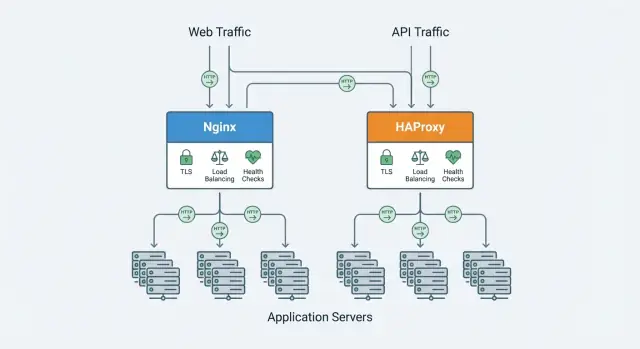
What a Reverse Proxy Does for Your Applications
A reverse proxy is a server that sits in front of your applications and receives client requests first. It forwards each request to the right backend service (your app servers) and returns the response to the client. Users talk to the proxy; the proxy talks to your apps.
A forward proxy works the other way around: it sits in front of clients (for example, inside a company network) and forwards their outbound requests to the internet. It’s mainly about controlling, filtering, or hiding client traffic.
A load balancer is often implemented as a reverse proxy, but with a specific focus: distributing traffic across multiple backend instances. Many products (including Nginx and HAProxy) do both reverse proxying and load balancing, so the terms are sometimes used interchangeably.
Typical goals teams use a reverse proxy for
Most deployments start for one or more of these reasons:
- TLS/SSL termination: handle HTTPS in one place, manage certificates centrally, and forward plain HTTP to internal services when appropriate.
- Routing: send traffic to different services based on hostname, path, headers, or other rules (e.g.,
/apito an API service,/to a web app). - Buffering and connection handling: smooth out slow clients or slow upstreams, reduce per-connection overhead on your app servers, and improve perceived reliability.
- Protection controls: enforce request limits, basic filtering, and safer defaults before requests ever reach your application.
Where it sits in front of your apps
Reverse proxies commonly front websites, APIs, and microservices—either at the edge (public internet) or internally between services. In modern stacks, they’re also used as building blocks for ingress gateways, blue/green deployments, and high-availability setups.
What this guide will help you decide
Nginx and HAProxy overlap, but they differ in emphasis. In the sections ahead, we’ll compare decision factors like performance under many connections, load balancing and health checks, protocol support (HTTP/2, TCP), TLS features, observability, and day-to-day configuration and operations.
Nginx Overview: Strengths and Typical Use Cases
Nginx is widely used as both a web server and a reverse proxy. Many teams start with it to serve a public website and later expand its role to sit in front of application servers—handling TLS, routing traffic, and smoothing over spikes.
Why people like Nginx at the edge
Nginx shines when your traffic is primarily HTTP(S) and you want a single “front door” that can do a bit of everything. It’s especially strong at:
- Serving static assets (images, CSS/JS) efficiently
- Acting as an HTTP reverse proxy with straightforward path- and host-based routing
- Caching responses to reduce load on upstream apps
- Adding or normalizing headers (e.g.,
X-Forwarded-For, security headers)
Because it can both serve content and proxy to apps, Nginx is a common choice for small-to-medium setups where you want fewer moving parts.
Modules and features teams rely on
Popular capabilities include:
- TLS termination and certificate management workflows (often with automation around reloads)
- Compression (gzip/brotli depending on build) to cut bandwidth
- Rate limiting and basic request controls to blunt noisy clients
- Rewrites and redirects for URL cleanup and legacy migrations
- Optional features like WebSocket proxying for real-time apps
Typical “front door” scenarios
Nginx is often chosen when you need one entry point for:
- A marketing site plus an API (static + proxy)
- Simple load balancing across a few app instances
- Caching in front of slower backends (e.g., CMS or REST services)
- Acting as a gateway for multiple services under different hostnames
If your priority is rich HTTP handling and you like the idea of combining web serving and reverse proxying, Nginx is frequently the default starting point.
HAProxy Overview: Strengths and Typical Use Cases
HAProxy (High Availability Proxy) is most commonly used as a reverse proxy and load balancer that sits in front of one or more application servers. It accepts incoming traffic, applies routing and traffic rules, and forwards requests to healthy backends—often while keeping response times stable under heavy concurrency.
What HAProxy is commonly used for
Teams typically deploy HAProxy for traffic management: spreading requests across multiple servers, keeping services available during failures, and smoothing out traffic spikes. It’s a frequent choice at the “edge” of a service (north–south traffic) and also between internal services (east–west), especially when you need predictable behavior and strong control over connection handling.
Core strengths: connections, load balancing, health checks
HAProxy is known for efficient handling of large numbers of concurrent connections. That matters when you have many clients connected at once (busy APIs, long-lived connections, chatty microservices) and want the proxy to stay responsive.
Its load balancing capabilities are a major reason people pick it. Beyond simple round-robin, it supports multiple algorithms and routing strategies that help you:
- Keep “hot” servers from being overwhelmed
- Shift traffic gradually during rollouts
- Prefer faster or less-loaded instances when needed
Health checks are another strong point. HAProxy can actively verify backend health and automatically remove unhealthy instances from rotation, then re-add them once they recover. In practice, this reduces downtime and prevents “half-broken” deployments from affecting all users.
Layer 4 vs Layer 7: what it means in practice
HAProxy can operate at Layer 4 (TCP) and Layer 7 (HTTP).
- Layer 4 (TCP) mode focuses on raw connection forwarding. It’s ideal for protocols where you don’t need to inspect HTTP details—think generic TCP services, database proxies, or when you want minimal overhead.
- Layer 7 (HTTP) mode understands HTTP semantics, enabling features like header-based routing, path rules, and finer-grained traffic controls.
The practical difference: L4 is generally simpler and very fast for TCP forwarding, while L7 gives you richer routing and request logic when you need it.
When HAProxy is chosen
HAProxy is often the pick when the primary goal is reliable, high-performance load balancing with strong health checking—for example, distributing API traffic across multiple app servers, managing failover between availability zones, or fronting services where connection volume and predictable traffic behavior matter more than advanced web server features.
Performance Basics: Latency, Throughput, and Connections
Performance comparisons often go wrong because people look at a single number (like “max RPS”) and ignore what users feel.
Throughput vs latency vs tail latency
- Throughput is how much work you can push through (requests/second or bytes/second).
- Latency is how long a request takes.
- Tail latency (p95/p99) is where real pain shows up: even if the average is fine, the slowest 1–5% can cause timeouts, retries, and bad UX.
A proxy can increase throughput while still making tail latency worse if it queues too much work under load.
Connection patterns matter
Think about your application’s “shape”:
- Many short-lived requests (typical web traffic): efficiency in accepting connections, TLS handshakes, and request parsing matters.
- Fewer long-lived connections (WebSockets, streaming, gRPC, database-like TCP): stability and predictable resource usage per connection matter more than raw RPS.
If you benchmark with one pattern but deploy another, results won’t transfer.
Buffering: friend and enemy
Buffering can help when clients are slow or bursty, because the proxy can read the full request (or response) and feed your app at a steadier pace.
Buffering can hurt when your app benefits from streaming (server-sent events, large downloads, real-time APIs). Extra buffering adds memory pressure and can increase tail latency.
Practical benchmarking tips
Measure more than “max RPS”:
- RPS/throughput, p50/p95/p99 latency, and error rate (timeouts, 502/503).
- Test steady load and spikes (short bursts often reveal queueing behavior).
- Use realistic keep-alive/TLS settings and record CPU, memory, and open connections.
If p95 climbs sharply before errors appear, you’re seeing early warning signs of saturation—not “free headroom.”
Load Balancing and Health Checks Compared
Both Nginx and HAProxy can sit in front of multiple application instances and spread traffic across them, but they differ in how deep their load-balancing feature set goes out of the box.
Load-balancing algorithms
Round-robin is the default “good enough” choice when your backends are similar (same CPU/memory, same request cost). It’s simple, predictable, and works well for stateless apps.
Least connections is useful when requests vary in duration (file downloads, long API calls, chat/websocket-ish workloads). It tends to keep slower servers from getting overwhelmed, because it favors the backend currently handling fewer active requests.
Weighted balancing (round-robin with weights, or weighted least connections) is the practical option when servers aren’t identical—mixing old and new nodes, different instance sizes, or gradually shifting traffic during a migration.
In general, HAProxy offers more algorithm choices and fine-grained control at Layer 4/7, while Nginx covers the common cases cleanly (and can be extended depending on edition/modules).
Session persistence (stickiness)
Stickiness keeps a user routed to the same backend across requests.
- Cookie-based persistence is typically best for web apps: it’s explicit, works across NAT, and allows controlled failover if the backend goes away.
- Source IP persistence is easy to enable, but can be unfair (many users behind one NAT/IP end up on one backend) and can break if client IP visibility changes (CDNs, proxies).
Use persistence only when you must (legacy server-side sessions). Stateless apps usually scale and recover better without it.
Health checks: active vs passive
Active health checks periodically probe backends (HTTP endpoint, TCP connect, expected status). They catch failures even when traffic is low.
Passive health checks react to real traffic: timeouts, connection errors, or bad responses mark a server as unhealthy. They’re lightweight but may take longer to detect problems.
HAProxy is widely known for rich health-check and failure-handling controls (thresholds, rise/fall counts, detailed checks). Nginx supports solid checks as well, with capabilities depending on build and edition.
Zero-downtime deploys: draining and retries
For rolling deploys, look for:
- Connection draining: stop sending new requests to a backend, but let in-flight requests finish.
- Retries and redispatch: if a backend fails mid-request, retry safely (only for idempotent requests) or send the request to another healthy server.
Whichever you choose, pair draining with short, well-defined timeouts and a clear “ready/unready” health endpoint so traffic shifts smoothly during deploys.
Protocols and TLS: HTTP, HTTP/2, and TCP Proxying
Reverse proxies sit on the edge of your system, so protocol and TLS choices affect everything from browser performance to how safely services talk to each other.
TLS termination and certificate management
Both Nginx and HAProxy can “terminate” TLS: they accept encrypted connections from clients, decrypt traffic, then forward requests to your apps over HTTP or re-encrypted TLS.
The operational reality is certificate management. You’ll need a plan for:
- Obtaining and renewing certs (often via ACME/Let’s Encrypt)
- Storing private keys securely and limiting who can access them
- Reloading configurations without dropping connections
Nginx is frequently chosen when TLS termination is paired with web-server features (static files, redirects). HAProxy is often chosen when TLS is primarily part of a traffic-management layer (load balancing, connection handling).
HTTP/2: performance and compatibility
HTTP/2 can reduce page load times for browsers by multiplexing multiple requests over one connection. Both tools support HTTP/2 on the client-facing side.
Key considerations:
- Client compatibility: most modern browsers support HTTP/2, but some older clients and certain automated tools may not.
- Backend support: you can terminate HTTP/2 at the proxy and speak HTTP/1.1 to upstream services, which is common and simpler.
When TCP proxying matters
If you need to route non-HTTP traffic (databases, SMTP, Redis, custom protocols), you need TCP proxying rather than HTTP routing. HAProxy is widely used for high-performance TCP load balancing with fine-grained connection controls. Nginx can proxy TCP as well (via its stream capabilities), which can be sufficient for straightforward pass-through setups.
Mutual TLS (mTLS)
mTLS verifies both sides: clients present certificates, not just servers. It fits well for service-to-service communication, partner integrations, or zero-trust designs. Either proxy can enforce client cert validation at the edge, and many teams also use mTLS internally between the proxy and upstream services to reduce “trusted network” assumptions.
Observability: Logging, Metrics, and Debugging
Reverse proxies sit in the middle of every request, so they’re often the best place to answer “what happened?” Good observability means consistent logs, a small set of high-signal metrics, and a repeatable way to debug timeouts and gateway errors.
Required logs: access, error, and upstream timing
At minimum, keep access logs and error logs enabled in production. For access logs, include upstream timing so you can tell whether slowness came from the proxy or the application.
In Nginx, common fields are request time and upstream timing (e.g., $request_time, $upstream_response_time, $upstream_status). In HAProxy, enable HTTP log mode and capture timing fields (queue/connect/response times) so you can separate “waiting for a backend slot” from “backend was slow.”
Keep logs structured (JSON if possible) and add a request ID (from an incoming header or generated) to correlate proxy logs with app logs.
Metrics you should export
Whether you scrape Prometheus or ship metrics elsewhere, export a consistent set:
- Requests and response codes (2xx/4xx/5xx)
- Error counters (retries, failed health checks, 502/504)
- Latency (p50/p95/p99; ideally proxy vs upstream)
- Connections (active, queued, rejected)
Nginx often uses the stub status endpoint or a Prometheus exporter; HAProxy has a built-in stats endpoint that many exporters read.
Health endpoints and readiness checks
Expose a lightweight /health (process is up) and /ready (can reach dependencies) endpoint. Use them both in automation: load balancer health checks, deployments, and auto-scaling decisions.
Debugging timeouts, resets, 502/504
- 502: backend refused/closed connection, DNS issues, or protocol mismatch.
- 504: proxy timed out waiting for the backend.
- Resets/timeouts: check keep-alive settings, backend saturation, and queue length.
When troubleshooting, compare proxy timing (connect/queue) to upstream response time. If connect/queue is high, add capacity or adjust load balancing; if upstream time is high, focus on the application and database.
Configuration and Day-to-Day Operations
Running a reverse proxy isn’t just about peak throughput—it’s also about how quickly your team can make safe changes at 2pm (or 2am).
Config style and onboarding
Nginx configuration is directive-based and hierarchical. It reads like “blocks inside blocks” (http → server → location), which many people find approachable when they think in terms of sites and routes.
HAProxy configuration is more “pipeline-like”: you define frontends (what you accept), backends (where you send traffic), and then attach rules (ACLs) to connect the two. It can feel more explicit and predictable once you internalize the model, especially for traffic routing logic.
Reloads and deployment change management
Nginx typically reloads config by starting new workers and gracefully draining old ones. This is friendly to frequent route updates and certificate renewals.
HAProxy can also do seamless reloads, but teams often treat it more like an “appliance”: tighter change control, clear versioned config, and careful coordination around reload commands.
Validation, templates, and staying DRY
Both support config testing before reload (a must for CI/CD). In practice, you’ll likely keep configs DRY by generating them:
- Use templates (Helm, Ansible, Terraform, or internal tooling)
- Keep shared snippets for logging, headers, timeouts, and security defaults
The key operational habit: treat the proxy config as code—reviewed, tested, and deployed like application changes.
Operating at scale: many apps, routes, and certificates
As the number of services grows, certificate and routing sprawl becomes the real pain point. Plan for:
- Standard naming and ownership (who owns which hostnames)
- Automated certificate issuance/rotation
- Clear conventions for timeouts and retries per app
If you expect hundreds of hosts, consider centralizing patterns and generating configs from service metadata rather than hand-editing files.
Where Koder.ai fits in this workflow
If you’re building and iterating on multiple services, a reverse proxy is only one part of the delivery pipeline—you still need repeatable app scaffolding, environment parity, and safe rollouts.
Koder.ai can help teams move faster from “idea” to running services by generating React web apps, Go + PostgreSQL backends, and Flutter mobile apps through a chat-based workflow, then supporting source code export, deployment/hosting, custom domains, and snapshots with rollback. In practice, that means you can prototype an API + web frontend, deploy it, and then decide whether Nginx or HAProxy is the better front door based on real traffic patterns rather than guesswork.
Security and Hardening Considerations
Security is rarely about one “magic” feature—it's about reducing the blast radius and tightening defaults around traffic you don’t fully control.
Basic hardening (least privilege, permissions, network rules)
Run the proxy with the least privilege possible: bind to privileged ports via capabilities (Linux) or a fronting service, and keep worker processes unprivileged. Lock down config and key material (TLS private keys, DH params) to read-only by the service account.
At the network layer, allow inbound only from expected sources (internet → proxy; proxy → backends). Deny direct access to backends whenever feasible, so the proxy is the single choke point for authentication, rate limits, and logging.
Rate limiting and abuse protection
Nginx has first-class primitives like request rate limiting and connection limiting (often via limit_req / limit_conn). HAProxy typically uses stick tables to track request rates, concurrent connections, or error patterns and then deny, tarp it, or slow down abusive clients.
Pick an approach that matches your threat model:
- Burst control for login/API endpoints
- Connection caps to protect slow clients from exhausting workers
- Bans based on repeated 4xx/5xx patterns (use carefully to avoid self-inflicted outages)
Header handling pitfalls (X-Forwarded-For, Host)
Be explicit about which headers you trust. Only accept X-Forwarded-For (and friends) from known upstreams; otherwise attackers can spoof client IPs and bypass IP-based controls. Similarly, validate or set Host to prevent host-header attacks and cache poisoning.
A simple rule of thumb: the proxy should set forwarding headers, not blindly pass them through.
Safer defaults against smuggling and bad inputs
Request smuggling often exploits ambiguous parsing (conflicting Content-Length / Transfer-Encoding, odd whitespace, or invalid header formatting). Prefer strict HTTP parsing modes, reject malformed headers, and set conservative limits:
- Max header size / count
- Reasonable timeouts for headers/body (slowloris protection)
- Clear handling for
Connection,Upgrade, and hop-by-hop headers
These controls differ in syntax between Nginx and HAProxy, but the outcome should be the same: fail closed on ambiguity and keep limits explicit.
Common Deployment Patterns (and When to Use Them)
Reverse proxies tend to get introduced in one of two ways: as a dedicated front door for a single application, or as a shared gateway that sits in front of many services. Both Nginx and HAProxy can do either—what matters is how much routing logic you need at the edge and how you want to operate it day to day.
1) One app, one proxy (simple and predictable)
This pattern puts a reverse proxy directly in front of a single web app (or a small set of tightly related services). It’s a great fit when you mainly need TLS termination, HTTP/2, compression, caching (if using Nginx), or clean separation between “public internet” and “private app.”
Use it when:
- You have one primary application domain and a clear backend target.
- You want straightforward rollbacks and minimal routing rules.
- You prefer app-specific config that can ship with the app.
2) Shared gateway for many apps (centralized routing)
Here, one (or a small cluster) of proxies routes traffic to multiple applications based on hostname, path, headers, or other request properties. This reduces the number of public entry points but increases the importance of clean configuration management and change control.
Use it when:
- You host multiple apps (e.g.,
app1.example.com,app2.example.com) and want a single ingress layer. - You need consistent policies (TLS settings, redirects, rate limiting) across services.
- You want to centralize certificates and access logging.
3) Blue/green and canary releases at the proxy layer
Proxies can split traffic between “old” and “new” versions without changing DNS or the application code. A common approach is to define two upstream pools (blue and green) or two backends (v1 and v2) and shift traffic gradually.
Typical uses:
- Blue/green: switch 100% traffic from blue to green once validated.
- Canary: send 1–10% to the new version (by weight, cookie, header, or a dedicated canary hostname), then ramp up.
This is especially handy when your deployment tooling can’t do weighted rollouts itself, or when you want a consistent rollout mechanism across teams.
4) High availability: active/passive, VRRP, and beyond
A single proxy is a single point of failure. Common HA patterns include:
- Active/passive with VRRP: two proxy nodes share a virtual IP; one is primary and the other takes over on failure.
- Active/active behind a load balancer: multiple proxies receive traffic, often via a cloud or hardware load balancer.
- Anycast (advanced): the same IP is announced from multiple locations; routing sends users to the closest healthy site.
Pick based on your environment: VRRP is popular on traditional VMs/bare metal; managed load balancers are often simplest in cloud.
5) Where CDN and WAF fit
A typical “front-to-back” chain is: CDN (optional) → WAF (optional) → reverse proxy → application.
- CDN reduces origin load and improves latency for static and cacheable content.
- WAF filters malicious requests before they hit your proxy/app.
- Your reverse proxy remains the control point for routing, TLS policy, and upstream health behavior.
If you already use a CDN/WAF, keep the proxy focused on application delivery and routing rather than trying to make it your only security layer.
Kubernetes and Modern App Stacks
Kubernetes changes how you “front” applications: services are ephemeral, IPs change, and routing decisions often happen at the edge of the cluster through an Ingress controller. Both Nginx and HAProxy can fit well here, but they tend to shine in slightly different roles.
Kubernetes: Ingress controller options and trade-offs
- Nginx is a very common choice for Ingress because the ecosystem is broad and the configuration model maps naturally to HTTP routing (hosts, paths, redirects, rewrites). Many teams like it when they need flexible L7 behavior.
- HAProxy is often picked when you want a strong focus on load balancing behavior, connection handling, and predictable performance under heavy concurrency.
In practice, the decision is rarely “which is better,” and more “which matches your traffic patterns and how much HTTP manipulation you need at the edge.”
Using a reverse proxy alongside a service mesh
If you run a service mesh (e.g., mTLS and traffic policies between services), you can still keep Nginx/HAProxy at the perimeter for north–south traffic (internet to cluster). The mesh handles east–west traffic (service to service). This division keeps edge concerns—TLS termination, WAF/rate limiting, basic routing—separate from internal reliability features like retries and circuit breaking.
Handling gRPC and long-lived connections (WebSockets, SSE)
gRPC and long-lived connections stress proxies differently than short HTTP requests. Watch for:
- HTTP/2 support and tuning for gRPC (timeouts, max concurrent streams).
- Connection timeouts and keepalives for WebSockets and Server-Sent Events.
- Load-balancing behavior that doesn’t break “sticky” conversational traffic when it matters.
Whichever you choose, test with realistic durations (minutes/hours), not just quick smoke tests.
Keeping configs in Git and deploying via CI/CD
Treat proxy config as code: keep it in Git, validate changes in CI (linting, config test), and roll out via CD using controlled deployments (canary or blue/green). This makes upgrades safer and gives you a clear audit trail when a routing or TLS change affects production.
Decision Checklist: Which One Should You Pick?
The fastest way to decide is to start from what you expect the proxy to do day to day: serve content, shape HTTP traffic, or strictly manage connections and balancing logic.
Choose Nginx when you need…
If your reverse proxy is also a “front door” for web traffic, Nginx is often the more convenient default.
- Caching to reduce load on upstream apps (API responses, assets, micro-cache)
- Serving static files efficiently (assets, downloads, simple landing pages)
- Simple HTTP routing (host/path rules, redirects, basic rewrites)
- App-adjacent features like compression and straightforward TLS termination
Choose HAProxy when you need…
If your priority is precise traffic distribution and strict control under load, HAProxy tends to shine.
- Advanced load balancing options and fine-grained behavior per backend
- Strict connection control (limits, queues, timeouts tuned for high concurrency)
- Deep health checking patterns and safer failover behavior for complex pools
- Layer 4 (TCP) proxying as a first-class use case (datastores, custom protocols)
When it makes sense to use both
Using both is common when you want web-server conveniences and specialized balancing:
- Nginx at the edge for static files, caching, and HTTP routing
- HAProxy behind it to distribute traffic across many app instances with stricter connection policies
This split can also help teams separate responsibilities: web concerns vs. traffic engineering.
A quick checklist
Ask yourself:
- Do we need caching or static file serving at the proxy? → Nginx
- Do we need very specific balancing/connection limits to protect backends? → HAProxy
- Is most traffic HTTP with simple routing? → Nginx
- Are we balancing mixed TCP services alongside HTTP? → HAProxy
- Do we want one tool or a two-layer setup (edge + balancer)? → pick accordingly
FAQ
What’s the difference between a reverse proxy and a forward proxy?
A reverse proxy sits in front of your applications: clients connect to the proxy, and the proxy forwards requests to the correct backend service and returns the response.
A forward proxy sits in front of clients and controls outbound internet access (common in corporate networks).
Is a load balancer the same thing as a reverse proxy?
A load balancer focuses on distributing traffic across multiple backend instances. Many load balancers are implemented as reverse proxies, which is why the terms overlap.
In practice, you’ll often use one tool (like Nginx or HAProxy) to do both: reverse proxying + load balancing.
Where should a reverse proxy sit in an architecture?
Put it at the boundary where you want a single control point:
- Edge (public internet → your system): TLS termination, routing, basic protection, consistent logging.
- Internal (service → service): controlled traffic shaping, connection management, and safer rollouts.
The key is to avoid letting clients hit backends directly so the proxy remains the choke point for policy and visibility.
What does “TLS/SSL termination” mean, and why is it useful?
TLS termination means the proxy handles HTTPS: it accepts encrypted client connections, decrypts them, and forwards traffic to your upstreams over HTTP or re-encrypted TLS.
Operationally, you must plan for:
- Automated certificate issuance/renewal (often ACME/Let’s Encrypt)
- Secure storage of private keys
- Safe reloads without dropping active connections
When is Nginx usually the better choice?
Pick Nginx when your proxy is also a web “front door”:
- Serving static files efficiently
- Caching (including micro-caching) to reduce backend load
- Simple host/path routing, redirects, and header normalization
- Convenient HTTP-centric configuration for typical web stacks
When is HAProxy usually the better choice?
Pick HAProxy when traffic management and predictability under load are the priority:
- Handling lots of concurrent connections efficiently
- Strong load balancing controls and algorithms
- Rich health checks and failure handling
- First-class TCP (Layer 4) proxying alongside HTTP (Layer 7) when needed
How do I choose between round-robin, least-connections, and weighted balancing?
Use round-robin for similar backends and mostly uniform request cost.
Use least connections when request duration varies (downloads, long API calls, long-lived connections) to avoid overloading slower instances.
Use weighted variants when backends differ (instance sizes, mixed hardware, gradual migrations) so you can shift traffic intentionally.
Do I need session persistence (sticky sessions), and which type is best?
Stickiness keeps a user routed to the same backend across requests.
- Prefer cookie-based persistence for web apps (explicit and fair across NAT).
- Be cautious with source-IP persistence (many users can share one IP behind NAT/CDNs).
Avoid stickiness if you can: stateless services scale, fail over, and roll out more cleanly without it.
How can proxy buffering affect latency and streaming workloads?
Buffering can help by smoothing slow or bursty clients so your app sees steadier traffic.
It can hurt when you need streaming behavior (SSE, WebSockets, large downloads), because extra buffering increases memory pressure and can worsen tail latency.
If your app is stream-oriented, test and tune buffering explicitly rather than relying on defaults.
How should I troubleshoot 502/504 errors and timeouts?
Start by separating proxy delay from backend delay using logs/metrics.
Common meanings:
- 502: backend refused/closed connection, DNS issues, or protocol mismatch.
- 504: proxy timed out waiting for the backend.
Useful signals to compare:
- Queue/connect timing (proxy couldn’t reach a backend quickly)
- Upstream response time (backend is slow)
Fixes usually involve adjusting timeouts, increasing backend capacity, or improving health checks/readiness endpoints.