

One-page service agreement builder for fast client sign-off
Build a one-page service agreement builder that collects client details, shows clear terms, and captures a signature in one smooth flow.
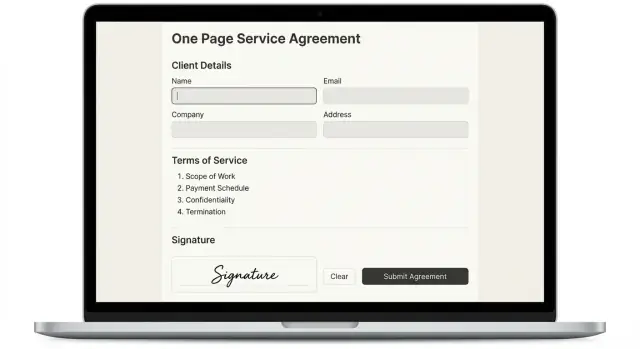
Why a one-page agreement beats email threads
Email threads feel easy at first: “Sounds good,” “Yes,” “Confirmed.” Then the project starts and everyone remembers the details differently. A small question turns into 12 replies, someone gets left off the chain, and the “final” version lives in three places.
The biggest cost is time. Back-and-forth creates pauses while you wait for answers, search old messages, or re-explain what you already agreed to. It also creates risk, because key details stay implied instead of written down.
When agreements live in email, the same things keep going missing: scope boundaries (what’s in and out), key dates, payment terms, the right billing details, and simple rules for changes.
A one-page service agreement builder fixes that by putting everything into one flow: collect client details, show clear terms next to the fields they relate to, then capture a signature immediately. Clients don’t have to hunt for attachments or guess which version is correct. You get one record you can store, export, and pull up when questions come up.
One-page agreements work best when the deal is straightforward and repeatable, like fixed-fee packages, monthly retainers, or standard onboarding services. They’re a poor fit when the work is complex or high-risk. If you need detailed deliverables, heavy compliance language, or negotiated clauses, you still need a longer contract.
A simple rule: if you can explain the work and the payment in a short call without “it depends” every 30 seconds, a one-page agreement is usually enough. If not, keep the one-page flow for intake and signature intent, then follow up with a fuller contract.
What this builder should do (and what it should not)
A one-page service agreement builder has one job: get a client from “ready to start” to “we both agree” without extra emails, missing details, or awkward follow-ups. If it can’t collect key info, confirm the terms, and capture a signature in one smooth pass, it’s just another form.
A solid builder does a few things consistently:
- Asks only for the details you need to deliver the service and invoice correctly.
- Shows plain-language terms right next to the inputs they relate to.
- Captures a signature with a timestamp, then locks the final copy.
- Stores the signed agreement and sends a receipt to both sides.
- Makes the status obvious (draft, sent, signed, expired).
Keep the page short with progressive disclosure. For example, show payment details only after the client chooses a pricing option. Show company fields only if they select “Business” instead of “Individual.”
Decide upfront who fills it out. For many teams, the fastest workflow is internal-first: you prefill scope and price, then the client reviews and signs. Client-only can work too, but it tends to create more back-and-forth unless your offering is highly standardized.
What it should not do: pretend to be a full legal contract generator, bury people in long clauses, or turn onboarding into an interrogation. Avoid complex attachments and multi-step account creation unless you truly need them.
If you’re building a one-page service agreement builder in Koder.ai, define “done” in practical terms: the client can sign, you can retrieve the signed PDF or record later, and both parties have proof of what was agreed.
Client details to collect without overwhelming people
A one-page service agreement builder works when it asks only for details that will matter if someone later says, “That’s not what I agreed to.” If the form feels like paperwork, clients slow down, abandon it, or type nonsense just to get through.
Start with a tight set of fields that clearly map to the agreement.
The must-have fields
Keep the first screen short and familiar. In most cases, these cover nearly everything:
- Client legal name and billing address
- Primary email and phone
- Service name and start date
- Delivery date or timeframe
- Pricing and payment terms
Then add a small billing section so the money part can’t be misunderstood: fixed fee amount, hourly rate, milestone amounts (if used), and the payment due date (for example, “due on receipt” or “net 7”). If you offer both hourly and fixed-fee, make the client pick one so you don’t end up with conflicting numbers.
Optional fields (hide them until needed)
Optional details can help, but they shouldn’t block signing. Make them collapsible or conditional: purchase order number, VAT or tax ID, and an extra billing contact.
A simple rule holds up well: if you won’t use it, don’t ask for it.
Validation rules that prevent messy submissions
A few guardrails prevent disputes later:
- Require a legal name, not just a brand name.
- Validate email format and phone length.
- Enforce valid dates (end date can’t be before start date).
- Lock currency and number formats (no “$5k-ish”).
- Confirm authority to sign (for example, a checkbox).
Example: a client types “ACME” and leaves the address blank. If your form requires the full legal entity and billing address before it unlocks the signature step, you avoid chasing details afterward and your agreement stays usable when it matters.
Simple terms: the minimum you should spell out
A one-page service agreement builder works best when it covers the few things that actually cause disputes. Keep the terms short, use everyday words, and avoid vague promises like “ongoing support” or “unlimited revisions.” If you can’t explain a term in one sentence, it probably doesn’t belong on the one-pager.
Start with scope. Describe what you will deliver in plain language, then name what’s out of scope. “Design and build a 5-page marketing site” is clearer than “web design services.” Add one direct line for exclusions, such as “Copywriting and SEO are not included unless added in writing.”
Revisions are the next flashpoint. Clients often hear “revision” as “start over,” so define what counts as a revision and what counts as a change request. A simple approach is to include a small limit and state what happens after that.
Payment terms should be direct: the total amount, when it’s due, and what happens if payment is late (only include late fees if you intend to enforce them). If you split payments, name the triggers: “50% to start, 50% on delivery.”
Cancellation and refunds should be explicit, even if the answer is “no refunds after work starts.” Keep it fair and easy to understand.
Finally, set support expectations. A support window is not a lifetime promise. Spell out how long support lasts and how fast you typically respond.
Minimum terms worth capturing on a one-pager:
- Scope (deliverables and exclusions)
- Revisions (what’s included, how changes are priced)
- Payment (amount, schedule, late rule)
- Cancellation and refunds (what happens if either side stops)
- Support (duration and response time)
Example: “Two rounds of revisions on the homepage layout. New pages or new features are a change request billed at $X/hour.”
Capturing a signature in a way clients trust
A signature step feels real when it’s clear, predictable, and leaves a paper trail. The goal isn’t legal theater. It’s giving the client a simple action that matches their intent, and proving what happened later if anyone forgets.
Offer signature options that match how people work. Some clients sign on a phone between meetings, others prefer drawing a signature, and sometimes a clear consent is enough:
- Typed name
- Drawn signature
- Checkbox consent (best for very simple approvals)
Whichever option you use, always record when the signature happened. Add an automatic date and time stamp near the signature, and keep an internal record of who signed, which version of the terms they saw, and the email used. That audit trail matters more than whether the signature is typed or drawn.
Place a short consent sentence right above the button. Keep it plain: “By signing, I agree to the terms above and intend this to be a legal signature.” If they’re signing on behalf of a company, add one more line: “I confirm I’m authorized to sign for this company.”
After signing, immediately show confirmation and send a copy. A good default is: a downloadable PDF, an email receipt to the signer, and an internal dashboard where you can retrieve the latest signed version.
If the signer is not the payer (common in agencies and larger teams), make it explicit. Capture both “Signer” and “Billing contact,” and add a checkbox that invoices should go to the billing contact. That small step prevents the classic dispute: “I approved it, but finance didn’t know.”
A practical one-page flow that still feels safe
A one-page agreement works when it feels like a guided checkout, not a wall of text. Keep everything on one page, but use clear sections so clients never wonder what happens next.
Layout that builds confidence
Start with a short header (service name and your business name). Then structure the page into three blocks: client details, terms, and signature.
A simple progress cue helps: “1) Details 2) Review 3) Sign.” Pair it with a sticky summary panel (sidebar on desktop, bottom bar on mobile) showing price, start date, and the key cancellation or refund line.
Prefill what you can. If the client arrived from an invite or proposal, load their name and company automatically. If you can’t prefill, keep fields short and say why you need them.
One flow, with clear checkpoints
Even on one page, you still want clear lifecycle states:
- Draft (editable)
- Sent (client received it)
- Viewed (first open logged)
- Signed (locked and stored)
- Expired (needs resending)
Behind the scenes, keep the model simple: a Client record, an Agreement record, a Terms Version (so you can prove what they saw), and a Signature Record (name, timestamp, method, plus a short audit note like “signed from email invite”).
After signing, show a confirmation screen with a short summary and “what happens next.” Send two notifications: one to the client (receipt and copy) and one internal (signed agreement and key fields).
If you build this in Koder.ai, ask for a single-page UI with a sticky summary and a small state machine for the agreement lifecycle. It’s one page for the client, but it should behave like a controlled process.
Step by step: build it quickly with Koder.ai
Koder.ai is a vibe-coding platform that lets you create web, server, and mobile applications through a chat interface. For a one-page service agreement builder, that’s a good match: you can describe the flow in plain English and generate a React UI with a Go backend and PostgreSQL storage.
Start in Planning mode and write the exact words you want clients to see. Be specific about what fields you collect, what terms you show, and what happens after they sign. Then generate the app with those labels and that tone.
A practical build order:
- Define the form fields and short terms text first, so the copy stays consistent.
- Generate a React form with clear validation (required fields, email format) and autosave.
- Add a Go API and PostgreSQL tables for clients, agreements, and signatures, including timestamps and status (draft, sent, signed).
- Build a review-and-sign section that shows a read-only summary and locks terms after signing.
- Use snapshots and rollback while you adjust wording, validation, and layout.
For locking terms, keep it simple: when the client clicks Sign, store the final terms text exactly as shown (optionally with a checksum), then prevent edits for that agreement record.
When the flow feels solid, deploy from Koder.ai. If you want it to look client-ready, add a custom domain. If you need to host data in a specific region, you can run applications in the country that fits your data requirements.
Example: onboarding a client for a fixed-fee service
A freelance designer, Maya, sells a fixed-fee landing page package. She wants sign-off in five minutes, without a long contract or a back-and-forth email thread. She uses a one-page service agreement builder that feels like a short checkout.
Maya preconfigures what shouldn’t change: the package name, the fixed price, and a short scope statement. The client only sees what they need to fill in, plus the terms they’re agreeing to.
The client fills out:
- Legal name (and company name, if applicable)
- Email and billing address
- Project name and a one-sentence goal
- Best contact person for approvals
- Signature (typed or drawn) and today’s date
Her terms stay minimal and clear:
- Deposit: 50% due upfront to start work
- Revisions: 1 revision round included; extra rounds billed at a stated rate
- Delivery dates: first draft by May 10, final by May 17 (assuming feedback within 2 business days)
After the client signs, the flow matters as much as the words. The confirmation screen shows a plain summary (price, deposit, delivery dates) and states what happens next.
Behind the scenes, the signed copy is stored with a timestamp and both sides receive a clean PDF copy. Then the next steps trigger automatically: “Pay deposit” for the client, and “Schedule kickoff call” for Maya. That’s when the agreement stops being paperwork and becomes an e-signature workflow that moves the project forward.
Common mistakes that create disputes later
Most disputes don’t start with bad intent. They start with a form that felt “good enough” on launch day, then fails when someone remembers the work differently.
One common trap is turning a one-page flow into a mini legal document. When the page is packed with dense terms, clients skim, miss key points, and later feel surprised. Keep the words plain and include only the terms you actually expect a client to follow.
Another frequent problem is vague scope. If your agreement says “design support” or “marketing help,” you’re inviting two different interpretations. Name concrete deliverables and boundaries: what’s included, what’s not, and what counts as a change request.
Where the process breaks
A one-page service agreement builder should also prevent silent changes after signature. Disputes happen when someone edits the page, updates pricing, or tweaks dates and no one can prove what was agreed.
Watch for gaps like these:
- Clients can edit fields after signing, with no version history.
- The signer’s full name is missing, or their authority is unclear.
- You capture a signature image but not a timestamp or terms version.
- You overwrite agreements instead of saving each signed copy separately.
A quick example
A freelancer sends a one-page agreement for a fixed-fee website. The client signs, then later says, “We agreed it included copywriting.” The scope line said “website build” with no exclusions, and the agreement was edited after signing to add a new deadline. Now both sides feel misled.
Treat the agreement like a record: lock signed fields, store the terms version, and save each signed copy separately. That alone prevents many avoidable arguments.
A quick checklist before you ship
Before you send your one-page service agreement builder to real clients, do a dry run with someone who hasn’t seen it. Watch where they pause, what they try to skip, and what they expect to receive at the end.
Use this as a final pass:
- Only essential fields are required, and each required field has a clear reason.
- The client sees the full terms before signing (no hidden last-step terms).
- The confirmation screen is obvious and includes what was signed and the date/time.
- The signed record is write-once: locked, timestamped, and tied to a specific terms version.
- Access and exports are limited by default and clear to the client (can they download, and in what format?).
A simple test: sign it twice, once with correct info and once with a deliberate mistake (like a typo in the name). If fixing the mistake requires editing the original signed record, you need an amendment or re-sign path.
If you’re building with Koder.ai, add these items as acceptance criteria for the app, not “nice to have” notes.
Next steps: launch a small version and improve it
Start with a small but real version: one page that collects the essentials, shows clear terms, and captures a signature. Put it in front of 3 to 5 friendly clients and watch where they hesitate. The goal is fewer delays and fewer misunderstandings.
Before you ship, decide where the data must live. Some clients care a lot about location and access. If you work with EU customers, healthcare, finance, or enterprise teams, ask early about privacy expectations and who needs to download or delete records.
Keep retention simple and visible. Write down what you store (client details, the final agreement PDF, signature timestamp, and IP address if you capture it) and how long you keep it. A short retention rule is easier to defend later than “we keep everything forever.”
Make sure you can export your data. Even if your current tool works well today, exports protect you if you switch systems, get audited, or need to share records with a lawyer or accountant.
A practical launch plan:
- Ship a basic version to a small group.
- Add one export format (PDF or CSV) and one admin view.
- Set a retention rule and a delete request process.
- Collect feedback weekly for a month.
If you’re using Koder.ai (koder.ai), Planning mode and snapshots make iteration easier: you can refine the flow, test wording changes, and roll back if something confuses users. If you share what you built, Koder.ai also offers ways to earn credits through its content and referral programs.
FAQ
When is a one-page service agreement actually enough?
Use a one-page agreement when the work is simple and repeatable, like a fixed-fee package or a monthly retainer. If the project has lots of unknowns, detailed deliverables, or negotiated clauses, use the one-pager for intake and signature intent, then follow with a longer contract.
Why not just agree over email if everyone says “confirmed”?
Email creates confusion because key details stay scattered, implied, or buried in replies. A one-page flow puts scope, dates, payment, and signature in one place so you have a single record to reference when questions come up.
What client details should I collect without making it feel like paperwork?
Start with the basics you’ll need to deliver and invoice: legal name, billing address, email/phone, service name, start date, delivery timeframe, and payment terms. Add optional fields only when they matter, like a PO number or tax ID.
How do I prevent clients from submitting vague or incorrect info?
Make the minimum fields required and keep everything else optional or conditional. Use validation to prevent messy entries, like enforcing real dates, consistent currency formats, and a full legal name instead of a brand nickname.
What are the minimum terms a one-page agreement should include?
Spell out scope and exclusions, revisions, payment schedule, cancellation/refunds, and support expectations. Keep each term plain and specific so it’s hard to misread later.
How should I handle revisions and change requests on a one-pager?
Define what a revision is and set a clear limit that’s included in the price. Then state what happens after the limit, such as billing an hourly rate or issuing a change request.
What makes an e-signature feel trustworthy to clients?
Offer a simple method like typed name or drawn signature, and always record a timestamp and the exact terms version shown. The audit trail is what makes the signature step credible when someone asks later what was agreed.
How do I avoid disputes caused by edits after signing?
Lock the signed copy so fields and terms can’t be edited after signature. If something needs to change, create a new agreement version or an amendment that gets re-signed, instead of altering the original record.
What does a good one-page agreement flow look like?
Use a single page with clear sections: client details, terms, and signature, plus a small summary that shows price and key dates. Treat it like a guided checkout so clients always know what to do next without reading a wall of text.
How can I build this quickly in Koder.ai without missing key features?
In Koder.ai, you can describe the flow in Planning mode and generate a React UI with a Go backend and PostgreSQL storage. Make “done” include locked signed records, a stored terms version, clear status states, and an exportable signed copy you can retrieve later.