

Palantir vs Enterprise Software: Integration, Analytics, Deployment
See how Palantir’s approach to data integration, operational analytics, and deployment differs from traditional enterprise software—and what it means for buyers.
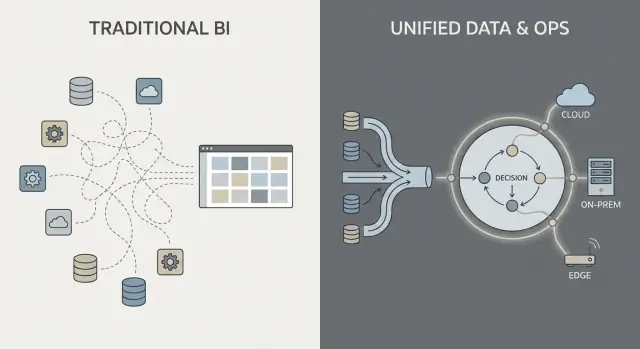
What “Palantir” and “Traditional Enterprise Software” Mean Here
People often use “Palantir” as shorthand for a few related products and an overall way of building data-driven operations. To keep this comparison clear, it helps to name what’s actually being discussed—and what isn’t.
What “Palantir” refers to in this post
When someone says “Palantir” in an enterprise context, they typically mean one (or more) of these:
- Foundry: Palantir’s commercial platform, centered on integrating data, modeling it, and enabling operational decision-making.
- Gotham: Often associated with defense and public sector use cases, with similar themes but different history and positioning.
- Apollo: A deployment and delivery system used to ship and manage software across many environments (including restricted ones).
This post uses “Palantir-like” to describe the combination of (1) strong data integration, (2) a semantic/ontology layer that aligns teams on meaning, and (3) deployment patterns that can span cloud, on‑prem, and disconnected setups.
What “traditional enterprise software” means here
“Traditional enterprise software” isn’t one product—it’s the typical stack many organizations assemble over time, such as:
- ERP and CRM systems (systems of record for finance, supply chain, sales)
- A data warehouse or lake plus BI dashboards (systems for reporting and analytics)
- Integration middleware (ETL/ELT tools, iPaaS, message queues, APIs)
In this approach, integration, analytics, and operations are frequently handled by separate tools and teams, connected through projects and governance processes.
What this comparison is (and isn’t)
This is an approach comparison, not a vendor endorsement. Many organizations succeed with conventional stacks; others benefit from a more unified platform model.
The practical question is: what trade-offs are you making in speed, control, and how directly analytics connects to day-to-day work?
To keep the rest of the article grounded, we’ll focus on three areas:
- Data integration: how data gets connected, maintained, and owned
- Operational analytics: how analysis moves beyond dashboards into decisions
- Deployment models: cloud, on‑prem, and air‑gapped/disconnected realities
Data Integration: Pipelines and Responsibilities
Most “traditional enterprise software” data work follows a familiar chain: pull data from systems (ERP, CRM, logs), transform it, load it into a warehouse or lake, and then build BI dashboards plus a few downstream apps.
That pattern can work well, but it often turns integration into a series of fragile handoffs: one team owns extraction scripts, another owns warehouse models, a third owns dashboard definitions, and business teams maintain spreadsheets that quietly redefine “the real number.”
The traditional pattern: ETL/ELT as a relay race
With ETL/ELT, changes tend to ripple. A new field in the source system can break a pipeline. A “quick fix” creates a second pipeline. Soon you have duplicated metrics (“revenue” in three places), and it’s unclear who is responsible when numbers don’t match.
Batch processing is common here: data lands nightly, dashboards update in the morning. Near-real-time is possible, but it often becomes a separate streaming stack with its own tooling and owners.
The Palantir-style pattern: integrate, standardize meaning, then reuse everywhere
A Palantir-style approach aims to unify sources and apply consistent semantics (definitions, relationships, and rules) earlier, then expose the same curated data to analytics and operational workflows.
In plain terms: instead of each dashboard or app “figuring out” what a customer, asset, case, or shipment means, that meaning is defined once and reused. This can reduce duplicated logic and make ownership clearer—because when a definition changes, you know where it lives and who approves it.
Common pain points to watch for
Integration usually fails on responsibilities, not connectors:
- Brittle pipelines that break on small source changes
- Duplicated metrics defined differently across teams
- Unclear ownership for data quality, definitions, and fixes
The key question isn’t just “Can we connect to system X?” It’s “Who owns the pipeline, the metric definitions, and the business meaning over time?”
Semantic Layer and Ontology: A Different Center of Gravity
Traditional enterprise software often treats “meaning” as an afterthought: data is stored in many app-specific schemas, metric definitions live inside individual dashboards, and teams quietly maintain their own versions of “what an order is” or “when a case is considered resolved.” The result is familiar—different numbers in different places, slow reconciliation meetings, and unclear ownership when something looks off.
Ontology, explained in plain terms
In a Palantir-like approach, the semantic layer is not just a reporting convenience. An ontology acts as a shared business model that defines:
- Entities (things your business cares about): Order, Customer, Asset, Shipment, Case
- Relationships (how those things connect): an Order belongs to a Customer; a Shipment fulfills an Order; an Asset is installed at a Site
- Actions (what people do with them): approve, dispatch, escalate, retire, refund
This becomes the “center of gravity” for analytics and operations: multiple data sources can still exist, but they map into a common set of business objects with consistent definitions.
Why semantics matter more than people expect
A shared model reduces mismatched numbers because teams aren’t reinventing definitions in every report or app. It also improves accountability: if “On-time delivery” is defined against Shipment events in the ontology, it’s clearer who owns the underlying data and business logic.
Practical examples you can picture
- Orders: Sales, finance, and support view the same Order object, including status, value, approvals, and exceptions—no separate “order tables” per department.
- Assets: Maintenance, operations, and compliance share one Asset record with location, inspection history, and risk flags.
- Cases: Support cases connect to customers, orders, and shipments, so escalation rules and service metrics don’t drift by team.
Done well, an ontology doesn’t just make dashboards cleaner—it makes day-to-day decisions faster and less argumentative.
Operational Analytics vs BI Dashboards
BI dashboards and traditional reporting are primarily about hindsight and monitoring. They answer questions like “What happened last week?” or “Are we on track against KPIs?” A sales dashboard, a finance close report, or an executive scorecard is valuable—but it often stops at visibility.
Operational analytics is different: it’s analytics embedded in day-to-day decisions and execution. Instead of a separate “analytics destination,” analysis shows up inside the workflow where work is performed, and it drives a specific next step.
BI: Observe and explain
BI/reporting typically focuses on:
- Standardized metrics and KPI definitions
- Scheduled refreshes and weekly/monthly reviews
- Aggregated views (teams, regions, time periods)
- Root-cause exploration after outcomes are known
That’s excellent for governance, performance management, and accountability.
Operational analytics: Decide and do
Operational analytics focuses on:
- Real-time or near-real-time signals
- Decision support at the moment of action
- Recommendations, prioritization, and exception handling
- Feedback loops (did the action work, and what changed?)
Concrete examples look less like “a chart” and more like a work queue with context:
- Dispatching: choosing which job to send to which crew given location, skill, SLA, and parts availability
- Inventory allocation: deciding where limited stock should go to reduce backorders and missed deliveries
- Fraud triage: ranking cases by risk and routing them to investigators with the right evidence attached
- Maintenance scheduling: predicting failures and scheduling downtime around production constraints
The key shift: from “view” to “act”
The most important change is that analysis is tied to a specific workflow step. A BI dashboard might show “late deliveries are up.” Operational analytics turns that into “here are the 37 shipments at risk today, the likely causes, and the recommended interventions,” with the ability to execute or assign the next action immediately.
From Insights to Actions: Workflow-Centered Design
Traditional enterprise analytics often ends with a dashboard view: someone spots an issue, exports to CSV, emails a report, and a separate team “does something” later. A Palantir-like approach is designed to shorten that gap by embedding analytics directly into the workflow where decisions are made.
Human-in-the-loop decisions (not autopilot)
Workflow-centered systems typically generate recommendations (e.g., “prioritize these 12 shipments,” “flag these 3 vendors,” “schedule maintenance within 72 hours”) but still require explicit approvals. That approval step matters because it creates:
- Decision accountability: who approved, when, and based on what data
- Audit trails: a recorded chain from input data → logic/model → recommendation → action
- Controlled exceptions: operators can override with a reason, rather than working around the tool
This is especially useful in regulated or high-stakes operations where “the model said so” is not an acceptable justification.
Workflows replace the “report handoff”
Instead of treating analytics as a separate destination, the interface can route insights into tasks: assign to a queue, request sign-off, trigger a notification, open a case, or create a work order. The important shift is that outcomes are tracked inside the same system—so you can measure whether actions actually reduced risk, cost, or delays.
Role-based experiences and decision rights
Workflow-centered design usually separates experiences by role:
- Frontline operators: fast queues, clear next-best action, minimal context needed
- Analysts: deeper drill-down, scenario testing, and monitoring data/model quality
- Executives: KPIs tied to operational throughput and bottlenecks, not just charts
The common success factor is aligning the product with decision rights and operating procedures: who is allowed to act, what approvals are required, and what “done” means operationally.
Governance, Security, and Trust in the Data
Governance is where many analytics programs succeed or stall. It’s not just “security settings”—it’s the practical set of rules and evidence that lets people trust the numbers, share them safely, and use them to make real decisions.
What governance needs to cover (beyond login)
Most enterprises need the same core controls, regardless of vendor:
- Access controls: who can see, edit, or approve data, models, and operational outputs
- Data lineage: where a metric came from, which sources fed it, and what transformations happened
- Audit logs: a defensible record of who changed what and when
- Approvals and change control: especially for “official” metrics, shared datasets, and production workflows
These aren’t bureaucracy for its own sake. They’re how you prevent the “two versions of the truth” problem and reduce risk when analytics moves closer to operations.
“Security at the dashboard” vs security across the whole chain
Traditional BI implementations often put security mainly at the report layer: users can view certain dashboards, and administrators manage permissions there. That can work when analytics is mostly descriptive.
A Palantir-like approach pushes security and governance through the entire pipeline: from raw data ingestion, to the semantic layer (objects, relationships, definitions), to models, and even to the actions triggered from insights. The goal is that an operational decision (like dispatching a crew, releasing inventory, or prioritizing cases) inherits the same controls as the data behind it.
Least privilege and segregation of duties (in plain terms)
Two principles matter for safety and accountability:
- Least privilege: people get only the access they need to do their job
- Segregation of duties: the person who builds or changes logic isn’t the same person who approves it for production use
For example, an analyst might propose a metric definition, a data steward approves it, and operations uses it—with a clear audit trail.
Why governance drives adoption
Good governance isn’t just for compliance teams. When business users can click into lineage, see definitions, and rely on consistent permissions, they stop arguing about the spreadsheet and start acting on the insight. That confidence is what turns analytics from “interesting reports” into operational behavior.
Deployment Models: Cloud, On-Prem, and Disconnected Environments
Where enterprise software runs is no longer an IT detail—it shapes what you can do with data, how quickly you can change, and what risks you can accept. Buyers usually evaluate four deployment patterns.
Public cloud
Public cloud (AWS/Azure/GCP) optimizes for speed: provisioning is fast, managed services reduce infrastructure work, and scaling is straightforward. The main buyer questions are data residency (which region, which backups, which support access), integration to on-prem systems, and whether your security model can tolerate cloud network connectivity.
Private cloud
A private cloud (single-tenant or customer-managed Kubernetes/VMs) is often chosen when you need cloud-like automation but tighter control over network boundaries and audit requirements. It can reduce some compliance friction, but you still need strong operational discipline around patching, monitoring, and access reviews.
On-prem
On-prem deployments remain common in manufacturing, energy, and highly regulated sectors where core systems and data cannot leave the facility. The trade-off is operational overhead: hardware lifecycle, capacity planning, and more work to keep environments consistent across dev/test/prod. If your organization struggles to run platforms reliably, on-prem can slow time-to-value.
Disconnected / air-gapped
Disconnected (air-gapped) environments are a special case: defense, critical infrastructure, or sites with limited connectivity. Here, the deployment model must support strict update controls—signed artifacts, controlled promotion of releases, and repeatable installation in isolated networks.
Network constraints also affect data movement: instead of continuous sync, you may rely on staged transfers and “export/import” workflows.
The key trade-offs
In practice, it’s a triangle: flexibility (cloud), control (on-prem/air-gapped), and speed of change (automation + updates). The right choice depends on residency rules, network realities, and how much platform operations your team is willing to own.
Operationalizing Updates: What Apollo-Like Delivery Changes
“Apollo-like delivery” is basically continuous delivery for high-stakes environments: you can ship improvements frequently (weekly, daily, even multiple times per day) while keeping operations steady.
The goal isn’t “move fast and break things.” It’s “move often and don’t break anything.”
Continuous delivery in plain terms
Instead of bundling changes into a big quarterly release, teams deliver small, reversible updates. Each update is easier to test, easier to explain, and easier to roll back if something goes wrong.
For operational analytics, that matters because your “software” is not just a UI—it’s data pipelines, business logic, and the workflows people rely on. A safer update process becomes part of day-to-day operations.
How this differs from traditional enterprise cycles
Traditional enterprise software upgrades often look like projects: long planning windows, downtime coordination, compatibility worries, retraining, and a hard cutover date. Even when vendors offer patches, many organizations delay updates because the risk and effort are unpredictable.
Apollo-like tooling aims to make upgrading routine rather than exceptional—more like maintaining infrastructure than executing a major migration.
Separating “building” from “shipping”
Modern deployment tooling can let teams develop and test in isolated environments, then “promote” the same build through stages (dev → test → staging → production) with consistent controls. That separation helps reduce last-minute surprises caused by differences between environments.
Vendor questions to ask
- How do you handle rollback—one click, partial rollback, or complex recovery steps?
- What versioning exists for pipelines, models, and ontology changes (not just the UI)?
- How does environment promotion work, and who can approve it?
- Can you run canary releases (small subset first) or feature flags?
- What audit trail shows who shipped what, when, and why?
- What’s the expected downtime—ideally none—for typical updates?
Implementation and Time-to-Value: What Actually Takes Effort
Time-to-value is less about how quickly you can “install” something and more about how fast teams can agree on definitions, connect messy data, and turn insights into day-to-day decisions.
Implementation styles: configure, assemble, or build
Traditional enterprise software often emphasizes configuration: you adopt a predefined data model and workflows, then map your business into them.
Palantir-like platforms tend to mix three modes:
- Configuration for access controls, data connections, and standard components
- Reusable building blocks (templates, components, patterns) that can be assembled into new use cases
- Custom application development when the workflow is unique (e.g., approvals, exception handling, operational handoffs)
The promise is flexibility—but it also means you need clarity on what you’re building versus what you’re standardizing.
One practical option during early discovery is to prototype workflow apps quickly—before committing to a large platform rollout. For example, teams sometimes use Koder.ai (a vibe-coding platform) to turn a workflow description into a working web app via chat, then iterate with stakeholders using planning mode, snapshots, and rollback. Because Koder.ai supports source code export and typical production stacks (React on the web; Go + PostgreSQL on the backend; Flutter for mobile), it can be a low-friction way to validate “insight → task → audit trail” UX and integration requirements during a proof-of-value.
Where teams actually spend time
Most effort usually goes into four areas:
- Data onboarding: getting source owners to provide access, documenting fields, handling quality gaps, and setting refresh expectations
- Modeling and semantics: agreeing on business definitions (what counts as “active,” “late,” “available”) and keeping them consistent
- Workflow design: deciding who acts on alerts, what decisions are allowed, and what “done” looks like
- Training and adoption: turning a tool into a habit—especially for frontline users who won’t tolerate complexity
Red flags that slow or kill value
Watch for unclear ownership (no accountable data/product owner), too many bespoke definitions (each team invents its own metrics), and no path from pilot to scale (a demo that can’t be operationalized, supported, or governed).
Structuring a pilot that can scale
A good pilot is intentionally narrow: pick one workflow, define specific users, and commit to a measurable outcome (e.g., reduce turnaround time by 15%, cut exception backlog by 30%). Design the pilot so the same data, semantics, and controls can extend to the next use case—rather than starting over.
Cost and Procurement: Platform vs Point Solutions
Cost conversations can get confusing because a “platform” bundles capabilities that are often bought as separate tools. The key is to map pricing to the outcomes you need (integration + modeling + governance + operational apps), not just to a line item called “software.”
Common cost drivers for a Palantir-like platform
Most platform deals are shaped by a handful of variables:
- User count and roles: builders (engineers, modelers) vs consumers (operators, analysts)
- Compute and storage: heavier workloads (real-time data, simulation, large joins) raise infrastructure costs
- Number of environments: dev/test/prod, plus regulated or disconnected environments, each adds overhead
- Support and uptime requirements: 24/7 support, incident SLAs, and dedicated success teams change the price
- Professional services: initial data onboarding, ontology design, and workflow build-out are often the real early cost driver
What the “traditional stack” costs hide
A point-solution approach can look cheaper at first, but the total cost tends to spread across:
- Multiple licenses (ETL/ELT, BI, catalog, governance, workflow, feature store, etc.)
- Integration work between tools (connectors, identity, permissions, metadata syncing)
- Ongoing maintenance (version upgrades, broken pipelines, duplicated metric definitions)
Platforms often reduce tool sprawl, but you’re trading it for a larger, more strategic contract.
Procurement: buying a platform vs an app
With a platform, procurement should treat it like shared infrastructure: define enterprise scope, data domains, security requirements, and delivery milestones. Ask for clear separation between license, cloud/infrastructure, and services, so you can compare apples-to-apples.
Simple budgeting checklist
- Which teams will actively build vs only view?
- Which workflows must run in production (not just dashboards)?
- How many environments and regions are required?
- Any air-gapped or offline sites?
- Expected growth in data volume/refresh frequency?
- Services needed for first 90 days?
If you want a quick way to structure assumptions, see /pricing.
When Palantir-Like Approaches Fit (and When They Don’t)
Palantir-like platforms tend to shine when the problem is operational (people need to make decisions and take actions across systems), not just analytical (people need a report). The trade-off is that you’re adopting a more “platform” style approach—powerful, but it asks more of your organization than a simple BI rollout.
Strong-fit scenarios
A Palantir-like approach is usually a strong fit when work spans multiple systems and teams and you can’t afford brittle handoffs.
Common examples include cross-system operations such as supply chain coordination, fraud and risk operations, mission planning, case management, or fleet and maintenance workflows—where the same data must be interpreted consistently by different roles.
It’s also a strong fit when permissions are complex (row/column-level access, multi-tenant data, need-to-know rules) and when you need a clear audit trail of how data was used.
Finally, it fits well in regulated or constrained environments: on‑prem requirements, air‑gapped/disconnected deployments, or strict security accreditation where the deployment model is a first-class requirement, not an afterthought.
Weaker-fit scenarios
If the goal is mainly straightforward reporting—weekly KPIs, a few dashboards, basic finance rollups—traditional BI on top of a well-managed warehouse can be faster and cheaper.
It can also be overkill for small datasets, stable schemas, or single-department analytics where one team controls the sources and definitions, and the main “action” happens outside the tool.
Decision criteria (fit to problem)
Ask three practical questions:
- Urgency: Do teams need working workflows in weeks, or is this a long modernization program?
- Data complexity: Are key decisions blocked by inconsistent definitions and fragmented source systems?
- Change capacity: Do you have product ownership, SMEs, and governance bandwidth to adopt a platform and keep it current?
The best outcomes come from treating this as “fit to problem,” not “one tool replaces everything.” Many organizations keep existing BI for broad reporting while using a Palantir-like approach for the highest-stakes operational domains.
Buyer Checklist and Next Steps
Buying a “Palantir-like” platform versus traditional enterprise software is less about feature checkboxes and more about where the real work will land: integration, shared meaning (semantics), and day‑to‑day operational use. Use the checklist below to force clarity early, before you get locked into a long implementation or a narrow point tool.
A practical vendor comparison checklist
Ask each vendor to be specific about who does what, how it stays consistent, and how it’s used in real operations.
- Integration effort: What data sources are typical (ERP, logs, spreadsheets, partner feeds)? What’s prebuilt vs custom? Who maintains pipelines after go‑live—IT, data engineering, or the vendor?
- Semantic consistency: How do they prevent five teams from defining “customer,” “asset,” or “mission-ready” differently? Can they show a governed business layer (ontology/semantic model) and how changes propagate?
- Workflow support: Can frontline teams complete a task (triage, approve, dispatch, investigate) inside the product, or is it “analyze here, act somewhere else”? How are exceptions handled?
- Governance and security: Granular access controls, audit logs, and policy management—can data owners control who sees what, at what grain, and why?
- Deployment constraints: Can it run in your required environment (cloud, on‑prem, air‑gapped/disconnected)? What breaks when connectivity is limited? What’s the upgrade path?
Proof questions for demos (don’t accept slides)
- Show lineage: Pick one critical KPI and trace it from source to final metric. Where can it be wrong, and how would you detect it?
- Demonstrate a workflow end-to-end: Start with raw data, then alert → decision → action → audit trail. Include approvals and “who changed what.”
- Simulate an outage/rollback: What happens if a pipeline fails or a release causes a regression? Can they roll back cleanly, and how quickly?
Who needs to be in the room
Include stakeholders who will live with the tradeoffs:
- IT and platform owners (integration ownership, reliability, cost)
- Security and compliance (controls, auditing, deployment approvals)
- Data owners/stewards (definitions, access rules, accountability)
- Operations leaders (process impact, adoption)
- Frontline users (does it actually help them do the job faster?)
Next steps
Run a time-boxed proof-of-value centered on one high-stakes operational workflow (not a generic dashboard). Define success criteria in advance: time-to-decision, error reduction, auditability, and ownership of ongoing data work.
If you want more guidance on evaluation patterns, see /blog. For help scoping a proof-of-value or vendor shortlisting, reach out at /contact.
FAQ
What does “Palantir” mean in this comparison, and what counts as “traditional enterprise software”?
In this post, “Palantir” is shorthand for a platform-style approach commonly associated with Foundry (commercial data/operations platform), Gotham (public sector/defense roots), and Apollo (deployment/delivery across environments).
“Traditional enterprise software” refers to the more common assembled stack: ERP/CRM + warehouse/lake + BI + ETL/ELT/iPaaS and integration middleware, often owned by separate teams and connected via projects and governance processes.
What’s the difference between a semantic layer and an ontology?
A semantic layer is where you define business meaning once (e.g., what “Order,” “Customer,” or “On-time delivery” means) and then reuse it across analytics and workflows.
An ontology goes further by modeling:
- Entities (Order, Shipment, Asset, Case)
- Relationships (Shipment fulfills Order)
- Actions (approve, dispatch, escalate)
The practical benefit is fewer conflicting definitions across dashboards, apps, and teams—and clearer ownership when definitions change.
Why do data integration efforts become brittle in traditional stacks?
Traditional ETL/ELT often becomes a relay race: source extracts → transformations → warehouse models → dashboards, with separate owners at each step.
Common failure modes are:
- Pipelines that break when source schemas change
- Duplicated metrics (“revenue” defined multiple ways)
- Unclear responsibility for fixes
A Palantir-like pattern tries to standardize meaning earlier and then reuse the curated objects everywhere, reducing duplicated logic and making change control more explicit.
How is operational analytics different from BI dashboards?
BI dashboards are mainly observe and explain: monitoring KPIs, scheduled refreshes, and retrospective analysis.
Operational analytics is decide and do:
- Near-real-time signals
- Prioritized work queues and recommendations
- Embedded actions (assign, approve, create work orders)
- Feedback loops that measure whether interventions worked
If the output is “a chart,” it’s usually BI. If the output is “here’s what to do next, and do it here,” it’s operational analytics.
What does “workflow-centered” design mean, and why does it matter?
A workflow-centered system shortens the gap between insight and execution by embedding analysis into the place work happens.
In practice, it replaces “export to CSV and email” with:
- A queue of exceptions or opportunities
- Context attached (evidence, history, constraints)
- A defined next step (approve, dispatch, escalate)
- Outcome tracking (did the action reduce delays/risk?)
The goal is not prettier reporting—it’s faster, auditable decisions.
What is “human-in-the-loop” decision-making in operational analytics?
“Human-in-the-loop” means the system can recommend actions, but people explicitly approve or override them.
This matters because it creates:
- Accountability (who approved what, when, and why)
- Auditability (input data → logic/model → recommendation → action)
- Controlled exceptions (overrides with reasons instead of workarounds)
It’s especially important in regulated or high-stakes operations where blind automation is unacceptable.
What governance controls should I expect beyond basic dashboard permissions?
Governance isn’t just logins; it’s the operational rules and evidence that make data safe and trustworthy.
At minimum, enterprises typically need:
- Access controls (who can see/edit/approve)
- Data lineage (where metrics came from)
- Audit logs (who changed what and when)
- Change control (approvals for “official” definitions and production workflows)
When governance is strong, teams spend less time reconciling numbers and more time acting on them.
How do cloud, on-prem, and air-gapped deployments change what’s possible?
The deployment choice constrains speed, control, and operating overhead:
- Public cloud: fastest provisioning and scaling; requires comfort with residency and connectivity.
- Private cloud: more boundary/control with cloud-like automation; still demands disciplined ops.
- On-prem: keeps data local; higher overhead for lifecycle, capacity, and environment consistency.
- Disconnected/air-gapped: strict update controls (signed artifacts, controlled promotion) and staged data movement.
Pick based on residency rules, network realities, and how much platform operations you can support.
What does “Apollo-like” delivery change compared to traditional enterprise upgrade cycles?
Apollo-like delivery is continuous delivery designed for constrained, high-stakes environments: frequent, small, reversible updates with strong controls.
Compared to traditional upgrade projects, it emphasizes:
- Routine upgrades instead of quarterly “big bang” releases
- Promotion through environments (dev → test → prod) with approvals
- Rollbacks, canaries, and feature flags
- Versioning for pipelines, models, and semantic/ontology changes (not only UI)
This matters because operational analytics depends on reliable pipelines and business logic, not just reports.
How should I structure a pilot so it can scale beyond a demo?
A scalable proof-of-value is narrow and operational.
A practical structure:
- Choose one workflow (e.g., shipment exception triage, fraud case routing)
- Define specific users and decision rights (who can act, who approves)
- Commit to measurable outcomes (cycle time, backlog reduction, error rate)
- Demonstrate lineage and audit trails end-to-end
- Ensure the data and definitions can extend to the next use case without starting over
Avoid “generic dashboards” as the pilot goal if the real aim is operational impact.