

Pinterest Ads Explained: Visual Search and Intent Discovery
Learn how Pinterest’s visual search and intent-driven discovery shape ad targeting, creative, bidding, and measurement—different from social feeds.
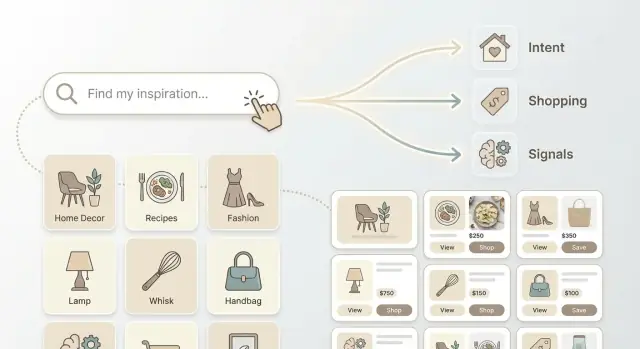
Why Pinterest Feels Different From Social Feeds
Most social platforms feel like a stream: you open the app, see what people you follow are doing, and react in the moment. Pinterest feels different because it’s not built around status updates—it’s built around finding ideas.
Pinterest ads work differently for the same reason. They’re designed to show up when someone is actively searching, browsing, saving, and planning—not just scrolling past friends’ posts.
The core question: why do Pinterest ads “behave” differently?
On feed-based social, advertising often competes with identity-driven content (“who’s doing what”). Success is frequently tied to interruption: grabbing attention fast enough to stop the scroll.
On Pinterest, advertising is closer to discovery. People arrive with a goal—outfit inspiration, kitchen remodel ideas, gifts, recipes, workouts, product comparisons. Promoted content can blend into that behavior because it’s relevant to what the person is trying to find.
That difference changes the fundamentals:
- Users are often future-focused (planning), not just reacting
- Content can keep circulating for longer (saved and revisited)
- Targeting leans heavily on keywords and topics, not just demographics
What to expect from this guide
This guide focuses on the mechanics that make Pinterest unique:
- Visual search: how images are interpreted and matched to interests
- Intent-based discovery: why actions like search, save, and browse matter
- Discovery flow: where ads appear and how people move from idea → product
If you’re expecting a “social ads” playbook (viral hooks, follower growth, meme formats), this will feel different—by design.
Who this is for
You’ll get the most value from this if you’re:
- A marketer who’s used to Meta/TikTok and wants a clearer Pinterest model
- An ecommerce owner trying to drive product discovery (not just retargeting)
- A content or creative team building evergreen visual assets
What you’ll be able to do after reading
By the end, you should be able to:
- Plan campaigns around intent, not just audience identity
- Use keyword targeting and Pinterest SEO concepts confidently
- Create ad creative that works with visual search signals
- Measure performance with longer consideration cycles in mind
If you want next steps after the strategy, you can also explore /pricing or browse more tactical examples in /blog.
Pinterest as a Discovery Engine, Not a Status Feed
Pinterest behaves less like a running commentary on people’s lives and more like a personal planning tool. Users arrive with a project, goal, or curiosity—then they search, browse, and save ideas until they’re ready to act.
Discovery = search + browse + recommendations
On Pinterest, discovery happens in a few interconnected ways:
- Search: users type queries (“small backyard patio,” “wedding nail ideas,” “meal prep snacks”) and refine with filters.
- Browse: they follow visual threads by tapping related Pins and exploring category feeds.
- Recommendations: Pinterest suggests similar or complementary ideas based on what someone saved, viewed, or engaged with.
That mix means your ad can be found the same way organic ideas are found: by matching what someone is actively exploring.
Pins are saved ideas, not just posts
A Pin isn’t primarily a “status update.” It’s closer to a bookmark with a picture—something a person can collect, organize into boards, and return to later. Saving is often a signal of intent: “this is relevant to my plan,” not “this reflects my identity today.”
Because people revisit boards when they’re ready to decide, Pinterest content (including ads) can keep working beyond the moment it was first seen.
The user mindset: planning, comparing, collecting
Many Pinterest sessions look like research:
- comparing styles, prices, or options
- building a shortlist
- mapping steps (recipes, routines, renovations, travel)
What this means for ad strategy
If you treat Pinterest like a typical social feed, you’ll often over-index on quick hooks and inside jokes. A better approach is to align ads with discovery behavior: make the visual instantly scannable, connect it to clear search terms, and position it as a useful idea someone would save for later—without assuming immediate purchase or guaranteeing results.
How Intent-Based Discovery Changes Targeting
Pinterest targeting works best when you think in signals of intent rather than “who someone is.” People leave clues as they explore, and those clues are often about a future project they haven’t started yet.
What counts as an intent signal on Pinterest
Intent shows up in multiple, compounding behaviors:
- Searches: the most direct statement of what someone wants (e.g., “small kitchen remodel ideas”).
- Saves: strong “this is for later” behavior, often tied to planning.
- Clicks: interest in details, instructions, pricing, or where to buy.
- Board themes: the categories and titles people collect under (“Scandi kitchen,” “Budget remodel,” “DIY backsplash”).
- Engagement patterns: repeated interaction with a style, color palette, or product type over time.
The practical shift: you’re not trying to interrupt a feed; you’re trying to match what someone is actively assembling.
Intent is often forward-looking (and that’s a feature)
A Pinterest user searching “kitchen remodel” might be weeks or months away from purchasing cabinets or appliances. That doesn’t make the traffic low quality—it means the platform can influence decisions early, while preferences are forming.
For advertisers, this changes how you build audiences and keywords:
- Target categories and searches that indicate a project is underway.
- Layer keywords that show progression (ideas → styles → materials → products).
Visual content helps users refine what they want
As people scroll, they’re not just consuming—they’re narrowing. A single Pin can help someone move from a vague goal (“modern kitchen”) to specifics (“matte black pulls,” “white oak cabinets,” “cream zellige backsplash”). Your creative becomes part of the decision-making tool.
A simple journey example
Someone starts with “kitchen remodel”, then searches “modern warm kitchen”, saves Pins into a board called “White oak + black hardware”, and eventually clicks Shopping results for cabinet pulls and pendant lights.
Your targeting should be ready for each step: broad inspiration keywords early, then more specific terms and product-focused creatives later.
Common misconceptions to avoid
- Treating Pinterest like chronological posting (consistency matters, but discovery is driven by relevance).
- Over-focusing on demographics and under-using keyword + theme signals.
- Expecting every click to convert immediately, instead of measuring assisted progress over time.
Visual Search and Keywords: Two Sides of the Same System
Pinterest discovery runs on two inputs that reinforce each other: what people type (keywords) and what they show interest in visually (images).
Keyword search is “shopping language”
On Pinterest, searches often look like plans: “small living room layout,” “summer wedding guest outfit,” or “meal prep lunch ideas.” These queries are specific, practical, and usually tied to a future decision.
For ads, that matters because keywords aren’t just topics—they’re intent signals. If your campaign is aligned to the phrases people actually use, you’re showing up at the moment someone is collecting options and narrowing preferences.
Visual search finds the style, not just the term
Pinterest can also match Pins by what’s in the image—color, shape, category cues, and overall aesthetic. Someone might not know the right keywords (“mid-century,” “scandi,” “quiet luxury”), but they can still discover similar items by engaging with an image they like.
That’s why visual search and keywords should be treated as one system: keywords bring you into the conversation, and visuals keep you there by matching taste.
What this changes in creative (and metadata)
Creative that works best with visual search is easy to “read” at a glance:
- A clear main subject (one hero product or focal point)
- Recognizable style cues (materials, colors, patterns, room context)
- Minimal clutter that confuses what the Pin is “about”
To align assets with real queries, build variations around use cases and contexts: rooms (“nursery storage”), occasions (“holiday table setting”), and problems (“frizzy hair routine”).
Where you can, keep titles and descriptions consistent with the visual: name the product, include the key attribute, and match the words people search. That metadata helps Pinterest connect the same intent across keyword search and visual similarity.
Where Pinterest Ads Appear in the Discovery Flow
Pinterest ads don’t “break” a conversation the way many social ads do. They show up in the same places people are already using to look for ideas—so the best-performing ads feel like the next useful option, not an interruption.
Common placements inside discovery
You’ll most often see ads woven into:
- Home feed: where people browse fresh ideas based on what they’ve saved, searched, and engaged with.
- Search results: alongside organic Pins when someone types a query (high intent, very keyword-driven).
- Related Pins / recommendations: when a person clicks into a Pin and keeps exploring similar ideas.
- Shopping surfaces: browseable product areas and results where people compare options and prices.
The important point: each placement is a different “moment” in the same discovery loop—browse → refine → compare → act.
What makes an ad feel native
A Pinterest ad tends to blend in when it’s:
- Helpful and idea-forward (shows the “how” or the outcome, not just the item)
- Visually clear at a glance (single focal point, readable text overlay if used)
- Aligned with a specific search intent (mirrors the words and visuals people use for that topic)
- Save-worthy (something a person would bookmark for later)
Formats, at a high level
Most campaigns are built from a few building blocks: single-image, video, carousel/multi-card, and catalog/shopping-style ads. The right choice depends on whether you’re introducing an idea, helping someone evaluate, or trying to drive a purchase.
Quick checklist: match format to goal
- Awareness: Video or strong single-image that communicates the idea in 1–2 seconds.
- Consideration: Carousel/multi-card to show variations, steps, or “before/after.”
- Sales: Shopping/catalog-style or product-forward single-image tied to clear keywords and a direct landing page.
If you’re unsure, start by aligning one keyword theme to one clear visual concept—then scale what earns saves, clicks, and downstream actions.
Intent vs Identity: A Simple Targeting Framework
Pinterest targeting works best when you treat it less like “find my people” and more like “show up in the moment someone is planning.” That doesn’t mean audiences are useless—it means the order and purpose of targeting matters.
Two mindsets: identity vs intent
Identity/interest targeting tries to reach who someone is: demographics, affinities, or broad interests. This can work well on status-driven social feeds where the content is tied to self-expression.
Intent/context targeting reaches what someone is working on right now: searches, keywords, and the topics implied by the Pin they’re viewing. On Pinterest, this often matches how people actually use the platform—saving ideas, comparing options, and planning purchases.
When audiences still help
Audience targeting is valuable when you already have signal and want to control who sees your ads:
- Retargeting: reach people who visited your site or engaged with Pins, to help them pick up where they left off.
- Customer lists: re-engage past buyers, upsell, or announce new collections.
- Broad testing: if you’re unsure which themes will resonate, a wider audience can help generate early learnings—then you refine creative and keywords based on what converts.
When keywords/context shines
Keyword and contextual targeting tends to win when people are actively exploring:
- Category discovery: “small bathroom storage,” “workwear capsule wardrobe,” “easy weeknight dinners.”
- Seasonal planning: searches spike early for holidays, events, and life moments, so being present around planning queries matters.
- Non-branded demand capture: showing up before someone knows which brand they want.
A simple decision tree
Use this as a starting point:
- Do you know what people search for to find this product?
- Yes → Start with keywords/context, then layer retargeting to close the loop.
- No → Start with broader audiences and multiple creatives, then mine winners for keyword themes.
- Is your goal prospecting or conversion?
- Prospecting → prioritize keywords/context + strong creative coverage.
- Conversion → add retargeting/customer lists and optimize for downstream actions.
Avoid the over-segmentation trap
It’s tempting to slice campaigns into tiny ad groups (by keyword, audience, device, placement). On Pinterest, that can restrict delivery and slow learning—especially with longer consideration cycles. Keep structures simple, let campaigns gather enough data, and only split when you have a clear reason (different budgets, different objectives, or meaningfully different creative).
Creative That Works With Visual Search (Not Against It)
Great Pinterest creative isn’t “scroll-stopping” in the social-feed sense—it’s decision-friendly. People are actively searching, saving, and comparing ideas, so your Pin has one job: make the idea instantly clear and easy to evaluate.
What “great Pinterest creative” looks like
Idea-first: The Pin communicates a single, specific promise (not a vague brand vibe). Think “5 outfit formulas for work,” “small balcony herb garden,” or “sofa cover that hides pet hair.”
Scannable: Users evaluate Pins in a split second. High-contrast visuals, one focal subject, and simple text overlay help them understand what they’ll get if they click.
Aspirational and practical: Beautiful is good—useful is better. The best Pins show the end result and hint at how to achieve it.
Why clarity beats cleverness
Pinterest behavior is closer to “search + shortlist” than “hang out + react.” If your creative is cryptic, users won’t decode it—they’ll keep browsing.
Clarity wins because it aligns with how the system understands content too: visual signals + keywords + engagement. A clear subject, readable text, and consistent theme help your Pin get matched to relevant queries and appear in the right discovery paths.
Creative elements that consistently work
Text overlay (done simply): One headline that matches real intent: “Weekly meal prep in 30 minutes,” “Capsule wardrobe checklist,” “Beginner-friendly patio makeover.” Keep it short and legible on mobile.
Step-by-step or “recipe card” structure: Pins that preview the process reduce uncertainty. Examples: “1) Clean 2) Prime 3) Paint,” “3 steps to style a shelf.”
Before/after: Especially strong for home, beauty, organization, and fitness. Make the contrast obvious—same angle, same framing.
How-to framing: “How to choose…,” “What to buy for…,” “Mistakes to avoid…,” “Best X for Y.” These map directly to search behavior.
Product in context: Show the item being used in a real scenario, not just a cutout. Context helps the user imagine it and helps Pinterest classify it.
Quick do/don’t guidelines
Do
- Use one clear focal subject per Pin
- Make text large enough to read on a phone
- Match the Pin promise to the landing page headline and hero image
- Use consistent style across a set (so multiple Pins build familiarity)
Don’t
- Over-clutter with too many elements, stickers, or multiple messages
- Use tiny text or low-contrast overlays
- Hide the product/idea behind abstract visuals
- Send clicks to a page that doesn’t immediately deliver what the Pin offered (mismatched landing page = wasted spend)
Lightweight creative brief (Pinterest-ready)
Use this to keep production focused—especially when you’re making variations at scale.
- Objective: (save, click, shop, sign up)
- Audience intent: “Searching for ____ because ____”
- Core promise (one sentence):
- Keyword theme: 3–5 phrases your audience would type
- Visual concept: (before/after, step-by-step, product-in-context, checklist)
- Text overlay: 4–8 words max
- Proof/benefit to show: (time saved, outcome, ingredient, feature)
- CTA: (Shop, Learn, Get the checklist)
- Landing page: exact URL + what should appear above the fold
- Variations to produce: (3 headlines, 2 images, 2 formats)
If your bottleneck is turning briefs into on-brand landing pages and variants, a vibe-coding workflow like Koder.ai can help your team spin up React-based pages and iterate quickly from a chat prompt—useful when you need many intent-specific pages without a heavy dev cycle.
Landing Pages and Merchandising for Discovery Traffic
Pinterest traffic behaves differently because people often click with a goal (solve a problem, plan a purchase) rather than to “hang out.” That makes landing pages less about persuading from scratch and more about confirming relevance fast.
Relevance is the conversion lever
If the Pin promises “Small bedroom storage ideas,” the landing page should immediately prove: you’re in the right place. Mismatches (generic homepage, unrelated products, unclear category) increase bounce—even if the Pin itself was strong.
A simple rule: match the query/intent with the page’s first screen. That means aligning:
- Pin headline/overlay text with the page H1 (or near-equivalent heading)
- Pin imagery style with the page’s hero image and product photography
- The “thing” being searched (room, use case, style, size) with obvious filters or categories
If you want a quick audit template, keep a checklist handy (e.g., /blog/landing-page-checklist).
Make the page read like the Pin
Treat the Pin as a preview. When someone clicks, they should see familiar cues: the same category name, a similar visual, and the same promise. If your Pin is “Minimalist entryway shoe storage,” don’t land on “All Storage” with 200 mixed items.
Instead, use dedicated collections for high-intent searches—think curated pages like “Small bedroom storage,” “Nursery closet organizers,” or “White floating shelves.” These pages convert well because they act like a merchandising layer between broad browsing and a specific product.
Mobile-first is non-negotiable
Most Pinterest sessions are mobile. Small issues compound:
- Load time: heavy scripts and oversized images can kill momentum
- Readability: large type, clear headings, and short sections win
- Strong hero image: one clear, scroll-stopping visual that matches the Pin
Also make “next steps” effortless: visible price, delivery info, and an obvious path to filter by size, color, or room.
Merchandising that supports discovery
Discovery traffic benefits from guidance. Add lightweight structure:
- A clear category header (what this page is)
- Filters that map to intent (space constraints, style, material)
- Small curated clusters (“Best for rentals,” “No-drill options,” “Under-bed picks”)
The goal is to keep the user in the same mental thread they started on Pinterest—so the click feels like progress, not a restart.
Budgeting and Bidding for Longer Consideration Cycles
Pinterest budgeting feels different because many people aren’t trying to decide right now. They’re saving ideas, comparing options, and returning later—sometimes repeatedly—when the timing is right. That means your goal isn’t only to “win the click today,” but to keep showing up consistently while intent develops.
Structure budgets around intent themes (not audiences)
A practical way to plan spend is to organize campaigns by what someone is trying to achieve:
- Projects: kitchen refresh, nursery setup, wedding planning
- Styles: minimalist bedroom, rustic patio, mid-century living room
- Occasions: back-to-school, holiday hosting, spring cleaning
This makes budgeting easier because you can shift spend toward the themes that are most aligned with your inventory, margin, or seasonal priorities—without rebuilding everything each month.
Bidding with a “stay present” mindset
With longer consideration cycles, aggressive short-term optimization can backfire. Instead, use bidding to maintain reliable distribution and let learning accumulate.
Focus on controllable levers:
- Keep bids consistent long enough to judge performance without constant resets.
- Separate “always-on” themes (core categories) from seasonal themes (short bursts).
- Expand keyword coverage gradually, starting with the most descriptive terms that match your Pins and landing pages.
Test creatives per intent cluster (and rotate deliberately)
For each intent theme, plan multiple creatives that express the same idea in different ways—different hero images, angles, overlays, and formats. Discovery traffic responds to variety because people are comparing and collecting.
A simple approach: build a small creative set per cluster, rotate regularly, and keep winners live while introducing fresh variations.
Pacing and seasonality planning
Pinterest demand often builds ahead of the calendar moment. Plan seasonal pushes around how people prepare, not just when they buy: gift guides, home refresh periods, and back-to-school planning.
Use pacing to avoid front-loading your budget. A steadier spend can help you stay visible across the full planning window and learn which themes deserve a bigger push next cycle.
Measurement: What to Track When Intent Builds Over Time
Pinterest often works like a “bookmark now, buy later” channel. That means measurement needs to reward signals of growing intent—not just last-click purchases.
Core metrics by funnel stage
- Awareness / discovery: impressions, reach, video views (if you use video), saves
- Consideration: outbound clicks, CTR, engaged sessions on site (time on site, pages per visit)
- Shopping intent: product page views, add-to-cart, checkout starts
- Conversion: purchases, revenue, ROAS/CPA
Why “saves” matter
A save is Pinterest’s native “I want this later” action. It can indicate:
- The creative matched a real need or taste
- The user is building a shortlist (often across multiple sessions)
- Future re-discovery: saved Pins can resurface when someone is ready to act
So even if saves don’t convert immediately, rising save rate is often an early sign your targeting and creative are aligned.
Attribution realities to plan for
Conversions may arrive days (or weeks) after the first interaction. It’s also common for users to discover on mobile and purchase later on desktop, which can undercount performance depending on your setup.
To stay grounded, compare:
- Short-window results (what converts now)
- Longer-window trends (what builds intent over time)
Keep reporting clean with naming + UTMs
Use consistent campaign/ad group names (objective, audience, theme, date) and apply UTMs across all ads. This makes it much easier to reconcile Pinterest reporting with analytics and ecommerce data.
A simple cadence that works
- Weekly: review learnings (save rate, CTR, top creatives, top search terms/keywords, spend efficiency)
- Monthly: refresh creatives, prune weak ad groups, and scale winners with clear incremental tests
How Pinterest Fits Into a Full-Funnel Plan
Pinterest works best when you treat it as a discovery-to-decision channel, not a “post something and hope it trends” channel. People arrive with ideas in mind, then narrow down options over time.
A practical funnel for Pinterest
A simple way to structure campaigns is:
- Broad discovery: reach people exploring themes (e.g., “small kitchen ideas,” “winter capsule wardrobe”). Use lighter asks: inspire, show variety, introduce your brand.
- Mid-intent keywords: move closer to “I’m choosing” searches (e.g., “oak floating shelves 36 inch,” “black ankle boots wide calf”). Here, product details and benefits matter more than vibes.
- Retargeting: reconnect with people who already interacted. If you need a refresher on setup concepts, see /blog/retargeting-basics.
Reusing creative across stages (without feeling repetitive)
You can often reuse the same core assets—product photos, UGC-style shots, short videos—while changing the message:
- Discovery: “Get ideas for…” “Save this look…” “3 ways to style…”
- Mid-intent: “Compare materials,” “Sizing guide,” “What’s included,” “Best for…”
- Retargeting: “Still deciding?” “Back in stock,” “Limited seasonal color,” “Free returns” (only if true).
Frequency, fatigue, and seasonal swaps
Because consideration can stretch, watch for creative fatigue. Refresh by rotating new angles (before/after, different rooms/outfits, alternate hooks), swapping seasonal versions, and updating text overlays while keeping the same product.
Example audience stacks for retargeting
Common stacks to test (depending on your tracking and volume): site visitors, product viewers, add-to-cart / checkout starters, and Pinterest engagers (people who interacted with your Pins or ads). Each group can handle a different level of urgency and detail.
Common Mistakes and a Practical Fix-It Checklist
Pinterest rewards clarity and consistency more than novelty. Most underperforming accounts aren’t “missing a secret trick”—they’re treating Pinterest like a fast social feed, then measuring it like a last-click channel.
Pitfalls that quietly drain performance
One common mistake is publishing ads like short-lived posts. If your creative relies on timeliness (“this week only!”) or assumes people know your brand already, it tends to fade fast. Pinterest works better when a Pin can stay useful for months.
Another is ignoring keywords. Even with interest and audience options, Pinterest still behaves like a search-and-discovery system. If you don’t match what people are actively looking for (and the words they use), you’re competing blind.
Finally, many ads are simply unclear: busy images, tiny text, no obvious product, and no immediate “what is this?” answer. Visual search favors recognizable objects and straightforward messaging.
Structure mistakes: messy accounts, mixed signals
Over-segmentation is a classic trap: too many ad sets, too many tiny audiences, and not enough data in any one place. Pair that with inconsistent naming, and you’ll struggle to learn what’s working.
The biggest structural error is mixing goals in the same campaign (e.g., catalog sales + blog traffic + lead gen). Pinterest optimization needs a single clear objective per campaign, otherwise you get muddled delivery and confusing reporting.
Measurement traps: judging the wrong signals too early
Pinterest often has a longer consideration cycle. Turning off campaigns after a few days because ROAS isn’t immediate is a common way to kill winners before they mature.
Also, don’t ignore saves. Saves are a meaningful “future intent” signal on Pinterest—especially for higher-consideration products.
Lastly, mismatched UTMs create reporting chaos. If your campaign naming in Pinterest doesn’t line up with your analytics, you’ll misread performance and overcorrect.
Practical fixes that compound over time
Build a simple creative system: a repeatable template style, clear product-first visuals, consistent branding, and multiple angles (benefit, use case, comparison) you can refresh without reinventing.
Create a keyword routine: quarterly research, monthly additions, and a habit of aligning Pin titles/descriptions with what people actually search.
Align landing pages with discovery intent. If the Pin is about “small kitchen organization,” don’t land on a generic homepage—land on the relevant collection, with clear next steps.
Fix-it checklist
- Use evergreen creative that stays relevant beyond a week
- Make the product/idea instantly recognizable in the first glance
- Add keyword targeting and write keyword-aware titles/descriptions
- Simplify structure: fewer ad sets, cleaner naming, one goal per campaign
- Give campaigns time; watch saves and assisted conversions, not just day-1 ROAS
- Standardize UTMs so Pinterest and analytics tell the same story
- Match the Pin promise to the landing page (category, collection, or specific product)
Next read: /blog/pinterest-keyword-research
FAQ
Why do Pinterest ads feel different from ads on Instagram or TikTok?
Pinterest is built around finding and saving ideas, not reacting to friends’ updates.
That means ads perform best when they match what someone is already searching, browsing, and planning—so they feel like relevant options in a discovery flow rather than interruptions in a social feed.
How do I choose the right keywords for Pinterest ads?
Start with the words people use when they’re planning, not brand terms.
- Pull themes from your product use cases (room, occasion, problem, style)
- Build keyword “ladders” from broad → specific (e.g., kitchen remodel ideas → white oak cabinets → matte black cabinet pulls)
- Write Pin titles/descriptions that mirror those phrases so keyword and creative reinforce each other
What is “visual search” on Pinterest, and how does it affect my ads?
Pinterest can match Pins based on what’s in the image (style cues like colors, materials, objects, room context), not just text.
To help visual search:
- Use one clear focal subject (product or outcome)
- Avoid clutter that makes the Pin ambiguous
- Keep the visual, title, and description aligned so the system (and users) understand what the Pin is “about” quickly
What creative elements tend to work best on Pinterest?
Design for clarity and evaluation, not “viral” cleverness.
- Show the product or outcome immediately (product-in-context often wins)
- Use short, legible text overlay that matches intent (“Small bedroom storage ideas”)
- Try formats that fit the job: single image for quick understanding, carousel for steps/variants, video for demonstrating an idea
- Make the landing page deliver the same promise above the fold
Why are saves important, and should I optimize for them?
A save is a strong “this is for later” signal.
Practically, saves can mean:
- Your creative matches a real project or taste
- You’re entering someone’s shortlist before they’re ready to buy
- Your Pin may resurface when they revisit boards to make a decision
Track save rate as an early indicator of intent alignment, especially for longer-consideration products.
Where do Pinterest ads show up, and what placements matter most?
Pinterest ads appear inside the same discovery moments as organic ideas:
- Home feed (personalized browsing)
- Search results (high intent, keyword-driven)
- Related Pins/recommendations (exploring similar ideas)
- Shopping surfaces (comparison and product browsing)
Your goal is to look like the “next useful option” in that loop: browse → refine → compare → act.
Should I target keywords or audiences on Pinterest?
Use intent (keywords/context) when you know what people search for, and use audiences to control reach or close the loop.
- Prospecting: start with keywords/context tied to active projects
- Conversion: add retargeting (site visitors, product viewers, Pinterest engagers)
- If you’re unsure what resonates: test broader audiences with multiple creatives, then convert winners into keyword themes
What makes a good landing page for Pinterest discovery traffic?
Treat the click as “I want to keep exploring this idea,” then confirm relevance instantly.
- Match the Pin’s promise to the page’s first screen (headline, imagery, category)
- Send traffic to a specific collection/category page when the intent is broad
- Make mobile usability non-negotiable (speed, readable type, clear filters, obvious next step)
If you need a structured audit, create a simple checklist you can reuse across themes.
How should I budget and bid on Pinterest if conversions take longer?
Budget and bid with a longer consideration cycle in mind.
- Organize spend by intent themes (projects/styles/occasions), not hyper-sliced audiences
- Keep bids stable long enough to learn; constant changes can reset performance
- Separate always-on themes from seasonal bursts
- Rotate creatives per theme so you stay present while people compare and save
How should I measure Pinterest ads when people “save now, buy later”?
Don’t judge Pinterest only by day-1 last-click ROAS.
- Discovery: impressions, reach, video views, saves
- Consideration: outbound clicks, CTR, engaged sessions
- Shopping intent: product views, add-to-cart, checkout starts
- Conversion: purchases, ROAS/CPA
Expect delayed conversions and cross-device behavior; use consistent UTMs and clean naming so Pinterest reporting and analytics are easy to reconcile.