

How LLMs Turn Plain-English Ideas into Full-Stack Apps
How LLMs turn plain-English product ideas into web, mobile, and backend apps: requirements, UI flows, data models, APIs, testing, and deployment.
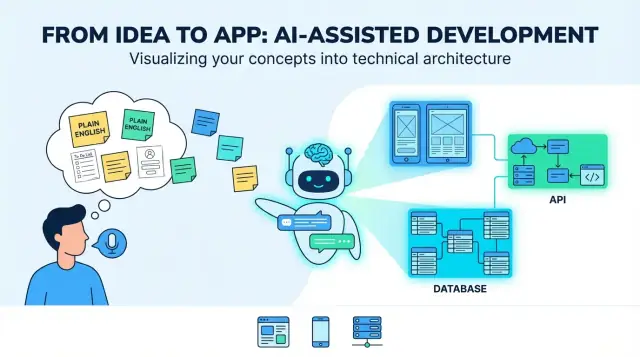
From Idea to App: What “Translation” Really Means
A “plain English product idea” usually starts as a mix of intent and hope: who it’s for, what problem it solves, and what success looks like. It might be a few sentences (“an app for scheduling dog walkers”), a rough workflow (“customer requests → walker accepts → payment”), and a couple of must-haves (“push notifications, ratings”). That’s enough to talk about an idea—but not enough to build consistently.
When people say an LLM can “translate” an idea into an app, the useful meaning is this: turning fuzzy goals into concrete, testable decisions. The “translation” isn’t just rewriting—it’s adding structure so you can review, challenge, and implement.
What the LLM can generate (fast)
LLMs are good at producing a first draft of core building blocks:
- User roles and core journeys (e.g., customer, provider, admin)
- Feature lists and acceptance criteria (“a user can reset a password via email”)
- Screen inventories and UI flows for web and mobile
- Suggested architecture (frontend apps, backend services, integrations)
- Data models (tables/collections, relationships)
- API outlines (endpoints, request/response shapes)
The typical “end result” looks like a blueprint for a full-stack product: a web UI (often for admins or desktop-heavy tasks), a mobile UI (for on-the-go users), backend services (auth, business logic, notifications), and data storage (database plus file/media storage).
What still needs human decisions
LLMs can’t reliably choose your product’s trade-offs, because the right answers depend on context you may not have written down:
- What counts as “success,” and what metrics matter?
- What constraints exist (budget, timeline, compliance, existing tools)?
- Which edge cases you care about (and which you can postpone)?
- What’s the simplest version users will still love?
Treat the model as a system that proposes options and defaults, not final truth.
Key risks to watch for
The biggest failure modes are predictable:
- Ambiguity: “fast,” “secure,” or “easy” can’t be implemented without definitions.
- Missing edge cases: cancellations, retries, offline mode, refunds, duplicates, abuse.
- Overconfidence: outputs can sound certain even when assumptions are shaky.
The real goal of “translation” is to make assumptions visible—so you can confirm, revise, or reject them before they harden into code.
Step 1: Clarify the Product Brief
Before an LLM can turn “Build me an app for X” into screens, APIs, and data models, you need a product brief that’s specific enough to design against. This step is about turning fuzzy intent into a shared target.
Start with the problem and how you’ll measure success
Write the problem statement in one or two sentences: who is struggling, with what, and why it matters. Then add success metrics that are observable.
For example: “Reduce the time it takes for a clinic to schedule follow-up appointments.” Metrics could include average scheduling time, no-show rate, or % of patients booking via self-serve.
Define target users and primary use cases
List the primary user types (not everyone who might touch the system). Give each one a top task and a short scenario.
A useful prompt template is: “As a [role], I want to [do something] so that [benefit].” Aim for 3–7 core use cases that describe the MVP.
Capture constraints early (they shape everything)
Constraints are the difference between a clean prototype and a shippable product. Include:
- Platforms: web, iOS, Android (and any offline needs)
- Timeline and budget: what tradeoffs are acceptable
- Compliance/privacy: HIPAA, GDPR, data residency, audit logs
- Integrations: payments, calendars, SSO, CRM, email/SMS providers
Define “done”: MVP vs later
Be explicit about what’s in the first release and what’s postponed. A simple rule: MVP features must support the primary use cases end-to-end without manual workarounds.
If you want, capture this as a one-page brief and keep it as the “source of truth” for the next steps (requirements, UI flows, and architecture).
Step 2: Convert Plain English into Requirements
A plain-English idea is usually a mix of goals (“help people book classes”), assumptions (“users will log in”), and vague scope (“make it simple”). An LLM is useful here because it can turn messy input into requirements you can review, correct, and approve.
Turn statements into user stories
Start by rewriting each sentence as a user story. This forces clarity about who needs what and why:
- As a new user, I want to sign up with email or Google so I can start quickly.
- As a returning user, I want to see my upcoming bookings so I can plan my week.
If a story doesn’t name a user type or benefit, it’s probably still too vague.
Build a feature list and set priorities
Next, group stories into features, then label each as must-have or nice-to-have. This helps prevent scope drift before design and engineering begin.
Example: “push notifications” may be nice-to-have, while “cancel a booking” is usually must-have.
Write acceptance criteria the model can check
Add simple, testable rules under each story. Good acceptance criteria are specific and observable:
- Given I enter an invalid email, when I submit the form, then I see an inline error and the account is not created.
- Given I cancel within 24 hours, when I confirm cancellation, then my spot is released and I receive a confirmation message.
List edge cases early
LLMs often default to the “happy path,” so explicitly request edge cases such as:
- Offline mode or poor network (queued actions, retry behavior)
- Invalid inputs (empty fields, unsupported file types)
- Cancellations and double-submits (idempotency, confirmation prompts)
This requirements bundle becomes the source of truth you’ll use to evaluate later outputs (UI flows, APIs, and tests).
Step 3: Design UI Flows for Web and Mobile
A plain-English idea becomes buildable when it turns into user journeys and screens connected by clear navigation. At this step, you’re not choosing colors—you’re defining what people can do, in what order, and what success looks like.
Map the key user journeys
Start by listing the paths that matter most. For many products, you can structure them as:
- Onboarding: account creation, email/phone verification, first-time setup
- Core task: the main job the app helps the user do (create, search, book, track, share)
- Payment: pricing view, checkout, receipts, subscription management (if relevant)
- Support: FAQ, contact form, report an issue
- Settings: profile, notifications, privacy controls, sign out, delete account
The model can draft these flows as step-by-step sequences. Your job is to confirm what’s optional, what’s required, and where users can safely exit and resume.
Generate a screen list (web + mobile) with navigation
Ask for two deliverables: a screen inventory and a navigation map.
- Web often favors a left sidebar/top nav with more visible options.
- Mobile typically uses tabs and stacked screens, with fewer choices per view.
A good output names screens consistently (e.g., “Order Details” vs “Order Detail”), defines entry points, and includes empty states (no results, no saved items).
Forms and validation rules
Turn requirements into form fields with rules: required/optional, formats, limits, and friendly error messages. Example: password rules, payment address formats, or “date must be in the future.” Make sure validation happens both inline (as users type) and on submit.
Accessibility basics to bake in
Include readable text sizes, clear contrast, full keyboard support on web, and error messages that explain how to fix the problem (not just “Invalid input”). Also ensure every form field has a label and the focus order makes sense.
Step 4: Propose an App Architecture
An “architecture” is the app’s blueprint: what parts exist, what each part is responsible for, and how they talk to each other. When an LLM proposes an architecture, your job is to make sure it’s simple enough to build now and clear enough to evolve later.
Start with a default: monolith or modular?
For most new products, a single backend (a monolith) is the right starting point: one codebase, one deployment, one database. It’s faster to build, easier to debug, and cheaper to operate.
A modular monolith is often the sweet spot: still one deploy, but organized into modules (Auth, Billing, Projects, etc.) with clean boundaries. You delay a service split until there’s real pressure—like heavy traffic, a team that needs independent deploys, or a part of the system that scales differently.
If the LLM immediately suggests “microservices,” ask it to justify that choice with concrete needs, not future hypotheticals.
Define the core components (and keep them boring)
A good architecture outline names the essentials:
- Auth & user management: sign-up/login, roles, sessions/tokens.
- Business logic layer: the rules of your product (pricing, approvals, limits).
- Data access: how the app reads/writes the database.
- Background jobs: long-running work (imports, report generation, scheduled tasks).
- Notifications: email/push/in-app, plus templates and preferences.
The model should also specify where each piece lives (backend vs mobile vs web) and define how clients interact with the backend (usually REST or GraphQL).
Make tech stack assumptions explicit
Architecture stays ambiguous unless you pin down basics: backend framework, database, hosting, and mobile approach (native vs cross-platform). Ask the model to write these as “Assumptions” so everyone knows what’s being designed.
Plan for scale without overengineering
Instead of big rewrites, prefer small “escape hatches”: caching for hot reads, a queue for background jobs, and stateless app servers so you can add more instances later. The best architecture proposals explain these options while keeping v1 straightforward.
Step 5: Model the Data
A product idea is usually full of nouns: “users,” “projects,” “tasks,” “payments,” “messages.” Data modeling is the step where an LLM turns those nouns into a shared picture of what the app must store—and how different things connect.
Turn nouns into entities and relationships
Start by listing the key entities and asking: what belongs to what?
For example:
- A User creates many Projects
- A Project contains many Tasks
- A Task can have many Comments
Then define relationships and constraints: can a task exist without a project, can comments be edited, can projects be archived, and what happens to tasks when a project is deleted.
Draft tables/collections and the fields that matter
Next, the model proposes a first-pass schema (SQL tables or NoSQL collections). Keep it simple and focused on decisions that affect behavior.
A typical draft might include:
- users: id, email, name, password_hash/identity_provider_id, created_at
- projects: id, owner_user_id, name, status, created_at
- project_members: project_id, user_id, role
- tasks: id, project_id, title, description, status, due_date, assignee_user_id
Important: capture “status” fields, timestamps, and unique constraints early (like unique email). Those details drive UI filters, notifications, and reporting later.
Ownership, permissions, and multi-tenant separation
Most real apps need clear rules for who can see what. An LLM should make ownership explicit (owner_user_id) and model access (memberships/roles). For multi-tenant products (many companies in one system), introduce a tenant/organization entity and attach tenant_id to everything that must be isolated.
Also define how permissions are enforced: by role (admin/member/viewer), by ownership, or by both.
Retention, deletion, and audit logging
Finally, decide what must be logged and what must be deleted. Examples:
- Audit events: “task created,” “permission changed,” “export performed”
- Retention rules: delete personal data on request, keep invoices for X years
- Soft delete vs hard delete: keep records recoverable, or remove entirely
These choices prevent unpleasant surprises when compliance, support, or billing questions show up later.
Step 6: Generate Backend APIs
Backend APIs are where your app’s promises become real actions: “save my profile,” “show my orders,” “search listings.” A good output starts from user actions and turns them into a small set of clear endpoints.
Start from user actions → CRUD + search
List the main things users interact with (e.g., Projects, Tasks, Messages). For each, define what the user can do:
- Create: add a new item
- Read: fetch one item or a list
- Update: change fields
- Delete: remove/disable
- Search/filter: find items by keyword, status, date, etc.
That usually maps neatly to endpoints like:
POST /api/v1/tasks(create)GET /api/v1/tasks?status=open&q=invoice(list/search)GET /api/v1/tasks/{taskId}(read)PATCH /api/v1/tasks/{taskId}(update)DELETE /api/v1/tasks/{taskId}(delete)
Request/response examples (plain language + JSON)
Create a task: user submits title and due date.
POST /api/v1/tasks
{
  "title": "Send invoice",
  "dueDate": "2026-01-15"
}
Response returns the saved record (including server-generated fields):
201 Created
{
  "id": "tsk_123",
  "title": "Send invoice",
  "dueDate": "2026-01-15",
  "status": "open",
  "createdAt": "2025-12-26T10:00:00Z"
}
Error handling that mobile apps can live with
Have the model produce consistent errors:
- 400 validation errors (with field-level messages)
- 401/403 auth/permission issues
- 404 not found
- 409 conflict (duplicate, outdated update)
- 429 too many requests (tell clients when to retry)
- 500 unexpected errors (generic message + request id)
For retries, prefer idempotency keys on POST and clear guidance like “retry after 5 seconds.”
Versioning and backward compatibility
Mobile clients update slowly. Use a versioned base path (/api/v1/...) and avoid breaking changes:
- Add new optional fields instead of renaming/removing
- Keep old fields for a deprecation window
- Document changes in a short changelog endpoint (e.g.,
GET /api/version)
Step 7: Security and Privacy by Default
Security isn’t a “later” task. When an LLM turns your idea into app specs, you want safe defaults to be explicit—so the first generated version isn’t accidentally open to abuse.
Authentication: how users prove who they are
Ask the model to recommend a primary login method and a fallback, plus what happens when things go wrong (lost access, suspicious login, etc.). Common choices include:
- Email + password (familiar, but you must handle password resets, strength rules, and breach risks)
- Magic links / one-time codes (less password risk, but requires solid email deliverability and short token expiry)
- Social login (fast onboarding, but you depend on third parties and need account-linking rules)
Have it specify session handling (short-lived access tokens, refresh tokens, device logout) and whether you support multi-factor authentication.
Authorization: what users are allowed to do
Authentication identifies the user; authorization limits access. Encourage the model to choose one clear pattern:
- Roles (e.g., Admin, Member, Viewer) for simple apps
- Permissions (fine-grained actions like
project:edit,invoice:export) for flexible products - Object-level access (critical): users can only read/write items they own or are explicitly shared with
A good output includes sample rules like: “Only project owners can delete a project; collaborators can edit; viewers can comment.”
Security checks you want in the generated plan
Make the model list concrete safeguards, not generic promises:
- Input validation and sanitization on every endpoint (don’t trust clients)
- Rate limiting for login, OTP/magic-link requests, and expensive endpoints
- Secrets handling: keep API keys out of code, rotate credentials, never log tokens
Also request a baseline threat checklist: CSRF/XSS protections, secure cookies, and safe file uploads if applicable.
Privacy basics: collect less, explain more
Default to minimal data collection: only what the feature truly needs, for as short a time as possible.
Have the LLM draft plain-language copy for:
- What data you collect (and why)
- How long you keep it
- How users can delete or export it
If you add analytics, insist on an opt-out (or opt-in where required) and document it clearly in your settings and policy pages.
Step 8: Testing Strategy the Model Can Produce
A good LLM can turn your requirements into a test plan that’s surprisingly usable—if you force it to anchor everything to acceptance criteria, not generic “should work” statements.
Map tests directly to acceptance criteria
Start by giving the model your feature list and acceptance criteria, then ask it to generate tests per criterion. A solid output includes:
- Unit tests for business rules (e.g., pricing calculation, validation, permission checks)
- Integration tests for API + database behavior (e.g., creating an order persists the right rows)
- End-to-end tests for critical user journeys (e.g., sign up → onboarding → complete first task)
If a test can’t point back to a specific criterion, it’s probably noise.
Test data and fixtures from real scenarios
LLMs can also propose fixtures that mirror how people actually use the app: messy names, missing fields, time zones, long text, flaky networks, and “almost duplicate” records.
Ask for:
- Seed data sets (small, medium) with edge cases
- Reusable factories/fixtures for users, roles, and common objects
- A “golden path” dataset used across E2E tests for consistency
Mobile-specific checks people forget
Have the model add a dedicated mobile checklist:
- Offline mode (read-only vs queued writes, conflict handling)
- Backgrounding/foregrounding (state restoration, in-flight requests)
- Permissions prompts (camera, location, notifications) and denial flows
Using LLMs to generate tests—and how to review them
LLMs are great at drafting test skeletons, but you should review:
- Assertions: do they verify outcomes, not implementation details?
- Coverage: are failure cases included (401/403, 422, timeouts)?
- Flakiness risks: time-based waits, network dependencies, unstable selectors
Treat the model as a fast test author, not the final QA sign-off.
Step 9: Deployment, Releases, and Monitoring
A model can generate a lot of code, but users only benefit once it’s shipped safely and you can see what happens after launch. This step is about repeatable releases: the same steps every time, with the least surprise.
CI basics (what to automate)
Set up a simple CI pipeline that runs on every pull request and on merges to your main branch:
- Linting/formatting to catch inconsistent code and common mistakes early.
- Automated tests (unit + a small number of end-to-end “happy path” checks).
- Build steps for each surface:
- Web app build
- Mobile app build (Android/iOS)
- Backend build/package
Even if the LLM wrote the code, CI is what tells you whether it still works after a change.
Environments: dev, staging, production
Use three environments with clear purposes:
- Dev: fast iteration, local databases, debug logging.
- Staging: production-like settings for final verification.
- Production: real users, strict access, lowest log noise.
Configuration should be handled via environment variables and secrets (not hard-coded). A good rule: if changing a value requires a code change, it’s probably misconfigured.
Deployment outline
For a typical full-stack app:
- Backend hosting: deploy a container or managed service, then run health checks.
- Database migrations: version migrations, run them automatically during deploy, and make them reversible where possible.
- Mobile releases: publish internal builds first (TestFlight / internal testing), then staged rollout to the App Store/Play Store.
Monitoring and issue workflow
Plan for three signals:
- Logs (what happened), metrics (how often), and alerts (what needs attention now).
- A lightweight on-call rule: alerts should be actionable, not noisy.
- A user-facing path to report issues (in-app link or /support), feeding into a triage queue with severity, reproduction steps, and a rollback plan.
This is where AI-assisted development becomes operational: you’re not just generating code—you’re running a product.
Where LLM Outputs Go Wrong (and How to Fix Them)
LLMs can turn a vague idea into something that looks like a full plan—but polished prose can hide gaps. The most common failures are predictable, and you can prevent them with a few repeatable habits.
Why prompts fail
Most weak outputs trace back to four issues:
- Missing context: The model doesn’t know your users, constraints (budget, timeline, team skills), compliance needs, or what already exists.
- Conflicting requirements: “Make it simple” plus “support every edge case” yields muddled specs.
- Hidden assumptions: The model may assume login is email/password, that “real-time” means WebSockets, or that “admin” means full data access.
- Unstated priorities: Without trade-offs (speed vs. cost vs. quality), you’ll get generic answers that don’t fit your situation.
How to ask for better outputs
Give the model concrete material to work with:
- Examples: “Like Calendly booking, but for on-site services” plus 2–3 sample user stories.
- Constraints: “Must use Postgres, deploy to AWS, and support 10k MAU.”
- Force reasoning to be visible: Ask it to list assumptions, open questions, and alternatives: “Show your work: decisions + why.”
Add a “Definition of Done” to reduce rework
Ask for checklists per deliverable. For instance, requirements aren’t “done” until they include acceptance criteria, error states, roles/permissions, and measurable success metrics.
Keep a single source of truth
LLM outputs drift when specs, API notes, and UI ideas live in separate threads. Maintain one living doc (even a simple markdown file) that links:
- the product spec,
- the API contract (endpoints + schemas),
- and design notes (key flows and edge cases).
When you prompt again, paste the latest excerpt and say: “Update only sections X and Y; keep everything else unchanged.”
If you’re implementing as you go, it also helps to use a workflow that supports quick iteration without losing traceability. For example, Koder.ai’s “planning mode” fits naturally here: you can lock down the spec (assumptions, open questions, acceptance criteria), generate the web/mobile/backend scaffolding from a single chat thread, and rely on snapshots/rollback if a change introduces regressions. Source code export is especially useful when you want your generated architecture and your repo to stay aligned.
A Practical Walkthrough and Human Review Points
Here’s what “LLM translation” can look like end to end—plus the checkpoints where a human should slow down and make real decisions.
A short example: idea → screens, data, APIs
Plain-English idea: “A pet-sitting marketplace where owners post requests, sitters apply, and payments are released after the job.”
An LLM can turn that into a first draft like:
- Screens: Sign up/login, Create Request, Request Details (with applicants), Apply to Request, In-App Chat, Checkout, Job Completion, Ratings/Reviews, Admin (disputes).
- Data model: Users (role: owner/sitter), PetProfiles, Requests (dates, location, status), Applications, Messages, Payments, Reviews.
- APIs:
POST /requests,GET /requests/{id},POST /requests/{id}/apply,GET /requests/{id}/applications,POST /messages,POST /checkout/session,POST /jobs/{id}/complete,POST /reviews.
That’s useful—but it’s not “done.” It’s a structured proposal that needs validation.
Where humans review (and why it matters)
Product decisions: What makes an “application” valid? Can an owner invite a sitter directly? When is a request considered “filled”? These rules affect every screen and API.
Security & privacy review: Confirm role-based access (owners can’t read other owners’ chats), protect payments, and define data retention (e.g., delete chat after X months). Add abuse controls: rate limits, spam prevention, audit logs.
Performance tradeoffs: Decide what must be fast and scalable (search/filter requests, chat). This influences caching, pagination, indexing, and background jobs.
Iteration loop: feedback → requirements → code
After a pilot, users might ask for “repeat a request” or “cancel with partial refund.” Feed that back as updated requirements, regenerate or patch affected flows, then re-run tests and security checks.
What to document for maintainability
Capture the “why,” not just the “what”: key business rules, permission matrix, API contracts, error codes, database migrations, and a short runbook for releases and incident response. This is what keeps generated code understandable six months later.
FAQ
What does “translation” mean when people say an LLM can translate an idea into an app?
In this context, “translation” means converting a fuzzy idea into specific, testable decisions: roles, journeys, requirements, data, APIs, and success criteria.
It’s not just paraphrasing—it’s making assumptions explicit so you can confirm or reject them before building.
What outputs should I expect an LLM to generate quickly for a new product?
A practical first pass includes:
- User roles and core journeys
- Feature list with priorities (must-have vs nice-to-have)
- User stories with acceptance criteria
- Screen inventory + navigation map (web and mobile)
- Data model (entities, relationships, constraints)
- API outline (endpoints, schemas, errors)
Treat it as a draft blueprint you review, not a final spec.
What decisions still require a human, even with good LLM outputs?
Because an LLM can’t reliably know your real-world constraints and trade-offs without you stating them. Humans still need to decide:
- What “success” means (metrics)
- Budget/timeline constraints and acceptable risk
- Which edge cases matter now vs later
- What the simplest lovable MVP is
Use the model to propose options, then choose deliberately.
How do I write a product brief that an LLM can actually use?
Give it enough context to design against:
- One-sentence problem statement + 2–3 measurable success metrics
- 3–7 MVP use cases (“As a [role], I want…”)
- Platforms (web/iOS/Android), offline needs, and integrations
- Compliance/privacy constraints (e.g., HIPAA/GDPR)
- Clear MVP vs later list
If you can’t hand this to a teammate and get the same interpretation, it’s not ready.
How do I convert plain-English ideas into requirements without getting vague specs?
Focus on turning goals into user stories + acceptance criteria.
A strong bundle usually has:
- User stories grouped into features
- Priority labels (must-have/nice-to-have)
- Acceptance criteria written as “Given/When/Then”
- Explicit edge cases (cancellations, retries, duplicates, refunds)
This becomes your “source of truth” for UI, APIs, and tests.
What’s the best way to use an LLM for UI flows without getting “pretty but unusable” designs?
Ask for two deliverables:
- Screen inventory (every screen you must build)
- Navigation map (how users move between screens)
Then verify:
- Each core journey can be completed end-to-end
- Empty states and error states exist
- Web vs mobile patterns make sense (sidebar/top nav vs tabs/stack)
- Forms have validation rules and friendly errors
You’re designing behavior, not visuals.
Should I start with a monolith, modular monolith, or microservices?
Start with a default: monolith or modular monolith for most v1 products.
Push back if the model jumps to microservices—ask for concrete reasons (traffic, independent deploy needs, scaling differences). Prefer “escape hatches” instead:
- Background job queue
- Caching for hot reads
- Stateless app servers for horizontal scaling
Keep v1 easy to ship and easy to debug.
What should I look for in an LLM-generated data model to avoid painful rewrites later?
Make the model spell out:
- Entities and relationships (what belongs to what)
- Ownership and access control (owner_user_id, memberships, roles)
- Constraints (unique email, required fields, status enums)
- Deletion rules (soft vs hard delete) and audit events
- Multi-tenant isolation (tenant/organization + tenant_id everywhere needed)
Data decisions drive UI filters, notifications, reporting, and security.
How do I evaluate whether an LLM-generated API design is usable in real apps?
Insist on consistency and mobile-friendly behavior:
- Versioned base path (e.g.,
/api/v1/...) - Clear CRUD + search/filter endpoints
- Stable request/response shapes with examples
- Standard error format covering 400/401/403/404/409/429/500
- Idempotency keys for retried
POSTrequests
Avoid breaking changes; add optional fields and keep a deprecation window.
How can I use LLMs to produce a testing strategy that isn’t just boilerplate?
Use the model to draft a plan, then review it against acceptance criteria:
- Unit tests for business rules and permissions
- Integration tests for API + database behavior
- End-to-end tests for critical journeys
- Mobile-specific checks (offline, backgrounding, permissions prompts)
Also require real fixtures: time zones, long text, near-duplicates, flaky networks. Treat generated tests as a starting point, not final QA.