

Podcast Websites: Build Episode Pages That Rank on Google
Learn the episode-page layout, SEO fields, transcripts, schema, and internal links that help podcast websites earn more Google traffic and listens.
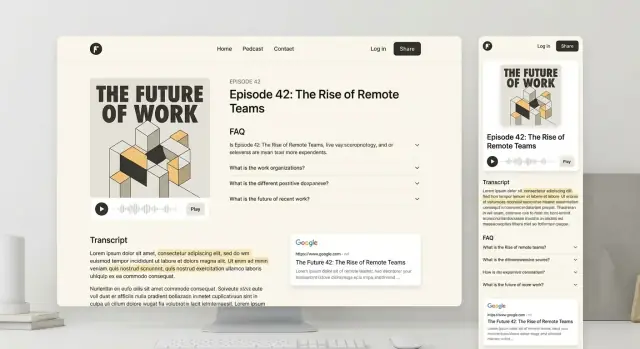
What Makes an Episode Page Rank in Google
Ranking episode pages means your individual episode URLs (not just your podcast homepage) show up in Google when someone searches for a topic, guest, question, or problem you covered—and that searcher clicks through to that specific episode page.
For many shows, this is where long-term growth lives: someone searches “how to negotiate a salary,” lands on Episode 42, and then discovers the rest of your catalog. Episode-level search traffic is different from “brand” traffic (people searching your show name). It’s earned by being clear, useful, and easy for Google to understand.
What Google is really rewarding
SEO for podcast episode pages isn’t about tricks. It’s mostly about:
- Clarity: the page makes it obvious what the episode is about (topic, guest, takeaways).
- Helpfulness: the content answers the searcher’s question better than alternatives (strong show notes, key points, resources).
- Technical basics: pages load reliably, can be crawled and indexed, and aren’t confusing due to duplicates.
Get those three right consistently and rankings tend to follow—especially for specific, lower-competition queries tied to your episode topics.
Who this guide is for (and what we’ll cover)
This article is for podcast owners, marketers, and small teams managing a podcast website and publishing new episodes regularly.
We’ll cover keyword selection, URL and site structure, episode page layout, transcripts and timestamps, schema markup, internal linking, technical SEO basics (speed and indexing), trust-building elements, and how to measure and refresh episodes over time.
Keyword Research for Podcast Episodes (Simple and Practical)
You don’t need complicated tools to pick good keywords for an episode page. What you need is clarity on what someone is trying to find when they search—and which single query you want your page to answer best.
Map the main search intents
Podcast episode searches usually fall into three intent types:
- Informational (topic-led): “email marketing segmentation tips”
- Episodic (guest + topic): “Jane Smith email marketing podcast”
- Navigational (brand-led): “Your Show Name episode 42” or “Host Name podcast”
A strong episode page can capture more than one intent, but it should still have one clear focus.
Common keyword patterns worth checking
Use these patterns to brainstorm phrases people actually type:
- “guest name podcast” (often high intent and easy to match)
- “topic + podcast episode” (good when the topic is specific)
- “how to + topic + podcast” (great for tutorial-style episodes)
Quick sources: Google autocomplete, “People also ask,” related searches, YouTube suggestions, and your own audience’s wording from comments/emails.
Pick one primary query + a few close variants
For each episode, choose:
- 1 primary query (the best match for the episode’s core promise)
- 2–4 close variants (same meaning, slightly different wording)
This keeps your title, H1, intro, and headings aligned—without trying to rank for everything.
Simple episode keyword worksheet
Fill this out in 5 minutes before publishing:
| Field | Your notes |
|---|---|
| Episode in one sentence | |
| Search intent (info / episodic / navigational) | |
| Primary keyword (exact phrase) | |
| 2–4 close variants | |
| Guest name variants (if relevant) | |
| What question does the page answer? | |
| Proof you’ll include (bullets, tools, links, examples) |
If the primary keyword feels forced, pick a different one—Google rewards pages that clearly satisfy the search, not pages that awkwardly repeat a phrase.
URL Structure, Categories, and Canonicals for Episodes
A clean, predictable URL structure helps Google understand your site—and helps listeners share links that won’t break later. The goal is to choose a format you can keep for years.
Ideal URL patterns (short, readable, stable)
Use a single, consistent pattern for every episode page:
/episodes/episode-title(simple and flexible)/podcast/episode-title(great if the podcast is the core of your site)
Keep URLs lowercase, use hyphens, and avoid extra folders like dates unless they add real meaning. Most importantly: don’t change the structure once you’ve published many episodes.
Should you include episode numbers?
Including numbers can be helpful when your audience searches by number (e.g., “Episode 42”), but it’s not required for SEO.
If you include it, do it consistently:
/episodes/42-episode-title
Avoid stuffing the URL with both season and episode unless that’s how people find you. You can always show season/episode numbers prominently on the page without forcing them into the URL.
Categories vs. tags (avoid tag sprawl)
Think of categories as a small set of “shelves” (6–12 max) that group episodes into themes. Tags are optional and should be used sparingly—only when they’re truly reusable and you’ll maintain them.
Common tag sprawl problems: dozens of one-off tags, inconsistent naming (“startups” vs “startup”), and thin tag pages that add no value.
Canonicals when an episode appears in multiple lists
It’s normal for the same episode to show up on pages like “Latest Episodes,” a category archive, and a guest page. Make sure there is one primary episode URL, and every other place links to it.
If your CMS creates duplicate URLs (for example, parameters or alternate paths), use a canonical tag that references the primary episode page so Google knows which version to rank.
An Episode Page Layout That Works for SEO and Listeners
A great episode page does two jobs at once: it helps a visitor decide “Is this worth my time?” and it helps Google understand what the page is about. The simplest approach is to lead with clarity—then make the rest of the page easy to scan.
Recommended layout (top to bottom)
-
Episode title (H1) + guest name (if relevant)
-
1–2 sentence summary stating the topic, who it’s for, and the main promise
-
Podcast player (clear play button + visible duration)
-
Key takeaways (3–6 bullets)
-
Links and resources mentioned (tools, articles, sponsors) with descriptive anchor text
-
Timestamps / chapter markers so readers can jump to what they need
-
Full transcript (or a clean, expandable transcript)
-
Related episodes (and optional “Next” / “Previous” navigation)
This order works because the “decision-making” content is near the top (title, summary, player, takeaways), while the deeper SEO content (timestamps, transcript) remains prominent and indexable further down.
Why above-the-fold clarity matters
The first screenful should answer: what the episode covers, who it’s for, and why it’s valuable. Visitors decide quickly whether to listen or bounce—and a vague intro or a player with no context makes relevance harder for both humans and Google.
Aim for an opening that includes the primary topic phrase naturally (for example, “email deliverability,” “first-time founders,” or “meditation for sleep”) without stuffing.
Make the page scannable
Use structure that both humans and search engines can skim:
- Use clear H2/H3 headings (“Key takeaways,” “Transcript,” “Resources,” “Timestamps”).
- Keep paragraphs short and add whitespace.
- Put timestamps in a simple list (00:00, 03:12, 12:40) so people can jump around.
- If you include show notes, break them into sections rather than a wall of text.
Accessibility note (don’t skip this)
Accessibility supports SEO by improving usability:
- Use readable font sizes, strong contrast, and comfortable line spacing.
- Make link text descriptive (avoid “click here”; prefer “Download the guest’s checklist”).
- Ensure the player and transcript are usable on mobile and with keyboard navigation.
On-Page SEO Checklist for Every Episode
Great podcast SEO is often just consistent basics. If you standardize what goes on every episode page, you’ll avoid “thin” pages and make it easier for Google (and listeners) to understand what the episode delivers.
1) H1 rules (the page headline)
Your H1 should be unique and descriptive—think “What is this episode about?” rather than an internal label.
- Include the main topic and, if helpful, the guest name.
- Avoid using only “Episode 42” as the H1 (you can still show the episode number as a smaller label).
- Keep it natural and readable; don’t cram in multiple keyword variations.
2) Must-have on-page fields (every single time)
These elements help search engines form a clear snippet and help users decide whether to click.
- Title tag: Put the topic first, then the show name (e.g., “How to Price Freelance Work (w/ Jane Doe) | The Creator Show”).
- Meta description: 1–2 sentences that explain who it’s for and what they’ll learn.
- Intro paragraph (above the fold): A short, clear setup that repeats the topic in plain language.
- Headings (H2/H3): Break the page into scan-friendly sections like “What you’ll learn,” “Key moments,” and “Resources.”
3) Episode summary + key moments
Add an episode summary of 150–300 words. This is the “core content” Google can index even if someone never presses play.
Then include a Key moments section (bulleted is fine) highlighting the most useful takeaways or timestamped moments. It improves skimmability and can match long-tail searches (specific questions, tools, or frameworks mentioned).
4) Images and alt text
If you use cover art, guest photos, or screenshots, write alt text that describes the image in a helpful way (not keyword stuffing).
Examples:
- Cover art: “Cover art for The Creator Show episode on pricing freelance work”
- Screenshot: “Screenshot of a freelance pricing worksheet with hourly rate and project fee columns”
Do this checklist on every episode and your pages will feel complete, consistent, and search-ready.
Transcripts and Timestamps That Add Real Search Value
A good transcript turns a single audio file into indexable, skimmable content Google can understand. It adds depth (more relevant text on the page), captures long-tail searches (the specific questions and phrases guests say), improves accessibility for deaf/hard-of-hearing listeners, and makes the episode easier to scan for anyone short on time.
Choose the right transcript style
You don’t have to publish a wall of raw text. Pick the option that matches your audience and resources:
- Full transcript (verbatim): best for maximum keyword coverage and accessibility.
- Cleaned transcript (lightly edited): removes filler words and fixes obvious errors while keeping meaning intact—often the best balance.
- Time-stamped highlights: a curated “best moments” transcript with timestamps; faster to produce and great for skimming, but less comprehensive.
Formatting that helps readers (and SEO)
Small formatting choices make transcripts far more usable:
- Add speaker names (Host, Guest) so it reads like a conversation, not a blob.
- Include timestamps (every 30–60 seconds or at topic changes) so people can jump to the exact moment in the audio.
- Add a simple table of contents (“What we cover”) that matches your timestamps.
- Consider a collapsible transcript (e.g., “Show transcript” accordion) to keep the page clean while still making the text available.
Don’t publish unreviewed auto-transcripts
Auto-transcription is a great starting point, but unedited output can hurt trust and search value—especially with names, acronyms, industry terms, and medical/legal topics. A quick review pass (correct key terms, headings, and timestamps) usually delivers most of the benefits without a huge time investment.
Schema Markup for Podcast Episode Pages
Schema markup helps search engines understand what your episode page is (a podcast episode) and what the key details are (title, publish date, audio, duration). It won’t guarantee special search features, but it can reduce ambiguity and improve consistency across your pages.
Which schema types to use
For most episode pages, add:
- PodcastEpisode for the individual episode
- PodcastSeries for the overall show (often referenced from the episode)
Depending on your page, you may also include related types like Person (host/guest) or Organization (publisher), but keep the first version simple and accurate.
Key properties to include (the “must-haves”)
At a minimum, aim to provide these on PodcastEpisode:
- name (episode title)
- description (a clean summary, not keyword stuffing)
- datePublished (ISO date)
- duration (ISO 8601 format, e.g.,
PT42M15S) - associatedMedia or contentUrl (the audio URL)
- episodeNumber (only if you use episode numbers consistently)
If you reference the show, connect it via partOfSeries (PodcastSeries) and include the series name.
Validate (and keep it honest)
After publishing, test your page with Google’s tools:
- Rich Results Test
- Schema Markup Validator
You’re mainly looking for parsing errors, missing required fields, or URLs that Google can’t fetch. Only mark up content that’s actually visible or truly represents the episode.
Don’t forget share previews
Schema helps search engines; social platforms rely on Open Graph and Twitter Cards for link previews. Add OG title, description, image, and audio/player URLs where applicable so episode shares look good in Slack, X, and Facebook.
Internal Linking: Turn Episodes into a Search-Friendly Library
Internal links do two jobs on a podcast site: they help listeners discover the next best episode, and they help Google understand which pages matter most. When you treat your episode archive like a library (not a pile of posts), your strongest themes and best episodes get reinforced over time.
Set clear internal linking goals
Start by deciding what you want links to accomplish:
- Discovery: keep people moving to relevant episodes instead of bouncing.
- Relevance: signal which topics, guests, and evergreen episodes deserve more visibility.
- Priority: funnel link equity toward key pages you want to rank (topic hubs, the “start here” page, and flagship episodes).
Link blocks that work (and where to place them)
On every episode page, include at least one intentional link block near the end (or after the transcript):
- Related episodes: 3–6 links based on the same problem, tool, or audience (not just “latest episodes”).
- Topic hub page: a curated collection like /topics/email-marketing or /podcast/seo.
- Guest page: a profile page such as /guests/jane-doe that lists all appearances.
- “Start here” page: for new listeners, e.g. /start-here.
These blocks make your archive feel navigable, and they create consistent pathways between episodes that share intent.
Anchor text that helps SEO (and humans)
Use descriptive anchors that say what the listener will get: “email segmentation basics,” “B2B pricing strategy,” or “how to pitch podcast guests.” Avoid generic anchors like “click here” or “read more.”
Breadcrumbs for structure
Add breadcrumb navigation (Home → Podcast → Topic → Episode). Breadcrumbs clarify hierarchy for visitors and strengthen internal structure for search engines, especially when your site grows past a few dozen episodes.
Topic Hubs and Guest Pages (So Episodes Don’t Stand Alone)
Episode pages are great for long-tail searches, but they can also compete with each other and feel like isolated islands. Topic hubs and guest pages fix that by giving Google (and listeners) a clear map of your best content around a theme or a person.
Topic hubs: one theme, many episodes
A topic hub is a page built around a single subject you cover repeatedly—like “email marketing,” “first-time founders,” or “burnout recovery.” It should summarize the theme and curate the best episodes, so someone can understand the topic even if they don’t click play immediately.
This helps podcast website SEO because hubs:
- strengthen internal linking (hub links out; episodes link back)
- reduce duplication by giving each episode a clear home within a larger topic
- capture broader searches that a single episode can’t target well
When a guest page makes sense (and when it doesn’t)
Create a guest page when:
- the guest appears more than once (or you plan recurring updates)
- the guest is notable enough that people search their name
- the guest’s expertise ties into a topic you cover often (so you can link between the guest page and hubs)
Skip guest pages for one-off, non-searchable guests. A thin page that only says “This person was on Episode 42” won’t help your rankings.
A simple hub template you can copy
Use a consistent structure so hubs are easy to build and maintain:
- Intro (100–200 words): who this hub is for, what the topic includes, and what listeners will get.
- Key questions: 5–8 questions your episodes answer (great for scannability and intent match).
- Featured episode list: 6–12 best episodes with a 1–2 sentence “why listen” blurb and links to each episode page.
- FAQs: short answers based on real listener questions (and what you already discuss on the show).
Link to your hubs from your main navigation or a /topics page, and add a “Filed under: [Topic]” link on each relevant episode page pointing back to the hub.
Avoid thin pages: every hub must add unique value
A hub can’t be just a list of links. Add original context—definitions, a mini framework, your recommended starting episode, and those key questions and FAQs. That unique material turns a hub from a directory into a destination page.
Technical SEO for Podcast Websites (Speed, Mobile, Indexing)
Technical SEO is about making sure your episode pages load quickly, work smoothly on phones, and can be indexed without surprises. If Google (and listeners) struggle to use the page, rankings usually follow.
Keep the audio player fast (and lightweight)
Podcast pages often get slow because the player and analytics stack ships too much JavaScript. Choose a minimal player, and avoid loading multiple players, tracking pixels, and social widgets above the fold.
A few practical wins:
- Lazy-load non-essential scripts (chat widgets, related episode carousels, social embeds) so the main content renders first.
- Defer heavy scripts where possible, and remove plugins you don’t need.
- If you use an external host embed, test alternatives—some embeds are dramatically heavier than others.
Core Web Vitals: what usually breaks on episode pages
You don’t need to be deeply technical to spot common problems:
- Largest Contentful Paint (LCP): huge hero images, oversized episode thumbnails, and slow font loading. Compress images, use modern formats (WebP/AVIF), and avoid loading five font weights.
- Cumulative Layout Shift (CLS): player/ads/embeds that “pop in” and push content down. Reserve space with fixed dimensions for players, iframes, and thumbnails.
- Interaction (INP): pages feel laggy due to too many scripts. Fewer third-party tools usually improves this quickly.
Mobile-first: make the page usable with thumbs
Most listeners arrive on mobile. Ensure the play button is easy to tap, the progress bar isn’t tiny, and links aren’t packed together. Keep text readable (comfortable font size, sensible line length), and avoid sticky elements that cover the player.
Indexing basics (so pages actually show up)
- Confirm your episode pages are in your XML sitemap.
- Do a quick robots.txt sanity check to make sure you’re not blocking /episodes or /podcast.
- Watch for accidental noindex on templates—especially after redesigns, staging migrations, or “maintenance mode” plugins.
Content Elements That Build Trust and Earn Links
Ranking is easier when your episode page feels reliable, current, and genuinely useful. That’s also what makes other sites comfortable linking to it.
External links that make your show notes credible
Add a small “Referenced in this episode” area with links that help a reader verify claims or go deeper. Keep it selective (3–8 links) and make each one clearly connected to a moment in the audio.
Examples of credible links to include:
- The guest’s official website and a key profile (LinkedIn, university page, company bio)
- Original sources for statistics (government datasets, peer-reviewed studies, reputable research orgs)
- Books mentioned (publisher page or author site)
- Tools and products discussed (official documentation, changelog, pricing page)
- Standards or definitions (industry bodies, major encyclopedic references)
When possible, add a one-line annotation: what it is and why it matters.
A short FAQ (based on real listener intent)
Add 3–5 questions that someone would ask after listening.
FAQ
What’s the main takeaway from this episode? Summarize in 1–2 sentences.
Which resources did you mention? List the top links and what each helps with.
Where should a beginner start? Point to the simplest first step and a related episode.
A clear CTA without the popup fatigue
Keep CTAs simple and embedded near the end:
- Subscribe on your preferred app
- Join the newsletter (/newsletter)
- Continue with a related episode (/episodes)
Keep older episode pages accurate (and link-worthy)
Revisit high-traffic episodes quarterly. Update outdated tool names, broken links, and stats; add an editor’s note with the date; and, if something changed meaningfully, add a short “What’s changed since recording” paragraph. This protects trust and keeps the page worth linking to.
Measure, Improve, and Refresh Episode Pages Over Time
Episode SEO isn’t one-and-done. The easiest wins often come from improving pages you’ve already published—especially the ones Google is already testing on pages 1–3.
Define what “success” looks like
Track a mix of search and on-page engagement metrics:
- Impressions, clicks, and average position (search visibility and traction)
- Time on page (are visitors actually reading?)
- Plays that start from the episode page (does the page convert to listening?)
If you have analytics set up, also watch scroll depth and outbound clicks (to guest sites, resources, etc.).
Use Google Search Console to find quick improvements
In Google Search Console → Performance → Search results, filter to your episode URL (or URL pattern). Then:
- Sort queries by high impressions + low CTR: these often need a clearer title tag and meta description.
- Look for queries where you rank positions 8–20: add a short on-page section answering that query directly (often a mini-FAQ block works).
- Compare query wording to your headline: if people search “how to …” but your title is abstract, rewrite the title to match intent.
Quarterly refresh checklist (for your top episodes)
Every 90 days, revisit your best performers and:
- Add 2–4 FAQs based on real Search Console queries
- Improve the transcript (fix speaker labels, remove errors, add missing chunks)
- Add or refine timestamps for key segments
- Update internal links to newer related episodes and any relevant hub pages
- Add 1–2 credible external references and ensure old links still work
Workflow tip: publishing faster without sacrificing quality
If your bottleneck is production (templates, on-page consistency, and shipping updates), a build workflow can help as much as an SEO workflow. Teams that use Koder.ai often create or update episode page templates, hub pages, and internal-link blocks via a simple chat interface—then export source code or deploy quickly—so the SEO checklist becomes repeatable instead of manual.
Quick recap: your next-episode checklist
Before publishing, confirm: clear SEO title, compelling meta description, strong intro, transcript + timestamps, internal links, and analytics tracking for time on page and plays.
FAQ
What does it mean for a podcast episode page to rank in Google?
Focus on individual episode URLs and match a clear search intent (topic, guest, or question). Google tends to reward pages that are:
- Clear: obvious topic, guest, and takeaways
- Helpful: show notes that actually answer the query
- Technically sound: indexable pages with minimal duplication
When those basics are consistent, episode pages can win long-tail searches even if your show isn’t a big brand yet.
How do I choose the right keyword for a specific podcast episode?
Pick one primary query that best matches the episode’s core promise, then support it with 2–4 close variants.
A quick workflow:
- Check Google autocomplete, People Also Ask, and related searches
- Consider patterns like “guest name podcast” and “how to + topic + podcast”
- Write a 1–2 sentence summary that naturally includes the main topic phrase
If the keyword feels awkward in plain English, choose a different query.
What’s the best URL structure for podcast episode pages?
Use a single, stable URL pattern you can keep for years, such as:
/episodes/episode-title/podcast/episode-title
Keep URLs lowercase with hyphens, and avoid adding dates or extra folders unless they add real meaning. Stability matters more than micro-optimizations—frequent URL changes usually create redirects, duplication, and lost momentum.
Should I include episode numbers in the URL or title?
Episode numbers aren’t required for SEO, but they can help if your audience searches by number (e.g., “Episode 42”).
If you include numbers, be consistent, for example:
/episodes/42-episode-title
You can also display season/episode info prominently on the page without forcing it into the URL.
How should I use categories and tags without creating SEO problems?
Use categories as a small set of durable themes (roughly 6–12 max). Use tags only if you’ll maintain them.
Avoid tag sprawl:
- one-off tags that create thin pages
- inconsistent naming (e.g., “startup” vs “startups”)
- archives that add no unique context
If an archive page exists, make sure it provides value beyond a list of links.
How do I handle duplicate episode URLs and canonicals?
Choose one primary episode URL and ensure other versions point back to it.
If your CMS generates duplicates (parameters, alternate paths, multiple archives), add a canonical tag that references the main episode URL. This helps Google know which version to index and rank, reducing dilution from duplicate pages.
What should an SEO-friendly podcast episode page include?
A practical, search-friendly layout is:
- H1 episode title + guest (if relevant)
- 1–2 sentence summary (topic + promise)
- Player (clear play button + duration)
- Key takeaways (3–6 bullets)
- Resources/links mentioned (descriptive anchors)
- Timestamps/chapters
- Transcript (full or expandable)
- Related episodes + navigation
Put “decision” content near the top and deeper indexable content (timestamps/transcript) further down.
What are the most important on-page SEO elements for each episode?
Aim for a unique, descriptive H1 that explains the episode topic (and optionally the guest). Avoid using only “Episode 42” as the headline.
Also standardize these basics on every page:
- Title tag: topic first, then show name
- Meta description: 1–2 sentences on who it’s for + what they’ll learn
- Intro paragraph above the fold
- Clear H2/H3 sections like takeaways, timestamps, resources, transcript
Do transcripts and timestamps really help podcast SEO?
Transcripts make audio indexable text, capturing long-tail queries and improving accessibility.
Best options:
- Full transcript (verbatim): maximum coverage
- Cleaned transcript: best balance for most shows
- Timestamped highlights: faster, but less comprehensive
Avoid publishing unreviewed auto-transcripts—at least correct names, key terms, and obvious errors to protect trust and usefulness.
What schema markup should I add to podcast episode pages?
Add PodcastEpisode schema (and reference the show with PodcastSeries) to reduce ambiguity about what the page represents.
Useful properties to include:
name,description,datePublishedduration(ISO 8601 likePT42M15S)- audio URL via
associatedMediaorcontentUrl episodeNumber(only if consistent)
Validate with Rich Results Test / Schema Markup Validator, and keep markup accurate to what the page actually contains.