

Preview environments vs production: a safe release workflow
Preview environments vs production: a simple workflow to create preview URLs per feature, promote safely to production, and roll back fast when issues appear.
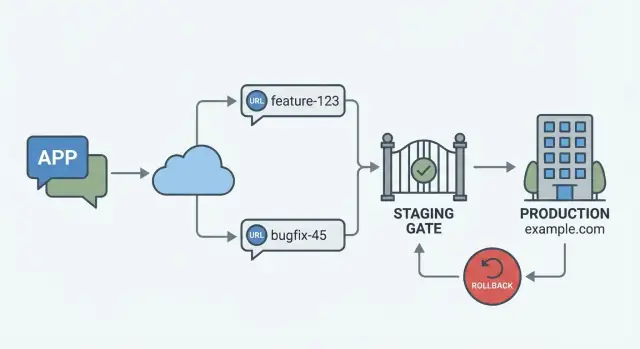
What preview and production mean (without jargon)
A preview environment is a temporary copy of your app that you can open in a browser and share with other people. It’s isolated, so changes you make there don’t affect the live app. Think of it as a safe practice stage where a new feature can be seen and clicked before it goes out to everyone.
A common setup is one preview URL per feature or per change. That makes feedback simple: you send one link to a teammate, a client, or even your future self tomorrow, and everyone is looking at the exact same version.
Production is the real app. It’s what real users see, with real accounts, real payments, real data, and real expectations. If something breaks in production, it’s not just annoying - it can mean lost sales, support tickets, or data issues.
The names can sound technical, but the idea is simple: preview is for learning, production is for serving.
Chat-built apps still need the same safety steps because the risks don’t change. Even if you create an app by chatting with a platform like Koder.ai, you’re still shipping code that runs in browsers and talks to databases. A small change (like a form field or a database query) can have big effects once real traffic hits it.
When you use previews well, you get faster feedback without breaking the live app. You can review a feature in context, catch obvious issues early, and only then promote the change to production when it looks right.
The real problem: changes are easy, releases are risky
Building a feature in a chat tool can feel almost instant. The risk shows up later, when that change has to run on real infrastructure, talk to real services, and serve real users. That’s why preview vs production isn’t just a hosting choice - it’s how you reduce surprises.
Most release problems aren’t “bad code.” They’re mismatches between what you tested and what users actually hit after deploy. A page can look perfect in a preview and still break in production because production has different settings, different data, and stricter security rules.
The same issues show up again and again:
- Broken UI from cached assets, responsive quirks, or missing build-time settings
- Missing or wrong environment variables (API keys, OAuth redirects, base URLs)
- Database changes that don’t match real data (migrations, constraints, old rows)
- Auth and permissions issues (roles, sessions, cookies, domain settings)
- Integration failures (payments, email, webhooks, rate limits)
Previews are where you validate behavior and user flow without risking customers. They’re great for checking layouts, basic navigation, form validation, and whether a feature works end to end with test data.
Some things are hard to fully prove in previews unless you have a production-like staging setup: final domain and cookie behavior, live payment providers, real email sending, and performance under realistic traffic. Those depend on production configuration and real integrations.
The goal is a repeatable release workflow. In Koder.ai, for example, you might spin up a preview URL for a single feature, review it with a teammate, then promote the same build to production after a small set of checks. And when something slips through, you need a fast rollback path so a bad release becomes a short incident, not a long outage.
Designing your preview URL strategy
A good preview setup answers four questions quickly: what changed, where can I see it, what version am I looking at, and who is allowed to open it.
1) Name previews so they explain themselves
Make the URL (or subdomain label) match how your team talks about work: a feature name or a ticket ID. Keep it short, consistent, and safe to paste into chat.
prv-<ticket>-<short-feature>(example:prv-482-checkout-tax)- Use lowercase and hyphens only
- Add an owner tag when it helps (example:
prv-482-checkout-tax-alex) - Treat
mainandprodas reserved words
If you use Koder.ai, pairing each preview URL with a snapshot helps keep the preview stable even if more work happens later.
2) Tie each preview to a specific version
A preview should point to a single build and config, not “whatever is latest.” That usually means one preview URL equals one snapshot (or a commit-like version).
When feedback arrives, update the preview in a visible way: create a new snapshot and switch the preview to that snapshot (or create a new preview URL). Avoid silently changing what a shared URL shows.
3) Decide what data previews use
Pick one default and document it:
- Sample data is best for UI review and demos.
- A masked copy of production is best for realistic edge cases (with privacy safeguards).
- An empty database is best for onboarding flows and migration testing.
4) Set a simple access rule
Previews often leak through screenshots and forwarded messages. Use a clear rule like “team-only unless explicitly shared,” and enforce it with basic controls (login required, allowlist, or a share password).
Also decide how long previews live (for example, delete after merge) so old URLs don’t confuse reviewers.
Step-by-step: create a preview per feature and review it
A good preview setup keeps every change isolated. One feature gets one URL, so reviewers never guess which version they’re looking at.
1) Start from a stable base
Begin from your most stable point: the main branch if it stays clean, or the last production release if main is noisy. This keeps the preview focused on the feature, not unrelated changes.
2) Create a feature workspace and generate a preview
Make a dedicated workspace for the feature (for example, “billing-copy-update” or “new-onboarding-step”). Deploy that workspace to a preview environment and treat the preview URL as the feature’s home.
If you use a chat-built tool like Koder.ai, this is where the workflow feels natural: build the feature in its own space, then export or deploy a separate preview without touching production.
3) Verify the core flows before asking for review
Do a quick pass that catches the most common breakages. Keep it small and repeatable:
- Sign in and sign out
- Visit the key pages the feature touches
- Run the main action (create, edit, save, pay, submit)
- Check one error case (bad input, empty state, no permissions)
Write down what you tested in one sentence. It saves time later.
4) Share the preview URL and collect feedback
Send the preview URL with a short note: what changed, where to click first, and what “done” looks like. Ask for specific feedback (copy, layout, edge cases) instead of “looks good?”
5) Iterate: update, redeploy, repeat
Apply feedback, redeploy, and keep notes on what changed between rounds. When the preview is approved, you should have a clear trail of what was tested and why it’s ready.
What to test in previews (quick but meaningful)
A preview is not the place for a full QA marathon. It’s where you catch mistakes that usually slip into production because nobody looked at the app like a real user.
Start with the basics: open the main pages on desktop and mobile widths, click through navigation, and make sure you don’t land on a blank screen. Then do one happy-path flow end to end, the same way a customer would.
A minimum test set that works for most web apps:
- Pages load and key routes work (home, pricing, account, dashboard)
- Forms submit and show clear feedback (success, validation, error text)
- Errors are visible and useful (no silent failures, no endless spinners)
- Data is saved and shown correctly after refresh (create, edit, delete one item)
- Permissions make sense (a logged-out user can’t see private pages)
If your app connects to other systems, do one small integration check per feature. Trigger a test email, run a small payment in sandbox mode, send a webhook to a test endpoint, or upload a small file and confirm it downloads again. You’re not proving every edge case. You’re confirming the wiring is intact.
Previews also fail for boring reasons: missing settings. Confirm environment variables and secrets are present, and that they point to the right services (often a sandbox). A common trap is a preview accidentally using production keys or production data.
Finally, do a light performance pass. Load the slowest page and watch for obvious problems: huge images, long loading spinners, repeated API calls. If it feels slow in a preview, it’ll feel worse in production.
If you’re building on Koder.ai, treat these preview checks as a habit: open the preview URL, run the checklist, and only then promote. Snapshots and rollback help, but catching issues early is cheaper than undoing them later.
Promoting to production safely (a small release gate)
Promotion should mean one simple thing: the exact same version you reviewed in a preview moves to production. No last-minute edits, no “quick fixes” after approval. Previews are where you gain confidence; production is where you protect users.
A small release gate keeps this boring (in a good way). It doesn’t need a committee. It needs a short set of checks you always follow, even when you’re in a hurry:
- Final smoke test on the preview: log in, create or edit a real record, and run the main happy path.
- Confirm config and secrets: environment variables, API keys, and third-party callbacks match production needs.
- Confirm production-domain behavior: redirects, HTTPS, cookies, and auth providers often behave differently on the real domain.
- Verify observability basics: errors are visible (logs/alerts), and you know where to look if something fails.
Database changes deserve extra care. A safer pattern is “expand, then contract.” First, ship changes that are backwards-compatible (add a column, add a new table, write to both). Only after the new version is stable do you remove old columns or old code paths. This reduces the risk that a rollback fails because the database no longer matches.
Timing is part of safety too. Pick a simple rule and stick to it:
- Release in a low-traffic window.
- Assign one owner on call for the next hour.
- Announce a short hands-off period so nobody merges surprises.
On Koder.ai, this maps well to promoting a reviewed preview to production, then relying on snapshots and rollback if the smoke test in production finds a missed edge case.
Common mistakes that cause surprises
Most release problems aren’t “new bugs.” They’re mismatches between preview and production, or a missing safety net when something goes wrong.
A few repeat offenders:
- Reusing production secrets in previews. A preview should behave like production, but it shouldn’t have production power. If preview tokens, API keys, or admin credentials can touch real services, one test click can trigger real emails, charges, or data changes.
- Pointing preview and production at the same database. A reviewer “tests” a feature, and customers suddenly see half-finished records or broken migrations. Give previews their own data source, or use safe, read-only access.
- Deploying from a moving target. If you promote “whatever is currently in the editor” instead of a fixed snapshot, you can ship something different from what was reviewed. Lock the exact version you tested, then promote that.
- Skipping a rollback plan because the change is small. Small changes break often because they feel safe and skip checks. Decide in advance what rollback means (previous snapshot, previous deployment, feature toggle) and who can trigger it.
- Bundling too much in one release. Mixing UI tweaks with auth changes and database updates makes failures harder to diagnose. Keep releases narrow so you can tell what caused the issue and reverse it quickly.
If you build with a chat-based tool like Koder.ai, treat previews as disposable and production as controlled. The goal is simple: every promotion is repeatable, and every rollback is boring.
Rollback basics: how to recover fast when something breaks
A rollback isn’t just “put the old code back.” A good rollback restores what users depend on: the app version, the settings it runs with, and a database state that matches that version.
If you roll back code but keep a new configuration (like an API key, feature flag, or background job schedule), you can end up with the same outage under a different name. If you roll back code but the database has already changed shape, the old app may crash or show wrong data.
A simple habit helps: take a known-good snapshot right before every production release. That snapshot is your safety line. If your platform supports snapshots and one-click rollback (Koder.ai does), treat that step as non-negotiable, even for “small” changes.
When something goes wrong, decide quickly: roll back or hotfix forward.
- Roll back when users are blocked, data looks wrong, or the cause is unclear.
- Hotfix forward when the bug is small, well understood, and you can fix it safely in minutes.
- If there’s any doubt, roll back first. You can still ship a fix after things are stable.
What a “complete” rollback should recover
Aim to get back to a state where the system behaved normally:
- App version (the exact build that was working)
- Runtime configuration (env vars, flags, third-party settings)
- Database compatibility (migrations, seed changes, and any data backfills)
- Background workers and scheduled tasks (often the hidden troublemakers)
The human side: keep it calm and clear
Mark it as an incident, stop all new changes, and name one person to confirm recovery. Then verify the basics: key pages load, sign-in works, and critical actions succeed. Once stable, write down what triggered the rollback and what you’ll change before the next release.
A short checklist you can reuse for every release
A release feels safer when you have the same small set of checks every time. Keep it short enough that you actually do it, but specific enough that it catches the usual problems.
Before you promote (preview to production)
Use this right after a feature is ready and you have a preview URL:
- The preview URL matches the feature you think you’re reviewing (right work, latest build).
- Environment variables look right for that preview (API keys, auth settings, third-party callbacks).
- The data source is correct (test database for preview, not production by accident).
- Core flows work end to end (sign in, main action, save, view results) with real clicks.
- Production basics are ready: domain/DNS and HTTPS are set, logs are visible, and you have a fresh snapshot or backup.
Right after release (and what to do if it breaks)
Do these in the first minutes after production goes live, while the change is still easy to reason about:
- Run a 2-minute smoke test in production: load the home page, sign in, complete the main task, confirm data saves.
- Check errors and logs for obvious spikes (500s, auth failures, payment webhook errors, slow requests).
- Confirm one key signal: a simple metric (sign-ins, checkouts, message sends) or a few real user reports.
- If something is wrong, roll back immediately using your deployment rollback or snapshot restore.
- After rollback, repeat the same smoke test and confirm the incident is resolved before investigating the root cause.
If you print this, put it next to your release button. The best checklist is the one you follow every time.
Example workflow: one feature from preview to production to rollback
A small team adds a new checkout step (like “company name and VAT”) built via chat. Sales wants to try it on real customer calls before it goes live. The goal is to keep preview and production clearly separated while still moving fast.
They create a feature branch and generate a preview build with its own URL, for example checkout-vat.preview. The preview uses the same database shape as production, but with test data. Sales gets the preview URL and a short script: “Add an item, enter VAT, complete a test payment.”
Over two days, feedback comes in: the VAT field is unclear, and the error message is scary. The team tweaks the UI, updates copy, and redeploys.
A simple flow they follow:
- Build the feature in a separate branch, generate a preview URL, and share it with Sales.
- Gather feedback, fix issues, and redeploy the preview until it matches expectations.
- Run a small release gate: smoke test, config check, and a clear sign-off.
- Deploy to production during a calm time, then watch the first real checkouts.
The release looks fine for 20 minutes, then payments start failing. The bug isn’t in the code. A hidden config value (an environment variable used by the payment provider) is missing in production.
Instead of trying to hotfix under pressure, they roll back to the previous snapshot. Payments recover quickly. Then they restore the new release in preview, add the missing config there first, and repeat the release gate.
Afterward, they adjust the process so it doesn’t happen again:
- Add a “required config” checklist item for every release.
- Keep a tiny production smoke test that verifies the payment provider handshake.
- Record the fix in planning notes so the next similar feature starts with the right config.
Next steps: make this workflow your default
Treat releases like a repeatable routine, not a special event. The goal is for preview vs production to feel boring: the same steps, the same checks, every time.
Write down your environment rules in plain language. Keep it short and specific: how you name preview URLs, who can access them, what data is allowed, and who owns fixing issues found there. For data, a simple rule helps: previews use test data or masked copies, and never touch real customer records unless you have a clear reason and approval.
Make one habit non-negotiable: every production release starts with a snapshot and ends with a smoke test. The snapshot gives you a safe exit if the release breaks something you didn’t expect. The smoke test proves the app still works for the few actions that matter most.
A lightweight default you can reuse:
- Before release: create a snapshot and note what changed.
- Release: promote only what passed review in a preview URL.
- After release: run a 2-minute smoke test (login, core flow, payment or save).
- If something is off: roll back first, then investigate calmly.
Risk drops fast when changes stay small. Prefer frequent releases with one feature or fix at a time. If a change is big, split it into pieces that can ship safely, even if the UI arrives before the backend logic is fully used.
If you build with Koder.ai, lean on preview deployments for each feature so reviewers can click a real URL instead of guessing from screenshots. When it looks good, promote to production, and keep snapshots and rollback ready so a bad deploy becomes a quick detour instead of a long outage.
FAQ
What’s the difference between a preview environment and production?
A preview environment is a temporary, isolated copy of your app you can open and share for feedback. Production is the live app real users rely on, with real data and real consequences if something breaks.
Default rule: preview is for learning and checking, production is for serving customers.
When should I create a preview instead of deploying straight to production?
Create a preview for any change that affects what users see or do: UI updates, forms, auth, billing, database queries, or third‑party integrations.
If the change could create support tickets if it’s wrong, it deserves a preview link first.
How should I name preview URLs so reviewers don’t get confused?
Use a simple, consistent pattern that tells reviewers what they’re looking at:
prv-<ticket>-<feature>(example:prv-482-checkout-tax)- lowercase + hyphens
- avoid names like
prodormain
Goal: someone can paste the URL into chat and everyone understands what it is.
How do I make sure a preview matches the exact version being reviewed?
A preview should point to one specific build (not “whatever is latest”).
Practical approach:
- tie the preview to a snapshot/version
- when you change code, create a new snapshot and redeploy
- don’t silently change what an already-shared link shows
This makes feedback reliable because everyone tests the same version.
What data should a preview environment use?
Pick one default and write it down for your team:
- sample data for UI reviews and demos
- masked production copy for realistic edge cases (only with privacy safeguards)
- empty DB for onboarding flows and migration testing
Default recommendation: use sample data unless you have a clear reason to simulate production edge cases.
How do I control who can access a preview link?
Treat previews as easy to share and easy to leak.
Common safe options:
- require login
- allowlist specific emails/domains
- use a share password for client reviews
- set an expiry rule (for example, delete after merge)
Default: team-only access unless explicitly shared.
What’s the minimum testing I should do on a preview before asking for review?
Keep it short enough that you’ll actually do it:
- sign in and sign out
- run the main action (create/edit/pay/submit)
- refresh and confirm data is saved
- check one error case (invalid input/permissions)
- confirm key pages/routes load on desktop and mobile widths
Write one sentence with what you tested so reviewers know what’s covered.
How do I avoid environment variable and secret mistakes across preview and production?
Environment variables are a top cause of “works in preview, fails in production.”
Before promoting:
- verify required env vars exist (API keys, OAuth redirects, base URLs)
- ensure preview uses sandbox/test credentials
- ensure production has its own correct values
- double-check callbacks/redirect domains match the production domain
Never reuse production secrets in previews.
How should I handle database migrations so releases and rollbacks stay safe?
Use a backwards-compatible pattern:
- expand: add new columns/tables first; keep old code working
- deploy the new app version
- migrate traffic/usage
- contract later: remove old columns and old code paths
This reduces the chance that a rollback fails because the database no longer matches the older app version.
If production breaks, should I roll back or hotfix forward?
Default action when users are blocked or the cause isn’t clear: roll back fast to the last known-good snapshot/version.
Use a hotfix only when:
- the bug is small and understood
- you can safely fix and redeploy in minutes
After rollback, run a quick production smoke test (login + core action) to confirm recovery.