

Build a Professional Nail Salon Website With Booking & Gallery
Learn how to create a professional nail salon website with online booking and a photo gallery. Get a clear checklist for pages, content, SEO, and launch.
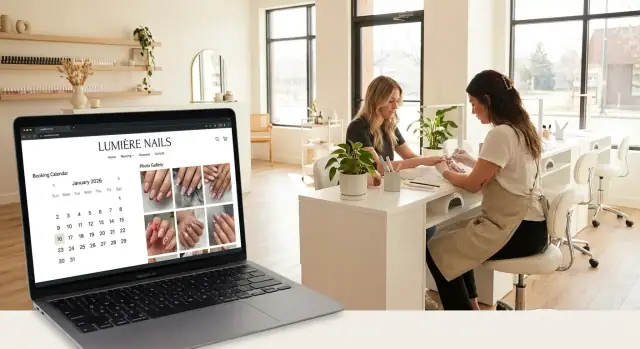
Set Goals and Plan Your Website Content
Before you pick a template or upload photos, decide what your nail salon website is for. A clear goal keeps the design simple and helps you choose content that actually leads to appointments.
Define what “success” means
Write down 2–3 outcomes you want the site to deliver in the next 60–90 days. For example:
- More bookings (e.g., +20 appointments/month through online booking)
- Higher-value services (more gel sets, builder gel, nail art upgrades)
- Fewer no-shows (clear policies + confirmations)
These goals will guide what you highlight on the home page, how you arrange your services menu, and which calls-to-action you repeat.
Know exactly who you’re trying to attract
Different clients scan your site differently. List your primary audience segments and what matters to them:
- Walk-ins: hours, wait time notes, location, “call now”
- Appointments-only clients: online booking, availability, service timing
- Bridal / events: group bookings, packages, photo examples
- Gel lovers / nail art fans: gallery quality, artist specialties, add-ons
Once you know your targets, you can plan content that answers their questions quickly (price range, time, durability, design options).
Choose the primary actions visitors should take
Pick 1–2 main actions and make them easy to spot across the site:
- Book now (best for most salons)
- Call (great for same-day questions)
- Get directions (especially for new clients)
- View gallery (turns “just browsing” into booking)
If everything is equally important, nothing stands out.
Decide what you’ll manage in-house vs. outsource
Be realistic about time and quality. Many salons do best with a hybrid approach:
- In-house: service list, pricing, policies, staff bios, weekly updates
- Outsource (optional): brand photos, copywriting, logo/visual identity
A simple plan—goals, audience, key actions, and ownership—will make every next step faster and cheaper.
Choose a Domain, Platform, and Site Structure
Your domain and platform decisions affect everything that follows—from how easy your site is to update to how confident clients feel when they’re booking.
Pick a domain clients can remember
Choose a domain name that matches your salon name as closely as possible and is easy to spell after hearing it once. Short is better, and avoid hyphens, extra words, or clever spellings that clients might mistype.
If your exact name isn’t available, try small, clear additions like your city (e.g., YourSalonAustin.com) instead of changing the brand name.
Set up a professional email address
A professional email (like hello@yourdomain) builds trust instantly—especially when clients are sharing contact details or asking about policies. You can still forward it to Gmail if you prefer, but having your own domain-based email looks established and keeps your messages organized.
Choose a platform that fits your time and budget
Decide between a website builder and a custom build based on how quickly you need to launch and how hands-on you want to be:
- Website builder (fastest): Great if you want to publish quickly, update services and photos yourself, and keep costs predictable.
- Custom build (most flexible): Best if you need advanced features, a very unique look, or you’re working with a designer/developer.
If online booking for salons is essential (it usually is), make sure your platform supports your booking calendar and lets clients book easily on mobile.
If you want speed without being boxed into a rigid template, a vibe-coding approach can be a strong middle ground. For example, Koder.ai lets you describe your nail salon website in chat (pages, booking flow, gallery layout, policies, SEO structure) and generate a full web app you can host, connect to a custom domain, and later export the source code if needed. Features like snapshots and rollback are also useful when you want to update pricing or policies without risking a broken booking page.
Create a simple site map before design
Before you choose colors or fonts, outline a basic site structure. A clear sitemap prevents “where do I put this?” confusion later and keeps pages easy to find.
Start with:
- Home
- Services + pricing
- Gallery
- Booking
- About / Team
- Contact / Location / Policies
This structure sets you up for a mobile-friendly salon site that feels clean, premium, and effortless to navigate.
Decide the Must-Have Pages for a Nail Salon Website
A great nail salon website doesn’t need dozens of pages—it needs the right ones, arranged so clients can get answers and book in seconds. Think “browse → trust → book.”
The 5 pages you should treat as non-negotiable
Home should quickly show what you do and who you serve. Include a clear “Book Now” button, a few signature services (e.g., gel manicure, nail art, pedicure), and a small preview of your best work.
Services is where clients decide whether you’re the right fit. Create a clean nail salon pricing menu that’s easy to scan. If you have a dedicated manicure service page, keep descriptions short, list add-ons, and show starting prices.
Booking should be dedicated to scheduling—no clutter. If you use a booking calendar, make it the main focus and minimize distractions so clients finish the appointment.
Gallery is your proof. A well-organized nail gallery website (short categories like “Natural,” “Gel,” “Acrylic,” “Art”) helps clients choose a style and feel confident booking.
About + Contact builds trust and removes friction. Add your location, hours, parking details, and accessibility notes (e.g., step-free entry, elevator, wheelchair-friendly stations if applicable). Your salon contact page should include tap-to-call, tap-to-map, and a simple contact form.
Optional pages that can increase bookings and revenue
If they match your business, add:
- Gift Cards (especially around holidays)
- Policies (cancellations, late arrivals, no-shows, refunds)
- FAQs (how to prep, how long services take, aftercare)
- Reviews/Testimonials (or a page that pulls highlights)
- Blog (only if you’ll post occasionally—think aftercare tips or trend roundups)
Trust details to include (only if true)
Clients look for safety and professionalism. Mention hygiene practices, licensed technicians, and the products you use if you’re confident you can stand behind those claims.
Tip: Keep these pages visible in your main navigation on a mobile-friendly salon site so users don’t hunt for them.
Design for a Premium Look (Especially on Mobile)
Most clients will discover your nail salon website on a phone—and many will book within minutes if everything feels polished and easy. A premium look isn’t about flashy effects; it’s about clarity, consistency, and confidence.
Start with a clean, mobile-first layout
Design the mobile version first: big tap targets, generous spacing, and simple sections that scroll naturally. Keep your home page focused on what a new visitor needs to decide fast: your style, your services, and how to book.
Aim for:
- Short, scannable blocks (not long paragraphs)
- Plenty of white space so photos and headings can “breathe”
- Consistent padding and alignment (small details read as “high-end”)
Make booking actions impossible to miss
Use clear, consistent buttons—especially on high-traffic pages like Home, Services, Gallery, and Contact.
- Primary CTA: “Book appointment”
- Secondary CTA: “Call”
These should be visible on every key page, not buried in a menu. If your platform allows it, add a sticky header or quick actions bar so booking and directions are always one tap away.
Typography and color: readable equals premium
Luxury feels calm and effortless. Choose one or two readable fonts and stick with them. Avoid thin, tiny text—especially for pricing and policies.
- Use high-contrast colors (dark text on light background is safest)
- Keep body text comfortably sized for phones
- Reserve accent colors for buttons and highlights (don’t compete with your nail photos)
Small UI choices that elevate the vibe
Use consistent button styles, icons, and photo shapes. A simple rule: if something looks “off” on mobile, remove it or simplify it. Smooth, predictable navigation always feels more expensive than extra effects.
Add Online Booking That Clients Will Actually Use
Online booking should feel like texting your salon: quick, clear, and done in under a minute. If clients have to create an account, answer ten questions, or hunt for the “Book” button, they’ll bounce—and book somewhere else.
Build a simple booking flow
Aim for a straight path that matches how people decide:
- Choose service → pick technician (optional) → select date/time → enter details
“Optional” is the key word. Some clients care about a specific tech; others just want the next available appointment. Let them skip steps without guilt.
Ask for less, get more bookings
Every extra field increases drop-off. Collect only what you truly need to confirm the appointment:
- Name
- Phone or email (for confirmations)
- Service selected
- Notes (optional, e.g., “allergy to acetone” or “remove old gel”)
If you want marketing consent, keep it as a single checkbox—don’t block the booking.
Set rules you can actually follow
A booking calendar only helps if it reflects real availability. Configure:
- Working hours per day (including breaks)
- Buffer time between appointments (especially for clean-up)
- Maximum bookings per slot (so you don’t accidentally double-book)
If you offer add-ons (chrome, nail art, repairs), make sure they extend timing appropriately or show a “request” note that you can confirm.
Confirmations and reminders prevent no-shows
Use your booking system’s automated messages if available: instant confirmation, a reminder the day before, and another a few hours prior. Include the essentials: service, time, address, and your change/cancellation rules.
Put “Book Now” where clients expect it
Add booking in two high-visibility places: your homepage hero button and the main navigation. Keep the label direct (“Book Online”), and link to a dedicated /booking page (or the embedded calendar) so it’s always one click away.
Create a Clear Services Menu and Pricing Layout
Your services page is where most visitors decide whether to book—or keep scrolling. The goal is to make options easy to understand at a glance, with pricing and timing that prevents “what do I choose?” hesitation.
Use plain-language service names
Skip internal jargon and write services the way clients ask for them. Clear names reduce back-and-forth messages and wrong bookings.
Examples that work well:
- Gel manicure
- Acrylic fill
- Nail art add-on
If you offer variations (e.g., “builder gel,” “hard gel,” “structured manicure”), include a short one-line description under the main label so clients know what’s best for them.
Show starting prices (or ranges) and what’s included
Display a starting price or price range, then list what the client gets. This makes pricing feel fair and reduces surprises at checkout.
For example:
- Gel manicure — from $45
Includes prep, shaping, cuticle care, gel color, and finish. - Acrylic full set — $70–$95
Price varies by length and design level.
If you charge extra for removal, repairs, or length upgrades, call it out right here.
Add timing estimates so clients book the right slot
Time is just as important as price. Add a realistic duration next to each service (e.g., 45 min, 75 min, 2 hrs). This helps clients choose correctly and keeps your calendar running on time.
Use add-ons to increase booking value
Add-ons make it easy for clients to customize while increasing average ticket. Keep them scannable and specific:
- Design level (simple / medium / detailed)
- Nail repair (per nail)
- Chrome
- French tips
Make every service easy to book
Each service should have a clear “Book now” button that jumps directly into your booking flow with the correct service selected. If you have a dedicated booking page, link it consistently (e.g., /booking) and avoid making clients hunt for the next step.
Build a Beautiful Nail Gallery That Brings in Bookings
A great gallery doesn’t just “show your work”—it helps a client choose a style quickly and feel confident clicking Book. Treat it like your visual menu.
Use real photos that look consistent
Skip mixed lighting and cluttered backgrounds. Aim for a simple, repeatable setup: same corner of the salon, similar distance from the nails, clean props, and focused close-ups. Consistency makes your work look more premium and helps visitors compare styles without distraction.
Organize by what clients actually ask for
Make browsing effortless by grouping sets into clear categories such as Gel, Acrylic, Short nails, Nail art, and Pedicure results. If someone comes in wanting “short natural gel,” they should find inspiration in seconds—not scroll through everything.
Add captions that answer the usual questions
A photo is stronger with a short caption that adds context:
- Style name or vibe (e.g., “Milky pink ombré”)
- Technique (gel overlay, acrylic full set, builder gel, etc.)
- Approximate appointment time (e.g., “~90 minutes”)
This sets expectations and reduces back-and-forth messages.
Make it fast (because speed affects bookings)
Large image files can slow your site and cause people to leave before they ever see your best work. Export images at a web-friendly size, use modern formats when possible, and compress them so pages load quickly without looking blurry.
Add a “Book this look” path on every photo
Turn inspiration into action. For each gallery item, include a clear “Book this look” button that links to /booking. If your booking form allows it, pre-select the matching service (or add a note like “Request this photo”). The goal is simple: less thinking, more confirmed appointments.
Add Trust Builders: About Page, Team, and Reviews
People don’t book nail appointments purely on photos—they book because they feel safe, understood, and confident you’ll deliver. Your About, Team, and Reviews content should answer one question: “What will my experience be like?”
Write an About page that sounds like you
Keep it personal, but practical. Share your salon name, a short origin story, and what clients can expect when they walk in—your vibe, your cleanliness standards, and how you handle consultations.
A simple structure works best:
- What you’re known for (e.g., natural nail health, detailed nail art, long-lasting gel)
- Your approach to comfort and communication (especially for first-time clients)
- What you do to keep things clean and consistent (without medical claims)
Introduce your team (only if you can maintain it)
If you have multiple technicians and you can keep staff info current, a Team section can boost conversions. Add one friendly photo per tech and a few lines: specialties (e.g., Russian manicure, builder gel, intricate art), preferred styles, and booking tips.
If your team changes often, skip detailed bios and use a simpler “Meet the Studio” block on the About page.
Reviews that feel real (because they are)
Add a few short, recent reviews with permission. Include the client’s first name/initial and the service type when possible (“Gel overlay + art”). If you’d rather not manage testimonials, link out to your main review platforms and keep them visible on your salon contact page.
Credentials and safety—clear, not exaggerated
Mention relevant certifications, product brands you use, and hygiene routines (sealed tools, sanitation steps, patch tests when appropriate). Keep it factual and easy to scan.
Trust builders won’t replace great work—but they’ll help the right clients choose you faster.
Make Contact, Location, and Policies Easy to Find
People don’t hunt for details—they scan. If your address, hours, or phone number are buried, you’ll lose bookings to the salon that makes it effortless. Treat contact info like a “sticky note” clients can reach from any page.
Put the essentials in two places
Your Contact page should be complete, but the real win is repeating key details in your footer site-wide.
Include:
- Address, phone number, hours, and a map on the /contact page
- The same basics in the footer (at minimum: phone, address, hours)
If you have multiple locations, list them clearly with separate hours and map links so clients don’t arrive at the wrong place.
Make mobile actions one tap
Most clients will find you on their phone—often while walking around or sitting in a car. Add tap-friendly actions that work instantly:
- Click-to-call on your phone number
- Click-to-directions (open in Maps) next to your address
Also, keep the contact layout simple: large text, big buttons, and no tiny links that are hard to tap.
Add a “questions only” contact form
Online booking should handle appointments. Your contact form should be for everything else.
Keep it short: name, email/phone, message. Add a note like: “For appointments, please use /booking so you can choose your service and time.” This reduces double-handling and missed requests.
Policies and FAQ: short, clear, easy to find
Policies build trust when they’re written like a friendly checklist—not a contract.
- If you publish policies, keep them brief and link them in the footer (for example, /policies)
- Add FAQ items that reduce back-and-forth: late arrival policy, repair/breakage window, refunds/redo terms, and what to book for (e.g., “Need a soak-off?”)
When clients know what to expect, they book with confidence—and show up prepared.
Improve Local SEO So Nearby Clients Can Find You
Local SEO is what helps your nail salon website show up when someone searches “nails near me” or “gel manicure in [area].” The goal is simple: make it obvious to Google (and clients) where you are, what you offer, and why you’re a great choice.
Use location phrases naturally
Add local keywords where they fit—without stuffing them everywhere. For example, your homepage can mention “nail salon in Downtown Austin,” while your services page can include phrases like “gel manicure in South Congress.” Keep it conversational and specific.
Write better page titles and descriptions
Give key pages unique titles and meta descriptions so search results look relevant and clickable.
- Home: “Luxe Nails — Nail Salon in [City] | Online Booking”
- Services: “Manicure & Pedicure Services in [City] | Pricing Menu”
- Gallery: “Nail Art Gallery — Gel, Acrylic, French Tips | [City]”
Make your photos work harder
Your nail gallery website is full of search opportunities. Add image alt text that describes what’s in the photo, like “almond-shaped nude gel manicure with gold foil” or “short acrylic French tips with chrome finish.” This helps accessibility and can support search visibility.
Set up Google Business Profile and match NAP
Create (or claim) your Google Business Profile and ensure your NAP—name, address, and phone—matches exactly on your site, especially on your /contact page and footer. Even small differences (like “St.” vs “Street”) can cause confusion.
Publish a few helpful posts and link internally
Write a couple of short articles that answer real questions (and link to your services and booking).
Examples:
- “Gel vs. Acrylic: What to Choose for Your Next Set” (link to /services and /booking)
- “How Long Does a Gel Manicure Last?” (link to your manicure service page)
Internal links help visitors find what they need—and help search engines understand your site structure.
Test, Launch, and Maintain Your Website
Before you share your new nail salon website, do a “client walk-through.” Pretend you’re booking an appointment from your phone with one hand and zero patience. If anything feels confusing, it will cost you bookings.
Do a real-world testing sweep
Test on multiple phones and browsers (iPhone + Android, Safari + Chrome). Focus on the actions that matter:
- Online booking for salons: service selection, staff selection, date/time, confirmation message/email
- Forms: contact form, gift card inquiries, waitlist (if you have one)
- Maps: tap-to-open directions, correct pin, correct address formatting
- Buttons: “Book Now,” “Call,” “Get Directions,” “Instagram,” and any promo banners
- Nail gallery website: swipe behavior, lightbox popups, and whether images load smoothly
Check speed (especially your gallery)
Slow pages lose clients fast. Keep your gallery and homepage lean:
- Resize and compress photos before uploading (your platform may do this automatically, but don’t rely on it)
- Remove heavy sliders, unnecessary animations, and extra apps/widgets
- Re-test after changes—speed issues often come from one oversized image
Track what turns into bookings
Add basic analytics so you can see what’s working:
- Track “Book Now” clicks, calls, and directions taps
- Track completed bookings (if your booking calendar supports it)
Even simple data helps you improve your manicure service page, promotions, and navigation.
Lock in security, backups, and a maintenance routine
Enable SSL, platform updates, spam protection for forms, and automatic backups (most hosts/site builders provide these).
Create a monthly routine: update your nail salon pricing menu, hours/holiday closures, policies, and featured photos. A fresh gallery and accurate info builds trust—and saves you from awkward “your website says…” conversations.
If you’re building on a platform like Koder.ai, features such as one-click deployment plus snapshots/rollback can make ongoing maintenance less stressful—especially when you’re changing prices, reorganizing services, or testing a new booking flow.
Promote Your New Site and Turn Visitors Into Regulars
A new site won’t help much if clients don’t see it—or if they see it once and never return. The goal is simple: make your nail salon website the fastest path from “I want my nails done” to a confirmed appointment.
Make booking the default action on social
Update your Instagram and TikTok bio link to your booking page (not the homepage). If you have online booking for salons, use the most direct URL you can, like /booking.
Pin a post or video that clearly says “Book now” and shows what happens after they tap (choose a service → pick a time → confirmation). The fewer steps people imagine, the more likely they are to book.
Turn every appointment into a shareable moment
After each appointment, send a quick follow-up text with a link to your gallery, such as /gallery. Invite clients to save their look for inspiration next time.
This is where a nail gallery website becomes more than pretty photos—it becomes your repeat-visit engine. If your gallery includes names like “Chrome French” or “Holiday Red Gel,” clients can easily reference what they want again.
Use QR codes in-store (and make them specific)
Place simple QR codes at the front desk, mirrors, and after-care cards:
- “Book your next visit” → /booking
- “See more designs” → /gallery
This helps even walk-in clients convert into scheduled regulars—especially if your booking calendar shows real-time availability.
Launch offer: small, clear, and time-limited
If you can truly honor it, run a small launch offer with a firm end date (e.g., “$10 off Gel Manicure—ends Sunday”). Keep the rules simple and display it on the site and socials. A complicated promo creates hesitation.
Create a logical next step for visitors
Some visitors won’t be ready to book immediately—they’re comparing options. Give them a clear next click:
- A simple /pricing page so they can scan your nail salon pricing menu
- A /templates page if you offer preset sets or “choose-your-look” options
Done well, your mobile-friendly salon site becomes the hub: socials bring attention, the gallery builds desire, pricing answers questions, and booking converts.
FAQ
What should my nail salon website’s main goal be?
Start with 2–3 measurable outcomes for the next 60–90 days, like:
- More online bookings per month
- More higher-value services (gel, builder gel, nail art)
- Fewer no-shows through clearer policies and reminders
Then design the home page, services layout, and CTAs around those goals.
How do I decide who my nail salon website should be for?
Focus on quick answers for the clients you want most.
- Walk-ins: hours, location, “Call now,” parking notes
- Appointments-only: online booking, availability, service durations
- Bridal/events: group booking info, packages, examples
- Nail art/gel fans: strong gallery categories, specialties, add-ons
If a visitor can’t find price range, timing, and how to book fast, they’ll leave.
What are the best calls-to-action (CTAs) for a nail salon website?
Choose 1–2 primary actions and repeat them everywhere:
- Book Online (usually #1)
- Call or Get Directions (strong secondary actions)
Make the primary CTA visible on Home, Services, Gallery, and Contact, and consider a sticky header or quick-actions bar for mobile.
How do I choose a domain name and email for my salon?
Pick something short, brand-matching, and easy to spell after hearing it once.
- Avoid hyphens, extra words, and “clever” spellings
- If the exact name is taken, add your city (e.g., YourSalonAustin.com)
Also set up a domain-based email (like hello@yourdomain) to look more established and keep messages organized.
Should I use a website builder or a custom website for my nail salon?
Choose based on how fast you need to launch and how much you want to manage yourself.
- Website builder: quickest, predictable costs, easier updates
- Custom build: more flexibility and unique design, higher cost/time
Whatever you choose, confirm it supports mobile-friendly online booking and lets you update services, pricing, and photos without friction.
What pages are non-negotiable for a nail salon website?
A simple structure covers almost everything most salons need:
- Home
- Services + pricing
- Gallery
- Booking
- About / Team
- Contact / Location / Policies
This keeps navigation clean on mobile and reduces “where do I find this?” confusion for new clients.
How can I make online booking fast and easy to use?
Make it a straight path that mirrors how clients decide:
- Choose service → (optional) pick technician → select date/time → enter details
Collect only what you need (name, phone/email, service). Keep notes optional. Too many steps or required fields increases drop-off and lost bookings.
How do I reduce no-shows with my booking system?
Use your booking system’s automation to reduce no-shows:
- Instant confirmation
- Reminder the day before
- Reminder a few hours before
Include essentials in each message: service, time, address, and change/cancellation rules. Make sure your calendar rules match reality (hours, breaks, buffer time, add-on durations).
What’s the best way to show services, pricing, and timing?
Make it scannable and transparent:
- Use plain-language names (Gel manicure, Acrylic fill, Nail art add-on)
- Show starting prices or ranges and what’s included
- Add time estimates (45 min, 75 min, 2 hrs)
- List common extras (removal, repairs, length upgrades)
Where possible, add “Book now” buttons that pre-select the service in your booking flow.
How do I build a gallery that actually turns into bookings?
Speed and organization matter as much as photo quality.
- Keep lighting/backgrounds consistent
- Group photos by what clients ask for (Gel, Acrylic, Short nails, Nail art)
- Add short captions (style, technique, approx. time)
- Compress images so pages load quickly
Add a clear “Book this look” link/button for each item that routes to /booking (or lets clients reference the photo in notes).